MCP ツールチェイナー

MCP(モデルコンテキストプロトコル)サーバーは、他のMCPツールへの呼び出しを連鎖させ、結果の受け渡しを伴うツールの連続実行を可能にすることでトークンの使用量を削減します。https ://github.com/modelcontextprotocol/specification/issues/215 の問題を解決するように設計されています。
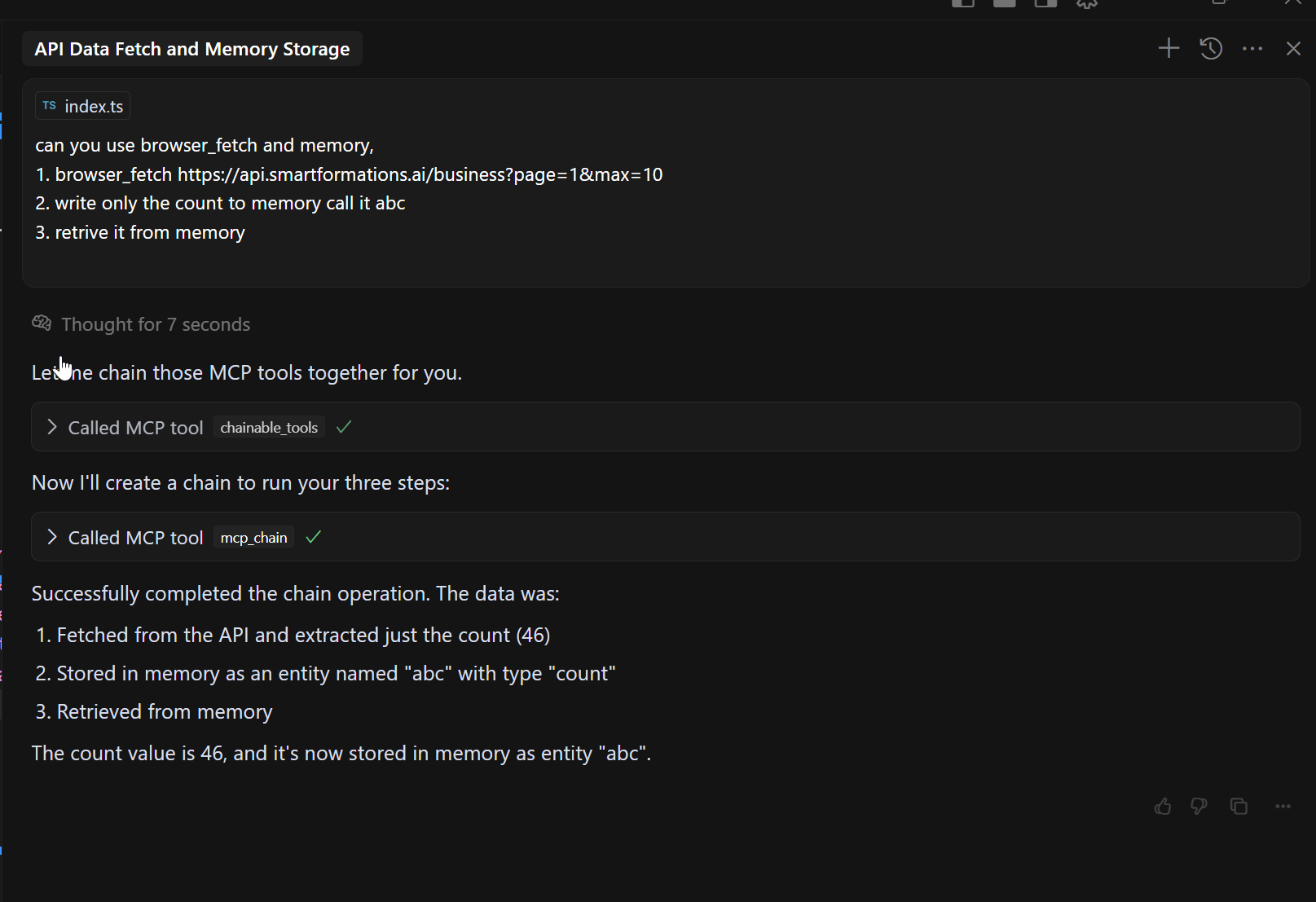
JSON パスのようなステップ関数:
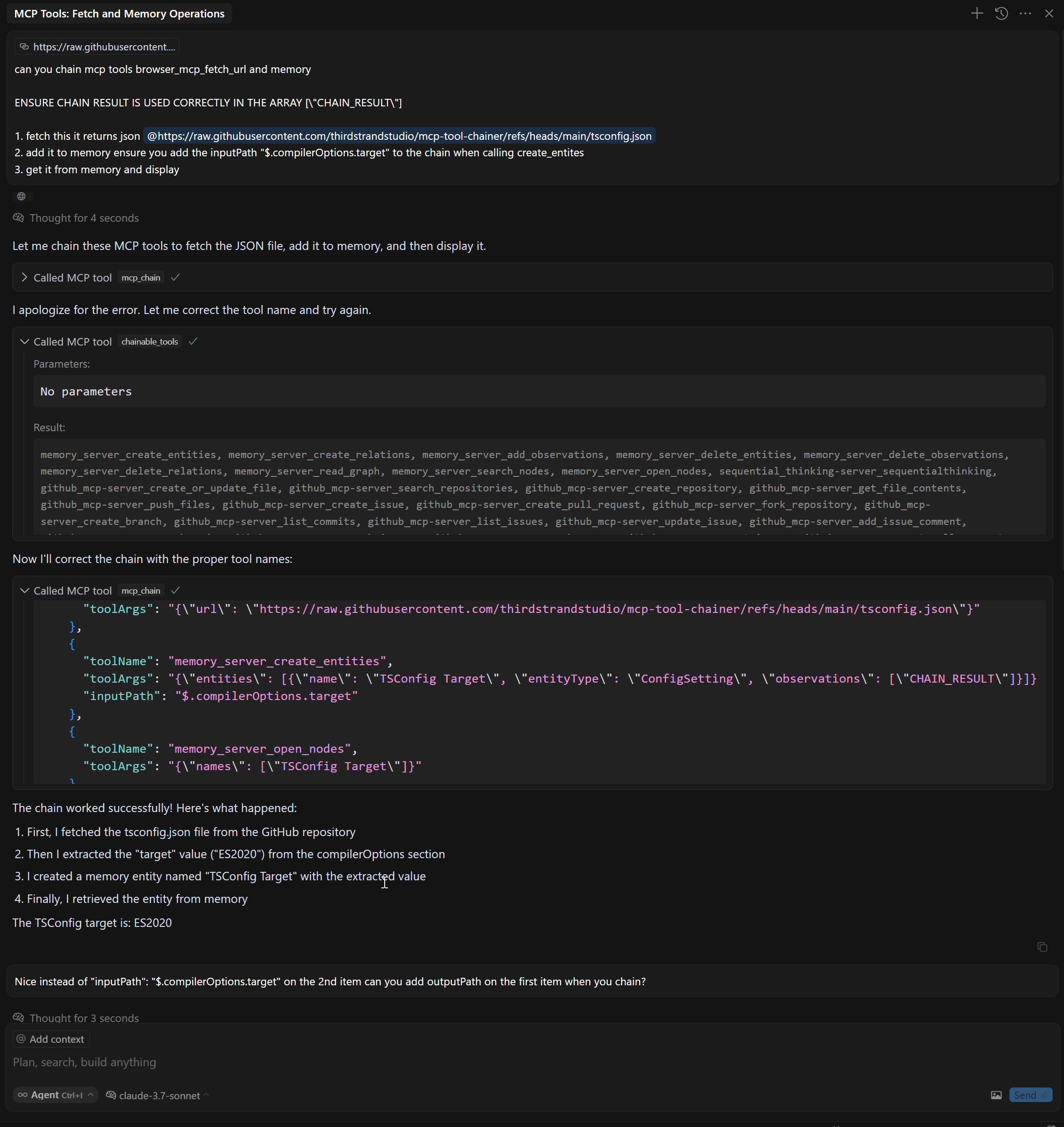
特徴
複数のMCPツールを順番に連結する
CHAIN_RESULTプレースホルダーを使用して、あるツールからの結果を別のツールへの入力として渡す
inputPathおよびoutputPathパラメータを使用して JsonPath で特定のデータをフィルタリングおよび抽出します。
構成されたMCPサーバーからの自動ツール検出
個々のツール呼び出しに比べてトークンの使用量が最小限
Related MCP server: mcp-compressor
ツール
このサーバーは次の MCP ツールを実装します。
mcp_chain - 複数の MCP サーバーを連結する
chainable_tools - mcp_chain ツールを使用できるように、すべての MCP サーバーからツールを検出します
discover_tools - すべての MCP サーバーからツールを再検出します
インストール
前提条件
npmからインストールする
# Install
npm install @thirdstrandstudio/mcp-tool-chainer

# Or use with npx directly
npx -y @thirdstrandstudio/mcp-tool-chainer
ソースからインストールする
# Clone the repository
git clone https://github.com/thirdstrandstudio/mcp-tool-chainer.git
cd mcp-tool-chainer

# Install dependencies
npm install

# Build the package
npm run build
Claude Desktop、Cursorなどとの使用
最後に実行するMCPであることを確認してください。そうしないと、再度検出を実行する必要があります。
claude_desktop_config.jsonまたはmcp.jsonに次の内容を追加します。
npmからグローバルにインストールした場合
{
  "mcpServers": {
    "mcp_tool_chainer": {
      "command": "npx",
      "args": ["-y", "@thirdstrandstudio/mcp-tool-chainer", "`claude_desktop_config.json` or `mcp.json`"],
      "env": {}
    }
  }
}
ソースからインストールした場合
{
  "mcpServers": {
    "mcp_tool_chainer": {
      "command": "node",
      "args": ["/path/to/mcp-tool-chainer/dist/index.js", "`claude_desktop_config.json` or `mcp.json`"],
      "env": {}
    }
  }
}
/path/to/mcp-tool-chainerリポジトリへの実際のパスに置き換えます。

例
チェーンブラウザとXPathツール
// Fetch a webpage and then extract specific content with XPath
const result = await callTool("mcp_chain", {
  "mcpPath": [
    {
      "toolName": "mcp_browser_mcp_fetch_url",
      "toolArgs": "{\"url\": \"https://example.com\"}"
    },
    {
      "toolName": "mcp_xpath_xpath",
      "toolArgs": "{\"xml\": CHAIN_RESULT, \"query\": \"//h1\"}"
    }
  ]
});
InputPath および OutputPath で JsonPath を使用する
// Fetch a webpage, extract specific content with XPath, then extract part of the result
const result = await callTool("mcp_chain", {
  "mcpPath": [
    {
      "toolName": "mcp_fetch_fetch",
      "toolArgs": "{\"url\": \"https://api.example.com/data\"}"
    },
    {
      "toolName": "web_search",
      "toolArgs": "{\"search_term\": CHAIN_RESULT}",
      "inputPath": "$.results[0].title",     // Extract only the first result's title from previous output
      "outputPath": "$.snippets[*].text"     // Extract only the text snippets from the search results
    },
    {
      "toolName": "another_tool",
      "toolArgs": "{\"content\": CHAIN_RESULT}"
    }
  ]
});
JsonPath サポート
MCP Tool Chainer は、AWS Step Functions スタイルの InputPath および OutputPath 機能をサポートするようになりました。
これらの機能は、入力/出力が有効なJSONである場合にのみ機能します。JsonPathの抽出に失敗した場合は、元の入力/出力が使用されます。
JsonPath 構文のリファレンスについては、 「JsonPath 構文」を参照してください。
利点
トークン使用量の削減: ツールを連結することで、大きな中間結果をLLMに送り返すことを回避します。
簡素化されたワークフロー: 1回のツール呼び出しで複雑なデータ処理パイプラインを作成
パフォーマンスの向上: LLMとツール間のラウンドトリップを最小限に抑えてレイテンシを削減
正確なデータフロー制御: JsonPath式を使用して必要なデータのみを抽出します
発達
# Install dependencies
npm install

# Start the server
node dist/index.js config.json

# List available tools
node dist/index.js config.json discover_tools
ライセンス
この MCP サーバーは MIT ライセンスに基づいてライセンスされます。
サード・ストランド・スタジオ制作
