

A
licenseNot graded
qualityB
maintenanceMCP server for generating, editing, and processing images via multiple providers including Kilo, OpenRouter, OpenAI, and Gemini, with local tools for background removal, resizing, and cropping.
19 npm
3
MIT


English | 日本語
mcp-alphabanana 是一个用于通过 Google Gemini 生成图像资产的模型上下文协议 (MCP) 服务器。它专为需要快速图像生成、透明输出、参考图像引导和灵活交付格式的 MCP 兼容客户端及代理工作流而构建。
关键词:MCP 服务器, 模型上下文协议, Gemini AI, 图像生成, FastMCP
核心功能:
跨 Flash 和 Pro 级别的超快速 Gemini 图像生成
适用于 Web 和游戏流水线的透明 PNG/WebP 资产输出
使用本地参考图像文件的多图像风格引导
适用于代理工作流的灵活文件、base64 或组合输出
使用 npx 运行 MCP 服务器:
npx -y @tasopen/mcp-alphabanana或者将其添加到您的 MCP 配置中:
{
  "mcp": {
    "servers": {
      "alphabanana": {
        "command": "npx",
        "args": ["-y", "@tasopen/mcp-alphabanana"],
        "env": {
          "GEMINI_API_KEY": "${env:GEMINI_API_KEY}"
        }
      }
    }
  }
}
在启动服务器之前设置 GEMINI_API_KEY。
对于 Claude Desktop,
下载 mcp-alphabanana-latest.mcpb,然后从 Claude Desktop 设置中将其添加为扩展。对于 Windows,建议添加 'FileSystem' 扩展以获得更好的本地文件处理能力。
Related MCP server: nano-banana-claude
Claude 注册表 / MCPB 包元数据定义在 manifest.json 中,并附带 images/mcp-alphabanana.png 处的静态 512x512 图标。
原生的 sharp 运行时包被声明为可选依赖项,因此 .mcpb 安装可以在每个受支持的平台上解析正确的预构建二进制文件,而无需依赖 postinstall 钩子。
稳定的 MCPB URL: https://github.com/tasopen/mcp-alphabanana/releases/latest/download/mcp-alphabanana-latest.mcpb
版本化 MCPB URL 模式: https://github.com/tasopen/mcp-alphabanana/releases/download/vVERSION/mcp-alphabanana-VERSION.mcpb
支持: GitHub Issues
此存储库提供了一个 MCP 服务器,使 AI 代理能够使用 Google Gemini 生成图像。
它可以与 MCP 兼容的客户端一起使用,例如:
Claude Desktop
VS Code MCP
Cursor
使用 FastMCP 3 构建,以实现简化的代码库和灵活的输出选项。
Glama MCP 服务器徽章:\
使用 Google Gemini 生成图像,支持可选的透明度、本地参考图像、溯源和推理元数据。
对于 Claude Desktop,中大型图像建议使用 outputType=file。base64 和 combine 响应会消耗 Claude 上下文,并可能达到客户端的大小限制。在 Windows 上,请使用 FileSystem 扩展来选择可写的绝对 outputPath 和任何本地 referenceImages 路径。
关键参数:
prompt (string): 要生成的图像描述
model: Flash3.1, Flash2.5, Pro3, flash, pro
outputWidth 和 outputHeight: 正常模式下请求的最终图像像素大小
noresize + aspectRatio + output_resolution: 返回 Gemini 原生大小而不进行调整
output_resolution: 0.5K, 1K, 2K, 4K
output_format: png, jpg, webp
outputType: file, base64, combine
outputPath: 当 outputType 为 file 或 combine 时必需
transparent: 启用透明 PNG/WebP 后处理
referenceImages: 可选的本地参考图像文件数组
grounding_type 和 thinking_mode: 高级 Gemini 3.1 控制
输入模型 ID | 内部模型 ID | 描述 |
|
| 超快,支持思考/溯源。 |
|
| 旧版 Flash。高稳定性。低成本。 |
|
| 高保真 Pro 模型。 |
|
| 向后兼容的别名。 |
|
| 向后兼容的别名。 |
generate_image 工具的完整参数参考。
参数 | 类型 | 默认值 | 描述 |
| string | 必需 | 要生成的图像描述 |
| string | 必需 | 输出文件名(如果缺少,自动添加扩展名) |
| enum |
|
|
| enum |
| 模型: |
| enum | auto |
|
| boolean |
| 跳过生成后调整大小并返回 Gemini 原生尺寸 |
| enum | 可选 | 当 |
| integer | 除非 | 最终输出宽度(像素) |
| integer | 除非 | 最终输出高度(像素) |
| enum |
|
|
| string |
| 绝对输出目录路径 |
| boolean |
| 透明背景(仅限 PNG/WebP) |
| string 或 null |
| 用于透明度提取的颜色键覆盖 |
| integer |
| 透明度颜色匹配容差 |
| enum |
|
|
| enum |
|
|
| enum |
|
|
| enum |
|
|
| boolean |
| 启用元数据时返回模型推理字段 |
| boolean |
| 在 JSON 输出中包含溯源和推理元数据 |
| array |
| 最多 14 个本地参考文件 (Flash3.1/Pro3),Flash2.5 为 3 个 |
| boolean |
| 保存中间调试工件 |
零水印: API 原生纯净图像。
思考/溯源支持: 更高的提示词遵循度和基于搜索的准确性。
生产就绪: 支持透明 WebP 和精确的宽高比,适用于 Web 和游戏资产。
超快速图像生成 (Gemini 3.1 Flash, 0.5K/1K/2K/4K)
高级多图像推理 (最多 14 张参考图像)
思考/溯源支持 (仅限 Flash3.1)
透明 PNG/WebP 输出 (颜色键后处理,去溢色)
多种输出格式:文件、base64 或两者兼有
灵活的调整大小模式:裁剪、拉伸、信箱、包含
多个模型级别:Flash3.1, Flash2.5, Pro3, 旧版别名
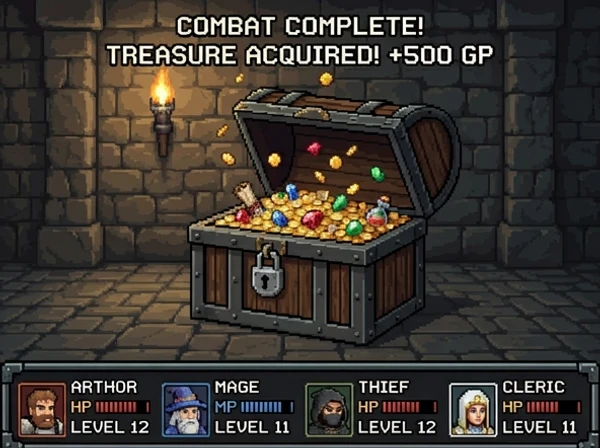
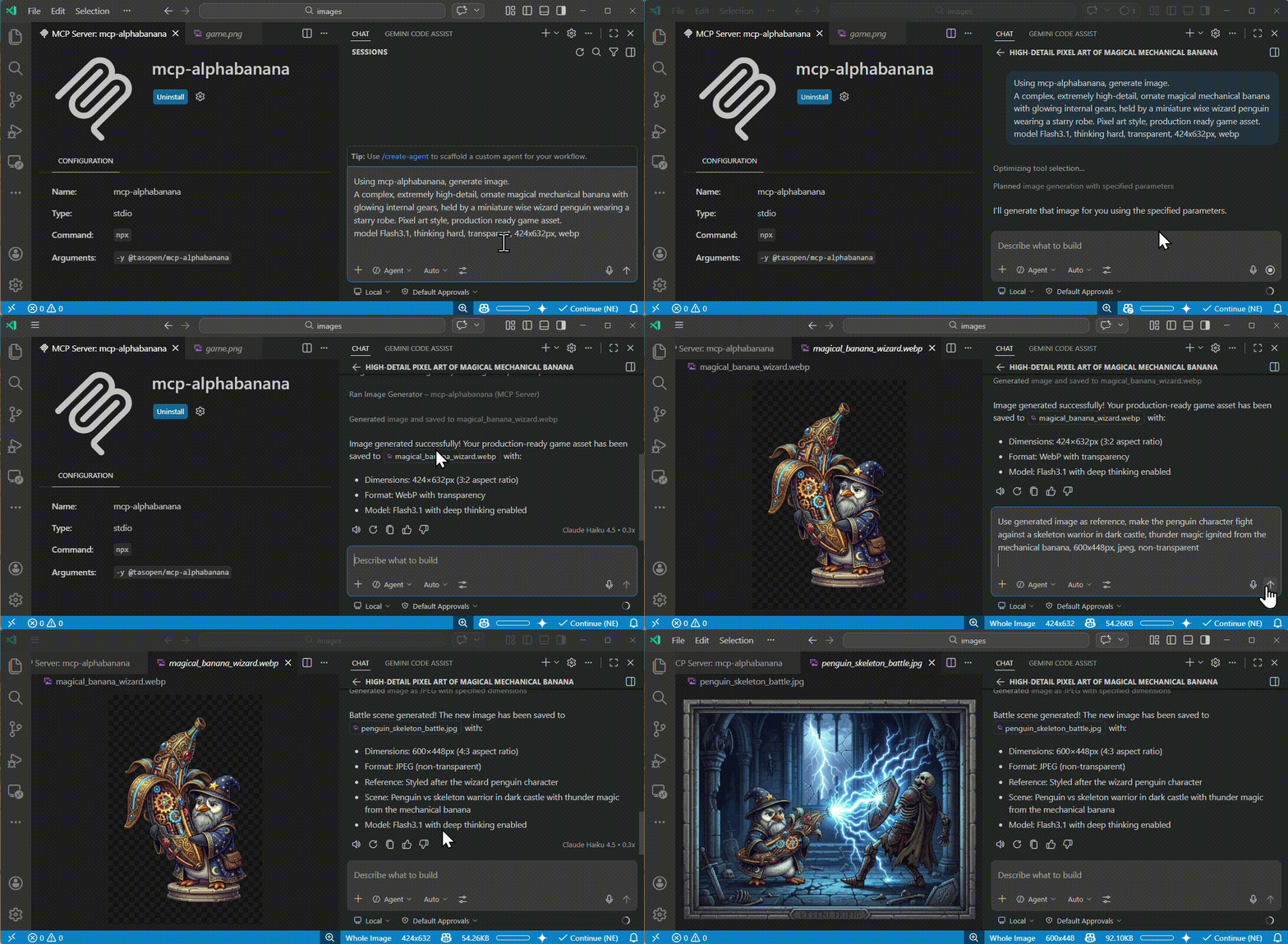
这些示例输出是使用 mcp-alphabanana 生成并存储在 images/examples 中的。
像素艺术资产 | 参考图像游戏场景 | 照片级真实感生成 |
|
|
|
在您的 MCP 配置(例如 mcp.json)中配置 GEMINI_API_KEY。
示例:
从 mcp.json 引用 OS 环境变量:
{
  "env": {
    "GEMINI_API_KEY": "${env:GEMINI_API_KEY}"
  }
}
直接在 mcp.json 中提供密钥:
{
  "env": {
    "GEMINI_API_KEY": "your_api_key_here"
  }
}添加到您的 VS Code 设置(.vscode/settings.json 或用户设置)中,在 mcp.json 中或通过 VS Code MCP 设置配置服务器 env。
{
  "mcp": {
    "servers": {
      "mcp-alphabanana": {
        "command": "npx",
        "args": ["-y", "@tasopen/mcp-alphabanana"],
        "env": {
          "GEMINI_API_KEY": "${env:GEMINI_API_KEY}"
        }
      }
    }
  }
}
可选: 通过将 MCP_FALLBACK_OUTPUT 添加到 env 对象,为写入失败设置自定义回退目录。
{
  "prompt": "A pixel art treasure chest, golden trim, wooden texture",
  "model": "Flash3.1",
  "outputFileName": "chest",
  "outputType": "base64",
  "outputWidth": 64,
  "outputHeight": 64,
  "transparent": true
}{
"prompt": "A clean app icon with a banana mascot, flat graphic design",
"model": "Flash3.1",
"outputFileName": "banana-icon-native",
"outputType": "base64",
"noresize": true,
"aspectRatio": "1:1",
"output_resolution": "0.5K",
"output_format": "png"
}此模式返回请求比例和分辨率的 Gemini 原生像素大小。例如,1:1 + 0.5K 返回 512x512 而无需任何调整大小步骤。
{
  "prompt": "A vertical, photorealistic travel poster advertising Magical Wings Day Tours. A joyful young couple flies high above a breathtaking European countryside at golden hour, holding hands as they soar through a partly cloudy sky. Below them are vineyards, villages, forests, a winding river, and a hilltop medieval castle. The poster uses large, elegant typography with the headline FLY THE COUNTRYSIDE at the top and Magical Wings Day Tours branding near the bottom.",
  "model": "Flash3.1",
  "output_resolution": "1K",
  "outputFileName": "photoreal-travel-poster",
  "outputType": "file",
  "outputPath": "/path/to/output",
  "outputWidth": 848,
  "outputHeight": 1264,
  "output_format": "jpg",
  "thinking_mode": "high",
  "include_metadata": true
}{
"prompt": "A modern travel poster featuring today's weather and skyline highlights in Kuala Lumpur",
"model": "Flash3.1",
"outputFileName": "kl_travel_poster",
"outputType": "base64",
"outputWidth": 1024,
"outputHeight": 1024,
"grounding_type": "text",
"thinking_mode": "high",
"include_metadata": true,
"include_thoughts": true
}此示例启用 Google 搜索溯源,并在 JSON 中返回溯源和推理元数据。
{
  "prompt": "Use the reference image to create a game screen showing an opened treasure chest filled with coins and treasure, 8-bit dungeon crawler style, after-battle reward scene, dungeon corridor background, four-party status UI at the bottom",
  "model": "Flash3.1",
  "output_resolution": "0.5K",
  "outputFileName": "reference-image-dungeon-loot",
  "outputType": "file",
  "outputPath": "/path/to/output",
  "outputWidth": 600,
  "outputHeight": 448,
  "output_format": "webp",
  "transparent": false,
  "referenceImages": [
    {
      "description": "Treasure chest style reference",
      "filePath": "/path/to/references/pixel-art-treasure-chest.png"
    }
  ]
}PNG: 全 Alpha 通道,颜色键 + 去溢色
WebP: 全 Alpha 通道,更好的压缩 (Flash3.1+)
JPEG: 无透明度(回退到纯色背景)
# Development mode with MCP CLI
npm run dev

# MCP Inspector (Web UI)
npm run inspect

# Build for production
npm run buildMIT
Generate image assets using Gemini AI with optional transparency and reference images.
[Claude Desktop Guidance]
Prefer outputType='file' for medium or large images. base64 and combine responses can exceed Claude Desktop's context limit.
On Claude Desktop for Windows, use the FileSystem extension to choose reference-image paths and a writable absolute outputPath before calling this tool.
Use base64 only for small previews or when the client explicitly needs inline image data.
[Model Guidance]
Flash3.1 (recommended): High quality, very fast, supports grounding and advanced features.
Lite3.1 (Nano Banana 2 Lite): Ultra-fast, cost-effective, 1K-only, no search grounding. Ideal for quick drafting and low-latency iteration.
Pro3: Higher fidelity, but more costly and slower.
Flash2.5: Legacy, maintained for compatibility. Does not support 0.5K, 2K, or 4K resolutions.
[Aspect Ratios] Gemini supports the following aspect ratios (model-dependent):
Common to all models: 1:1, 2:3, 3:2, 3:4, 4:3, 4:5, 5:4, 9:16, 16:9, 21:9
Flash3.1 only: 1:4, 4:1, 1:8, 8:1
Normal mode: provide outputWidth/outputHeight and the server will choose the closest Gemini aspect ratio and source resolution, then resize to the requested pixel size. No-resize mode: set noresize=true and provide aspectRatio plus output_resolution. The server will return Gemini's native pixel dimensions for that combination without post-generation resizing.
If you intentionally want to control resizing/cropping in normal mode, use the 'resizeMode' parameter: 'crop' (default, center crop), 'letterbox' (fit with padding), 'contain' (trim transparent margins then fit), or 'stretch' (distort to fit).
[IMPORTANT] Always preserve the user's prompt as-is, including language and nuance. Do not translate or summarize.
| Name | Required | Description | Default |
|---|---|---|---|
| debug | No | Debug mode: output intermediate processing images and prompt | |
| model | No | Model tier to use for generation (see tool description for details; "flash" and "pro" are aliases for Flash2.5 and Pro3; "Lite3.1" is the low-latency Nano Banana 2 Lite model, 1K-only, no grounding) | Flash3.1 |
| prompt | Yes | User-provided image prompt. Preserve the original wording and detail; do not summarize or translate. Only append transparency-related hints if needed. | |
| noresize | No | Skip post-generation resizing and return Gemini native dimensions directly. When true, provide aspectRatio and output_resolution instead of outputWidth/outputHeight. | |
| fringeMode | No | Fringe reduction mode: auto (size-based), crisp (binary alpha), hd (force-clear 1px boundary for large images). | auto |
| outputPath | No | Output directory path (MUST be an absolute path when outputType is file or combine). In Claude Desktop on Windows, use the FileSystem extension to choose or prepare a writable absolute path such as C:\temp. | |
| outputType | No | Output format: file=file only, base64=base64 only, combine=both. In Claude Desktop, prefer file for medium or large images to avoid context-size limits; use base64 only for small previews. | combine |
| resizeMode | No | Resize mode: crop=center crop, stretch=distort, letterbox=fit with padding, contain=trim transparent margins then fit | crop |
| aspectRatio | No | Gemini aspect ratio to use directly when noresize=true. Ignored in normal resize mode. | |
| outputWidth | No | Output image width in pixels. Required unless noresize=true. In normal mode, the image will be generated using the closest supported Gemini aspect ratio and resolution, then resized to this width. | |
| transparent | No | Request transparent background (PNG or WebP only). Background color is selected by histogram analysis. | |
| outputHeight | No | Output image height in pixels. Required unless noresize=true. In normal mode, the image will be generated using the closest supported Gemini aspect ratio and resolution, then resized to this height. | |
| output_format | No | Output format | png |
| thinking_mode | No | Thinking mode (3.1 only) | minimal |
| colorTolerance | No | Tolerance for color matching (0-255). Higher values are more permissive for transparent color selection and keying. | |
| grounding_type | No | Grounding tool usage (3.1 only) | none |
| outputFileName | Yes | Output filename (extension auto-added if missing) | |
| referenceImages | No | Reference images for style guidance (Flash2.5: max 3, others: max 14) | |
| include_metadata | No | Include grounding and reasoning metadata in JSON output (optional, may increase payload size). | |
| include_thoughts | No | Optional (default: false). Request thought fields from Gemini (3.1 only). Thought content is returned in MCP response only when include_metadata=true. | |
| transparentColor | No | Color to make transparent. Hex (e.g. #FF00FF). null defaults to #FF00FF when transparent=true. | |
| output_resolution | No | Gemini generation source resolution (optional in normal mode, required when noresize=true). In normal mode, the final image is resized to the requested pixel size after generation. |
Does the description disclose side effects, auth requirements, rate limits, or destructive behavior?
The description discloses key behaviors beyond annotations: it explains that the tool generates files on disk (outputPath), handles resizing and cropping, supports transparency, and has model-dependent features. Annotations already indicate destructiveHint=true and openWorldHint=true, so the description adds context about what gets created and modified. However, it does not explicitly warn about overwriting existing files, which would have earned a 5.
Agents need to know what a tool does to the world before calling it. Descriptions should go beyond structured annotations to explain consequences.
Is the description appropriately sized, front-loaded, and free of redundancy?
The description is long but well-structured with sections (Claude Desktop Guidance, Model Guidance, Aspect Ratios, IMPORTANT) and uses bullet points for readability. It front-loads the main purpose and then provides detailed guidance. While every sentence contributes value, some redundancy with schema descriptions could be trimmed slightly.
Shorter descriptions cost fewer tokens and are easier for agents to parse. Every sentence should earn its place.
Given the tool's complexity, does the description cover enough for an agent to succeed on first attempt?
Given the tool's complexity (22 parameters, multiple modes, platform specifics), the description is quite comprehensive. It covers purpose, usage guidelines, model comparisons, resize behavior, output types, and important notes. However, it lacks explicit details about error responses or rate limits, and there is no output schema, but the description compensates well for the tool's generative nature.
Complex tools with many parameters or behaviors need more documentation. Simple tools need less. This dimension scales expectations accordingly.
Does the description clarify parameter syntax, constraints, interactions, or defaults beyond what the schema provides?
Schema coverage is 100%, so parameters are already documented. The description adds value by grouping parameters logically (e.g., model selection, aspect ratios, resize modes) and providing context for platform-specific usage (e.g., referenceImages filePath on Windows). It explains the interaction between parameters like outputWidth/outputHeight and noresize, which goes beyond individual parameter descriptions.
Input schemas describe structure but not intent. Descriptions should explain non-obvious parameter relationships and valid value ranges.
Does the description clearly state what the tool does and how it differs from similar tools?
The description opens with 'Generate image assets using Gemini AI with optional transparency and reference images,' clearly stating the action, resource, and technology. It differentiates between different usage contexts (Claude Desktop, Windows, etc.) and provides model recommendations, ensuring the agent understands what the tool does and when to use which option.
Agents choose between tools based on descriptions. A clear purpose with a specific verb and resource helps agents select the right tool.
Does the description explain when to use this tool, when not to, or what alternatives exist?
The description includes explicit guidance on when to use different output types ('Prefer outputType='file' for medium or large images'), when to use noresize mode vs normal mode, and when to choose each model (Flash3.1 recommended, Lite3.1 for quick drafting, etc.). It also provides platform-specific usage instructions for Claude Desktop and Windows, giving clear context for tool selection.
Agents often have multiple tools that could apply. Explicit usage guidance like "use X instead of Y when Z" prevents misuse.
Recent tool additions, removals, and schema changes observed during successful MCP inspections.
v1.5.0generate_image14 fields changedInput schema / properties / aspectRatioAdded value: +{
+ "description": "Gemini aspect ratio to use directly when noresize=true. Ignored in normal resize mode.",
+ "enum": [
+ "1:1",
+ "2:3",
+ "3:2",
+ "3:4",
+ "4:3",
+ "4:5",
+ "5:4",
+ "9:16",
+ "16:9",
+ "21:9",
+ "1:4",
+ "4:1",
+ "1:8",
+ "8:1"
+ ],
+ "type": "string"
+}Input schema / properties / model / descriptionPrevious value: -"Model tier to use for generation (see tool description for details; \"flash\" and \"pro\" are aliases for Flash2.5 and Pro3)"New value: +"Model tier to use for generation (see tool description for details; \"flash\" and \"pro\" are aliases for Flash2.5 and Pro3; \"Lite3.1\" is the low-latency Nano Banana 2 Lite model, 1K-only, no grounding)"Input schema / properties / model / enumPrevious value: -[
- "Flash3.1",
- "Flash2.5",
- "Pro3",
- "flash",
- "pro"
-]New value: +[
+ "Flash3.1",
+ "Lite3.1",
+ "Flash2.5",
+ "Pro3",
+ "flash",
+ "pro"
+]Input schema / properties / noresizeAdded value: +{
+ "default": false,
+ "description": "Skip post-generation resizing and return Gemini native dimensions directly. When true, provide aspectRatio and output_resolution instead of outputWidth/outputHeight.",
+ "type": "boolean"
+}Input schema / properties / outputHeight / descriptionPrevious value: -"Output image height in pixels. The image will be generated using the closest supported Gemini aspect ratio and resolution, then resized to this height. To avoid cropping or padding, set width and height to match a supported aspect ratio (see tool description)."New value: +"Output image height in pixels. Required unless noresize=true. In normal mode, the image will be generated using the closest supported Gemini aspect ratio and resolution, then resized to this height."Input schema / properties / outputPath / descriptionPrevious value: -"Output directory path (MUST be an absolute path when outputType is file or combine)"New value: +"Output directory path (MUST be an absolute path when outputType is file or combine). In Claude Desktop on Windows, use the FileSystem extension to choose or prepare a writable absolute path such as C:\\temp."Input schema / properties / outputType / descriptionPrevious value: -"Output format: file=file only, base64=base64 only, combine=both"New value: +"Output format: file=file only, base64=base64 only, combine=both. In Claude Desktop, prefer file for medium or large images to avoid context-size limits; use base64 only for small previews."Input schema / properties / outputWidth / descriptionPrevious value: -"Output image width in pixels. The image will be generated using the closest supported Gemini aspect ratio and resolution, then resized to this width. To avoid cropping or padding, set width and height to match a supported aspect ratio (see tool description)."New value: +"Output image width in pixels. Required unless noresize=true. In normal mode, the image will be generated using the closest supported Gemini aspect ratio and resolution, then resized to this width."Input schema / properties / output_resolution / descriptionPrevious value: -"Gemini generation source resolution (optional; normally auto-calculated from pixel size. Set only to override. Final image is resized to requested pixel size.)"New value: +"Gemini generation source resolution (optional in normal mode, required when noresize=true). In normal mode, the final image is resized to the requested pixel size after generation."Input schema / properties / referenceImages / items / additionalPropertiesRemoved value: -falseInput schema / properties / referenceImages / items / properties / filePath / descriptionPrevious value: -"Absolute path to reference image file (.png, .jpg, .jpeg, .webp)"New value: +"Absolute path to reference image file (.png, .jpg, .jpeg, .webp). In Claude Desktop on Windows, use the FileSystem extension to locate the file and pass its Windows absolute path."Input schema / properties / transparentColor / anyOfAdded value: +[
+ {
+ "type": "string"
+ },
+ {
+ "type": "null"
+ }
+]Input schema / properties / transparentColor / typeRemoved value: -[
- "string",
- "null"
-]Input schema / requiredPrevious value: -[
- "prompt",
- "outputFileName",
- "outputWidth",
- "outputHeight"
-]New value: +[
+ "prompt",
+ "outputFileName"
+]v1.3.6generate_imageScored across 1 tool
With only one tool, there is no potential for confusion between tools. The single tool's purpose is clearly defined as generating images.
There is only one tool, so naming consistency is not applicable. The tool name 'generate_image' follows a clear verb_noun convention.
The server has a single tool, which is slightly thin but acceptable given the tool's complexity and the server's focused purpose of image generation. The tool includes many parameters and guidance, making it substantial.
The tool provides comprehensive image generation capabilities with support for multiple AI models, aspect ratios, output formats, and advanced options like no-resize and resize modes. It covers the full scope of image generation for the server's domain.
MCP server for Qwen Image 3 AI image generation
MCP server for NanoBanana AI image generation and editing
Focused MCP server for OpenAI image/audio generation (v2.0.0). Wraps endpoints via HAPI CLI.
MCP server for Google Veo AI video generation