

A
licenseNot graded
qualityC
maintenanceMCP server for generating, editing, and processing images via multiple providers including Kilo, OpenRouter, OpenAI, and Gemini, with local tools for background removal, resizing, and cropping.
57 npm
3
MIT


English | 日本語
mcp-alphabananaは、Google Geminiを使用して画像アセットを生成するためのModel Context Protocol (MCP) サーバーです。高速な画像生成、透過出力、参照画像によるガイダンス、柔軟な配信フォーマットを必要とするMCP互換クライアントおよびエージェントワークフロー向けに構築されています。
キーワード: MCPサーバー, Model Context Protocol, Gemini AI, 画像生成, FastMCP
主な機能:
FlashおよびProティア全体での超高速Gemini画像生成
Webおよびゲームパイプライン向けの透過PNG/WebPアセット出力
ローカルの参照画像ファイルを使用したマルチ画像スタイルガイダンス
エージェントワークフロー向けの柔軟なファイル、base64、または結合出力
npxを使用してMCPサーバーを実行します:
npx -y @tasopen/mcp-alphabananaまたは、MCP設定に追加します:
{
  "mcp": {
    "servers": {
      "alphabanana": {
        "command": "npx",
        "args": ["-y", "@tasopen/mcp-alphabanana"],
        "env": {
          "GEMINI_API_KEY": "${env:GEMINI_API_KEY}"
        }
      }
    }
  }
}
サーバーを起動する前に GEMINI_API_KEY を設定してください。
Claude Desktopの場合、
mcp-alphabanana-latest.mcpb をダウンロードし、Claude Desktopの設定から拡張機能として追加してください。Windowsの場合は、ローカルファイル操作を改善するために「FileSystem」拡張機能を追加することを推奨します。
Related MCP server: nano-banana-claude
Claudeレジストリ / MCPBパッケージのメタデータは manifest.json で定義されており、images/mcp-alphabanana.png にある静的な512x512アイコンが同梱されています。
ネイティブの sharp ランタイムパッケージはオプションの依存関係として宣言されているため、.mcpb インストールはpostinstallフックに依存することなく、サポートされている各プラットフォームで正しいプリビルドバイナリを解決できます。
安定版MCPB URL: https://github.com/tasopen/mcp-alphabanana/releases/latest/download/mcp-alphabanana-latest.mcpb
バージョン付きMCPB URLパターン: https://github.com/tasopen/mcp-alphabanana/releases/download/vVERSION/mcp-alphabanana-VERSION.mcpb
サポート: GitHub Issues
このリポジトリは、AIエージェントがGoogle Geminiを使用して画像を生成できるようにするMCPサーバーを提供します。
以下のようなMCP互換クライアントで使用できます:
Claude Desktop
VS Code MCP
Cursor
FastMCP 3 で構築されており、コードベースの簡素化と柔軟な出力オプションを実現しています。
Glama MCP Serverバッジ:
オプションの透過処理、ローカル参照画像、グラウンディング、推論メタデータを使用して、Google Geminiで画像を生成します。
Claude Desktopの場合、中規模または大規模な画像には outputType=file を推奨します。base64 および combine の応答はClaudeのコンテキストを消費し、クライアントのサイズ制限に達する可能性があります。Windowsでは、FileSystem拡張機能を使用して、書き込み可能な絶対パスの outputPath と任意のローカル referenceImages パスを選択してください。
主なパラメータ:
prompt (string): 生成する画像の記述
model: Flash3.1, Flash2.5, Pro3, flash, pro
outputWidth および outputHeight: 通常モードで要求される最終的な画像サイズ(ピクセル単位)
noresize + aspectRatio + output_resolution: リサイズせずにGeminiネイティブサイズを返す
output_resolution: 0.5K, 1K, 2K, 4K
output_format: png, jpg, webp
outputType: file, base64, combine
outputPath: outputType が file または combine の場合に必須
transparent: 透過PNG/WebPポストプロセッシングを有効にする
referenceImages: ローカル参照画像のオプション配列
grounding_type および thinking_mode: 高度なGemini 3.1制御
入力モデルID | 内部モデルID | 説明 |
|
| 超高速、Thinking/Groundingをサポート。 |
|
| レガシーFlash。高い安定性。低コスト。 |
|
| 高忠実度Proモデル。 |
|
| 下位互換性のためのエイリアス。 |
|
| 下位互換性のためのエイリアス。 |
generate_image ツールの全パラメータリファレンス。
パラメータ | 型 | デフォルト | 説明 |
| string | 必須 | 生成する画像の記述 |
| string | 必須 | 出力ファイル名(拡張子がない場合は自動追加) |
| enum |
|
|
| enum |
| モデル: |
| enum | auto |
|
| boolean |
| 生成後のリサイズをスキップし、Geminiネイティブの寸法を返す |
| enum | オプション |
|
| integer |
| 最終出力の幅(ピクセル単位) |
| integer |
| 最終出力の高さ(ピクセル単位) |
| enum |
|
|
| string |
| 絶対出力ディレクトリパス |
| boolean |
| 透過背景(PNG/WebPのみ) |
| string or null |
| 透過抽出用のカラーキーオーバーライド |
| integer |
| 透過色マッチングの許容値 |
| enum |
|
|
| enum |
|
|
| enum |
|
|
| enum |
|
|
| boolean |
| メタデータが有効な場合にモデルの推論フィールドを返す |
| boolean |
| JSON出力にグラウンディングと推論のメタデータを含める |
| array |
| 最大14個のローカル参照ファイル (Flash3.1/Pro3)、Flash2.5は3個 |
| boolean |
| 中間デバッグアーティファクトを保存 |
透かしなし: APIネイティブのクリーンな画像。
Thinking/Groundingサポート: より高いプロンプト順守と検索に裏打ちされた正確性。
本番環境対応: Webおよびゲームアセット向けの透過WebPと正確なアスペクト比をサポート。
超高速画像生成 (Gemini 3.1 Flash, 0.5K/1K/2K/4K)
高度なマルチ画像推論 (最大14枚の参照画像)
Thinking/Groundingサポート (Flash3.1のみ)
透過PNG/WebP出力 (カラーキーポストプロセッシング、デスピル)
複数の出力フォーマット: ファイル、base64、または両方
柔軟なリサイズモード: クロッピング、ストレッチ、レターボックス、コンテイン
複数のモデルティア: Flash3.1, Flash2.5, Pro3, レガシーエイリアス
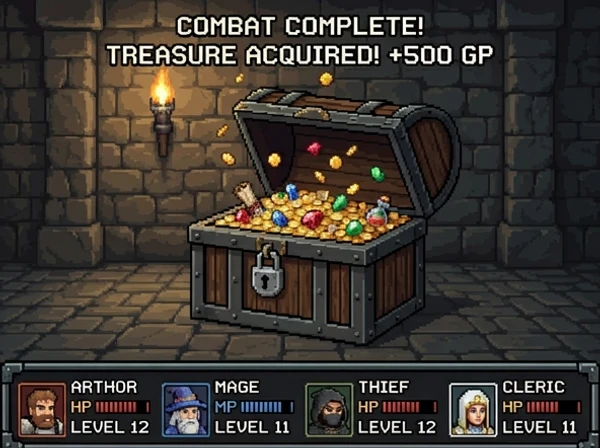
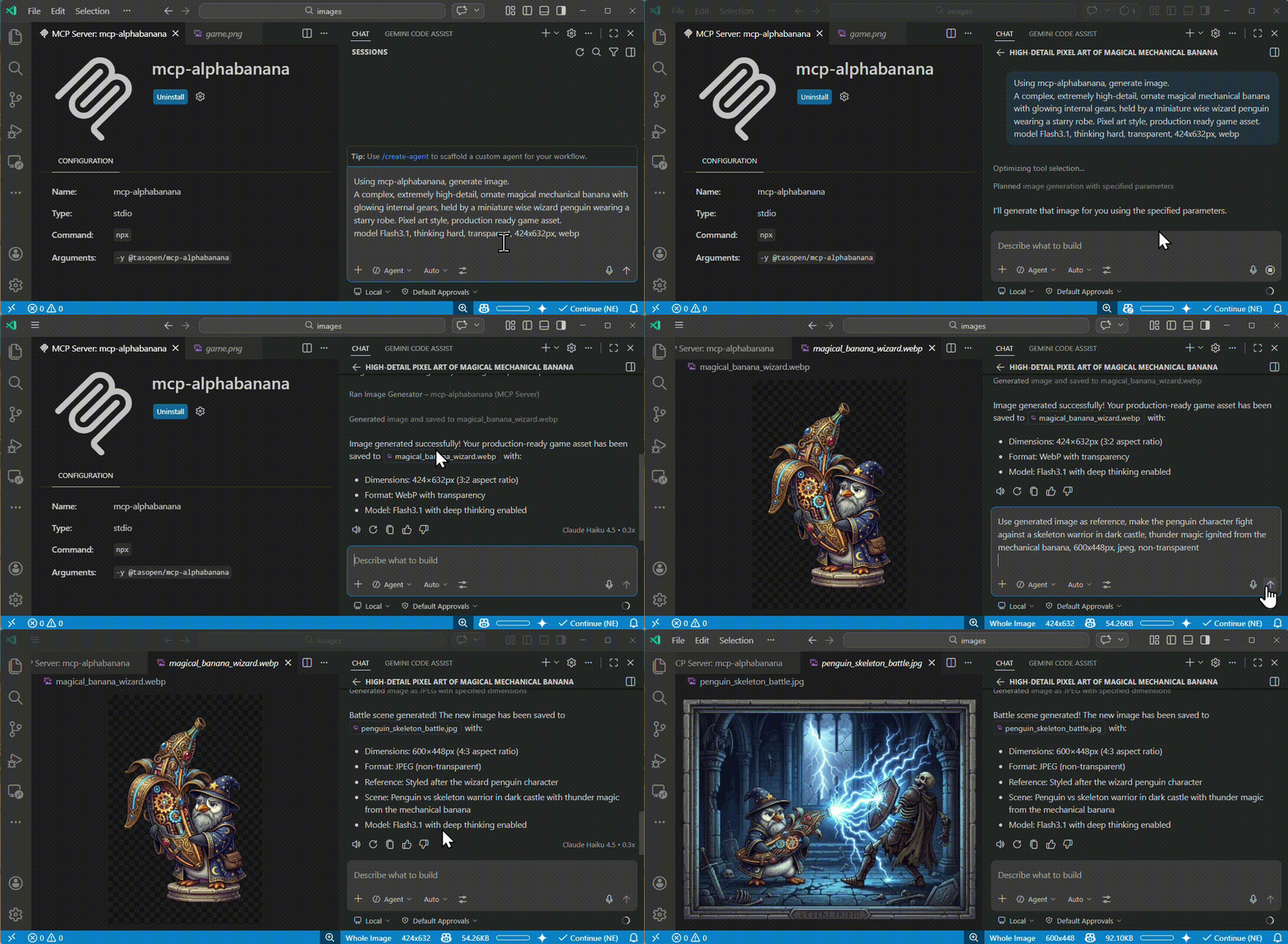
これらのサンプル出力はmcp-alphabananaで生成され、images/examples に保存されています。
ピクセルアートアセット | 参照画像ゲームシーン | フォトリアルな生成 |
|
|
|
MCP設定(例: mcp.json)で GEMINI_API_KEY を設定します。
例:
mcp.json からOS環境変数を参照:
{
  "env": {
    "GEMINI_API_KEY": "${env:GEMINI_API_KEY}"
  }
}
mcp.json に直接キーを指定:
{
  "env": {
    "GEMINI_API_KEY": "your_api_key_here"
  }
}
VS Code設定(.vscode/settings.json またはユーザー設定)に追加し、mcp.json の env またはVS Code MCP設定を介してサーバーの env を設定します。
{
  "mcp": {
    "servers": {
      "mcp-alphabanana": {
        "command": "npx",
        "args": ["-y", "@tasopen/mcp-alphabanana"],
        "env": {
          "GEMINI_API_KEY": "${env:GEMINI_API_KEY}"
        }
      }
    }
  }
}
オプション: 書き込み失敗時のカスタムフォールバックディレクトリを設定するには、env オブジェクトに MCP_FALLBACK_OUTPUT を追加します。
{
  "prompt": "A pixel art treasure chest, golden trim, wooden texture",
  "model": "Flash3.1",
  "outputFileName": "chest",
  "outputType": "base64",
  "outputWidth": 64,
  "outputHeight": 64,
  "transparent": true
}{
"prompt": "A clean app icon with a banana mascot, flat graphic design",
"model": "Flash3.1",
"outputFileName": "banana-icon-native",
"outputType": "base64",
"noresize": true,
"aspectRatio": "1:1",
"output_resolution": "0.5K",
"output_format": "png"
}このモードは、要求された比率と解像度に対してGeminiネイティブのピクセルサイズを返します。例えば、1:1 + 0.5K はリサイズパスなしで 512x512 を返します。
{
  "prompt": "A vertical, photorealistic travel poster advertising Magical Wings Day Tours. A joyful young couple flies high above a breathtaking European countryside at golden hour, holding hands as they soar through a partly cloudy sky. Below them are vineyards, villages, forests, a winding river, and a hilltop medieval castle. The poster uses large, elegant typography with the headline FLY THE COUNTRYSIDE at the top and Magical Wings Day Tours branding near the bottom.",
  "model": "Flash3.1",
  "output_resolution": "1K",
  "outputFileName": "photoreal-travel-poster",
  "outputType": "file",
  "outputPath": "/path/to/output",
  "outputWidth": 848,
  "outputHeight": 1264,
  "output_format": "jpg",
  "thinking_mode": "high",
  "include_metadata": true
}{
"prompt": "A modern travel poster featuring today's weather and skyline highlights in Kuala Lumpur",
"model": "Flash3.1",
"outputFileName": "kl_travel_poster",
"outputType": "base64",
"outputWidth": 1024,
"outputHeight": 1024,
"grounding_type": "text",
"thinking_mode": "high",
"include_metadata": true,
"include_thoughts": true
}このサンプルはGoogle検索グラウンディングを有効にし、JSONでグラウンディングと推論のメタデータを返します。
{
  "prompt": "Use the reference image to create a game screen showing an opened treasure chest filled with coins and treasure, 8-bit dungeon crawler style, after-battle reward scene, dungeon corridor background, four-party status UI at the bottom",
  "model": "Flash3.1",
  "output_resolution": "0.5K",
  "outputFileName": "reference-image-dungeon-loot",
  "outputType": "file",
  "outputPath": "/path/to/output",
  "outputWidth": 600,
  "outputHeight": 448,
  "output_format": "webp",
  "transparent": false,
  "referenceImages": [
    {
      "description": "Treasure chest style reference",
      "filePath": "/path/to/references/pixel-art-treasure-chest.png"
    }
  ]
}PNG: フルアルファ、カラーキー + デスピル
WebP: フルアルファ、より優れた圧縮 (Flash3.1+)
JPEG: 透過なし(単色背景にフォールバック)
# Development mode with MCP CLI
npm run dev

# MCP Inspector (Web UI)
npm run inspect

# Build for production
npm run buildMIT
Generate image assets using Gemini AI with optional transparency and reference images.
[Claude Desktop Guidance]
Prefer outputType='file' for medium or large images. base64 and combine responses can exceed Claude Desktop's context limit.
On Claude Desktop for Windows, use the FileSystem extension to choose reference-image paths and a writable absolute outputPath before calling this tool.
Use base64 only for small previews or when the client explicitly needs inline image data.
[Model Guidance]
NanoBanana2.1 (default): Google Nano Banana 2.1 (gemini-nano-banana-2.1). Best overall quality, prompt adherence, character consistency, text rendering and reference-image handling. Supports 1K/2K/4K and up to 14 reference images, plus thinking and grounding.
Flash3.1 (deprecated): gemini-3.1-flash-image. Google shuts it down on October 29, 2026; requests are rejected from that date. Please migrate to NanoBanana2.1.
Lite3.1 (Nano Banana 2 Lite): Ultra-fast, cost-effective, 1K-only, no search grounding. Ideal for quick drafting and low-latency iteration.
Pro3: Higher fidelity, but more costly and slower.
Flash2.5: Legacy, maintained for compatibility. 1K only. Aliases: 'flash' resolves to NanoBanana2.1 (the default), 'pro' to Pro3.
[Thinking] thinking_mode accepts minimal, medium, high (default: medium, matching NanoBanana2.1's model default). NanoBanana2.1 supports all three levels; Flash3.1 and Pro3 support minimal/high and fall back to their own default when given an unsupported level.
[Resolutions] output_resolution supports 1K, 2K and 4K (0.5K was removed in v1.6.0). It is auto-selected from the requested pixel size in normal mode.
[Aspect Ratios] Gemini supports the following aspect ratios (model-dependent):
Common to all models: 1:1, 2:3, 3:2, 3:4, 4:3, 4:5, 5:4, 9:16, 16:9, 21:9
Flash3.1 only: 1:4, 4:1, 1:8, 8:1
Normal mode: provide outputWidth/outputHeight and the server will choose the closest Gemini aspect ratio and source resolution, then resize to the requested pixel size. No-resize mode: set noresize=true and provide aspectRatio plus output_resolution. The server will return Gemini's native pixel dimensions for that combination without post-generation resizing.
If you intentionally want to control resizing/cropping in normal mode, use the 'resizeMode' parameter: 'crop' (default, center crop), 'letterbox' (fit with padding), 'contain' (trim transparent margins then fit), or 'stretch' (distort to fit).
[IMPORTANT] Always preserve the user's prompt as-is, including language and nuance. Do not translate or summarize.
| Name | Required | Description | Default |
|---|---|---|---|
| debug | No | Debug mode: output intermediate processing images and prompt | |
| model | No | Model tier to use for generation (default: NanoBanana2.1; see tool description for details; "flash" resolves to NanoBanana2.1, "pro" to Pro3; "Lite3.1" is the low-latency Nano Banana 2 Lite model, 1K-only, no grounding; "Flash3.1" is deprecated — Google shuts it down on October 29, 2026) | NanoBanana2.1 |
| prompt | Yes | User-provided image prompt. Preserve the original wording and detail; do not summarize or translate. Only append transparency-related hints if needed. | |
| noresize | No | Skip post-generation resizing and return Gemini native dimensions directly. When true, provide aspectRatio and output_resolution instead of outputWidth/outputHeight. | |
| fringeMode | No | Fringe reduction mode: auto (size-based), crisp (binary alpha), hd (force-clear 1px boundary for large images). | auto |
| outputPath | No | Output directory path (MUST be an absolute path when outputType is file or combine). In Claude Desktop on Windows, use the FileSystem extension to choose or prepare a writable absolute path such as C:\temp. | |
| outputType | No | Output format: file=file only, base64=base64 only, combine=both. In Claude Desktop, prefer file for medium or large images to avoid context-size limits; use base64 only for small previews. | combine |
| resizeMode | No | Resize mode: crop=center crop, stretch=distort, letterbox=fit with padding, contain=trim transparent margins then fit | crop |
| aspectRatio | No | Gemini aspect ratio to use directly when noresize=true. Ignored in normal resize mode. | |
| outputWidth | No | Output image width in pixels. Required unless noresize=true. In normal mode, the image will be generated using the closest supported Gemini aspect ratio and resolution, then resized to this width. | |
| transparent | No | Request transparent background (PNG or WebP only). Background color is selected by histogram analysis. | |
| outputHeight | No | Output image height in pixels. Required unless noresize=true. In normal mode, the image will be generated using the closest supported Gemini aspect ratio and resolution, then resized to this height. | |
| output_format | No | Output format | png |
| thinking_mode | No | Thinking level: minimal, medium, high (default: medium, matching NanoBanana2.1's model default; requires a thinking-capable model — NanoBanana2.1 accepts all three levels, Flash3.1/Pro3 accept minimal/high and fall back to their own default otherwise) | medium |
| colorTolerance | No | Tolerance for color matching (0-255). Higher values are more permissive for transparent color selection and keying. | |
| grounding_type | No | Grounding tool usage (requires a grounding-capable model; see [Model Guidance] in the tool description) | none |
| outputFileName | Yes | Output filename (extension auto-added if missing) | |
| referenceImages | No | Reference images for style guidance (max 14 files; per-model limits are enforced automatically) | |
| include_metadata | No | Include grounding and reasoning metadata in JSON output (optional, may increase payload size). | |
| include_thoughts | No | Optional (default: false). Request thought fields from Gemini (thinking-capable models only). Thought content is returned in MCP response only when include_metadata=true. | |
| transparentColor | No | Color to make transparent. Hex (e.g. #FF00FF). null defaults to #FF00FF when transparent=true. | |
| output_resolution | No | Gemini generation source resolution: 1K, 2K, and 4K (optional in normal mode, required when noresize=true; 0.5K was removed in v1.6.0). In normal mode, the final image is resized to the requested pixel size after generation. |
Does the description disclose side effects, auth requirements, rate limits, or destructive behavior?
Annotations declare destructiveHint=true and openWorldHint=true, and the description adds substantial behavioral context beyond them: model deprecation dates, fallback behavior for unsupported thinking levels, histogram-based background selection, and the auto-resize pipeline. It does not explain the destructive aspect — notably whether an existing file at outputPath is overwritten — which is the main remaining gap.
Agents need to know what a tool does to the world before calling it. Descriptions should go beyond structured annotations to explain consequences.
Is the description appropriately sized, front-loaded, and free of redundancy?
Front-loaded purpose followed by clearly bracketed sections, so the agent can scan to the relevant concern. It is long and the [Thinking], [Resolutions], and [Aspect Ratios] sections restate schema parameter descriptions, so not every sentence is strictly additive.
Shorter descriptions cost fewer tokens and are easier for agents to parse. Every sentence should earn its place.
Given the tool's complexity, does the description cover enough for an agent to succeed on first attempt?
For a 22-parameter tool with no output schema, the description covers client constraints, model tiers, mode interplay, and prompt-preservation rules. It leaves unstated what happens on unwritable outputPath or on overwrite of an existing file, which matters given destructiveHint=true.
Complex tools with many parameters or behaviors need more documentation. Simple tools need less. This dimension scales expectations accordingly.
Does the description clarify parameter syntax, constraints, interactions, or defaults beyond what the schema provides?
Schema coverage is 100%, so baseline is 3, but the description adds model-dependent semantics not in the schema: which aspect ratios are Flash3.1-only, that aliases resolve ('flash' to NanoBanana2.1, 'pro' to Pro3), and how normal vs noresize mode changes which of outputWidth/outputHeight, aspectRatio, and output_resolution matter.
Input schemas describe structure but not intent. Descriptions should explain non-obvious parameter relationships and valid value ranges.
Does the description clearly state what the tool does and how it differs from similar tools?
The opening sentence states a specific verb and resource ('Generate image assets using Gemini AI') plus the two distinguishing capabilities (optional transparency, reference images). With no sibling tools to disambiguate against, this fully identifies the operation.
Agents choose between tools based on descriptions. A clear purpose with a specific verb and resource helps agents select the right tool.
Does the description explain when to use this tool, when not to, or what alternatives exist?
Gives explicit when-to-use rules: prefer outputType='file' for medium/large images, base64 only for small previews, use FileSystem extension on Windows for reference paths, and normal mode vs noresize mode selection. Model selection is also routed with named tradeoffs (Lite3.1 for drafting, Pro3 for fidelity).
Agents often have multiple tools that could apply. Explicit usage guidance like "use X instead of Y when Z" prevents misuse.
Recent tool additions, removals, and schema changes observed during successful MCP inspections.
v1.6.0generate_image13 fields changedInput schema / properties / grounding_type / descriptionPrevious value: -"Grounding tool usage (3.1 only)"New value: +"Grounding tool usage (requires a grounding-capable model; see [Model Guidance] in the tool description)"Input schema / properties / include_thoughts / descriptionPrevious value: -"Optional (default: false). Request thought fields from Gemini (3.1 only). Thought content is returned in MCP response only when include_metadata=true."New value: +"Optional (default: false). Request thought fields from Gemini (thinking-capable models only). Thought content is returned in MCP response only when include_metadata=true."Input schema / properties / model / defaultPrevious value: -"Flash3.1"New value: +"NanoBanana2.1"Input schema / properties / model / descriptionPrevious value: -"Model tier to use for generation (see tool description for details; \"flash\" and \"pro\" are aliases for Flash2.5 and Pro3; \"Lite3.1\" is the low-latency Nano Banana 2 Lite model, 1K-only, no grounding)"New value: +"Model tier to use for generation (default: NanoBanana2.1; see tool description for details; \"flash\" resolves to NanoBanana2.1, \"pro\" to Pro3; \"Lite3.1\" is the low-latency Nano Banana 2 Lite model, 1K-only, no grounding; \"Flash3.1\" is deprecated — Google shuts it down on October 29, 2026)"Input schema / properties / model / enumPrevious value: -[
- "Flash3.1",
- "Lite3.1",
- "Flash2.5",
- "Pro3",
- "flash",
- "pro"
-]New value: +[
+ "NanoBanana2.1",
+ "Flash3.1",
+ "Lite3.1",
+ "Flash2.5",
+ "Pro3",
+ "flash",
+ "pro"
+]Input schema / properties / output_resolution / descriptionPrevious value: -"Gemini generation source resolution (optional in normal mode, required when noresize=true). In normal mode, the final image is resized to the requested pixel size after generation."New value: +"Gemini generation source resolution: 1K, 2K, and 4K (optional in normal mode, required when noresize=true; 0.5K was removed in v1.6.0). In normal mode, the final image is resized to the requested pixel size after generation."Input schema / properties / output_resolution / enumRemoved value: -[
- "0.5K",
- "1K",
- "2K",
- "4K"
-]Input schema / properties / referenceImages / descriptionPrevious value: -"Reference images for style guidance (Flash2.5: max 3, others: max 14)"New value: +"Reference images for style guidance (max 14 files; per-model limits are enforced automatically)"Input schema / properties / thinking_mode / defaultPrevious value: -"minimal"New value: +"medium"Input schema / properties / thinking_mode / descriptionPrevious value: -"Thinking mode (3.1 only)"New value: +"Thinking level: minimal, medium, high (default: medium, matching NanoBanana2.1's model default; requires a thinking-capable model — NanoBanana2.1 accepts all three levels, Flash3.1/Pro3 accept minimal/high and fall back to their own default otherwise)"Input schema / properties / thinking_mode / enumPrevious value: -[
- "minimal",
- "high"
-]New value: +[
+ "minimal",
+ "medium",
+ "high"
+]Input schema / properties / transparentColor / anyOfRemoved value: -[
- {
- "type": "string"
- },
- {
- "type": "null"
- }
-]Input schema / properties / transparentColor / typeAdded value: +[
+ "string",
+ "null"
+]v1.5.0generate_image14 fields changedInput schema / properties / aspectRatioAdded value: +{
+ "description": "Gemini aspect ratio to use directly when noresize=true. Ignored in normal resize mode.",
+ "enum": [
+ "1:1",
+ "2:3",
+ "3:2",
+ "3:4",
+ "4:3",
+ "4:5",
+ "5:4",
+ "9:16",
+ "16:9",
+ "21:9",
+ "1:4",
+ "4:1",
+ "1:8",
+ "8:1"
+ ],
+ "type": "string"
+}Input schema / properties / model / descriptionPrevious value: -"Model tier to use for generation (see tool description for details; \"flash\" and \"pro\" are aliases for Flash2.5 and Pro3)"New value: +"Model tier to use for generation (see tool description for details; \"flash\" and \"pro\" are aliases for Flash2.5 and Pro3; \"Lite3.1\" is the low-latency Nano Banana 2 Lite model, 1K-only, no grounding)"Input schema / properties / model / enumPrevious value: -[
- "Flash3.1",
- "Flash2.5",
- "Pro3",
- "flash",
- "pro"
-]New value: +[
+ "Flash3.1",
+ "Lite3.1",
+ "Flash2.5",
+ "Pro3",
+ "flash",
+ "pro"
+]Input schema / properties / noresizeAdded value: +{
+ "default": false,
+ "description": "Skip post-generation resizing and return Gemini native dimensions directly. When true, provide aspectRatio and output_resolution instead of outputWidth/outputHeight.",
+ "type": "boolean"
+}Input schema / properties / outputHeight / descriptionPrevious value: -"Output image height in pixels. The image will be generated using the closest supported Gemini aspect ratio and resolution, then resized to this height. To avoid cropping or padding, set width and height to match a supported aspect ratio (see tool description)."New value: +"Output image height in pixels. Required unless noresize=true. In normal mode, the image will be generated using the closest supported Gemini aspect ratio and resolution, then resized to this height."Input schema / properties / outputPath / descriptionPrevious value: -"Output directory path (MUST be an absolute path when outputType is file or combine)"New value: +"Output directory path (MUST be an absolute path when outputType is file or combine). In Claude Desktop on Windows, use the FileSystem extension to choose or prepare a writable absolute path such as C:\\temp."Input schema / properties / outputType / descriptionPrevious value: -"Output format: file=file only, base64=base64 only, combine=both"New value: +"Output format: file=file only, base64=base64 only, combine=both. In Claude Desktop, prefer file for medium or large images to avoid context-size limits; use base64 only for small previews."Input schema / properties / outputWidth / descriptionPrevious value: -"Output image width in pixels. The image will be generated using the closest supported Gemini aspect ratio and resolution, then resized to this width. To avoid cropping or padding, set width and height to match a supported aspect ratio (see tool description)."New value: +"Output image width in pixels. Required unless noresize=true. In normal mode, the image will be generated using the closest supported Gemini aspect ratio and resolution, then resized to this width."Input schema / properties / output_resolution / descriptionPrevious value: -"Gemini generation source resolution (optional; normally auto-calculated from pixel size. Set only to override. Final image is resized to requested pixel size.)"New value: +"Gemini generation source resolution (optional in normal mode, required when noresize=true). In normal mode, the final image is resized to the requested pixel size after generation."Input schema / properties / referenceImages / items / additionalPropertiesRemoved value: -falseInput schema / properties / referenceImages / items / properties / filePath / descriptionPrevious value: -"Absolute path to reference image file (.png, .jpg, .jpeg, .webp)"New value: +"Absolute path to reference image file (.png, .jpg, .jpeg, .webp). In Claude Desktop on Windows, use the FileSystem extension to locate the file and pass its Windows absolute path."Input schema / properties / transparentColor / anyOfAdded value: +[
+ {
+ "type": "string"
+ },
+ {
+ "type": "null"
+ }
+]Input schema / properties / transparentColor / typeRemoved value: -[
- "string",
- "null"
-]Input schema / requiredPrevious value: -[
- "prompt",
- "outputFileName",
- "outputWidth",
- "outputHeight"
-]New value: +[
+ "prompt",
+ "outputFileName"
+]v1.3.6generate_imageScored across 1 tool
With a single tool there is no possibility of misselection; generate_image has one unambiguous purpose. The extensive guidance distinguishes modes and parameters rather than competing tools, so no disambiguation burden is placed on the agent.
generate_image follows a clear verb_noun snake_case pattern. There are no other names to conflict with, so consistency is trivially satisfied and readable.
A one-tool surface is thin for what is effectively a full image-generation service with multiple models, resolutions, reference handling, and resize modes. Much of that surface is expressed through parameters and documentation rather than discoverable tools, making the count borderline.
Core generation is well covered: model choice, resolution, aspect ratio, transparency, reference images, and resize behavior are all parameterized. Minor gaps exist around ancillary operations such as editing/upscaling existing assets or programmatically listing available models, which are only described in prose guidance.
MCP server for Qwen Image 3 AI image generation
Focused MCP server for OpenAI image/audio generation (v2.0.0). Wraps endpoints via HAPI CLI.
MCP server for Google Veo AI video generation
MCP server for Hailuo (MiniMax) AI video generation