Glama

MCP Personal Assistant

A comprehensive MCP (Model Context Protocol) server for personal productivity management, including status tracking, project management, todos, calendar functionality, and document storage.

Features

๐Ÿ” Status Management

  • Track your current location, laptop details, and system permissions

  • View a dashboard of active projects and upcoming tasks

  • Update your personal information and system status

๐Ÿ“‹ Project Management

  • Create and manage projects with customizable status and priority

  • Add tasks to projects with due dates and priorities

  • Track project progress with percentage completion

  • Filter projects by status (not started, in progress, on hold, completed, cancelled)

โœ… Todo Management

  • Create and manage todos with due dates and reminders

  • Set priority levels (low, medium, high, urgent)

  • Mark todos as completed

  • Filter todos by completion status

๐Ÿ“… Calendar Management

  • Create calendar events with start/end times

  • Set event locations and attendee lists

  • Configure reminder notifications

  • View events within date ranges

๐Ÿ“„ Document Management

  • Upload and store documents (PDFs, images, text files, etc.)

  • Create references to external documents (cloud storage links)

  • Tag and organize documents

  • Support for encrypted storage

  • Automatic file type detection and categorization

Related MCP server: Follow Plan MCP Server

Installation & Setup

Prerequisites

  • Python 3.10 or higher

  • Claude Desktop application

Installation Options

Using uvx (recommended):

uvx install mcp-personal-assistant

Using pipx:

pipx install mcp-personal-assistant

Using pip:

pip install mcp-personal-assistant

Option 2: Install from Source (Development)

Step 1: Clone the Repository

git clone <repository-url>
cd mcp-pa

Step 2: Create Virtual Environment

python3 -m venv venv
source venv/bin/activate  # On Windows: venv\Scripts\activate

Step 3: Install Dependencies

pip install -r requirements.txt
pip install -e .  # Install in development mode

Configuration

The MCP server can be configured using environment variables:

Database Configuration

  • MCP_PA_DB_TYPE: Database type (sqlite or tinydb, default: sqlite)

  • MCP_PA_DB_PATH: Custom database file path

  • MCP_PA_ENCRYPTION_KEY: Encryption key for database (optional)

Storage Configuration

  • MCP_PA_DOCS_DIR: Directory for document storage

  • MCP_PA_MAX_FILE_SIZE_MB: Maximum file size in MB (default: 100)

Default Locations

  • macOS: ~/Library/Application Support/mcp-pa/

  • Linux: ~/.config/mcp-pa/

  • Windows: %APPDATA%\mcp-pa\

To use specific settings:

export MCP_PA_DB_TYPE=sqlite
export MCP_PA_ENCRYPTION_KEY=mysecretkey
export MCP_PA_DOCS_DIR=/path/to/documents

Claude Desktop Configuration

  1. Locate your Claude Desktop configuration file:

    • macOS: ~/Library/Application Support/Claude/claude_desktop_config.json

    • Linux: ~/.config/Claude/claude_desktop_config.json

    • Windows: %APPDATA%\Claude\claude_desktop_config.json

  2. Add the MCP server configuration:

For PyPI Installation (uvx/pipx/pip):

{
  "mcpServers": {
    "personal-assistant": {
      "command": "uvx",
      "args": ["mcp-personal-assistant"],
      "env": {
        "MCP_PA_DB_TYPE": "sqlite"
      }
    }
  }
}

For Source Installation:

{
  "mcpServers": {
    "personal-assistant": {
      "command": "/path/to/your/mcp-pa/venv/bin/python",
      "args": ["-m", "src.server"],
      "cwd": "/path/to/your/mcp-pa",
      "env": {
        "MCP_PA_DB_TYPE": "sqlite"
      }
    }
  }
}

Notes for Source Installation:

  • Use the full path to your virtual environment's Python executable

  • Use the full path to your project directory in the cwd field

  • On Windows, use forward slashes or escaped backslashes in paths

  1. Restart Claude Desktop for the configuration to take effect

Usage Examples

Once configured, the MCP Personal Assistant integrates seamlessly with Claude Desktop. Here are some examples of how it works:

Claude Desktop Settings
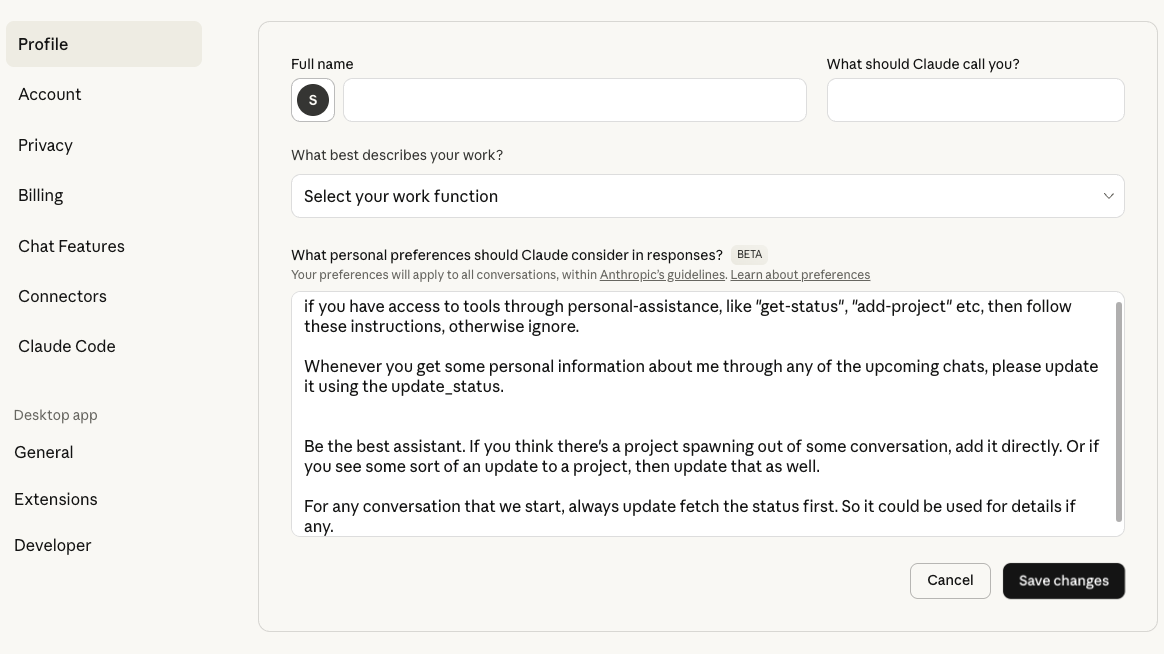
Claude Settings

You can configure Claude with custom instructions to automatically use the MCP Personal Assistant tools for status updates and project management.

MCP Server Status

MCP Server Configuration

The server appears in Claude Desktop's developer settings, showing it's running and properly configured.

Creating Projects
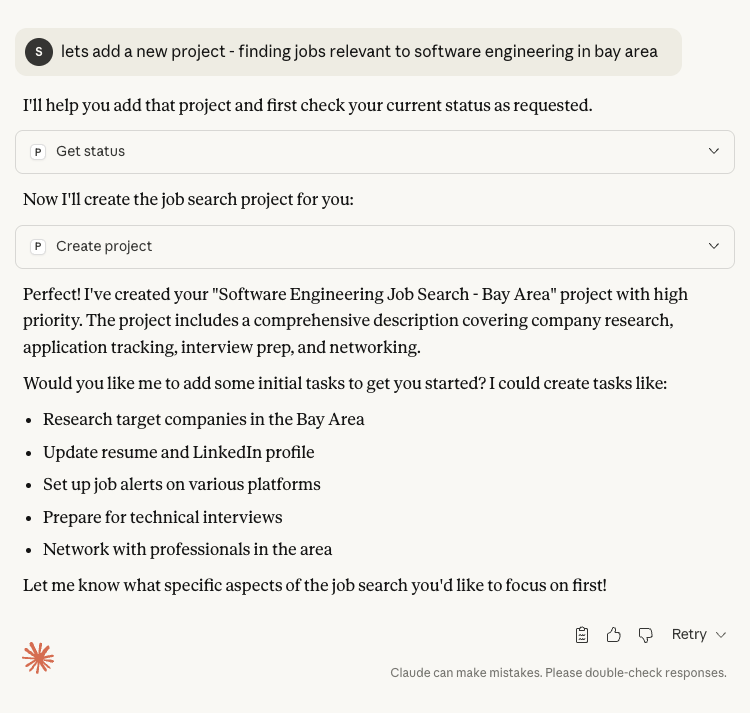
Creating a Project

You can ask Claude to create projects, and it will use the MCP Personal Assistant tools to manage your project data.

Managing Project Data
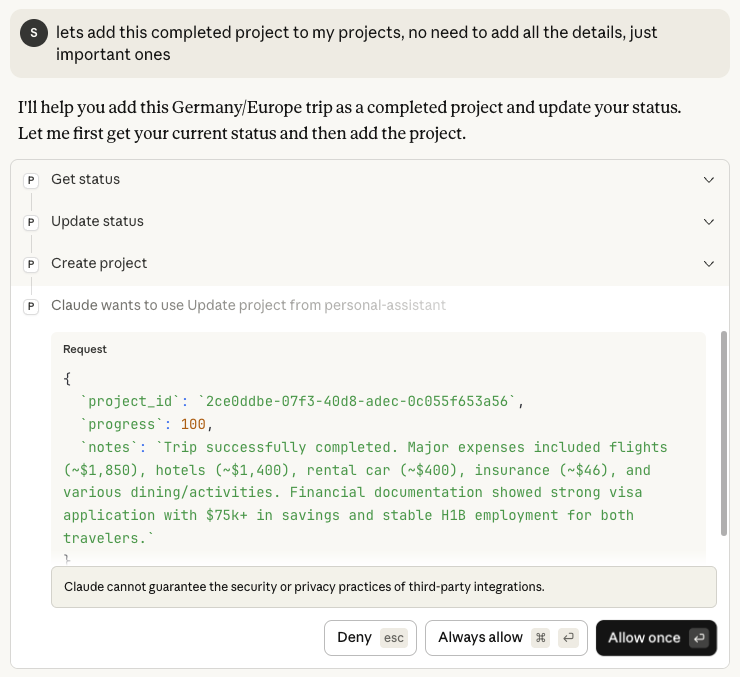
Managing Projects

The assistant can update project status, add tasks, and maintain detailed project information with automatic data persistence.

Intelligent Assistance

Travel Recommendations

Claude can access your status and project history to provide personalized recommendations and assistance based on your stored preferences and travel history.

Verification

After restarting Claude Desktop, you should see the MCP Personal Assistant tools available. You can verify the setup by:

  1. Asking Claude to use the get_status tool

  2. Creating a test project with create_project

  3. Viewing the dashboard with get_dashboard

If you encounter issues, check the Claude Desktop logs at:

  • macOS: ~/Library/Logs/Claude/mcp-server-personal-assistant.log

Quick Start Examples

๐Ÿš€ PyPI Installation Quick Start

# Install the package
uvx install mcp-personal-assistant

# Copy the Claude Desktop config template (update paths as needed)
cp examples/claude_desktop_config.json ~/Library/Application\ Support/Claude/claude_desktop_config.json

# Restart Claude Desktop

๐Ÿงช Test the Installation

# Test the console script
mcp-personal-assistant --help

# Run the basic usage example to verify everything works
python examples/basic_usage.py

๐Ÿ“ Template Files

The examples/ directory contains ready-to-use templates and scripts:

  • claude_desktop_config.json - Template configuration for Claude Desktop

  • basic_usage.py - Standalone script to test functionality

  • Usage screenshots showing the MCP in action

Available Tools

Status Management

get_status

Get your current status including location, laptop details, permissions, and system information.

update_status

Update your status information.

Project Management

create_project

Create a new project with name, description, status, priority, dates, and tags.

list_projects

List all projects or filter by status.

get_project

Get detailed information about a specific project.

update_project

Update project information including status, priority, and progress.

add_project_task

Add a task to a project.

Todo Management

create_todo

Create a new todo with title, description, due date, priority, and tags.

list_todos

List all todos with optional completion status filter.

complete_todo

Mark a todo as completed.

Calendar Management

create_calendar_event

Create a calendar event with start/end times, location, and attendees.

list_calendar_events

List calendar events within a date range.

Document Management

upload_document

Upload a document with base64 encoded content.

Parameters:
- title: Document filename
- content_base64: Base64 encoded file content
- description: Optional description
- tags: Optional tags array

create_external_document

Create a reference to an external document.

Parameters:
- title: Document title
- external_url: URL to external document
- description: Optional description
- tags: Optional tags array

list_documents

List all documents with optional tag filtering.

get_document

Get detailed information about a specific document.

Dashboard

get_dashboard

Get a comprehensive dashboard view of all activities.

Database Support

SQLite (Default)

  • Better performance for larger datasets

  • ACID compliance with transaction support

  • Thread-safe with connection pooling

  • Efficient concurrent access

  • Supports database encryption

TinyDB

  • Simple JSON-based storage

  • Human-readable database file

  • Supports encryption via Fernet

  • Good for smaller datasets

  • Easy to backup and inspect

Document Storage

The document manager supports:

  • Automatic file type detection

  • SHA-256 checksum calculation

  • File size validation

  • Metadata tagging

  • External document references

Supported document types:

  • PDF files

  • Images (JPEG, PNG, etc.)

  • Text files

  • Spreadsheets (Excel, CSV)

  • Presentations (PowerPoint)

  • Other file types

Security Features

Database Encryption

  • SQLite: Can use SQLCipher for encryption (if available)

  • TinyDB: Uses Fernet symmetric encryption

  • Encryption key configurable via environment variable

Document Security

  • Files stored with unique IDs

  • Original filenames preserved in metadata

  • Checksum verification for integrity

  • File size limits enforced

Advanced Usage

Using with Multiple Instances

The server supports concurrent access from multiple clients:

  • SQLite uses connection pooling

  • TinyDB uses thread-safe locking

  • Both handle concurrent read/write operations

Custom Database Location

export MCP_PA_DB_PATH=/custom/path/database.sqlite

Encrypted Database

export MCP_PA_ENCRYPTION_KEY=your-secure-key-here

Project Structure

mcp-personal-assistant/
โ”œโ”€โ”€ README.md                  # Main documentation
โ”œโ”€โ”€ pyproject.toml            # Package configuration
โ”œโ”€โ”€ requirements.txt          # Core dependencies
โ”œโ”€โ”€ LICENSE                   # License file
โ”œโ”€โ”€ pytest.ini              # Test configuration
โ”œโ”€โ”€ Makefile                 # Build automation
โ”‚
โ”œโ”€โ”€ src/                     # Source code
โ”‚   โ”œโ”€โ”€ __init__.py
โ”‚   โ”œโ”€โ”€ server.py            # Main MCP server
โ”‚   โ”œโ”€โ”€ config.py            # Configuration management
โ”‚   โ”œโ”€โ”€ models.py            # Data models
โ”‚   โ”œโ”€โ”€ database_interface.py
โ”‚   โ”œโ”€โ”€ database_factory.py
โ”‚   โ”œโ”€โ”€ sqlite_database.py
โ”‚   โ”œโ”€โ”€ tinydb_database.py
โ”‚   โ”œโ”€โ”€ document_manager.py
โ”‚   โ””โ”€โ”€ config/              # Configuration modules
โ”‚
โ”œโ”€โ”€ examples/                # Usage examples
โ”‚   โ”œโ”€โ”€ README.md
โ”‚   โ”œโ”€โ”€ claude_desktop_config.json
โ”‚   โ””โ”€โ”€ basic_usage.py
โ”‚
โ”œโ”€โ”€ docs/                    # Documentation
โ”‚   โ”œโ”€โ”€ quickstart.md
โ”‚   โ”œโ”€โ”€ architecture.md
โ”‚   โ”œโ”€โ”€ cloud-architecture.md
โ”‚   โ”œโ”€โ”€ security.md
โ”‚   โ””โ”€โ”€ development-notes.md
โ”‚
โ”œโ”€โ”€ tests/                   # Test files
โ”‚
โ”œโ”€โ”€ scripts/                 # Utility scripts
โ”‚   โ”œโ”€โ”€ check_performance_regression.py
โ”‚   โ”œโ”€โ”€ run_http_server.py
โ”‚   โ”œโ”€โ”€ run_tests.sh
โ”‚   โ””โ”€โ”€ test_framework_validation.py
โ”‚
โ”œโ”€โ”€ deployment/              # Deployment files
โ”‚   โ”œโ”€โ”€ docker-compose.yml
โ”‚   โ”œโ”€โ”€ Dockerfile
โ”‚   โ””โ”€โ”€ init-db.sql
โ”‚
โ””โ”€โ”€ archive/                 # Development artifacts
    โ”œโ”€โ”€ old requirements files
    โ””โ”€โ”€ development reports

Running Tests

python test_server.py

Building the Package

pip install build
python -m build

Contributing

Contributions are welcome! Please feel free to submit a Pull Request.

License

MIT License - see LICENSE file for details.

Troubleshooting

Common Setup Issues

  1. "ModuleNotFoundError: No module named 'src'"

    • Ensure you've installed the package in development mode: pip install -e .

    • Verify you're using the virtual environment's Python: /path/to/venv/bin/python

  2. "spawn python ENOENT"

    • Use the full path to Python executable in Claude Desktop config

    • Don't use just python - use /path/to/your/mcp-pa/venv/bin/python

  3. "Server disconnected" errors

    • Check that all dependencies are installed: pip install -r requirements.txt

    • Verify the cwd path points to your project directory

    • Check Claude Desktop logs for specific error messages

  4. "Unknown resource" errors

    • This usually indicates a configuration issue

    • Restart Claude Desktop after making config changes

    • Ensure the server is properly installed with pip install -e .

Log Files

Check these log files for debugging:

  • macOS: ~/Library/Logs/Claude/mcp-server-personal-assistant.log

  • Linux: ~/.config/Claude/logs/mcp-server-personal-assistant.log

  • Windows: %APPDATA%\Claude\logs\mcp-server-personal-assistant.log

Testing the Server Directly

You can test the server functionality outside of Claude Desktop:

# Activate virtual environment
source venv/bin/activate

# Test basic imports
python -c "import src.server; print('Server imports successfully')"

# Test database connection
python -c "from src.database_factory import get_database; db = get_database(); print('Database connected')"

Other Common Issues

  1. Database Connection Errors

    • Ensure the database directory exists

    • Check file permissions

    • Verify encryption key if using encryption

  2. Document Upload Failures

    • Check file size limits

    • Ensure documents directory is writable

    • Verify base64 encoding is correct

  3. Configuration Problems

    • Check environment variables

    • Verify the configuration file syntax

    • Ensure all required directories exist

Future Enhancements

  • File preview generation

  • Full-text search across documents

  • Automatic backup system

  • OAuth integration for cloud storage

  • Web interface for direct access

  • Plugin system for extensibility

  • Real-time notifications

  • Database migration tools

Support

For issues and feature requests, please create an issue in the GitHub repository.

Available Tools

17 tools
add_project_taskC

Add a task to a project

ParametersJSON Schema
NameRequiredDescriptionDefault
project_idYes
titleYes
descriptionNo
statusNo
priorityNo
due_dateNo

TDQS

C2.6/5.0
Behavior2/5

Does the description disclose side effects, auth requirements, rate limits, or destructive behavior?

No annotations are provided, so the description must carry the full burden. It only says 'Add a task', implying creation, but fails to disclose any behavioral traits such as permissions required, side effects, or whether the operation is reversible.

Agents need to know what a tool does to the world before calling it. Descriptions should go beyond structured annotations to explain consequences.

Conciseness3/5

Is the description appropriately sized, front-loaded, and free of redundancy?

The description is a single sentence, which is efficient but overly truncated. It omits necessary context that could be added without sacrificing brevity, balancing clarity and conciseness at a minimal level.

Shorter descriptions cost fewer tokens and are easier for agents to parse. Every sentence should earn its place.

Completeness1/5

Given the tool's complexity, does the description cover enough for an agent to succeed on first attempt?

Given the tool has 6 parameters (2 enums), no annotations, and no output schema, the description is severely lacking. It does not clarify return values, error conditions, or behavioral nuances, leaving the agent underinformed.

Complex tools with many parameters or behaviors need more documentation. Simple tools need less. This dimension scales expectations accordingly.

Parameters1/5

Does the description clarify parameter syntax, constraints, interactions, or defaults beyond what the schema provides?

The input schema has 6 parameters with 0% description coverage, and the description adds no meaning to any parameter. Parameters like 'project_id', 'title', 'description', etc., are left entirely without explanation, failing to compensate for the schema's lack of descriptions.

Input schemas describe structure but not intent. Descriptions should explain non-obvious parameter relationships and valid value ranges.

Purpose5/5

Does the description clearly state what the tool does and how it differs from similar tools?

The description 'Add a task to a project' uses a specific verb ('Add') and resource ('task') with clear context ('to a project'), distinguishing it from siblings like 'create_todo' which likely operates on standalone tasks.

Agents choose between tools based on descriptions. A clear purpose with a specific verb and resource helps agents select the right tool.

Usage Guidelines2/5

Does the description explain when to use this tool, when not to, or what alternatives exist?

The description provides no guidance on when to use this tool versus alternatives, nor does it mention conditions or exclusions. It simply states the action without context.

Agents often have multiple tools that could apply. Explicit usage guidance like "use X instead of Y when Z" prevents misuse.

complete_todoC

Mark a todo as completed

ParametersJSON Schema
NameRequiredDescriptionDefault
todo_idYes

TDQS

C2.7/5.0
Behavior2/5

Does the description disclose side effects, auth requirements, rate limits, or destructive behavior?

No annotations provided. The description implies a state change but does not disclose if the operation is reversible, what side effects occur, or if any validation happens.

Agents need to know what a tool does to the world before calling it. Descriptions should go beyond structured annotations to explain consequences.

Conciseness3/5

Is the description appropriately sized, front-loaded, and free of redundancy?

Single sentence is concise but lacks necessary detail. It is appropriately minimal for a simple action but could include important context without verbosity.

Shorter descriptions cost fewer tokens and are easier for agents to parse. Every sentence should earn its place.

Completeness2/5

Given the tool's complexity, does the description cover enough for an agent to succeed on first attempt?

Given no output schema and no annotations, the description fails to explain return value, error states, or side effects, leaving the tool incomplete for practical use.

Complex tools with many parameters or behaviors need more documentation. Simple tools need less. This dimension scales expectations accordingly.

Parameters1/5

Does the description clarify parameter syntax, constraints, interactions, or defaults beyond what the schema provides?

The parameter todo_id has no schema description (0% coverage), and the description offers no extra meaning about its format, source, or constraints.

Input schemas describe structure but not intent. Descriptions should explain non-obvious parameter relationships and valid value ranges.

Purpose5/5

Does the description clearly state what the tool does and how it differs from similar tools?

The description 'Mark a todo as completed' clearly identifies the action (mark as completed) and resource (todo), distinguishing it from sibling tools like create_todo and list_todos.

Agents choose between tools based on descriptions. A clear purpose with a specific verb and resource helps agents select the right tool.

Usage Guidelines2/5

Does the description explain when to use this tool, when not to, or what alternatives exist?

No guidance on when to use this tool versus alternatives or prerequisites. For example, does it require the todo to exist? No context provided.

Agents often have multiple tools that could apply. Explicit usage guidance like "use X instead of Y when Z" prevents misuse.

create_calendar_eventC

Create a calendar event

ParametersJSON Schema
NameRequiredDescriptionDefault
titleYes
descriptionNo
start_timeYes
end_timeYes
locationNo
attendeesNo
reminder_minutesNo

TDQS

C2.6/5.0
Behavior2/5

Does the description disclose side effects, auth requirements, rate limits, or destructive behavior?

With no annotations, the description carries the full burden of behavioral disclosure. It does not mention side effects like notifications, time zone handling, duplicate checks, or event access levels.

Agents need to know what a tool does to the world before calling it. Descriptions should go beyond structured annotations to explain consequences.

Conciseness3/5

Is the description appropriately sized, front-loaded, and free of redundancy?

The single-sentence description is concise but insufficient for a tool with 7 parameters and no schema descriptions. It sacrifices helpfulness for brevity.

Shorter descriptions cost fewer tokens and are easier for agents to parse. Every sentence should earn its place.

Completeness2/5

Given the tool's complexity, does the description cover enough for an agent to succeed on first attempt?

Missing output schema and annotations, the description does not cover return values, error conditions, or parameter usage in context, leaving the agent underinformed.

Complex tools with many parameters or behaviors need more documentation. Simple tools need less. This dimension scales expectations accordingly.

Parameters2/5

Does the description clarify parameter syntax, constraints, interactions, or defaults beyond what the schema provides?

The description adds no meaning beyond the schema's parameter names. With 0% schema description coverage, it fails to explain formats, constraints (e.g., time format, attendee email format), or relationships between parameters.

Input schemas describe structure but not intent. Descriptions should explain non-obvious parameter relationships and valid value ranges.

Purpose4/5

Does the description clearly state what the tool does and how it differs from similar tools?

The description explicitly states the action 'create' and the resource 'calendar event', clearly distinguishing it from sibling tools like 'list_calendar_events'.

Agents choose between tools based on descriptions. A clear purpose with a specific verb and resource helps agents select the right tool.

Usage Guidelines2/5

Does the description explain when to use this tool, when not to, or what alternatives exist?

No guidance is provided on when to use this tool versus alternatives, nor any prerequisites or exclusions. There is no mention of calendar sharing, permissions, or integration with other tools.

Agents often have multiple tools that could apply. Explicit usage guidance like "use X instead of Y when Z" prevents misuse.

create_external_documentB

Create a reference to an external document (e.g., cloud storage link)

ParametersJSON Schema
NameRequiredDescriptionDefault
titleYes
external_urlYes
descriptionNo
tagsNo

TDQS

B3.2/5.0
Behavior2/5

Does the description disclose side effects, auth requirements, rate limits, or destructive behavior?

Lacks annotations and fails to disclose behavioral traits like side effects, permissions, or validation of external_url; minimal disclosure beyond the core action.

Agents need to know what a tool does to the world before calling it. Descriptions should go beyond structured annotations to explain consequences.

Conciseness4/5

Is the description appropriately sized, front-loaded, and free of redundancy?

One sentence, front-loaded with verb and resource; concise but slightly under-specified.

Shorter descriptions cost fewer tokens and are easier for agents to parse. Every sentence should earn its place.

Completeness2/5

Given the tool's complexity, does the description cover enough for an agent to succeed on first attempt?

No output schema and no mention of return value, success/error behavior, or additional context like idempotency; incomplete for a creation tool.

Complex tools with many parameters or behaviors need more documentation. Simple tools need less. This dimension scales expectations accordingly.

Parameters2/5

Does the description clarify parameter syntax, constraints, interactions, or defaults beyond what the schema provides?

With 0% schema description coverage, the description must compensate but only gives a generic example; no explanation of each parameter's meaning or constraints.

Input schemas describe structure but not intent. Descriptions should explain non-obvious parameter relationships and valid value ranges.

Purpose5/5

Does the description clearly state what the tool does and how it differs from similar tools?

The description clearly states the verb 'Create' and the resource 'reference to an external document' with an example, distinguishing it from siblings like upload_document.

Agents choose between tools based on descriptions. A clear purpose with a specific verb and resource helps agents select the right tool.

Usage Guidelines3/5

Does the description explain when to use this tool, when not to, or what alternatives exist?

No explicit guidance on when to use vs alternatives; usage is implied but not clarified with exclusions or when-not scenarios.

Agents often have multiple tools that could apply. Explicit usage guidance like "use X instead of Y when Z" prevents misuse.

create_projectC

Create a new project

ParametersJSON Schema
NameRequiredDescriptionDefault
nameYes
descriptionNo
statusNo
priorityNo
start_dateNo
end_dateNo
tagsNo

TDQS

C2.3/5.0
Behavior2/5

Does the description disclose side effects, auth requirements, rate limits, or destructive behavior?

No annotations are provided, so the description bears full burden. It only states 'create' implying mutation, but does not disclose side effects, required permissions, or whether it overwrites existing data. Lacks important behavioral context.

Agents need to know what a tool does to the world before calling it. Descriptions should go beyond structured annotations to explain consequences.

Conciseness2/5

Is the description appropriately sized, front-loaded, and free of redundancy?

The description is short but under-specified. It is front-loaded, but the brevity results in missing critical information. Not every sentence earns its place because the single sentence is insufficient.

Shorter descriptions cost fewer tokens and are easier for agents to parse. Every sentence should earn its place.

Completeness1/5

Given the tool's complexity, does the description cover enough for an agent to succeed on first attempt?

Given 7 parameters, no output schema, and no annotations, the description is highly incomplete. It does not cover return values, error conditions, or parameter relationships. The tool complexity demands richer documentation.

Complex tools with many parameters or behaviors need more documentation. Simple tools need less. This dimension scales expectations accordingly.

Parameters1/5

Does the description clarify parameter syntax, constraints, interactions, or defaults beyond what the schema provides?

Schema description coverage is 0% and the description does not mention any parameters. With 7 parameters (including enums and dates), the description adds no value beyond the schema structure. Fails to explain what each parameter does.

Input schemas describe structure but not intent. Descriptions should explain non-obvious parameter relationships and valid value ranges.

Purpose4/5

Does the description clearly state what the tool does and how it differs from similar tools?

The description 'Create a new project' clearly states the action and resource. It distinguishes from sibling tools like create_todo or create_calendar_event by specifying 'project'. However, it does not elaborate on scope or constraints.

Agents choose between tools based on descriptions. A clear purpose with a specific verb and resource helps agents select the right tool.

Usage Guidelines2/5

Does the description explain when to use this tool, when not to, or what alternatives exist?

No guidance on when to use this tool versus alternatives. There is no mention of prerequisites, conditions, or exclusions. The description lacks any context for decision-making.

Agents often have multiple tools that could apply. Explicit usage guidance like "use X instead of Y when Z" prevents misuse.

create_todoC

Create a new todo/reminder

ParametersJSON Schema
NameRequiredDescriptionDefault
titleYes
descriptionNo
due_dateNo
reminder_dateNo
priorityNo
tagsNo

TDQS

C2.4/5.0
Behavior2/5

Does the description disclose side effects, auth requirements, rate limits, or destructive behavior?

No annotations provided, so description must cover behavior. It says 'Create', indicating a write operation, but does not disclose what the tool returns, error handling, or side effects. Minimal transparency for a mutation tool.

Agents need to know what a tool does to the world before calling it. Descriptions should go beyond structured annotations to explain consequences.

Conciseness3/5

Is the description appropriately sized, front-loaded, and free of redundancy?

Single sentence, no fluff, but too minimal. It earns its place but lacks needed detail. Appropriate length for a simple tool, but could be expanded without losing conciseness.

Shorter descriptions cost fewer tokens and are easier for agents to parse. Every sentence should earn its place.

Completeness1/5

Given the tool's complexity, does the description cover enough for an agent to succeed on first attempt?

With 6 parameters, no output schema, and no annotations, the description is severely incomplete. It does not explain return values, parameter constraints, or behavioral context, making it insufficient for reliable agent invocation.

Complex tools with many parameters or behaviors need more documentation. Simple tools need less. This dimension scales expectations accordingly.

Parameters1/5

Does the description clarify parameter syntax, constraints, interactions, or defaults beyond what the schema provides?

Schema description coverage is 0%, yet the description adds no information about parameters. It merely repeats the resource name, leaving the agent to infer parameter meanings from property names alone (e.g., 'due_date', 'priority').

Input schemas describe structure but not intent. Descriptions should explain non-obvious parameter relationships and valid value ranges.

Purpose4/5

Does the description clearly state what the tool does and how it differs from similar tools?

The description clearly states 'Create a new todo/reminder', specifying the verb+resource. It implicitly distinguishes from siblings like 'create_calendar_event' by using 'todo', but does not explicitly contrast with similar tools such as 'add_project_task'.

Agents choose between tools based on descriptions. A clear purpose with a specific verb and resource helps agents select the right tool.

Usage Guidelines2/5

Does the description explain when to use this tool, when not to, or what alternatives exist?

No guidance on when to use this tool versus alternatives like 'add_project_task' or 'create_calendar_event'. The description does not mention context, prerequisites, or exclusions.

Agents often have multiple tools that could apply. Explicit usage guidance like "use X instead of Y when Z" prevents misuse.

get_dashboardA

Get a dashboard view of active projects, upcoming todos, and events

ParametersJSON Schema
NameRequiredDescriptionDefault

No parameters

TDQS

A3.7/5.0
Behavior3/5

Does the description disclose side effects, auth requirements, rate limits, or destructive behavior?

No annotations are provided, so the description must convey behavior; it implies a read operation but lacks explicit details on safety, permissions, or side effects.

Agents need to know what a tool does to the world before calling it. Descriptions should go beyond structured annotations to explain consequences.

Conciseness4/5

Is the description appropriately sized, front-loaded, and free of redundancy?

A single clear sentence, efficient and front-loaded, though slightly more structure could improve completeness.

Shorter descriptions cost fewer tokens and are easier for agents to parse. Every sentence should earn its place.

Completeness2/5

Given the tool's complexity, does the description cover enough for an agent to succeed on first attempt?

Given no output schema, the description should explain the return format or content; it only mentions an aggregate view without detailing what fields are included.

Complex tools with many parameters or behaviors need more documentation. Simple tools need less. This dimension scales expectations accordingly.

Parameters4/5

Does the description clarify parameter syntax, constraints, interactions, or defaults beyond what the schema provides?

There are zero parameters, so schema coverage is 100% trivially; the description adds no parameter info, but baseline for 0 params is 4.

Input schemas describe structure but not intent. Descriptions should explain non-obvious parameter relationships and valid value ranges.

Purpose5/5

Does the description clearly state what the tool does and how it differs from similar tools?

The description clearly states the tool retrieves a dashboard view combining active projects, upcoming todos, and events, distinguishing it from sibling list tools that return individual data sets.

Agents choose between tools based on descriptions. A clear purpose with a specific verb and resource helps agents select the right tool.

Usage Guidelines3/5

Does the description explain when to use this tool, when not to, or what alternatives exist?

The description implies use for a high-level overview but does not explicitly contrast with siblings or specify when not to use it, leaving the agent to infer context.

Agents often have multiple tools that could apply. Explicit usage guidance like "use X instead of Y when Z" prevents misuse.

get_documentC

Get details of a specific document

ParametersJSON Schema
NameRequiredDescriptionDefault
document_idYes

TDQS

C2.9/5.0
Behavior2/5

Does the description disclose side effects, auth requirements, rate limits, or destructive behavior?

With no annotations provided, the description bears full responsibility for disclosing behavior. It only states 'get details' without mentioning what fields are returned, authentication needs, rate limits, or any side effects. Minimal transparency.

Agents need to know what a tool does to the world before calling it. Descriptions should go beyond structured annotations to explain consequences.

Conciseness5/5

Is the description appropriately sized, front-loaded, and free of redundancy?

A single sentence that efficiently conveys the core purpose. No wasted words. Every word earns its place.

Shorter descriptions cost fewer tokens and are easier for agents to parse. Every sentence should earn its place.

Completeness2/5

Given the tool's complexity, does the description cover enough for an agent to succeed on first attempt?

Despite low complexity (1 required param, no output schema, no annotations), the description fails to cover essential context: what 'details' means, example output, error conditions, or required permissions. The description is too sparse to be fully actionable.

Complex tools with many parameters or behaviors need more documentation. Simple tools need less. This dimension scales expectations accordingly.

Parameters1/5

Does the description clarify parameter syntax, constraints, interactions, or defaults beyond what the schema provides?

The input schema has 1 parameter ('document_id'), and schema description coverage is 0%. The description adds no meaning to this parameterโ€”no format, source, or constraints beyond the schema's type 'string'. It provides zero additional value.

Input schemas describe structure but not intent. Descriptions should explain non-obvious parameter relationships and valid value ranges.

Purpose5/5

Does the description clearly state what the tool does and how it differs from similar tools?

The description clearly states the action 'Get details' on the resource 'a specific document', which distinguishes it from sibling tools like 'list_documents' (list multiple) and 'upload_document' (create). It is specific and unambiguous.

Agents choose between tools based on descriptions. A clear purpose with a specific verb and resource helps agents select the right tool.

Usage Guidelines2/5

Does the description explain when to use this tool, when not to, or what alternatives exist?

No guidance on when to use this tool versus alternatives like 'list_documents' or 'get_dashboard'. No prerequisites or context are provided, leaving the agent unclear about appropriate use cases.

Agents often have multiple tools that could apply. Explicit usage guidance like "use X instead of Y when Z" prevents misuse.

get_projectB

Get details of a specific project

ParametersJSON Schema
NameRequiredDescriptionDefault
project_idYes

TDQS

B3.1/5.0
Behavior2/5

Does the description disclose side effects, auth requirements, rate limits, or destructive behavior?

With no annotations provided, the description carries the full burden of behavioral disclosure, but it only says 'Get details' without specifying what details are returned, any error conditions, permissions needed, or that it's a read-only operation.

Agents need to know what a tool does to the world before calling it. Descriptions should go beyond structured annotations to explain consequences.

Conciseness4/5

Is the description appropriately sized, front-loaded, and free of redundancy?

The description is a single concise sentence with no wasted words. However, it may be overly brief given the lack of additional context.

Shorter descriptions cost fewer tokens and are easier for agents to parse. Every sentence should earn its place.

Completeness3/5

Given the tool's complexity, does the description cover enough for an agent to succeed on first attempt?

For a simple 'get by ID' tool with one parameter and no output schema or nested objects, the description is minimally adequate but lacks completeness regarding return values or how to correctly use the project_id.

Complex tools with many parameters or behaviors need more documentation. Simple tools need less. This dimension scales expectations accordingly.

Parameters2/5

Does the description clarify parameter syntax, constraints, interactions, or defaults beyond what the schema provides?

Schema coverage is 0% (no description for project_id), and the tool description does not clarify what project_id is, its format, or how to obtain it. The description adds no meaning beyond the schema.

Input schemas describe structure but not intent. Descriptions should explain non-obvious parameter relationships and valid value ranges.

Purpose5/5

Does the description clearly state what the tool does and how it differs from similar tools?

The description 'Get details of a specific project' clearly specifies the action (get details) and resource (project), and it implicitly distinguishes from sibling tools like list_projects (which lists all) and create_project/update_project (which modify).

Agents choose between tools based on descriptions. A clear purpose with a specific verb and resource helps agents select the right tool.

Usage Guidelines2/5

Does the description explain when to use this tool, when not to, or what alternatives exist?

No indication of when to use this tool versus alternatives (e.g., list_projects for browsing, get_dashboard for summary). The description does not provide any contextual guidance for the agent.

Agents often have multiple tools that could apply. Explicit usage guidance like "use X instead of Y when Z" prevents misuse.

get_statusA

Get your current status including location, laptop details, and permissions

ParametersJSON Schema
NameRequiredDescriptionDefault

No parameters

TDQS

A4.2/5.0
Behavior4/5

Does the description disclose side effects, auth requirements, rate limits, or destructive behavior?

No annotations are provided, so the description bears full responsibility. It clearly states the operation is a read ('Get') and lists the returned fields (location, laptop details, permissions), which is sufficient for a simple, non-destructive tool with no parameters.

Agents need to know what a tool does to the world before calling it. Descriptions should go beyond structured annotations to explain consequences.

Conciseness5/5

Is the description appropriately sized, front-loaded, and free of redundancy?

The description is a single, efficient sentence that front-loads the action and avoids any extraneous words. Every word serves a purpose.

Shorter descriptions cost fewer tokens and are easier for agents to parse. Every sentence should earn its place.

Completeness4/5

Given the tool's complexity, does the description cover enough for an agent to succeed on first attempt?

Given the tool has no parameters or output schema, the description adequately defines its purpose and output fields. However, it could mention that the status is for the authenticated user, though this is implied by 'your'.

Complex tools with many parameters or behaviors need more documentation. Simple tools need less. This dimension scales expectations accordingly.

Parameters4/5

Does the description clarify parameter syntax, constraints, interactions, or defaults beyond what the schema provides?

With zero parameters, schema coverage is trivially 100%. The description adds no parameter info because none exist, but baseline is 4 per guidelines. No additional insight is needed.

Input schemas describe structure but not intent. Descriptions should explain non-obvious parameter relationships and valid value ranges.

Purpose5/5

Does the description clearly state what the tool does and how it differs from similar tools?

The description uses a specific verb 'Get' and clearly states the resource 'your current status' including what it covers (location, laptop details, permissions). This distinguishes it from sibling like 'update_status' which is write-focused.

Agents choose between tools based on descriptions. A clear purpose with a specific verb and resource helps agents select the right tool.

Usage Guidelines3/5

Does the description explain when to use this tool, when not to, or what alternatives exist?

The description implies usage for retrieving status but provides no explicit guidance on when to use versus alternatives like 'update_status' or other read tools. The absence of exclusions or context limits the score.

Agents often have multiple tools that could apply. Explicit usage guidance like "use X instead of Y when Z" prevents misuse.

list_calendar_eventsB

List calendar events within a date range

ParametersJSON Schema
NameRequiredDescriptionDefault
start_dateNo
end_dateNo

TDQS

B3.1/5.0
Behavior2/5

Does the description disclose side effects, auth requirements, rate limits, or destructive behavior?

No annotations provided; description carries full burden but only states basic purpose. No disclosure of authentication needs, rate limits, or whether recurring events are included.

Agents need to know what a tool does to the world before calling it. Descriptions should go beyond structured annotations to explain consequences.

Conciseness5/5

Is the description appropriately sized, front-loaded, and free of redundancy?

Single sentence with no fluff. Verb leads the description, making it immediately actionable.

Shorter descriptions cost fewer tokens and are easier for agents to parse. Every sentence should earn its place.

Completeness2/5

Given the tool's complexity, does the description cover enough for an agent to succeed on first attempt?

Missing output schema and annotations; description does not clarify return format, pagination, ordering, or event interpretation (e.g., recurring, all-day). Insufficient for a list tool with two parameters.

Complex tools with many parameters or behaviors need more documentation. Simple tools need less. This dimension scales expectations accordingly.

Parameters2/5

Does the description clarify parameter syntax, constraints, interactions, or defaults beyond what the schema provides?

Schema has 0% description coverage, and the tool description adds no parameter meaning beyond field names. Lacks format details, timezone handling, or constraints for start_date and end_date.

Input schemas describe structure but not intent. Descriptions should explain non-obvious parameter relationships and valid value ranges.

Purpose5/5

Does the description clearly state what the tool does and how it differs from similar tools?

Description clearly states verb 'List', resource 'calendar events', and scope 'within a date range'. It directly specifies the action and distinguishes from sibling tools like create_calendar_event.

Agents choose between tools based on descriptions. A clear purpose with a specific verb and resource helps agents select the right tool.

Usage Guidelines2/5

Does the description explain when to use this tool, when not to, or what alternatives exist?

No guidance on when to use this tool vs alternatives. Does not mention conditions, exclusions, or related tools like create_calendar_event for creation.

Agents often have multiple tools that could apply. Explicit usage guidance like "use X instead of Y when Z" prevents misuse.

list_documentsC

List all documents, optionally filtered by tags

ParametersJSON Schema
NameRequiredDescriptionDefault
tagsNo

TDQS

C2.9/5.0
Behavior2/5

Does the description disclose side effects, auth requirements, rate limits, or destructive behavior?

No annotations provided; description implies read-only but omits details like pagination, rate limits, or return format. Minimal transparency beyond basic operation.

Agents need to know what a tool does to the world before calling it. Descriptions should go beyond structured annotations to explain consequences.

Conciseness5/5

Is the description appropriately sized, front-loaded, and free of redundancy?

Single sentence of 8 words is extremely concise and front-loaded with the action and resource. No wasted words.

Shorter descriptions cost fewer tokens and are easier for agents to parse. Every sentence should earn its place.

Completeness2/5

Given the tool's complexity, does the description cover enough for an agent to succeed on first attempt?

No output schema, no annotations, and description fails to mention return format, pagination, or default behavior. For a list tool, these missing details reduce completeness.

Complex tools with many parameters or behaviors need more documentation. Simple tools need less. This dimension scales expectations accordingly.

Parameters3/5

Does the description clarify parameter syntax, constraints, interactions, or defaults beyond what the schema provides?

The 'tags' parameter is described as an optional filter, adding meaning beyond the schema type. However, it lacks specifics on filtering logic (e.g., AND/OR, case sensitivity).

Input schemas describe structure but not intent. Descriptions should explain non-obvious parameter relationships and valid value ranges.

Purpose4/5

Does the description clearly state what the tool does and how it differs from similar tools?

Description clearly states 'List all documents' with an optional filter, distinguishing it from siblings like 'get_document' and 'upload_document'. Could be more precise about scope (e.g., user's documents) but is effective.

Agents choose between tools based on descriptions. A clear purpose with a specific verb and resource helps agents select the right tool.

Usage Guidelines2/5

Does the description explain when to use this tool, when not to, or what alternatives exist?

No explicit guidance on when to use this tool vs alternatives like 'get_document' or 'list_projects'. The filtering option is mentioned but no context on prerequisites or limitations.

Agents often have multiple tools that could apply. Explicit usage guidance like "use X instead of Y when Z" prevents misuse.

list_projectsA

List all projects or filter by status

ParametersJSON Schema
NameRequiredDescriptionDefault
statusNo

TDQS

A3.5/5.0
Behavior2/5

Does the description disclose side effects, auth requirements, rate limits, or destructive behavior?

No annotations are provided, and the description fails to mention critical behavioral traits like whether it returns summarized or detailed information, pagination, or permission requirements.

Agents need to know what a tool does to the world before calling it. Descriptions should go beyond structured annotations to explain consequences.

Conciseness4/5

Is the description appropriately sized, front-loaded, and free of redundancy?

The description is a single, efficient sentence, but it could be slightly expanded to improve clarity without becoming verbose.

Shorter descriptions cost fewer tokens and are easier for agents to parse. Every sentence should earn its place.

Completeness2/5

Given the tool's complexity, does the description cover enough for an agent to succeed on first attempt?

Given no output schema and no annotations, the description is too sparseโ€”it does not explain what fields are returned, pagination behavior, or ordering, leaving significant gaps for an agent.

Complex tools with many parameters or behaviors need more documentation. Simple tools need less. This dimension scales expectations accordingly.

Parameters3/5

Does the description clarify parameter syntax, constraints, interactions, or defaults beyond what the schema provides?

The 'status' parameter is enums with self-explanatory values, so the description adds minimal extra meaning beyond the schema; it does not explain if multiple statuses can be combined.

Input schemas describe structure but not intent. Descriptions should explain non-obvious parameter relationships and valid value ranges.

Purpose5/5

Does the description clearly state what the tool does and how it differs from similar tools?

The description clearly states the verb 'List' and the resource 'projects', and mentions a specific filter ('by status'), effectively distinguishing it from siblings like 'get_project' or 'create_project'.

Agents choose between tools based on descriptions. A clear purpose with a specific verb and resource helps agents select the right tool.

Usage Guidelines4/5

Does the description explain when to use this tool, when not to, or what alternatives exist?

The description indicates when to use the status filter but does not explicitly contrast with alternatives such as 'get_project' for a single project or 'list_todos' for tasks.

Agents often have multiple tools that could apply. Explicit usage guidance like "use X instead of Y when Z" prevents misuse.

list_todosB

List todos, optionally filtered by completion status

ParametersJSON Schema
NameRequiredDescriptionDefault
completedNo

TDQS

B3.4/5.0
Behavior2/5

Does the description disclose side effects, auth requirements, rate limits, or destructive behavior?

With no annotations provided, the description carries the full burden of transparency. It indicates a read operation but fails to disclose behavioral details such as pagination, sorting, response structure, or any side effects. The description is too minimal to provide adequate behavioral context.

Agents need to know what a tool does to the world before calling it. Descriptions should go beyond structured annotations to explain consequences.

Conciseness5/5

Is the description appropriately sized, front-loaded, and free of redundancy?

The description is a single, front-loaded sentence that conveys the core purpose without any wasted words. Every element (verb, resource, filter) earns its place.

Shorter descriptions cost fewer tokens and are easier for agents to parse. Every sentence should earn its place.

Completeness2/5

Given the tool's complexity, does the description cover enough for an agent to succeed on first attempt?

Given the lack of output schema and annotations, the description should provide more context about the return value, possible errors, or default behavior. It only states the basic functionality, leaving many important details unspecified.

Complex tools with many parameters or behaviors need more documentation. Simple tools need less. This dimension scales expectations accordingly.

Parameters4/5

Does the description clarify parameter syntax, constraints, interactions, or defaults beyond what the schema provides?

The input schema has 0% description coverage, so the description must add meaning. It explains that the 'completed' parameter filters by completion status, which goes beyond the raw schema (which only specifies boolean type). This adds significant semantic value for the single parameter.

Input schemas describe structure but not intent. Descriptions should explain non-obvious parameter relationships and valid value ranges.

Purpose5/5

Does the description clearly state what the tool does and how it differs from similar tools?

The description clearly states the verb 'list' and the resource 'todos', and specifies an optional filter by completion status. It distinguishes itself from sibling tools like list_projects or list_calendar_events by focusing on todos, and from create_todo/complete_todo by being a read operation.

Agents choose between tools based on descriptions. A clear purpose with a specific verb and resource helps agents select the right tool.

Usage Guidelines2/5

Does the description explain when to use this tool, when not to, or what alternatives exist?

The description does not provide any guidance on when to use this tool versus alternatives, nor does it mention any prerequisites or exclusions. It only notes the optional filter but lacks context about when filtering is appropriate or when to use other sibling list tools.

Agents often have multiple tools that could apply. Explicit usage guidance like "use X instead of Y when Z" prevents misuse.

update_projectC

Update a project's information

ParametersJSON Schema
NameRequiredDescriptionDefault
project_idYes
nameNo
descriptionNo
statusNo
priorityNo
progressNo
notesNo

TDQS

C2/5.0
Behavior2/5

Does the description disclose side effects, auth requirements, rate limits, or destructive behavior?

No annotations are provided. The description only states 'Update' implying mutation, but does not disclose side effects, permission requirements, reversibility, or any behavioral traits beyond the basic action.

Agents need to know what a tool does to the world before calling it. Descriptions should go beyond structured annotations to explain consequences.

Conciseness2/5

Is the description appropriately sized, front-loaded, and free of redundancy?

The description is a single sentence with no waste, but it is under-specified and fails to provide useful information. Conciseness is not valuable when it sacrifices clarity and completeness.

Shorter descriptions cost fewer tokens and are easier for agents to parse. Every sentence should earn its place.

Completeness1/5

Given the tool's complexity, does the description cover enough for an agent to succeed on first attempt?

Given 7 parameters, no output schema, and no annotations, the description is completely inadequate. It does not explain required fields, optional updates, constraints, or response behavior.

Complex tools with many parameters or behaviors need more documentation. Simple tools need less. This dimension scales expectations accordingly.

Parameters1/5

Does the description clarify parameter syntax, constraints, interactions, or defaults beyond what the schema provides?

Schema description coverage is 0%, and the description adds no meaning to any parameter. 'Project's information' is too generic to help an agent understand the parameters like project_id, name, status, etc.

Input schemas describe structure but not intent. Descriptions should explain non-obvious parameter relationships and valid value ranges.

Purpose3/5

Does the description clearly state what the tool does and how it differs from similar tools?

The description 'Update a project's information' vaguely states the action and resource but lacks specificity about what fields or aspects can be updated. It does not differentiate from sibling tools like add_project_task or update_status.

Agents choose between tools based on descriptions. A clear purpose with a specific verb and resource helps agents select the right tool.

Usage Guidelines2/5

Does the description explain when to use this tool, when not to, or what alternatives exist?

No guidance on when to use this tool versus alternatives like create_project or update_status. There is no mention of prerequisites or context for using this tool.

Agents often have multiple tools that could apply. Explicit usage guidance like "use X instead of Y when Z" prevents misuse.

update_statusD

Update your status information

ParametersJSON Schema
NameRequiredDescriptionDefault
nameNo
cityNo
stateNo
countryNo
laptop_osNo
laptop_modelNo
notesNo

TDQS

D1.8/5.0
Behavior1/5

Does the description disclose side effects, auth requirements, rate limits, or destructive behavior?

With no annotations present, the description bears full responsibility for disclosing behavior. It only states 'Update your status information' without mentioning whether the operation is destructive, if partial updates are possible, what authorization is needed, or any side effects. This is severely insufficient.

Agents need to know what a tool does to the world before calling it. Descriptions should go beyond structured annotations to explain consequences.

Conciseness2/5

Is the description appropriately sized, front-loaded, and free of redundancy?

The description is a single short sentence, which is concise, but it sacrifices essential information. It under-specifies the tool's functionality and provides no structure or elaboration, making it less useful despite its brevity.

Shorter descriptions cost fewer tokens and are easier for agents to parse. Every sentence should earn its place.

Completeness1/5

Given the tool's complexity, does the description cover enough for an agent to succeed on first attempt?

Given 7 parameters, no output schema, and no annotations, the description is far too sparse. It fails to cover the tool's purpose, parameter usage, expected output, or operational context, leaving the agent unable to use it effectively.

Complex tools with many parameters or behaviors need more documentation. Simple tools need less. This dimension scales expectations accordingly.

Parameters1/5

Does the description clarify parameter syntax, constraints, interactions, or defaults beyond what the schema provides?

Schema description coverage is 0%, meaning none of the 7 parameters have descriptions in the schema. The tool description adds no meaning to any parameter. The agent cannot infer what 'name', 'city', 'notes', etc., represent in this context.

Input schemas describe structure but not intent. Descriptions should explain non-obvious parameter relationships and valid value ranges.

Purpose3/5

Does the description clearly state what the tool does and how it differs from similar tools?

The description states the tool updates status information, which aligns with the name. However, it is vague on what 'status information' entails; the schema reveals fields like personal details and laptop specs, which could be better described as profile information. Sibling tools include 'get_status' and 'update_project', but no differentiation is provided.

Agents choose between tools based on descriptions. A clear purpose with a specific verb and resource helps agents select the right tool.

Usage Guidelines2/5

Does the description explain when to use this tool, when not to, or what alternatives exist?

No guidance is given on when to use this tool versus alternatives like 'update_project' or 'get_status'. There is no mention of prerequisites, context, or exclusions. The agent gets no help in selecting this tool over others.

Agents often have multiple tools that could apply. Explicit usage guidance like "use X instead of Y when Z" prevents misuse.

upload_documentC

Upload a document to the personal assistant

ParametersJSON Schema
NameRequiredDescriptionDefault
titleYes
content_base64YesBase64 encoded file content
descriptionNo
tagsNo

TDQS

C2.6/5.0
Behavior2/5

Does the description disclose side effects, auth requirements, rate limits, or destructive behavior?

No annotations are present, so the description carries full burden for behavioral disclosure. It only states the action without mentioning side effects, authentication needs, or outcomes like file overwriting.

Agents need to know what a tool does to the world before calling it. Descriptions should go beyond structured annotations to explain consequences.

Conciseness3/5

Is the description appropriately sized, front-loaded, and free of redundancy?

The description is a single concise sentence, but it lacks structure and fails to provide any additional context. It is minimally acceptable.

Shorter descriptions cost fewer tokens and are easier for agents to parse. Every sentence should earn its place.

Completeness2/5

Given the tool's complexity, does the description cover enough for an agent to succeed on first attempt?

Given the lack of output schema and annotations, the description is incomplete. It omits file size limits, supported formats, success/error behavior, and any post-upload actions.

Complex tools with many parameters or behaviors need more documentation. Simple tools need less. This dimension scales expectations accordingly.

Parameters2/5

Does the description clarify parameter syntax, constraints, interactions, or defaults beyond what the schema provides?

Schema coverage is 25% (only content_base64 has a description). The description does not explain the purpose of title, description, or tags, leaving the agent to guess their roles.

Input schemas describe structure but not intent. Descriptions should explain non-obvious parameter relationships and valid value ranges.

Purpose4/5

Does the description clearly state what the tool does and how it differs from similar tools?

The description clearly states 'Upload a document to the personal assistant', specifying the verb and resource. However, it does not differentiate from sibling tools like create_external_document, which suggests a similar action.

Agents choose between tools based on descriptions. A clear purpose with a specific verb and resource helps agents select the right tool.

Usage Guidelines2/5

Does the description explain when to use this tool, when not to, or what alternatives exist?

No usage guidance is provided. The description does not indicate when to use this tool versus alternatives, nor does it mention any prerequisites or context.

Agents often have multiple tools that could apply. Explicit usage guidance like "use X instead of Y when Z" prevents misuse.

TDQS

B3.1/5.0
Disambiguation5/5

Each tool targets a distinct resource and action. For example, project tools (create, get, update, list) are clearly separated from todo tools (create, complete, list) and calendar tools (create, list). There is no overlap.

Naming Consistency5/5

All tool names follow a consistent verb_noun pattern in snake_case (e.g., create_project, list_todos, upload_document). The verbs are imperative and the nouns match resource types, making it predictable.

Tool Count5/5

With 17 tools covering projects, todos, calendar, documents, status, and a dashboard, the count is well-scoped for a personal assistant. No tool feels redundant or missing.

Completeness3/5

The set covers most create, read, and list operations but lacks delete tools for projects, todos, events, and documents. Additionally, todos only have a 'complete' action, not a general update. These gaps could hinder some workflows.

Maintenance

ActivityInactive
ResponsivenessSyncing

Resources

Unclaimed servers have limited discoverability.

Looking for Admin?

If you are the server author, to access and configure the admin panel.

Related MCP Connectors

Related MCP Servers

  • F
    license
    C
    quality
    Not graded
    maintenance
    A modular productivity automation server providing reusable prompt templates, composable skills, and multi-step workflows for tasks like daily planning, code review, document summarization, and project management.
    19
    1
  • A
    license
    Not graded
    quality
    D
    maintenance
    An MCP server for intelligent project planning and task management featuring task tracking, bug reporting, and feature specification with SQLite persistence. It includes full-text search capabilities and automatic filesystem synchronization to keep project data organized and accessible.
    MIT
  • A
    license
    Not graded
    quality
    D
    maintenance
    A production-ready Model Context Protocol server for managing tasks and todos with support for both file-based and database storage backends. It enables users to perform bulk operations, track priorities, and access productivity analytics through a structured management system.
    MIT
  • F
    license
    Not graded
    quality
    C
    maintenance
    A privacy-first, local-first MCP server that provides 15 ADHD/second-brain tools for capturing, prioritizing, and resurfacing tasks with context from calendar, mail, and messages.
    1

Latest Blog Posts

MCP directory API

We provide all the information about MCP servers via our MCP API.

curl -X GET 'https://glama.ai/api/mcp/v1/servers/swapnilsurdi/mcp-pa'

If you have feedback or need assistance with the MCP directory API, please join our Discord server