Glama
stanfrbd

Cyberbro MCP Server

by stanfrbd

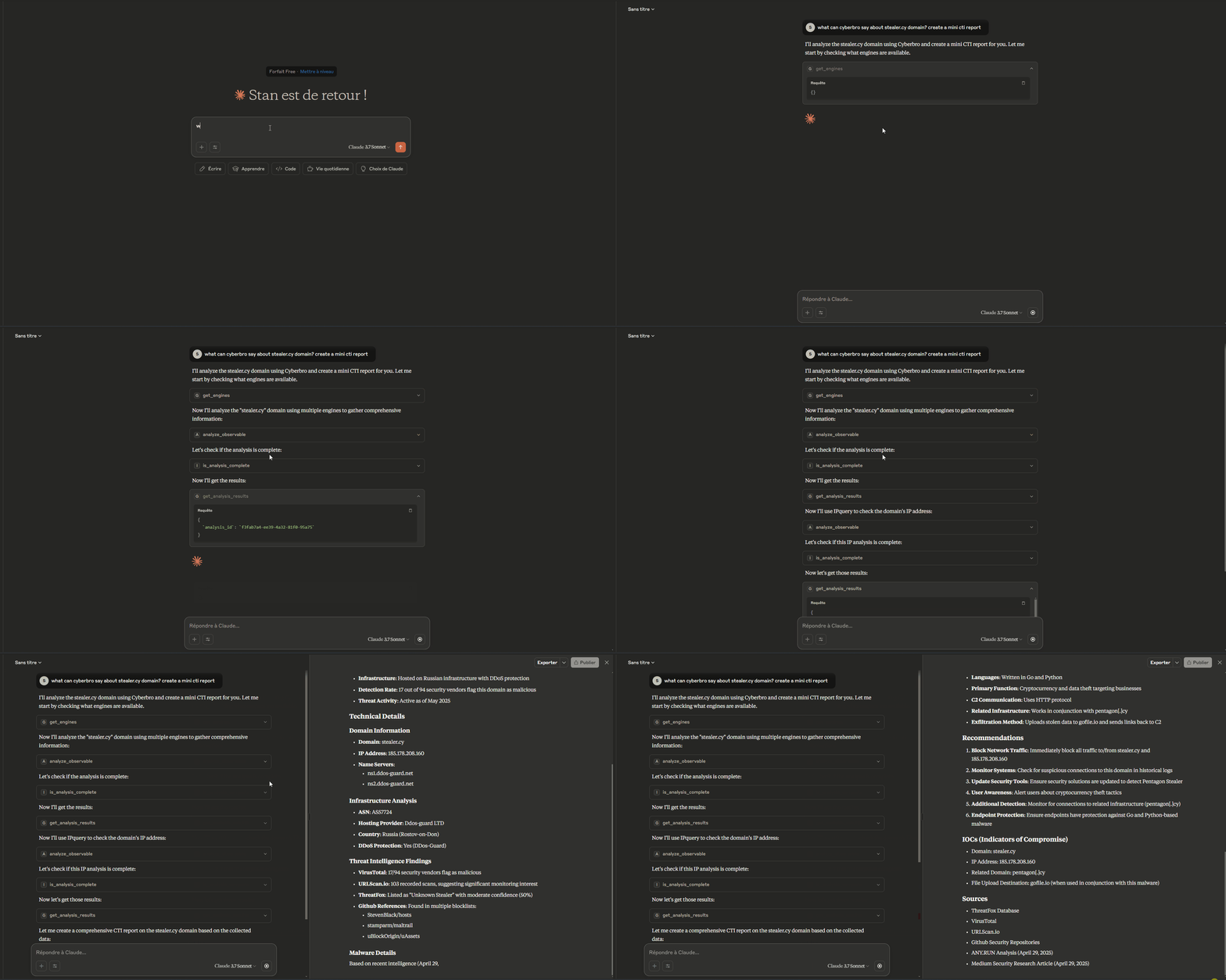
mcp-cyberbro-demo

Servidor del Protocolo de Contexto de Modelo (MCP) para Cyberbro.

Este proyecto está empaquetado como una distribución estándar de Python y puede iniciarse con:

  • uvx mcp-cyberbro

  • pip install mcp-cyberbro y luego mcp-cyberbro

Por qué este servidor

  • Analiza observables (IP, dominio, URL, hash, etc.) a través de los motores de Cyberbro.

  • Integra acciones de análisis de amenazas directamente en asistentes compatibles con MCP.

  • Ejecuta con transportes stdio, sse o streamable-http.

  • Compatible con cualquier cliente MCP que admita uno de estos transportes.

Related MCP server: cortex-mcp

Instalación

Uso con uvx (independiente)

uvx mcp-cyberbro --cyberbro_url http://localhost:5000

Uso con pip

pip install mcp-cyberbro
mcp-cyberbro --cyberbro_url http://localhost:5000

Desarrollo local

pip install -e .
mcp-cyberbro --cyberbro_url http://localhost:5000

Docker

El comando predeterminado del contenedor inicia en modo streamable-http en el puerto 8000.

docker run --rm -p 8000:8000 \
  -e CYBERBRO_URL=http://host.docker.internal:5000 \
  ghcr.io/stanfrbd/mcp-cyberbro:latest

Para forzar el transporte stdio:

docker run -i --rm \
  -e CYBERBRO_URL=http://host.docker.internal:5000 \
  ghcr.io/stanfrbd/mcp-cyberbro:latest \
  --transport stdio

Configuración

Copia .env.example y establece al menos:

  • CYBERBRO_URL (obligatorio)

Variables de entorno admitidas:

  • CYBERBRO_URL

  • API_PREFIX (predeterminado: api)

  • SSL_VERIFY (true/false)

  • MCP_TRANSPORT (stdio, sse, streamable-http)

  • MCP_HOST

  • MCP_PORT

  • MCP_MOUNT_PATH

  • MCP_SSE_PATH

  • MCP_STREAMABLE_HTTP_PATH

Las banderas de CLI también están disponibles y sobrescriben los valores de entorno.

Integración con clientes MCP

Puedes usar este servidor con Claude Desktop, Claude Code, Cursor, clientes MCP compatibles con OpenAI o cualquier otro cliente MCP.

Ejemplo de configuración usando uvx:

{
  "mcpServers": {
    "cyberbro": {
      "command": "uvx",
      "args": ["mcp-cyberbro"],
      "env": {
        "CYBERBRO_URL": "http://localhost:5000"
      }
    }
  }
}

Ejemplo con Docker + stdio:

{
  "mcpServers": {
    "cyberbro": {
      "command": "docker",
      "args": [
        "run",
        "-i",
        "--rm",
        "-e",
        "CYBERBRO_URL",
        "ghcr.io/stanfrbd/mcp-cyberbro:latest",
        "--transport",
        "stdio"
      ],
      "env": {
        "CYBERBRO_URL": "http://localhost:5000"
      }
    }
  }
}

Uso en VSCode - Ejemplo

Crea .vscode/mcp.json

{
	"servers": {
		"mcp-cyberbro": {
			"type": "stdio",
			"command": "uvx",
			"args": [
				"mcp-cyberbro"
			],
			"env": {
				"CYBERBRO_URL": "http://127.0.0.1:5000"
			}
		}
	}
}

Metadatos del registro MCP

server.json se incluye para la publicación en el registro MCP y apunta al paquete PyPI mcp-cyberbro.

Pipelines de lanzamiento

Flujos de trabajo creados para lanzamientos:

  • .github/workflows/publish-test-pypi.yml

  • .github/workflows/publish-pypi.yml

  • .github/workflows/publish-mcp-plugin.yml

Herramientas disponibles

  • analyze_observable

  • is_analysis_complete

  • get_analysis_results

  • get_engines

  • get_web_url

Ejemplos de prompts

Aquí tienes ejemplos prácticos de prompts que puedes usar con cualquier asistente compatible con MCP conectado a Cyberbro.

Obtención de detalles de indicadores

  • Cyberbro: Comprueba los indicadores para target.com

  • ¿Puedes comprobar la reputación de esta IP con Cyberbro? 192.168.1.1. Usa los motores github, google y virustotal.

  • Quiero analizar el dominio example.com. ¿Qué puede decirme Cyberbro al respecto? Usa un máximo de 3 motores.

  • Analiza estos observables con Cyberbro: suspicious-domain.com, 8.8.8.8 y 44d88612fea8a8f36de82e1278abb02f. Usa todos los motores disponibles.

Análisis de observables

  • Encontré esto (hash|dominio|url|ip|extensión). ¿Puedes enviarlo para su análisis a Cyberbro y analizar los resultados?

Investigación OSINT

  • Crea un informe OSINT para el dominio example.com usando Cyberbro. Usa todos los motores disponibles y pivota sobre los resultados para obtener más información. Usa un máximo de 10 solicitudes de análisis.

Agradecimientos

Licencia

MIT

Available Tools

5 tools
analyze_observableB

Trigger an analysis for a given observable (IP, domain, URL, hash, chrome extension id) using Cyberbro. It can support multiple observables at once separated by spaces. Args: text: Observable(s) to analyze. engines: List of engine names. Returns: The analysis response from Cyberbro API.

ParametersJSON Schema
NameRequiredDescriptionDefault
textYes
enginesYes

TDQS

B3.3/5.0
Behavior2/5

Does the description disclose side effects, auth requirements, rate limits, or destructive behavior?

No annotations provided, so description must fully disclose behavior. It lacks details on error handling, rate limits, response time, or side effects. Simply states it triggers analysis and returns response.

Agents need to know what a tool does to the world before calling it. Descriptions should go beyond structured annotations to explain consequences.

Conciseness4/5

Is the description appropriately sized, front-loaded, and free of redundancy?

Short and direct, with front-loaded purpose. Uses Args/Returns structure but still efficient. No redundant sentences.

Shorter descriptions cost fewer tokens and are easier for agents to parse. Every sentence should earn its place.

Completeness2/5

Given the tool's complexity, does the description cover enough for an agent to succeed on first attempt?

Missing key context: no output schema, no explanation of asynchronous behavior, no details on response format. With siblings like get_analysis_results, description should clarify that this returns initial response, not final results.

Complex tools with many parameters or behaviors need more documentation. Simple tools need less. This dimension scales expectations accordingly.

Parameters3/5

Does the description clarify parameter syntax, constraints, interactions, or defaults beyond what the schema provides?

Adds meaning to parameters by explaining 'text' as observable(s) and 'engines' as list of engine names. Notes multiple observables separated by spaces, but does not specify engine source or format constraints beyond schema.

Input schemas describe structure but not intent. Descriptions should explain non-obvious parameter relationships and valid value ranges.

Purpose5/5

Does the description clearly state what the tool does and how it differs from similar tools?

The description clearly states it triggers analysis for observables (IP, domain, URL, hash, chrome extension id) using Cyberbro. It distinguishes from siblings like get_analysis_results and get_engines by indicating it initiates analysis.

Agents choose between tools based on descriptions. A clear purpose with a specific verb and resource helps agents select the right tool.

Usage Guidelines3/5

Does the description explain when to use this tool, when not to, or what alternatives exist?

Implies usage for initiating analysis, but no explicit when-to-use or alternatives compared to siblings. Mentions support for multiple observables, offering some guidance.

Agents often have multiple tools that could apply. Explicit usage guidance like "use X instead of Y when Z" prevents misuse.

get_analysis_resultsB

Retrieve the results of a previous analysis by analysis_id. Args: analysis_id: Analysis ID to retrieve results for. Returns: The analysis results from Cyberbro API.

ParametersJSON Schema
NameRequiredDescriptionDefault
analysis_idYes

TDQS

B3.2/5.0
Behavior2/5

Does the description disclose side effects, auth requirements, rate limits, or destructive behavior?

No annotations are provided, so the description carries full disclosure burden. It describes a read operation ('retrieve') but does not disclose error behavior (e.g., if analysis_id is invalid), idempotency, or any side effects. The description adds minimal value beyond the tool name and schema.

Agents need to know what a tool does to the world before calling it. Descriptions should go beyond structured annotations to explain consequences.

Conciseness4/5

Is the description appropriately sized, front-loaded, and free of redundancy?

The description is short and uses a clear docstring format with Args and Returns sections. Every sentence serves a purpose, but the Returns section is vague ('analysis results from Cyberbro API'). Still, it is front-loaded and efficient.

Shorter descriptions cost fewer tokens and are easier for agents to parse. Every sentence should earn its place.

Completeness2/5

Given the tool's complexity, does the description cover enough for an agent to succeed on first attempt?

For a tool with one parameter and no output schema, the description should cover the return format, error cases, and lifecycle expectations. It only states 'the analysis results' generically. Combined with no annotations, the agent lacks context on when results are available or how to interpret them.

Complex tools with many parameters or behaviors need more documentation. Simple tools need less. This dimension scales expectations accordingly.

Parameters2/5

Does the description clarify parameter syntax, constraints, interactions, or defaults beyond what the schema provides?

Schema description coverage is 0%, so the description must compensate. It restates the parameter as 'analysis_id: Analysis ID to retrieve results for', which adds little meaning beyond the schema's 'title'. No constraints, formats, or examples are provided, leaving the parameter under-documented.

Input schemas describe structure but not intent. Descriptions should explain non-obvious parameter relationships and valid value ranges.

Purpose5/5

Does the description clearly state what the tool does and how it differs from similar tools?

The description clearly states 'Retrieve the results of a previous analysis by analysis_id', specifying the verb, resource, and key parameter. This distinguishes it from siblings like analyze_observable (starts analysis) and is_analysis_complete (checks status), making the purpose unambiguous.

Agents choose between tools based on descriptions. A clear purpose with a specific verb and resource helps agents select the right tool.

Usage Guidelines3/5

Does the description explain when to use this tool, when not to, or what alternatives exist?

The description implies usage after an analysis is started, but does not explicitly state when to use it versus alternatives such as is_analysis_complete or get_web_url. No conditions, prerequisites, or when-not-to-use information is provided.

Agents often have multiple tools that could apply. Explicit usage guidance like "use X instead of Y when Z" prevents misuse.

get_enginesB

List available Cyberbro engines. This is the first tool to be called to get the usable engines. Returns: The list of engines.

ParametersJSON Schema
NameRequiredDescriptionDefault

No parameters

TDQS

B3.3/5.0
Behavior2/5

Does the description disclose side effects, auth requirements, rate limits, or destructive behavior?

With no annotations, the description carries the full burden. It only states that the tool lists engines, lacking details on side effects, caching, or any constraints. The return info is minimal.

Agents need to know what a tool does to the world before calling it. Descriptions should go beyond structured annotations to explain consequences.

Conciseness3/5

Is the description appropriately sized, front-loaded, and free of redundancy?

The description is short but contains redundancy (the returns line repeats the purpose). It could be more concise by merging the last sentence.

Shorter descriptions cost fewer tokens and are easier for agents to parse. Every sentence should earn its place.

Completeness4/5

Given the tool's complexity, does the description cover enough for an agent to succeed on first attempt?

Given zero parameters and no output schema, the description adequately covers the tool's purpose and usage order. It is sufficient for such a simple tool.

Complex tools with many parameters or behaviors need more documentation. Simple tools need less. This dimension scales expectations accordingly.

Parameters4/5

Does the description clarify parameter syntax, constraints, interactions, or defaults beyond what the schema provides?

Input schema has no parameters (0 params), so description compensation is unnecessary. Baseline for zero parameters is 4, and no additional param info is needed.

Input schemas describe structure but not intent. Descriptions should explain non-obvious parameter relationships and valid value ranges.

Purpose4/5

Does the description clearly state what the tool does and how it differs from similar tools?

The description clearly states the tool lists available Cyberbro engines and positions it as the first tool to call. It distinguishes from siblings like analyze_observable, but does not explicitly contrast them.

Agents choose between tools based on descriptions. A clear purpose with a specific verb and resource helps agents select the right tool.

Usage Guidelines3/5

Does the description explain when to use this tool, when not to, or what alternatives exist?

The description provides a clear usage hint (call this first), but does not specify when not to use it or offer alternatives. Usage context is implied rather than explicit.

Agents often have multiple tools that could apply. Explicit usage guidance like "use X instead of Y when Z" prevents misuse.

get_web_urlB

Get the web GUI URL for a given analysis ID. Args: analysis_id: Analysis ID to get the web URL for. Returns: The web URL from Cyberbro API - Useful for the user to check the results.

ParametersJSON Schema
NameRequiredDescriptionDefault
analysis_idYes

TDQS

B3.1/5.0
Behavior2/5

Does the description disclose side effects, auth requirements, rate limits, or destructive behavior?

Without annotations, the description carries full burden. It only mentions the return value ('web URL from Cyberbro API') but does not disclose read-only nature, authentication needs, or side effects. Behavioral traits are inadequately addressed.

Agents need to know what a tool does to the world before calling it. Descriptions should go beyond structured annotations to explain consequences.

Conciseness4/5

Is the description appropriately sized, front-loaded, and free of redundancy?

The description is concise with two sentences and clearly separated args/returns. It is front-loaded with the core purpose. Minor improvement possible by structuring the return statement.

Shorter descriptions cost fewer tokens and are easier for agents to parse. Every sentence should earn its place.

Completeness3/5

Given the tool's complexity, does the description cover enough for an agent to succeed on first attempt?

For a simple tool with one parameter and no output schema, the description is mostly adequate but lacks guidance on when to use vs siblings and does not explain if the URL requires authentication. A more complete description would mention usage context.

Complex tools with many parameters or behaviors need more documentation. Simple tools need less. This dimension scales expectations accordingly.

Parameters2/5

Does the description clarify parameter syntax, constraints, interactions, or defaults beyond what the schema provides?

With 0% schema description coverage, the description adds only a restatement of the parameter purpose ('Analysis ID to get the web URL for'). No format, constraints, or examples are provided, leaving the agent with minimal additional meaning.

Input schemas describe structure but not intent. Descriptions should explain non-obvious parameter relationships and valid value ranges.

Purpose5/5

Does the description clearly state what the tool does and how it differs from similar tools?

The description clearly states the tool retrieves a web GUI URL for a given analysis ID, using a specific verb and resource. It distinguishes from siblings like get_analysis_results (raw data) and is_analysis_complete (status check).

Agents choose between tools based on descriptions. A clear purpose with a specific verb and resource helps agents select the right tool.

Usage Guidelines2/5

Does the description explain when to use this tool, when not to, or what alternatives exist?

No explicit guidance on when to use this tool versus alternatives like get_analysis_results or analyze_observable. The description merely states the function without context for selection.

Agents often have multiple tools that could apply. Explicit usage guidance like "use X instead of Y when Z" prevents misuse.

is_analysis_completeB

Check if the analysis is complete for the given analysis_id. Args: analysis_id: Analysis ID to check. Returns: The completion status from Cyberbro API.

ParametersJSON Schema
NameRequiredDescriptionDefault
analysis_idYes

TDQS

B3.1/5.0
Behavior2/5

Does the description disclose side effects, auth requirements, rate limits, or destructive behavior?

No annotations are provided, and the description lacks behavioral details such as whether the operation is read-only, error handling (e.g., if analysis_id is invalid), or rate limits. It only states that it returns completion status without specifying the format or possible values.

Agents need to know what a tool does to the world before calling it. Descriptions should go beyond structured annotations to explain consequences.

Conciseness4/5

Is the description appropriately sized, front-loaded, and free of redundancy?

The description is extremely concise, with the main purpose stated upfront. However, it could include more details without becoming overly long. The structure is clear but minimal.

Shorter descriptions cost fewer tokens and are easier for agents to parse. Every sentence should earn its place.

Completeness3/5

Given the tool's complexity, does the description cover enough for an agent to succeed on first attempt?

For a simple tool with one parameter and no output schema, the description is somewhat complete. It explains the action and return type ('completion status'), but lacks specifics on the possible status values and error scenarios. Given the simplicity, it is adequate but could be improved.

Complex tools with many parameters or behaviors need more documentation. Simple tools need less. This dimension scales expectations accordingly.

Parameters2/5

Does the description clarify parameter syntax, constraints, interactions, or defaults beyond what the schema provides?

The schema has 0% description coverage, and the description only repeats the parameter name and purpose ('analysis_id: Analysis ID to check') without adding any new semantic information beyond what the schema's title already provides. It does not explain constraints, allowed values, or provide examples.

Input schemas describe structure but not intent. Descriptions should explain non-obvious parameter relationships and valid value ranges.

Purpose5/5

Does the description clearly state what the tool does and how it differs from similar tools?

The description clearly states the action ('Check if the analysis is complete') and the resource ('for the given analysis_id'). The tool name itself is specific, and it is distinct from sibling tools like get_analysis_results which retrieve full results.

Agents choose between tools based on descriptions. A clear purpose with a specific verb and resource helps agents select the right tool.

Usage Guidelines2/5

Does the description explain when to use this tool, when not to, or what alternatives exist?

The description provides no guidance on when to use this tool versus alternatives (e.g., get_analysis_results). It does not specify that it should be used for polling or as a prerequisite before retrieving results.

Agents often have multiple tools that could apply. Explicit usage guidance like "use X instead of Y when Z" prevents misuse.

Tool Schema Changelog

Recent tool additions, removals, and schema changes observed during successful MCP inspections.

  1. 4 tool updatesv0.0.4
    • Addedget_analysis_results
    • Addedget_engines
    • Addedget_web_url
    • Addedis_analysis_complete
  2. 1 tool updatev0.0.3
    • First observedanalyze_observable

TDQS

A3.7/5.0

Scored across 5 tools

Disambiguation5/5

Each tool serves a distinct function: triggering analysis, retrieving results, listing engines, getting web URL, and checking completion. No overlapping purposes.

Naming Consistency5/5

All tool names follow the consistent verb_noun pattern in snake_case (e.g., analyze_observable, get_analysis_results), making them predictable and easy to distinguish.

Tool Count5/5

With 5 tools, the set is well-scoped for the purpose of observable analysis via Cyberbro. Each tool fills a clear role without redundancy.

Completeness4/5

The workflow from listing engines to triggering analysis, checking completion, and retrieving results is fully covered. A minor gap is the lack of a tool to list past analyses by date or filter, but core operations are complete.

Maintenance

ActivitySlowing
ResponsivenessResponsive

Related MCP Connectors

Related MCP Servers

  • A
    license
    Not graded
    quality
    D
    maintenance
    An MCP server that integrates ThreatBook's threat intelligence API, offering 15 specialized tools for security analysis. It enables AI models to perform IP reputation checks, domain investigations, file sandbox analysis, and vulnerability intelligence lookups.
    51
    MIT
  • A
    license
    A
    quality
    A
    maintenance
    An MCP server for the Cortex observable analysis and active response engine. It enables LLMs to automate security investigations by running analyzers on observables like IPs and URLs and executing automated response actions.
    31
    9 npm
    1
    MIT
  • A
    license
    A
    quality
    A
    maintenance
    An MCP server that enables LLMs to interact with MISP for threat intelligence sharing, IOC lookups, and event management. It provides tools for investigating indicators, discovering correlations, and exporting intelligence in formats like STIX and Suricata.
    36
    7 npm
    2
    MIT
  • F
    license
    Not graded
    quality
    D
    maintenance
    A security-focused MCP server that enables automated log retrieval and threat analysis using LangGraph orchestration and RAG. It allows users to detect suspicious activity and generate structured security insights by integrating LLM reasoning with log data and runbook documentation.
    -