Cyberbro MCP Server
The Cyberbro MCP Server enables threat intelligence analysis by allowing you to:
Analyze observables: Submit IPs, domains, URLs, file hashes, or Chrome extension IDs for analysis using Cyberbro's engines (e.g., VirusTotal, GitHub, Google). Use the
analyze_observabletool.Check analysis status: Poll whether an analysis is complete with
is_analysis_completeusing its analysis ID.Retrieve results: Fetch detailed results of a completed analysis via
get_analysis_results.List available engines: Discover which Cyberbro engines are available before submitting an analysis with
get_engines.Access web GUI: Obtain a direct URL to view results in the Cyberbro web interface using
get_web_url.
Additionally, the server supports multiple transport methods (stdio, SSE, streamable HTTP) and can be integrated with MCP-capable assistants like Claude Desktop, Cursor, and others.
Enables analysis of observables using GitHub engine through Cyberbro integration, allowing threat intelligence queries and security analysis of code repositories and developer activities.
Enables analysis of observables using Google engine through Cyberbro integration, allowing threat intelligence queries and security analysis leveraging Google's threat data.
Enables analysis of observables using VirusTotal engine through Cyberbro integration, allowing threat intelligence queries and reputation checks for IPs, domains, URLs, and file hashes.
Click on "Install Server".
Wait a few minutes for the server to deploy. Once ready, it will show a "Started" state.
In the chat, type
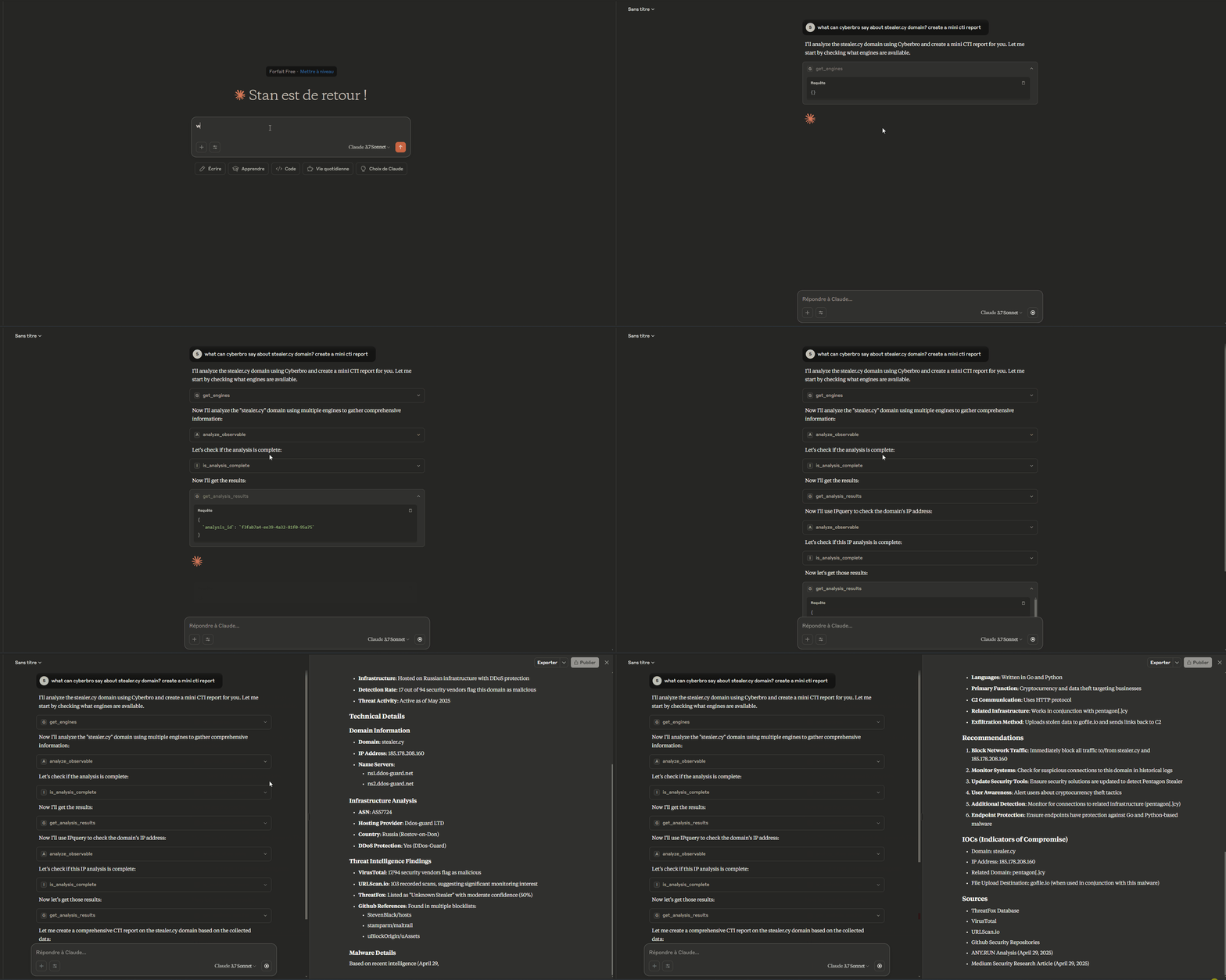
@followed by the MCP server name and your instructions, e.g., "@Cyberbro MCP ServerScan 193.214.232.181 and summarize its threat reputation."
That's it! The server will respond to your query, and you can continue using it as needed.
Here is a step-by-step guide with screenshots.
Model Context Protocol server for Cyberbro.
This project is packaged as a standard Python distribution and can be launched with:
uvx mcp-cyberbropip install mcp-cyberbrothenmcp-cyberbro
Why this server
Analyze observables (IP, domain, URL, hash, etc.) via Cyberbro engines.
Integrate threat-analysis actions directly in MCP-capable assistants.
Run with
stdio,sse, orstreamable-httptransports.Compatible with any MCP client that supports one of these transports.
Related MCP server: cortex-mcp
Installation
Use with uvx (standalone)
uvx mcp-cyberbro --cyberbro_url http://localhost:5000Use with pip
pip install mcp-cyberbro
mcp-cyberbro --cyberbro_url http://localhost:5000Local development
pip install -e .
mcp-cyberbro --cyberbro_url http://localhost:5000Docker
Default container command starts in streamable-http mode on port 8000.
docker run --rm -p 8000:8000 \
-e CYBERBRO_URL=http://host.docker.internal:5000 \
ghcr.io/stanfrbd/mcp-cyberbro:latestTo run in stdio mode, a custom Dockerfile is required:
FROM ghcr.io/stanfrbd/mcp-cyberbro:latest
CMD ["mcp-cyberbro", "--transport", "stdio"]Build and use it:
docker build -t mcp-cyberbro-stdio .
docker run -i --rm -e CYBERBRO_URL=http://host.docker.internal:5000 mcp-cyberbro-stdioConfiguration
Copy .env.example and set at least:
CYBERBRO_URL(required)
Supported environment variables:
CYBERBRO_URLAPI_PREFIX(default:api)SSL_VERIFY(true/false)MCP_TRANSPORT(stdio,sse,streamable-http)MCP_HOSTMCP_PORTMCP_MOUNT_PATHMCP_SSE_PATHMCP_STREAMABLE_HTTP_PATH
CLI flags are also available and override env values.
MCP Client Integration
You can use this server with Claude Desktop, Claude Code, Cursor, OpenAI-compatible MCP clients, or any other MCP client.
Example config using uvx:
{
"mcpServers": {
"cyberbro": {
"command": "uvx",
"args": ["mcp-cyberbro"],
"env": {
"CYBERBRO_URL": "http://localhost:5000"
}
}
}
}To use Docker with stdio transport (required by some MCP clients), build a custom image as shown in the Docker section above, then reference it:
{
"mcpServers": {
"cyberbro": {
"command": "docker",
"args": ["run", "-i", "--rm", "-e", "CYBERBRO_URL", "mcp-cyberbro-stdio"],
"env": {
"CYBERBRO_URL": "http://localhost:5000"
}
}
}
}Usage in VSCode - Example
Create .vscode/mcp.json
{
"servers": {
"mcp-cyberbro": {
"type": "stdio",
"command": "uvx",
"args": [
"mcp-cyberbro"
],
"env": {
"CYBERBRO_URL": "http://127.0.0.1:5000"
}
}
}
}MCP Registry Metadata
server.json is included for MCP Registry publication and points to PyPI package mcp-cyberbro.
Release Pipelines
Release-created workflows:
.github/workflows/publish-test-pypi.yml.github/workflows/publish-pypi.yml.github/workflows/publish-mcp-plugin.yml
Available Tools
analyze_observableis_analysis_completeget_analysis_resultsget_enginesget_web_url
Example Prompts
Here are practical prompt examples you can use with any MCP-capable assistant connected to Cyberbro.
Getting Indicator Details
Cyberbro: Check indicators for target.com
Can you check this IP reputation with Cyberbro? 192.168.1.1. Use github, google and virustotal engines.
I want to analyze the domain example.com. What can Cyberbro tell me about it? Use max 3 engines.
Analyze these observables with Cyberbro: suspicious-domain.com, 8.8.8.8, and 44d88612fea8a8f36de82e1278abb02f. Use all available engines.
Observable Analysis
I found this (hash|domain|url|ip|extension). Can you submit it for analysis to Cyberbro and analyze the results?
OSINT Investigation
Create an OSINT report for the domain example.com using Cyberbro. Use all available engines and pivot on the results for more information. Use a maximum of 10 analysis requests.
Acknowledgements
License
MIT
Available Tools
5 toolsanalyze_observableB
Trigger an analysis for a given observable (IP, domain, URL, hash, chrome extension id) using Cyberbro. It can support multiple observables at once separated by spaces. Args: text: Observable(s) to analyze. engines: List of engine names. Returns: The analysis response from Cyberbro API.
| Name | Required | Description | Default |
|---|---|---|---|
| text | Yes | ||
| engines | Yes |
TDQS
Does the description disclose side effects, auth requirements, rate limits, or destructive behavior?
No annotations provided, so description must fully disclose behavior. It lacks details on error handling, rate limits, response time, or side effects. Simply states it triggers analysis and returns response.
Agents need to know what a tool does to the world before calling it. Descriptions should go beyond structured annotations to explain consequences.
Is the description appropriately sized, front-loaded, and free of redundancy?
Short and direct, with front-loaded purpose. Uses Args/Returns structure but still efficient. No redundant sentences.
Shorter descriptions cost fewer tokens and are easier for agents to parse. Every sentence should earn its place.
Given the tool's complexity, does the description cover enough for an agent to succeed on first attempt?
Missing key context: no output schema, no explanation of asynchronous behavior, no details on response format. With siblings like get_analysis_results, description should clarify that this returns initial response, not final results.
Complex tools with many parameters or behaviors need more documentation. Simple tools need less. This dimension scales expectations accordingly.
Does the description clarify parameter syntax, constraints, interactions, or defaults beyond what the schema provides?
Adds meaning to parameters by explaining 'text' as observable(s) and 'engines' as list of engine names. Notes multiple observables separated by spaces, but does not specify engine source or format constraints beyond schema.
Input schemas describe structure but not intent. Descriptions should explain non-obvious parameter relationships and valid value ranges.
Does the description clearly state what the tool does and how it differs from similar tools?
The description clearly states it triggers analysis for observables (IP, domain, URL, hash, chrome extension id) using Cyberbro. It distinguishes from siblings like get_analysis_results and get_engines by indicating it initiates analysis.
Agents choose between tools based on descriptions. A clear purpose with a specific verb and resource helps agents select the right tool.
Does the description explain when to use this tool, when not to, or what alternatives exist?
Implies usage for initiating analysis, but no explicit when-to-use or alternatives compared to siblings. Mentions support for multiple observables, offering some guidance.
Agents often have multiple tools that could apply. Explicit usage guidance like "use X instead of Y when Z" prevents misuse.
get_analysis_resultsB
Retrieve the results of a previous analysis by analysis_id. Args: analysis_id: Analysis ID to retrieve results for. Returns: The analysis results from Cyberbro API.
| Name | Required | Description | Default |
|---|---|---|---|
| analysis_id | Yes |
TDQS
Does the description disclose side effects, auth requirements, rate limits, or destructive behavior?
No annotations are provided, so the description carries full disclosure burden. It describes a read operation ('retrieve') but does not disclose error behavior (e.g., if analysis_id is invalid), idempotency, or any side effects. The description adds minimal value beyond the tool name and schema.
Agents need to know what a tool does to the world before calling it. Descriptions should go beyond structured annotations to explain consequences.
Is the description appropriately sized, front-loaded, and free of redundancy?
The description is short and uses a clear docstring format with Args and Returns sections. Every sentence serves a purpose, but the Returns section is vague ('analysis results from Cyberbro API'). Still, it is front-loaded and efficient.
Shorter descriptions cost fewer tokens and are easier for agents to parse. Every sentence should earn its place.
Given the tool's complexity, does the description cover enough for an agent to succeed on first attempt?
For a tool with one parameter and no output schema, the description should cover the return format, error cases, and lifecycle expectations. It only states 'the analysis results' generically. Combined with no annotations, the agent lacks context on when results are available or how to interpret them.
Complex tools with many parameters or behaviors need more documentation. Simple tools need less. This dimension scales expectations accordingly.
Does the description clarify parameter syntax, constraints, interactions, or defaults beyond what the schema provides?
Schema description coverage is 0%, so the description must compensate. It restates the parameter as 'analysis_id: Analysis ID to retrieve results for', which adds little meaning beyond the schema's 'title'. No constraints, formats, or examples are provided, leaving the parameter under-documented.
Input schemas describe structure but not intent. Descriptions should explain non-obvious parameter relationships and valid value ranges.
Does the description clearly state what the tool does and how it differs from similar tools?
The description clearly states 'Retrieve the results of a previous analysis by analysis_id', specifying the verb, resource, and key parameter. This distinguishes it from siblings like analyze_observable (starts analysis) and is_analysis_complete (checks status), making the purpose unambiguous.
Agents choose between tools based on descriptions. A clear purpose with a specific verb and resource helps agents select the right tool.
Does the description explain when to use this tool, when not to, or what alternatives exist?
The description implies usage after an analysis is started, but does not explicitly state when to use it versus alternatives such as is_analysis_complete or get_web_url. No conditions, prerequisites, or when-not-to-use information is provided.
Agents often have multiple tools that could apply. Explicit usage guidance like "use X instead of Y when Z" prevents misuse.
get_enginesB
List available Cyberbro engines. This is the first tool to be called to get the usable engines. Returns: The list of engines.
| Name | Required | Description | Default |
|---|---|---|---|
No parameters | |||
TDQS
Does the description disclose side effects, auth requirements, rate limits, or destructive behavior?
With no annotations, the description carries the full burden. It only states that the tool lists engines, lacking details on side effects, caching, or any constraints. The return info is minimal.
Agents need to know what a tool does to the world before calling it. Descriptions should go beyond structured annotations to explain consequences.
Is the description appropriately sized, front-loaded, and free of redundancy?
The description is short but contains redundancy (the returns line repeats the purpose). It could be more concise by merging the last sentence.
Shorter descriptions cost fewer tokens and are easier for agents to parse. Every sentence should earn its place.
Given the tool's complexity, does the description cover enough for an agent to succeed on first attempt?
Given zero parameters and no output schema, the description adequately covers the tool's purpose and usage order. It is sufficient for such a simple tool.
Complex tools with many parameters or behaviors need more documentation. Simple tools need less. This dimension scales expectations accordingly.
Does the description clarify parameter syntax, constraints, interactions, or defaults beyond what the schema provides?
Input schema has no parameters (0 params), so description compensation is unnecessary. Baseline for zero parameters is 4, and no additional param info is needed.
Input schemas describe structure but not intent. Descriptions should explain non-obvious parameter relationships and valid value ranges.
Does the description clearly state what the tool does and how it differs from similar tools?
The description clearly states the tool lists available Cyberbro engines and positions it as the first tool to call. It distinguishes from siblings like analyze_observable, but does not explicitly contrast them.
Agents choose between tools based on descriptions. A clear purpose with a specific verb and resource helps agents select the right tool.
Does the description explain when to use this tool, when not to, or what alternatives exist?
The description provides a clear usage hint (call this first), but does not specify when not to use it or offer alternatives. Usage context is implied rather than explicit.
Agents often have multiple tools that could apply. Explicit usage guidance like "use X instead of Y when Z" prevents misuse.
get_web_urlB
Get the web GUI URL for a given analysis ID. Args: analysis_id: Analysis ID to get the web URL for. Returns: The web URL from Cyberbro API - Useful for the user to check the results.
| Name | Required | Description | Default |
|---|---|---|---|
| analysis_id | Yes |
TDQS
Does the description disclose side effects, auth requirements, rate limits, or destructive behavior?
Without annotations, the description carries full burden. It only mentions the return value ('web URL from Cyberbro API') but does not disclose read-only nature, authentication needs, or side effects. Behavioral traits are inadequately addressed.
Agents need to know what a tool does to the world before calling it. Descriptions should go beyond structured annotations to explain consequences.
Is the description appropriately sized, front-loaded, and free of redundancy?
The description is concise with two sentences and clearly separated args/returns. It is front-loaded with the core purpose. Minor improvement possible by structuring the return statement.
Shorter descriptions cost fewer tokens and are easier for agents to parse. Every sentence should earn its place.
Given the tool's complexity, does the description cover enough for an agent to succeed on first attempt?
For a simple tool with one parameter and no output schema, the description is mostly adequate but lacks guidance on when to use vs siblings and does not explain if the URL requires authentication. A more complete description would mention usage context.
Complex tools with many parameters or behaviors need more documentation. Simple tools need less. This dimension scales expectations accordingly.
Does the description clarify parameter syntax, constraints, interactions, or defaults beyond what the schema provides?
With 0% schema description coverage, the description adds only a restatement of the parameter purpose ('Analysis ID to get the web URL for'). No format, constraints, or examples are provided, leaving the agent with minimal additional meaning.
Input schemas describe structure but not intent. Descriptions should explain non-obvious parameter relationships and valid value ranges.
Does the description clearly state what the tool does and how it differs from similar tools?
The description clearly states the tool retrieves a web GUI URL for a given analysis ID, using a specific verb and resource. It distinguishes from siblings like get_analysis_results (raw data) and is_analysis_complete (status check).
Agents choose between tools based on descriptions. A clear purpose with a specific verb and resource helps agents select the right tool.
Does the description explain when to use this tool, when not to, or what alternatives exist?
No explicit guidance on when to use this tool versus alternatives like get_analysis_results or analyze_observable. The description merely states the function without context for selection.
Agents often have multiple tools that could apply. Explicit usage guidance like "use X instead of Y when Z" prevents misuse.
is_analysis_completeB
Check if the analysis is complete for the given analysis_id. Args: analysis_id: Analysis ID to check. Returns: The completion status from Cyberbro API.
| Name | Required | Description | Default |
|---|---|---|---|
| analysis_id | Yes |
TDQS
Does the description disclose side effects, auth requirements, rate limits, or destructive behavior?
No annotations are provided, and the description lacks behavioral details such as whether the operation is read-only, error handling (e.g., if analysis_id is invalid), or rate limits. It only states that it returns completion status without specifying the format or possible values.
Agents need to know what a tool does to the world before calling it. Descriptions should go beyond structured annotations to explain consequences.
Is the description appropriately sized, front-loaded, and free of redundancy?
The description is extremely concise, with the main purpose stated upfront. However, it could include more details without becoming overly long. The structure is clear but minimal.
Shorter descriptions cost fewer tokens and are easier for agents to parse. Every sentence should earn its place.
Given the tool's complexity, does the description cover enough for an agent to succeed on first attempt?
For a simple tool with one parameter and no output schema, the description is somewhat complete. It explains the action and return type ('completion status'), but lacks specifics on the possible status values and error scenarios. Given the simplicity, it is adequate but could be improved.
Complex tools with many parameters or behaviors need more documentation. Simple tools need less. This dimension scales expectations accordingly.
Does the description clarify parameter syntax, constraints, interactions, or defaults beyond what the schema provides?
The schema has 0% description coverage, and the description only repeats the parameter name and purpose ('analysis_id: Analysis ID to check') without adding any new semantic information beyond what the schema's title already provides. It does not explain constraints, allowed values, or provide examples.
Input schemas describe structure but not intent. Descriptions should explain non-obvious parameter relationships and valid value ranges.
Does the description clearly state what the tool does and how it differs from similar tools?
The description clearly states the action ('Check if the analysis is complete') and the resource ('for the given analysis_id'). The tool name itself is specific, and it is distinct from sibling tools like get_analysis_results which retrieve full results.
Agents choose between tools based on descriptions. A clear purpose with a specific verb and resource helps agents select the right tool.
Does the description explain when to use this tool, when not to, or what alternatives exist?
The description provides no guidance on when to use this tool versus alternatives (e.g., get_analysis_results). It does not specify that it should be used for polling or as a prerequisite before retrieving results.
Agents often have multiple tools that could apply. Explicit usage guidance like "use X instead of Y when Z" prevents misuse.
Tool Schema Changelog
Recent tool additions, removals, and schema changes observed during successful MCP inspections. Dates show when Glama detected each change.
4 tool updates
v0.0.4- Added
get_analysis_results - Added
get_engines - Added
get_web_url - Added
is_analysis_complete
1 tool update
v0.0.3- First observed
analyze_observable
TDQS
Each tool serves a distinct function: triggering analysis, retrieving results, listing engines, getting web URL, and checking completion. No overlapping purposes.
All tool names follow the consistent verb_noun pattern in snake_case (e.g., analyze_observable, get_analysis_results), making them predictable and easy to distinguish.
With 5 tools, the set is well-scoped for the purpose of observable analysis via Cyberbro. Each tool fills a clear role without redundancy.
The workflow from listing engines to triggering analysis, checking completion, and retrieving results is fully covered. A minor gap is the lack of a tool to list past analyses by date or filter, but core operations are complete.
Maintenance
Resources
Unclaimed servers have limited discoverability.
Looking for Admin?
If you are the server author, to access and configure the admin panel.
Related MCP Connectors
Enrich, search, assess, and manage threat intelligence through 80+ typed MCP tools.
Cybersecurity MCP server for URL scanning, threat intelligence, and domain reputation.
Email safety MCP server. Detects phishing, prompt injection, CEO fraud for AI agents.
Security scanner for MCP servers. Detect vulnerabilities, prompt injection, and tool poisoning.
Related MCP Servers
- AlicenseNot gradedqualityDmaintenanceAn MCP server that integrates ThreatBook's threat intelligence API, offering 15 specialized tools for security analysis. It enables AI models to perform IP reputation checks, domain investigations, file sandbox analysis, and vulnerability intelligence lookups.50MIT
- AlicenseAqualityAmaintenanceAn MCP server for the Cortex observable analysis and active response engine. It enables LLMs to automate security investigations by running analyzers on observables like IPs and URLs and executing automated response actions.31191MIT
- AlicenseAqualityAmaintenanceAn MCP server that enables LLMs to interact with MISP for threat intelligence sharing, IOC lookups, and event management. It provides tools for investigating indicators, discovering correlations, and exporting intelligence in formats like STIX and Suricata.36342MIT
- FlicenseNot gradedqualityDmaintenanceA security-focused MCP server that enables automated log retrieval and threat analysis using LangGraph orchestration and RAG. It allows users to detect suspicious activity and generate structured security insights by integrating LLM reasoning with log data and runbook documentation.-
Latest Blog Posts
- Who's Calling? MCP Hosts Are an Identity Blind Spot (And the Spec Knows It)By Om-Shree-0709 on .mcpAgent IdentityOAuth 2.1
- Your AI Chatbot Just Exposed Your CEO's Salary to an InternBy Om-Shree-0709 on .Agent IdentityMCP SecurityOAuth Delegation
- Why MCP Servers Need Execution Sandboxing (And Why Your Current Stack Isn't Enough)By Om-Shree-0709 on .Agentic AiPrompt InjectionWebAssembly
MCP directory API
We provide all the information about MCP servers via our MCP API.
curl -X GET 'https://glama.ai/api/mcp/v1/servers/stanfrbd/mcp-cyberbro'
If you have feedback or need assistance with the MCP directory API, please join our Discord server