Glama
sifue

ZEN University Syllabus MCP Server

by sifue

ZEN大学シラバスMCPサーバー実装

ZEN大学シラバスのコンテンツを利用できるようMCPを実装したもの。

使い方

Node.jsをインストールする。 Node.jsのバージョンは20以上を使用すること。

このリポジトリをクローンするか、ZIPでダウンロードして展開する。 コンソールで開き、以下のコマンドを実行する。

npm install
npx tsc

でビルド。Macはコンソールで実行権限をつける。 chmod 755 build/index.js

Related MCP server: University Course Catalog MCP Server

Claude Desktopでの設定

Claude Desktopをインストールする。 VSCodeのエディタがインストール前提だが、

code $env:AppData\Claude\claude_desktop_config.json

で設定ファイルを開く。Macは、

code ~/Library/Application\ Support/Claude/claude_desktop_config.json

以下のように書き換えて設定。

{
  "mcpServers": {
      "get-subjects": {
          "command": "node",
          "args": [
              "C:\\Users\\sifue\\workspace\\zen-syllabus-mcp\\build\\index.js"
          ]
      }
  }
}

build/index.jsのパスは適宜変更すること。

Macでは、

{
  "mcpServers": {
      "get-subjects": {
          "command": "node",
          "args": [
              "/Users/sifue/workspace/zen-syllabus-mcp/build/index.js"
          ]
      }
  }
}

nvmなどのNode.jsのバージョン管理システムを利用している場合以下のようにnodeを指定する。

{
    "mcpServers": {
        "get-subjects": {
            "command": "/Users/soichiro_yoshimura/.nvm/versions/node/v22.14.0/bin/node",
            "args": [
                "/Users/soichiro_yoshimura/workspace/zen-syllabus-mcp/build/index.js"
            ]
        }
    }
}

このようになる。build/index.jsのパスは適宜変更すること。

設定後はClaude Desktopを再起動。

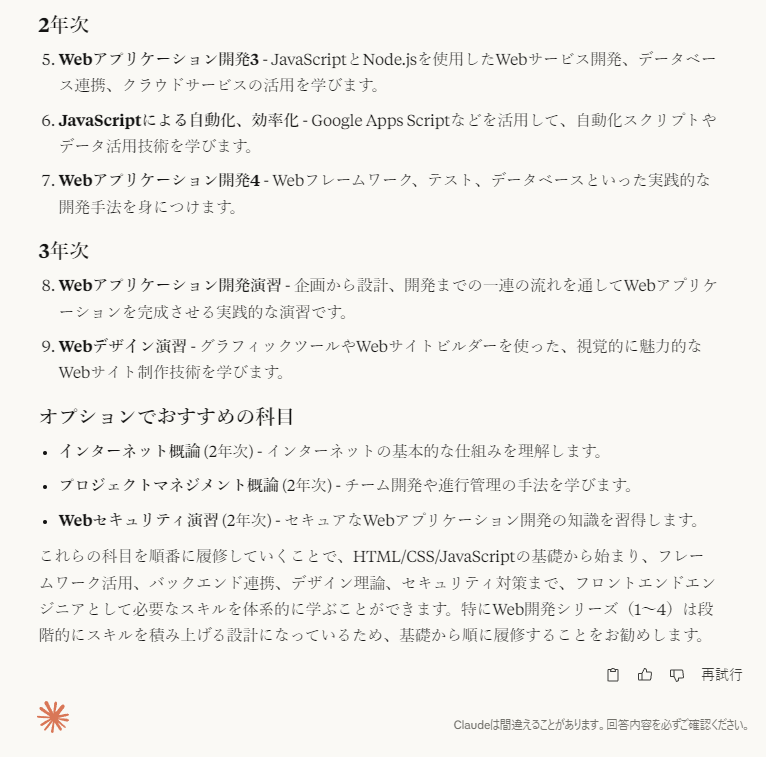
「ZEN大学のシラバスMCPを利用して、フロントエンドエンジニアになるためのオススメの科目をあげてください」

で検証。
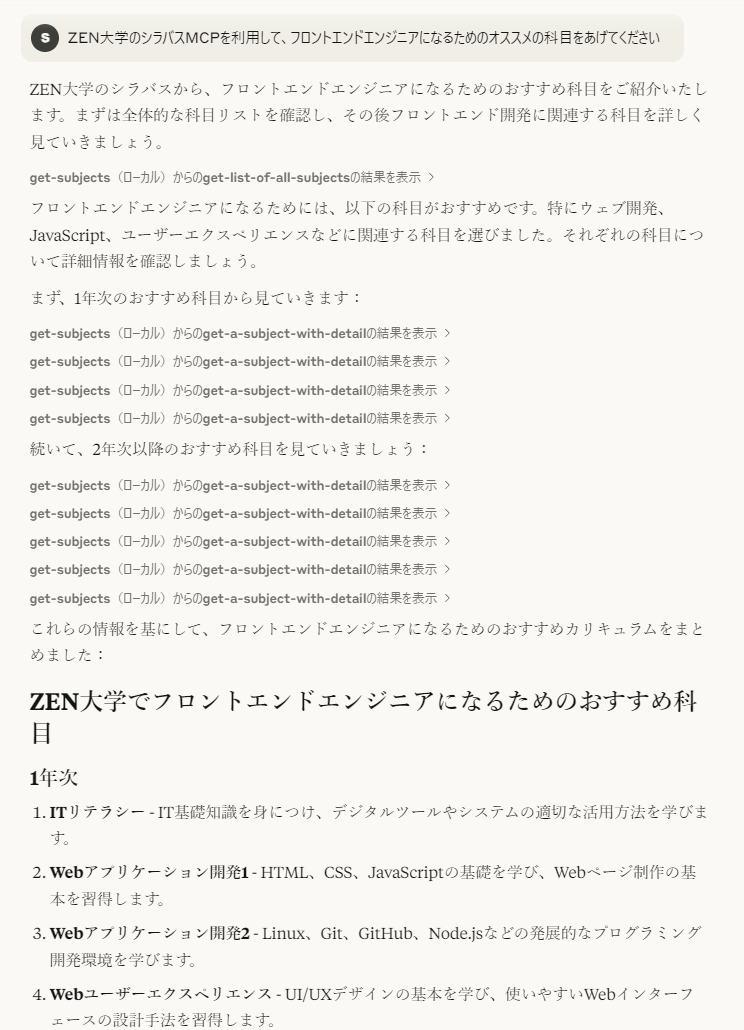
Claude Desktopのスクショ1 Claude Desktopのスクショ2

このようになる。履修要件を設定すれば細かな履修相談も可能。

VSCodeの設定

【未検証】いずれGitHub Copilot でAIエージェントが利用できるようなると利用できるらしい(現在はプレビュー版のみ)。 mcpで設定を検索して以下をsetting.jsonに設定。パスは適宜変更すること。jsonのweatherの上に起動ボタンが現れるので起動しておく。

{
  "mcpServers": {
      "get-subjects": {
          "command": "node",
          "args": [
              "C:\\Users\\sifue\\workspace\\zen-syllabus-mcp\\build\\index.js"
          ]
      }
  }
}

設定後はGitHub Copilotで

「ZEN大学のシラバスMCPを利用して、フロントエンドエンジニアになるためのオススメの科目をあげてください」

で検証。履修要件を設定すれば細かな履修相談も可能。

サーバー実装時の動作確認

詳しくは、TypeScript SDKのClientの実装を参照。

node build/index.js

でサーバーを起動。

node .\build\client.js

でクライアントを起動して実行。

クライアントは検証したいコードに合わせて書き換え、その後、

npx tsc

でビルドして再度クライアントを実行する。

参考

Available Tools

2 tools
get-a-subject-with-detailB

Retrieve detailed a course information from the ZEN University syllabus. The numeric intended year of enrollment (enrollment_grade (optional)) and the freeword parameter (freeword) must be specified. The freeword parameter is intended for searching course names and similar keywords.

ParametersJSON Schema
NameRequiredDescriptionDefault
enrollment_gradeNo year of enrollment (e.g. 1, 2, 3, 4)
freewordYesthe freeword search parameter (e.g. 'ITリテラシー')

TDQS

B3.2/5.0
Behavior2/5

Does the description disclose side effects, auth requirements, rate limits, or destructive behavior?

With no annotations provided, the description carries the full burden of behavioral disclosure. It mentions that parameters 'must be specified' and describes the freeword's purpose, but lacks details on permissions, rate limits, error handling, or what 'detailed information' entails. This is a significant gap for a tool with no annotation coverage.

Agents need to know what a tool does to the world before calling it. Descriptions should go beyond structured annotations to explain consequences.

Conciseness4/5

Is the description appropriately sized, front-loaded, and free of redundancy?

The description is concise with three sentences that efficiently cover purpose and parameter usage. It's front-loaded with the main action and avoids unnecessary details, though it could be slightly more structured by separating purpose from parameter guidelines.

Shorter descriptions cost fewer tokens and are easier for agents to parse. Every sentence should earn its place.

Completeness3/5

Given the tool's complexity, does the description cover enough for an agent to succeed on first attempt?

Given the tool's moderate complexity (2 parameters, no output schema, no annotations), the description is adequate but incomplete. It explains the purpose and parameters but lacks behavioral context and output details, leaving gaps in understanding how to use it effectively beyond basic parameter input.

Complex tools with many parameters or behaviors need more documentation. Simple tools need less. This dimension scales expectations accordingly.

Parameters3/5

Does the description clarify parameter syntax, constraints, interactions, or defaults beyond what the schema provides?

Schema description coverage is 100%, so the schema already documents both parameters thoroughly. The description adds some context by explaining that the freeword is for 'searching course names and similar keywords', but this doesn't significantly enhance the schema's details. Baseline 3 is appropriate as the schema does the heavy lifting.

Input schemas describe structure but not intent. Descriptions should explain non-obvious parameter relationships and valid value ranges.

Purpose4/5

Does the description clearly state what the tool does and how it differs from similar tools?

The description clearly states the action ('Retrieve detailed course information') and resource ('from the ZEN University syllabus'), making the purpose evident. However, it doesn't explicitly differentiate from the sibling tool 'get-list-of-all-subjects', which likely retrieves a broader list without detailed information or filtering.

Agents choose between tools based on descriptions. A clear purpose with a specific verb and resource helps agents select the right tool.

Usage Guidelines3/5

Does the description explain when to use this tool, when not to, or what alternatives exist?

The description implies usage by specifying that parameters 'must be specified' for retrieving detailed information, suggesting this tool is for targeted searches rather than general listing. However, it doesn't explicitly state when to use this vs. the sibling tool or provide clear alternatives or exclusions.

Agents often have multiple tools that could apply. Explicit usage guidance like "use X instead of Y when Z" prevents misuse.

get-list-of-all-subjectsA

Retrieve a simplified list of all courses from the ZEN University syllabus, containing only the essential properties (name, enrollmentGrade, quarters, credit).

ParametersJSON Schema
NameRequiredDescriptionDefault

No parameters

TDQS

A4.4/5.0
Behavior3/5

Does the description disclose side effects, auth requirements, rate limits, or destructive behavior?

No annotations are provided, so the description carries the full burden. It discloses the tool's behavior as a retrieval operation with a specific output format (simplified list with named properties), but lacks details about potential limitations like pagination, rate limits, authentication requirements, or error handling. The description adds some behavioral context but doesn't fully compensate for the absence of annotations.

Agents need to know what a tool does to the world before calling it. Descriptions should go beyond structured annotations to explain consequences.

Conciseness5/5

Is the description appropriately sized, front-loaded, and free of redundancy?

The description is a single, well-structured sentence that efficiently communicates the tool's purpose, scope, and differentiation from siblings. Every word earns its place with no redundant information, making it appropriately sized and front-loaded.

Shorter descriptions cost fewer tokens and are easier for agents to parse. Every sentence should earn its place.

Completeness4/5

Given the tool's complexity, does the description cover enough for an agent to succeed on first attempt?

Given the tool's simplicity (0 parameters, no output schema, no annotations), the description provides adequate context by clearly explaining what the tool does, what it returns, and how it differs from alternatives. However, the absence of output schema means the description doesn't fully document the return structure beyond property names, leaving some ambiguity about format.

Complex tools with many parameters or behaviors need more documentation. Simple tools need less. This dimension scales expectations accordingly.

Parameters4/5

Does the description clarify parameter syntax, constraints, interactions, or defaults beyond what the schema provides?

The input schema has 0 parameters with 100% coverage, so no parameter documentation is needed. The description appropriately doesn't discuss parameters, maintaining focus on the tool's purpose and output. This meets the baseline expectation for tools with no parameters.

Input schemas describe structure but not intent. Descriptions should explain non-obvious parameter relationships and valid value ranges.

Purpose5/5

Does the description clearly state what the tool does and how it differs from similar tools?

The description clearly states the specific action ('Retrieve'), resource ('list of all courses from the ZEN University syllabus'), and scope ('simplified list... containing only the essential properties'). It explicitly distinguishes from the sibling tool 'get-a-subject-with-detail' by emphasizing the simplified nature versus detailed information.

Agents choose between tools based on descriptions. A clear purpose with a specific verb and resource helps agents select the right tool.

Usage Guidelines5/5

Does the description explain when to use this tool, when not to, or what alternatives exist?

The description provides explicit guidance on when to use this tool versus alternatives by specifying it returns 'only the essential properties' and contrasting with the sibling tool name 'get-a-subject-with-detail', which implies a more detailed alternative. It clearly indicates this tool is for simplified overviews rather than detailed information.

Agents often have multiple tools that could apply. Explicit usage guidance like "use X instead of Y when Z" prevents misuse.

Tool Schema Changelog

Recent tool additions, removals, and schema changes observed during successful MCP inspections.

  1. 1 tool updatev1.0.0
    • Changedget-list-of-all-subjects1 field changed
      • removedInput schema / additionalProperties
        Removed value: -false
  2. 2 tool updates
    • First observedget-a-subject-with-detail
    • First observedget-list-of-all-subjects

TDQS

A3.6/5.0

Scored across 2 tools

Disambiguation5/5

The two tools have clearly distinct purposes: one retrieves detailed information for a specific course with search parameters, while the other fetches a simplified list of all courses. There is no overlap in functionality, making it easy for an agent to choose the correct tool based on the need for detailed vs. broad data.

Naming Consistency5/5

Both tools follow a consistent verb_noun pattern with hyphens ('get-a-subject-with-detail' and 'get-list-of-all-subjects'), using clear, descriptive names that indicate their actions and targets. The naming style is uniform across the set, enhancing predictability.

Tool Count2/5

With only 2 tools, the server feels under-scoped for a university syllabus domain, which typically involves operations like searching, filtering, updating, or managing course data. This limited set may force agents to work around gaps, as it lacks comprehensive coverage for common syllabus interactions.

Completeness2/5

The tool surface is severely incomplete for a syllabus server, covering only retrieval (detailed and list) without essential operations like creating, updating, or deleting courses, or advanced search capabilities. This will likely cause agent failures when full lifecycle management is required.

Maintenance

ActivityInactive
ResponsivenessNo issues

Related MCP Connectors

Related MCP Servers