ZEN University Syllabus MCP Server
Implementación del servidor MCP del programa de estudios de la Universidad ZEN
Una implementación de MCP que permite el acceso al contenido del programa de estudios de la Universidad ZEN .
Cómo utilizar
Instalar Node.js. Se debe utilizar la versión 20 o superior de Node.js.
Clone este repositorio o descargue el ZIP y extráigalo. Abra una consola y ejecute el siguiente comando:
npm install
npx tscConstruir con. Para Mac, otorgue permisos de ejecución en la consola. chmod 755 build/index.js
Related MCP server: University Course Catalog MCP Server
Configuración de escritorio de Claude
Instalar Claude Desktop . Es necesario instalar el editor VSCode .
code $env:AppData\Claude\claude_desktop_config.jsonAbra el archivo de configuración. Mac es
code ~/Library/Application\ Support/Claude/claude_desktop_config.jsonReescríbelo de la siguiente manera y configúralo.
{
"mcpServers": {
"get-subjects": {
"command": "node",
"args": [
"C:\\Users\\sifue\\workspace\\zen-syllabus-mcp\\build\\index.js"
]
}
}
}Cambie la ruta de build/index.js según corresponda.
En Mac,
{
"mcpServers": {
"get-subjects": {
"command": "node",
"args": [
"/Users/sifue/workspace/zen-syllabus-mcp/build/index.js"
]
}
}
}Si está utilizando un sistema de control de versiones Node.js como nvm , especifique el nodo de la siguiente manera.
{
"mcpServers": {
"get-subjects": {
"command": "/Users/soichiro_yoshimura/.nvm/versions/node/v22.14.0/bin/node",
"args": [
"/Users/soichiro_yoshimura/workspace/zen-syllabus-mcp/build/index.js"
]
}
}
}Parece así. Cambie la ruta de build/index.js según corresponda.
Después de la configuración, reinicie Claude Desktop.
"Utilizando el programa MCP de la Universidad ZEN, por favor, proporciónenos los cursos que recomienda para convertirse en ingeniero front-end".
Verificado.
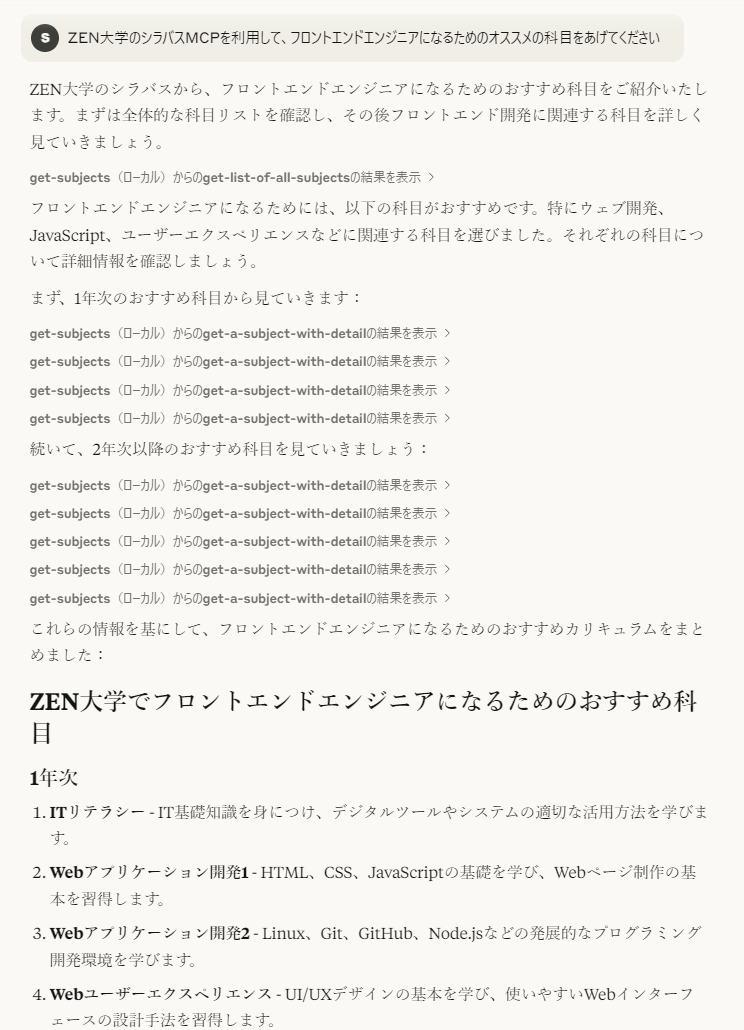
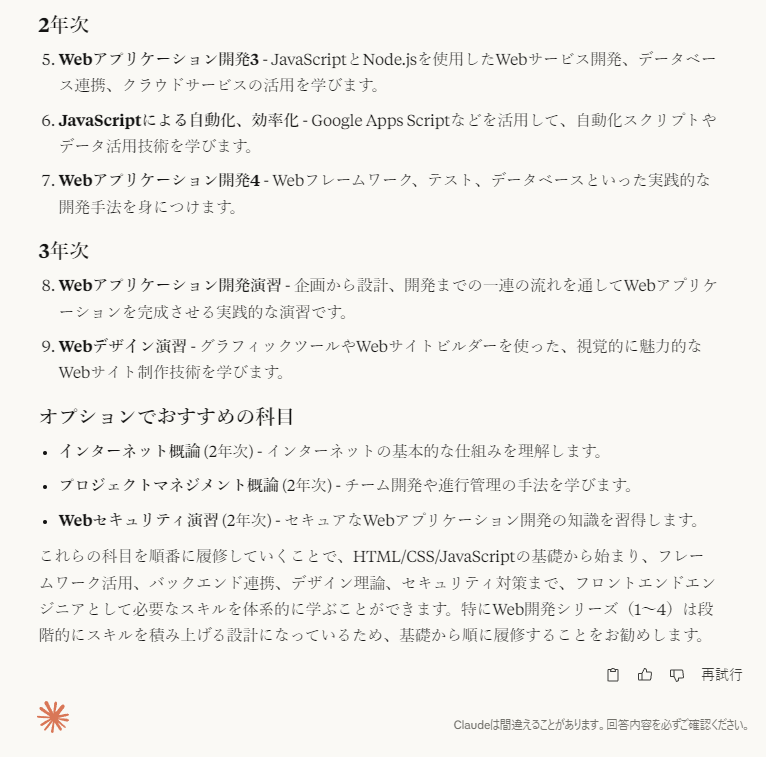
Parece así. Si establece los requisitos del curso, también puede discutir los detalles detallados del mismo.
Configuración de VSCode
[Sin verificar] Probablemente estará disponible cuando GitHub Copilot esté disponible con agentes de IA (actualmente solo una versión preliminar). Busque configuraciones con mcp y configure lo siguiente en setting.json. Cambie la ruta según corresponda. Aparecerá un botón de inicio encima del clima en el json, así que ejecútalo.
{
"mcpServers": {
"get-subjects": {
"command": "node",
"args": [
"C:\\Users\\sifue\\workspace\\zen-syllabus-mcp\\build\\index.js"
]
}
}
}Una vez configurado, utilice GitHub Copilot
"Utilizando el programa MCP de la Universidad ZEN, por favor, proporciónenos los cursos que recomienda para convertirse en ingeniero front-end".
Verificado. Si establece los requisitos del curso, también puede discutir los detalles detallados del mismo.
Comprobación del funcionamiento al implementar en un servidor
Para obtener más información, consulte la implementación del cliente en el SDK de TypeScript .
node build/index.jsInicie el servidor con:
node .\build\client.jsInicie el cliente y ejecútelo.
El cliente reescribe el código que se va a verificar y luego
npx tscCree y ejecute el cliente nuevamente.
referencia
Available Tools
2 toolsget-a-subject-with-detailB
Retrieve detailed a course information from the ZEN University syllabus. The numeric intended year of enrollment (enrollment_grade (optional)) and the freeword parameter (freeword) must be specified. The freeword parameter is intended for searching course names and similar keywords.
| Name | Required | Description | Default |
|---|---|---|---|
| enrollment_grade | No | year of enrollment (e.g. 1, 2, 3, 4) | |
| freeword | Yes | the freeword search parameter (e.g. 'ITリテラシー') |
TDQS
Does the description disclose side effects, auth requirements, rate limits, or destructive behavior?
With no annotations provided, the description carries the full burden of behavioral disclosure. It mentions that parameters 'must be specified' and describes the freeword's purpose, but lacks details on permissions, rate limits, error handling, or what 'detailed information' entails. This is a significant gap for a tool with no annotation coverage.
Agents need to know what a tool does to the world before calling it. Descriptions should go beyond structured annotations to explain consequences.
Is the description appropriately sized, front-loaded, and free of redundancy?
The description is concise with three sentences that efficiently cover purpose and parameter usage. It's front-loaded with the main action and avoids unnecessary details, though it could be slightly more structured by separating purpose from parameter guidelines.
Shorter descriptions cost fewer tokens and are easier for agents to parse. Every sentence should earn its place.
Given the tool's complexity, does the description cover enough for an agent to succeed on first attempt?
Given the tool's moderate complexity (2 parameters, no output schema, no annotations), the description is adequate but incomplete. It explains the purpose and parameters but lacks behavioral context and output details, leaving gaps in understanding how to use it effectively beyond basic parameter input.
Complex tools with many parameters or behaviors need more documentation. Simple tools need less. This dimension scales expectations accordingly.
Does the description clarify parameter syntax, constraints, interactions, or defaults beyond what the schema provides?
Schema description coverage is 100%, so the schema already documents both parameters thoroughly. The description adds some context by explaining that the freeword is for 'searching course names and similar keywords', but this doesn't significantly enhance the schema's details. Baseline 3 is appropriate as the schema does the heavy lifting.
Input schemas describe structure but not intent. Descriptions should explain non-obvious parameter relationships and valid value ranges.
Does the description clearly state what the tool does and how it differs from similar tools?
The description clearly states the action ('Retrieve detailed course information') and resource ('from the ZEN University syllabus'), making the purpose evident. However, it doesn't explicitly differentiate from the sibling tool 'get-list-of-all-subjects', which likely retrieves a broader list without detailed information or filtering.
Agents choose between tools based on descriptions. A clear purpose with a specific verb and resource helps agents select the right tool.
Does the description explain when to use this tool, when not to, or what alternatives exist?
The description implies usage by specifying that parameters 'must be specified' for retrieving detailed information, suggesting this tool is for targeted searches rather than general listing. However, it doesn't explicitly state when to use this vs. the sibling tool or provide clear alternatives or exclusions.
Agents often have multiple tools that could apply. Explicit usage guidance like "use X instead of Y when Z" prevents misuse.
get-list-of-all-subjectsA
Retrieve a simplified list of all courses from the ZEN University syllabus, containing only the essential properties (name, enrollmentGrade, quarters, credit).
| Name | Required | Description | Default |
|---|---|---|---|
No parameters | |||
TDQS
Does the description disclose side effects, auth requirements, rate limits, or destructive behavior?
No annotations are provided, so the description carries the full burden. It discloses the tool's behavior as a retrieval operation with a specific output format (simplified list with named properties), but lacks details about potential limitations like pagination, rate limits, authentication requirements, or error handling. The description adds some behavioral context but doesn't fully compensate for the absence of annotations.
Agents need to know what a tool does to the world before calling it. Descriptions should go beyond structured annotations to explain consequences.
Is the description appropriately sized, front-loaded, and free of redundancy?
The description is a single, well-structured sentence that efficiently communicates the tool's purpose, scope, and differentiation from siblings. Every word earns its place with no redundant information, making it appropriately sized and front-loaded.
Shorter descriptions cost fewer tokens and are easier for agents to parse. Every sentence should earn its place.
Given the tool's complexity, does the description cover enough for an agent to succeed on first attempt?
Given the tool's simplicity (0 parameters, no output schema, no annotations), the description provides adequate context by clearly explaining what the tool does, what it returns, and how it differs from alternatives. However, the absence of output schema means the description doesn't fully document the return structure beyond property names, leaving some ambiguity about format.
Complex tools with many parameters or behaviors need more documentation. Simple tools need less. This dimension scales expectations accordingly.
Does the description clarify parameter syntax, constraints, interactions, or defaults beyond what the schema provides?
The input schema has 0 parameters with 100% coverage, so no parameter documentation is needed. The description appropriately doesn't discuss parameters, maintaining focus on the tool's purpose and output. This meets the baseline expectation for tools with no parameters.
Input schemas describe structure but not intent. Descriptions should explain non-obvious parameter relationships and valid value ranges.
Does the description clearly state what the tool does and how it differs from similar tools?
The description clearly states the specific action ('Retrieve'), resource ('list of all courses from the ZEN University syllabus'), and scope ('simplified list... containing only the essential properties'). It explicitly distinguishes from the sibling tool 'get-a-subject-with-detail' by emphasizing the simplified nature versus detailed information.
Agents choose between tools based on descriptions. A clear purpose with a specific verb and resource helps agents select the right tool.
Does the description explain when to use this tool, when not to, or what alternatives exist?
The description provides explicit guidance on when to use this tool versus alternatives by specifying it returns 'only the essential properties' and contrasting with the sibling tool name 'get-a-subject-with-detail', which implies a more detailed alternative. It clearly indicates this tool is for simplified overviews rather than detailed information.
Agents often have multiple tools that could apply. Explicit usage guidance like "use X instead of Y when Z" prevents misuse.
Tool Schema Changelog
Recent tool additions, removals, and schema changes observed during successful MCP inspections.
1 tool update
v1.0.0- Changed
get-list-of-all-subjects1 field changed- removed
Input schema / additionalPropertiesRemoved value: -false
2 tool updates
- First observed
get-a-subject-with-detail - First observed
get-list-of-all-subjects
TDQS
Scored across 2 tools
The two tools have clearly distinct purposes: one retrieves detailed information for a specific course with search parameters, while the other fetches a simplified list of all courses. There is no overlap in functionality, making it easy for an agent to choose the correct tool based on the need for detailed vs. broad data.
Both tools follow a consistent verb_noun pattern with hyphens ('get-a-subject-with-detail' and 'get-list-of-all-subjects'), using clear, descriptive names that indicate their actions and targets. The naming style is uniform across the set, enhancing predictability.
With only 2 tools, the server feels under-scoped for a university syllabus domain, which typically involves operations like searching, filtering, updating, or managing course data. This limited set may force agents to work around gaps, as it lacks comprehensive coverage for common syllabus interactions.
The tool surface is severely incomplete for a syllabus server, covering only retrieval (detailed and list) without essential operations like creating, updating, or deleting courses, or advanced search capabilities. This will likely cause agent failures when full lifecycle management is required.
Maintenance
Related MCP Connectors
Let AI agents query data and act across all your business apps via MCP.
- PressoOAuthnow.presso
Connect e-commerce and marketing data to AI assistants via MCP.
Your memory, everywhere AI goes. Build knowledge once, access it via MCP anywhere.
MCP Hub: AI service discovery, per-user OAuth, and multi-service workflow orchestration
Related MCP Servers
- FlicenseNot gradedqualityDmaintenanceTransforms documentation repositories into interactive educational content and provides standardized access to AI-generated structured courses through MCP protocol. Generates multi-complexity learning paths from docs and enables AI tutoring applications to interact with course content.-
- FlicenseNot gradedqualityDmaintenanceMCP server that exposes a university course catalog to LLMs, enabling course search, prerequisite lookup, instructor details, and department directory through natural language.-
- FlicenseAqualityBmaintenanceEnables MCP clients to search and read the free AI School curriculum, including 550+ tracks on AI engineering, governance, security, and applied AI by profession.4-
- FlicenseNot gradedqualityBmaintenanceMCP server exposing a university course catalog with tools for searching courses, looking up prerequisites and instructors, and generating prerequisite graphs, plus resources and a prompt template for AI academic advisors.-