
F
licenseNot graded
qualityD
maintenanceA Model Context Protocol server that provides access to CoinMarketCap's cryptocurrency data, enabling AI applications to retrieve cryptocurrency listings, quotes, and detailed information.
37
-

Сервер протокола контекста модели (MCP) , который обеспечивает доступ только для чтения к API криптовалютной биржи Bybit.
ЭТО ПРОГРАММНОЕ ОБЕСПЕЧЕНИЕ КАЧЕСТВА АЛЬФА - ИСПОЛЬЗУЙТЕ НА СВОЙ СТРАХ И РИСК!
Используйте только ключ API только для чтения с этим сервером. Я бы не доверил свой код вашим «деньгам», и вам тоже не стоит!
Этот MCP-сервер предоставляет следующие инструменты для взаимодействия с API Bybit:
get_ticker : Получить информацию о тикере в реальном времени для торговой пары
get_orderbook : Получить данные книги ордеров (глубины рынка) для торговой пары
get_kline : Получить данные kline/японских свечей для торговой пары
get_market_info : Получить подробную рыночную информацию для торговых пар
get_trades : Получить последние сделки для торговой пары
get_instrument_info : Получить подробную информацию об инструменте для определенной торговой пары
get_wallet_balance : Получить информацию о балансе кошелька для аутентифицированного пользователя
get_positions : Получить информацию о текущих позициях аутентифицированного пользователя
get_order_history : Получить историю заказов для аутентифицированного пользователя
get_ml_rsi : Получить RSI (индекс относительной силы) на основе машинного обучения для торговой пары
get_market_structure : Получить информацию о структуре рынка для торговой пары
get_order_blocks : Обнаружение зон накопления институциональных заказов
get_order_history : Получить историю заказов для аутентифицированного пользователя
get_orderbook : Получить данные книги ордеров (глубины рынка) для торговой пары
get_ticker : Получить информацию о тикере в реальном времени для торговой пары
Также имеется весьма экспериментальный WebUI, подробности см. в файле WebUI README .
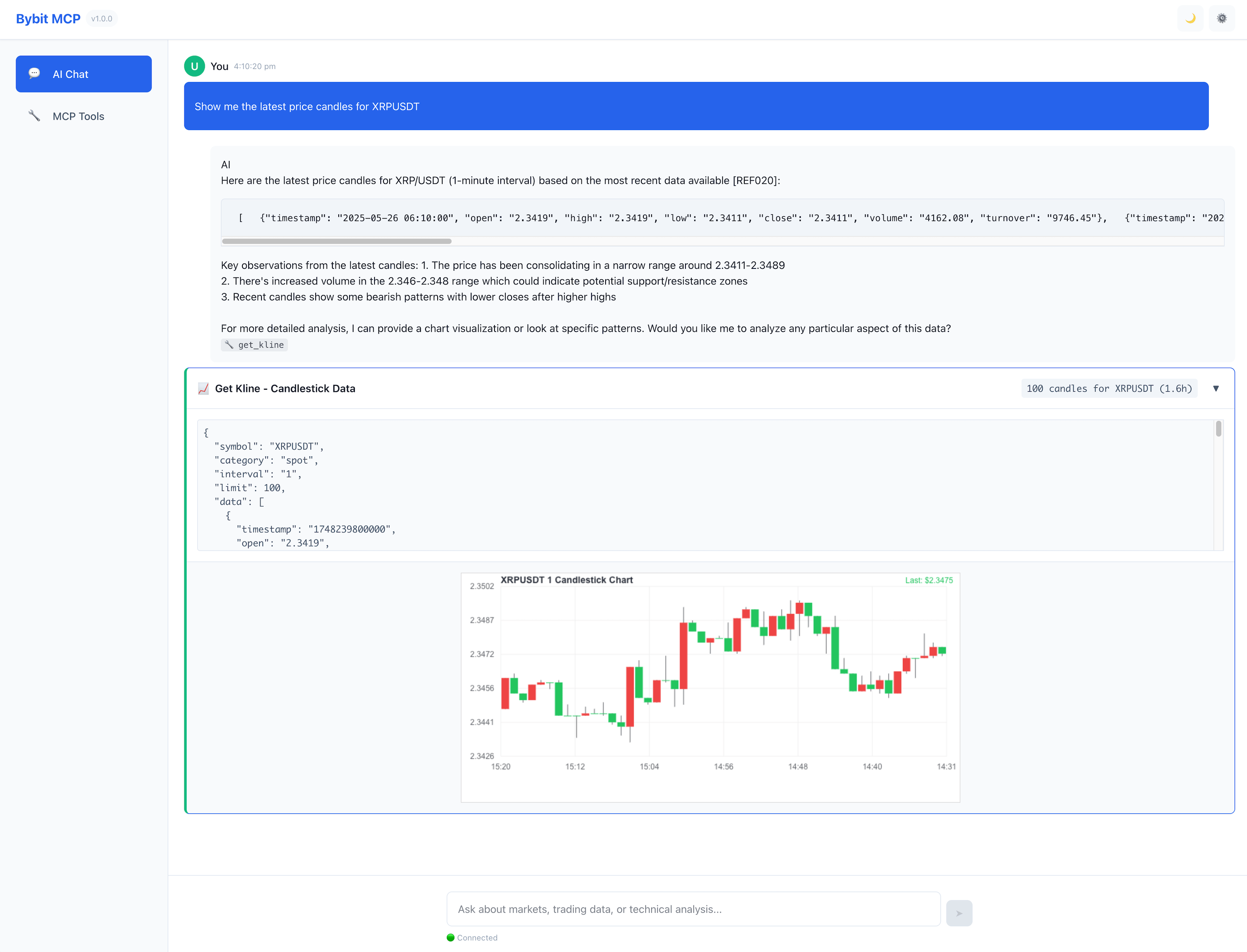
Весь код может быть подвергнут критическим изменениям и добавлениям/удалениям функций по мере продолжения разработки этого проекта.
Related MCP server: Binance MCP Server
Node.js (v22+)
пнпм ( npm i -g pnpm )
Если вы хотите запустить клиент Ollama, как показано в кратком руководстве ниже, вам понадобится установленная и запущенная Ollama, а также выбранная вами модель.
pnpm iДля установки пакетов соберите все и запустите интерактивный клиент:
pnpm iСкопируйте файл .env.example в .env и заполните свои данные.
cp .env.example .env
code .envpnpm servepnpm start:httpHTTP-сервер по умолчанию работает на порту 8080 и предоставляет как современный Streamable HTTP, так и устаревшие транспорты SSE, что делает его совместимым с веб-приложениями и различными клиентами MCP. Подробную информацию см. в документации HTTP-сервера .
Установите необходимые клиентские пакеты:
(cd client && pnpm i)Скопируйте клиентский файл .env.example в .env и заполните свои данные.
cp client/.env.example client/.env
code client/.env
Затем, чтобы запустить клиент и сервер одной командой:
pnpm startСервер требует, чтобы учетные данные API Bybit были установлены в качестве переменных среды:
BYBIT_API_KEY : Ваш ключ API Bybit (обязательно)
BYBIT_API_SECRET : Ваш секретный ключ API Bybit (обязательно) — ВАЖНО — Создавайте только ключ API, доступный только для чтения!
BYBIT_USE_TESTNET : установите значение «true», чтобы использовать тестовую сеть вместо основной сети (необязательно, по умолчанию — false)
DEBUG : установите значение «true», чтобы включить ведение журнала отладки (необязательно, по умолчанию — false)
Переменные среды клиента (./client/.env):
OLLAMA_HOST : Хост сервера Ollama (по умолчанию http://localhost:11434 )
DEFAULT_MODEL : модель по умолчанию для использования в чате (по умолчанию qwen3-30b-a3b-ud-nothink-128k:q4_k_xl)
Чтобы использовать этот сервер с клиентами MCP, вам необходимо добавить его в файл конфигурации настроек MCP. Расположение файла зависит от вашего клиента:
Расположение: ~/Library/Application\ Support/Claude/claude_desktop_config.json
{
  "mcpServers": {
    "bybit": {
      "command": "node",
      "args": ["/path/to/bybit-mcp/build/index.js"],
      "env": {
        "BYBIT_API_KEY": "your-api-key",
        "BYBIT_API_SECRET": "your-api-secret",
        "BYBIT_USE_TESTNET": "false"
      }
    }
  }
}Расположение: ~/.config/gomcp/config.yaml
mcp_servers:
  - name: "bybit"
    command: "cd /path/to/bybit-mcp && pnpm run serve"
    arguments: []
    env:
      BYBIT_API_KEY: ""      # Add your Bybit API **READ ONLY** key here
      BYBIT_API_SECRET: ""   # Add your Bybit API **READ ONLY** secret here
      BYBIT_USE_TESTNET: "true"  # Set to false for production
DEBUG: "false" # Optional: Set to true for debug loggingЭтот пакет включает клиент TypeScript, который предоставляет интерфейс командной строки для взаимодействия как с Ollama LLM, так и с сервером bybit-mcp. Клиент поддерживает:
Интерактивный чат с моделями Ollama
Прямой доступ ко всем торговым инструментам bybit-mcp
Автоматическое управление сервером
Конфигурация на основе среды
Отладочное ведение журнала
Подробную документацию по клиенту см. в файле README клиента .
Сборка сервера:
pnpm buildЗапустите сервер:
node build/index.jsДля разработки с автоматической перекомпиляцией TypeScript:
pnpm watchЧтобы проверить сервер MCP во время разработки:
pnpm inspector{
"name": "get_ticker",
"arguments": {
"symbol": "BTCUSDT",
"category": "spot" // optional, defaults to "spot"
}
}{
"name": "get_orderbook",
"arguments": {
"symbol": "BTCUSDT",
"category": "spot", // optional, defaults to "spot"
"limit": 25 // optional, defaults to 25 (available: 1, 25, 50, 100, 200)
}
}{
"name": "get_kline",
"arguments": {
"symbol": "BTCUSDT",
"category": "spot", // optional, defaults to "spot"
"interval": "1", // optional, defaults to "1" (available: "1", "3", "5", "15", "30", "60", "120", "240", "360", "720", "D", "M", "W")
"limit": 200 // optional, defaults to 200 (max 1000)
}
}{
"name": "get_market_info",
"arguments": {
"category": "spot", // optional, defaults to "spot"
"symbol": "BTCUSDT", // optional, if not provided returns info for all symbols in the category
"limit": 200 // optional, defaults to 200 (max 1000)
}
}{
"name": "get_trades",
"arguments": {
"symbol": "BTCUSDT",
"category": "spot", // optional, defaults to "spot"
"limit": 200 // optional, defaults to 200 (max 1000)
}
}{
"name": "get_instrument_info",
"arguments": {
"symbol": "BTCUSDT", // required
"category": "spot" // optional, defaults to "spot"
}
}Возвращает подробную информацию о торговом инструменте, включая:
Базовая и котируемая валюты
Торговый статус
Фильтры размера партии (мин./макс. количество заказа)
Фильтры цен (размер тика)
Настройки кредитного плеча (для фьючерсов)
Детали контракта (для фьючерсов)
{
  "name": "get_wallet_balance",
  "arguments": {
    "accountType": "UNIFIED", // required (available: "UNIFIED", "CONTRACT", "SPOT")
    "coin": "BTC" // optional, if not provided returns all coins
  }
}{
"name": "get_positions",
"arguments": {
"category": "linear", // required (available: "linear", "inverse")
"symbol": "BTCUSDT", // optional
"baseCoin": "BTC", // optional
"settleCoin": "USDT", // optional
"limit": 200 // optional, defaults to 200
}
}{
"name": "get_order_history",
"arguments": {
"category": "spot", // required (available: "spot", "linear", "inverse")
"symbol": "BTCUSDT", // optional
"baseCoin": "BTC", // optional
"orderId": "1234567890", // optional
"orderLinkId": "myCustomId", // optional
"orderStatus": "Filled", // optional (available: "Created", "New", "Rejected", "PartiallyFilled", "PartiallyFilledCanceled", "Filled", "Cancelled", "Untriggered", "Triggered", "Deactivated")
"orderFilter": "Order", // optional (available: "Order", "StopOrder")
"limit": 200 // optional, defaults to 200
}
}spot : спотовая торговля
linear : Линейные бессрочные контракты
inverse : обратные бессрочные контракты
Массачусетский технологический институт
Get detailed instrument information for a specific trading pair
Inputs: symbol (required), category.
Get kline/candlestick data for a trading pair. Supports optional reference ID for data verification.
Inputs: symbol (required), category, includeReferenceId, interval, +1 more.
Get detailed market information for trading pairs
Inputs: category, limit, symbol.
Advanced market structure analysis combining ML-RSI, order blocks, and liquidity zones. Provides comprehensive market regime detection and trading recommendations.
Inputs: category (required), interval (required), symbol (required), analysisDepth, +3 more.
Get ML-enhanced RSI using K-Nearest Neighbors algorithm for pattern recognition. Provides adaptive overbought/oversold levels and enhanced RSI values based on historical pattern similarity.
Inputs: category (required), interval (required), symbol (required), featureCount, +6 more.
Detect institutional order accumulation zones based on volume analysis. Identifies bullish and bearish order blocks using volume peaks and tracks their mitigation status.
Inputs: category (required), interval (required), symbol (required), bearishBlocks, +4 more.
Get orderbook (market depth) data for a trading pair
Inputs: symbol (required), category, limit.
Get order history for the authenticated user
Inputs: category (required), baseCoin, limit, orderFilter, +4 more.
Get positions information for the authenticated user
Inputs: category (required), baseCoin, limit, settleCoin, +1 more.
Get real-time ticker information for a trading pair. Supports optional reference ID for data verification.
Inputs: symbol (required), category, includeReferenceId.
Get recent trades for a trading pair
Inputs: symbol (required), category, limit.
Get wallet balance information for the authenticated user
Inputs: accountType (required), coin.
Recent tool additions, removals, and schema changes observed during successful MCP inspections.
Loading tool schema changelog…
Scored across 12 tools
Most tools have distinct purposes, but there is some overlap between get_market_info, get_instrument_info, and get_ticker, which all provide market-related data for trading pairs. The descriptions help differentiate them, but an agent might need to carefully choose between these for specific needs.
All tool names follow a consistent verb_noun pattern using snake_case, starting with 'get_' followed by a descriptive noun phrase. This uniformity makes the tool set predictable and easy to navigate for an agent.
With 12 tools, the count is well-scoped for a trading server, covering market data, analysis, and user account operations. Each tool appears to serve a specific function without redundancy, fitting the domain appropriately.
The tool set covers key areas like market data retrieval, advanced analysis, and user account management, but lacks tools for executing trades or managing orders, which are core actions in a trading domain. This gap might limit agent workflows for full trading automation.
Unlock the power of real-time cryptocurrency data with our Crypto Price Insights MCP server.
Pay-per-call crypto data over x402 (USDC on Base). Hosted, no wallet or key held by the server.
A Model Context Protocol server exposing real-time and historical Colombo Stock Exchange (CSE) data to AI agents and LLM applications. Provides quotes and OHLCV price history, full financial statements (income, balance sheet, cash flow), pre-computed technicals (moving averages, RS ratings, volume signals), macroeconomic indicators, corporate actions, and rule-based screening across CSE stocks and sector indices, everything needed to build CSE-aware trading assistants, research tools, and market-analysis agents. This is the official MCP server of www.ceyloncharts.com
A comprehensive Model Context Protocol (MCP) server that enables AI assistants to interact with yo…