
F
licenseNot graded
qualityD
maintenanceA Model Context Protocol server that provides access to CoinMarketCap's cryptocurrency data, enabling AI applications to retrieve cryptocurrency listings, quotes, and detailed information.
37
-

Ein Model Context Protocol (MCP) -Server, der schreibgeschützten Zugriff auf die Kryptowährungsaustausch-API von Bybit bietet.
DIES IST SOFTWARE IN ALPHA-QUALITÄT – DIE VERWENDUNG ERFOLGT AUF EIGENES RISIKO!
Verwenden Sie für diesen Server ausschließlich einen schreibgeschützten API-Schlüssel. Ich würde meinem Code Ihr „Geld“ nicht anvertrauen, und Sie sollten das auch nicht tun!
Dieser MCP-Server bietet die folgenden Tools für die Interaktion mit der API von Bybit:
get_ticker : Holen Sie sich Echtzeit-Tickerinformationen für ein Handelspaar
get_orderbook : Orderbuchdaten (Markttiefe) für ein Handelspaar abrufen
get_kline : Holen Sie sich Kline-/Candlestick-Daten für ein Handelspaar
get_market_info : Erhalten Sie detaillierte Marktinformationen für Handelspaare
get_trades : Aktuelle Trades für ein Handelspaar abrufen
get_instrument_info : Erhalten Sie detaillierte Instrumenteninformationen für ein bestimmtes Handelspaar
get_wallet_balance : Ruft Informationen zum Wallet-Guthaben des authentifizierten Benutzers ab
get_positions : Aktuelle Positionsinformationen für den authentifizierten Benutzer abrufen
get_order_history : Bestellverlauf für den authentifizierten Benutzer abrufen
get_ml_rsi : Holen Sie sich den auf maschinellem Lernen basierenden RSI (Relative Strength Index) für ein Handelspaar
get_market_structure : Marktstrukturinformationen für ein Handelspaar abrufen
get_order_blocks : Erkennen institutioneller Auftragsakkumulationszonen
get_order_history : Bestellverlauf für den authentifizierten Benutzer abrufen
get_orderbook : Orderbuchdaten (Markttiefe) für ein Handelspaar abrufen
get_ticker : Holen Sie sich Echtzeit-Tickerinformationen für ein Handelspaar
Es gibt auch eine hochgradig experimentelle WebUI. Weitere Informationen finden Sie in der README-Datei zur WebUI .
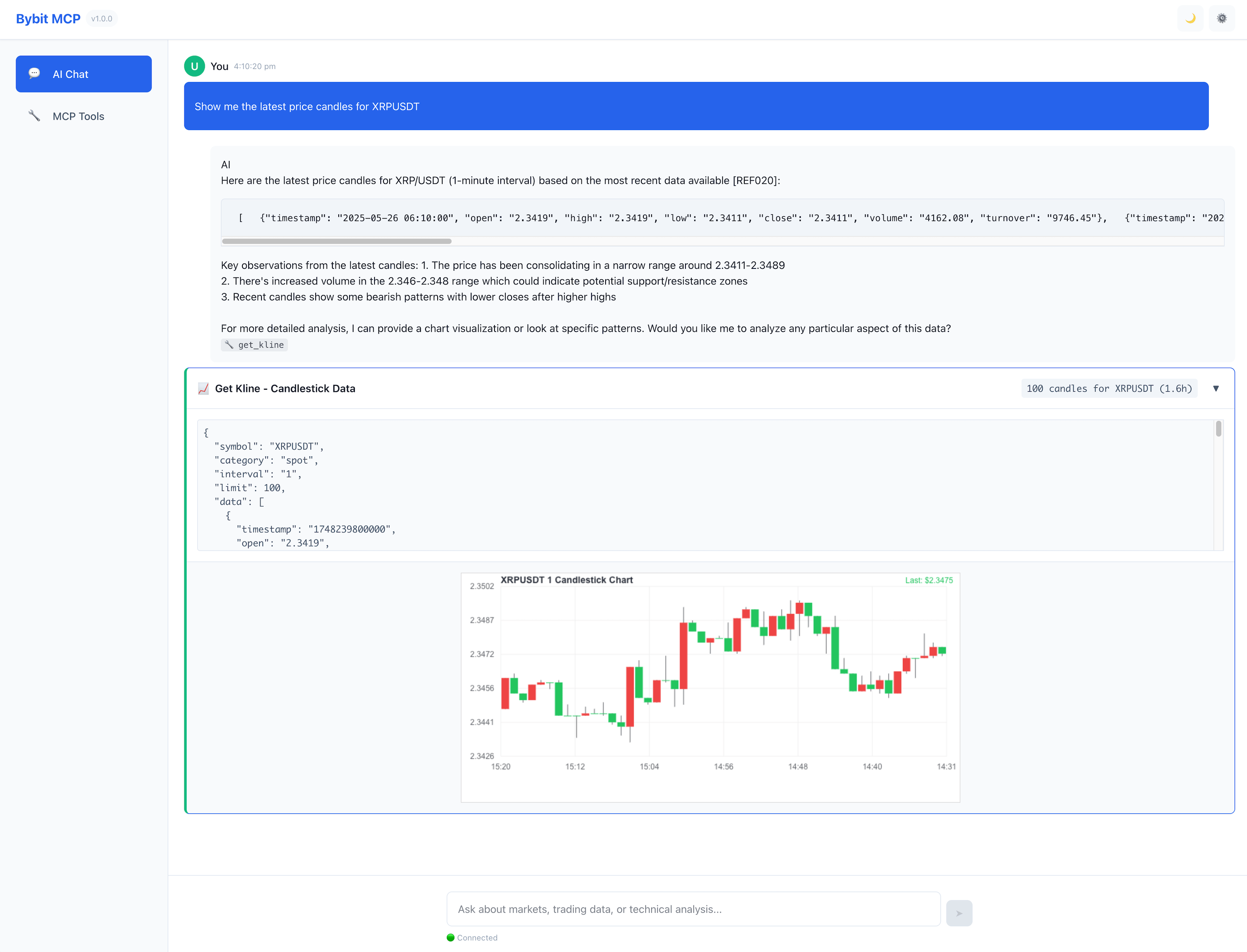
Während ich dieses Projekt weiterentwickle, kann es am gesamten Code zu gravierenden Änderungen und der Hinzufügung bzw. Entfernung von Funktionen kommen.
Related MCP server: Binance MCP Server
Node.js (v22+)
pnpm ( npm i -g pnpm )
Wenn Sie den Ollama-Client wie in der Schnellstartanleitung unten gezeigt ausführen möchten, müssen Sie Ollama sowie das Modell Ihrer Wahl installiert und ausgeführt haben.
pnpm iUm Pakete zu installieren, erstellen Sie alles und starten Sie den interaktiven Client:
pnpm iKopieren Sie die Datei .env.example nach .env und geben Sie Ihre Daten ein.
cp .env.example .env
code .envpnpm servepnpm start:httpDer HTTP-Server läuft standardmäßig auf Port 8080 und bietet sowohl modernes streambares HTTP als auch ältere SSE-Transporte. Dadurch ist er mit Webanwendungen und verschiedenen MCP-Clients kompatibel. Detaillierte Informationen finden Sie in der HTTP-Serverdokumentation .
Installieren Sie die erforderlichen Clientpakete:
(cd client && pnpm i)Kopieren Sie die Client-Datei .env.example nach .env und geben Sie Ihre Daten ein.
cp client/.env.example client/.env
code client/.env
So starten Sie Client und Server mit einem Befehl:
pnpm startDer Server erfordert, dass die Bybit-API-Anmeldeinformationen als Umgebungsvariablen festgelegt werden:
BYBIT_API_KEY : Ihr Bybit-API-Schlüssel (erforderlich)
BYBIT_API_SECRET : Ihr Bybit-API-Geheimnis (erforderlich) – WICHTIG – Erstellen Sie immer nur einen schreibgeschützten API-Schlüssel!
BYBIT_USE_TESTNET : Auf „true“ setzen, um Testnet statt Mainnet zu verwenden (optional, standardmäßig auf „false“ gesetzt)
DEBUG : Auf „true“ setzen, um die Debug-Protokollierung zu aktivieren (optional, standardmäßig „false“)
Client-Umgebungsvariablen (./client/.env):
OLLAMA_HOST : Der Host des Ollama-Servers (standardmäßig http://localhost:11434 )
DEFAULT_MODEL : Das für den Chat zu verwendende Standardmodell (standardmäßig qwen3-30b-a3b-ud-nothink-128k:q4_k_xl)
Um diesen Server mit MCP-Clients zu verwenden, müssen Sie ihn zu Ihrer MCP-Konfigurationsdatei hinzufügen. Der Speicherort der Datei hängt von Ihrem Client ab:
Speicherort: ~/Library/Application\ Support/Claude/claude_desktop_config.json
{
  "mcpServers": {
    "bybit": {
      "command": "node",
      "args": ["/path/to/bybit-mcp/build/index.js"],
      "env": {
        "BYBIT_API_KEY": "your-api-key",
        "BYBIT_API_SECRET": "your-api-secret",
        "BYBIT_USE_TESTNET": "false"
      }
    }
  }
}Speicherort: ~/.config/gomcp/config.yaml
mcp_servers:
  - name: "bybit"
    command: "cd /path/to/bybit-mcp && pnpm run serve"
    arguments: []
    env:
      BYBIT_API_KEY: ""      # Add your Bybit API **READ ONLY** key here
      BYBIT_API_SECRET: ""   # Add your Bybit API **READ ONLY** secret here
      BYBIT_USE_TESTNET: "true"  # Set to false for production
DEBUG: "false" # Optional: Set to true for debug loggingDieses Paket enthält einen TypeScript-Client, der eine Kommandozeilenschnittstelle für die Interaktion mit Ollama-LLMs und dem bybit-mcp-Server bereitstellt. Der Client unterstützt:
Interaktiver Chat mit Ollama-Modellen
Direkter Zugriff auf alle bybit-mcp-Handelstools
Automatische Serververwaltung
Umgebungsbasierte Konfiguration
Debug-Protokollierung
Eine ausführliche Client-Dokumentation finden Sie in der README-Datei des Clients .
Erstellen Sie den Server:
pnpm buildFühren Sie den Server aus:
node build/index.jsFür die Entwicklung mit automatischer TypeScript-Neukompilierung:
pnpm watchSo überprüfen Sie den MCP-Server während der Entwicklung:
pnpm inspector{
"name": "get_ticker",
"arguments": {
"symbol": "BTCUSDT",
"category": "spot" // optional, defaults to "spot"
}
}{
"name": "get_orderbook",
"arguments": {
"symbol": "BTCUSDT",
"category": "spot", // optional, defaults to "spot"
"limit": 25 // optional, defaults to 25 (available: 1, 25, 50, 100, 200)
}
}{
"name": "get_kline",
"arguments": {
"symbol": "BTCUSDT",
"category": "spot", // optional, defaults to "spot"
"interval": "1", // optional, defaults to "1" (available: "1", "3", "5", "15", "30", "60", "120", "240", "360", "720", "D", "M", "W")
"limit": 200 // optional, defaults to 200 (max 1000)
}
}{
"name": "get_market_info",
"arguments": {
"category": "spot", // optional, defaults to "spot"
"symbol": "BTCUSDT", // optional, if not provided returns info for all symbols in the category
"limit": 200 // optional, defaults to 200 (max 1000)
}
}{
"name": "get_trades",
"arguments": {
"symbol": "BTCUSDT",
"category": "spot", // optional, defaults to "spot"
"limit": 200 // optional, defaults to 200 (max 1000)
}
}{
"name": "get_instrument_info",
"arguments": {
"symbol": "BTCUSDT", // required
"category": "spot" // optional, defaults to "spot"
}
}Gibt detaillierte Informationen zu einem Handelsinstrument zurück, darunter:
Basis- und Notierungswährungen
Handelsstatus
Losgrößenfilter (Mindest-/Maximalbestellmengen)
Preisfilter (Tickgröße)
Hebeleinstellungen (für Futures)
Vertragsdetails (für Futures)
{
  "name": "get_wallet_balance",
  "arguments": {
    "accountType": "UNIFIED", // required (available: "UNIFIED", "CONTRACT", "SPOT")
    "coin": "BTC" // optional, if not provided returns all coins
  }
}{
"name": "get_positions",
"arguments": {
"category": "linear", // required (available: "linear", "inverse")
"symbol": "BTCUSDT", // optional
"baseCoin": "BTC", // optional
"settleCoin": "USDT", // optional
"limit": 200 // optional, defaults to 200
}
}{
"name": "get_order_history",
"arguments": {
"category": "spot", // required (available: "spot", "linear", "inverse")
"symbol": "BTCUSDT", // optional
"baseCoin": "BTC", // optional
"orderId": "1234567890", // optional
"orderLinkId": "myCustomId", // optional
"orderStatus": "Filled", // optional (available: "Created", "New", "Rejected", "PartiallyFilled", "PartiallyFilledCanceled", "Filled", "Cancelled", "Untriggered", "Triggered", "Deactivated")
"orderFilter": "Order", // optional (available: "Order", "StopOrder")
"limit": 200 // optional, defaults to 200
}
}spot : Spothandel
linear : Lineare unbefristete Verträge
inverse : Inverse unbefristete Verträge
MIT
Get detailed instrument information for a specific trading pair
Inputs: symbol (required), category.
Get kline/candlestick data for a trading pair. Supports optional reference ID for data verification.
Inputs: symbol (required), category, includeReferenceId, interval, +1 more.
Get detailed market information for trading pairs
Inputs: category, limit, symbol.
Advanced market structure analysis combining ML-RSI, order blocks, and liquidity zones. Provides comprehensive market regime detection and trading recommendations.
Inputs: category (required), interval (required), symbol (required), analysisDepth, +3 more.
Get ML-enhanced RSI using K-Nearest Neighbors algorithm for pattern recognition. Provides adaptive overbought/oversold levels and enhanced RSI values based on historical pattern similarity.
Inputs: category (required), interval (required), symbol (required), featureCount, +6 more.
Detect institutional order accumulation zones based on volume analysis. Identifies bullish and bearish order blocks using volume peaks and tracks their mitigation status.
Inputs: category (required), interval (required), symbol (required), bearishBlocks, +4 more.
Get orderbook (market depth) data for a trading pair
Inputs: symbol (required), category, limit.
Get order history for the authenticated user
Inputs: category (required), baseCoin, limit, orderFilter, +4 more.
Get positions information for the authenticated user
Inputs: category (required), baseCoin, limit, settleCoin, +1 more.
Get real-time ticker information for a trading pair. Supports optional reference ID for data verification.
Inputs: symbol (required), category, includeReferenceId.
Get recent trades for a trading pair
Inputs: symbol (required), category, limit.
Get wallet balance information for the authenticated user
Inputs: accountType (required), coin.
Recent tool additions, removals, and schema changes observed during successful MCP inspections.
Loading tool schema changelog…
Scored across 12 tools
Most tools have distinct purposes, but there is some overlap between get_market_info, get_instrument_info, and get_ticker, which all provide market-related data for trading pairs. The descriptions help differentiate them, but an agent might need to carefully choose between these for specific needs.
All tool names follow a consistent verb_noun pattern using snake_case, starting with 'get_' followed by a descriptive noun phrase. This uniformity makes the tool set predictable and easy to navigate for an agent.
With 12 tools, the count is well-scoped for a trading server, covering market data, analysis, and user account operations. Each tool appears to serve a specific function without redundancy, fitting the domain appropriately.
The tool set covers key areas like market data retrieval, advanced analysis, and user account management, but lacks tools for executing trades or managing orders, which are core actions in a trading domain. This gap might limit agent workflows for full trading automation.
Unlock the power of real-time cryptocurrency data with our Crypto Price Insights MCP server.
Pay-per-call crypto data over x402 (USDC on Base). Hosted, no wallet or key held by the server.
A Model Context Protocol server exposing real-time and historical Colombo Stock Exchange (CSE) data to AI agents and LLM applications. Provides quotes and OHLCV price history, full financial statements (income, balance sheet, cash flow), pre-computed technicals (moving averages, RS ratings, volume signals), macroeconomic indicators, corporate actions, and rule-based screening across CSE stocks and sector indices, everything needed to build CSE-aware trading assistants, research tools, and market-analysis agents. This is the official MCP server of www.ceyloncharts.com
A comprehensive Model Context Protocol (MCP) server that enables AI assistants to interact with yo…