Glama

MCP Redmine

Status: Funktioniert einwandfrei und ist im täglichen Einsatz ohne bekannte Fehler.

Status2: Ich habe das Paket gerade zu PyPI hinzugefügt und die Gebrauchsanweisung aktualisiert. Bitte melden Sie etwaige Probleme. :)

Machen Sie Claude zu Ihrem Redmine-Assistenten! MCP Redmine verbindet Claude Desktop mit Ihrer Redmine-Instanz und ermöglicht ihm so:

  • Suchen und Durchsuchen von Projekten und Problemen

  • Erstellen und aktualisieren Sie Probleme mit vollständiger Markdown-Unterstützung

  • Dateianhänge hochladen und herunterladen

  • Zeiteinträge verwalten und verfolgen

  • Aktualisieren von Problemstatus und Feldern

  • Greifen Sie auf umfassende Redmine-API-Funktionen zu

Verwendet httpx für API-Anfragen und integriert sich in die Redmine OpenAPI-Spezifikation für eine umfassende API-Abdeckung.
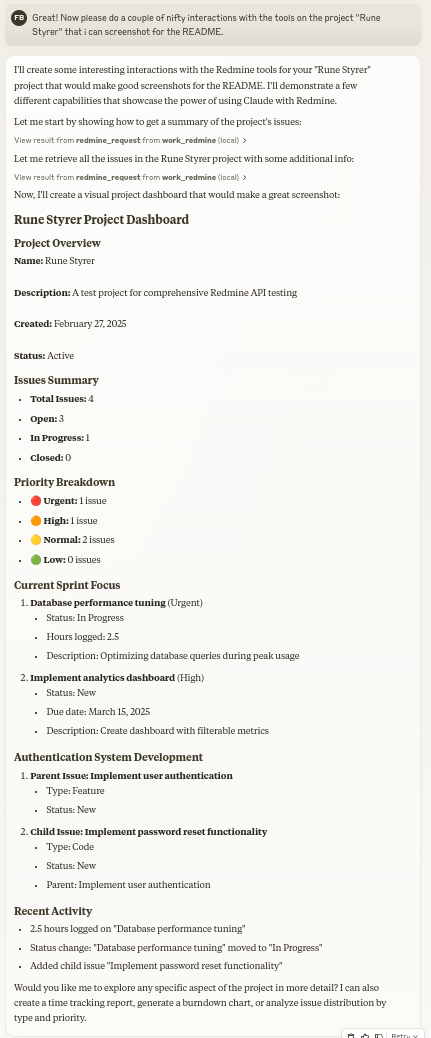
MCP Redmine in Aktion

Installation

Stellen Sie sicher, dass Sie UV installiert haben:

# Install uv if you haven't already
curl -LsSf https://astral.sh/uv/install.sh | sh

Related MCP server: Redmine MCP Server

Verwendung mit Claude Desktop

Fügen Sie zu Ihrer claude_desktop_config.json hinzu:

{
  "mcpServers": {
    "redmine": {
      "command": "uvx",
      "args": ["--from", "mcp-redmine==2025.04.09.153531", 
               "--refresh-package", "mcp-redmine", "mcp-redmine"],
      "env": {
        "REDMINE_URL": "https://your-redmine-instance.example.com",
        "REDMINE_API_KEY": "your-api-key",
        "REDMINE_REQUEST_INSTRUCTIONS": "/path/to/instructions.md"
      }
    }
  }
}

Umgebungsvariablen

  • REDMINE_URL : URL Ihrer Redmine-Instanz (erforderlich)

  • REDMINE_API_KEY : Ihr Redmine-API-Schlüssel (erforderlich, siehe unten, wie Sie ihn erhalten)

  • REDMINE_REQUEST_INSTRUCTIONS : Pfad zu einer Datei mit zusätzlichen Anweisungen für das Tool redmine_request (optional). Ich habe festgestellt, dass es sehr gut funktioniert, wenn das LLM diese Datei nach einer Sitzung generiert. ( Beispiel1 Beispiel2 )

Abrufen Ihres Redmine-API-Schlüssels

  1. Melden Sie sich bei Ihrer Redmine-Instanz an

  2. Gehen Sie zu „Mein Konto“ (normalerweise im Menü oben rechts zu finden)

  3. Auf der rechten Seite der Seite sollten Sie „API-Zugriffsschlüssel“ sehen.

  4. Klicken Sie auf „Anzeigen“, um Ihren vorhandenen Schlüssel anzuzeigen, oder auf „Generieren“, um einen neuen zu erstellen.

  5. Kopieren Sie diesen Schlüssel zur Verwendung in Ihrer Konfiguration

API

Werkzeuge

  • Redmine_Pfadliste

    • Gibt eine Liste der verfügbaren API-Pfade aus der OpenAPI-Spezifikation zurück

    • Keine Eingabe erforderlich

    • Gibt einen YAML-String zurück, der eine Liste von Pfadvorlagen enthält: GXP3

  • Redmine_Pfade_Info

    • Vollständige Pfadinformationen für angegebene Pfadvorlagen abrufen

    • Eingabe: path_templates (Liste von Zeichenfolgen)

    • Gibt eine YAML-Zeichenfolge mit API-Spezifikationen für die angeforderten Pfade zurück: GXP4

  • Redmine_Anfrage

    • Stellen Sie eine Anfrage an die Redmine-API

    • Eingänge:

      • path (Zeichenfolge): API-Endpunktpfad (z. B. „/issues.json“)

      • method (Zeichenfolge, optional): Zu verwendende HTTP-Methode (Standard: „get“)

      • data (Objekt, optional): Wörterbuch für den Anforderungstext (für POST/PUT)

      • params (Objekt, optional): Wörterbuch für Abfrageparameter

    • Gibt eine YAML-Zeichenfolge mit Antwortstatuscode, Text und Fehlermeldung zurück: GXP5

  • redmine_upload

    • Laden Sie eine Datei auf Redmine hoch und erhalten Sie ein Token für den Anhang

    • Eingänge:

      • file_path (Zeichenfolge): Vollständiger Pfad zur hochzuladenden Datei

      • description (Zeichenfolge, optional): Optionale Beschreibung für die Datei

    • Gibt eine YAML-Zeichenfolge im gleichen Format wie redmine_request zurück, einschließlich Upload-Token: GXP6

  • Redmine_Download

    • Laden Sie einen Anhang von Redmine herunter und speichern Sie ihn in einer lokalen Datei

    • Eingänge:

      • attachment_id (Ganzzahl): Die ID des herunterzuladenden Anhangs

      • save_path (Zeichenfolge): Vollständiger Pfad, in dem die Datei gespeichert werden soll

      • filename (Zeichenfolge, optional): Optionaler zu verwendender Dateiname (wird automatisch ermittelt, wenn nicht angegeben)

    • Gibt den YAML-String mit den Download-Ergebnissen zurück: GXP7

Beispiele

Erstellen eines neuen Problems

Let's create a new bug report in the "Website" project:

1. Title: "Homepage not loading on mobile devices"
2. Description: "When accessing the homepage from iOS or Android devices, the loading spinner appears but the content never loads. This issue started after the last deployment."
3. Priority: High
4. Assign to: John Smith

Suchen nach Problemen

Can you find all high priority issues in the "Website" project that are currently unassigned?

Aktualisieren des Problemstatus

Please mark issue #123 as "In Progress" and add a comment: "I've started working on this issue. Expect it to be completed by Friday."

Protokollierungszeit

Log 3.5 hours against issue #456 for "Implementing user authentication" done today.

MCP-Verzeichniseinträge

MCP Redmine ist in den folgenden MCP-Verzeichnisseiten und -Repositorys aufgeführt:

Entwicklung

Klonen Sie zuerst das GitHub-Repository und installieren Sie die Abhängigkeiten:

git clone git@github.com:runekaagaard/mcp-redmine.git
cd mcp-redmine
uv sync

Legen Sie dann Folgendes in claude_desktop_config.json fest:

...
"command": "uv",
"args": ["run", "--directory", "/path/to/mcp-redmine", "-m", "mcp_redmine.server", "main"],
...

Meine anderen LLM-Projekte

  • MCP Alchemy – Verbinden Sie Claude Desktop mit Datenbanken, um Schemata zu erkunden und SQL auszuführen.

  • MCP Notmuch Sendmail – E-Mail-Assistent für Claude Desktop mit Notmuch.

  • Diffpilot – Mehrspaltiger Git-Diff-Viewer mit Dateigruppierung und -markierung.

  • Lokale Claude-Dateien – Greifen Sie auf lokale Dateien in Claude-Desktop-Artefakten zu.

Beitragen

Beiträge sind herzlich willkommen! Ob Fehlerberichte, Funktionswünsche, Dokumentationsverbesserungen oder Codebeiträge – jeder Input ist wertvoll. Fühlen Sie sich frei:

  • Öffnen Sie ein Problem, um Fehler zu melden oder Funktionen vorzuschlagen

  • Senden Sie Pull Requests mit Verbesserungen

  • Erweitern Sie die Dokumentation oder teilen Sie Ihre Anwendungsbeispiele

  • Stellen Sie Fragen und teilen Sie Ihre Erfahrungen

Das Ziel besteht darin, das Redmine-Projektmanagement mit Claude noch besser zu machen, und Ihre Erkenntnisse und Beiträge tragen dazu bei, dies zu erreichen.

Danksagung

Dieses Projekt baut auf der hervorragenden Arbeit anderer auf:

Lizenz

Mozilla Public License Version 2.0

Available Tools

5 tools
redmine_downloadA

Download an attachment from Redmine and save it to a local file

Args: attachment_id: The ID of the attachment to download save_path: Fully qualified file path (not directory) where the file should be saved to (must be within REDMINE_ALLOWED_DIRECTORIES) filename: Optional filename for the Redmine download URL. If not provided, will be determined from attachment metadata. Does not affect the local save path.

Returns: str: YAML string containing download status, file path, and any error messages

ParametersJSON Schema
NameRequiredDescriptionDefault
filenameNo
save_pathYes
attachment_idYes

Output Schema

ParametersJSON Schema
NameRequiredDescription
resultYes

TDQS

A4.5/5.0
Behavior4/5

Does the description disclose side effects, auth requirements, rate limits, or destructive behavior?

With no annotations provided, the description carries the full burden of behavioral disclosure. It mentions the save_path must be within REDMINE_ALLOWED_DIRECTORIES, the optional filename behavior, and that returns are a YAML string with status, file path, and errors. These go beyond the obvious and materially help an agent anticipate side effects and error handling.

Agents need to know what a tool does to the world before calling it. Descriptions should go beyond structured annotations to explain consequences.

Conciseness5/5

Is the description appropriately sized, front-loaded, and free of redundancy?

The description is efficiently structured: a one-sentence summary, then Args list, then Returns. No redundant text, and the key purpose is front-loaded. Each line earns its place.

Shorter descriptions cost fewer tokens and are easier for agents to parse. Every sentence should earn its place.

Completeness4/5

Given the tool's complexity, does the description cover enough for an agent to succeed on first attempt?

For a download tool with three parameters (one optional) and no annotations, the description covers the essentials: directory restriction, optional filename nuance, and return format. It does not mention overwrite behavior or specific failure modes beyond generic error messages, but given the output schema exists, these are minor gaps.

Complex tools with many parameters or behaviors need more documentation. Simple tools need less. This dimension scales expectations accordingly.

Parameters5/5

Does the description clarify parameter syntax, constraints, interactions, or defaults beyond what the schema provides?

Schema description coverage is 0%, yet the description fully compensates. Each parameter is explained: attachment_id (the ID), save_path (fully qualified file path with a directory restriction), and filename (optional, for the download URL, not affecting save path). This adds meaning well beyond the schema's bare titles.

Input schemas describe structure but not intent. Descriptions should explain non-obvious parameter relationships and valid value ranges.

Purpose5/5

Does the description clearly state what the tool does and how it differs from similar tools?

The opening sentence states the exact action: 'Download an attachment from Redmine and save it to a local file.' This clearly identifies the verb (download), resource (attachment), and destination (local file). It effectively distinguishes from siblings like redmine_upload and redmine_request.

Agents choose between tools based on descriptions. A clear purpose with a specific verb and resource helps agents select the right tool.

Usage Guidelines4/5

Does the description explain when to use this tool, when not to, or what alternatives exist?

The description implies its use case by specifying it downloads attachments and saves locally. While it does not explicitly mention alternatives or when not to use it, the purpose is so unambiguous that an agent would not confuse it with siblings. No exclusions are stated, but the context is clear.

Agents often have multiple tools that could apply. Explicit usage guidance like "use X instead of Y when Z" prevents misuse.

redmine_paths_infoB

Get full path information for given path templates

Args: path_templates: List of path templates (e.g. ['/issues.json', '/projects.json'])

Returns: str: YAML string containing API specifications for the requested paths

ParametersJSON Schema
NameRequiredDescriptionDefault
path_templatesYes

Output Schema

ParametersJSON Schema
NameRequiredDescription
resultYes

TDQS

B3.4/5.0
Behavior2/5

Does the description disclose side effects, auth requirements, rate limits, or destructive behavior?

No annotations are provided, so the description carries the full burden. It discloses the return format (YAML string) but does not explicitly state that it is a read-only operation or that it has no side effects. The verb 'Get' implies a read, but safety is not confirmed. Additionally, there is no mention of error behavior or authorization requirements, which is needed for a tool with zero annotation coverage.

Agents need to know what a tool does to the world before calling it. Descriptions should go beyond structured annotations to explain consequences.

Conciseness4/5

Is the description appropriately sized, front-loaded, and free of redundancy?

The description is appropriately sized and uses a clear docstring structure with Args and Returns sections. It is front-loaded with the core purpose and concise, without redundant information. It could be even more compact but is not verbose.

Shorter descriptions cost fewer tokens and are easier for agents to parse. Every sentence should earn its place.

Completeness3/5

Given the tool's complexity, does the description cover enough for an agent to succeed on first attempt?

The tool has an output schema (not shown) and a description that explains the return type (YAML string). For a single-parameter introspection tool, it covers the essentials. However, it lacks guidance on when to use it relative to siblings (e.g., redmine_request) and does not explain the relationship between path templates and actual paths, which could be important for correct invocation. It is adequate but not complete.

Complex tools with many parameters or behaviors need more documentation. Simple tools need less. This dimension scales expectations accordingly.

Parameters4/5

Does the description clarify parameter syntax, constraints, interactions, or defaults beyond what the schema provides?

The schema has 0% description coverage, so the description must compensate. It does so by specifying that path_templates is a 'List of path templates' and provides clear examples (['/issues.json', '/projects.json']). This gives the agent a concrete sense of expected input. However, it does not define what 'path templates' means (e.g., if wildcards are allowed) or clarify constraints, leaving some ambiguity, but overall it is effective.

Input schemas describe structure but not intent. Descriptions should explain non-obvious parameter relationships and valid value ranges.

Purpose5/5

Does the description clearly state what the tool does and how it differs from similar tools?

The description clearly states the tool's function: 'Get full path information for given path templates'. It uses a specific verb ('Get') and resource ('path information'), and the returning YAML string of API specifications distinguishes it from siblings like redmine_request (which makes requests) and redmine_paths_list (which lists paths). The purpose is unambiguous and differentiates from alternatives.

Agents choose between tools based on descriptions. A clear purpose with a specific verb and resource helps agents select the right tool.

Usage Guidelines2/5

Does the description explain when to use this tool, when not to, or what alternatives exist?

There is no explicit guidance on when to use this tool instead of siblings. While one can infer it is for retrieving API specs for path templates, it does not mention alternatives or exclusions. For example, it does not say 'Use this before making a request with redmine_request' or 'Consider redmine_paths_list for available paths.' This leaves the agent to guess.

Agents often have multiple tools that could apply. Explicit usage guidance like "use X instead of Y when Z" prevents misuse.

redmine_paths_listA

Return a list of available API paths from OpenAPI spec

Retrieves all endpoint paths defined in the Redmine OpenAPI specification. Remember that you can use the redmine_paths_info tool to get the full specfication for a path.

Returns: str: YAML string containing a list of path templates (e.g. '/issues.json')

ParametersJSON Schema
NameRequiredDescriptionDefault

No parameters

Output Schema

ParametersJSON Schema
NameRequiredDescription
resultYes

TDQS

A4.2/5.0
Behavior4/5

Does the description disclose side effects, auth requirements, rate limits, or destructive behavior?

No annotations are provided, so the description carries the behavioral burden. For a zero-parameter read-only list operation there is little to disclose, and the description does disclose the return format (YAML string of path templates), which is the main behavioral trait. It does not contradict any annotations since none exist.

Agents need to know what a tool does to the world before calling it. Descriptions should go beyond structured annotations to explain consequences.

Conciseness3/5

Is the description appropriately sized, front-loaded, and free of redundancy?

The description is reasonably efficient but has redundancy: 'Return a list of available API paths' and 'Retrieves all endpoint paths' say the same thing twice. It also contains a typo ('specfication'). The structure is otherwise front-loaded with the core purpose, and the Returns note is useful.

Shorter descriptions cost fewer tokens and are easier for agents to parse. Every sentence should earn its place.

Completeness4/5

Given the tool's complexity, does the description cover enough for an agent to succeed on first attempt?

For a simple zero-parameter enumeration tool this is complete: it states the purpose, the output type, and cross-references the sibling tool for further depth. An output schema exists, so return-value details need no further elaboration. Minor blemishes (typo, mild redundancy) don't materially reduce usefulness.

Complex tools with many parameters or behaviors need more documentation. Simple tools need less. This dimension scales expectations accordingly.

Parameters4/5

Does the description clarify parameter syntax, constraints, interactions, or defaults beyond what the schema provides?

With zero parameters the description has nothing to document, and the baseline for a no-parameter tool is 4. The description need not elaborate further; its only param-adjacent content (that it takes no input) is implicit in the empty schema.

Input schemas describe structure but not intent. Descriptions should explain non-obvious parameter relationships and valid value ranges.

Purpose5/5

Does the description clearly state what the tool does and how it differs from similar tools?

The description states a specific verb+resource: 'Return a list of available API paths from OpenAPI spec.' It clearly distinguishes itself from siblings by being the enumeration tool, while explicitly noting that redmine_paths_info provides the full spec for a single path. The example ('/issues.json') further grounds what a path template looks like.

Agents choose between tools based on descriptions. A clear purpose with a specific verb and resource helps agents select the right tool.

Usage Guidelines4/5

Does the description explain when to use this tool, when not to, or what alternatives exist?

The description explicitly names the sibling alternative (redmine_paths_info) and explains when it applies ('to get the full specification for a path'), giving an agent a clear decision point between listing all paths and drilling into one. It stops short of a full when-to-use/when-not-to-use directive, so it isn't a 5.

Agents often have multiple tools that could apply. Explicit usage guidance like "use X instead of Y when Z" prevents misuse.

redmine_requestA

Make a request to the Redmine API

Args: path: API endpoint path (e.g. '/issues.json') method: HTTP method to use (default: 'get') data: Dictionary for request body (for POST/PUT) params: Dictionary for query parameters

Returns: str: YAML string containing response status code, body and error message

ParametersJSON Schema
NameRequiredDescriptionDefault
dataNo
pathYes
methodNoget
paramsNo

Output Schema

ParametersJSON Schema
NameRequiredDescription
resultYes

TDQS

A3.7/5.0
Behavior2/5

Does the description disclose side effects, auth requirements, rate limits, or destructive behavior?

No annotations are provided, so the description carries full responsibility for behavioral disclosure. It notes that the method can be 'get', 'post', 'put', etc., implying potential write side effects, but it does not disclose authentication requirements, rate limits, or that responses are returned as a YAML string. The phrase 'error message' in the return hints at error handling but is insufficient for a generic tool that could perform destructive writes without explicit warning.

Agents need to know what a tool does to the world before calling it. Descriptions should go beyond structured annotations to explain consequences.

Conciseness5/5

Is the description appropriately sized, front-loaded, and free of redundancy?

The description is a compact docstring with a one-line purpose, an Args section, and a Returns section. Every sentence serves a purpose, and the most important information (the purpose) is front-loaded. No fluff or repetition.

Shorter descriptions cost fewer tokens and are easier for agents to parse. Every sentence should earn its place.

Completeness4/5

Given the tool's complexity, does the description cover enough for an agent to succeed on first attempt?

Given that this is a low-level API client, the description covers the essential aspects: how to call it (path, method, data, params) and what it returns (YAML with status, body, error). However, it omits critical operational context such as authentication handling, rate limits, and any warnings about using methods other than GET. Since an output schema exists (though not shown), the return format is partially covered, but the lack of security or safety notes is a gap.

Complex tools with many parameters or behaviors need more documentation. Simple tools need less. This dimension scales expectations accordingly.

Parameters5/5

Does the description clarify parameter syntax, constraints, interactions, or defaults beyond what the schema provides?

Schema description coverage is 0%, so the description is the sole source of parameter meaning. It precisely defines each parameter: 'path' as an API endpoint path with an example, 'method' as HTTP method with a default, 'data' as request body for POST/PUT, and 'params' as query parameters. This far exceeds the schema, which only lists types and defaults.

Input schemas describe structure but not intent. Descriptions should explain non-obvious parameter relationships and valid value ranges.

Purpose5/5

Does the description clearly state what the tool does and how it differs from similar tools?

The description states 'Make a request to the Redmine API', which clearly identifies the tool's purpose as a generic HTTP client for Redmine. It is distinct from the sibling tools (redmine_paths_list, redmine_paths_info, redmine_upload, redmine_download) which are higher-level specific operations. The verb 'make' and resource 'Redmine API' are explicit and unambiguous.

Agents choose between tools based on descriptions. A clear purpose with a specific verb and resource helps agents select the right tool.

Usage Guidelines2/5

Does the description explain when to use this tool, when not to, or what alternatives exist?

The description gives no guidance on when to use this tool versus the sibling tools. There is no mention of using it only for endpoints not covered by specific helpers, nor any exclusions or alternatives. The agent would have to infer that this is the low-level fallback, but the description doesn't state that explicitly.

Agents often have multiple tools that could apply. Explicit usage guidance like "use X instead of Y when Z" prevents misuse.

redmine_uploadA

Upload a file to Redmine and get a token for attachment

Args: file_path: Fully qualified path to the file to upload (must be within REDMINE_ALLOWED_DIRECTORIES) description: Optional description for the file

Returns: str: YAML string containing response status code, body and error message The body contains the attachment token

ParametersJSON Schema
NameRequiredDescriptionDefault
file_pathYes
descriptionNo

Output Schema

ParametersJSON Schema
NameRequiredDescription
resultYes

TDQS

A4.1/5.0
Behavior4/5

Does the description disclose side effects, auth requirements, rate limits, or destructive behavior?

With no annotations provided, the description carries the full disclosure burden, and it does so well: it reveals the return envelope (YAML with status code, body, error message), the location of the attachment token, and the critical security boundary (file must be within REDMINE_ALLOWED_DIRECTORIES). It stops short of covering auth requirements, persistence side-effects, or rate limits, but the non-obvious details it does disclose are genuinely useful.

Agents need to know what a tool does to the world before calling it. Descriptions should go beyond structured annotations to explain consequences.

Conciseness4/5

Is the description appropriately sized, front-loaded, and free of redundancy?

Purpose is front-loaded in one line, followed by a tight Args block and a Returns block. No wasted phrasing; the Returns explanation of the YAML envelope carries real behavioral value rather than padding. Structure is clean and scannable, with only the verbosity of the YAML explanation being slightly expandable.

Shorter descriptions cost fewer tokens and are easier for agents to parse. Every sentence should earn its place.

Completeness4/5

Given the tool's complexity, does the description cover enough for an agent to succeed on first attempt?

An output schema exists, so return values are already covered, yet the description still adds the envelope context. For a moderate-complexity mutation tool, it covers purpose, both parameters, the security constraint, and return format. It's largely complete; only auth/permission prerequisites and side-effect persistence notes are absent, which are minor against the output schema coverage.

Complex tools with many parameters or behaviors need more documentation. Simple tools need less. This dimension scales expectations accordingly.

Parameters4/5

Does the description clarify parameter syntax, constraints, interactions, or defaults beyond what the schema provides?

Schema description coverage is 0%, so the description must compensate, and it does: file_path gains the essential allowed-directories constraint, and description is clarified as optional. Both parameters receive meaning beyond the bare schema titles ('File Path', 'Description'). Only minor gaps remain, such as description length limits or path format examples.

Input schemas describe structure but not intent. Descriptions should explain non-obvious parameter relationships and valid value ranges.

Purpose5/5

Does the description clearly state what the tool does and how it differs from similar tools?

States a specific verb and resource ('Upload a file to Redmine') plus a concrete outcome ('get a token for attachment'). This immediately distinguishes it from sibling redmine_download (inverse operation) and redmine_paths_* (path lookups). The purpose is unambiguous and non-tautological.

Agents choose between tools based on descriptions. A clear purpose with a specific verb and resource helps agents select the right tool.

Usage Guidelines3/5

Does the description explain when to use this tool, when not to, or what alternatives exist?

The intent is implied by the purpose — uploading a file to obtain an attachment token for later use — and the security constraint hints at context, but there is no explicit when-to-use vs when-not-to-use guidance or reference to siblings like redmine_request for non-file operations. Usage context is present but left to inference.

Agents often have multiple tools that could apply. Explicit usage guidance like "use X instead of Y when Z" prevents misuse.

Tool Schema Changelog

Recent tool additions, removals, and schema changes observed during successful MCP inspections.

  1. 5 tool updatesv0.1.0
    • First observedredmine_download
    • First observedredmine_paths_info
    • First observedredmine_paths_list
    • First observedredmine_request
    • First observedredmine_upload

TDQS

A4.1/5.0

Scored across 5 tools

Disambiguation5/5

The tools are clearly distinct: redmine_request is a generic API caller, while the paths_list and paths_info are dedicated to API discovery, and upload/download are for file operations. No two tools appear to serve the same purpose, minimizing agent misselection.

Naming Consistency4/5

All tools share the 'redmine_' prefix, but the suffixes are not uniformly verb_noun (e.g., 'request' vs 'paths_list' vs 'upload'). The pattern is predominantly clear and readable, with minor inconsistency between the two path-related tools.

Tool Count5/5

With 5 tools, the server falls comfortably within the ideal range. Each tool serves a specific role: a generic request handler, two API discovery helpers, and two file operations. No unnecessary duplication or bloat.

Completeness5/5

The generic redmine_request tool can access all Redmine API endpoints, making the surface functionally complete. The additional tools for path discovery and file transfer fill practical niches, leaving no obvious gaps in the server's purpose.

Maintenance

ActivityMaintained
ResponsivenessWithin a week

Related MCP Connectors

Related MCP Servers