
A
licenseNot graded
qualityD
maintenanceEnables AI applications to interact with Redmine project management systems for issue tracking, time logging, and project management through natural language.
8 npm
MIT

MCP Redmine connects an MCP client (e.g. Claude Desktop) to a Redmine instance so it can browse and modify Redmine data through the Redmine REST API.
redmine_paths_list – list all available API endpoint paths from the bundled Redmine OpenAPI spec (e.g. /issues.json, /projects.json, /time_entries.json).
redmine_paths_info – retrieve full OpenAPI specifications (methods, parameters, schemas) for one or more given path templates.
redmine_request – make arbitrary Redmine API calls (GET/POST/PUT/DELETE) with a path, optional method, body data, and query params, returning status code, body, and errors as YAML; this covers searching/browsing projects and issues, creating and updating issues with markdown, managing time entries, and updating statuses/fields.
redmine_upload – upload a local file to Redmine and get an attachment token (requires REDMINE_ALLOWED_DIRECTORIES).
redmine_download – download an attachment by ID to a local file path within allowed directories.
Supporting behavior: responses are YAML or JSON, custom headers and CA bundles are configurable, a read-only mode can block all writes, and HTTP transports with per-client X-Redmine-API-Key headers are supported for multi-user deployments.
Allows Claude to interact with a Redmine instance, including searching/browsing projects and issues, creating/updating issues with markdown support, uploading/downloading file attachments, managing time entries, updating issue statuses and fields, and accessing the Redmine API
Click on "Deploy Server".
Wait a few minutes for the server to deploy. Once ready, it will show a "Started" state.
In the chat, type @ followed by the MCP server name and your instructions, e.g., "@MCP Redmine show me open issues for project 'website redesign'"
That's it! The server will respond to your query, and you can continue using it as needed.
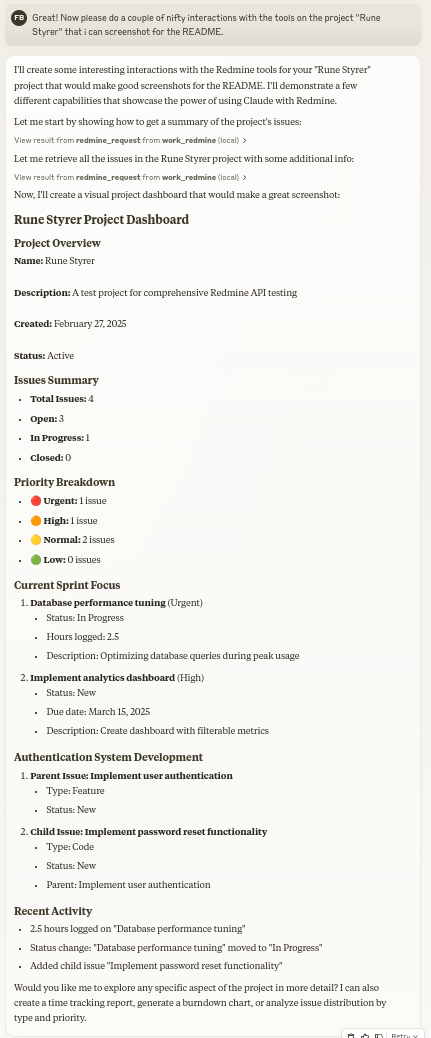
Here is a step-by-step guide with screenshots.
Status: Maintained, in daily use.
Let Claude be your Redmine assistant! MCP Redmine connects Claude Desktop to your Redmine instance, allowing it to:
Search and browse projects and issues
Create and update issues with full markdown support
Upload and download file attachments
Manage and track time entries
Update issue statuses and fields
Access comprehensive Redmine API functionality
Uses httpx for API requests and integrates with the Redmine OpenAPI specification for comprehensive API coverage.
uvEnsure you have uv installed.
uv --versionInstall uv if you haven't already.
Linux
curl -LsSf https://astral.sh/uv/install.sh | shmacOS
brew install uvwindows
powershell -ExecutionPolicy ByPass -c "irm https://astral.sh/uv/install.ps1 | iex"Add to your claude_desktop_config.json:
  {
    "mcpServers": {
      "redmine": {
        "command": "uvx",
        "args": ["--from", "mcp-redmine==2026.10.15.204909",
                "--refresh-package", "mcp-redmine", "mcp-redmine"],
        "env": {
          "REDMINE_URL": "https://your-redmine-instance.example.com",
          "REDMINE_API_KEY": "your-api-key",
          "REDMINE_REQUEST_INSTRUCTIONS": "/path/to/instructions.md",
          "REDMINE_ALLOWED_DIRECTORIES": "/tmp,/home/user/uploads"
        }
      }
    }
}dockerEnsure you have docker installed.
docker --versionPull the published image from GitHub Container Registry:
docker pull ghcr.io/runekaagaard/mcp-redmine:latestOr build the image yourself:
git clone git@github.com:runekaagaard/mcp-redmine.git
cd mcp-redmine
docker build -t ghcr.io/runekaagaard/mcp-redmine .
Add to your claude_desktop_config.json:
{
  "mcpServers": {
    "redmine": {
      "command": "docker",
      "args":  [
          "run",
          "-i",
          "--rm",
          "-e", "REDMINE_URL",
          "-e", "REDMINE_API_KEY",
          "-e", "REDMINE_REQUEST_INSTRUCTIONS",
          "-e", "REDMINE_ALLOWED_DIRECTORIES",
          "-v", "/path/to/instructions.md:/app/INSTRUCTIONS.md",
          "-v", "/path/to/uploads:/app/uploads",
          "ghcr.io/runekaagaard/mcp-redmine:latest"
      ],
      "env": {
        "REDMINE_URL": "https://your-redmine-instance.example.com",
        "REDMINE_API_KEY": "your-api-key",
        "REDMINE_REQUEST_INSTRUCTIONS": "/app/INSTRUCTIONS.md",
        "REDMINE_ALLOWED_DIRECTORIES": "/app/uploads"
      }
    }
  }
}MCP Redmine works with any MCP client (Claude Code, Cursor, IntelliJ-based IDEs, n8n, etc.) - point your client at the same command and environment variables as above, following your client's documentation for registering MCP servers.
By default the server speaks stdio. For clients or setups that connect over HTTP, start the server with one of the HTTP transports:
# Recommended HTTP transport (serves on http://HOST:PORT/mcp)
mcp-redmine --transport streamable-http --host 0.0.0.0 --port 8000

# Legacy SSE transport, for older clients (serves on http://HOST:PORT/sse)
mcp-redmine --transport sse --host 0.0.0.0 --port 8000When running as a shared HTTP server, each client can send its own Redmine API key in an
X-Redmine-API-Key request header, so actions are attributed to the calling user instead
of one shared service account. The header takes precedence; REDMINE_API_KEY remains the
fallback (and the only option on stdio). Example with Claude Code:
claude mcp add --transport http --header "X-Redmine-API-Key: <your-personal-key>" \
  redmine http://shared-server:8000/mcp
Only do this over trusted networks or TLS - the header carries a credential.
Related MCP server: Redmine Enhanced MCP Server
Variable | Required | Default | Description |
| Yes | - | URL of your Redmine instance. Subpaths are supported (e.g., |
| Yes* | - | Your Redmine API key (see below for how to get it). *Optional when every client sends |
| No | - | Path to a file containing additional instructions for the redmine_request tool. I've found it works great to have the LLM generate that file after a session. (example1 example2) |
| No | (empty) | Custom HTTP headers to include in all requests. Format: |
| No |
| Response format: |
| For upload/download | (disabled) | Required for file operations. Comma-separated list of directories where upload/download are allowed (e.g., |
| No | (disabled) | Set to |
| No | (system CAs) | Path to a custom CA certificate bundle (e.g. |
| No | (disabled) | Set to |
Note: When running via Docker, the
REDMINE_REQUEST_INSTRUCTIONSenvironment variable must point to a path inside the container, not a path on the host machine. Therefore, if you want to use a local file, you need to mount it into the container at the correct location.
Security Note: The
REDMINE_ALLOWED_DIRECTORIESsetting protects against path traversal attacks. Paths containing../are resolved before validation, ensuring files can only be accessed within the allowed directories.
Log in to your Redmine instance
Go to "My account" (typically found in the top-right menu)
On the right side of the page, you should see "API access key"
Click "Show" to view your existing key or "Generate" to create a new one
Copy this key for use in your configuration
redmine_paths_list
Return a list of available API paths from OpenAPI spec
No input required
Returns a YAML string containing a list of path templates:
- /issues.json
- /projects.json
- /time_entries.json
...
redmine_paths_info
Get full path information for given path templates
Input: path_templates (list of strings)
Returns YAML string containing API specifications for the requested paths:
/issues.json:
  get:
    operationId: getIssues
    parameters:
      - $ref: '#/components/parameters/format'
    ...
redmine_request
Make a request to the Redmine API
Inputs:
path (string): API endpoint path (e.g. '/issues.json')
method (string, optional): HTTP method to use (default: 'get')
data (object, optional): Dictionary for request body (for POST/PUT)
params (object, optional): Dictionary for query parameters
Returns YAML string containing response status code, body and error message:
status_code: 200
body:
  issues:
    - id: 1
      subject: "Fix login page"
      ...
error: ""
redmine_upload
Upload a file to Redmine and get a token for attachment
Requires REDMINE_ALLOWED_DIRECTORIES to be set
Inputs:
file_path (string): Fully qualified path to the file to upload (must be within allowed directories)
description (string, optional): Optional description for the file
Returns YAML string with the same format as redmine_request, including upload token:
status_code: 201
body:
  upload:
    id: 7
    token: "7.ed32257a2ab0f7526c0d72c32994c58b131bb2c0775f7aa84aae01ea8397ea54"
error: ""
redmine_attachment_image
Fetch an image attachment (e.g. an inline screenshot referenced as !screenshot.png! in an issue
description) and return it as viewable image content, letting the LLM actually see it
Input: attachment_id (integer)
Returns image content on success (max 5 MB, images only), or a YAML error string on failure
redmine_download
Download an attachment from Redmine and save it to a local file
Requires REDMINE_ALLOWED_DIRECTORIES to be set
Inputs:
attachment_id (integer): The ID of the attachment to download
save_path (string): Fully qualified file path (not directory) where the file should be saved (must be within allowed directories)
filename (string, optional): Optional filename for the Redmine download URL (determined automatically from attachment metadata if not provided)
Returns YAML string with download results:
status_code: 200
body:
  saved_to: "/path/to/downloaded/file.pdf"
  filename: "file.pdf"
error: ""Let's create a new bug report in the "Website" project:
1. Title: "Homepage not loading on mobile devices"
2. Description: "When accessing the homepage from iOS or Android devices, the loading spinner appears but the content never loads. This issue started after the last deployment."
3. Priority: High
4. Assign to: John SmithCan you find all high priority issues in the "Website" project that are currently unassigned?Please mark issue #123 as "In Progress" and add a comment: "I've started working on this issue. Expect it to be completed by Friday."Log 3.5 hours against issue #456 for "Implementing user authentication" done today.MCP Redmine is listed in the following MCP directory sites and repositories:
First clone the github repository and install the dependencies:
git clone git@github.com:runekaagaard/mcp-redmine.git
cd mcp-redmine
uv sync
Then set this in claude_desktop_config.json:
...
"command": "uv",
"args": ["run", "--directory", "/path/to/mcp-redmine", "-m", "mcp_redmine.server"],
...MCP Alchemy - Connect Claude Desktop to databases for exploring schema and running SQL.
MCP Notmuch Sendmail - Email assistant for Claude Desktop using notmuch.
MCP Show-on-Kindle - Copy a file to a Kindle running KOReader and open it on screen.
Diffpilot - Multi-column git diff viewer with file grouping and tagging.
Claude Local Files - Access local files in Claude Desktop artifacts.
Contributions are warmly welcomed! Whether it's bug reports, feature requests, documentation improvements, or code contributions - all input is valuable. Feel free to:
Open an issue to report bugs or suggest features
Submit pull requests with improvements
Enhance documentation or share your usage examples
Ask questions and share your experiences
The goal is to make Redmine project management with Claude even better, and your insights and contributions help achieve that.
This project builds on the excellent work of others:
httpx - For handling HTTP requests
Redmine OpenAPI Specification - For the comprehensive API specification
Redmine - The flexible project management web application
Mozilla Public License Version 2.0
Download an attachment from Redmine and save it to a local file
Args: attachment_id: The ID of the attachment to download save_path: Fully qualified file path (not directory) where the file should be saved to (must be within REDMINE_ALLOWED_DIRECTORIES) filename: Optional filename for the Redmine download URL. If not provided, will be determined from attachment metadata. Does not affect the local save path.
Returns: str: YAML string containing download status, file path, and any error messages
| Name | Required | Description | Default |
|---|---|---|---|
| filename | No | ||
| save_path | Yes | ||
| attachment_id | Yes |
| Name | Required | Description |
|---|---|---|
| result | Yes |
Does the description disclose side effects, auth requirements, rate limits, or destructive behavior?
With no annotations provided, the description carries the full burden of behavioral disclosure. It mentions the save_path must be within REDMINE_ALLOWED_DIRECTORIES, the optional filename behavior, and that returns are a YAML string with status, file path, and errors. These go beyond the obvious and materially help an agent anticipate side effects and error handling.
Agents need to know what a tool does to the world before calling it. Descriptions should go beyond structured annotations to explain consequences.
Is the description appropriately sized, front-loaded, and free of redundancy?
The description is efficiently structured: a one-sentence summary, then Args list, then Returns. No redundant text, and the key purpose is front-loaded. Each line earns its place.
Shorter descriptions cost fewer tokens and are easier for agents to parse. Every sentence should earn its place.
Given the tool's complexity, does the description cover enough for an agent to succeed on first attempt?
For a download tool with three parameters (one optional) and no annotations, the description covers the essentials: directory restriction, optional filename nuance, and return format. It does not mention overwrite behavior or specific failure modes beyond generic error messages, but given the output schema exists, these are minor gaps.
Complex tools with many parameters or behaviors need more documentation. Simple tools need less. This dimension scales expectations accordingly.
Does the description clarify parameter syntax, constraints, interactions, or defaults beyond what the schema provides?
Schema description coverage is 0%, yet the description fully compensates. Each parameter is explained: attachment_id (the ID), save_path (fully qualified file path with a directory restriction), and filename (optional, for the download URL, not affecting save path). This adds meaning well beyond the schema's bare titles.
Input schemas describe structure but not intent. Descriptions should explain non-obvious parameter relationships and valid value ranges.
Does the description clearly state what the tool does and how it differs from similar tools?
The opening sentence states the exact action: 'Download an attachment from Redmine and save it to a local file.' This clearly identifies the verb (download), resource (attachment), and destination (local file). It effectively distinguishes from siblings like redmine_upload and redmine_request.
Agents choose between tools based on descriptions. A clear purpose with a specific verb and resource helps agents select the right tool.
Does the description explain when to use this tool, when not to, or what alternatives exist?
The description implies its use case by specifying it downloads attachments and saves locally. While it does not explicitly mention alternatives or when not to use it, the purpose is so unambiguous that an agent would not confuse it with siblings. No exclusions are stated, but the context is clear.
Agents often have multiple tools that could apply. Explicit usage guidance like "use X instead of Y when Z" prevents misuse.
Get full path information for given path templates
Args: path_templates: List of path templates (e.g. ['/issues.json', '/projects.json'])
Returns: str: YAML string containing API specifications for the requested paths
| Name | Required | Description | Default |
|---|---|---|---|
| path_templates | Yes |
| Name | Required | Description |
|---|---|---|
| result | Yes |
Does the description disclose side effects, auth requirements, rate limits, or destructive behavior?
No annotations are provided, so the description carries the full burden. It discloses the return format (YAML string) but does not explicitly state that it is a read-only operation or that it has no side effects. The verb 'Get' implies a read, but safety is not confirmed. Additionally, there is no mention of error behavior or authorization requirements, which is needed for a tool with zero annotation coverage.
Agents need to know what a tool does to the world before calling it. Descriptions should go beyond structured annotations to explain consequences.
Is the description appropriately sized, front-loaded, and free of redundancy?
The description is appropriately sized and uses a clear docstring structure with Args and Returns sections. It is front-loaded with the core purpose and concise, without redundant information. It could be even more compact but is not verbose.
Shorter descriptions cost fewer tokens and are easier for agents to parse. Every sentence should earn its place.
Given the tool's complexity, does the description cover enough for an agent to succeed on first attempt?
The tool has an output schema (not shown) and a description that explains the return type (YAML string). For a single-parameter introspection tool, it covers the essentials. However, it lacks guidance on when to use it relative to siblings (e.g., redmine_request) and does not explain the relationship between path templates and actual paths, which could be important for correct invocation. It is adequate but not complete.
Complex tools with many parameters or behaviors need more documentation. Simple tools need less. This dimension scales expectations accordingly.
Does the description clarify parameter syntax, constraints, interactions, or defaults beyond what the schema provides?
The schema has 0% description coverage, so the description must compensate. It does so by specifying that path_templates is a 'List of path templates' and provides clear examples (['/issues.json', '/projects.json']). This gives the agent a concrete sense of expected input. However, it does not define what 'path templates' means (e.g., if wildcards are allowed) or clarify constraints, leaving some ambiguity, but overall it is effective.
Input schemas describe structure but not intent. Descriptions should explain non-obvious parameter relationships and valid value ranges.
Does the description clearly state what the tool does and how it differs from similar tools?
The description clearly states the tool's function: 'Get full path information for given path templates'. It uses a specific verb ('Get') and resource ('path information'), and the returning YAML string of API specifications distinguishes it from siblings like redmine_request (which makes requests) and redmine_paths_list (which lists paths). The purpose is unambiguous and differentiates from alternatives.
Agents choose between tools based on descriptions. A clear purpose with a specific verb and resource helps agents select the right tool.
Does the description explain when to use this tool, when not to, or what alternatives exist?
There is no explicit guidance on when to use this tool instead of siblings. While one can infer it is for retrieving API specs for path templates, it does not mention alternatives or exclusions. For example, it does not say 'Use this before making a request with redmine_request' or 'Consider redmine_paths_list for available paths.' This leaves the agent to guess.
Agents often have multiple tools that could apply. Explicit usage guidance like "use X instead of Y when Z" prevents misuse.
Return a list of available API paths from OpenAPI spec
Retrieves all endpoint paths defined in the Redmine OpenAPI specification. Remember that you can use the redmine_paths_info tool to get the full specfication for a path.
Returns: str: YAML string containing a list of path templates (e.g. '/issues.json')
| Name | Required | Description | Default |
|---|---|---|---|
No parameters | |||
| Name | Required | Description |
|---|---|---|
| result | Yes |
Does the description disclose side effects, auth requirements, rate limits, or destructive behavior?
No annotations are provided, so the description carries the behavioral burden. For a zero-parameter read-only list operation there is little to disclose, and the description does disclose the return format (YAML string of path templates), which is the main behavioral trait. It does not contradict any annotations since none exist.
Agents need to know what a tool does to the world before calling it. Descriptions should go beyond structured annotations to explain consequences.
Is the description appropriately sized, front-loaded, and free of redundancy?
The description is reasonably efficient but has redundancy: 'Return a list of available API paths' and 'Retrieves all endpoint paths' say the same thing twice. It also contains a typo ('specfication'). The structure is otherwise front-loaded with the core purpose, and the Returns note is useful.
Shorter descriptions cost fewer tokens and are easier for agents to parse. Every sentence should earn its place.
Given the tool's complexity, does the description cover enough for an agent to succeed on first attempt?
For a simple zero-parameter enumeration tool this is complete: it states the purpose, the output type, and cross-references the sibling tool for further depth. An output schema exists, so return-value details need no further elaboration. Minor blemishes (typo, mild redundancy) don't materially reduce usefulness.
Complex tools with many parameters or behaviors need more documentation. Simple tools need less. This dimension scales expectations accordingly.
Does the description clarify parameter syntax, constraints, interactions, or defaults beyond what the schema provides?
With zero parameters the description has nothing to document, and the baseline for a no-parameter tool is 4. The description need not elaborate further; its only param-adjacent content (that it takes no input) is implicit in the empty schema.
Input schemas describe structure but not intent. Descriptions should explain non-obvious parameter relationships and valid value ranges.
Does the description clearly state what the tool does and how it differs from similar tools?
The description states a specific verb+resource: 'Return a list of available API paths from OpenAPI spec.' It clearly distinguishes itself from siblings by being the enumeration tool, while explicitly noting that redmine_paths_info provides the full spec for a single path. The example ('/issues.json') further grounds what a path template looks like.
Agents choose between tools based on descriptions. A clear purpose with a specific verb and resource helps agents select the right tool.
Does the description explain when to use this tool, when not to, or what alternatives exist?
The description explicitly names the sibling alternative (redmine_paths_info) and explains when it applies ('to get the full specification for a path'), giving an agent a clear decision point between listing all paths and drilling into one. It stops short of a full when-to-use/when-not-to-use directive, so it isn't a 5.
Agents often have multiple tools that could apply. Explicit usage guidance like "use X instead of Y when Z" prevents misuse.
Make a request to the Redmine API
Args: path: API endpoint path (e.g. '/issues.json') method: HTTP method to use (default: 'get') data: Dictionary for request body (for POST/PUT) params: Dictionary for query parameters
Returns: str: YAML string containing response status code, body and error message
| Name | Required | Description | Default |
|---|---|---|---|
| data | No | ||
| path | Yes | ||
| method | No | get | |
| params | No |
| Name | Required | Description |
|---|---|---|
| result | Yes |
Does the description disclose side effects, auth requirements, rate limits, or destructive behavior?
No annotations are provided, so the description carries full responsibility for behavioral disclosure. It notes that the method can be 'get', 'post', 'put', etc., implying potential write side effects, but it does not disclose authentication requirements, rate limits, or that responses are returned as a YAML string. The phrase 'error message' in the return hints at error handling but is insufficient for a generic tool that could perform destructive writes without explicit warning.
Agents need to know what a tool does to the world before calling it. Descriptions should go beyond structured annotations to explain consequences.
Is the description appropriately sized, front-loaded, and free of redundancy?
The description is a compact docstring with a one-line purpose, an Args section, and a Returns section. Every sentence serves a purpose, and the most important information (the purpose) is front-loaded. No fluff or repetition.
Shorter descriptions cost fewer tokens and are easier for agents to parse. Every sentence should earn its place.
Given the tool's complexity, does the description cover enough for an agent to succeed on first attempt?
Given that this is a low-level API client, the description covers the essential aspects: how to call it (path, method, data, params) and what it returns (YAML with status, body, error). However, it omits critical operational context such as authentication handling, rate limits, and any warnings about using methods other than GET. Since an output schema exists (though not shown), the return format is partially covered, but the lack of security or safety notes is a gap.
Complex tools with many parameters or behaviors need more documentation. Simple tools need less. This dimension scales expectations accordingly.
Does the description clarify parameter syntax, constraints, interactions, or defaults beyond what the schema provides?
Schema description coverage is 0%, so the description is the sole source of parameter meaning. It precisely defines each parameter: 'path' as an API endpoint path with an example, 'method' as HTTP method with a default, 'data' as request body for POST/PUT, and 'params' as query parameters. This far exceeds the schema, which only lists types and defaults.
Input schemas describe structure but not intent. Descriptions should explain non-obvious parameter relationships and valid value ranges.
Does the description clearly state what the tool does and how it differs from similar tools?
The description states 'Make a request to the Redmine API', which clearly identifies the tool's purpose as a generic HTTP client for Redmine. It is distinct from the sibling tools (redmine_paths_list, redmine_paths_info, redmine_upload, redmine_download) which are higher-level specific operations. The verb 'make' and resource 'Redmine API' are explicit and unambiguous.
Agents choose between tools based on descriptions. A clear purpose with a specific verb and resource helps agents select the right tool.
Does the description explain when to use this tool, when not to, or what alternatives exist?
The description gives no guidance on when to use this tool versus the sibling tools. There is no mention of using it only for endpoints not covered by specific helpers, nor any exclusions or alternatives. The agent would have to infer that this is the low-level fallback, but the description doesn't state that explicitly.
Agents often have multiple tools that could apply. Explicit usage guidance like "use X instead of Y when Z" prevents misuse.
Upload a file to Redmine and get a token for attachment
Args: file_path: Fully qualified path to the file to upload (must be within REDMINE_ALLOWED_DIRECTORIES) description: Optional description for the file
Returns: str: YAML string containing response status code, body and error message The body contains the attachment token
| Name | Required | Description | Default |
|---|---|---|---|
| file_path | Yes | ||
| description | No |
| Name | Required | Description |
|---|---|---|
| result | Yes |
Does the description disclose side effects, auth requirements, rate limits, or destructive behavior?
With no annotations provided, the description carries the full disclosure burden, and it does so well: it reveals the return envelope (YAML with status code, body, error message), the location of the attachment token, and the critical security boundary (file must be within REDMINE_ALLOWED_DIRECTORIES). It stops short of covering auth requirements, persistence side-effects, or rate limits, but the non-obvious details it does disclose are genuinely useful.
Agents need to know what a tool does to the world before calling it. Descriptions should go beyond structured annotations to explain consequences.
Is the description appropriately sized, front-loaded, and free of redundancy?
Purpose is front-loaded in one line, followed by a tight Args block and a Returns block. No wasted phrasing; the Returns explanation of the YAML envelope carries real behavioral value rather than padding. Structure is clean and scannable, with only the verbosity of the YAML explanation being slightly expandable.
Shorter descriptions cost fewer tokens and are easier for agents to parse. Every sentence should earn its place.
Given the tool's complexity, does the description cover enough for an agent to succeed on first attempt?
An output schema exists, so return values are already covered, yet the description still adds the envelope context. For a moderate-complexity mutation tool, it covers purpose, both parameters, the security constraint, and return format. It's largely complete; only auth/permission prerequisites and side-effect persistence notes are absent, which are minor against the output schema coverage.
Complex tools with many parameters or behaviors need more documentation. Simple tools need less. This dimension scales expectations accordingly.
Does the description clarify parameter syntax, constraints, interactions, or defaults beyond what the schema provides?
Schema description coverage is 0%, so the description must compensate, and it does: file_path gains the essential allowed-directories constraint, and description is clarified as optional. Both parameters receive meaning beyond the bare schema titles ('File Path', 'Description'). Only minor gaps remain, such as description length limits or path format examples.
Input schemas describe structure but not intent. Descriptions should explain non-obvious parameter relationships and valid value ranges.
Does the description clearly state what the tool does and how it differs from similar tools?
States a specific verb and resource ('Upload a file to Redmine') plus a concrete outcome ('get a token for attachment'). This immediately distinguishes it from sibling redmine_download (inverse operation) and redmine_paths_* (path lookups). The purpose is unambiguous and non-tautological.
Agents choose between tools based on descriptions. A clear purpose with a specific verb and resource helps agents select the right tool.
Does the description explain when to use this tool, when not to, or what alternatives exist?
The intent is implied by the purpose — uploading a file to obtain an attachment token for later use — and the security constraint hints at context, but there is no explicit when-to-use vs when-not-to-use guidance or reference to siblings like redmine_request for non-file operations. Usage context is present but left to inference.
Agents often have multiple tools that could apply. Explicit usage guidance like "use X instead of Y when Z" prevents misuse.
Recent tool additions, removals, and schema changes observed during successful MCP inspections.
v0.1.0redmine_downloadredmine_paths_inforedmine_paths_listredmine_requestredmine_uploadScored across 5 tools
The tools are clearly distinct: redmine_request is a generic API caller, while the paths_list and paths_info are dedicated to API discovery, and upload/download are for file operations. No two tools appear to serve the same purpose, minimizing agent misselection.
All tools share the 'redmine_' prefix, but the suffixes are not uniformly verb_noun (e.g., 'request' vs 'paths_list' vs 'upload'). The pattern is predominantly clear and readable, with minor inconsistency between the two path-related tools.
With 5 tools, the server falls comfortably within the ideal range. Each tool serves a specific role: a generic request handler, two API discovery helpers, and two file operations. No unnecessary duplication or bloat.
The generic redmine_request tool can access all Redmine API endpoints, making the surface functionally complete. The additional tools for path discovery and file transfer fill practical niches, leaving no obvious gaps in the server's purpose.
Manage Redbooth tasks, task lists, comments, tags and files from Claude and other AI assistants.
Connect to Atlassian Jira, Confluence, Loom, and more to search, create, and manage your work.
Connect Claude to your Platform7n workspaces: chat, links, work and decks. One-click OAuth.
Connect Claude to Fathom meeting recordings, transcripts, and summaries