MCP Redmine
MCP Redmine
状态:运行良好,日常使用中没有任何已知错误。
状态2:我刚刚把这个包添加到PyPI,并更新了使用说明。如有任何问题,请报告 :)
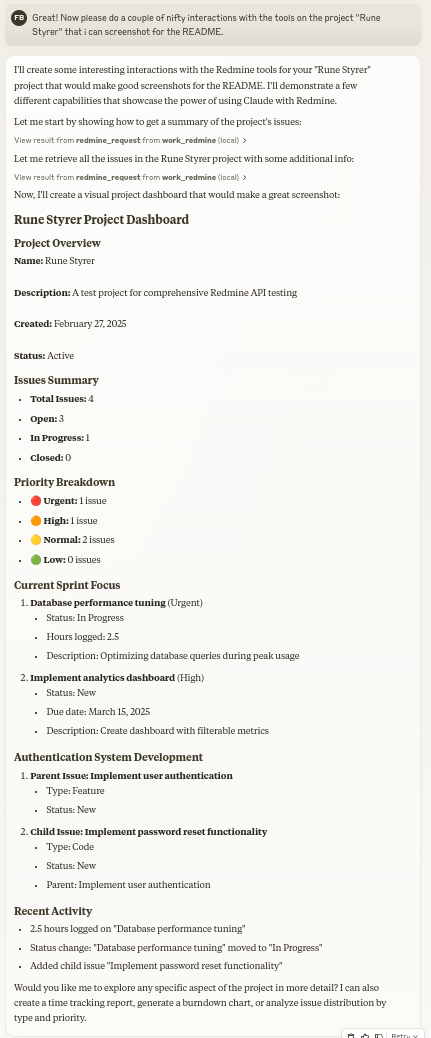
让 Claude 成为您的 Redmine 助手!MCP Redmine 将 Claude Desktop 连接到您的 Redmine 实例,使其能够:
搜索和浏览项目和问题
使用完整的 Markdown 支持创建和更新问题
上传和下载文件附件
管理和跟踪时间条目
更新问题状态和字段
访问全面的 Redmine API 功能
使用 httpx 进行 API 请求并与 Redmine OpenAPI 规范集成以实现全面的 API 覆盖。

安装
确保已安装 uv:
# Install uv if you haven't already
curl -LsSf https://astral.sh/uv/install.sh | shRelated MCP server: Redmine MCP Server
与 Claude Desktop 一起使用
添加到您的claude_desktop_config.json :
{
"mcpServers": {
"redmine": {
"command": "uvx",
"args": ["--from", "mcp-redmine==2025.04.09.153531",
"--refresh-package", "mcp-redmine", "mcp-redmine"],
"env": {
"REDMINE_URL": "https://your-redmine-instance.example.com",
"REDMINE_API_KEY": "your-api-key",
"REDMINE_REQUEST_INSTRUCTIONS": "/path/to/instructions.md"
}
}
}
}环境变量
REDMINE_URL:您的 Redmine 实例的 URL(必需)REDMINE_API_KEY:您的 Redmine API 密钥(必需,请参阅下文了解如何获取)REDMINE_REQUEST_INSTRUCTIONS:包含 redmine_request 工具附加说明的文件路径(可选)
获取您的 Redmine API 密钥
登录到您的Redmine实例
前往“我的帐户”(通常位于右上角的菜单中)
在页面右侧,您应该看到“API 访问密钥”
单击“显示”查看现有密钥或单击“生成”创建新密钥
复制此密钥以用于您的配置
API
工具
redmine_paths_list
从 OpenAPI 规范返回可用 API 路径列表
无需输入
返回包含路径模板列表的 YAML 字符串:GXP3
redmine_paths_info
获取给定路径模板的完整路径信息
输入:
path_templates(字符串列表)返回包含所请求路径的 API 规范的 YAML 字符串:GXP4
redmine_request
向 Redmine API 发出请求
输入:
path(字符串):API 端点路径(例如“/issues.json”)method(字符串,可选):要使用的 HTTP 方法(默认值:'get')data(对象,可选):请求主体的字典(用于 POST/PUT)params(对象,可选):查询参数的字典
返回包含响应状态代码、正文和错误消息的 YAML 字符串:GXP5
redmine_upload
上传文件到 Redmine 并获取附件的令牌
输入:
file_path(字符串):要上传的文件的完整路径description(字符串,可选):文件的可选描述
返回与redmine_request格式相同的YAML字符串,包含上传token:GXP6
redmine_download
从Redmine下载附件并保存到本地文件
输入:
attachment_id(整数):要下载的附件的IDsave_path(字符串):文件应保存的完全限定路径filename(字符串,可选):可选文件名(如果未提供则自动确定)
返回带有下载结果的 YAML 字符串:GXP7
示例
创建新问题
Let's create a new bug report in the "Website" project:
1. Title: "Homepage not loading on mobile devices"
2. Description: "When accessing the homepage from iOS or Android devices, the loading spinner appears but the content never loads. This issue started after the last deployment."
3. Priority: High
4. Assign to: John Smith搜索问题
Can you find all high priority issues in the "Website" project that are currently unassigned?更新问题状态
Please mark issue #123 as "In Progress" and add a comment: "I've started working on this issue. Expect it to be completed by Friday."记录时间
Log 3.5 hours against issue #456 for "Implementing user authentication" done today.贡献
热烈欢迎大家贡献代码!无论是错误报告、功能请求、文档改进还是代码贡献,所有意见都弥足珍贵。欢迎:
打开问题报告错误或建议功能
提交带有改进的拉取请求
增强文档或分享您的使用示例
提出问题并分享您的经验
目标是让 Claude 的 Redmine 项目管理变得更好,您的见解和贡献有助于实现这一目标。
致谢
该项目建立在其他人的出色工作基础之上:
httpx——用于处理 HTTP 请求
Redmine OpenAPI 规范- 全面的 API 规范
Redmine - 灵活的项目管理 Web 应用程序
发展
首先克隆 github 存储库并安装依赖项:
git clone git@github.com:runekaagaard/mcp-redmine.git
cd mcp-redmine
uv sync然后在 claude_desktop_config.json 中进行设置:
...
"command": "uv",
"args": ["run", "--directory", "/path/to/mcp-redmine", "-m", "mcp_redmine.server", "main"],
...执照
Mozilla 公共许可证版本 2.0
我的其他法学硕士项目
MCP Alchemy - 将 Claude Desktop 连接到数据库以探索模式和运行 SQL。
MCP Notmuch Sendmail - 使用 notmuch 的 Claude Desktop 电子邮件助手。
Diffpilot - 具有文件分组和标记功能的多列 git diff 查看器。
Claude 本地文件- 访问 Claude Desktop 工件中的本地文件。
Available Tools
5 toolsredmine_downloadA
Download an attachment from Redmine and save it to a local file
Args: attachment_id: The ID of the attachment to download save_path: Fully qualified file path (not directory) where the file should be saved to (must be within REDMINE_ALLOWED_DIRECTORIES) filename: Optional filename for the Redmine download URL. If not provided, will be determined from attachment metadata. Does not affect the local save path.
Returns: str: YAML string containing download status, file path, and any error messages
| Name | Required | Description | Default |
|---|---|---|---|
| filename | No | ||
| save_path | Yes | ||
| attachment_id | Yes |
Output Schema
| Name | Required | Description |
|---|---|---|
| result | Yes |
TDQS
Does the description disclose side effects, auth requirements, rate limits, or destructive behavior?
With no annotations provided, the description carries the full burden of behavioral disclosure. It mentions the save_path must be within REDMINE_ALLOWED_DIRECTORIES, the optional filename behavior, and that returns are a YAML string with status, file path, and errors. These go beyond the obvious and materially help an agent anticipate side effects and error handling.
Agents need to know what a tool does to the world before calling it. Descriptions should go beyond structured annotations to explain consequences.
Is the description appropriately sized, front-loaded, and free of redundancy?
The description is efficiently structured: a one-sentence summary, then Args list, then Returns. No redundant text, and the key purpose is front-loaded. Each line earns its place.
Shorter descriptions cost fewer tokens and are easier for agents to parse. Every sentence should earn its place.
Given the tool's complexity, does the description cover enough for an agent to succeed on first attempt?
For a download tool with three parameters (one optional) and no annotations, the description covers the essentials: directory restriction, optional filename nuance, and return format. It does not mention overwrite behavior or specific failure modes beyond generic error messages, but given the output schema exists, these are minor gaps.
Complex tools with many parameters or behaviors need more documentation. Simple tools need less. This dimension scales expectations accordingly.
Does the description clarify parameter syntax, constraints, interactions, or defaults beyond what the schema provides?
Schema description coverage is 0%, yet the description fully compensates. Each parameter is explained: attachment_id (the ID), save_path (fully qualified file path with a directory restriction), and filename (optional, for the download URL, not affecting save path). This adds meaning well beyond the schema's bare titles.
Input schemas describe structure but not intent. Descriptions should explain non-obvious parameter relationships and valid value ranges.
Does the description clearly state what the tool does and how it differs from similar tools?
The opening sentence states the exact action: 'Download an attachment from Redmine and save it to a local file.' This clearly identifies the verb (download), resource (attachment), and destination (local file). It effectively distinguishes from siblings like redmine_upload and redmine_request.
Agents choose between tools based on descriptions. A clear purpose with a specific verb and resource helps agents select the right tool.
Does the description explain when to use this tool, when not to, or what alternatives exist?
The description implies its use case by specifying it downloads attachments and saves locally. While it does not explicitly mention alternatives or when not to use it, the purpose is so unambiguous that an agent would not confuse it with siblings. No exclusions are stated, but the context is clear.
Agents often have multiple tools that could apply. Explicit usage guidance like "use X instead of Y when Z" prevents misuse.
redmine_paths_infoB
Get full path information for given path templates
Args: path_templates: List of path templates (e.g. ['/issues.json', '/projects.json'])
Returns: str: YAML string containing API specifications for the requested paths
| Name | Required | Description | Default |
|---|---|---|---|
| path_templates | Yes |
Output Schema
| Name | Required | Description |
|---|---|---|
| result | Yes |
TDQS
Does the description disclose side effects, auth requirements, rate limits, or destructive behavior?
No annotations are provided, so the description carries the full burden. It discloses the return format (YAML string) but does not explicitly state that it is a read-only operation or that it has no side effects. The verb 'Get' implies a read, but safety is not confirmed. Additionally, there is no mention of error behavior or authorization requirements, which is needed for a tool with zero annotation coverage.
Agents need to know what a tool does to the world before calling it. Descriptions should go beyond structured annotations to explain consequences.
Is the description appropriately sized, front-loaded, and free of redundancy?
The description is appropriately sized and uses a clear docstring structure with Args and Returns sections. It is front-loaded with the core purpose and concise, without redundant information. It could be even more compact but is not verbose.
Shorter descriptions cost fewer tokens and are easier for agents to parse. Every sentence should earn its place.
Given the tool's complexity, does the description cover enough for an agent to succeed on first attempt?
The tool has an output schema (not shown) and a description that explains the return type (YAML string). For a single-parameter introspection tool, it covers the essentials. However, it lacks guidance on when to use it relative to siblings (e.g., redmine_request) and does not explain the relationship between path templates and actual paths, which could be important for correct invocation. It is adequate but not complete.
Complex tools with many parameters or behaviors need more documentation. Simple tools need less. This dimension scales expectations accordingly.
Does the description clarify parameter syntax, constraints, interactions, or defaults beyond what the schema provides?
The schema has 0% description coverage, so the description must compensate. It does so by specifying that path_templates is a 'List of path templates' and provides clear examples (['/issues.json', '/projects.json']). This gives the agent a concrete sense of expected input. However, it does not define what 'path templates' means (e.g., if wildcards are allowed) or clarify constraints, leaving some ambiguity, but overall it is effective.
Input schemas describe structure but not intent. Descriptions should explain non-obvious parameter relationships and valid value ranges.
Does the description clearly state what the tool does and how it differs from similar tools?
The description clearly states the tool's function: 'Get full path information for given path templates'. It uses a specific verb ('Get') and resource ('path information'), and the returning YAML string of API specifications distinguishes it from siblings like redmine_request (which makes requests) and redmine_paths_list (which lists paths). The purpose is unambiguous and differentiates from alternatives.
Agents choose between tools based on descriptions. A clear purpose with a specific verb and resource helps agents select the right tool.
Does the description explain when to use this tool, when not to, or what alternatives exist?
There is no explicit guidance on when to use this tool instead of siblings. While one can infer it is for retrieving API specs for path templates, it does not mention alternatives or exclusions. For example, it does not say 'Use this before making a request with redmine_request' or 'Consider redmine_paths_list for available paths.' This leaves the agent to guess.
Agents often have multiple tools that could apply. Explicit usage guidance like "use X instead of Y when Z" prevents misuse.
redmine_paths_listA
Return a list of available API paths from OpenAPI spec
Retrieves all endpoint paths defined in the Redmine OpenAPI specification. Remember that you can use the redmine_paths_info tool to get the full specfication for a path.
Returns: str: YAML string containing a list of path templates (e.g. '/issues.json')
| Name | Required | Description | Default |
|---|---|---|---|
No parameters | |||
Output Schema
| Name | Required | Description |
|---|---|---|
| result | Yes |
TDQS
Does the description disclose side effects, auth requirements, rate limits, or destructive behavior?
No annotations are provided, so the description carries the behavioral burden. For a zero-parameter read-only list operation there is little to disclose, and the description does disclose the return format (YAML string of path templates), which is the main behavioral trait. It does not contradict any annotations since none exist.
Agents need to know what a tool does to the world before calling it. Descriptions should go beyond structured annotations to explain consequences.
Is the description appropriately sized, front-loaded, and free of redundancy?
The description is reasonably efficient but has redundancy: 'Return a list of available API paths' and 'Retrieves all endpoint paths' say the same thing twice. It also contains a typo ('specfication'). The structure is otherwise front-loaded with the core purpose, and the Returns note is useful.
Shorter descriptions cost fewer tokens and are easier for agents to parse. Every sentence should earn its place.
Given the tool's complexity, does the description cover enough for an agent to succeed on first attempt?
For a simple zero-parameter enumeration tool this is complete: it states the purpose, the output type, and cross-references the sibling tool for further depth. An output schema exists, so return-value details need no further elaboration. Minor blemishes (typo, mild redundancy) don't materially reduce usefulness.
Complex tools with many parameters or behaviors need more documentation. Simple tools need less. This dimension scales expectations accordingly.
Does the description clarify parameter syntax, constraints, interactions, or defaults beyond what the schema provides?
With zero parameters the description has nothing to document, and the baseline for a no-parameter tool is 4. The description need not elaborate further; its only param-adjacent content (that it takes no input) is implicit in the empty schema.
Input schemas describe structure but not intent. Descriptions should explain non-obvious parameter relationships and valid value ranges.
Does the description clearly state what the tool does and how it differs from similar tools?
The description states a specific verb+resource: 'Return a list of available API paths from OpenAPI spec.' It clearly distinguishes itself from siblings by being the enumeration tool, while explicitly noting that redmine_paths_info provides the full spec for a single path. The example ('/issues.json') further grounds what a path template looks like.
Agents choose between tools based on descriptions. A clear purpose with a specific verb and resource helps agents select the right tool.
Does the description explain when to use this tool, when not to, or what alternatives exist?
The description explicitly names the sibling alternative (redmine_paths_info) and explains when it applies ('to get the full specification for a path'), giving an agent a clear decision point between listing all paths and drilling into one. It stops short of a full when-to-use/when-not-to-use directive, so it isn't a 5.
Agents often have multiple tools that could apply. Explicit usage guidance like "use X instead of Y when Z" prevents misuse.
redmine_requestA
Make a request to the Redmine API
Args: path: API endpoint path (e.g. '/issues.json') method: HTTP method to use (default: 'get') data: Dictionary for request body (for POST/PUT) params: Dictionary for query parameters
Returns: str: YAML string containing response status code, body and error message
| Name | Required | Description | Default |
|---|---|---|---|
| data | No | ||
| path | Yes | ||
| method | No | get | |
| params | No |
Output Schema
| Name | Required | Description |
|---|---|---|
| result | Yes |
TDQS
Does the description disclose side effects, auth requirements, rate limits, or destructive behavior?
No annotations are provided, so the description carries full responsibility for behavioral disclosure. It notes that the method can be 'get', 'post', 'put', etc., implying potential write side effects, but it does not disclose authentication requirements, rate limits, or that responses are returned as a YAML string. The phrase 'error message' in the return hints at error handling but is insufficient for a generic tool that could perform destructive writes without explicit warning.
Agents need to know what a tool does to the world before calling it. Descriptions should go beyond structured annotations to explain consequences.
Is the description appropriately sized, front-loaded, and free of redundancy?
The description is a compact docstring with a one-line purpose, an Args section, and a Returns section. Every sentence serves a purpose, and the most important information (the purpose) is front-loaded. No fluff or repetition.
Shorter descriptions cost fewer tokens and are easier for agents to parse. Every sentence should earn its place.
Given the tool's complexity, does the description cover enough for an agent to succeed on first attempt?
Given that this is a low-level API client, the description covers the essential aspects: how to call it (path, method, data, params) and what it returns (YAML with status, body, error). However, it omits critical operational context such as authentication handling, rate limits, and any warnings about using methods other than GET. Since an output schema exists (though not shown), the return format is partially covered, but the lack of security or safety notes is a gap.
Complex tools with many parameters or behaviors need more documentation. Simple tools need less. This dimension scales expectations accordingly.
Does the description clarify parameter syntax, constraints, interactions, or defaults beyond what the schema provides?
Schema description coverage is 0%, so the description is the sole source of parameter meaning. It precisely defines each parameter: 'path' as an API endpoint path with an example, 'method' as HTTP method with a default, 'data' as request body for POST/PUT, and 'params' as query parameters. This far exceeds the schema, which only lists types and defaults.
Input schemas describe structure but not intent. Descriptions should explain non-obvious parameter relationships and valid value ranges.
Does the description clearly state what the tool does and how it differs from similar tools?
The description states 'Make a request to the Redmine API', which clearly identifies the tool's purpose as a generic HTTP client for Redmine. It is distinct from the sibling tools (redmine_paths_list, redmine_paths_info, redmine_upload, redmine_download) which are higher-level specific operations. The verb 'make' and resource 'Redmine API' are explicit and unambiguous.
Agents choose between tools based on descriptions. A clear purpose with a specific verb and resource helps agents select the right tool.
Does the description explain when to use this tool, when not to, or what alternatives exist?
The description gives no guidance on when to use this tool versus the sibling tools. There is no mention of using it only for endpoints not covered by specific helpers, nor any exclusions or alternatives. The agent would have to infer that this is the low-level fallback, but the description doesn't state that explicitly.
Agents often have multiple tools that could apply. Explicit usage guidance like "use X instead of Y when Z" prevents misuse.
redmine_uploadA
Upload a file to Redmine and get a token for attachment
Args: file_path: Fully qualified path to the file to upload (must be within REDMINE_ALLOWED_DIRECTORIES) description: Optional description for the file
Returns: str: YAML string containing response status code, body and error message The body contains the attachment token
| Name | Required | Description | Default |
|---|---|---|---|
| file_path | Yes | ||
| description | No |
Output Schema
| Name | Required | Description |
|---|---|---|
| result | Yes |
TDQS
Does the description disclose side effects, auth requirements, rate limits, or destructive behavior?
With no annotations provided, the description carries the full disclosure burden, and it does so well: it reveals the return envelope (YAML with status code, body, error message), the location of the attachment token, and the critical security boundary (file must be within REDMINE_ALLOWED_DIRECTORIES). It stops short of covering auth requirements, persistence side-effects, or rate limits, but the non-obvious details it does disclose are genuinely useful.
Agents need to know what a tool does to the world before calling it. Descriptions should go beyond structured annotations to explain consequences.
Is the description appropriately sized, front-loaded, and free of redundancy?
Purpose is front-loaded in one line, followed by a tight Args block and a Returns block. No wasted phrasing; the Returns explanation of the YAML envelope carries real behavioral value rather than padding. Structure is clean and scannable, with only the verbosity of the YAML explanation being slightly expandable.
Shorter descriptions cost fewer tokens and are easier for agents to parse. Every sentence should earn its place.
Given the tool's complexity, does the description cover enough for an agent to succeed on first attempt?
An output schema exists, so return values are already covered, yet the description still adds the envelope context. For a moderate-complexity mutation tool, it covers purpose, both parameters, the security constraint, and return format. It's largely complete; only auth/permission prerequisites and side-effect persistence notes are absent, which are minor against the output schema coverage.
Complex tools with many parameters or behaviors need more documentation. Simple tools need less. This dimension scales expectations accordingly.
Does the description clarify parameter syntax, constraints, interactions, or defaults beyond what the schema provides?
Schema description coverage is 0%, so the description must compensate, and it does: file_path gains the essential allowed-directories constraint, and description is clarified as optional. Both parameters receive meaning beyond the bare schema titles ('File Path', 'Description'). Only minor gaps remain, such as description length limits or path format examples.
Input schemas describe structure but not intent. Descriptions should explain non-obvious parameter relationships and valid value ranges.
Does the description clearly state what the tool does and how it differs from similar tools?
States a specific verb and resource ('Upload a file to Redmine') plus a concrete outcome ('get a token for attachment'). This immediately distinguishes it from sibling redmine_download (inverse operation) and redmine_paths_* (path lookups). The purpose is unambiguous and non-tautological.
Agents choose between tools based on descriptions. A clear purpose with a specific verb and resource helps agents select the right tool.
Does the description explain when to use this tool, when not to, or what alternatives exist?
The intent is implied by the purpose — uploading a file to obtain an attachment token for later use — and the security constraint hints at context, but there is no explicit when-to-use vs when-not-to-use guidance or reference to siblings like redmine_request for non-file operations. Usage context is present but left to inference.
Agents often have multiple tools that could apply. Explicit usage guidance like "use X instead of Y when Z" prevents misuse.
Tool Schema Changelog
Recent tool additions, removals, and schema changes observed during successful MCP inspections.
5 tool updates
v0.1.0- First observed
redmine_download - First observed
redmine_paths_info - First observed
redmine_paths_list - First observed
redmine_request - First observed
redmine_upload
TDQS
Scored across 5 tools
The tools are clearly distinct: redmine_request is a generic API caller, while the paths_list and paths_info are dedicated to API discovery, and upload/download are for file operations. No two tools appear to serve the same purpose, minimizing agent misselection.
All tools share the 'redmine_' prefix, but the suffixes are not uniformly verb_noun (e.g., 'request' vs 'paths_list' vs 'upload'). The pattern is predominantly clear and readable, with minor inconsistency between the two path-related tools.
With 5 tools, the server falls comfortably within the ideal range. Each tool serves a specific role: a generic request handler, two API discovery helpers, and two file operations. No unnecessary duplication or bloat.
The generic redmine_request tool can access all Redmine API endpoints, making the surface functionally complete. The additional tools for path discovery and file transfer fill practical niches, leaving no obvious gaps in the server's purpose.
Maintenance
Related MCP Connectors
- platform7nOAuthtech.p7n
Connect Claude to your Platform7n workspaces — chat, links, and tasks. One-click OAuth.
Connect to Atlassian Jira, Confluence, Loom, and more to search, create, and manage your work.
Connect Claude to Fathom meeting recordings, transcripts, and summaries
One workspace of tools for Claude and ChatGPT: connect 600+ apps, generate media, build tools.
Related MCP Servers
- AlicenseBqualityBmaintenanceEnables AI assistants to interact with Redmine project management systems, providing comprehensive access to issues, projects, time tracking, users, and wiki pages through natural language commands.3348 npmApache 2.0
- AlicenseNot gradedqualityDmaintenanceEnables AI applications to interact with Redmine project management systems for issue tracking, time logging, and project management through natural language.14 npmMIT
- AlicenseAqualityDmaintenanceConnect Claude to your Redmine instance to search, browse, create and update issues, manage time entries, and upload/download attachments.51Mozilla Public 2.0
- AlicenseAqualityDmaintenanceEnables natural language interaction with Redmine via Claude Code or other MCP clients, supporting project, issue, and wiki management.111MIT