Glama
qianniuspace

MCP Security Audit Server

by qianniuspace

Herramienta de auditoría de seguridad

insignia de herrería Versión de NPM Licencia: MIT

Un potente servidor MCP (Protocolo de Contexto de Modelo) que audita las dependencias de los paquetes npm para detectar vulnerabilidades de seguridad. Integrado con el registro remoto de npm para realizar comprobaciones de seguridad en tiempo real.

Características

  • 🔍 Escaneo de vulnerabilidades de seguridad en tiempo real

  • Integración remota del registro npm

  • 📊 Informes detallados de vulnerabilidad con niveles de gravedad

  • 🛡️ Soporte para múltiples niveles de gravedad (crítico, alto, moderado, bajo)

  • 📦 Compatible con los administradores de paquetes npm/pnpm/yarn

  • Recomendaciones de soluciones automáticas

  • Puntuación CVSS y referencias CVE

Instalación mediante herrería

Para instalar la herramienta de auditoría de seguridad para Claude Desktop automáticamente a través de Smithery :

npx -y @smithery/cli install @qianniuspace/mcp-security-audit --client claude

Integración MCP

Opción 1: Usar NPX (recomendado)

  1. Agregar configuración MCP a Cline/Cursor:

{
  "mcpServers": {
    "mcp-security-audit": {
      "command": "npx",
      "args": ["-y", "mcp-security-audit"]
    }
  }
}

Opción 2: Descargar el código fuente y configurarlo manualmente

  1. Clonar el repositorio:

git clone https://github.com/qianniuspace/mcp-security-audit.git
cd mcp-security-audit
  1. Instalar dependencias y compilar:

npm install
npm run build
  1. Agregar configuración MCP a Cline/Cursor:

{
  "mcpServers": {
    "mcp-security-audit": {
      "command": "npx",
      "args": ["-y", "/path/to/mcp-security-audit/build/index.js"]
    }
  }
}

Related MCP server: audit-mcp-cli

Capturas de pantalla de configuración

Configuración del cursor
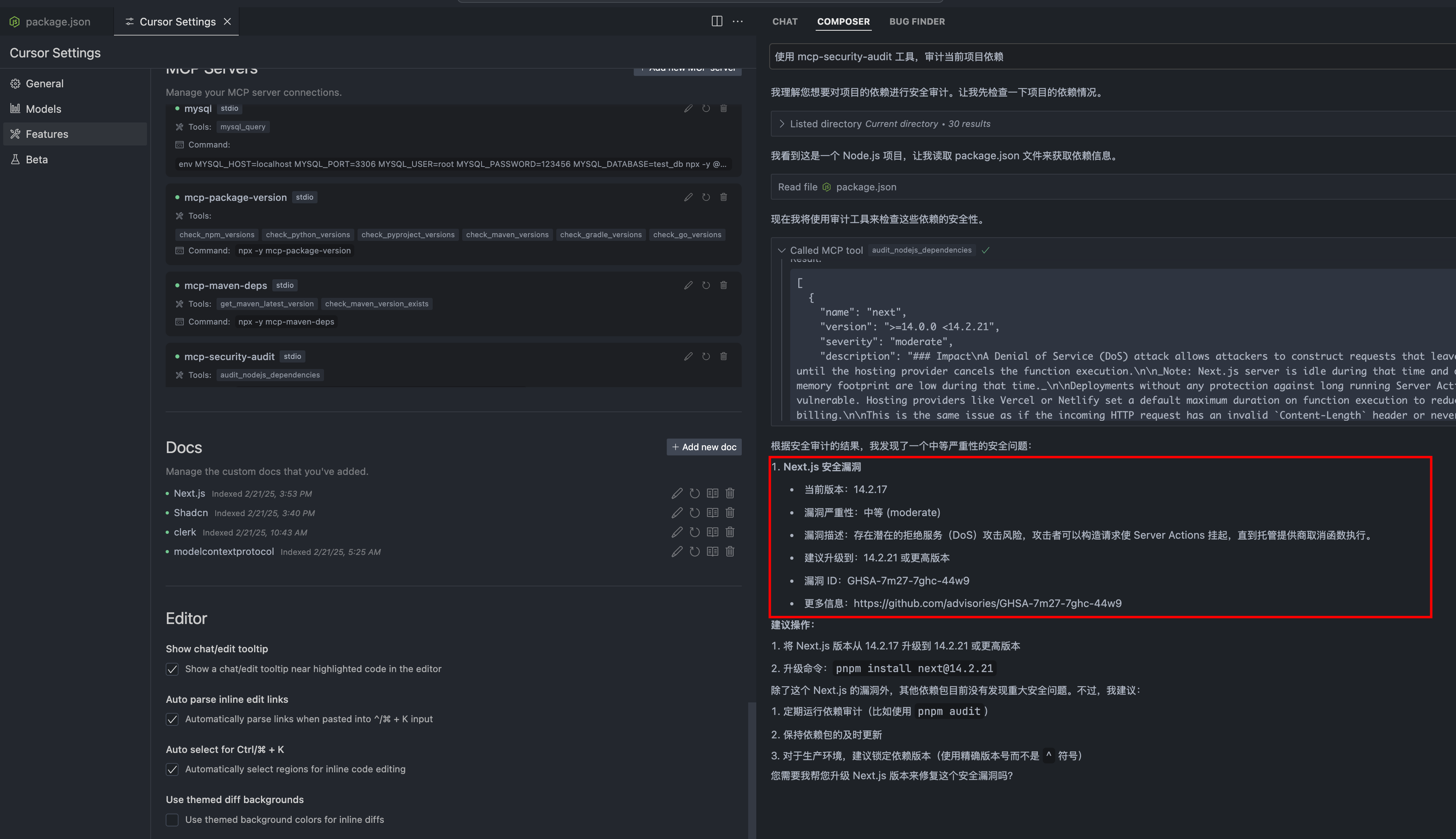
Configuración del cursor

Configuración de Cline
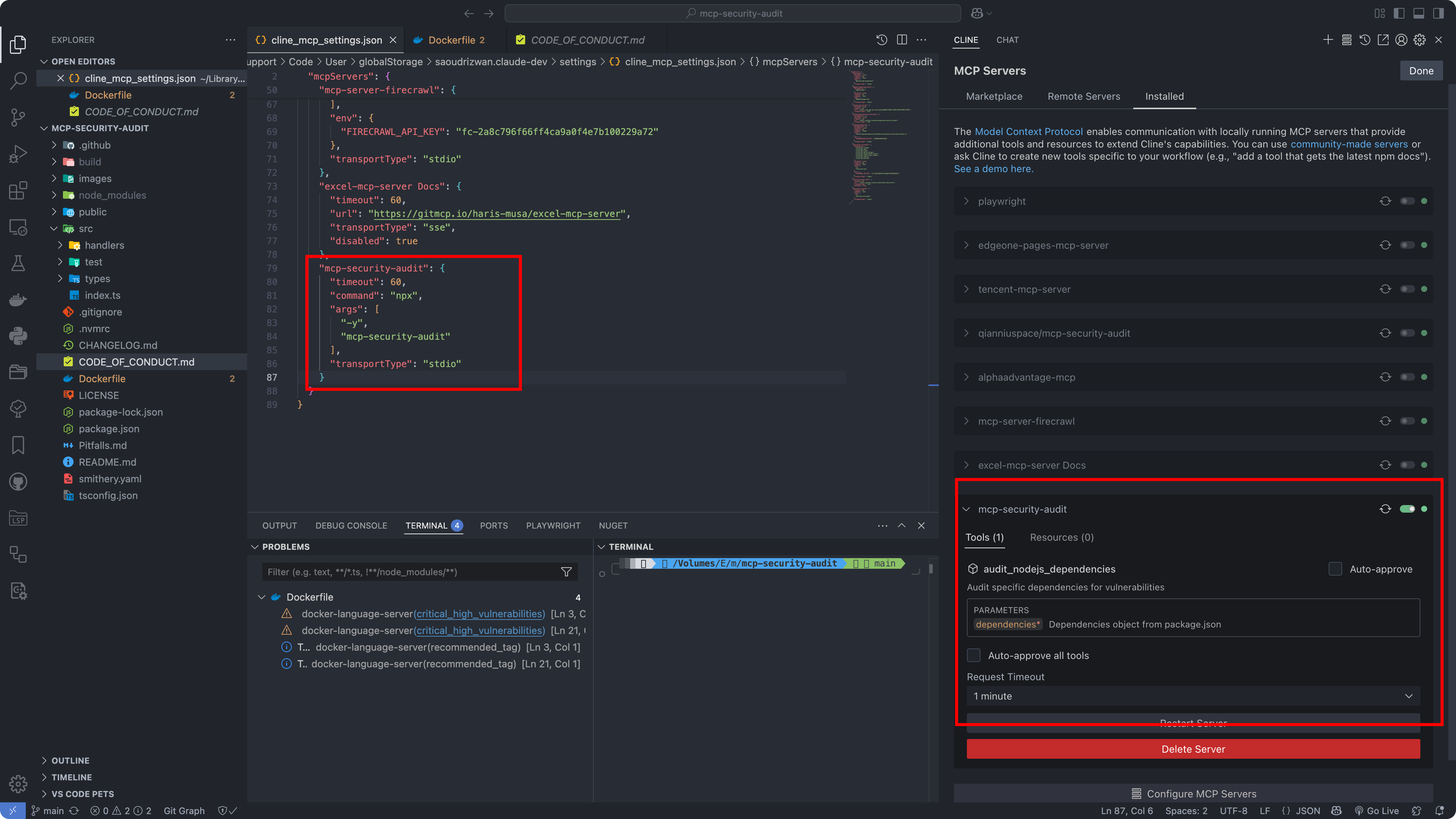
Configuración de Cline

Formato de respuesta de la API

La herramienta proporciona información detallada sobre vulnerabilidades, incluidos niveles de gravedad, recomendaciones de solución, puntuaciones CVSS y referencias CVE.

Ejemplos de respuestas

1. Cuando se encuentran vulnerabilidades (Severity-response.json)

{
  "content": [{
    "vulnerability": {
      "packageName": "lodash",
      "version": "4.17.15",
      "severity": "high",
      "description": "Prototype Pollution in lodash",
      "cve": "CVE-2020-8203",
      "githubAdvisoryId": "GHSA-p6mc-m468-83gw",
      "recommendation": "Upgrade to version 4.17.19 or later",
      "fixAvailable": true,
      "fixedVersion": "4.17.19",
      "cvss": {
        "score": 7.4,
        "vector": "CVSS:3.1/AV:N/AC:H/PR:N/UI:N/S:U/C:H/I:H/A:N"
      },
      "cwe": ["CWE-1321"],
      "url": "https://github.com/advisories/GHSA-p6mc-m468-83gw"
    },
    "metadata": {
      "timestamp": "2024-04-23T10:00:00.000Z",
      "packageManager": "npm"
    }
  }]
}

2. Cuando no se encuentran vulnerabilidades (no-Severity-response.json)

{
  "content": [{
    "vulnerability": null,
    "metadata": {
      "timestamp": "2024-04-23T10:00:00.000Z",
      "packageManager": "npm",
      "message": "No known vulnerabilities found"
    }
  }]
}

Desarrollo

Como referencia de desarrollo, consulte los archivos de respuesta de ejemplo en el directorio public :

  • Severity-response.json : Respuesta de ejemplo cuando se encuentran vulnerabilidades (transformada a partir de la respuesta de la API de auditoría de npm)

  • no-Severity-response.json : Ejemplo de respuesta cuando no se encuentran vulnerabilidades (transformada a partir de la respuesta de la API de auditoría de npm)

Nota: Las respuestas de ejemplo mostradas arriba se han transformado a partir de las respuestas sin procesar de la API de auditoría de npm para ofrecer un formato más estructurado. Las respuestas originales de la API de auditoría de npm contienen metadatos adicionales y pueden tener una estructura diferente.

Contribuyendo

¡Agradecemos sus contribuciones! Lea nuestra Guía de Contribución para obtener más información sobre nuestro código de conducta y el proceso para enviar solicitudes de incorporación de cambios.

Licencia

Este proyecto está licenciado bajo la licencia MIT: consulte el archivo de LICENCIA para obtener más detalles.

Autor

ESX ( qianniuspace@gmail.com )

Campo de golf

Available Tools

1 tool
audit_nodejs_dependenciesC

Audit specific dependencies for vulnerabilities

ParametersJSON Schema
NameRequiredDescriptionDefault
dependenciesYesDependencies object from package.json

TDQS

C2.9/5.0
Behavior2/5

Does the description disclose side effects, auth requirements, rate limits, or destructive behavior?

No annotations provided, so description carries full burden. It fails to mention whether the operation is read-only, requires network access, or what happens with the dependencies data.

Agents need to know what a tool does to the world before calling it. Descriptions should go beyond structured annotations to explain consequences.

Conciseness4/5

Is the description appropriately sized, front-loaded, and free of redundancy?

The description is one sentence, no unnecessary words. It is concise but slightly under-informative for its brevity.

Shorter descriptions cost fewer tokens and are easier for agents to parse. Every sentence should earn its place.

Completeness2/5

Given the tool's complexity, does the description cover enough for an agent to succeed on first attempt?

No output schema and minimal description leave the return value and behavior undocumented. The nested object type is not elaborated.

Complex tools with many parameters or behaviors need more documentation. Simple tools need less. This dimension scales expectations accordingly.

Parameters3/5

Does the description clarify parameter syntax, constraints, interactions, or defaults beyond what the schema provides?

Schema coverage is 100% with a clear description for the parameter. The tool description adds no additional semantic value beyond the schema.

Input schemas describe structure but not intent. Descriptions should explain non-obvious parameter relationships and valid value ranges.

Purpose4/5

Does the description clearly state what the tool does and how it differs from similar tools?

The description clearly states it audits dependencies for vulnerabilities, using a verb-object structure. However, without sibling tools, differentiation is not necessary.

Agents choose between tools based on descriptions. A clear purpose with a specific verb and resource helps agents select the right tool.

Usage Guidelines2/5

Does the description explain when to use this tool, when not to, or what alternatives exist?

No guidance on when to use the tool, prerequisites, or alternatives. The description assumes the agent knows the context.

Agents often have multiple tools that could apply. Explicit usage guidance like "use X instead of Y when Z" prevents misuse.

Tool Schema Changelog

Recent tool additions, removals, and schema changes observed during successful MCP inspections.

  1. 1 tool updatev1.0.0
    • First observedaudit_nodejs_dependencies

TDQS

C2.9/5.0

Scored across 1 tool

Disambiguation5/5

With only one tool, there is no possibility of confusion between tools. The tool's purpose is clearly stated in its name and description, making it unambiguous.

Naming Consistency5/5

A single tool name follows a clear verb_noun pattern (audit_nodejs_dependencies) which is consistent with typical MCP naming conventions. There are no other names to compare, but the pattern is clear.

Tool Count1/5

Having only one tool is extremely thin for a security audit server. Auditing dependencies likely requires supporting operations like resolving dependency trees, checking for updates, or generating reports, which are missing.

Completeness1/5

The server's purpose appears to be auditing Node.js dependencies, but it only offers a single operation that audits dependencies without coverage for other lifecycle steps like viewing audit results, fixing vulnerabilities, or scanning different scopes.

Maintenance

ActivityInactive
ResponsivenessUnresponsive

Related MCP Connectors

Related MCP Servers

  • A
    license
    B
    quality
    C
    maintenance
    Enables security scanning for npm dependencies by checking manifest and lockfiles against the OSV.dev and Socket.dev vulnerability databases. It provides tools to detect vulnerabilities in specific packages and retrieve detailed technical reports for identified security issues.
    3
    10 npm
    MIT
  • A
    license
    A
    quality
    D
    maintenance
    Lightweight Node.js dependency vulnerability audit tool with CLI and MCP Server modes. Supports npm/pnpm, full dependency chain tracing, remote GitHub repo auditing, and generates Markdown/HTML reports.
    1
    18 npm
    1
    MIT
  • A
    license
    B
    quality
    D
    maintenance
    Audits package lockfiles for vulnerabilities, supporting npm, yarn, and pnpm. Runs via CLI or as an MCP server over stdio.
    1
    11 npm
    83
    MIT