MCP Security Audit Server
セキュリティ監査ツール
npmパッケージの依存関係のセキュリティ脆弱性を監査する強力なMCP(モデルコンテキストプロトコル)サーバー。リモートnpmレジストリ統合により、リアルタイムのセキュリティチェックを実現します。
特徴
🔍 リアルタイムのセキュリティ脆弱性スキャン
🚀 リモート npm レジストリ統合
📊 重大度レベル付きの詳細な脆弱性レポート
🛡️ 複数の重大度レベル(重大、高、中、低)をサポート
📦 npm/pnpm/yarn パッケージマネージャーと互換性があります
🔄自動修正推奨
📋 CVSSスコアとCVE参照
Smithery経由でインストール
Smithery経由で Claude Desktop のセキュリティ監査ツールを自動的にインストールするには:
npx -y @smithery/cli install @qianniuspace/mcp-security-audit --client claudeMCP統合
オプション 1: NPX を使用する (推奨)
Cline /Cursor に MCP 構成を追加します。
{
"mcpServers": {
"mcp-security-audit": {
"command": "npx",
"args": ["-y", "mcp-security-audit"]
}
}
}オプション2: ソースコードをダウンロードして手動で設定する
リポジトリをクローンします。
git clone https://github.com/qianniuspace/mcp-security-audit.git
cd mcp-security-audit依存関係をインストールしてビルドします。
npm install
npm run buildCline /Cursor に MCP 構成を追加します。
{
"mcpServers": {
"mcp-security-audit": {
"command": "npx",
"args": ["-y", "/path/to/mcp-security-audit/build/index.js"]
}
}
}Related MCP server: audit-mcp-cli
設定のスクリーンショット
カーソルの設定
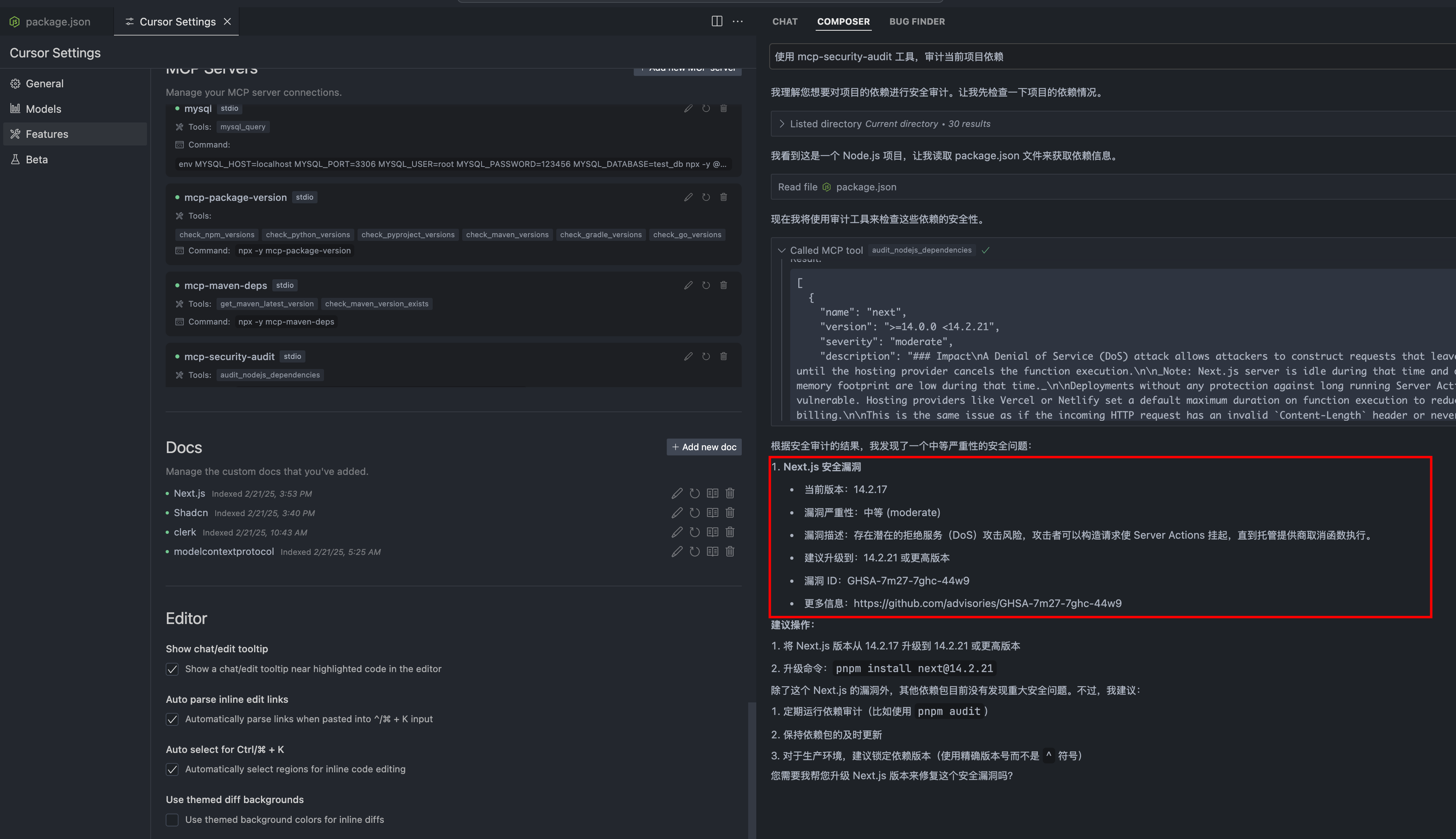
傾斜構成
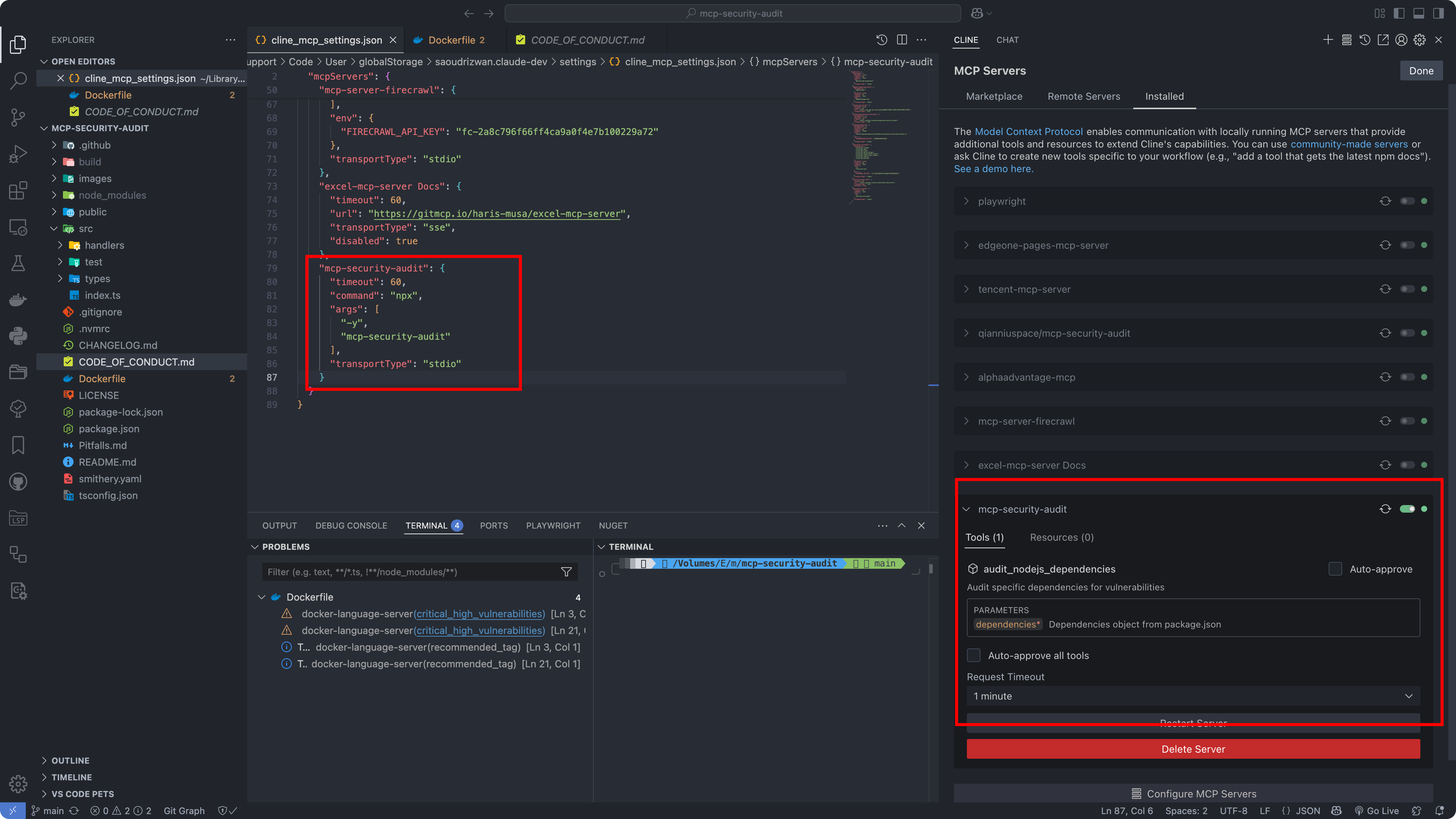
APIレスポンスフォーマット
このツールは、重大度レベル、修正推奨事項、CVSS スコア、CVE 参照などの詳細な脆弱性情報を提供します。
回答例
1. 脆弱性が発見された場合(Severity-response.json)
{
"content": [{
"vulnerability": {
"packageName": "lodash",
"version": "4.17.15",
"severity": "high",
"description": "Prototype Pollution in lodash",
"cve": "CVE-2020-8203",
"githubAdvisoryId": "GHSA-p6mc-m468-83gw",
"recommendation": "Upgrade to version 4.17.19 or later",
"fixAvailable": true,
"fixedVersion": "4.17.19",
"cvss": {
"score": 7.4,
"vector": "CVSS:3.1/AV:N/AC:H/PR:N/UI:N/S:U/C:H/I:H/A:N"
},
"cwe": ["CWE-1321"],
"url": "https://github.com/advisories/GHSA-p6mc-m468-83gw"
},
"metadata": {
"timestamp": "2024-04-23T10:00:00.000Z",
"packageManager": "npm"
}
}]
}2. 脆弱性が見つからない場合(no-Severity-response.json)
{
"content": [{
"vulnerability": null,
"metadata": {
"timestamp": "2024-04-23T10:00:00.000Z",
"packageManager": "npm",
"message": "No known vulnerabilities found"
}
}]
}発達
開発の参考として、 publicディレクトリ内のサンプル応答ファイルを確認してください。
Severity-response.json : 脆弱性が発見された場合のレスポンスの例(npm 監査 API レスポンスから変換)
no-Severity-response.json : 脆弱性が見つからない場合のレスポンスの例(npm 監査 API レスポンスから変換)
注: 上記のレスポンス例は、npm 監査 API の生のレスポンスを変換し、より構造化された形式にしたものです。元の npm 監査 API レスポンスには追加のメタデータが含まれており、構造が異なる場合があります。
貢献
貢献を歓迎します!行動規範とプルリクエストの送信手順の詳細については、貢献ガイドをお読みください。
ライセンス
このプロジェクトは MIT ライセンスに基づいてライセンスされています - 詳細についてはLICENSEファイルを参照してください。
著者
ESX ( qianniuspace@gmail.com )
リンク
Available Tools
1 toolaudit_nodejs_dependenciesC
Audit specific dependencies for vulnerabilities
| Name | Required | Description | Default |
|---|---|---|---|
| dependencies | Yes | Dependencies object from package.json |
TDQS
Does the description disclose side effects, auth requirements, rate limits, or destructive behavior?
No annotations provided, so description carries full burden. It fails to mention whether the operation is read-only, requires network access, or what happens with the dependencies data.
Agents need to know what a tool does to the world before calling it. Descriptions should go beyond structured annotations to explain consequences.
Is the description appropriately sized, front-loaded, and free of redundancy?
The description is one sentence, no unnecessary words. It is concise but slightly under-informative for its brevity.
Shorter descriptions cost fewer tokens and are easier for agents to parse. Every sentence should earn its place.
Given the tool's complexity, does the description cover enough for an agent to succeed on first attempt?
No output schema and minimal description leave the return value and behavior undocumented. The nested object type is not elaborated.
Complex tools with many parameters or behaviors need more documentation. Simple tools need less. This dimension scales expectations accordingly.
Does the description clarify parameter syntax, constraints, interactions, or defaults beyond what the schema provides?
Schema coverage is 100% with a clear description for the parameter. The tool description adds no additional semantic value beyond the schema.
Input schemas describe structure but not intent. Descriptions should explain non-obvious parameter relationships and valid value ranges.
Does the description clearly state what the tool does and how it differs from similar tools?
The description clearly states it audits dependencies for vulnerabilities, using a verb-object structure. However, without sibling tools, differentiation is not necessary.
Agents choose between tools based on descriptions. A clear purpose with a specific verb and resource helps agents select the right tool.
Does the description explain when to use this tool, when not to, or what alternatives exist?
No guidance on when to use the tool, prerequisites, or alternatives. The description assumes the agent knows the context.
Agents often have multiple tools that could apply. Explicit usage guidance like "use X instead of Y when Z" prevents misuse.
Tool Schema Changelog
Recent tool additions, removals, and schema changes observed during successful MCP inspections.
1 tool update
v1.0.0- First observed
audit_nodejs_dependencies
TDQS
Scored across 1 tool
With only one tool, there is no possibility of confusion between tools. The tool's purpose is clearly stated in its name and description, making it unambiguous.
A single tool name follows a clear verb_noun pattern (audit_nodejs_dependencies) which is consistent with typical MCP naming conventions. There are no other names to compare, but the pattern is clear.
Having only one tool is extremely thin for a security audit server. Auditing dependencies likely requires supporting operations like resolving dependency trees, checking for updates, or generating reports, which are missing.
The server's purpose appears to be auditing Node.js dependencies, but it only offers a single operation that audits dependencies without coverage for other lifecycle steps like viewing audit results, fixing vulnerabilities, or scanning different scopes.
Maintenance
Related MCP Connectors
Detect malicious or vulnerable npm packages: registry search, OSV.dev and GitHub advisory lookups
Provide AI-powered real-time analysis and intelligence on NPM packages, including security, depend…
Query OSV.dev for package vulnerabilities and batch-audit dependency lists via MCP.
Dive into the world of npm with our NPM Package Info MCP. Access crucial metadata about any npm
Related MCP Servers
- AlicenseBqualityCmaintenanceEnables security scanning for npm dependencies by checking manifest and lockfiles against the OSV.dev and Socket.dev vulnerability databases. It provides tools to detect vulnerabilities in specific packages and retrieve detailed technical reports for identified security issues.310 npmMIT
- AlicenseAqualityDmaintenanceLightweight Node.js dependency vulnerability audit tool with CLI and MCP Server modes. Supports npm/pnpm, full dependency chain tracing, remote GitHub repo auditing, and generates Markdown/HTML reports.118 npm1MIT
- AlicenseBqualityDmaintenanceAudits package lockfiles for vulnerabilities, supporting npm, yarn, and pnpm. Runs via CLI or as an MCP server over stdio.111 npm83MIT
- AlicenseAqualityDmaintenanceMCP server that audits npm dependencies against the live registry, providing per-dependency reports on versions behind, deprecation, and license.29 npmMIT