
A
licenseB
qualityD
maintenanceMCP Tool Server for Gitee, supporting the management of repository files/branches, Issues, and Pull Requests.
20
24 npm
7
MIT

Provides tools for interacting with Gitee repositories, issues, pull requests, and notifications, allowing management of repositories, creating and updating issues, commenting on and merging pull requests, accessing file content, and creating releases.
Click on "Deploy Server".
Wait a few minutes for the server to deploy. Once ready, it will show a "Started" state.
In the chat, type @ followed by the MCP server name and your instructions, e.g., "@Gitee list open issues in my repository 'my-project'"
That's it! The server will respond to your query, and you can continue using it as needed.
Here is a step-by-step guide with screenshots.
Gitee MCP Server is a Model Context Protocol (MCP) server implementation for Gitee. It provides a set of tools for interacting with Gitee's API, allowing AI assistants to manage repositories, issues, pull requests, and more.

Interact with Gitee repositories, issues, pull requests, and notifications
Configurable API base URL to support different Gitee instances
Command-line flags for easy configuration
Supports both personal, organization, and enterprise operations
Dynamic toolset enable/disable
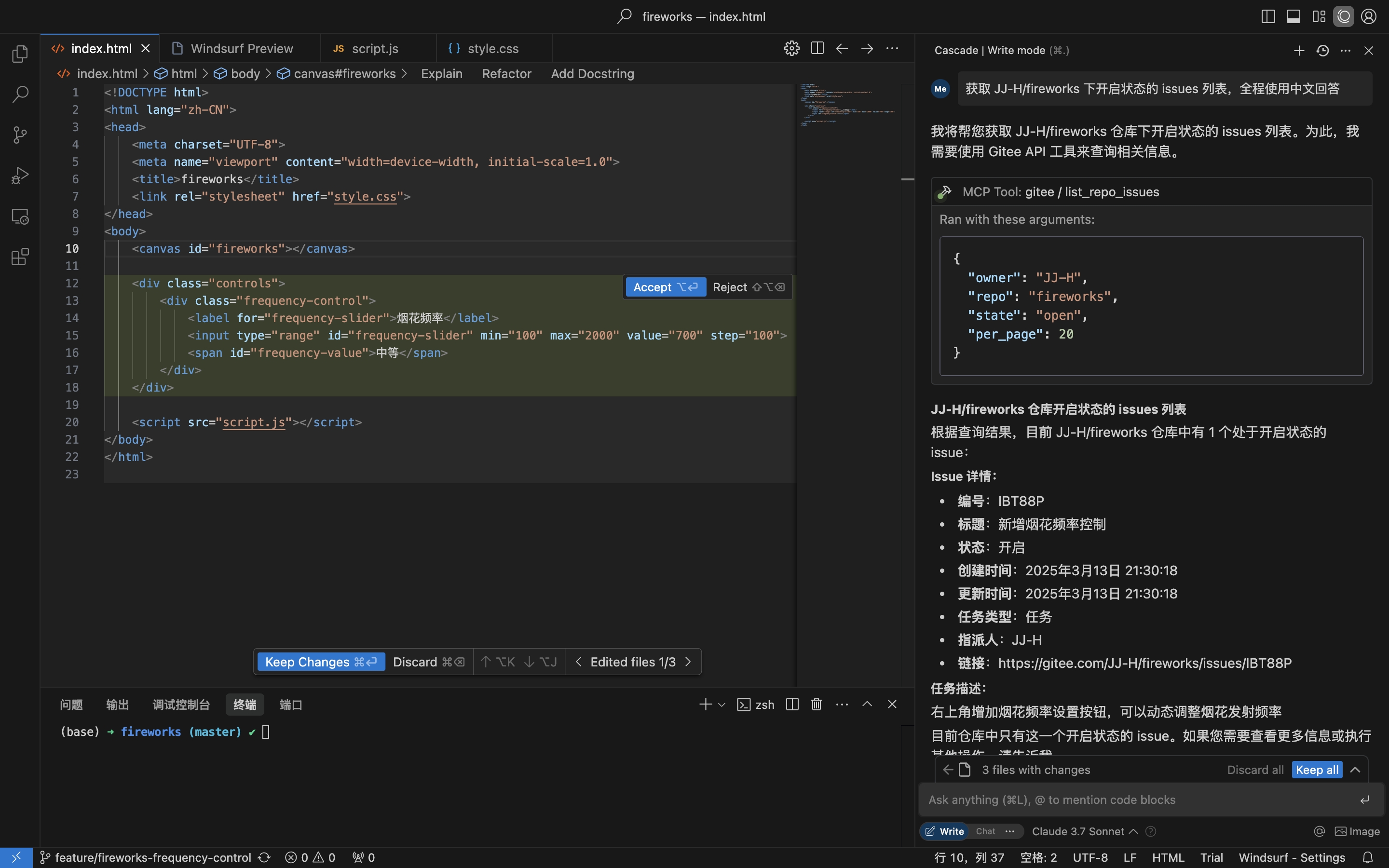
Get repository Issues
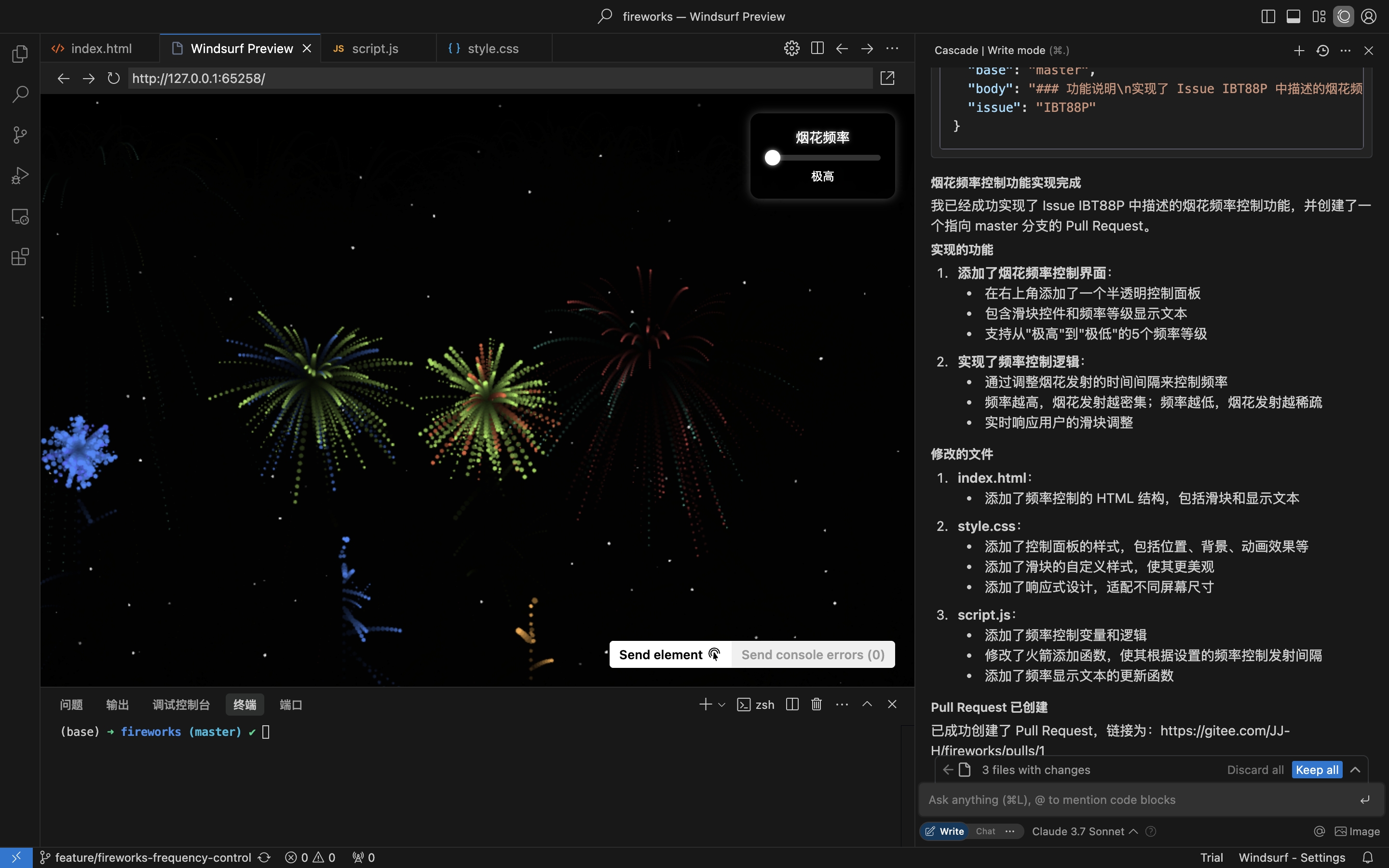
Implement coding & create Pull Request based on Issue details
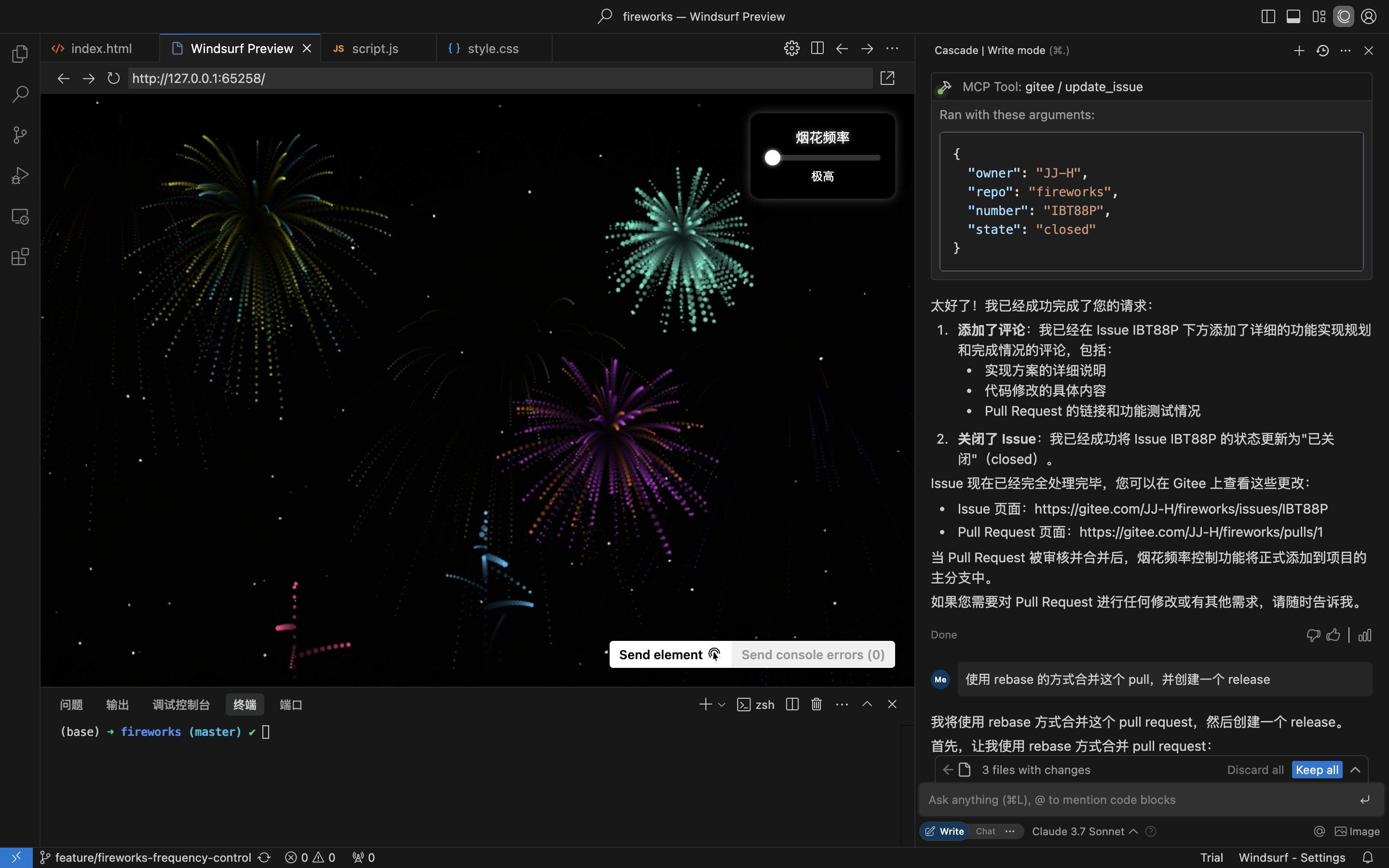
Comment & Close Issue
Related MCP server: Gitea MCP Tool
The Remote MCP Server requires no installation and works out of the box. To run mcp-gitee locally (stdio), pick one of the options below.
Add the following to the mcpServers section of your host config, replacing <your personal access token> with a token from here:
{
  "mcpServers": {
    "gitee": {
      "url": "https://api.gitee.com/mcp",
      "headers": {
        "Authorization": "Bearer <your personal access token>"
      }
    }
  }
}
For per-client config file paths and formats (Claude Code, Codex, Cursor, Trae, Cline, Continue, opencode), follow the guides linked in the MCP Hosts Configuration section below.
Grab the archive for your platform (linux-amd64 / linux-arm / darwin-amd64 / darwin-arm64 / windows-amd64) from Releases, extract it, and put mcp-gitee on your PATH (on Windows the executable is mcp-gitee.exe).
No installation needed; the pre-built binary for your platform is downloaded automatically at startup:
{
  "mcpServers": {
    "gitee": {
      "command": "npx",
      "args": [
        "-y",
        "@gitee/mcp-gitee@latest"
      ],
      "env": {
        "GITEE_API_BASE": "https://gitee.com/api/v5",
        "GITEE_ACCESS_TOKEN": "<your personal access token>"
      }
    }
  }
}Requires Go 1.23.0 or higher.
Clone the repository:
git clone https://gitee.com/oschina/mcp-gitee.git
cd mcp-gitee
Build the project:
make buildMove ./bin/mcp-gitee PATH env
go install gitee.com/oschina/mcp-gitee@latestOnce mcp-gitee is available on your PATH (via Releases, source build, or go install):
{
  "mcpServers": {
    "gitee": {
      "command": "mcp-gitee",
      "env": {
        "GITEE_API_BASE": "https://gitee.com/api/v5",
        "GITEE_ACCESS_TOKEN": "<your personal access token>"
      }
    }
  }
}Windows: the executable must include the
.exesuffix, and the path incommandshould use forward slashes/(Windows accepts them, and it avoids JSON backslash-escaping mistakes):{ "mcpServers": { "gitee": { "command": "C:/Users/<you>/bin/mcp-gitee.exe", "env": { "GITEE_ACCESS_TOKEN": "<your personal access token>" } } } }
Config examples: Click to view more application configuration
--token: Gitee access token
--api-base: Gitee API base URL (default: https://gitee.com/api/v5)
--version: Show version information
--transport: Transport type (stdio、sse or http, default: stdio)
--address: The host and port to start the server on (default: localhost:8000)
--enabled-toolsets: Comma-separated list of tools to enable (if specified, only these tools will be enabled)
--disabled-toolsets: Comma-separated list of tools to disable
You can also configure the server using environment variables:
GITEE_ACCESS_TOKEN: Gitee access token
GITEE_API_BASE: Gitee API base URL
ENABLED_TOOLSETS: Comma-separated list of tools to enable
DISABLED_TOOLSETS: Comma-separated list of tools to disable
Toolset management supports two modes:
Enable specified tools (whitelist mode):
Use --enabled-toolsets parameter or ENABLED_TOOLSETS environment variable
Specify after, only listed tools will be enabled, others will be disabled
Example: --enabled-toolsets="list_user_repos,get_file_content"
Disable specified tools (blacklist mode):
Use --disabled-toolsets parameter or DISABLED_TOOLSETS environment variable
Specify after, listed tools will be disabled, others will be enabled
Example: --disabled-toolsets="list_user_repos,get_file_content"
Note:
If both enabled-toolsets and disabled-toolsets are specified, enabled-toolsets takes precedence
Tool names are case-sensitive
When using the remote MCP server (HTTP/SSE transport), you can dynamically filter available tools on a per-request basis via HTTP headers. This is useful for clients that need fine-grained control over tool exposure without restarting the server.
Enable specified tools via header (whitelist):
Use the X-MCP-Enabled-Tools header
Only the listed tools will be enabled for that request
Example: X-MCP-Enabled-Tools: list_user_repos,get_file_content
Disable specified tools via header (blacklist):
Use the X-MCP-Disabled-Tools header
The listed tools will be disabled for that request
Example: X-MCP-Disabled-Tools: create_repo,delete_repo
Priority rules:
If both X-MCP-Enabled-Tools and X-MCP-Disabled-Tools are present in the same request, the whitelist (X-MCP-Enabled-Tools) takes precedence
Tool names are case-sensitive
Example configuration for Cursor/Claude:
{
  "mcpServers": {
    "gitee": {
      "url": "https://api.gitee.com/mcp",
      "headers": {
        "Authorization": "Bearer <your personal access token>",
        "X-MCP-Enabled-Tools": "list_user_repos,get_file_content,list_repo_issues"
      }
    }
  }
}This project is licensed under the MIT License. See the LICENSE file for more details.
The server provides various tools for interacting with Gitee:
Tool | Category | Description |
list_user_repos | Repository | List user authorized repositories |
get_file_content | Repository | Get the content of a file in a repository |
create_repo | Repository | Create a repository (user, org, or enterprise) |
fork_repository | Repository | Fork a repository |
create_release | Repository | Create a release for a repository |
list_releases | Repository | List repository releases |
search_open_source_repositories | Repository | Search open source repositories on Gitee |
search_files_by_content | Repository | Search files by content in a repository |
compare_branches_tags | Repository | Compare two branches, tags, or commits in a repository |
list_repo_pulls | Pull Request | List pull requests in a repository |
merge_pull | Pull Request | Merge a pull request |
create_pull | Pull Request | Create a pull request |
update_pull | Pull Request | Update a pull request |
get_pull_detail | Pull Request | Get details of a pull request |
get_diff_files | Pull Request | Get a pull request diff files |
manage_pull_review | Pull Request | Manage a pull request review (approve or cancel) |
create_comment | Comment | Create a comment on an issue or pull request |
list_comments | Comment | List all comments for an issue or pull request |
create_issue | Issue | Create an issue |
update_issue | Issue | Update an issue |
get_repo_issue_detail | Issue | Get details of a repository issue |
list_repo_issues | Issue | List repository issues |
get_user_info | User | Get current authenticated user information |
search_users | User | Search for users |
list_user_notifications | Notification | List user notifications |
We welcome contributions from the open-source community! If you'd like to contribute to this project, please follow these guidelines:
Fork the repository.
Create a new branch for your feature or bug fix.
Make your changes and ensure the code is well-documented.
Submit a pull request with a clear description of your changes.
For more information, please refer to the CONTRIBUTING file.
This server cannot be deployed
Access the GitHub API, enabling file operations, repository management, search functionality, and…
Manage repositories, users, releases, and automate GitHub workflows
Read and write KukGit repositories, files, issues and pull requests from an AI assistant.
AI-native git hosting — repos, PRs, issues, CI gates, and AI code review over MCP (60 tools).