
MCP Infra Lens
mcp-infra-lens
기준선 인식 MCP 도구를 사용하여 SSH를 통해 Linux 인시던트를 설명합니다.





데모
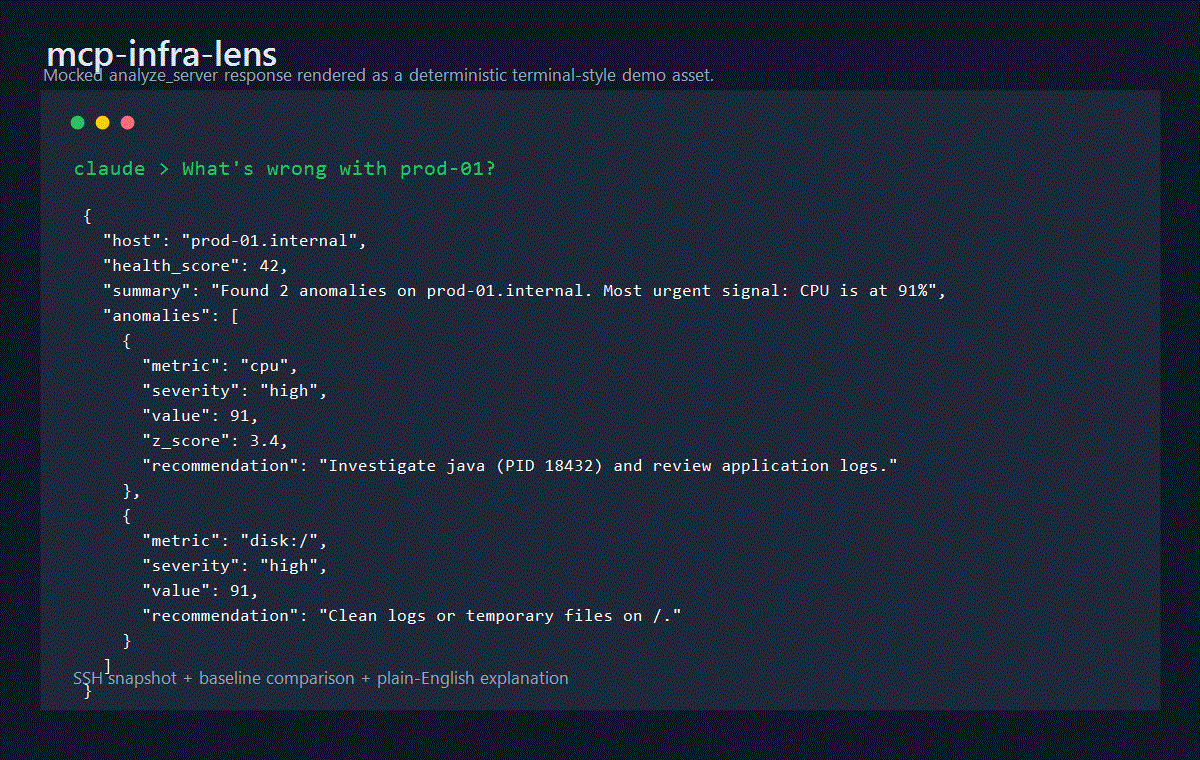
Claude가 "prod-01에 무슨 문제가 있나요?"라고 물었을 때의 샘플 analyze_server 응답:
{
  "host": "prod-01.internal",
  "health_score": 42,
  "summary": "Found 2 anomalies on prod-01.internal. Most urgent signal: CPU is at 91% (3.4σ above baseline 28.2%). Load is 7.2/6.8/5.1. Top CPU consumer: java (87%).",
  "anomalies": [
    {
      "metric": "cpu",
      "severity": "high",
      "value": 91,
      "z_score": 3.4,
      "explanation": "CPU is at 91% (3.4σ above baseline 28.2%). Load is 7.2/6.8/5.1. Top CPU consumer: java (87%).",
      "recommendation": "Investigate java (PID 18432) and review application logs or scale-out options."
    },
    {
      "metric": "disk:/",
      "severity": "high",
      "value": 91,
      "explanation": "Disk / is 91% full (182GB/200GB).",
      "recommendation": "Run du -sh //* | sort -rh | head -20 and clean logs or temporary files."
    }
  ]
}
기능
mcp-infra-lens는 SSH를 통해 Linux 호스트에 연결하여 실시간 인프라 스냅샷을 캡처하고, 최근 기록된 기준선과 비교하며, 이상 징후를 쉬운 영어로 설명합니다.
대상 호스트를 변경하지 않고 CPU, 메모리, 디스크, 네트워크, 프로세스 및 OS 데이터를 수집합니다.
기준선, 비교 및 추세 조회를 위해 로컬 메트릭 기록을 SQLite에 저장합니다.
충분한 기준선 샘플이 존재하면 CPU 이상 징후 탐지를 위해 z-점수 분석을 사용합니다.
단순한 원시 메트릭 값이 아닌 압력의 원인이 될 가능성이 높은 요인을 설명합니다.
stdio및 Streamable HTTP를 통한 MCP를 지원합니다.
작동 방식
flowchart TD
    A["Claude / Cursor / VS Code / Windsurf"] --> B["mcp-infra-lens"]
    B --> C["server-core.ts"]
    C --> D["collector.ts"]
    C --> E["analyzer.ts"]
    C --> F["baseline.ts + db.ts"]
    D --> G["ssh.ts"]
    G --> H["Linux host over SSH"]
F --> I["SQLite history + baselines"]analyze_server는 이제 요청된 duration_minutes 동안 실제 샘플링 수집을 수행하고, 수집 기간 동안의 CPU 및 메모리 압력을 평균화하며, 결과 스냅샷을 유지하고, 선택한 기준선에 대해 이상 징후 탐지를 실행합니다.
도구
도구 | 기능 | 주요 매개변수 |
| 샘플링된 스냅샷을 수집, 저장하고 이상 징후를 설명합니다 |
|
| 분석 없이 현재 시점의 메트릭을 캡처하고 저장합니다 |
|
| 향후 비교를 위해 레이블이 지정된 정상 상태 샘플을 저장합니다 |
|
| 현재 상태를 명명된 기준선과 비교하고 차이점을 설명합니다 |
|
| SQLite에서 과거 CPU, 메모리 또는 부하 지점을 반환합니다 |
|
빠른 시작
1. npx를 통한 실행
npx -y mcp-infra-lens1.0.1 버전에 고정되어 있는 경우, Node 24 네이티브 설치 실패를 방지하기 위해 1.0.2 이상으로 업그레이드하세요:
npx -y mcp-infra-lens@latest2. Claude Desktop
게시된 패키지:
{
  "mcpServers": {
    "infra-lens": {
      "command": "npx",
      "args": ["-y", "mcp-infra-lens"],
      "env": {
        "INFRA_LENS_DB": "/Users/you/.mcp-infra-lens/metrics.db"
      }
    }
  }
}
로컬 개발:
{
  "mcpServers": {
    "infra-lens": {
      "command": "node",
      "args": ["/absolute/path/to/mcp-infra-lens/dist/mcp.js"],
      "env": {
        "INFRA_LENS_DB": "/Users/you/.mcp-infra-lens/metrics.db"
      }
    }
  }
}
3. Docker
docker build -t mcp-infra-lens .
docker run --rm -it \
  -v "$HOME/.mcp-infra-lens:/home/appuser/.mcp-infra-lens" \
  mcp-infra-lens
구성
환경 변수 | 기본값 | 설명 |
|
| SQLite 데이터베이스 경로. 테스트 시 |
|
| HTTP 전송을 위한 바인딩 주소 |
|
| HTTP 전송을 위한 포트 |
상태 점수
90-100: 정상, 유의미한 이상 징후 없음70-89: 경미하거나 국소적인 압력40-69: 다수의 경고 또는 진행 중인 주요 문제0-39: 긴급한 수정이 필요한 위기 상태
권장 워크플로우
정상 작동 기간 동안
record_baseline샘플을 기록합니다.인시던트나 부하 급증 시
analyze_server를 사용합니다.명명된 기준선과 더 엄격한 차등 보기를 위해
compare_to_baseline을 사용합니다.추세를 검사하고 기본 스냅샷을 레이블이 지정된 기준선 세션과 분리하려면
get_history를 사용합니다.
인증
SSH 입력 스키마는 다음을 지원합니다:
비밀번호 인증
인라인 개인 키 인증
암호화된 키에 대한 선택적 암호문 지원
자격 증명 필드는 구조화된 로그에 기록되기 전에 삭제됩니다.
보안 참고 사항
SSH 수집은 대상 호스트에서 읽기 전용입니다.
SSH 자격 증명은 SQLite에 저장되지 않습니다.
호스트 키 검증은 호환성을 위해 v1에서는 허용적입니다. 프로덕션 배포 시에는 아웃바운드 네트워크 액세스를 제한하고 향후 릴리스에서 엄격한 호스트 검증을 적용할 계획을 세워야 합니다.
HTTP 전송에는 내장된 인증이 없습니다. 로컬이 아닌 배포 환경에서는 루프백에 바인딩하고 인증된 리버스 프록시 뒤에 배치하십시오.
보고 정책 및 저장된 데이터 범위는 SECURITY.md를 참조하십시오.
통합
Claude Desktop
{
  "mcpServers": {
    "infra-lens": {
      "command": "npx",
      "args": ["-y", "mcp-infra-lens"],
      "env": {
        "INFRA_LENS_DB": "/Users/you/.mcp-infra-lens/metrics.db"
      }
    }
  }
}
Cursor IDE
{
  "mcpServers": {
    "infra-lens": {
      "command": "npx",
      "args": ["-y", "mcp-infra-lens"]
    }
  }
}
VS Code (MCP 확장)
{
  "inputs": [],
  "servers": {
    "infra-lens": {
      "type": "stdio",
      "command": "npx",
      "args": ["-y", "mcp-infra-lens"]
    }
  }
}
Windsurf
{
  "mcpServers": {
    "infra-lens": {
      "command": "npx",
      "args": ["-y", "mcp-infra-lens"]
    }
  }
}
Docker (HTTP 전송)
docker run -d \
  -p 3000:3000 \
  -v $HOME/.mcp-infra-lens:/home/appuser/.mcp-infra-lens \
  ghcr.io/oaslananka/mcp-infra-lens:latest
그런 다음 MCP 클라이언트가 http://localhost:3000을 사용하도록 구성하십시오.
Docker
번들로 제공되는 Docker 이미지는 다음과 같습니다:
별도의 단계에서 TypeScript 프로젝트를 빌드합니다.
두 단계 모두에서 컨테이너 아키텍처에 맞게
better-sqlite3를 다시 빌드합니다.루트가 아닌
appuser로 실행됩니다.SQLite 데이터를
/home/appuser/.mcp-infra-lens/metrics.db에 저장합니다.
기여
기여를 환영합니다. CONTRIBUTING.md에서 시작한 다음 다음을 사용하십시오:
도구 예제는 docs/usage.md
구성 요소 맵은 docs/architecture.md
로컬 검증 및 게시 확인은 docs/testing.md
저장소별 AI 코딩 지침은
AGENTS.md,CLAUDE.md,GEMINI.md,.github/copilot-instructions.md및.agent/rules/repository.md
운영 / CI 참고 사항
azure-pipelines.yml은 표준 CI 파이프라인이며 이제 Node 20 및 Node 22에서Quality단계를 실행하고, JUnit 및 Cobertura 아티팩트를 게시하며, Node 20에서 Docker 기반 SSH e2e 커버리지를 실행합니다..azure/pipelines/publish.yml은 수동 npm 릴리스 파이프라인으로 유지됩니다..azure/pipelines/mirror.yml은 저장소 미러링 워크플로우에 계속 사용할 수 있습니다.로컬 게시 전 체크리스트와 CI가 모두 Node 20에서 정상적으로 통과된 후에만 게시하십시오.
변경 사항에 npm, MCP 레지스트리 또는 레지스트리 전용 사전 릴리스 게시가 필요한지 결정할 때 RELEASE_POLICY.md를 따르십시오.
라이선스
Tool Schema Changelog
Recent tool additions, removals, and schema changes observed during successful MCP inspections. Dates show when Glama detected each change.
5 tool updates
v1.0.1- First observed
analyze_server - First observed
compare_to_baseline - First observed
get_history - First observed
record_baseline - First observed
snapshot
TDQS
Tools are mostly distinct, though analyze_server and compare_to_baseline both perform explanatory analysis of deviations, which could cause brief hesitation. snapshot vs analyze_server clearly separates raw collection from analysis.
Four tools follow a clear verb_noun pattern (analyze_server, get_history, record_baseline, compare_to_baseline). snapshot stands alone without a verb prefix, though it functions as a verb in context—minor deviation but readable.
Five tools is ideal for this focused scope: baseline lifecycle (record, compare), historical retrieval, real-time analysis, and raw capture. Each serves a specific step in the monitoring workflow without bloat.
Covers the core monitoring lifecycle: establishing baselines, recording current state, historical lookup, and comparative analysis. Minor gaps exist (no list_baselines or delete_baseline), but agents can work around these.
Related MCP Connectors
Real-time infrastructure monitoring with metrics, logs, alerts, and ML-based anomaly detection.
- emisarOAuthdev.emisar
Let AI operate servers without SSH. Choose actions, approve risky changes, and audit every step.
Gain visibility into the performance, availability, and health of your apps and infrastructure.
Scoped, audited SSH exec, sessions, and SFTP on your saved servers without exposing credentials


Latest Blog Posts
- Who's Calling? MCP Hosts Are an Identity Blind Spot (And the Spec Knows It)By Om-Shree-0709 on .mcpAgent IdentityOAuth 2.1
- Your AI Chatbot Just Exposed Your CEO's Salary to an InternBy Om-Shree-0709 on .Agent IdentityMCP SecurityOAuth Delegation
- Why MCP Servers Need Execution Sandboxing (And Why Your Current Stack Isn't Enough)By Om-Shree-0709 on .Agentic AiPrompt InjectionWebAssembly
MCP directory API
We provide all the information about MCP servers via our MCP API.
curl -X GET 'https://glama.ai/api/mcp/v1/servers/oaslananka/mcp-infra-lens'
If you have feedback or need assistance with the MCP directory API, please join our Discord server