

A
licenseB
qualityNot graded
maintenanceAllows AI assistants to interact with Autodesk Revit through the MCP protocol, enabling the AI to create, modify, and delete elements in Revit projects.
15
123 npm
1
-

The Revit MCP server enables AI-driven interaction with Autodesk Revit through the MCP protocol, allowing you to:
Retrieve Data: Access information about the current view, selected elements, and available family types with filtering options
Element Management: Create, modify, and delete various elements:
Point-based (doors, windows, furniture)
Line-based (walls, beams, pipes)
Surface-based (floors, ceilings, roofs)
Model Enhancement: Color elements based on parameters, tag walls, and batch process elements for complex modeling tasks
Code Execution: Send and execute custom C# code directly in Revit
Reset Model: Delete process model when executing continuous dialog
Click on "Deploy Server".
Wait a few minutes for the server to deploy. Once ready, it will show a "Started" state.
In the chat, type @ followed by the MCP server name and your instructions, e.g., "@Revit MCP show me all the walls in the current view"
That's it! The server will respond to your query, and you can continue using it as needed.
Here is a step-by-step guide with screenshots.
🔴
Deprecation notice, this repo is being archived in favour of the mono repo approch for the mcphttps://github.com/mcp-servers-for-revit/mcp-servers-for-revit Simpler CI, less confusion for noobs, npm package and simpler install
English | 简体中文
revit-mcp allows you to interact with Revit using the MCP protocol through MCP-supported clients (such as Claude, Cline, etc.).
This project is the server side (providing Tools to AI), and you need to use revit-mcp-plugin (driving Revit) in conjunction.
Related MCP server: RevitMCPBridge2026
Allow AI to get data from the Revit project
Allow AI to drive Revit to create, modify, and delete elements
Send AI-generated code to Revit to execute (may not be successful, successful rate is higher in some simple scenarios with clear requirements)
nodejs 18+
Complete installation environment still needs to consider the needs of revit-mcp-plugin, please refer to revit-mcp-plugin
Install dependencies
npm installBuild
npm run buildClaude client
Claude client -> Settings > Developer > Edit Config > claude_desktop_config.json
{
    "mcpServers": {
        "revit-mcp": {
            "command": "node",
            "args": ["<path to the built file>\\build\\index.js"]
        }
    }
}
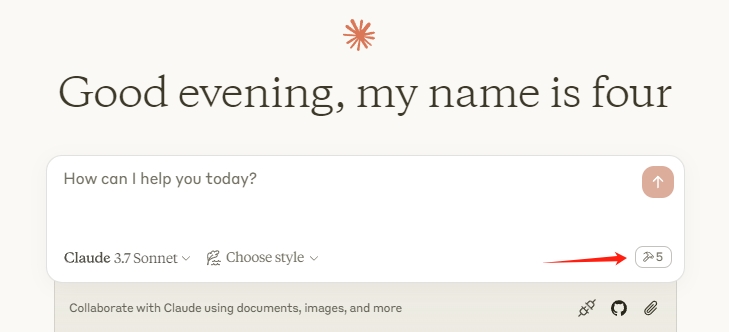
Restart the Claude client. When you see the hammer icon, it means the connection to the MCP service is normal.
flowchart LR
	ClaudeDesktop --> revit-mcp --> SocketService--commandName-->CommandSet--command-->CommandExecute
	CommandManager --> CommandSet
	CommandExecute --executeResult--> SocketService
	CommandProject1 --> CommandManager
	CommandProject2 --> CommandManager
	CommandProject... --> CommandManager
	subgraph ide1 [MCPClient]
	ClaudeDesktop
	end
	subgraph ide2 [MCPServer]
	revit-mcp
	end
	subgraph ide3 [Revit]
			subgraph ide3.1 [revit-mcp-plugin]
				SocketService
				CommandSet
				CommandManager
				CommandExecute
			end
endName | Description |
get_current_view_info | Get current active view info |
get_current_view_elements | Get elements from the current active view |
get_available_family_types | Get available family types in current project |
get_selected_elements | Get currently selected elements |
get_material_quantities | Calculate material quantities and takeoffs |
ai_element_filter | Intelligent element querying tool for AI assistants |
analyze_model_statistics | Analyze model complexity with element counts |
create_point_based_element | Create point-based elements (door, window, furniture) |
create_line_based_element | Create line-based elements (wall, beam, pipe) |
create_surface_based_element | Create surface-based elements (floor, ceiling, roof) |
create_grid | Create a grid system with smart spacing generation |
create_level | Create levels at specified elevations |
create_room | Create and place rooms at specified locations |
create_structural_framing_system | Create a structural beam framing system |
delete_element | Delete elements by ID |
operate_element | Operate on elements (select, setColor, hide, etc.) |
color_elements | Color elements based on a parameter value |
tag_all_walls | Tag all walls in the current view |
tag_all_rooms | Tag all rooms in the current view |
export_room_data | Export all room data from the project |
store_project_data | Store project metadata in local database |
store_room_data | Store room metadata in local database |
query_stored_data | Query stored project and room data |
send_code_to_revit | Send C# code to Revit to execute |
say_hello | Display a greeting dialog in Revit (connection test) |
An intelligent Revit element querying tool designed specifically for AI assistants to retrieve detailed element information from Revit projects. This tool allows the AI to request elements matching specific criteria (such as category, type, visibility, or spatial location) and then perform further analysis on the returned data to answer complex user queries about Revit model elements. Example: When a user asks 'Find all walls taller than 5m in the project', the AI would: 1) Call this tool with parameters: {"filterCategory": "OST_Walls", "includeInstances": true}, 2) Receive detailed information about all wall instances in the project, 3) Process the returned data to filter walls with height > 5000mm, 4) Present the filtered results to the user with relevant details.
| Name | Required | Description | Default |
|---|---|---|---|
| data | Yes | Configuration parameters for the Revit element filter tool. These settings determine which elements will be selected from the Revit project based on various filtering criteria. Multiple filters can be combined to achieve precise element selection. All spatial coordinates should be provided in millimeters. |
Does the description disclose side effects, auth requirements, rate limits, or destructive behavior?
With no annotations provided, the description carries the full burden of behavioral disclosure. It effectively communicates that the tool is read-only ('retrieve detailed element information'), includes a performance note about maxElements, and highlights nuances like furniture category ambiguity. However, it does not explicitly state the return format or error behavior, which would be valuable, but the provided details are substantial.
Agents need to know what a tool does to the world before calling it. Descriptions should go beyond structured annotations to explain consequences.
Is the description appropriately sized, front-loaded, and free of redundancy?
The description is moderately long (about 150 words) but well-structured: a clear definition, capability breakdown, and a practical usage example. The step-by-step example is valuable for agents but adds length; still, every section contributes to understanding. It is not overly verbose, but the example could be shortened slightly, so it warrants a 4 rather than 5.
Shorter descriptions cost fewer tokens and are easier for agents to parse. Every sentence should earn its place.
Given the tool's complexity, does the description cover enough for an agent to succeed on first attempt?
For a query tool with no output schema, the description provides a good overall picture: it explains filtering options, performance considerations, and the intended workflow. It does not specify the exact structure of the returned data, but the example implies the AI will receive 'detailed information' for further processing. Given the richness of the schema and the illustrative steps, the description is fairly complete, though a bit more detail on output format would push it to 5.
Complex tools with many parameters or behaviors need more documentation. Simple tools need less. This dimension scales expectations accordingly.
Does the description clarify parameter syntax, constraints, interactions, or defaults beyond what the schema provides?
The schema has 100% description coverage, so the baseline is 3. The tool description adds an example of using 'filterCategory' and 'includeInstances' and notes that multiple filters can be combined, reinforcing schema semantics. However, it does not introduce new parameter meanings beyond what the schema already provides, so a score of 3 is appropriate.
Input schemas describe structure but not intent. Descriptions should explain non-obvious parameter relationships and valid value ranges.
Does the description clearly state what the tool does and how it differs from similar tools?
The description clearly states the tool's purpose: 'An intelligent Revit element querying tool designed specifically for AI assistants to retrieve detailed element information from Revit projects.' It specifies the verb 'retrieve' and resource 'element information', and the example workflow ('Find all walls taller than 5m') further clarifies its role. It distinguishes itself from sibling tools like get_current_view_elements and get_selected_elements by focusing on filtered retrieval based on criteria.
Agents choose between tools based on descriptions. A clear purpose with a specific verb and resource helps agents select the right tool.
Does the description explain when to use this tool, when not to, or what alternatives exist?
The description provides a concrete example of when to use the tool: when a user asks to find elements matching specific criteria, the AI should call this tool with appropriate filters. It implies the tool is the primary querying mechanism for element data, but it does not explicitly mention alternatives or exclusion cases. This is clear context without exclusions, so it aligns with a score of 4.
Agents often have multiple tools that could apply. Explicit usage guidance like "use X instead of Y when Z" prevents misuse.
Color elements in the current view based on a category and parameter value. Each unique parameter value gets assigned a distinct color.
| Name | Required | Description | Default |
|---|---|---|---|
| categoryName | Yes | The name of the Revit category to color (e.g., 'Walls', 'Doors', 'Rooms') | |
| parameterName | Yes | The name of the parameter to use for grouping and coloring elements | |
| useGradient | No | Whether to use a gradient color scheme instead of random colors | |
| customColors | No | Optional array of custom RGB colors to use for specific parameter values |
Does the description disclose side effects, auth requirements, rate limits, or destructive behavior?
With no annotations, the description must disclose behavioral traits, but it only states that unique parameter values get distinct colors. It does not clarify whether this is a temporary visual override or a permanent change, whether existing colors are overwritten, how customColors affect the assignment, or what happens to elements missing the parameter. This is a significant gap for a mutating tool.
Agents need to know what a tool does to the world before calling it. Descriptions should go beyond structured annotations to explain consequences.
Is the description appropriately sized, front-loaded, and free of redundancy?
The description is two sentences, front-loaded with the main action, and contains no filler. Every word contributes to understanding the tool's purpose and basic mechanic.
Shorter descriptions cost fewer tokens and are easier for agents to parse. Every sentence should earn its place.
Given the tool's complexity, does the description cover enough for an agent to succeed on first attempt?
Given the lack of annotations and output schema, the description is under-specified for a tool with four parameters and side effects. It does not explain how colors are applied, how long they persist, what customColors do in detail, or how the gradient option behaves. The description conveys the core idea but omits important operational context.
Complex tools with many parameters or behaviors need more documentation. Simple tools need less. This dimension scales expectations accordingly.
Does the description clarify parameter syntax, constraints, interactions, or defaults beyond what the schema provides?
All schema properties have descriptions, so schema coverage is 100%. The tool description adds no new parameter-level information beyond repeating 'category' and 'parameter value.' Baseline 3 is appropriate because the schema already documents each parameter.
Input schemas describe structure but not intent. Descriptions should explain non-obvious parameter relationships and valid value ranges.
Does the description clearly state what the tool does and how it differs from similar tools?
The description clearly states the tool's purpose: 'Color elements in the current view based on a category and parameter value.' It uses a specific verb ('Color'), identifies the resource ('elements in the current view'), and mentions the basis ('category and parameter value'), which distinguishes it from sibling tools like delete_element or create_line_based_element.
Agents choose between tools based on descriptions. A clear purpose with a specific verb and resource helps agents select the right tool.
Does the description explain when to use this tool, when not to, or what alternatives exist?
The description makes the primary usage context explicit: coloring elements in the current view by category and parameter value. It implies a visualization/review workflow, but does not explicitly discuss when to avoid this tool or compare it to alternatives. Still, the context is clear enough to guide selection among siblings.
Agents often have multiple tools that could apply. Explicit usage guidance like "use X instead of Y when Z" prevents misuse.
Create one or more line-based elements in Revit such as walls, beams, or pipes. Supports batch creation with detailed parameters including family type ID, start and end points, thickness, height, and level information. All units are in millimeters (mm).
| Name | Required | Description | Default |
|---|---|---|---|
| data | Yes | Array of line-based elements to create |
Does the description disclose side effects, auth requirements, rate limits, or destructive behavior?
No annotations are provided, so the description must carry the burden of behavioral disclosure. It mentions batch creation and units, but it does not disclose required document state, permissions, side effects, error behavior, or whether any return value is produced. For a mutating tool, this is a notable gap.
Agents need to know what a tool does to the world before calling it. Descriptions should go beyond structured annotations to explain consequences.
Is the description appropriately sized, front-loaded, and free of redundancy?
The description is two sentences and directly introduces the tool's purpose, key capabilities, and units. There is no filler or redundant repetition of schema details.
Shorter descriptions cost fewer tokens and are easier for agents to parse. Every sentence should earn its place.
Given the tool's complexity, does the description cover enough for an agent to succeed on first attempt?
The schema is detailed and the purpose is clear, but the description omits important execution context such as requiring an active Revit document, how elements are added to the model, and any result or feedback after creation. Since there is no output schema, some of this burden falls on the description, leaving it slightly incomplete.
Complex tools with many parameters or behaviors need more documentation. Simple tools need less. This dimension scales expectations accordingly.
Does the description clarify parameter syntax, constraints, interactions, or defaults beyond what the schema provides?
Schema coverage is 100% with descriptions for all parameters, so the baseline is 3. The description adds meaningful value by stating that all units are in millimeters, which is critical for correctly interpreting coordinates and dimensions not specified in the schema.
Input schemas describe structure but not intent. Descriptions should explain non-obvious parameter relationships and valid value ranges.
Does the description clearly state what the tool does and how it differs from similar tools?
The description clearly states the action ('Create') and the specific resource ('line-based elements in Revit such as walls, beams, or pipes'), which distinguishes it from sibling tools like create_point_based_element and create_surface_based_element.
Agents choose between tools based on descriptions. A clear purpose with a specific verb and resource helps agents select the right tool.
Does the description explain when to use this tool, when not to, or what alternatives exist?
The description gives clear context for when to use the tool by defining line-based elements with examples, but it does not explicitly mention when not to use it or name alternative tools. The sibling context makes the distinction obvious, so this is a 4 rather than a 3.
Agents often have multiple tools that could apply. Explicit usage guidance like "use X instead of Y when Z" prevents misuse.
Create one or more point-based elements in Revit such as doors, windows, or furniture. Supports batch creation with detailed parameters including family type ID, position, dimensions, and level information. All units are in millimeters (mm).
| Name | Required | Description | Default |
|---|---|---|---|
| data | Yes | Array of point-based elements to create |
Does the description disclose side effects, auth requirements, rate limits, or destructive behavior?
With no annotations, the description carries the safety burden. It states the operation (create) and units, but does not explain side effects, required permissions, error behavior, or return values. It is minimal yet not misleading.
Agents need to know what a tool does to the world before calling it. Descriptions should go beyond structured annotations to explain consequences.
Is the description appropriately sized, front-loaded, and free of redundancy?
Two sentences, front-loaded with the core purpose, and no filler. Every sentence contributes meaningful information.
Shorter descriptions cost fewer tokens and are easier for agents to parse. Every sentence should earn its place.
Given the tool's complexity, does the description cover enough for an agent to succeed on first attempt?
The tool has a well-defined schema with one parameter, and the description covers the key purpose, batch capability, and units. It does not describe return values or error cases, but for a create tool this is acceptable.
Complex tools with many parameters or behaviors need more documentation. Simple tools need less. This dimension scales expectations accordingly.
Does the description clarify parameter syntax, constraints, interactions, or defaults beyond what the schema provides?
The schema covers all parameter descriptions (100% coverage), so the baseline is 3. The description adds unit context ('All units are in millimeters') which is helpful, though slightly inaccurate since rotation is in degrees per the schema.
Input schemas describe structure but not intent. Descriptions should explain non-obvious parameter relationships and valid value ranges.
Does the description clearly state what the tool does and how it differs from similar tools?
The description clearly states the tool creates point-based elements in Revit with examples (doors, windows, furniture). The 'point-based' modifier distinguishes it from sibling line-based and surface-based tools.
Agents choose between tools based on descriptions. A clear purpose with a specific verb and resource helps agents select the right tool.
Does the description explain when to use this tool, when not to, or what alternatives exist?
The description mentions batch creation and detailed parameters, implying use for creating one or more elements at once. It does not explicitly state when not to use, but the sibling tool names provide context for differentiation.
Agents often have multiple tools that could apply. Explicit usage guidance like "use X instead of Y when Z" prevents misuse.
Create one or more surface-based elements in Revit such as floors, ceilings, or roofs. Supports batch creation with detailed parameters including family type ID, boundary lines, thickness, and level information. All units are in millimeters (mm).
| Name | Required | Description | Default |
|---|---|---|---|
| data | Yes | Array of surface-based elements to create |
Does the description disclose side effects, auth requirements, rate limits, or destructive behavior?
No annotations are provided, so the description carries the full burden. It mentions the unit system (millimeters) and batch creation, but lacks disclosure of side effects, prerequisites (e.g., open document), error behavior, or what happens on failure. For a mutating tool, this is a notable gap.
Agents need to know what a tool does to the world before calling it. Descriptions should go beyond structured annotations to explain consequences.
Is the description appropriately sized, front-loaded, and free of redundancy?
The description is two sentences, front-loaded with the core purpose, followed by batch capability, parameter highlights, and units. Every sentence contributes meaningful information without redundancy.
Shorter descriptions cost fewer tokens and are easier for agents to parse. Every sentence should earn its place.
Given the tool's complexity, does the description cover enough for an agent to succeed on first attempt?
Given the detailed schema and lack of output schema/annotations, the description covers the high-level purpose, examples, batch aspect, and units. It lacks explicit error-handling or prerequisite information, but the overall context is sufficient for an agent to select and invoke the tool appropriately.
Complex tools with many parameters or behaviors need more documentation. Simple tools need less. This dimension scales expectations accordingly.
Does the description clarify parameter syntax, constraints, interactions, or defaults beyond what the schema provides?
The schema has 100% property descriptions, so the baseline is 3. The description adds valuable context beyond the schema by specifying units (mm) and clarifying the tool accepts multiple elements in an array (batch). This extra semantic guidance raises the score.
Input schemas describe structure but not intent. Descriptions should explain non-obvious parameter relationships and valid value ranges.
Does the description clearly state what the tool does and how it differs from similar tools?
The description clearly states the tool creates surface-based elements (floors, ceilings, roofs) with a specific verb and resource, distinguishing it from sibling tools like create_line_based_element and create_point_based_element. It also mentions batch creation, adding further specificity.
Agents choose between tools based on descriptions. A clear purpose with a specific verb and resource helps agents select the right tool.
Does the description explain when to use this tool, when not to, or what alternatives exist?
The description implies usage context by explicitly naming surface-based elements (floors, ceilings, roofs) and noting batch creation, which differentiates it from line/point-based alternatives. It does not provide explicit when-not-to-use or alternative tool references, but the examples and scope sufficiently guide an agent.
Agents often have multiple tools that could apply. Explicit usage guidance like "use X instead of Y when Z" prevents misuse.
Delete one or more elements from the Revit model by their element IDs.
| Name | Required | Description | Default |
|---|---|---|---|
| elementIds | Yes | The IDs of the elements to delete |
Does the description disclose side effects, auth requirements, rate limits, or destructive behavior?
No annotations are provided, so the description carries the full burden of disclosing behavioral traits. It only states the deletion action but gives no caveats about irreversibility, potential side effects on dependent elements, or permission requirements. For a destructive operation, this lack of context is a significant gap.
Agents need to know what a tool does to the world before calling it. Descriptions should go beyond structured annotations to explain consequences.
Is the description appropriately sized, front-loaded, and free of redundancy?
The description is a single, front-loaded sentence that directly states the action, target, and method. Every word is useful, with no fluff or redundancy. It is appropriately concise for a tool with one parameter.
Shorter descriptions cost fewer tokens and are easier for agents to parse. Every sentence should earn its place.
Given the tool's complexity, does the description cover enough for an agent to succeed on first attempt?
Given the tool's low complexity and complete schema coverage, the description covers the basic invocation details. However, it lacks important contextual information such as the permanence of deletion or any side effects, which would be expected for a destructive operation. Since no output schema exists, the absence of return-value explanation is acceptable, but safety-related context is missing.
Complex tools with many parameters or behaviors need more documentation. Simple tools need less. This dimension scales expectations accordingly.
Does the description clarify parameter syntax, constraints, interactions, or defaults beyond what the schema provides?
The schema already provides 100% coverage with a clear description for the elementIds parameter ('The IDs of the elements to delete'). The tool description adds no additional meaning beyond the schema, so the baseline score of 3 is appropriate. It does not offer syntax, formatting, or edge-case guidance.
Input schemas describe structure but not intent. Descriptions should explain non-obvious parameter relationships and valid value ranges.
Does the description clearly state what the tool does and how it differs from similar tools?
The description clearly states the tool deletes one or more elements from the Revit model by their element IDs. The verb 'delete' is specific, and the resource and method are unambiguous. It is easily distinguished from sibling tools like get_selected_elements or operate_element.
Agents choose between tools based on descriptions. A clear purpose with a specific verb and resource helps agents select the right tool.
Does the description explain when to use this tool, when not to, or what alternatives exist?
The description implies usage: when you want to delete elements by ID. However, it does not explicitly mention any alternatives or when not to use this tool, such as comparing with operate_element. There is no clear context that would help an agent decide between this and other manipulation tools, so it remains at an implied level.
Agents often have multiple tools that could apply. Explicit usage guidance like "use X instead of Y when Z" prevents misuse.
Get available family types in the current Revit project. You can filter by category and family name, and limit the number of returned types.
| Name | Required | Description | Default |
|---|---|---|---|
| categoryList | No | List of Revit category names to filter by (e.g., 'OST_Walls', 'OST_Doors', 'OST_Furniture') | |
| familyNameFilter | No | Filter family types by family name (partial match) | |
| limit | No | Maximum number of family types to return |
Does the description disclose side effects, auth requirements, rate limits, or destructive behavior?
No annotations are provided, so the description must carry the full burden. It indicates a read operation ('Get') and explains filtering/limit behavior, but fails to disclose the return format, ordering, or edge cases like empty results. This is a notable gap for an output with no schema.
Agents need to know what a tool does to the world before calling it. Descriptions should go beyond structured annotations to explain consequences.
Is the description appropriately sized, front-loaded, and free of redundancy?
Two sentences, front-loaded with the core purpose and followed by a concise list of capabilities. Every word earns its place, with no redundant information.
Shorter descriptions cost fewer tokens and are easier for agents to parse. Every sentence should earn its place.
Given the tool's complexity, does the description cover enough for an agent to succeed on first attempt?
The tool is simple with three optional parameters fully documented in the schema, but there is no output schema and the description does not describe the structure of the returned 'family types'. An agent would need to infer the return type, which leaves a clear completeness gap.
Complex tools with many parameters or behaviors need more documentation. Simple tools need less. This dimension scales expectations accordingly.
Does the description clarify parameter syntax, constraints, interactions, or defaults beyond what the schema provides?
The input schema already provides 100% coverage with clear descriptions for all three parameters (limit, categoryList, familyNameFilter). The description's mention of filtering and limiting adds no new semantic detail beyond what the schema defines.
Input schemas describe structure but not intent. Descriptions should explain non-obvious parameter relationships and valid value ranges.
Does the description clearly state what the tool does and how it differs from similar tools?
The description clearly states the tool 'Get available family types in the current Revit project' with a specific verb ('Get') and resource ('family types'). It also mentions filtering and limiting, which distinguishes it from sibling get tools focused on views or elements.
Agents choose between tools based on descriptions. A clear purpose with a specific verb and resource helps agents select the right tool.
Does the description explain when to use this tool, when not to, or what alternatives exist?
Description gives clear context: it is for retrieving available family types in the current Revit project, with optional filters. Although it doesn't explicitly mention alternatives or exclusions, the resource-specific nature makes the usage context apparent.
Agents often have multiple tools that could apply. Explicit usage guidance like "use X instead of Y when Z" prevents misuse.
Get elements from the current active view in Revit. You can filter by model categories (like Walls, Floors) or annotation categories (like Dimensions, Text). Use includeHidden to show/hide invisible elements and limit to control the number of returned elements.
| Name | Required | Description | Default |
|---|---|---|---|
| modelCategoryList | No | List of Revit model category names (e.g., 'OST_Walls', 'OST_Doors', 'OST_Floors') | |
| annotationCategoryList | No | List of Revit annotation category names (e.g., 'OST_Dimensions', 'OST_WallTags', 'OST_TextNotes') | |
| includeHidden | No | Whether to include hidden elements in the results | |
| limit | No | Maximum number of elements to return |
Does the description disclose side effects, auth requirements, rate limits, or destructive behavior?
No annotations are provided, so the description carries the burden. It does disclose important behaviors: includeHidden toggles inclusion of invisible elements (implying they are excluded by default), and limit controls the returned count. However, it does not mention the tool's read-only nature, error handling for invalid category names, or the return format (e.g., element IDs vs. objects). This is partial transparency.
Agents need to know what a tool does to the world before calling it. Descriptions should go beyond structured annotations to explain consequences.
Is the description appropriately sized, front-loaded, and free of redundancy?
The description is two sentences long, front-loaded with the main purpose, and finishes with the filtering options. No wasted words or redundant detail. Every sentence contributes to understanding.
Shorter descriptions cost fewer tokens and are easier for agents to parse. Every sentence should earn its place.
Given the tool's complexity, does the description cover enough for an agent to succeed on first attempt?
The description covers the core function and main options but omits the return format since there is no output schema. It does not state whether it returns element IDs, elements, or some other representation, which could be critical for an agent. It also doesn't address edge cases like empty views or invalid categories. Given the tool's moderate complexity, this is a gap.
Complex tools with many parameters or behaviors need more documentation. Simple tools need less. This dimension scales expectations accordingly.
Does the description clarify parameter syntax, constraints, interactions, or defaults beyond what the schema provides?
Schema coverage is 100% with all parameters described. The description adds simple examples like 'Walls, Floors' and 'Dimensions, Text' to clarify category types, which is slightly more intuitive than the schema's built examples (e.g., 'OST_Walls'). It also explains includeHidden and limit functionally, but these are already in the schema. Overall, it adds marginal value beyond the schema.
Input schemas describe structure but not intent. Descriptions should explain non-obvious parameter relationships and valid value ranges.
Does the description clearly state what the tool does and how it differs from similar tools?
The description clearly states the specific action: 'Get elements from the current active view in Revit.' It also distinguishes from sibling tools like get_current_view_info (which likely gets view metadata, not elements) and get_selected_elements (which gets user-selected elements, not all view elements). The verb 'Get' and resource 'elements from current active view' are precise.
Agents choose between tools based on descriptions. A clear purpose with a specific verb and resource helps agents select the right tool.
Does the description explain when to use this tool, when not to, or what alternatives exist?
The description provides clear context for when to use the tool: when you need elements from the current active view, with optional filters. However, it does not explicitly mention alternatives or when not to use it (e.g., when you need selected elements instead of all view elements). This gives clear context without exclusions.
Agents often have multiple tools that could apply. Explicit usage guidance like "use X instead of Y when Z" prevents misuse.
获取 Revit 当前活动视图的详细信息,包括视图类型、名称、比例等属性。
| Name | Required | Description | Default |
|---|---|---|---|
No parameters | |||
Does the description disclose side effects, auth requirements, rate limits, or destructive behavior?
No annotations are provided, so the description must convey behavioral traits on its own. It only states the action and sample outputs; it does not disclose safety, error conditions (e.g., no active view), or return format. This is a significant gap for a getter tool.
Agents need to know what a tool does to the world before calling it. Descriptions should go beyond structured annotations to explain consequences.
Is the description appropriately sized, front-loaded, and free of redundancy?
The description is a single, front-loaded sentence that names the tool's purpose and example outputs without any wasted words.
Shorter descriptions cost fewer tokens and are easier for agents to parse. Every sentence should earn its place.
Given the tool's complexity, does the description cover enough for an agent to succeed on first attempt?
Given no output schema and no annotations, the description provides enough high-level detail about what is returned (view type, name, scale) but omits edge cases like a missing active view. It is adequate for a simple getter but not exhaustive.
Complex tools with many parameters or behaviors need more documentation. Simple tools need less. This dimension scales expectations accordingly.
Does the description clarify parameter syntax, constraints, interactions, or defaults beyond what the schema provides?
There are zero parameters, and the schema confirms this. The description appropriately focuses on the output rather than parameters, matching the baseline of 4 for parameter-less tools.
Input schemas describe structure but not intent. Descriptions should explain non-obvious parameter relationships and valid value ranges.
Does the description clearly state what the tool does and how it differs from similar tools?
The description clearly states the tool retrieves detailed information about the current active Revit view, listing specific properties (type, name, scale). This distinguishes it from siblings like get_current_view_elements, which focus on elements in the view.
Agents choose between tools based on descriptions. A clear purpose with a specific verb and resource helps agents select the right tool.
Does the description explain when to use this tool, when not to, or what alternatives exist?
No explicit usage guidance or alternatives are mentioned. The context is implied—if you need view information, this is the tool—but there is no discussion of when not to use it or how it relates to siblings.
Agents often have multiple tools that could apply. Explicit usage guidance like "use X instead of Y when Z" prevents misuse.
Get elements currently selected in Revit. You can limit the number of returned elements.
| Name | Required | Description | Default |
|---|---|---|---|
| limit | No | Maximum number of elements to return |
Does the description disclose side effects, auth requirements, rate limits, or destructive behavior?
No annotations are provided, so the description carries the full burden. It discloses the ability to limit the number of returned elements, which is useful. However, it doesn't mention edge cases like empty selection or default behavior, but for a simple getter this is acceptable.
Agents need to know what a tool does to the world before calling it. Descriptions should go beyond structured annotations to explain consequences.
Is the description appropriately sized, front-loaded, and free of redundancy?
Two short sentences, no unnecessary words. Front-loaded with the core purpose, then describes the limit parameter.
Shorter descriptions cost fewer tokens and are easier for agents to parse. Every sentence should earn its place.
Given the tool's complexity, does the description cover enough for an agent to succeed on first attempt?
Given the low complexity (one optional parameter, no output schema, no annotations), the description is reasonably complete. It covers the core function and the limit option, though it could mention return format or behavior when nothing is selected.
Complex tools with many parameters or behaviors need more documentation. Simple tools need less. This dimension scales expectations accordingly.
Does the description clarify parameter syntax, constraints, interactions, or defaults beyond what the schema provides?
The schema already provides a description for the 'limit' parameter, so coverage is 100%. The description merely repeats this information ('You can limit the number of returned elements') without adding new meaning.
Input schemas describe structure but not intent. Descriptions should explain non-obvious parameter relationships and valid value ranges.
Does the description clearly state what the tool does and how it differs from similar tools?
The description clearly states the tool gets elements currently selected in Revit. This distinguishes it from sibling tools like get_current_view_elements, though it doesn't explicitly name alternatives.
Agents choose between tools based on descriptions. A clear purpose with a specific verb and resource helps agents select the right tool.
Does the description explain when to use this tool, when not to, or what alternatives exist?
No guidance on when to use this tool versus alternatives. The description implies use when you need selected elements but doesn't compare with get_current_view_elements or other sibling tools.
Agents often have multiple tools that could apply. Explicit usage guidance like "use X instead of Y when Z" prevents misuse.
Operate on Revit elements by performing actions such as select, selectionBox, setColor, setTransparency, delete, hide, etc.
| Name | Required | Description | Default |
|---|---|---|---|
| data | Yes | Parameters for operating on Revit elements with specific actions |
Does the description disclose side effects, auth requirements, rate limits, or destructive behavior?
With no annotations provided, the description must carry the burden of behavioral disclosure. It mentions 'delete' and 'hide' without cautioning about permanence or side effects, and gives no indication of reversibility or view-level changes. The action names imply some risk, but no explicit transparency is offered.
Agents need to know what a tool does to the world before calling it. Descriptions should go beyond structured annotations to explain consequences.
Is the description appropriately sized, front-loaded, and free of redundancy?
The description is a single sentence that efficiently lists key actions and 'etc.', but it could be more structured by explicitly mentioning the 'action' parameter or grouping actions by effect (e.g., destructive vs. non-destructive).
Shorter descriptions cost fewer tokens and are easier for agents to parse. Every sentence should earn its place.
Given the tool's complexity, does the description cover enough for an agent to succeed on first attempt?
For a multi-action tool with no output schema, the description leaves out return values, error handling, and prerequisites (e.g., view context for selection actions). The schema's action details partially compensate, but the description alone is thin and does not provide a complete context.
Complex tools with many parameters or behaviors need more documentation. Simple tools need less. This dimension scales expectations accordingly.
Does the description clarify parameter syntax, constraints, interactions, or defaults beyond what the schema provides?
The schema covers 100% of parameters, and the action parameter's detailed description explains each valid action and its requirements. The description itself adds no additional parameter semantics beyond listing a few action names, so baseline 3 is appropriate.
Input schemas describe structure but not intent. Descriptions should explain non-obvious parameter relationships and valid value ranges.
Does the description clearly state what the tool does and how it differs from similar tools?
The description clearly identifies the tool as operating on Revit elements with a list of example actions (select, selectionBox, setColor, setTransparency, delete, hide). However, it does not explicitly distinguish this tool from sibling tools like delete_element or color_elements, which overlap in functionality.
Agents choose between tools based on descriptions. A clear purpose with a specific verb and resource helps agents select the right tool.
Does the description explain when to use this tool, when not to, or what alternatives exist?
No guidance is provided on when to use this tool instead of the dedicated sibling tools (delete_element, color_elements). The description lists actions but does not note which sibling tool would be more appropriate for a given operation, leaving the agent without clear usage direction.
Agents often have multiple tools that could apply. Explicit usage guidance like "use X instead of Y when Z" prevents misuse.
Send C# code to Revit for execution. The code will be inserted into a template with access to the Revit Document and parameters. Your code should be written to work within the Execute method of the template.
| Name | Required | Description | Default |
|---|---|---|---|
| code | Yes | The C# code to execute in Revit. This code will be inserted into the Execute method of a template with access to Document and parameters. | |
| parameters | No | Optional execution parameters that will be passed to your code |
Does the description disclose side effects, auth requirements, rate limits, or destructive behavior?
With no annotations provided, the description carries the full burden of behavioral disclosure. It mentions that code is inserted into a template with access to Document and parameters, but doesn't address critical behaviors like execution safety (e.g., whether code runs in a sandbox, potential for destructive changes), authentication requirements, error handling, or performance implications. The description provides basic context but leaves significant gaps for a tool that executes arbitrary code.
Agents need to know what a tool does to the world before calling it. Descriptions should go beyond structured annotations to explain consequences.
Is the description appropriately sized, front-loaded, and free of redundancy?
The description is appropriately sized with two clear sentences that efficiently convey the core functionality. The first sentence states the primary action, and the second provides important contextual constraints about the template structure. There's no redundant information, though it could be slightly more front-loaded with usage context.
Shorter descriptions cost fewer tokens and are easier for agents to parse. Every sentence should earn its place.
Given the tool's complexity, does the description cover enough for an agent to succeed on first attempt?
For a tool that executes arbitrary C# code in Revit with no annotations and no output schema, the description is insufficiently complete. It doesn't address safety considerations, expected return values, error conditions, or execution environment details that would be crucial for an AI agent to use this tool responsibly. The description covers basic mechanics but misses critical contextual information.
Complex tools with many parameters or behaviors need more documentation. Simple tools need less. This dimension scales expectations accordingly.
Does the description clarify parameter syntax, constraints, interactions, or defaults beyond what the schema provides?
Schema description coverage is 100%, so the schema already fully documents both parameters. The description adds minimal value beyond the schema by mentioning the template context and Execute method, but doesn't provide additional syntax examples, parameter format details, or constraints beyond what's in the schema descriptions. This meets the baseline for high schema coverage.
Input schemas describe structure but not intent. Descriptions should explain non-obvious parameter relationships and valid value ranges.
Does the description clearly state what the tool does and how it differs from similar tools?
The description clearly states the specific action ('Send C# code to Revit for execution'), identifies the resource (Revit), and distinguishes it from sibling tools that perform element manipulation, filtering, or creation operations. It provides a precise verb+resource combination that is unique among the available tools.
Agents choose between tools based on descriptions. A clear purpose with a specific verb and resource helps agents select the right tool.
Does the description explain when to use this tool, when not to, or what alternatives exist?
The description provides no guidance on when to use this tool versus alternatives. It doesn't mention prerequisites (e.g., needing an active Revit session), exclusions, or compare it to sibling tools like 'operate_element' or 'ai_element_filter' that might handle different types of operations. Usage is implied only through the tool's purpose.
Agents often have multiple tools that could apply. Explicit usage guidance like "use X instead of Y when Z" prevents misuse.
Create tags for all walls in the current active view. Tags will be placed at the middle point of each wall.
| Name | Required | Description | Default |
|---|---|---|---|
| useLeader | No | Whether to use a leader line when creating the tags | |
| tagTypeId | No | The ID of the specific wall tag family type to use. If not provided, the default wall tag type will be used |
Does the description disclose side effects, auth requirements, rate limits, or destructive behavior?
With no annotations provided, the description carries the full burden. It discloses the creation action, scope, and precise placement, but does not mention behavior regarding pre-existing tags, error conditions if no walls exist, or whether the operation is reversible. These gaps leave some uncertainty for an AI agent.
Agents need to know what a tool does to the world before calling it. Descriptions should go beyond structured annotations to explain consequences.
Is the description appropriately sized, front-loaded, and free of redundancy?
The description consists of two concise sentences with no filler. The first sentence front-loads the core function, and the second adds a valuable placement detail. Every word contributes to the understanding of the tool's behavior.
Shorter descriptions cost fewer tokens and are easier for agents to parse. Every sentence should earn its place.
Given the tool's complexity, does the description cover enough for an agent to succeed on first attempt?
For a simple tool with two optional parameters and no output schema, the description adequately covers what the tool does, where it operates, and the placement rule. While it does not address edge cases like duplicate tagging or invalid tag type IDs, these are not essential for this straightforward operation.
Complex tools with many parameters or behaviors need more documentation. Simple tools need less. This dimension scales expectations accordingly.
Does the description clarify parameter syntax, constraints, interactions, or defaults beyond what the schema provides?
The input schema descriptions cover both parameters 100%, so the tool description adds no additional parameter semantics. Baseline 3 applies because the schema already documents tagTypeId and useLeader clearly, and the description offers no extra context beyond that.
Input schemas describe structure but not intent. Descriptions should explain non-obvious parameter relationships and valid value ranges.
Does the description clearly state what the tool does and how it differs from similar tools?
The description clearly states the specific action ('Create tags') and the exact resource ('all walls in the current active view'), plus placement detail ('middle point of each wall'). This distinguishes it from sibling tools that perform delete, filter, or element-creation operations.
Agents choose between tools based on descriptions. A clear purpose with a specific verb and resource helps agents select the right tool.
Does the description explain when to use this tool, when not to, or what alternatives exist?
The description gives clear context by specifying 'current active view', implying its use case for tagging all walls in a view. However, it does not explicitly mention alternatives or situations where this tool should not be used, such as when tagging only selected walls.
Agents often have multiple tools that could apply. Explicit usage guidance like "use X instead of Y when Z" prevents misuse.
Recent tool additions, removals, and schema changes observed during successful MCP inspections.
v1.0.0get_current_view_info1 field changedInput schema / additionalPropertiesRemoved value: -falseai_element_filtercolor_elementscreate_line_based_elementcreate_point_based_elementcreate_surface_based_elementdelete_elementget_available_family_typesget_current_view_elementsget_current_view_infoget_selected_elementsoperate_elementsend_code_to_revittag_all_wallsScored across 13 tools
Most tools have distinct purposes, such as ai_element_filter for querying, create_*_element for element creation by type, and delete_element for removal. However, there is some overlap between ai_element_filter, get_current_view_elements, and get_selected_elements, as all retrieve elements but with different scopes (filtered vs. view vs. selected), which could cause confusion if not carefully described. The descriptions help clarify, but the boundaries are not entirely clear-cut.
The naming follows a consistent verb_noun pattern for most tools, such as create_line_based_element, delete_element, and get_available_family_types. However, there are minor deviations: ai_element_filter uses a less standard prefix, operate_element is vague compared to others, and tag_all_walls is more specific in naming. Overall, the conventions are readable and mostly uniform, with only slight inconsistencies.
With 13 tools, the count is well-scoped for a Revit MCP server covering element creation, querying, deletion, and operations. Each tool appears to serve a distinct function in the BIM workflow, such as creating different element types, filtering, and executing code, making the set comprehensive without being overwhelming. This aligns with typical domain-specific servers that require moderate tool counts for effective coverage.
The tool set provides strong coverage for core Revit operations, including creation (point, line, surface-based), deletion, querying (filtering, view info, selection), and specialized actions like tagging and coding. Minor gaps exist, such as lack of update or modify tools for existing elements beyond basic operations in operate_element, and no explicit tools for managing views or parameters beyond current view info. However, agents can likely work around these with the available tools, ensuring most workflows are supported.
OCR, transcription, file extraction, and image generation for AI agents via MCP.
Let AI agents query data and act across all your business apps via MCP.
Unified MCP Server is a remote MCP connector for AI agents and vertical AI products that provides access to 22,000+ authorized SaaS tools across 400+ integrations and 24 categories directly inside LLMs (Claude, GPT, Gemini, Cohere). Tools operate only on explicitly authorized customer connections, enabling agents to safely read and write against live third-party systems.
Use AI models for chat, image, and video generation from Claude Code and other MCP hosts.