Used as a dependency for handling HTTP requests and responses in the MCP server implementation
Offers a File Manager tool for reading, writing, and listing files through the MCP protocol
Provides repository access for cloning the ZMCP application source code
Required as the runtime environment for the ZMCP application
Click on "Install Server".
Wait a few minutes for the server to deploy. Once ready, it will show a "Started" state.
In the chat, type
@followed by the MCP server name and your instructions, e.g., "@ZMCPshow me the available tools on the local server"
That's it! The server will respond to your query, and you can continue using it as needed.
Here is a step-by-step guide with screenshots.
ZMCP - MCP+A2A Client/Server
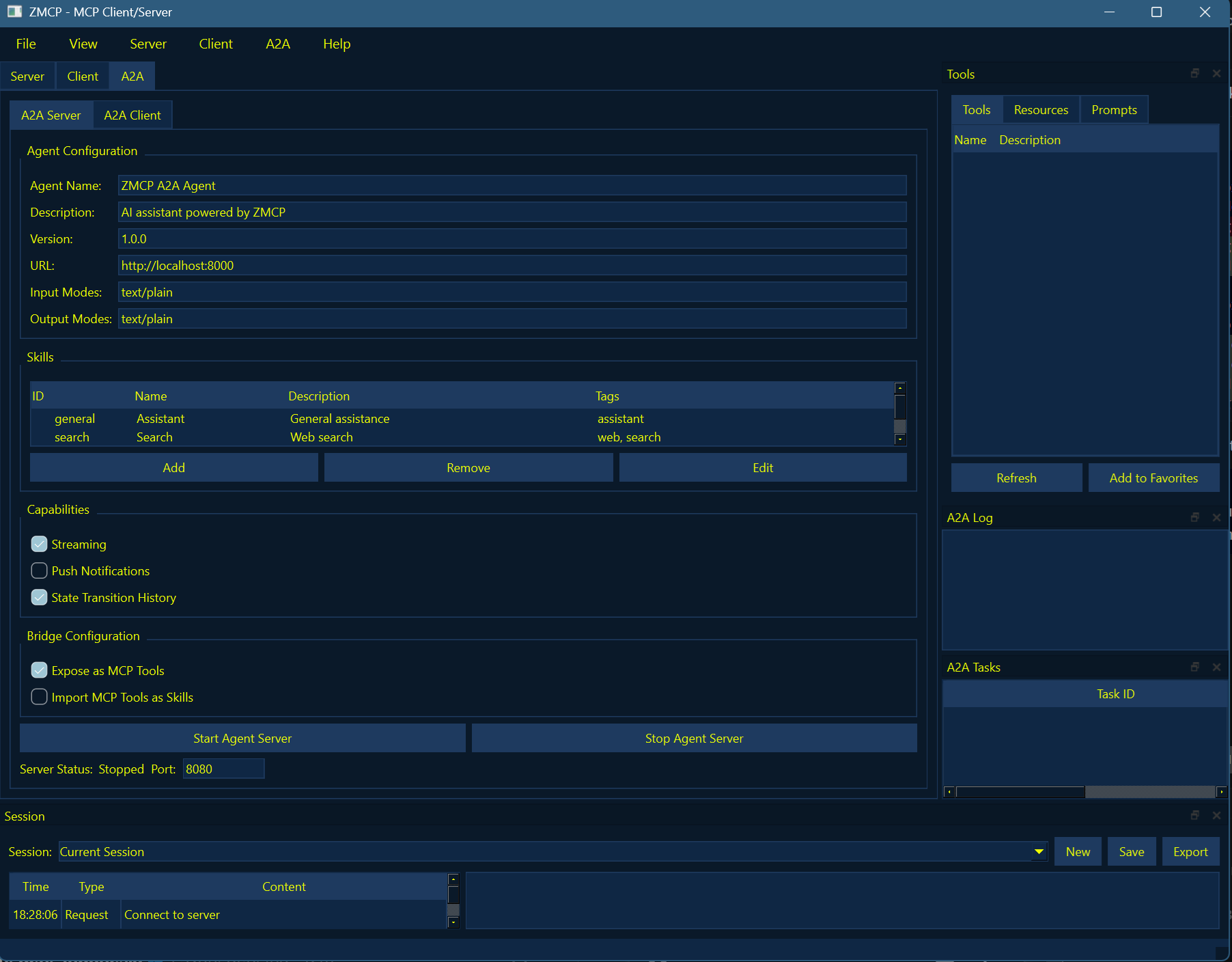
ZMCP is a desktop application implementing the Model Context Protocol (MCP) and A2A protocols. It provides both server and client capabilities in a modern, modular interface.

Features
Server Features
Flexible Server Configuration: Dynamically load and configure multiple MCP tool providers with visual configuration interface
Tool Management: Predefined tools with easy-to-use interfaces
Protocol Support: Full MCP specification compliance with support for tools, resources, and prompts
Performance Monitoring: Track server activity and performance metrics
Client Features
Server Connection Management: Connect to multiple MCP servers with secure authentication
Tool Discovery and Usage: Automatically discover and use tools from connected servers
Interactive Session Management: Create, save, and manage interaction sessions
Response Visualization: Display various content types in rich text format
Related MCP server: Calculator MCP Server
Installation
Setup
Clone the repository:
git clone https://github.com/mexyusef/zmcp.git
cd zmcpInstall dependencies:
pip install -r requirements.txtUsage
Running the Application
Run the application using the provided startup script:
python run.pyServer Mode
Go to the "Server" tab
Configure the server settings
Add and configure tools
Click "Start Server" to begin hosting
Client Mode
Go to the "Client" tab
Enter the server URL (e.g., http://localhost:8000)
Click "Connect" to connect to the server
Browse available tools, resources, and prompts
Select and use tools with the provided interface
Predefined Tools
ZMCP comes with several predefined tools:
Web Fetch: Fetch content from web URLs
System Info: Get information about the system
File Manager: Read, write, and list files
Process Manager: Execute and manage processes
Memory Tool: Store and retrieve memories
Customization
ZMCP can be customized in various ways:
Theme: Choose between light and dark themes
Layout: Adjust panel positions and visibility
Server Configuration: Configure server settings through the visual interface
Tool Configuration: Enable/disable and configure individual tools
Bridge Module
The ZMCP bridge module provides a way to connect the MCP and A2A protocols, allowing:
MCP Tools as A2A Agents: Convert MCP tools to A2A agents using the
MCPToolToA2AAgentclass.A2A Agents as MCP Tools: Convert A2A agents to MCP tools using the
A2AAgentToMCPToolclass.
Examples
Converting an MCP Tool to an A2A Agent
from zmcp.core.mcp import Tool as MCPTool
from zmcp.bridge.mcp_to_a2a import MCPToolToA2AAgent
# Create an MCP tool
async def handler(**kwargs):
return [{"type": "text", "text": f"Tool response: {kwargs.get('input', '')}"}]
mcp_tool = MCPTool(
name="calculator",
description="A simple calculator tool",
handler=handler,
input_schema={
"type": "object",
"properties": {
"input": {
"type": "string",
"description": "Math expression to calculate"
}
}
}
)
# Convert to A2A agent
bridge = MCPToolToA2AAgent(mcp_tool)
# Create a FastAPI app for the A2A agent
app = bridge.create_app()
# Run the app
import uvicorn
uvicorn.run(app, host="0.0.0.0", port=8000)Converting an A2A Agent to MCP Tools
import httpx
from zmcp.a2a.types import AgentCard
from zmcp.bridge.a2a_to_mcp import A2AAgentToMCPTool
# Create or load an agent card
agent_card = AgentCard(
id="math-agent",
name="Math Agent",
description="An agent that can do math",
skills=[
{
"id": "calculate",
"name": "Calculate",
"description": "Calculate a math expression"
}
]
)
# Create the bridge
bridge = A2AAgentToMCPTool(agent_card)
# Get the MCP tools
tools = bridge.get_tools()
# Use the tools
async def use_tools():
result = await tools[0].handler(text="2 + 2")
print(result)
# Clean up
await bridge.close()License
This server cannot be installed
Resources
Unclaimed servers have limited discoverability.
Looking for Admin?
If you are the server author, to access and configure the admin panel.