Glama

mcp-pandoc-md2pptx: Markdown to PowerPoint Converter

A Model Context Protocol server for converting Markdown content to PowerPoint (PPTX) presentations using pandoc.

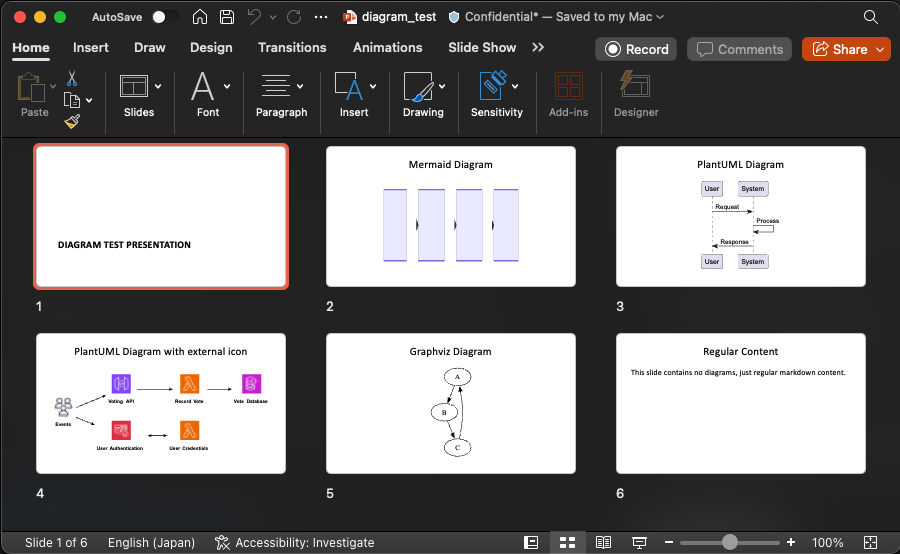
demo

Overview

This MCP server provides a simple tool to transform Markdown content into PowerPoint presentations while preserving formatting and structure. Perfect for creating presentations from documentation, notes, or any Markdown content.

Related MCP server: Deckbuilder MCP Server

Tools

  1. convert-contents

    • Converts Markdown content to PowerPoint (PPTX) format

    • Inputs:

      • contents (string): Markdown content to convert (required if input_file not provided)

      • input_file (string): Path to Markdown input file (required if contents not provided)

      • output_file (string): Complete path for PPTX output file (required)

      • template (string): Path to a template PPTX document to use for styling (optional)

Usage & Configuration

{
  "mcpServers": {
    "mcp-pandoc-md2pptx": {
      "command": "uvx",
      "args": ["mcp-pandoc-md2pptx"]
    }
  }
}

Prerequisites

  1. Pandoc Installation

    # macOS
    brew install pandoc
    
    # Ubuntu/Debian
    sudo apt-get install pandoc
    
    # Windows
    # Download from: https://pandoc.org/installing.html
  2. UV Package Installation

    # macOS
    brew install uv
    
    # Windows/Linux
    pip install uv

Examples

Basic Conversion

"Convert this markdown to PowerPoint and save as /presentations/demo.pptx:
# My Presentation
## Slide 1
Content here"

File Conversion

"Convert /path/to/input.md to PPTX and save as /path/to/output.pptx"

With Custom Template

"Convert markdown to PPTX using /templates/theme.pptx as template and save as /presentations/styled.pptx"

Template Support

Create custom PowerPoint templates for consistent branding:

  1. Generate default template:

    pandoc -o template.pptx --print-default-data-file reference.pptx
  2. Customize in PowerPoint with your fonts, colors, and slide layouts

  3. Use in conversion:

    "Convert content using /path/to/template.pptx as template"

Installation

Option 1: Manual Configuration

Add to your Claude Desktop config:

  • macOS: ~/Library/Application Support/Claude/claude_desktop_config.json

  • Windows: %APPDATA%/Claude/claude_desktop_config.json

{
  "mcpServers": {
    "mcp-pandoc-md2pptx": {
      "command": "uvx",
      "args": ["mcp-pandoc-md2pptx"]
    }
  }
}

Option 2: Smithery (Automatic)

npx -y @smithery/cli install mcp-pandoc-md2pptx --client claude

Development

Testing

uv run pytest

Building

uv sync
uv build

Publishing

uv publish

Contributing

  1. Report Issues: GitHub Issues

  2. Submit Pull Requests: Improve the codebase or add features

Acknowledgement

Special thanks to MCP Pandoc and pandoc-ext/diagram


Simple, focused Markdown to PowerPoint conversion via MCP

Available Tools

1 tool
convert-contentsA

Converts Markdown content to PowerPoint (PPTX) format.

๐Ÿšจ REQUIREMENTS:

  1. Input: Only Markdown format is supported

  2. Output: Only PPTX format is supported

  3. File Path: Complete output path with filename and .pptx extension is required

โœ… Usage Example: 'Convert this markdown to PowerPoint and save as /presentations/demo.pptx'

๐ŸŽจ PPTX STYLING:

  • Use template parameter to apply custom PowerPoint templates

  • Create templates with your branding, fonts, and slide layouts

  • Example: 'Convert markdown to PPTX using /templates/theme.pptx as template and save as /presentations/pitch.pptx'

โžก๏ธ Diagram Support:

  • Diagram using mermaid, plantuml, graphviz is supported by default. Referencing external resource in plantuml is also supported.

  • Example:

@startuml Two Modes - Technical View
' Uncomment the line below for "dark mode" styling
'!$AWS_DARK = true

!define AWSPuml https://raw.githubusercontent.com/awslabs/aws-icons-for-plantuml/v20.0/dist
!include AWSPuml/AWSCommon.puml

!include AWSPuml/AWSSimplified.puml
!include AWSPuml/General/Users.puml
!include AWSPuml/NetworkingContentDelivery/APIGateway.puml
!include AWSPuml/SecurityIdentityCompliance/Cognito.puml
!include AWSPuml/Compute/Lambda.puml
!include AWSPuml/Database/DynamoDB.puml

left to right direction

Users(sources, "Events", "millions of users")
APIGateway(votingAPI, "Voting API", "user votes")
Cognito(userAuth, "User Authentication", "jwt to submit votes")
Lambda(generateToken, "User Credentials", "return jwt")
Lambda(recordVote, "Record Vote", "enter or update vote per user")
DynamoDB(voteDb, "Vote Database", "one entry per user")

sources --> userAuth
sources --> votingAPI
userAuth <--> generateToken
votingAPI --> recordVote
recordVote --> voteDb
@enduml

๐Ÿ“‹ Creating Reference Documents:

  • Generate PPTX template: pandoc -o template.pptx --print-default-data-file reference.pptx

  • Customize in PowerPoint: fonts, colors, slide layouts

ParametersJSON Schema
NameRequiredDescriptionDefault
contentsNoMarkdown content to be converted (required if input_file not provided)
input_fileNoComplete path to Markdown input file (e.g., '/path/to/input.md')
output_fileNoComplete path where to save the PPTX output including filename and .pptx extension (required)
templateNoPath to a template PPTX document to use for styling

TDQS

A4.4/5.0
Behavior4/5

Does the description disclose side effects, auth requirements, rate limits, or destructive behavior?

With no annotations, the description must carry the burden. It discloses key behaviors: supports only Markdown input and PPTX output, requires complete file paths, supports diagram types (mermaid, plantuml, graphviz), and template usage. No contradictions. It could mention error handling or file size limits, but overall transparent.

Agents need to know what a tool does to the world before calling it. Descriptions should go beyond structured annotations to explain consequences.

Conciseness4/5

Is the description appropriately sized, front-loaded, and free of redundancy?

The description is moderately long but well-structured using headings, bullet points, and examples. Every section adds value (requirements, examples, diagram support, template creation). The core purpose is front-loaded, and the format is scannable. Could be slightly more concise, but effective.

Shorter descriptions cost fewer tokens and are easier for agents to parse. Every sentence should earn its place.

Completeness5/5

Given the tool's complexity, does the description cover enough for an agent to succeed on first attempt?

Given the tool's complexity (4 params, no output schema, no siblings), the description covers all necessary aspects: input/output formats, file path requirements, template usage, diagram support, and even how to generate templates. It provides complete guidance for correct invocation.

Complex tools with many parameters or behaviors need more documentation. Simple tools need less. This dimension scales expectations accordingly.

Parameters4/5

Does the description clarify parameter syntax, constraints, interactions, or defaults beyond what the schema provides?

Input schema has 100% description coverage, so baseline is 3. The description adds significant value beyond schema: explains the oneOf relationship between contents and input_file, provides real usage examples for template, and details diagram support. This extra context justifies a score of 4.

Input schemas describe structure but not intent. Descriptions should explain non-obvious parameter relationships and valid value ranges.

Purpose5/5

Does the description clearly state what the tool does and how it differs from similar tools?

The description explicitly states 'Converts Markdown content to PowerPoint (PPTX) format.' It clearly identifies the input format (Markdown), output format (PPTX), and the tool's action, leaving no ambiguity. With no sibling tools, differentiation is irrelevant, but the description is exceptionally clear.

Agents choose between tools based on descriptions. A clear purpose with a specific verb and resource helps agents select the right tool.

Usage Guidelines4/5

Does the description explain when to use this tool, when not to, or what alternatives exist?

The description provides explicit requirements: input must be Markdown, output only PPTX, complete file path required. It includes usage examples and mentions template and diagram support. While it lacks explicit 'when not to use' or alternative tools (none exist), the context is very clear and practical.

Agents often have multiple tools that could apply. Explicit usage guidance like "use X instead of Y when Z" prevents misuse.

TDQS

A4.5/5.0
Disambiguation5/5

With only one tool, there is no possibility of ambiguity or overlap. The tool's purpose is clearly defined and distinct.

Naming Consistency5/5

The single tool 'convert-contents' uses a clear and descriptive verb_noun pattern. Consistency is not an issue with only one tool.

Tool Count4/5

One tool is appropriate for a focused converter server. However, the tool must handle multiple aspects (templates, diagrams), which could justify additional tools for better separation.

Completeness5/5

The tool covers all necessary functionality for the Markdown-to-PPTX conversion use case: input format, template support, diagram rendering, and file output. No obvious gaps.

Maintenance

ActivityInactive
ResponsivenessSyncing

Resources

Unclaimed servers have limited discoverability.

Looking for Admin?

If you are the server author, to access and configure the admin panel.

Related MCP Connectors

Related MCP Servers

Latest Blog Posts

MCP directory API

We provide all the information about MCP servers via our MCP API.

curl -X GET 'https://glama.ai/api/mcp/v1/servers/maekawataiki/mcp-pandoc-md2pptx'

If you have feedback or need assistance with the MCP directory API, please join our Discord server