

A
licenseC
qualityD
maintenanceA Model Context Protocol (MCP) server implementation that allows AI assistants to run k6 load tests through natural language commands, supporting custom test durations and virtual users.
2
27
MIT

The Locust MCP Server enables you to run configurable load tests with seamless AI integration.
Execute load tests: Run tests with configurable parameters (users, spawn rate, runtime)
Flexible modes: Supports both headless and UI-based execution
Custom scenarios: Define custom task scenarios in your test scripts
Real-time output: Monitor test execution as it happens
Protocol support: Built-in HTTP/HTTPS protocol handling
API access: Easy-to-use API for programmatic test execution
AI integration: Seamlessly works with Model Context Protocol for AI-powered development environments
Enables running Locust load tests with configurable parameters (users, spawn rate, runtime) for HTTP/HTTPS performance testing through a simple API.
Click on "Deploy Server".
Wait a few minutes for the server to deploy. Once ready, it will show a "Started" state.
In the chat, type @ followed by the MCP server name and your instructions, e.g., "@Locust MCP Server run a load test on my API with 100 users for 2 minutes"
That's it! The server will respond to your query, and you can continue using it as needed.
Here is a step-by-step guide with screenshots.
A Model Context Protocol (MCP) server implementation for running Locust load tests. This server enables seamless integration of Locust load testing capabilities with AI-powered development environments.
Simple integration with Model Context Protocol framework
Support for headless and UI modes
Configurable test parameters (users, spawn rate, runtime)
Easy-to-use API for running Locust load tests
Real-time test execution output
HTTP/HTTPS protocol support out of the box
Custom task scenarios support
Related MCP server: JMeter MCP Server
Before you begin, ensure you have the following installed:
Python 3.13 or higher
uv package manager (Installation guide)
Clone the repository:
git clone https://github.com/qainsights/locust-mcp-server.gitInstall the required dependencies:
uv pip install -r requirements.txtSet up environment variables (optional):
Create a .env file in the project root:
LOCUST_HOST=http://localhost:8089  # Default host for your tests
LOCUST_USERS=3                     # Default number of users
LOCUST_SPAWN_RATE=1               # Default user spawn rate
LOCUST_RUN_TIME=10s # Default test durationCreate a Locust test script (e.g., hello.py):
from locust import HttpUser, task, between

class QuickstartUser(HttpUser):
    wait_time = between(1, 5)

    @task
    def hello_world(self):
        self.client.get("/hello")
        self.client.get("/world")

    @task(3)
    def view_items(self):
        for item_id in range(10):
            self.client.get(f"/item?id={item_id}", name="/item")
            time.sleep(1)

    def on_start(self):
        self.client.post("/login", json={"username":"foo", "password":"bar"})
Configure the MCP server using the below specs in your favorite MCP client (Claude Desktop, Cursor, Windsurf and more):
{
  "mcpServers": {
    "locust": {
      "command": "/Users/naveenkumar/.local/bin/uv",
      "args": [
        "--directory",
        "/Users/naveenkumar/Gits/locust-mcp-server",
        "run",
        "locust_server.py"
      ]
    }
  }
}
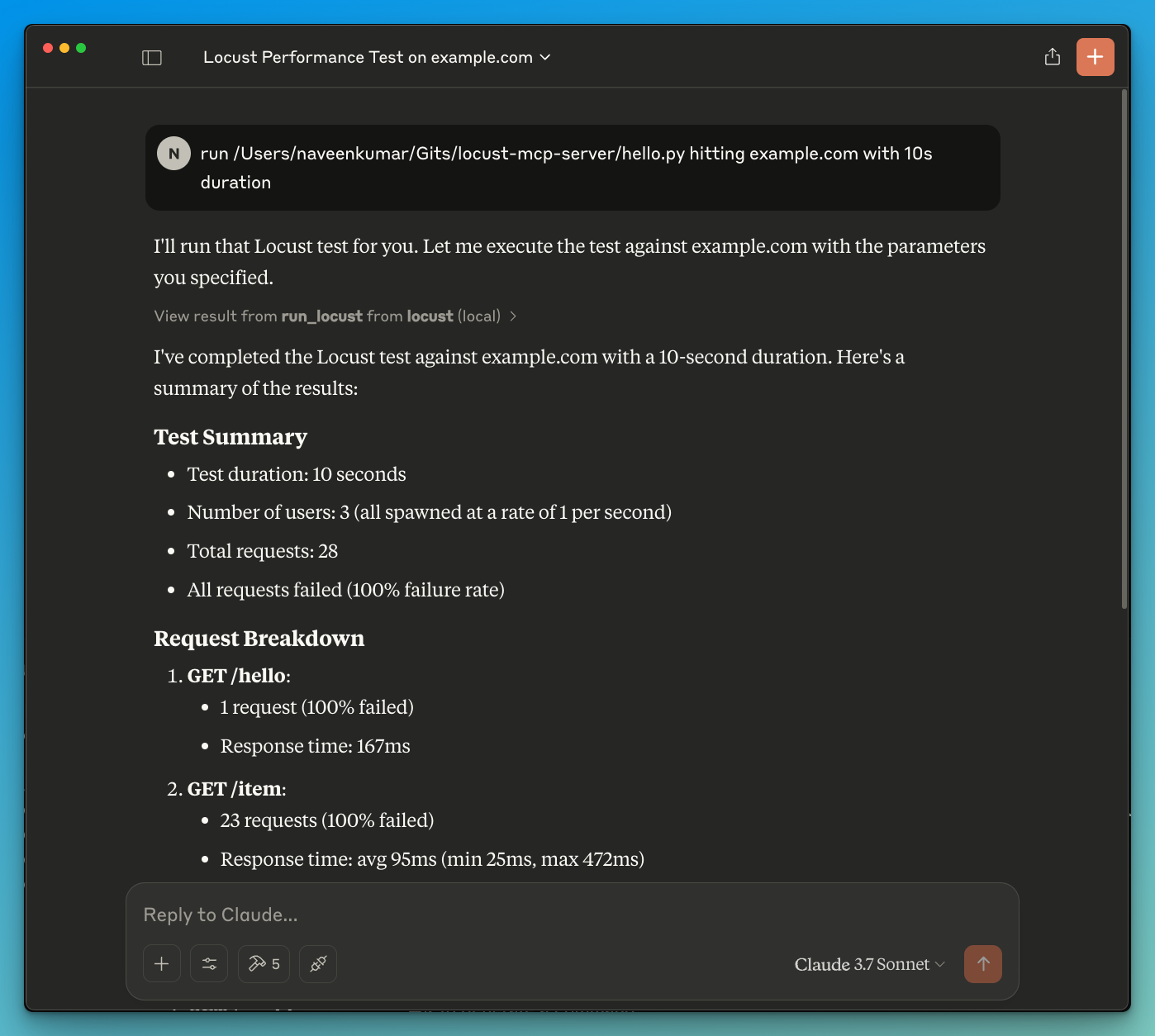
Now ask the LLM to run the test e.g. run locust test for hello.py. The Locust MCP server will use the following tool to start the test:
run_locust: Run a test with configurable options for headless mode, host, runtime, users, and spawn rate
run_locust(
    test_file: str,
    headless: bool = True,
    host: str = "http://localhost:8089",
    runtime: str = "10s",
    users: int = 3,
    spawn_rate: int = 1
)
Parameters:
test_file: Path to your Locust test script
headless: Run in headless mode (True) or with UI (False)
host: Target host to load test
runtime: Test duration (e.g., "30s", "1m", "5m")
users: Number of concurrent users to simulate
spawn_rate: Rate at which users are spawned
LLM powered results analysis
Effective debugging with the help of LLM
Contributions are welcome! Please feel free to submit a Pull Request.
This project is licensed under the MIT License - see the LICENSE file for details.
Run Locust with the given configuration.
| Name | Required | Description | Default |
|---|---|---|---|
| test_file | Yes | ||
| host | No | http://localhost:8089 | |
| users | No | ||
| spawn_rate | No | ||
| runtime | No | 30s | |
| headless | No |
Does the description disclose side effects, auth requirements, rate limits, or destructive behavior?
No annotations are provided, so the description carries the full burden of behavioral disclosure. It mentions 'run' but doesn't clarify if this is a read-only operation, if it modifies state (e.g., starts a process), potential side effects (e.g., consuming resources), or expected outputs (e.g., test results). This leaves significant gaps in understanding the tool's behavior.
Agents need to know what a tool does to the world before calling it. Descriptions should go beyond structured annotations to explain consequences.
Is the description appropriately sized, front-loaded, and free of redundancy?
The description is a single, straightforward sentence that is front-loaded and wastes no words. However, it's overly concise to the point of under-specification, which slightly reduces its effectiveness. Still, it's structurally sound with no redundant information.
Shorter descriptions cost fewer tokens and are easier for agents to parse. Every sentence should earn its place.
Given the tool's complexity, does the description cover enough for an agent to succeed on first attempt?
Given the complexity (6 parameters, no annotations, no output schema), the description is incomplete. It doesn't cover what the tool does beyond a high-level action, leaving the agent unsure about execution details, results, or error handling. This inadequacy is notable for a tool with multiple configuration options.
Complex tools with many parameters or behaviors need more documentation. Simple tools need less. This dimension scales expectations accordingly.
Does the description clarify parameter syntax, constraints, interactions, or defaults beyond what the schema provides?
Schema description coverage is 0%, so the description must compensate but fails to do so. It doesn't explain any parameters beyond implying a 'configuration' exists. For example, it doesn't clarify what 'test_file' should contain, the meaning of 'users' or 'spawn_rate', or how 'runtime' is formatted. This leaves all 6 parameters poorly understood.
Input schemas describe structure but not intent. Descriptions should explain non-obvious parameter relationships and valid value ranges.
Does the description clearly state what the tool does and how it differs from similar tools?
The description 'Run Locust with the given configuration' states the action ('Run') and target ('Locust'), but it's vague about what Locust is (a load testing tool) and what 'run' entails (e.g., executing tests). It doesn't distinguish from siblings, but since there are none, this is less critical. However, the purpose remains somewhat ambiguous without context.
Agents choose between tools based on descriptions. A clear purpose with a specific verb and resource helps agents select the right tool.
Does the description explain when to use this tool, when not to, or what alternatives exist?
The description provides no guidance on when to use this tool, such as for performance testing scenarios, prerequisites (e.g., having Locust installed), or alternatives. With no sibling tools, differentiation isn't needed, but it still lacks any usage context, leaving the agent to infer from the tool name and parameters alone.
Agents often have multiple tools that could apply. Explicit usage guidance like "use X instead of Y when Z" prevents misuse.
Recent tool additions, removals, and schema changes observed during successful MCP inspections.
run_locustScored across 1 tool
With only one tool, there is no possibility of confusion or overlap between tools. The single tool 'run_locust' has a clear and distinct purpose that cannot be mistaken for any other tool in this set.
The single tool name 'run_locust' follows a clear verb_noun pattern, and with only one tool, there is perfect consistency. There are no other tools to compare against, so no inconsistencies can exist.
A single tool is too few for most server purposes, as it severely limits functionality and flexibility. For a Locust server, one might expect additional tools for tasks like configuring tests, viewing results, or managing load scenarios, making this set feel incomplete and under-scoped.
The tool set is severely incomplete for a Locust server, which typically involves multiple aspects of load testing such as setup, execution, monitoring, and analysis. With only a 'run' tool, there are significant gaps that will cause agent failures, as it lacks coverage for configuration management, result retrieval, or test lifecycle operations.
MCP server for building and testing AI agents with multi-model experimentation and insights.
Load & browser performance testing — drive MaxoPerf from your AI agent with your API key.
Drive OctoPerf load testing from any AI agent: import, edit, validate, run scenarios, read metrics.
The Polar Signals MCP server enables AI assistants to connect directly with performance profiling data, allowing users to analyze application performance through natural language queries. Key capabilities include querying CPU performance and memory usage, exploring profiling metadata like profile types and labels, and providing AI-driven code optimization suggestions directly within development environments like Claude Code or Cursor.