siglent-sds-mcp


A Model Context Protocol (MCP) server that lets AI assistants control Siglent oscilloscopes over your local network. Connect Claude to your bench and measure, capture, and configure your scope through natural language.
Overview
This MCP server communicates with Siglent SDS oscilloscopes via SCPI commands over TCP sockets (port 5025). No VISA drivers or NI-MAX installation required — just a network connection to your scope.
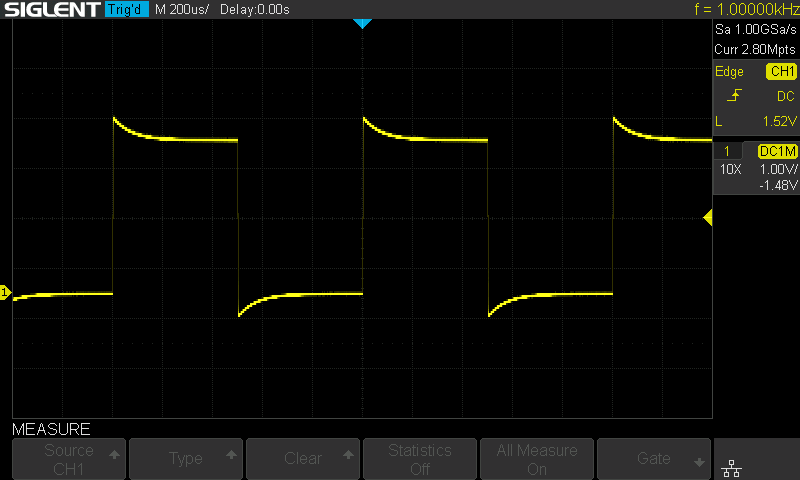
Oscilloscope display captured through the screenshot MCP tool.
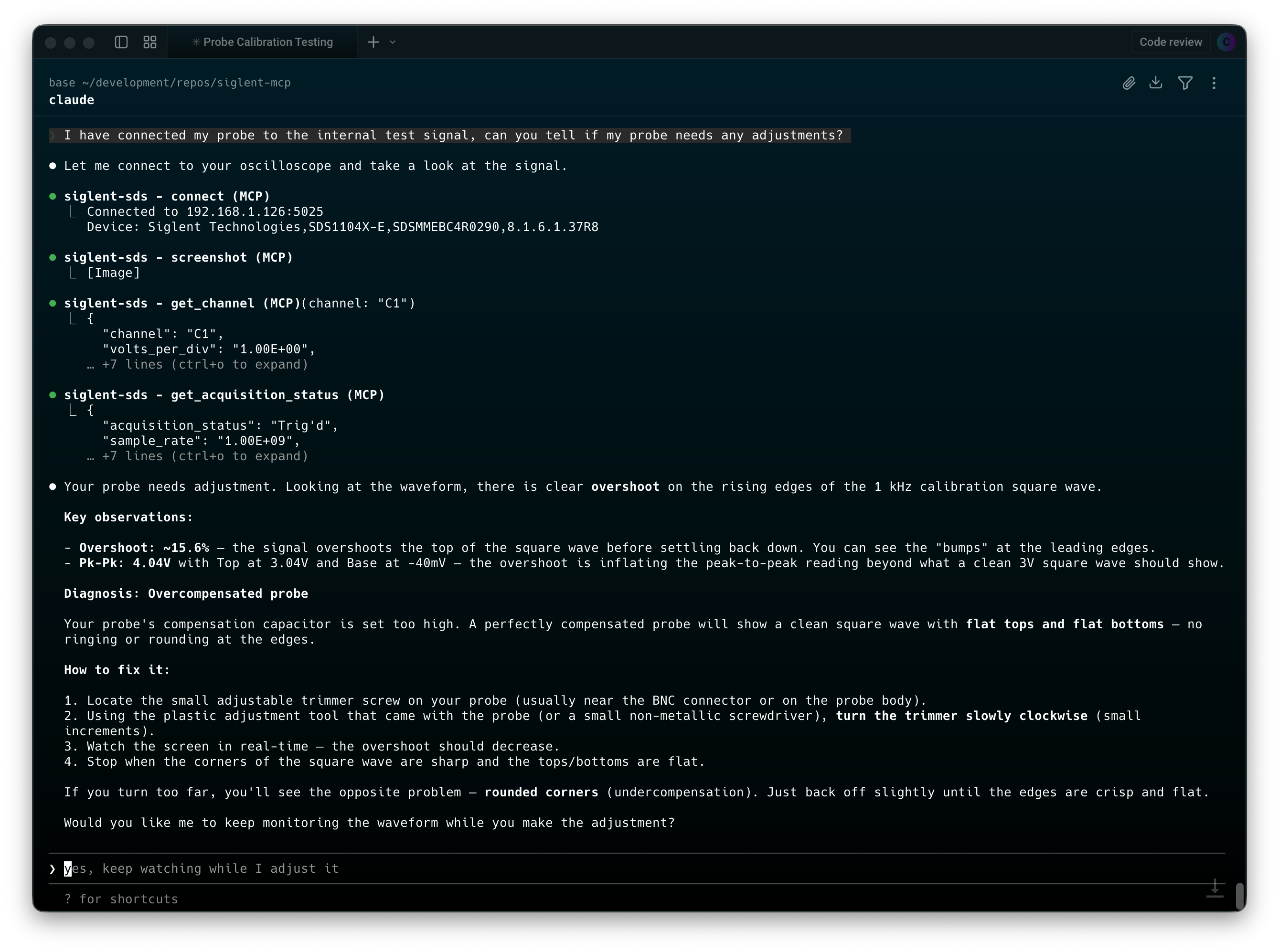
Natural-language scope control and measurement workflow in the terminal.
Key features:
12 tools covering channels, timebase, triggers, measurements, waveform capture, and screenshots
Auto-connect on startup via environment variable
Query queue serializes commands automatically — tools can safely run in parallel
Waveform data returned as voltage/time arrays ready for analysis
Screenshots captured and converted to PNG for inline display in Claude
Raw SCPI escape hatch for any command not covered by the built-in tools
Related MCP server: SkippyMCP
Compatibility
Status | Model |
Tested | SDS1104X-E |
Expected to work | SDS1000X-E series (SDS1202X-E, SDS1204X-E, etc.) |
May work | Other Siglent SDS models with SCPI over TCP support |
The server uses standard SCPI commands from the SDS1000X-E Programming Guide. Other Siglent models that support the same command set over port 5025 should work with little or no modification.
Quick Start
You need a Siglent oscilloscope accessible on your network (TCP port 5025). Pick one of the three options below and add the config to your .mcp.json (in your project directory, or ~/.claude/.mcp.json for global access).
Replace 192.168.1.126 with your scope's IP address.
Option A: Docker (recommended)
No Node.js installation required. Works on Linux, macOS, and Windows (via WSL2 or Docker Desktop).
{
  "mcpServers": {
    "siglent-sds": {
      "type": "stdio",
      "command": "docker",
      "args": [
        "run", "--rm", "-i",
        "-e", "SIGLENT_IP=192.168.1.126",
        "ghcr.io/magnusjohansson/siglent-sds-mcp:latest"
      ]
    }
  }
}
Option B: npx
Requires Node.js 20+. Downloads and runs the package automatically.
{
  "mcpServers": {
    "siglent-sds": {
      "type": "stdio",
      "command": "npx",
      "args": ["-y", "siglent-sds-mcp"],
      "env": {
        "SIGLENT_IP": "192.168.1.126"
      }
    }
  }
}
Option C: Clone and build
git clone https://github.com/magnusjohansson/siglent-sds-mcp.git
cd siglent-sds-mcp
npm install
npm run build
{
  "mcpServers": {
    "siglent-sds": {
      "type": "stdio",
      "command": "node",
      "args": ["/path/to/siglent-sds-mcp/build/index.js"],
      "env": {
        "SIGLENT_IP": "192.168.1.126"
      }
    }
  }
}
Replace /path/to/siglent-sds-mcp with the actual path to your clone.
Environment Variables
Variable | Required | Default | Description |
SIGLENT_IP
| No | — | Oscilloscope IP address for auto-connect on startup. Always allowed as a connect target. |
SIGLENT_PORT
| No | 5025
| TCP port (only change if your setup differs) |
SIGLENT_ALLOWED_HOSTS
| No | — | Comma-separated hosts connect may reach besides SIGLENT_IP. If neither is set, only private-LAN IP addresses are accepted. |
SIGLENT_ALLOW_RAW_SCPI
| No | false
| Registers the raw scpi_command tool. Requires SIGLENT_IP or SIGLENT_ALLOWED_HOSTS naming specific hosts. |
SIGLENT_IDLE_TIMEOUT
| No | 0 (never)
| Seconds of inactivity after which the scope connection is released (at most about 24 days). The next tool call reconnects automatically. |
Invalid values (e.g. a non-numeric port) stop the server at startup instead of being ignored.
Auto-Connect Behavior
If SIGLENT_IP is set, the server attempts to connect to the scope immediately after starting. This runs in the background and does not block the MCP server — Claude can start using other tools right away. If the scope is offline or unreachable, the server logs a warning and you can connect manually later using the connect tool.
If SIGLENT_IP is not set, the server starts without a scope connection. Use the connect tool to connect when ready.
If the connection is closed (by the idle timeout, a reset after a timeout, or the scope restarting), the next tool call reconnects automatically to the last host, subject to the same host policy as connect. An explicit disconnect turns this off until connect is called again.
One Client at a Time
The scope serves a single TCP client on port 5025. A second client can open the socket but gets no replies, so the server reports that the scope is probably in use by another program. If more than one MCP client uses the same scope, set SIGLENT_IDLE_TIMEOUT (e.g. 60) in each so an idle server releases the scope for the other.
Using with Other AI Clients
The Quick Start examples above use Claude Code's .mcp.json format, which includes a "type": "stdio" field. Other AI clients use the same JSON structure but without the "type" field and with different config file locations.
Claude Desktop
Edit claude_desktop_config.json:
Docker
{
  "mcpServers": {
    "siglent-sds": {
      "command": "docker",
      "args": [
        "run", "--rm", "-i",
        "-e", "SIGLENT_IP=192.168.1.126",
        "ghcr.io/magnusjohansson/siglent-sds-mcp:latest"
      ]
    }
  }
}
npx
{
  "mcpServers": {
    "siglent-sds": {
      "command": "npx",
      "args": ["-y", "siglent-sds-mcp"],
      "env": {
        "SIGLENT_IP": "192.168.1.126"
      }
    }
  }
}
Note: You must fully restart Claude Desktop after changing the config file.
Cursor
Edit one of:
You can also add servers through the UI: Settings > Cursor Settings > MCP > Add new global MCP server.
Docker
{
  "mcpServers": {
    "siglent-sds": {
      "command": "docker",
      "args": [
        "run", "--rm", "-i",
        "-e", "SIGLENT_IP=192.168.1.126",
        "ghcr.io/magnusjohansson/siglent-sds-mcp:latest"
      ]
    }
  }
}
npx
{
  "mcpServers": {
    "siglent-sds": {
      "command": "npx",
      "args": ["-y", "siglent-sds-mcp"],
      "env": {
        "SIGLENT_IP": "192.168.1.126"
      }
    }
  }
}
Windsurf
Edit mcp_config.json:
You can also configure servers through the UI: Cascade panel > MCP icon > Manage MCP Servers > View raw config.
Docker
{
  "mcpServers": {
    "siglent-sds": {
      "command": "docker",
      "args": [
        "run", "--rm", "-i",
        "-e", "SIGLENT_IP=192.168.1.126",
        "ghcr.io/magnusjohansson/siglent-sds-mcp:latest"
      ]
    }
  }
}
npx
{
  "mcpServers": {
    "siglent-sds": {
      "command": "npx",
      "args": ["-y", "siglent-sds-mcp"],
      "env": {
        "SIGLENT_IP": "192.168.1.126"
      }
    }
  }
}
Google Antigravity
Configuration is managed through the IDE's UI:
Open the Agent pane on the right side of the workspace
Click the ... button at the top
Select MCP Servers
Click Manage MCP Servers
Click View raw config
Add the configuration below and save
Docker
{
  "mcpServers": {
    "siglent-sds": {
      "command": "docker",
      "args": [
        "run", "--rm", "-i",
        "-e", "SIGLENT_IP=192.168.1.126",
        "ghcr.io/magnusjohansson/siglent-sds-mcp:latest"
      ]
    }
  }
}
npx
{
  "mcpServers": {
    "siglent-sds": {
      "command": "npx",
      "args": ["-y", "siglent-sds-mcp"],
      "env": {
        "SIGLENT_IP": "192.168.1.126"
      }
    }
  }
}
Replace 192.168.1.126 with your scope's IP address in all examples above.
ChatGPT Desktop
ChatGPT Desktop only supports remote HTTPS MCP servers (called "connectors"), not local stdio servers. Since this MCP server uses stdio transport, it is not directly compatible with ChatGPT Desktop.
Tools
12 tools across 6 categories by default, plus scpi_command when raw SCPI is enabled. See docs/tools-reference.md for full parameter details.
Category | Tool | Description |
Connection | connect
| Connect to oscilloscope over TCP |
| disconnect
| Close the connection |
| identify
| Query device ID (manufacturer, model, serial, firmware) |
Channel | get_channel
| Read channel configuration (vdiv, offset, coupling, etc.) |
| configure_channel
| Set vdiv, offset, coupling, bandwidth limit, trace, probe |
Acquisition | get_acquisition_status
| Read timebase, sample rate, trigger settings |
| configure_acquisition
| Set timebase, trigger, run/stop/single |
Measurement | measure
| Read a measurement (frequency, Vpp, RMS, etc.) |
| measure_statistics
| Enable/read/reset measurement statistics |
Waveform | get_waveform
| Download voltage/time data arrays |
| screenshot
| Capture scope screen as PNG |
SCPI | scpi_query
| Send a SCPI query (queries only) |
| scpi_command
| Send a raw SCPI command. Off by default; see Security |
Security
Tool arguments come from a language model, which may have been steered by content it read (a datasheet, a web page, a previous tool result). The server therefore treats every argument as untrusted and enforces its checks in the connection layer, the single point every command passes through before it reaches the scope. See docs/threat-model.md for the full analysis.
One command per write. Newlines, other control characters and ; are rejected in every command and query, so a parameter can't smuggle in a second command.
scpi_query only sends queries: a single header immediately followed by ?. Parameters after ? are only accepted for PAVA? (e.g. C1:PAVA? FREQ). * commands only as pure queries (*IDN?, *OPC?, ...); commands the programming guide documents without a query form (ASET?, ARM, SET50?, MEACL?, ...) and queries that clear a status register as they read it (INR?, *ESR?) are refused.
Strict formats for every free-text parameter: voltages (500mV), times (1US).
connect is restricted to SIGLENT_IP, SIGLENT_ALLOWED_HOSTS, or, if neither is set, private-LAN IP addresses, on the instrument port. Loopback, link-local (cloud metadata) and host names are refused. The same check applies to automatic reconnects.
Raw scpi_command is off by default. Set SIGLENT_ALLOW_RAW_SCPI=true to enable it; it also requires named hosts (* is not accepted).
Replies stay matched to their queries. After a timeout, or if a command unexpectedly produces output, the connection is reset so a late reply can't be read as the answer to the next query.
What it does not protect against:
Settings that can harm the scope or the circuit. configure_channel can switch a channel to 50 Ω input coupling (A50/D50) on models that have it. A signal above the 50 Ω input's rating can then exceed what the input is specified for; check your scope's manual. With raw SCPI enabled, the model can change any setting.
Other clients on port 5025. The instrument has no authentication: anyone with network access to it can control it directly, without this server. Network segmentation is the control for that.
Who is calling. In stdio mode, whoever can start the server has full access.
Example Conversations
Read a channel configuration
You: What's the current setup on channel 1?
Claude calls get_channel with channel: "C1" and returns the volts/div, offset, coupling, and other settings.
Measure a signal
You: Measure the frequency and peak-to-peak voltage on channel 2.
Claude calls measure twice — once with parameter: "FREQ" and once with parameter: "PKPK" on channel C2 — and reports both values.
Capture and analyze a waveform
You: Download the waveform from channel 1 and tell me what you see.
Claude calls get_waveform on C1, receives voltage/time data, and analyzes the signal shape, frequency, amplitude, and any anomalies.
Take a screenshot
You: Show me what the scope screen looks like right now.
Claude calls screenshot, receives a base64 BMP image, and displays it inline.
Configure the scope for a specific measurement
You: Set up channel 1 for a 3.3V logic signal — DC coupling, 1V/div, trigger on the rising edge at 1.6V.
Claude calls configure_channel (setting vdiv, coupling) and configure_acquisition (setting trigger source, level, slope) in sequence.
Architecture
Claude Code <-- stdio/JSON-RPC --> siglent-sds-mcp <-- TCP/SCPI --> Oscilloscope:5025
Transport: MCP over stdio (JSON-RPC 2.0)
Protocol: SCPI commands over raw TCP sockets, newline-terminated
Security checks: Every command and query passes through the connection layer, which checks it before writing to the socket (see Security).
Query Queue: All SCPI queries are serialized through an internal queue. The oscilloscope processes one command at a time, so even when tools issue parallel requests (via Promise.all), the queue ensures they're sent sequentially.
Binary Block Parsing: Waveform and screenshot data use IEEE 488.2 definite-length block format (#9XXXXXXXXX + data bytes + \n\n). The connection layer detects and parses these automatically.
Voltage Reconstruction: Raw ADC codes are converted to voltages: code * (vdiv / 25) - offset, with two's complement handling for signed values.
Development
npm run build       # Compile TypeScript
npm run watch       # Watch mode — recompile on changes
npm run dev         # Build and run
npm run inspector   # Launch with MCP Inspector for debugging
npm test            # Unit, integration and end-to-end security tests (SCPI simulator)
npm run hardware-check -- <scope-ip>   # Security checks against a real scope; restores the settings it changes
npm run e2e-loopback -- <generator-ip> <scope-ip>   # Siglent SDG CH1 -> coax -> scope CH1: generate with siglent-sdg-mcp, measure with this server
Releasing
Publishing is triggered by publishing a GitHub Release, not by pushing a tag:
Bump version in package.json and SERVER_VERSION in src/server.ts, and add a CHANGELOG.md section. Merge to master.
Create a release (draft first) with tag vX.Y.Z on master, using the changelog section as the release notes. Tick "pre-release" exactly when the version has a suffix such as -rc.1.
Publish the release. The Release workflow runs three jobs in order: verify, then npm, then docker.
The verify job fails, and nothing is published, if the tag doesn't match the package.json version, SERVER_VERSION differs from it, repository.url doesn't match the repository exactly, the pre-release checkbox doesn't match the version, the tagged commit isn't on master, or the build or tests fail. The Docker image is only pushed after the npm publish succeeds. A pre-release publishes to the npm next dist-tag and doesn't move the Docker latest tag. A draft release publishes nothing.
Docker (local build)
Build the image locally:
docker build -t siglent-sds-mcp .
Then use the local image in your .mcp.json:
{
  "mcpServers": {
    "siglent-sds": {
      "type": "stdio",
      "command": "docker",
      "args": [
        "run", "--rm", "-i",
        "-e", "SIGLENT_IP=192.168.1.126",
        "siglent-sds-mcp"
      ]
    }
  }
}
Project Structure
src/
  index.ts              # Entry point, MCP server setup
  connection.ts         # TCP socket manager with query queue
  tools/
    connection.ts       # connect, disconnect, identify
    channel.ts          # get_channel, configure_channel
    acquisition.ts      # configure_acquisition, get_acquisition_status
    measure.ts          # measure, measure_statistics
    waveform.ts         # get_waveform, screenshot
    scpi.ts             # scpi_query, scpi_command
Troubleshooting
"Not connected to oscilloscope"
The scope isn't connected yet. Either set SIGLENT_IP in your .mcp.json env for auto-connect, or use the connect tool manually.
Connection timeout
Verify the scope's IP address (check the scope's Utility > Interface menu)
Ensure port 5025 is accessible (try telnet <scope-ip> 5025 from your machine)
Check that no firewall is blocking the connection
The scope only accepts one TCP connection at a time — close any other SCPI clients
Query timeout
Some SCPI queries can take a few seconds, especially on slower scope models. The default timeout is 5 seconds. For scpi_query, you can increase the timeout with the timeout_ms parameter.
Docker: can't reach the oscilloscope
By default, Docker containers can reach LAN devices via the bridge network (NAT). If the container can't connect to your scope:
Verify the scope is reachable from your host: telnet 192.168.1.126 5025
On Linux, try adding --network host to the Docker args:
"args": ["run", "--rm", "-i", "--network", "host", "-e", "SIGLENT_IP=192.168.1.126", "ghcr.io/magnusjohansson/siglent-sds-mcp:latest"]
Note: --network host does not work on macOS or Windows Docker Desktop.
Docker: wrong architecture / exec format error
The published image supports linux/amd64 and linux/arm64. Docker should pull the correct one automatically. If you see an exec format error, pull explicitly:
docker pull --platform linux/amd64 ghcr.io/magnusjohansson/siglent-sds-mcp:latest
"CHDR" appears in responses
This shouldn't happen — the server sets CHDR OFF on connect. If you see command headers in responses, try disconnecting and reconnecting.
License
MIT — see LICENSE for details.


