Glama
MagnusJohansson

siglent-sds-mcp

siglent-sds-mcp

A Model Context Protocol (MCP) server that lets AI assistants control Siglent oscilloscopes over your local network. Connect Claude to your bench and measure, capture, and configure your scope through natural language.

Overview

This MCP server communicates with Siglent SDS oscilloscopes via SCPI commands over TCP sockets (port 5025). No VISA drivers or NI-MAX installation required — just a network connection to your scope.
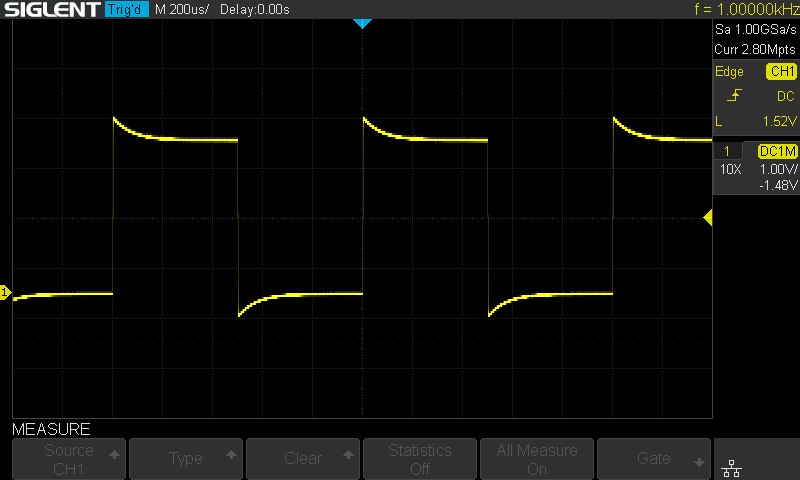
Oscilloscope screenshot captured via MCP

Oscilloscope display captured through the screenshot MCP tool.
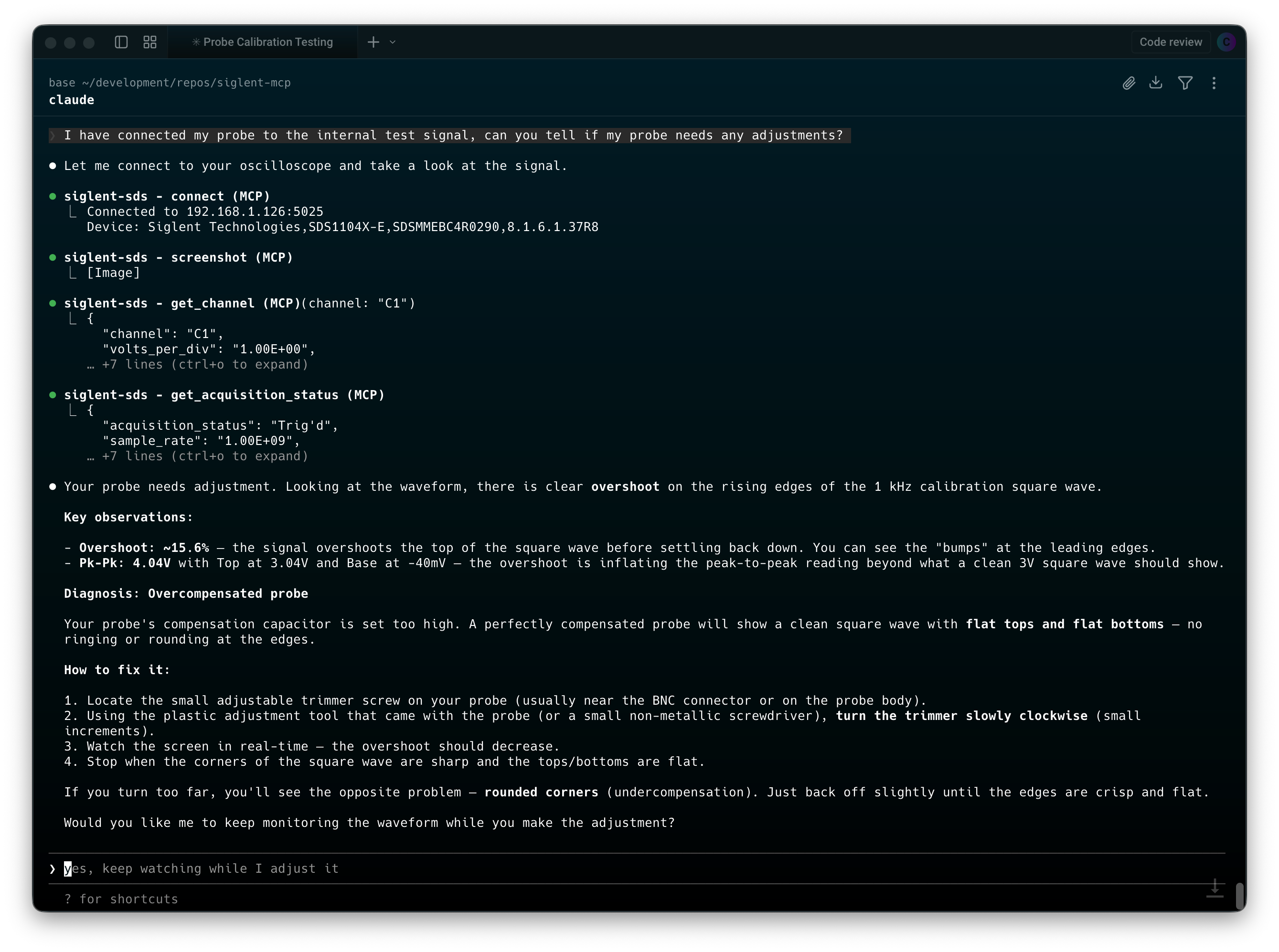
MCP interaction in terminal

Natural-language scope control and measurement workflow in the terminal.

Key features:

  • 12 tools covering channels, timebase, triggers, measurements, waveform capture, and screenshots

  • Auto-connect on startup via environment variable

  • Query queue serializes commands automatically — tools can safely run in parallel

  • Waveform data returned as voltage/time arrays ready for analysis

  • Screenshots captured and converted to PNG for inline display in Claude

  • Raw SCPI escape hatch for any command not covered by the built-in tools

Related MCP server: SkippyMCP

Compatibility

Status

Model

Tested

SDS1104X-E

Expected to work

SDS1000X-E series (SDS1202X-E, SDS1204X-E, etc.)

May work

Other Siglent SDS models with SCPI over TCP support

The server uses standard SCPI commands from the SDS1000X-E Programming Guide. Other Siglent models that support the same command set over port 5025 should work with little or no modification.

Quick Start

You need a Siglent oscilloscope accessible on your network (TCP port 5025). Pick one of the three options below and add the config to your .mcp.json (in your project directory, or ~/.claude/.mcp.json for global access).

Replace 192.168.1.126 with your scope's IP address.

No Node.js installation required. Works on Linux, macOS, and Windows (via WSL2 or Docker Desktop).

{
  "mcpServers": {
    "siglent-sds": {
      "type": "stdio",
      "command": "docker",
      "args": [
        "run", "--rm", "-i",
        "-e", "SIGLENT_IP=192.168.1.126",
        "ghcr.io/magnusjohansson/siglent-sds-mcp:latest"
      ]
    }
  }
}

Option B: npx

Requires Node.js 20+. Downloads and runs the package automatically.

{
  "mcpServers": {
    "siglent-sds": {
      "type": "stdio",
      "command": "npx",
      "args": ["-y", "siglent-sds-mcp"],
      "env": {
        "SIGLENT_IP": "192.168.1.126"
      }
    }
  }
}

Option C: Clone and build

git clone https://github.com/magnusjohansson/siglent-sds-mcp.git
cd siglent-sds-mcp
npm install
npm run build
{
  "mcpServers": {
    "siglent-sds": {
      "type": "stdio",
      "command": "node",
      "args": ["/path/to/siglent-sds-mcp/build/index.js"],
      "env": {
        "SIGLENT_IP": "192.168.1.126"
      }
    }
  }
}

Replace /path/to/siglent-sds-mcp with the actual path to your clone.

Environment Variables

Variable

Required

Default

Description

SIGLENT_IP

No

Oscilloscope IP address for auto-connect on startup

SIGLENT_PORT

No

5025

TCP port (only change if your setup differs)

Auto-Connect Behavior

If SIGLENT_IP is set, the server attempts to connect to the scope immediately after starting. This runs in the background and does not block the MCP server — Claude can start using other tools right away. If the scope is offline or unreachable, the server logs a warning and you can connect manually later using the connect tool.

If SIGLENT_IP is not set, the server starts without a scope connection. Use the connect tool to connect when ready.

Using with Other AI Clients

The Quick Start examples above use Claude Code's .mcp.json format, which includes a "type": "stdio" field. Other AI clients use the same JSON structure but without the "type" field and with different config file locations.

Claude Desktop

Edit claude_desktop_config.json:

  • Windows: %APPDATA%\Claude\claude_desktop_config.json

  • macOS: ~/Library/Application Support/Claude/claude_desktop_config.json

Docker

{
  "mcpServers": {
    "siglent-sds": {
      "command": "docker",
      "args": [
        "run", "--rm", "-i",
        "-e", "SIGLENT_IP=192.168.1.126",
        "ghcr.io/magnusjohansson/siglent-sds-mcp:latest"
      ]
    }
  }
}

npx

{
  "mcpServers": {
    "siglent-sds": {
      "command": "npx",
      "args": ["-y", "siglent-sds-mcp"],
      "env": {
        "SIGLENT_IP": "192.168.1.126"
      }
    }
  }
}

Note: You must fully restart Claude Desktop after changing the config file.

Cursor

Edit one of:

  • User-level: ~/.cursor/mcp.json (available across all projects)

  • Project-level: .cursor/mcp.json (shared with your team via version control)

You can also add servers through the UI: Settings > Cursor Settings > MCP > Add new global MCP server.

Docker

{
  "mcpServers": {
    "siglent-sds": {
      "command": "docker",
      "args": [
        "run", "--rm", "-i",
        "-e", "SIGLENT_IP=192.168.1.126",
        "ghcr.io/magnusjohansson/siglent-sds-mcp:latest"
      ]
    }
  }
}

npx

{
  "mcpServers": {
    "siglent-sds": {
      "command": "npx",
      "args": ["-y", "siglent-sds-mcp"],
      "env": {
        "SIGLENT_IP": "192.168.1.126"
      }
    }
  }
}

Windsurf

Edit mcp_config.json:

  • Windows: %USERPROFILE%\.codeium\windsurf\mcp_config.json

  • macOS/Linux: ~/.codeium/windsurf/mcp_config.json

You can also configure servers through the UI: Cascade panel > MCP icon > Manage MCP Servers > View raw config.

Docker

{
  "mcpServers": {
    "siglent-sds": {
      "command": "docker",
      "args": [
        "run", "--rm", "-i",
        "-e", "SIGLENT_IP=192.168.1.126",
        "ghcr.io/magnusjohansson/siglent-sds-mcp:latest"
      ]
    }
  }
}

npx

{
  "mcpServers": {
    "siglent-sds": {
      "command": "npx",
      "args": ["-y", "siglent-sds-mcp"],
      "env": {
        "SIGLENT_IP": "192.168.1.126"
      }
    }
  }
}

Google Antigravity

Configuration is managed through the IDE's UI:

  1. Open the Agent pane on the right side of the workspace

  2. Click the ... button at the top

  3. Select MCP Servers

  4. Click Manage MCP Servers

  5. Click View raw config

  6. Add the configuration below and save

Docker

{
  "mcpServers": {
    "siglent-sds": {
      "command": "docker",
      "args": [
        "run", "--rm", "-i",
        "-e", "SIGLENT_IP=192.168.1.126",
        "ghcr.io/magnusjohansson/siglent-sds-mcp:latest"
      ]
    }
  }
}

npx

{
  "mcpServers": {
    "siglent-sds": {
      "command": "npx",
      "args": ["-y", "siglent-sds-mcp"],
      "env": {
        "SIGLENT_IP": "192.168.1.126"
      }
    }
  }
}

Replace 192.168.1.126 with your scope's IP address in all examples above.

ChatGPT Desktop

ChatGPT Desktop only supports remote HTTPS MCP servers (called "connectors"), not local stdio servers. Since this MCP server uses stdio transport, it is not directly compatible with ChatGPT Desktop.

Tools

12 tools across 6 categories. See docs/tools-reference.md for full parameter details.

Category

Tool

Description

Connection

connect

Connect to oscilloscope over TCP

disconnect

Close the connection

identify

Query device ID (manufacturer, model, serial, firmware)

Channel

get_channel

Read channel configuration (vdiv, offset, coupling, etc.)

configure_channel

Set vdiv, offset, coupling, bandwidth limit, trace, probe

Acquisition

get_acquisition_status

Read timebase, sample rate, trigger settings

configure_acquisition

Set timebase, trigger, run/stop/single

Measurement

measure

Read a measurement (frequency, Vpp, RMS, etc.)

measure_statistics

Enable/read/reset measurement statistics

Waveform

get_waveform

Download voltage/time data arrays

screenshot

Capture scope screen as PNG

SCPI

scpi_query / scpi_command

Send arbitrary SCPI commands

Example Conversations

Read a channel configuration

You: What's the current setup on channel 1?

Claude calls get_channel with channel: "C1" and returns the volts/div, offset, coupling, and other settings.

Measure a signal

You: Measure the frequency and peak-to-peak voltage on channel 2.

Claude calls measure twice — once with parameter: "FREQ" and once with parameter: "PKPK" on channel C2 — and reports both values.

Capture and analyze a waveform

You: Download the waveform from channel 1 and tell me what you see.

Claude calls get_waveform on C1, receives voltage/time data, and analyzes the signal shape, frequency, amplitude, and any anomalies.

Take a screenshot

You: Show me what the scope screen looks like right now.

Claude calls screenshot, receives a base64 BMP image, and displays it inline.

Configure the scope for a specific measurement

You: Set up channel 1 for a 3.3V logic signal — DC coupling, 1V/div, trigger on the rising edge at 1.6V.

Claude calls configure_channel (setting vdiv, coupling) and configure_acquisition (setting trigger source, level, slope) in sequence.

Architecture

Claude Code <-- stdio/JSON-RPC --> siglent-sds-mcp <-- TCP/SCPI --> Oscilloscope:5025
  • Transport: MCP over stdio (JSON-RPC 2.0)

  • Protocol: SCPI commands over raw TCP sockets, newline-terminated

  • Query Queue: All SCPI queries are serialized through an internal queue. The oscilloscope processes one command at a time, so even when tools issue parallel requests (via Promise.all), the queue ensures they're sent sequentially.

  • Binary Block Parsing: Waveform and screenshot data use IEEE 488.2 definite-length block format (#9XXXXXXXXX + data bytes + \n\n). The connection layer detects and parses these automatically.

  • Voltage Reconstruction: Raw ADC codes are converted to voltages: code * (vdiv / 25) - offset, with two's complement handling for signed values.

Development

npm run build       # Compile TypeScript
npm run watch       # Watch mode — recompile on changes
npm run dev         # Build and run
npm run inspector   # Launch with MCP Inspector for debugging

Docker (local build)

Build the image locally:

docker build -t siglent-sds-mcp .

Then use the local image in your .mcp.json:

{
  "mcpServers": {
    "siglent-sds": {
      "type": "stdio",
      "command": "docker",
      "args": [
        "run", "--rm", "-i",
        "-e", "SIGLENT_IP=192.168.1.126",
        "siglent-sds-mcp"
      ]
    }
  }
}

Project Structure

src/
  index.ts              # Entry point, MCP server setup
  connection.ts         # TCP socket manager with query queue
  tools/
    connection.ts       # connect, disconnect, identify
    channel.ts          # get_channel, configure_channel
    acquisition.ts      # configure_acquisition, get_acquisition_status
    measure.ts          # measure, measure_statistics
    waveform.ts         # get_waveform, screenshot
    scpi.ts             # scpi_query, scpi_command

Troubleshooting

"Not connected to oscilloscope"

The scope isn't connected yet. Either set SIGLENT_IP in your .mcp.json env for auto-connect, or use the connect tool manually.

Connection timeout

  • Verify the scope's IP address (check the scope's Utility > Interface menu)

  • Ensure port 5025 is accessible (try telnet <scope-ip> 5025 from your machine)

  • Check that no firewall is blocking the connection

  • The scope only accepts one TCP connection at a time — close any other SCPI clients

Query timeout

Some SCPI queries can take a few seconds, especially on slower scope models. The default timeout is 5 seconds. For scpi_query, you can increase the timeout with the timeout_ms parameter.

Docker: can't reach the oscilloscope

By default, Docker containers can reach LAN devices via the bridge network (NAT). If the container can't connect to your scope:

  • Verify the scope is reachable from your host: telnet 192.168.1.126 5025

  • On Linux, try adding --network host to the Docker args:

    "args": ["run", "--rm", "-i", "--network", "host", "-e", "SIGLENT_IP=192.168.1.126", "ghcr.io/magnusjohansson/siglent-sds-mcp:latest"]

    Note: --network host does not work on macOS or Windows Docker Desktop.

Docker: wrong architecture / exec format error

The published image supports linux/amd64 and linux/arm64. Docker should pull the correct one automatically. If you see an exec format error, pull explicitly:

docker pull --platform linux/amd64 ghcr.io/magnusjohansson/siglent-sds-mcp:latest

"CHDR" appears in responses

This shouldn't happen — the server sets CHDR OFF on connect. If you see command headers in responses, try disconnecting and reconnecting.

License

MIT — see LICENSE for details.

Available Tools

13 tools
configure_acquisitionA

Control acquisition state and configure timebase/trigger settings. Use 'command' to run/stop the scope, and optionally set timebase and trigger parameters in the same call.

ParametersJSON Schema
NameRequiredDescriptionDefault
commandNoAcquisition command: 'run' starts acquisition (ARM), 'stop' stops it, 'single' sets single trigger mode, 'auto' sets auto trigger mode
timebaseNoTime per division with unit (e.g. '1US', '500NS', '10MS', '1S'). Range: 1NS to 100S
trigger_modeNoTrigger sweep mode
trigger_sourceNoTrigger source channel
trigger_levelNoTrigger level voltage with unit (e.g. '1.5V', '500mV', '-200mV')
trigger_slopeNoTrigger slope: POS=rising edge, NEG=falling edge, WINDOW=alternating
trigger_delayNoTrigger delay / horizontal position with unit (e.g. '0S', '-4.8US', '100NS')

TDQS

A3.9/5.0
Behavior3/5

Does the description disclose side effects, auth requirements, rate limits, or destructive behavior?

Annotations only show readOnlyHint=false, so the description must disclose behavioral traits. It indicates mutation (control, configure) but lacks details on side effects (e.g., clearing waveforms on run, prerequisites). Adds some context but not rich.

Agents need to know what a tool does to the world before calling it. Descriptions should go beyond structured annotations to explain consequences.

Conciseness5/5

Is the description appropriately sized, front-loaded, and free of redundancy?

Two sentences with no wasted words. Front-loaded with the main purpose, then specific guidance. Very concise and clearly structured.

Shorter descriptions cost fewer tokens and are easier for agents to parse. Every sentence should earn its place.

Completeness3/5

Given the tool's complexity, does the description cover enough for an agent to succeed on first attempt?

Given 7 optional parameters and no output schema, the description covers the high-level usage but misses parameter interactions (e.g., which trigger params apply with which commands). Adequate but not fully complete for a complex tool.

Complex tools with many parameters or behaviors need more documentation. Simple tools need less. This dimension scales expectations accordingly.

Parameters3/5

Does the description clarify parameter syntax, constraints, interactions, or defaults beyond what the schema provides?

Schema description coverage is 100%, so baseline is 3. The description merely restates that timebase and trigger can be set, adding no new meaning beyond the well-documented schema.

Input schemas describe structure but not intent. Descriptions should explain non-obvious parameter relationships and valid value ranges.

Purpose5/5

Does the description clearly state what the tool does and how it differs from similar tools?

Clearly states the tool controls acquisition state and configures timebase/trigger settings. Distinguishes from sibling tools like get_acquisition_status (read-only) and configure_channel (channel settings). The verb-resource combination is specific.

Agents choose between tools based on descriptions. A clear purpose with a specific verb and resource helps agents select the right tool.

Usage Guidelines4/5

Does the description explain when to use this tool, when not to, or what alternatives exist?

Explicitly states when to use 'command' to run/stop the scope and optionally set timebase/trigger. Implicitly suggests that for reading status, use get_acquisition_status, but no explicit exclusions or alternatives are given.

Agents often have multiple tools that could apply. Explicit usage guidance like "use X instead of Y when Z" prevents misuse.

configure_channelA
Idempotent

Configure an analog channel's parameters. Only specified parameters will be changed.

ParametersJSON Schema
NameRequiredDescriptionDefault
channelYesChannel to configure (C1, C2, C3, or C4)
vdivNoVolts per division with unit (e.g. '500mV', '1V', '2V'). Range: 500uV to 10V
offsetNoVertical offset with unit (e.g. '0V', '-500mV', '1.5V')
couplingNoCoupling mode: A1M=AC 1MOhm, A50=AC 50Ohm, D1M=DC 1MOhm, D50=DC 50Ohm, GND=Ground
bandwidth_limitNoEnable (true) or disable (false) 20MHz bandwidth limit
traceNoTurn channel display on (true) or off (false)
probeNoProbe attenuation factor (e.g. 1, 10, 100, 1000)

TDQS

A4/5.0
Behavior4/5

Does the description disclose side effects, auth requirements, rate limits, or destructive behavior?

Annotations give idempotentHint=true, so description adds value by clarifying partial updates ('Only specified parameters will be changed'). Does not contradict annotations. Could mention persistence or side effects but sufficient.

Agents need to know what a tool does to the world before calling it. Descriptions should go beyond structured annotations to explain consequences.

Conciseness5/5

Is the description appropriately sized, front-loaded, and free of redundancy?

Two sentences, no fluff, front-loaded with main action. Every part earns its place.

Shorter descriptions cost fewer tokens and are easier for agents to parse. Every sentence should earn its place.

Completeness4/5

Given the tool's complexity, does the description cover enough for an agent to succeed on first attempt?

With 7 parameters and annotations present, description covers partial update behavior. No output schema needed. Could elaborate on return value or confirmation, but adequate for a configuration tool.

Complex tools with many parameters or behaviors need more documentation. Simple tools need less. This dimension scales expectations accordingly.

Parameters3/5

Does the description clarify parameter syntax, constraints, interactions, or defaults beyond what the schema provides?

Schema coverage is 100% with good descriptions. Description adds only the general note about partial updates, not parameter-specific semantics. Baseline 3 is appropriate.

Input schemas describe structure but not intent. Descriptions should explain non-obvious parameter relationships and valid value ranges.

Purpose5/5

Does the description clearly state what the tool does and how it differs from similar tools?

Clear verb 'Configure' and resource 'analog channel's parameters'. Note about partial updates distinguishes from related tools like configure_acquisition. Specific and unambiguous.

Agents choose between tools based on descriptions. A clear purpose with a specific verb and resource helps agents select the right tool.

Usage Guidelines3/5

Does the description explain when to use this tool, when not to, or what alternatives exist?

Implies one can change only specified parameters, but no explicit guidance on when to use vs siblings like configure_acquisition or get_channel. No prerequisites or context provided.

Agents often have multiple tools that could apply. Explicit usage guidance like "use X instead of Y when Z" prevents misuse.

connectA

Connect to a Siglent oscilloscope over TCP. Returns device identification on success.

ParametersJSON Schema
NameRequiredDescriptionDefault
hostNoIP address of the oscilloscope (defaults to SIGLENT_IP env var)
portNoTCP port (defaults to 5025)

TDQS

A4/5.0
Behavior3/5

Does the description disclose side effects, auth requirements, rate limits, or destructive behavior?

Annotations already indicate mutability (readOnlyHint=false) and external interaction (openWorldHint=true). The description adds that it returns device identification, but does not disclose potential side effects like maintaining a persistent connection or timeout behavior.

Agents need to know what a tool does to the world before calling it. Descriptions should go beyond structured annotations to explain consequences.

Conciseness5/5

Is the description appropriately sized, front-loaded, and free of redundancy?

The description is extremely concise, using only two sentences to convey both the action and the return value, with no redundant information.

Shorter descriptions cost fewer tokens and are easier for agents to parse. Every sentence should earn its place.

Completeness4/5

Given the tool's complexity, does the description cover enough for an agent to succeed on first attempt?

For a simple connection tool, the description covers the essential purpose and return value. However, it does not specify the format of the device identification, error handling, or prerequisites (e.g., network availability), which could be helpful.

Complex tools with many parameters or behaviors need more documentation. Simple tools need less. This dimension scales expectations accordingly.

Parameters3/5

Does the description clarify parameter syntax, constraints, interactions, or defaults beyond what the schema provides?

Input schema provides full descriptions for both parameters (host, port) including default values, so the description adds no new semantic meaning beyond what is already in the schema.

Input schemas describe structure but not intent. Descriptions should explain non-obvious parameter relationships and valid value ranges.

Purpose5/5

Does the description clearly state what the tool does and how it differs from similar tools?

The description clearly states the action ('Connect to a Siglent oscilloscope over TCP') and the return value ('Returns device identification on success'), making it distinct from siblings that handle configuration, measurements, or disconnection.

Agents choose between tools based on descriptions. A clear purpose with a specific verb and resource helps agents select the right tool.

Usage Guidelines4/5

Does the description explain when to use this tool, when not to, or what alternatives exist?

The description implies this is a prerequisite for other oscilloscope operations, but it does not explicitly state 'use this before other tools' or provide scenarios where alternatives like 'identify' might be used instead.

Agents often have multiple tools that could apply. Explicit usage guidance like "use X instead of Y when Z" prevents misuse.

disconnectA

Disconnect from the oscilloscope.

ParametersJSON Schema
NameRequiredDescriptionDefault

No parameters

TDQS

A3.9/5.0
Behavior3/5

Does the description disclose side effects, auth requirements, rate limits, or destructive behavior?

The description aligns with the annotation readOnlyHint=false by indicating a state change. However, it does not provide any additional behavioral details beyond the obvious disconnection action. For a simple mutation tool, this is adequate but not enriched.

Agents need to know what a tool does to the world before calling it. Descriptions should go beyond structured annotations to explain consequences.

Conciseness5/5

Is the description appropriately sized, front-loaded, and free of redundancy?

The description is a single, front-loaded sentence with no wasted words. Every element contributes to clarity.

Shorter descriptions cost fewer tokens and are easier for agents to parse. Every sentence should earn its place.

Completeness5/5

Given the tool's complexity, does the description cover enough for an agent to succeed on first attempt?

Given no parameters, no output schema, and a simple action, the description is fully complete. It accurately conveys everything an agent needs to know for this tool.

Complex tools with many parameters or behaviors need more documentation. Simple tools need less. This dimension scales expectations accordingly.

Parameters4/5

Does the description clarify parameter syntax, constraints, interactions, or defaults beyond what the schema provides?

The tool has zero parameters, so the input schema fully defines the interface. The description correctly omits parameter details, and a baseline of 4 is appropriate per the rubric.

Input schemas describe structure but not intent. Descriptions should explain non-obvious parameter relationships and valid value ranges.

Purpose5/5

Does the description clearly state what the tool does and how it differs from similar tools?

The description uses a specific verb 'Disconnect' and clearly identifies the resource 'oscilloscope', making the tool's purpose immediately clear. It also distinguishes itself from the sibling tool 'connect'.

Agents choose between tools based on descriptions. A clear purpose with a specific verb and resource helps agents select the right tool.

Usage Guidelines2/5

Does the description explain when to use this tool, when not to, or what alternatives exist?

The description provides no guidance on when to use this tool versus alternatives, nor any prerequisites or context. It simply states the action without any usage recommendations.

Agents often have multiple tools that could apply. Explicit usage guidance like "use X instead of Y when Z" prevents misuse.

get_acquisition_statusA
Read-only

Get the current acquisition state including sample rate, memory depth, timebase, trigger configuration, and acquisition status.

ParametersJSON Schema
NameRequiredDescriptionDefault

No parameters

TDQS

A4/5.0
Behavior3/5

Does the description disclose side effects, auth requirements, rate limits, or destructive behavior?

Annotations declare readOnlyHint=true; description aligns with read behavior. No additional traits disclosed, but sufficient given annotations.

Agents need to know what a tool does to the world before calling it. Descriptions should go beyond structured annotations to explain consequences.

Conciseness5/5

Is the description appropriately sized, front-loaded, and free of redundancy?

Single sentence, front-loaded with purpose, includes relevant details without redundancy.

Shorter descriptions cost fewer tokens and are easier for agents to parse. Every sentence should earn its place.

Completeness4/5

Given the tool's complexity, does the description cover enough for an agent to succeed on first attempt?

Covers key return fields for a status tool, though no output schema exists. Adequate for a simple read operation.

Complex tools with many parameters or behaviors need more documentation. Simple tools need less. This dimension scales expectations accordingly.

Parameters4/5

Does the description clarify parameter syntax, constraints, interactions, or defaults beyond what the schema provides?

No parameters in schema; description adds value by listing returned fields, compensating for lack of output schema.

Input schemas describe structure but not intent. Descriptions should explain non-obvious parameter relationships and valid value ranges.

Purpose5/5

Does the description clearly state what the tool does and how it differs from similar tools?

Clearly states it gets acquisition state and lists specific components (sample rate, memory depth, etc.). Distinct from siblings like configure_acquisition (set) and get_waveform (data).

Agents choose between tools based on descriptions. A clear purpose with a specific verb and resource helps agents select the right tool.

Usage Guidelines3/5

Does the description explain when to use this tool, when not to, or what alternatives exist?

No explicit when-to-use or alternatives, but its role as a read-only status check is implied by the description and sibling names. Lacks guidance on prerequisites like connection.

Agents often have multiple tools that could apply. Explicit usage guidance like "use X instead of Y when Z" prevents misuse.

get_channelA
Read-only

Query the configuration of an analog channel. Returns volts/div, offset, coupling, bandwidth limit, trace on/off, probe attenuation, and unit.

ParametersJSON Schema
NameRequiredDescriptionDefault
channelYesChannel to query (C1, C2, C3, or C4)

TDQS

A4.2/5.0
Behavior4/5

Does the description disclose side effects, auth requirements, rate limits, or destructive behavior?

Annotations declare readOnlyHint=true. Description adds detail on returned fields (volts/div, offset, etc.), providing behavioral context beyond annotations.

Agents need to know what a tool does to the world before calling it. Descriptions should go beyond structured annotations to explain consequences.

Conciseness5/5

Is the description appropriately sized, front-loaded, and free of redundancy?

Single sentence followed by a list of returned fields. Efficient and front-loaded with action and resource.

Shorter descriptions cost fewer tokens and are easier for agents to parse. Every sentence should earn its place.

Completeness4/5

Given the tool's complexity, does the description cover enough for an agent to succeed on first attempt?

Lists returned fields, which is helpful given no output schema. Adequate for a simple query tool with one parameter, but could specify data types or units for completeness.

Complex tools with many parameters or behaviors need more documentation. Simple tools need less. This dimension scales expectations accordingly.

Parameters3/5

Does the description clarify parameter syntax, constraints, interactions, or defaults beyond what the schema provides?

Schema has 100% coverage with full description and enum for 'channel'. Description does not add new parameter information but contextualizes the parameter as querying configuration.

Input schemas describe structure but not intent. Descriptions should explain non-obvious parameter relationships and valid value ranges.

Purpose5/5

Does the description clearly state what the tool does and how it differs from similar tools?

Clearly states verb 'Query' and resource 'analog channel configuration', and lists return values. Distinguished from sibling tools like configure_channel and get_acquisition_status.

Agents choose between tools based on descriptions. A clear purpose with a specific verb and resource helps agents select the right tool.

Usage Guidelines4/5

Does the description explain when to use this tool, when not to, or what alternatives exist?

Implied usage is reading channel config; no explicit when/when-not or alternatives mentioned, but context is clear.

Agents often have multiple tools that could apply. Explicit usage guidance like "use X instead of Y when Z" prevents misuse.

get_waveformA
Read-only

Download waveform data from a channel. Returns voltage and time arrays reconstructed from the raw oscilloscope data. By default returns up to 1000 points (downsampled from full memory depth).

ParametersJSON Schema
NameRequiredDescriptionDefault
channelYesChannel to download waveform from (C1, C2, C3, or C4)
max_pointsNoMaximum number of data points to return (default 1000). Higher values give more detail but use more context.

TDQS

A4.3/5.0
Behavior4/5

Does the description disclose side effects, auth requirements, rate limits, or destructive behavior?

Annotations indicate readOnlyHint=true, and description confirms read operation. Adds behavioral detail about default downsampling to 1000 points, which is not in annotations. No contradictions.

Agents need to know what a tool does to the world before calling it. Descriptions should go beyond structured annotations to explain consequences.

Conciseness5/5

Is the description appropriately sized, front-loaded, and free of redundancy?

Two concise sentences, no filler. Front-loaded with key action and output. Every sentence provides value.

Shorter descriptions cost fewer tokens and are easier for agents to parse. Every sentence should earn its place.

Completeness5/5

Given the tool's complexity, does the description cover enough for an agent to succeed on first attempt?

For a simple tool with 2 parameters and no output schema, description explains return format (voltage/time arrays) and default behavior. Complete and sufficient for agent understanding.

Complex tools with many parameters or behaviors need more documentation. Simple tools need less. This dimension scales expectations accordingly.

Parameters4/5

Does the description clarify parameter syntax, constraints, interactions, or defaults beyond what the schema provides?

Schema covers both parameters with descriptions. Description adds context: default 1000 points for max_points and downsampling explanation, providing meaning beyond schema.

Input schemas describe structure but not intent. Descriptions should explain non-obvious parameter relationships and valid value ranges.

Purpose5/5

Does the description clearly state what the tool does and how it differs from similar tools?

Description clearly states the verb 'download' and resource 'waveform data from a channel', and specifies return type (voltage and time arrays). This distinguishes it from siblings like get_channel or measure_statistics.

Agents choose between tools based on descriptions. A clear purpose with a specific verb and resource helps agents select the right tool.

Usage Guidelines3/5

Does the description explain when to use this tool, when not to, or what alternatives exist?

The description implies use when waveform data is needed but does not explicitly contrast with sibling tools like get_channel or measure. No exclusion criteria or alternative suggestions provided.

Agents often have multiple tools that could apply. Explicit usage guidance like "use X instead of Y when Z" prevents misuse.

identifyA
Read-only

Query the oscilloscope identification (*IDN?). Returns manufacturer, model, serial number, and firmware version.

ParametersJSON Schema
NameRequiredDescriptionDefault

No parameters

TDQS

A4.2/5.0
Behavior3/5

Does the description disclose side effects, auth requirements, rate limits, or destructive behavior?

Annotations already declare readOnlyHint=true. The description adds that it returns manufacturer, model, serial number, and firmware version, providing context beyond the annotation but not significant behavioral details.

Agents need to know what a tool does to the world before calling it. Descriptions should go beyond structured annotations to explain consequences.

Conciseness5/5

Is the description appropriately sized, front-loaded, and free of redundancy?

The description is two precise sentences with no wasted words. It front-loads the action and resource, then lists return fields.

Shorter descriptions cost fewer tokens and are easier for agents to parse. Every sentence should earn its place.

Completeness4/5

Given the tool's complexity, does the description cover enough for an agent to succeed on first attempt?

The tool is simple with no input parameters and no output schema. The description fully covers what the tool does and what it returns, which is sufficient for an identification query.

Complex tools with many parameters or behaviors need more documentation. Simple tools need less. This dimension scales expectations accordingly.

Parameters4/5

Does the description clarify parameter syntax, constraints, interactions, or defaults beyond what the schema provides?

The input schema has zero parameters, and schema coverage is 100%. The description does not need to add parameter information. Baseline 4 for zero parameters.

Input schemas describe structure but not intent. Descriptions should explain non-obvious parameter relationships and valid value ranges.

Purpose5/5

Does the description clearly state what the tool does and how it differs from similar tools?

The description clearly specifies the tool's action ('Query the oscilloscope identification') and the resource (oscilloscope), listing the exact fields returned. It is distinct from sibling tools like scpi_query or scpi_command.

Agents choose between tools based on descriptions. A clear purpose with a specific verb and resource helps agents select the right tool.

Usage Guidelines4/5

Does the description explain when to use this tool, when not to, or what alternatives exist?

The description states the tool's purpose but does not provide explicit when-not or alternatives. However, the purpose is so specific that usage guidelines are implicitly clear.

Agents often have multiple tools that could apply. Explicit usage guidance like "use X instead of Y when Z" prevents misuse.

measureC
Read-only

Take a measurement on a channel. Common parameters: PKPK (peak-to-peak), FREQ (frequency), RMS, MEAN, RISE (rise time), FALL (fall time), DUTY (duty cycle), ALL (all measurements). Installs the measurement on the scope and returns the value.

ParametersJSON Schema
NameRequiredDescriptionDefault
channelYesChannel to measure (C1, C2, C3, or C4)
parameterYesMeasurement type: PKPK, MAX, MIN, AMPL, TOP, BASE, CMEAN, MEAN, RMS, CRMS, OVSN, FPRE, OVSP, RPRE, PER, FREQ, PWID, NWID, RISE, FALL, WID, DUTY, NDUTY, ALL

TDQS

C2.9/5.0
Behavior2/5

Does the description disclose side effects, auth requirements, rate limits, or destructive behavior?

The description states 'Installs the measurement on the scope', implying a side effect (configuration change). However, annotations declare readOnlyHint=true, indicating no side effects. This contradiction harms trust. Without this issue, the description adds some operational context beyond annotations.

Agents need to know what a tool does to the world before calling it. Descriptions should go beyond structured annotations to explain consequences.

Conciseness4/5

Is the description appropriately sized, front-loaded, and free of redundancy?

Two sentences with clear structure: first sentence states action, second lists common parameters and side effect. No wasted words, but could be slightly more informative about return value.

Shorter descriptions cost fewer tokens and are easier for agents to parse. Every sentence should earn its place.

Completeness3/5

Given the tool's complexity, does the description cover enough for an agent to succeed on first attempt?

With no output schema, the description should explain the return value format (e.g., number with units). It only says 'returns the value'. Missing details on what 'value' looks like, making it incomplete for an agent to handle the output.

Complex tools with many parameters or behaviors need more documentation. Simple tools need less. This dimension scales expectations accordingly.

Parameters3/5

Does the description clarify parameter syntax, constraints, interactions, or defaults beyond what the schema provides?

Schema coverage is 100% with descriptions for both parameters. The description lists common parameter values, adding marginal context. However, it does not explain what the returned value represents or any format details, so it adds only slight value beyond the schema.

Input schemas describe structure but not intent. Descriptions should explain non-obvious parameter relationships and valid value ranges.

Purpose4/5

Does the description clearly state what the tool does and how it differs from similar tools?

The description clearly states verb and resource: 'Take a measurement on a channel.' It lists common parameters, but does not explicitly differentiate from the sibling tool 'measure_statistics', which likely does multi-measurement statistics. Slightly unclear distinction lowers the score.

Agents choose between tools based on descriptions. A clear purpose with a specific verb and resource helps agents select the right tool.

Usage Guidelines2/5

Does the description explain when to use this tool, when not to, or what alternatives exist?

No guidance on when to use this tool versus alternatives like measure_statistics or get_waveform. The description does not mention appropriate contexts or when not to use it, leaving the agent with no decision support.

Agents often have multiple tools that could apply. Explicit usage guidance like "use X instead of Y when Z" prevents misuse.

measure_statisticsB
Read-only

Control measurement statistics. Turn statistics on/off, reset them, or read the statistical values (current, mean, min, max, std-dev, count) for a measurement.

ParametersJSON Schema
NameRequiredDescriptionDefault
channelYesChannel to measure
parameterYesMeasurement type
actionYesAction: 'on' enables statistics, 'off' disables, 'reset' clears accumulated stats, 'read' returns current statistics

TDQS

B3.2/5.0
Behavior1/5

Does the description disclose side effects, auth requirements, rate limits, or destructive behavior?

Annotations declare readOnlyHint: true, but description includes write operations ('Turn statistics on/off, reset them'). This is a direct contradiction, severely impeding the agent's ability to correctly assess side effects.

Agents need to know what a tool does to the world before calling it. Descriptions should go beyond structured annotations to explain consequences.

Conciseness5/5

Is the description appropriately sized, front-loaded, and free of redundancy?

Single sentence, no redundancy, front-loaded with the action verb. Every word is necessary.

Shorter descriptions cost fewer tokens and are easier for agents to parse. Every sentence should earn its place.

Completeness2/5

Given the tool's complexity, does the description cover enough for an agent to succeed on first attempt?

No output schema is provided, and the description only vaguely mentions what 'read' returns (a list of statistics) without detailing the response format. Combined with the annotation contradiction, the description is incomplete for safe and correct invocation.

Complex tools with many parameters or behaviors need more documentation. Simple tools need less. This dimension scales expectations accordingly.

Parameters3/5

Does the description clarify parameter syntax, constraints, interactions, or defaults beyond what the schema provides?

Schema covers 100% of parameters with descriptions and enums. The description adds no new parameter information beyond what the schema already provides, achieving baseline adequacy.

Input schemas describe structure but not intent. Descriptions should explain non-obvious parameter relationships and valid value ranges.

Purpose5/5

Does the description clearly state what the tool does and how it differs from similar tools?

Description clearly states the tool's purpose: controlling measurement statistics (on/off, reset, read). It distinguishes from sibling tools like 'measure' which handle individual measurements.

Agents choose between tools based on descriptions. A clear purpose with a specific verb and resource helps agents select the right tool.

Usage Guidelines3/5

Does the description explain when to use this tool, when not to, or what alternatives exist?

Description implies usage for managing statistics but does not explicitly state when to use this tool over alternatives or provide exclusion criteria.

Agents often have multiple tools that could apply. Explicit usage guidance like "use X instead of Y when Z" prevents misuse.

scpi_commandA

Send an arbitrary SCPI command to the oscilloscope (no response expected). Use this as an escape hatch for commands not covered by other tools.

ParametersJSON Schema
NameRequiredDescriptionDefault
commandYesSCPI command to send (e.g. '*RST', 'ARM', 'C1:VDIV 500mV')

TDQS

A4.7/5.0
Behavior5/5

Does the description disclose side effects, auth requirements, rate limits, or destructive behavior?

The description discloses that no response is expected, which is important behavioral info not present in annotations. Annotations indicate it's not read-only, so the description adds value by clarifying the fire-and-forget nature.

Agents need to know what a tool does to the world before calling it. Descriptions should go beyond structured annotations to explain consequences.

Conciseness5/5

Is the description appropriately sized, front-loaded, and free of redundancy?

Two sentences, each earning its place: first states purpose and behavior, second provides usage guidance. Front-loaded and efficient.

Shorter descriptions cost fewer tokens and are easier for agents to parse. Every sentence should earn its place.

Completeness5/5

Given the tool's complexity, does the description cover enough for an agent to succeed on first attempt?

Given the complexity and sibling tools, the description fully explains the tool's role as a fallback. No output schema, but that's consistent with the no-response behavior. Complete for an escape hatch tool.

Complex tools with many parameters or behaviors need more documentation. Simple tools need less. This dimension scales expectations accordingly.

Parameters3/5

Does the description clarify parameter syntax, constraints, interactions, or defaults beyond what the schema provides?

Schema coverage is 100% with a detailed description of the 'command' parameter including examples. The description does not add additional meaning beyond the schema, so baseline 3 is appropriate.

Input schemas describe structure but not intent. Descriptions should explain non-obvious parameter relationships and valid value ranges.

Purpose5/5

Does the description clearly state what the tool does and how it differs from similar tools?

The description clearly states the tool's purpose: sending arbitrary SCPI commands with no response expected. It distinguishes itself from 'scpi_query' which expects a response, and from other specific tools like 'configure_channel'.

Agents choose between tools based on descriptions. A clear purpose with a specific verb and resource helps agents select the right tool.

Usage Guidelines5/5

Does the description explain when to use this tool, when not to, or what alternatives exist?

The description explicitly frames the tool as an 'escape hatch' for commands not covered by other tools, providing clear guidance on when to use it and implying when not to (use other tools for covered commands).

Agents often have multiple tools that could apply. Explicit usage guidance like "use X instead of Y when Z" prevents misuse.

scpi_queryA
Read-only

Send an arbitrary SCPI query to the oscilloscope and return the response. Use this as an escape hatch for commands not covered by other tools. Note: CHDR is set to OFF, so responses contain only values (no headers).

ParametersJSON Schema
NameRequiredDescriptionDefault
commandYesSCPI query command to send (e.g. '*IDN?', 'C1:VDIV?', 'SARA?')
timeout_msNoTimeout in milliseconds (default 2000)

TDQS

A4.4/5.0
Behavior4/5

Does the description disclose side effects, auth requirements, rate limits, or destructive behavior?

Annotations declare readOnlyHint=true, and the description adds the important behavioral note that CHDR is set to OFF, so responses contain only values (no headers). This provides useful context beyond the annotations.

Agents need to know what a tool does to the world before calling it. Descriptions should go beyond structured annotations to explain consequences.

Conciseness5/5

Is the description appropriately sized, front-loaded, and free of redundancy?

The description is concise with three sentences, directly stating the purpose, usage guidance, and an important behavioral note. No unnecessary words.

Shorter descriptions cost fewer tokens and are easier for agents to parse. Every sentence should earn its place.

Completeness4/5

Given the tool's complexity, does the description cover enough for an agent to succeed on first attempt?

Given that there is no output schema, the description could be improved by mentioning the format or nature of the response. However, the note about CHDR and the context of an oscilloscope tool provide enough completeness for use.

Complex tools with many parameters or behaviors need more documentation. Simple tools need less. This dimension scales expectations accordingly.

Parameters3/5

Does the description clarify parameter syntax, constraints, interactions, or defaults beyond what the schema provides?

The description does not add parameter-specific semantics beyond what is already in the input schema. Since schema coverage is 100%, the baseline is 3, and no additional value is provided.

Input schemas describe structure but not intent. Descriptions should explain non-obvious parameter relationships and valid value ranges.

Purpose5/5

Does the description clearly state what the tool does and how it differs from similar tools?

The description clearly specifies the action: sending an arbitrary SCPI query and returning the response. It explicitly labels the tool as an 'escape hatch' for commands not covered by other tools, distinguishing it from sibling tools like scpi_command.

Agents choose between tools based on descriptions. A clear purpose with a specific verb and resource helps agents select the right tool.

Usage Guidelines5/5

Does the description explain when to use this tool, when not to, or what alternatives exist?

The description provides explicit guidance on when to use this tool: 'Use this as an escape hatch for commands not covered by other tools.' This helps the agent choose between this tool and its siblings.

Agents often have multiple tools that could apply. Explicit usage guidance like "use X instead of Y when Z" prevents misuse.

screenshotA
Read-only

Capture the oscilloscope screen as a PNG image. Returns a base64-encoded image.

ParametersJSON Schema
NameRequiredDescriptionDefault

No parameters

TDQS

A4/5.0
Behavior3/5

Does the description disclose side effects, auth requirements, rate limits, or destructive behavior?

Annotations declare readOnlyHint=true, and the description adds that the output is base64-encoded. However, no details on resolution, color depth, or potential effects on the instrument state are disclosed. For a read-only capture, transparency is adequate but could include more.

Agents need to know what a tool does to the world before calling it. Descriptions should go beyond structured annotations to explain consequences.

Conciseness5/5

Is the description appropriately sized, front-loaded, and free of redundancy?

Two concise sentences that front-load the purpose and output format. Every word is necessary and no redundancy.

Shorter descriptions cost fewer tokens and are easier for agents to parse. Every sentence should earn its place.

Completeness4/5

Given the tool's complexity, does the description cover enough for an agent to succeed on first attempt?

With no parameters and no output schema, the description sufficiently explains the input (none) and output (base64-encoded PNG). It could mention image size or quality, but for a simple capture it is adequate.

Complex tools with many parameters or behaviors need more documentation. Simple tools need less. This dimension scales expectations accordingly.

Parameters4/5

Does the description clarify parameter syntax, constraints, interactions, or defaults beyond what the schema provides?

No parameters exist in the input schema, so schema description coverage is 100%. Per guidelines, 0 parameters yields a baseline of 4. The description does not need to add parameter meaning.

Input schemas describe structure but not intent. Descriptions should explain non-obvious parameter relationships and valid value ranges.

Purpose5/5

Does the description clearly state what the tool does and how it differs from similar tools?

Description clearly states the action ('capture'), the resource ('oscilloscope screen'), the output format ('PNG image'), and the encoding ('base64-encoded'). It uniquely identifies the tool's purpose among siblings like 'get_waveform' and 'configure_acquisition'.

Agents choose between tools based on descriptions. A clear purpose with a specific verb and resource helps agents select the right tool.

Usage Guidelines3/5

Does the description explain when to use this tool, when not to, or what alternatives exist?

No explicit guidance on when to use this tool versus alternatives like 'get_waveform' or 'scpi_command'. The context implies it is for obtaining a visual screenshot, but no when-not-to-use or exclusion criteria are provided.

Agents often have multiple tools that could apply. Explicit usage guidance like "use X instead of Y when Z" prevents misuse.

Tool Schema Changelog

Recent tool additions, removals, and schema changes observed during successful MCP inspections.

  1. 13 tool updatesv1.0.1
    • First observedconfigure_acquisition
    • First observedconfigure_channel
    • First observedconnect
    • First observeddisconnect
    • First observedget_acquisition_status
    • First observedget_channel
    • First observedget_waveform
    • First observedidentify
    • First observedmeasure
    • First observedmeasure_statistics
    • First observedscpi_command
    • First observedscpi_query
    • First observedscreenshot

TDQS

A4/5.0

Scored across 13 tools

Disambiguation5/5

Each tool has a clearly distinct purpose: connection, configuration, acquisition control, querying status, downloading waveforms, measurements, statistics, and SCPI escape hatches. No two tools have overlapping functionality.

Naming Consistency5/5

All tool names follow a consistent snake_case verb_noun pattern (e.g., configure_channel, get_waveform, measure_statistics). The naming is predictable and uniform.

Tool Count5/5

With 13 tools, the server is well-scoped for controlling an oscilloscope. It covers essential operations without being excessive or sparse.

Completeness4/5

The tool set provides comprehensive coverage for core oscilloscope operations (connection, configuration, acquisition, measurement, screenshot). Minor gaps like advanced trigger settings exist but are mitigated by SCPI escape tools.

Maintenance

ActivityInactive
ResponsivenessNo issues

Related MCP Connectors

Related MCP Servers

  • A
    license
    A
    quality
    C
    maintenance
    An MCP server for controlling Rigol DS1000Z series oscilloscopes over LAN using natural language. It enables users to take measurements, configure instrument settings, and capture screenshots directly through an MCP client.
    17
    28
    MIT
  • A
    license
    Not graded
    quality
    B
    maintenance
    An MCP server for controlling Rigol oscilloscopes from an AI assistant. It translates MCP tool calls into SCPI commands over PyVISA.
    1
    MIT
  • A
    license
    A
    quality
    A
    maintenance
    An MCP server that enables AI agents to operate an oscilloscope through high-level tools like signal capture and measurement, abstracting vendor-specific SCPI commands.
    18
    3
    MIT
  • A
    license
    A
    quality
    D
    maintenance
    MCP server that lets AI assistants control Siglent SDG waveform generators over a local network using natural language, supporting signal generation, modulation, sweep, burst, and arbitrary waveforms.
    21
    6 npm
    MIT