
Provides access to Datadog API to fetch monitoring data, including monitor states and Kubernetes logs from infrastructure
Enables extraction and formatting of error logs from Kubernetes clusters through the Datadog API
Click on "Install Server".
Wait a few minutes for the server to deploy. Once ready, it will show a "Started" state.
In the chat, type
@followed by the MCP server name and your instructions, e.g., "@datadogshow me error logs from the production cluster for the last hour"
That's it! The server will respond to your query, and you can continue using it as needed.
Here is a step-by-step guide with screenshots.
Datadog Model Context Protocol (MCP) 🔍
A Python-based tool to interact with Datadog API and fetch monitoring data from your infrastructure. This MCP provides easy access to monitor states and Kubernetes logs through a simple interface.
Datadog Features 🌟
Monitor State Tracking: Fetch and analyze specific monitor states
Kubernetes Log Analysis: Extract and format error logs from Kubernetes clusters
Related MCP server: MongoDB MCP Server
Prerequisites 📋
Python 3.11+
Datadog API and Application keys (with correct permissions)
Access to Datadog site
Installation 🔧
Installing via Smithery
To install Datadog for Claude Desktop automatically via Smithery:
npx -y @smithery/cli install @didlawowo/mcp-collection --client claudeRequired packages:
datadog-api-client
fastmcp
loguru
icecream
python-dotenv
uv
Environment Setup 🔑
Create a .env file with your Datadog credentials:
DD_API_KEY=your_api_key
DD_APP_KEY=your_app_key
Setup Claude Desktop Setup for MCP 🖥️
Install Claude Desktop
# Assuming you're on macOS
brew install claude-desktop

# Or download from official website
https://claude.ai/desktop
Set up Datadog MCP config:
# on mac is
~/Library/Application\ Support/Claude/claude_desktop_config.json


# Add this to your claude config json
```json
    "Datadog-MCP-Server": {
      "command": "uv",
      "args": [
        "run",
        "--with",
        "datadog-api-client",
        "--with",
        "fastmcp",
        "--with",
        "icecream",
        "--with",
        "loguru",
        "--with",
        "python-dotenv",
        "fastmcp",
        "run",
        "/your-path/mcp-collection/datadog/main.py"
      ],
      "env": {
        "DD_API_KEY": "xxxx",
        "DD_APP_KEY": "xxx"
      }
    },
Usage 💻
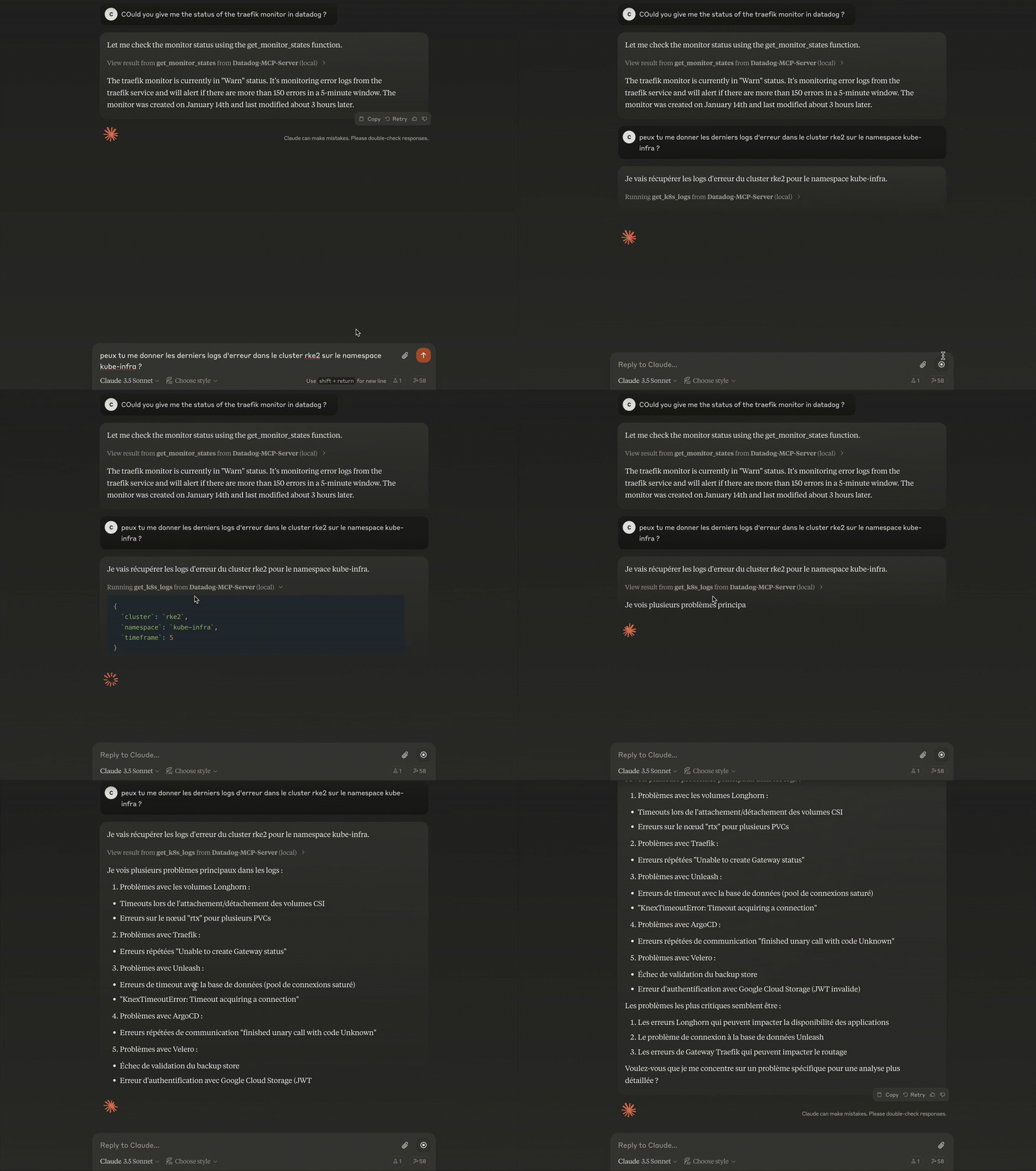
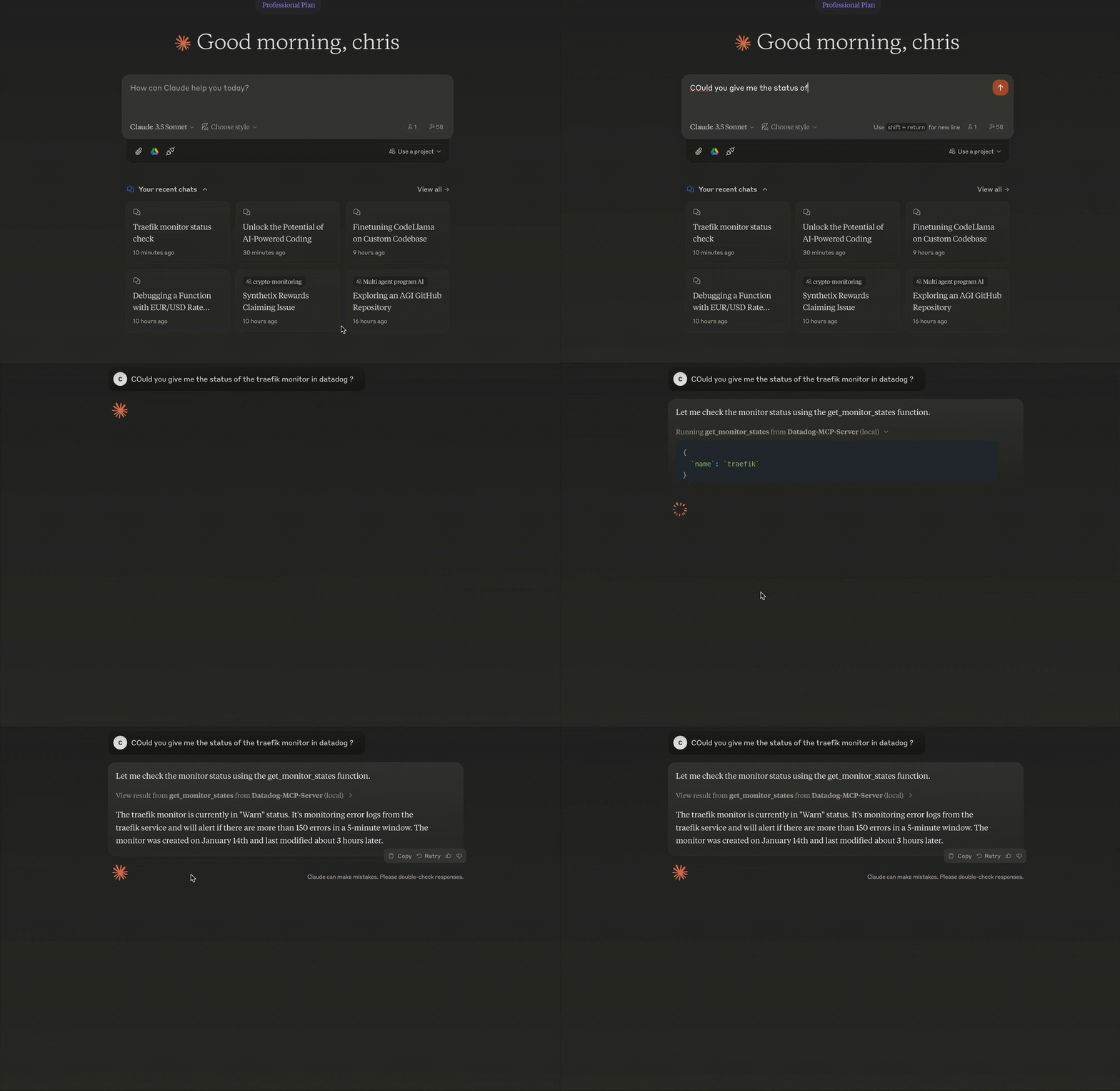
Architecture 🏗
FastMCP Base: Utilizes FastMCP framework for tool management
Modular Design: Separate functions for monitors and logs
Type Safety: Full typing support with Python type hints
API Abstraction: Wrapped Datadog API calls with error handling
I'll add a section about MCP and Claude Desktop setup:
Model Context Protocol (MCP) Introduction 🤖
What is MCP?
Model Context Protocol (MCP) is a framework allowing AI models to interact with external tools and APIs in a standardized way. It enables models like Claude to:
Access external data
Execute commands
Interact with APIs
Maintain context across conversations
some examples of MCP servers
https://github.com/punkpeye/awesome-mcp-servers?tab=readme-ov-file
Tutorial for setup MCP
How it works - Available Functions 🛠️
the LLM use provided function to get the data and use it
1. Get Monitor States
get_monitor_states(
    name: str,           # Monitor name to search
    timeframe: int = 1   # Hours to look back
)
Example:
response = get_monitor_states(name="traefik")

# Sample Output
{
    "id": "12345678",
    "name": "traefik",
    "status": "OK",
    "query": "avg(last_5m):avg:traefik.response_time{*} > 1000",
    "message": "Response time is too high",
    "type": "metric alert",
    "created": "2024-01-14T10:00:00Z",
    "modified": "2024-01-14T15:30:00Z"
}
2. Get Kubernetes Logs
get_k8s_logs(
    cluster: str,            # Kubernetes cluster name
    timeframe: int = 5,      # Hours to look back
    namespace: str = None    # Optional namespace filter
)
Example:
logs = get_k8s_logs(
    cluster="prod-cluster",
    timeframe=3,
    namespace="default"
)

# Sample Output
{
    "timestamp": "2024-01-14T22:00:00Z",
    "host": "worker-1",
    "service": "nginx-ingress",
    "pod_name": "nginx-ingress-controller-abc123",
    "namespace": "default",
    "container_name": "controller",
    "message": "Connection refused",
    "status": "error"
}
# Install as MCP extension
cd datadog
task install-mcp4. Verify Installation
In Claude chat desktop
check datadog connection in claude
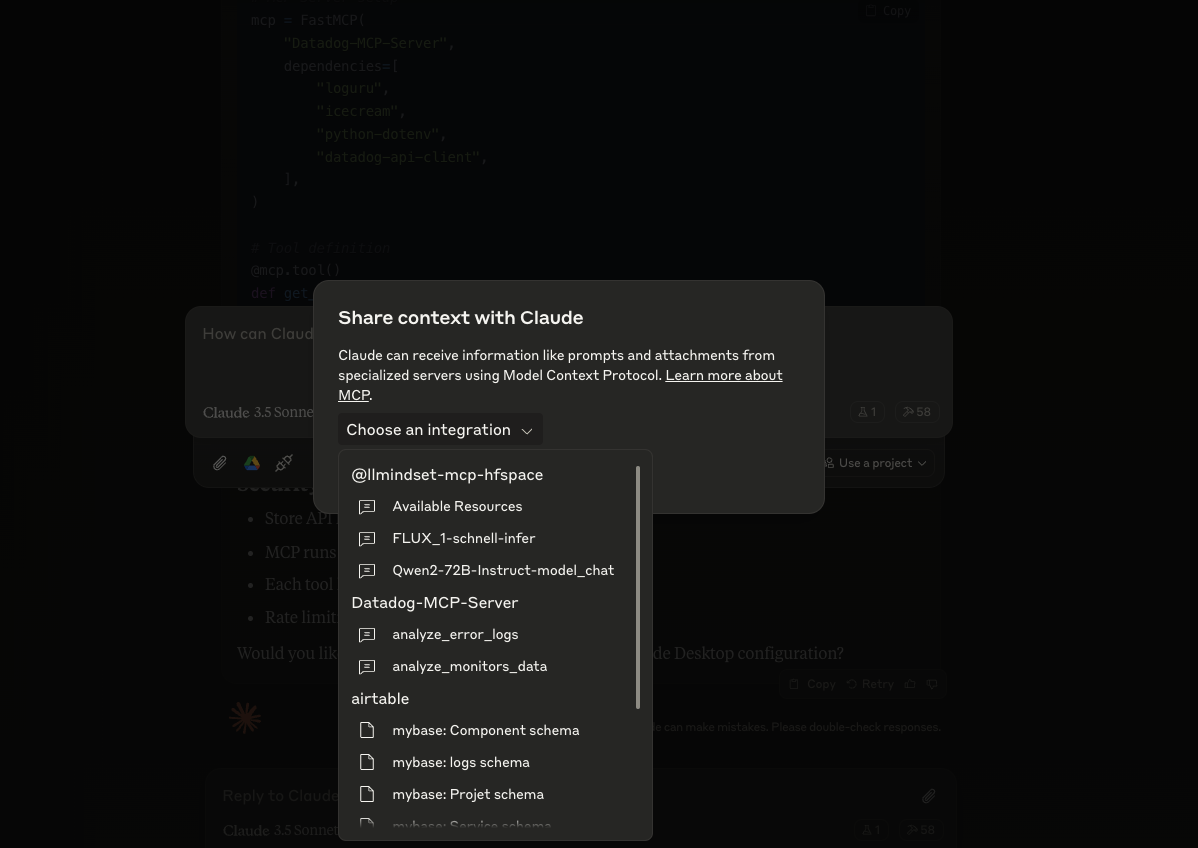
5. Use Datadog MCP Tools
Security Considerations 🔒
Store API keys in
.envMCP runs in isolated environment
Each tool has defined permissions
Rate limiting is implemented
Troubleshooting 🔧
Using MCP Inspector
# Launch MCP Inspector for debugging
task run-mcp-inspector
The MCP Inspector provides:
Real-time view of MCP server status
Function call logs
Error tracing
API response monitoring
Common issues and solutions
API Authentication Errors
Error: (403) Forbidden➡️ Check your DD_API_KEY and DD_APP_KEY in .env
MCP Connection Issues
Error: Failed to connect to MCP server➡️ Verify your claude_desktop_config.json path and content
Monitor Not Found
Error: No monitor found with name 'xxx'➡️ Check monitor name spelling and case sensitivity
logs can be found here
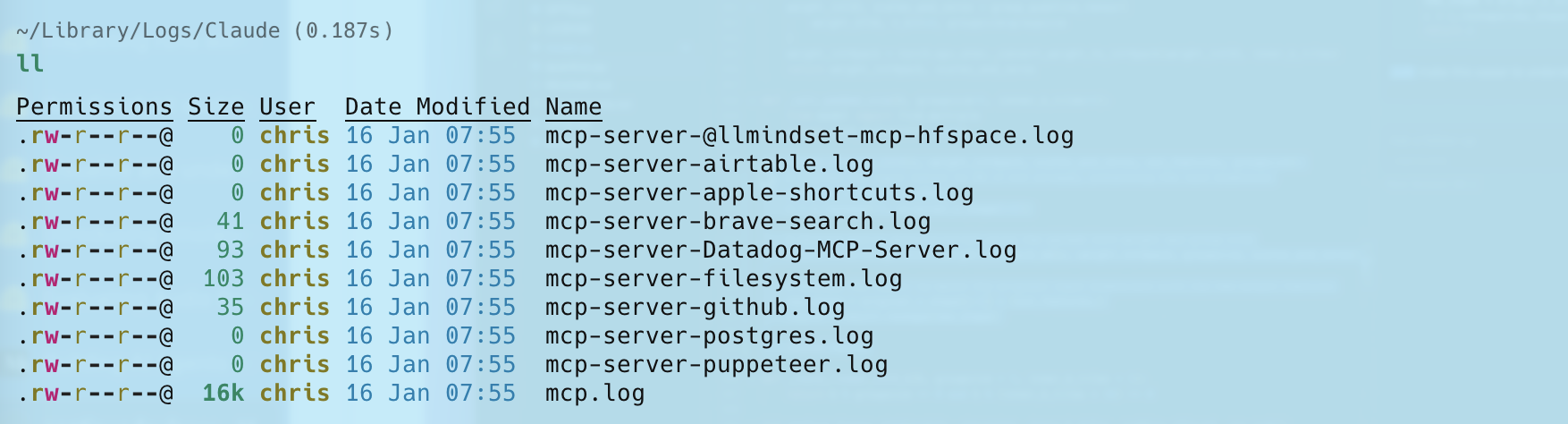
Contributing 🤝
Feel free to:
Open issues for bugs
Submit PRs for improvements
Add new features
Notes 📝
API calls are made to Datadog EU site
Default timeframe is 1 hour for monitor states
Page size limits are set to handle most use cases
This server cannot be installed
Resources
Looking for Admin?
Admins can modify the Dockerfile, update the server description, and track usage metrics. If you are the server author, to access the admin panel.
Appeared in Searches
- Combining MCP Server Aggregator
- Datadog - A monitoring and analytics platform for developers and IT operations
- A service for application performance monitoring and observability
- A platform for monitoring and analyzing system and application performance
- A platform for monitoring and analyzing data in real-time