

F
licenseC
qualityD
maintenanceA starter template for building MCP servers that can integrate with Claude, Cursor, or other MCP-compatible AI assistants to create custom tools, resource providers, and prompt templates.
2
8
-

このプロジェクトは、Cursor やその他のツールで使用できる非常に基本的な MCP サーバーです。
index.ts を変更して必要なツールを追加するか、デフォルトのツールをそのまま使用します。
次にプロジェクトをビルドします。
pnpm run buildそして実行します:
pnpm run start次に、プロジェクトに .cursor/mcp.json ファイルを追加し、以下を貼り付けます。
{
    "mcpServers":{
        "weather":{
            "command": "node",
            "args": ["[path]/build/index.js"]
        }
    }
}[path] をこのプロジェクトへの絶対パスに置き換えてください。プロジェクトフォルダで pwd を実行してください。例えば、私の場合は以下のようになります。
{
    "mcpServers":{
        "weather":{
            "command": "node",
            "args": ["/Users/ivanbtrujillo/Development/mcp-server-spike/build/index.js"]
        }
    }
}
カーソルの「設定」に移動してください。MCPサーバーが表示されるはずです。有効化してください(右上をクリック)。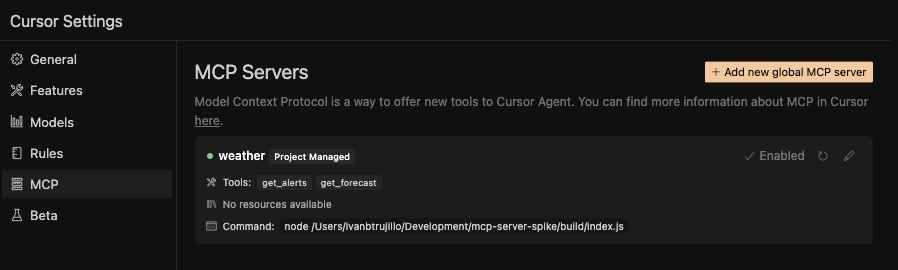
次にチャットに移動し、エージェント モードに切り替えて、モデルとして claude-3.7-sonnet を選択します。
次のように入力します。
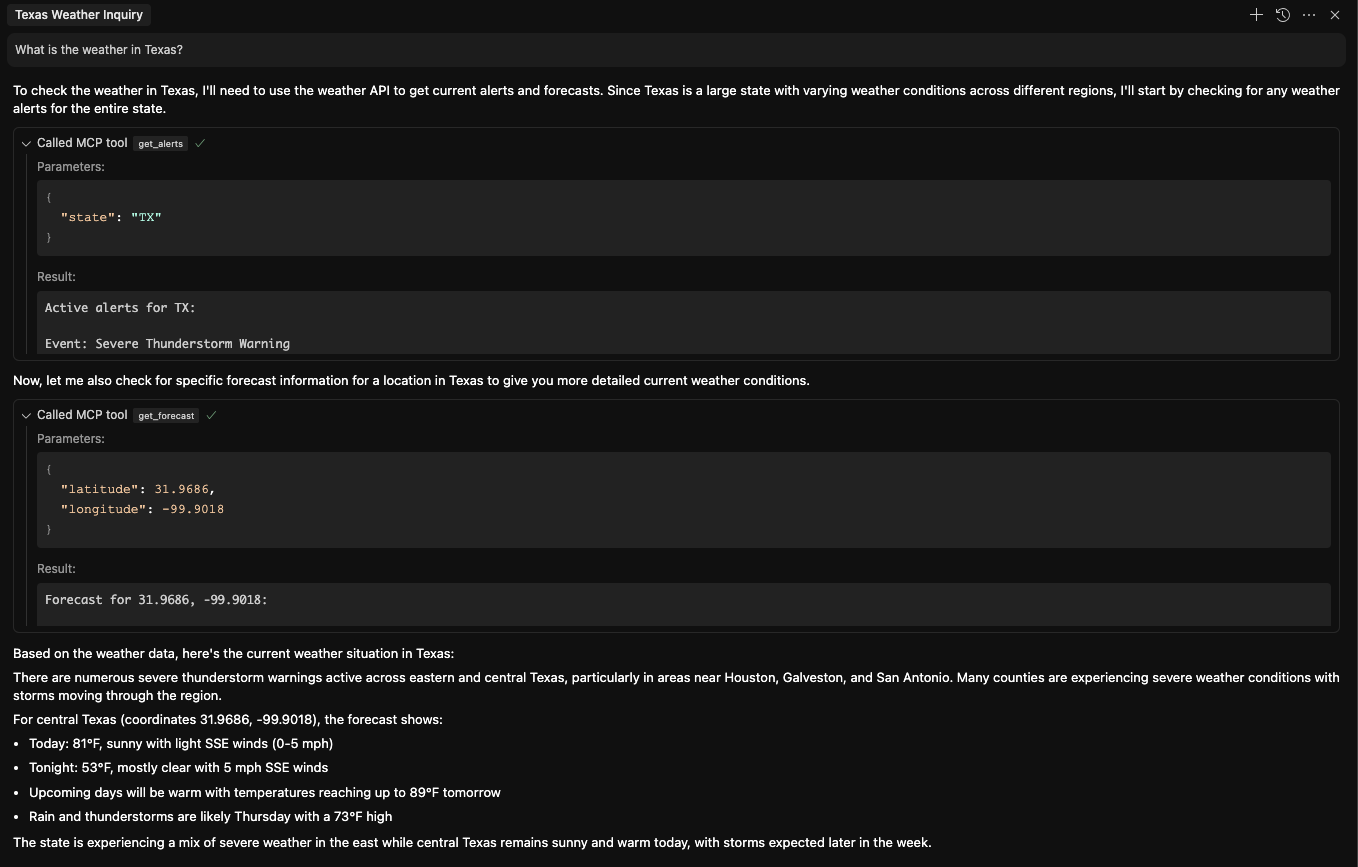
What is the weather in Texas?MCP を使用して、最初に天気警報を取得し、次に予報を取得します。以下は、テキサスの天気を問い合わせるときのチャット インターフェイスの外観の例です。
Get weather alerts for a state
| Name | Required | Description | Default |
|---|---|---|---|
| state | Yes | Two-letter state code (e.g. CA, NY) |
Does the description disclose side effects, auth requirements, rate limits, or destructive behavior?
No annotations are provided, so the description carries the full burden of behavioral disclosure. It states what the tool does but lacks details on traits like rate limits, authentication needs, error handling, or response format. For a tool with zero annotation coverage, this is a significant gap in transparency.
Agents need to know what a tool does to the world before calling it. Descriptions should go beyond structured annotations to explain consequences.
Is the description appropriately sized, front-loaded, and free of redundancy?
The description is a single, efficient sentence with zero waste—it directly states the tool's purpose without unnecessary words. It's appropriately sized and front-loaded, making it easy for an agent to parse quickly.
Shorter descriptions cost fewer tokens and are easier for agents to parse. Every sentence should earn its place.
Given the tool's complexity, does the description cover enough for an agent to succeed on first attempt?
Given the lack of annotations and output schema, the description is incomplete. It doesn't explain what 'weather alerts' entail (e.g., types, severity, format) or behavioral aspects like permissions or errors. For a tool with no structured data beyond the input schema, more context is needed for effective use.
Complex tools with many parameters or behaviors need more documentation. Simple tools need less. This dimension scales expectations accordingly.
Does the description clarify parameter syntax, constraints, interactions, or defaults beyond what the schema provides?
Schema description coverage is 100%, with the parameter 'state' fully documented in the schema (two-letter code, examples). The description adds no additional parameter semantics beyond implying the tool is state-specific, so it meets the baseline of 3 where the schema does the heavy lifting.
Input schemas describe structure but not intent. Descriptions should explain non-obvious parameter relationships and valid value ranges.
Does the description clearly state what the tool does and how it differs from similar tools?
The description clearly states the verb 'Get' and resource 'weather alerts' with scope 'for a state', making the purpose specific and understandable. However, it doesn't explicitly differentiate from its sibling 'get-forecast' (which presumably provides weather forecasts rather than alerts), so it doesn't reach the highest score.
Agents choose between tools based on descriptions. A clear purpose with a specific verb and resource helps agents select the right tool.
Does the description explain when to use this tool, when not to, or what alternatives exist?
The description provides no guidance on when to use this tool versus its sibling 'get-forecast' or any alternatives. It mentions the scope ('for a state') but doesn't clarify use cases, prerequisites, or exclusions, leaving the agent without contextual decision-making help.
Agents often have multiple tools that could apply. Explicit usage guidance like "use X instead of Y when Z" prevents misuse.
Get weather forecast for a location
| Name | Required | Description | Default |
|---|---|---|---|
| latitude | Yes | Latitude of the location | |
| longitude | Yes | Longitude of the location |
Does the description disclose side effects, auth requirements, rate limits, or destructive behavior?
No annotations are provided, so the description carries full burden for behavioral disclosure. It states the basic function but doesn't mention important behavioral aspects like whether this is a read-only operation, if it requires authentication, rate limits, data freshness, or what format the forecast returns. For a tool with no annotations, this is insufficient transparency.
Agents need to know what a tool does to the world before calling it. Descriptions should go beyond structured annotations to explain consequences.
Is the description appropriately sized, front-loaded, and free of redundancy?
The description is extremely concise - a single sentence that communicates the core purpose without any wasted words. It's appropriately sized for a simple tool and front-loads the essential information.
Shorter descriptions cost fewer tokens and are easier for agents to parse. Every sentence should earn its place.
Given the tool's complexity, does the description cover enough for an agent to succeed on first attempt?
Given that there are no annotations and no output schema, the description should provide more context about what the tool returns and its behavioral characteristics. A weather forecast tool could return various data formats (hourly, daily, current conditions) and may have important constraints, but none of this is mentioned. The description is too minimal for the tool's complexity.
Complex tools with many parameters or behaviors need more documentation. Simple tools need less. This dimension scales expectations accordingly.
Does the description clarify parameter syntax, constraints, interactions, or defaults beyond what the schema provides?
Schema description coverage is 100%, so the schema already fully documents both parameters (latitude and longitude). The description adds no additional parameter information beyond what's in the schema. According to scoring rules, when schema coverage is high (>80%), the baseline is 3 even with no param info in the description.
Input schemas describe structure but not intent. Descriptions should explain non-obvious parameter relationships and valid value ranges.
Does the description clearly state what the tool does and how it differs from similar tools?
The description clearly states the action ('Get weather forecast') and resource ('for a location'), making the purpose immediately understandable. However, it doesn't distinguish this tool from its sibling 'get-alerts' (which presumably provides weather alerts rather than forecasts), so it doesn't reach the highest score.
Agents choose between tools based on descriptions. A clear purpose with a specific verb and resource helps agents select the right tool.
Does the description explain when to use this tool, when not to, or what alternatives exist?
The description provides no guidance on when to use this tool versus alternatives. There's no mention of the sibling tool 'get-alerts' or any context about when a forecast is more appropriate than alerts. The description simply states what the tool does without usage context.
Agents often have multiple tools that could apply. Explicit usage guidance like "use X instead of Y when Z" prevents misuse.
Recent tool additions, removals, and schema changes observed during successful MCP inspections. Dates show when Glama detected each change.
get-alertsget-forecastThe two tools have clearly distinct purposes: one retrieves weather alerts for a state, and the other retrieves weather forecasts for a location. There is no overlap in functionality, making it easy for an agent to select the correct tool based on the need for alerts versus forecasts.
Both tools follow a consistent verb-noun pattern with hyphens (get-alerts, get-forecast), using the same verb 'get' and descriptive nouns. This predictable naming scheme enhances readability and reduces confusion for agents.
With only two tools, the server feels thin for a weather domain that typically involves more operations, such as current conditions, historical data, or radar imagery. This limited set may not fully support comprehensive weather-related tasks.
The tool set is severely incomplete for a weather server, lacking essential operations like getting current conditions, historical weather data, or radar images. This creates significant gaps that could lead to agent failures in handling broader weather queries.
Unclaimed servers have limited discoverability.
If you are the server author, to access and configure the admin panel.
Hosted MCP server connecting claude.ai, ChatGPT and other AI apps to your own computer
MCP server for AI dialogue using various LLM models via AceDataCloud
An MCP server for weather information by @kulybaba
We provide all the information about MCP servers via our MCP API.
curl -X GET 'https://glama.ai/api/mcp/v1/servers/ivanbtrujillo/mcp-server-spike'
If you have feedback or need assistance with the MCP directory API, please join our Discord server