
F
licenseC
qualityD
maintenanceA starter template for building MCP servers that can integrate with Claude, Cursor, or other MCP-compatible AI assistants to create custom tools, resource providers, and prompt templates.
2
3 npm
-

Este proyecto es un servidor MCP muy básico listo para ser consumido por Cursor u otras herramientas.
Modifique index.ts y agregue las herramientas que desee o mantenga las predeterminadas.
Luego construye el proyecto:
pnpm run buildY ejecutarlo:
pnpm run startAhora agregue un archivo .cursor/mcp.json en su proyecto y pegue lo siguiente;
{
    "mcpServers":{
        "weather":{
            "command": "node",
            "args": ["[path]/build/index.js"]
        }
    }
}
Reemplace [ruta] con la ruta absoluta de este proyecto. Ejecute pwd en la carpeta del proyecto para ello. Por ejemplo, en mi caso es:
{
    "mcpServers":{
        "weather":{
            "command": "node",
            "args": ["/Users/ivanbtrujillo/Development/mcp-server-spike/build/index.js"]
        }
    }
}
Ahora ve a "Configuración" en el cursor. Deberías poder ver el servidor MCP allí. Habilítalo (haz clic en la esquina superior derecha).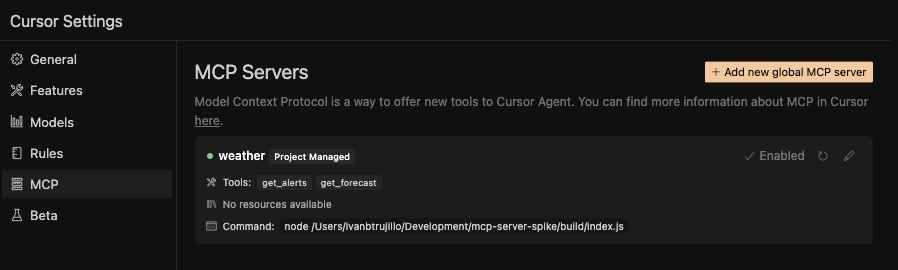
Ahora ve al chat, cambia al modo Agente y selecciona claude-3.7-sonnet como tu modelo.
Escriba lo siguiente:
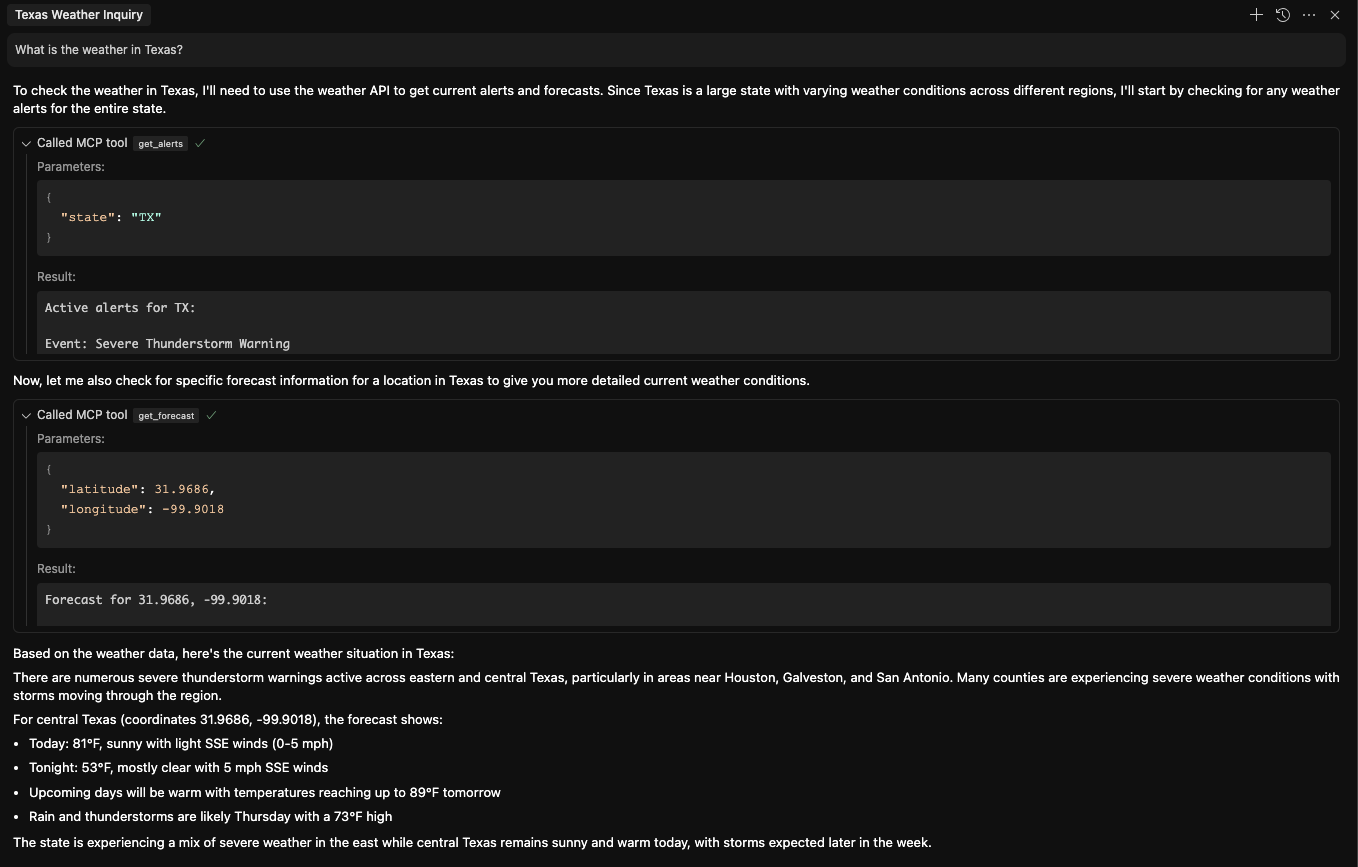
What is the weather in Texas?Utilizará el MCP para obtener primero las alertas meteorológicas y luego el pronóstico. Aquí hay un ejemplo de cómo se ve la interfaz de chat al consultar el clima en Texas:
Get weather alerts for a state
| Name | Required | Description | Default |
|---|---|---|---|
| state | Yes | Two-letter state code (e.g. CA, NY) |
Does the description disclose side effects, auth requirements, rate limits, or destructive behavior?
With no annotations provided, the description carries the full burden of behavioral disclosure. It states what the tool does but doesn't describe traits like rate limits, authentication needs, error handling, or response format. For a tool with no annotation coverage, this leaves significant gaps in understanding its behavior.
Agents need to know what a tool does to the world before calling it. Descriptions should go beyond structured annotations to explain consequences.
Is the description appropriately sized, front-loaded, and free of redundancy?
The description is a single, clear sentence with no wasted words, making it highly concise and front-loaded. It efficiently communicates the core purpose without unnecessary elaboration.
Shorter descriptions cost fewer tokens and are easier for agents to parse. Every sentence should earn its place.
Given the tool's complexity, does the description cover enough for an agent to succeed on first attempt?
Given the lack of annotations and output schema, the description is incomplete for a tool that likely returns complex alert data. It doesn't explain what the alerts include, how they're formatted, or any limitations, leaving the agent with insufficient context for effective use.
Complex tools with many parameters or behaviors need more documentation. Simple tools need less. This dimension scales expectations accordingly.
Does the description clarify parameter syntax, constraints, interactions, or defaults beyond what the schema provides?
The description doesn't add any parameter-specific information beyond what's in the input schema, which has 100% coverage and fully documents the 'state' parameter. This meets the baseline score of 3, as the schema adequately handles parameter semantics without needing extra description.
Input schemas describe structure but not intent. Descriptions should explain non-obvious parameter relationships and valid value ranges.
Does the description clearly state what the tool does and how it differs from similar tools?
The description clearly states the verb ('Get') and resource ('weather alerts for a state'), making the purpose specific and understandable. However, it doesn't explicitly differentiate from its sibling tool 'get-forecast', which likely provides different weather data, so it doesn't reach the highest score.
Agents choose between tools based on descriptions. A clear purpose with a specific verb and resource helps agents select the right tool.
Does the description explain when to use this tool, when not to, or what alternatives exist?
The description provides no guidance on when to use this tool versus its sibling 'get-forecast' or any alternatives. It lacks context about usage scenarios, exclusions, or prerequisites, offering only a basic statement of function.
Agents often have multiple tools that could apply. Explicit usage guidance like "use X instead of Y when Z" prevents misuse.
Get weather forecast for a location
| Name | Required | Description | Default |
|---|---|---|---|
| latitude | Yes | Latitude of the location | |
| longitude | Yes | Longitude of the location |
Does the description disclose side effects, auth requirements, rate limits, or destructive behavior?
With no annotations provided, the description carries the full burden of behavioral disclosure. It states what the tool does but doesn't describe any behavioral traits such as whether this is a read-only operation, if it requires authentication, rate limits, or what the response format might be. This is inadequate for a tool with zero annotation coverage.
Agents need to know what a tool does to the world before calling it. Descriptions should go beyond structured annotations to explain consequences.
Is the description appropriately sized, front-loaded, and free of redundancy?
The description is a single, clear sentence that efficiently conveys the core purpose without any unnecessary words. It's appropriately sized and front-loaded, making it easy for an agent to parse quickly.
Shorter descriptions cost fewer tokens and are easier for agents to parse. Every sentence should earn its place.
Given the tool's complexity, does the description cover enough for an agent to succeed on first attempt?
Given that there are no annotations and no output schema, the description is incomplete. It doesn't provide enough context about behavioral aspects, response format, or how this tool differs from its sibling. For a tool with this level of complexity and lack of structured data, the description should do more to compensate.
Complex tools with many parameters or behaviors need more documentation. Simple tools need less. This dimension scales expectations accordingly.
Does the description clarify parameter syntax, constraints, interactions, or defaults beyond what the schema provides?
The schema description coverage is 100%, with both parameters (latitude and longitude) well-documented in the schema. The description doesn't add any meaningful parameter semantics beyond what's already in the schema, so it meets the baseline score of 3.
Input schemas describe structure but not intent. Descriptions should explain non-obvious parameter relationships and valid value ranges.
Does the description clearly state what the tool does and how it differs from similar tools?
The description clearly states the verb ('Get') and resource ('weather forecast for a location'), making the purpose immediately understandable. However, it doesn't distinguish this tool from its sibling 'get-alerts', which likely provides different weather-related information, so it doesn't achieve the highest score.
Agents choose between tools based on descriptions. A clear purpose with a specific verb and resource helps agents select the right tool.
Does the description explain when to use this tool, when not to, or what alternatives exist?
The description provides no guidance on when to use this tool versus alternatives. It doesn't mention the sibling 'get-alerts' or explain the difference between getting a forecast versus alerts, leaving the agent without context for tool selection.
Agents often have multiple tools that could apply. Explicit usage guidance like "use X instead of Y when Z" prevents misuse.
Recent tool additions, removals, and schema changes observed during successful MCP inspections.
get-alertsget-forecastScored across 2 tools
The two tools have clearly distinct purposes: one retrieves weather alerts for a state, and the other retrieves weather forecasts for a location. There is no overlap in functionality, making it easy for an agent to select the correct tool based on the need for alerts versus forecasts.
Both tools follow a consistent verb-noun pattern with hyphens (get-alerts, get-forecast), using the same verb 'get' and descriptive nouns. This predictable naming scheme enhances readability and reduces confusion for agents.
With only two tools, the server feels thin for a weather domain that typically involves more operations, such as current conditions, historical data, or radar imagery. This limited set may not fully support comprehensive weather-related tasks.
The tool set is severely incomplete for a weather server, lacking essential operations like getting current conditions, historical weather data, or radar images. This creates significant gaps that could lead to agent failures in handling broader weather queries.
MCP server for AI dialogue using various LLM models via AceDataCloud
MCP server for OpenAI API (chat completions, image generation, embeddings) via AceDataCloud
An MCP server for weather information by @kulybaba