

A
licenseNot graded
qualityD
maintenanceEnables integration with Google Drive for listing, reading, and searching over files, supporting various file types with automatic export for Google Workspace files.
4,149 npm
72
MIT

この MCP サーバーは Google ドライブと統合されており、ファイルの一覧表示、読み取り、検索に加え、Google スプレッドシートの読み取りと書き込みも可能になります。
このプロジェクトには、もともと Anthropic, PBC によって開発され、このリポジトリから MIT ライセンスに基づいてライセンスされたコードが含まれています。
gdrive_search
説明: Google ドライブ内のファイルを検索します。
入力:
query (文字列): 検索クエリ。
pageToken (文字列、オプション): 次の結果ページのトークン。
pageSize (数値、オプション): ページあたりの結果数 (最大 100)。
出力: 一致するファイルのファイル名と MIME タイプを返します。
gdrive_read_file
説明: Google ドライブからファイルの内容を読み取ります。
入力:
fileId (文字列): 読み取るファイルの ID。
出力: 指定されたファイルの内容を返します。
gsheets_read
説明: 範囲と書式設定の柔軟なオプションを使用して、Google スプレッドシートからデータを読み取ります。
入力:
spreadsheetId (文字列): 読み取るスプレッドシートの ID。
ranges (文字列の配列、オプション):A1表記の範囲の配列(例: ['Sheet1!A1:B10'] )。指定されていない場合は、シート全体を読み取ります。
sheetId (数値、オプション): 読み取るシートIDを指定します。範囲が指定されていない場合は、最初のシートを読み取ります。
出力: スプレッドシートから指定されたデータを返します。
gsheets_update_cell
説明: Google スプレッドシートのセルの値を更新します。
入力:
fileId (文字列): スプレッドシートの ID。
range (文字列): A1 表記のセル範囲 (例: 'Sheet1!A1' )。
value (文字列): 新しいセルの値。
出力: 指定されたセルの更新された値を確認します。
サーバーは Google ドライブ ファイルへのアクセスを提供します。
ファイル( gdrive:///<file_id> )
すべてのファイルタイプをサポート
Google Workspace ファイルは自動的にエクスポートされます。
ドキュメント → Markdown
スプレッドシート → CSV
プレゼンテーション → プレーンテキスト
図面 → PNG
その他のファイルはネイティブ形式で提供されます
Related MCP server: Google Drive MCP Server
OAuth 同意画面を構成する(テストの場合は「内部」で問題ありません)
OAuth スコープhttps://www.googleapis.com/auth/spreadsheets追加しますhttps://www.googleapis.com/auth/drive.readonly
シートやドキュメントとのやり取りを許可するには、ワークスペースの有効な API とサービス セクションでGoogle Sheets APIとGoogle Docs APIも有効にする必要があります。
アプリケーションタイプ「デスクトップアプリ」のOAuth クライアント ID を作成します
クライアントのOAuthキーのJSONファイルをダウンロードします
キーファイルの名前をgcp-oauth.keys.jsonに変更し、 GDRIVE_CREDS_DIRで指定したパス (例: /Users/username/.config/mcp-gdrive ) に配置します。
OAuthクライアントIDとクライアントシークレットをメモしてください。これらは設定ディレクトリとともに環境変数として指定する必要があります。
また、プロジェクト内に以下のフィールドを含む .env ファイルを設定する必要があります。クライアントIDとクライアントシークレットは、Google Cloud Console の認証情報セクションで確認できます。
GDRIVE_CREDS_DIR=/path/to/config/directory
CLIENT_ID=<CLIENT_ID>
CLIENT_SECRET=<CLIENT_SECRET>必ずnpm run buildまたはnpm run watchのいずれかを使用してサーバーをビルドしてください。
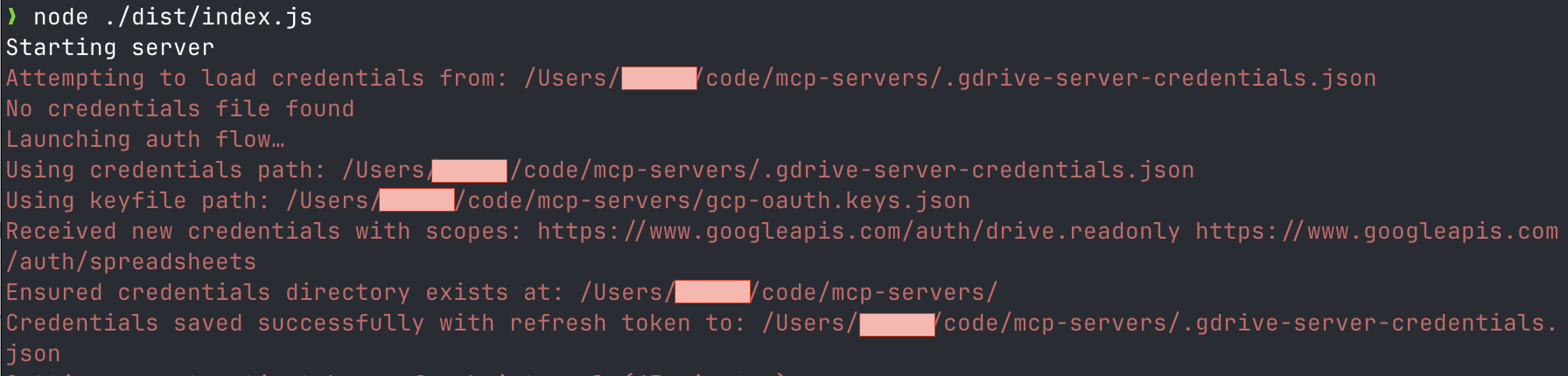
次に、認証ステップを開始するために、 node ./dist/index.jsを実行する必要があります。
ブラウザで認証を求められます。Google Cloud プロジェクトと同じ組織のアカウントで認証する必要があります。
OAuth トークンは、 GDRIVE_CREDS_DIR環境変数で指定されたディレクトリに保存されます。
このサーバーをデスクトップ アプリと統合するには、アプリのサーバー構成に以下を追加します。
{
  "mcpServers": {
    "gdrive": {
      "command": "npx",
      "args": ["-y", "@isaacphi/mcp-gdrive"],
      "env": {
        "CLIENT_ID": "<CLIENT_ID>",
        "CLIENT_SECRET": "<CLIENT_SECRET>",
        "GDRIVE_CREDS_DIR": "/path/to/config/directory"
      }
    }
  }
}このMCPサーバーはMITライセンスに基づいてライセンスされています。つまり、MITライセンスの条件に従って、ソフトウェアを自由に使用、改変、配布することができます。詳細については、プロジェクトリポジトリのLICENSEファイルをご覧ください。
This server cannot be deployed
Permissioned access to Gmail, Drive and Calendar via the user's own Google account
Provides tools for searching Google Workspace documentation and much more.
Connect AI assistants to Google Sheets through controlled tools for reading and updating rows.
Search, read, preview, create, update, rename, arrange and trash sketches in your Google Drive.