MCP Personal Assistant
A comprehensive MCP (Model Context Protocol) server for personal productivity management, including status tracking, project management, todos, calendar functionality, and document storage.
Features
🔍 Status Management
Track your current location, laptop details, and system permissions
View a dashboard of active projects and upcoming tasks
Update your personal information and system status
📋 Project Management
Create and manage projects with customizable status and priority
Add tasks to projects with due dates and priorities
Track project progress with percentage completion
Filter projects by status (not started, in progress, on hold, completed, cancelled)
✅ Todo Management
Create and manage todos with due dates and reminders
Set priority levels (low, medium, high, urgent)
Mark todos as completed
Filter todos by completion status
📅 Calendar Management
Create calendar events with start/end times
Set event locations and attendee lists
Configure reminder notifications
View events within date ranges
📄 Document Management
Upload and store documents (PDFs, images, text files, etc.)
Create references to external documents (cloud storage links)
Tag and organize documents
Support for encrypted storage
Automatic file type detection and categorization
Related MCP server: Follow Plan MCP Server
Installation & Setup
Prerequisites
Installation Options
Option 1: Install from PyPI (Recommended)
Using uvx (recommended):
uvx install mcp-personal-assistant
Using pipx:
pipx install mcp-personal-assistant
Using pip:
pip install mcp-personal-assistant
Option 2: Install from Source (Development)
Step 1: Clone the Repository
git clone <repository-url>
cd mcp-pa
Step 2: Create Virtual Environment
python3 -m venv venv
source venv/bin/activate  # On Windows: venv\Scripts\activate
Step 3: Install Dependencies
pip install -r requirements.txt
pip install -e .  # Install in development mode
Configuration
The MCP server can be configured using environment variables:
Database Configuration
MCP_PA_DB_TYPE: Database type (sqlite or tinydb, default: sqlite)
MCP_PA_DB_PATH: Custom database file path
MCP_PA_ENCRYPTION_KEY: Encryption key for database (optional)
Storage Configuration
Default Locations
To use specific settings:
export MCP_PA_DB_TYPE=sqlite
export MCP_PA_ENCRYPTION_KEY=mysecretkey
export MCP_PA_DOCS_DIR=/path/to/documents
Claude Desktop Configuration
Locate your Claude Desktop configuration file:
macOS: ~/Library/Application Support/Claude/claude_desktop_config.json
Linux: ~/.config/Claude/claude_desktop_config.json
Windows: %APPDATA%\Claude\claude_desktop_config.json
Add the MCP server configuration:
For PyPI Installation (uvx/pipx/pip):
{
  "mcpServers": {
    "personal-assistant": {
      "command": "uvx",
      "args": ["mcp-personal-assistant"],
      "env": {
        "MCP_PA_DB_TYPE": "sqlite"
      }
    }
  }
}
For Source Installation:
{
  "mcpServers": {
    "personal-assistant": {
      "command": "/path/to/your/mcp-pa/venv/bin/python",
      "args": ["-m", "src.server"],
      "cwd": "/path/to/your/mcp-pa",
      "env": {
        "MCP_PA_DB_TYPE": "sqlite"
      }
    }
  }
}
Notes for Source Installation:
Use the full path to your virtual environment's Python executable
Use the full path to your project directory in the cwd field
On Windows, use forward slashes or escaped backslashes in paths
Restart Claude Desktop for the configuration to take effect
Usage Examples
Once configured, the MCP Personal Assistant integrates seamlessly with Claude Desktop. Here are some examples of how it works:
Claude Desktop Settings
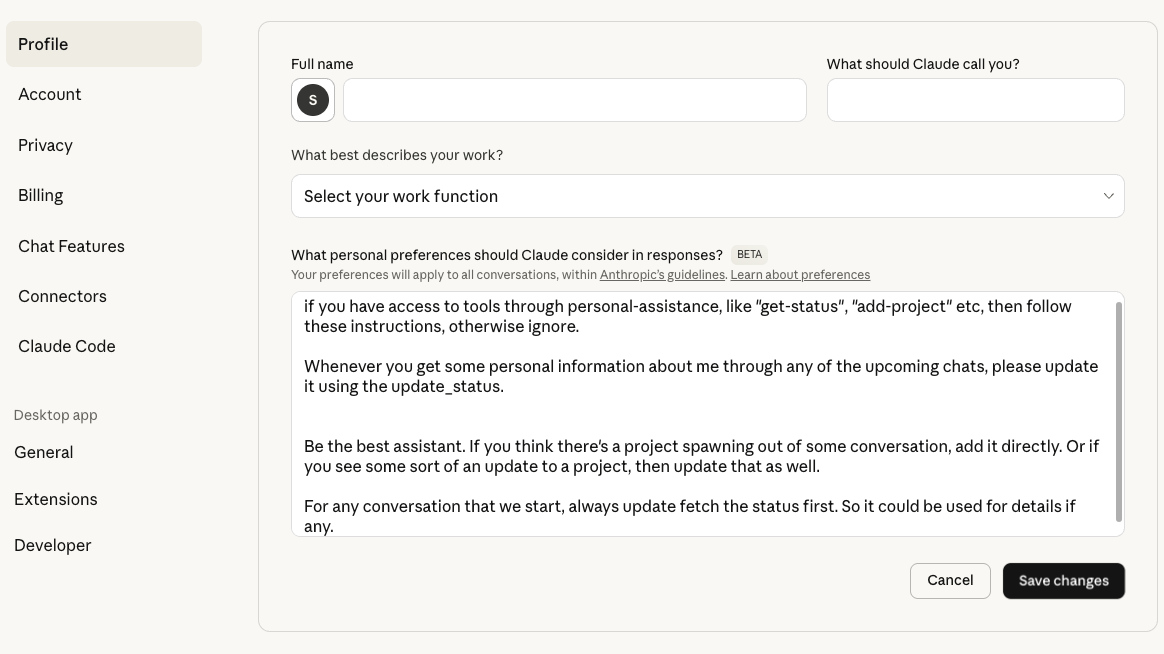
You can configure Claude with custom instructions to automatically use the MCP Personal Assistant tools for status updates and project management.
MCP Server Status

The server appears in Claude Desktop's developer settings, showing it's running and properly configured.
Creating Projects
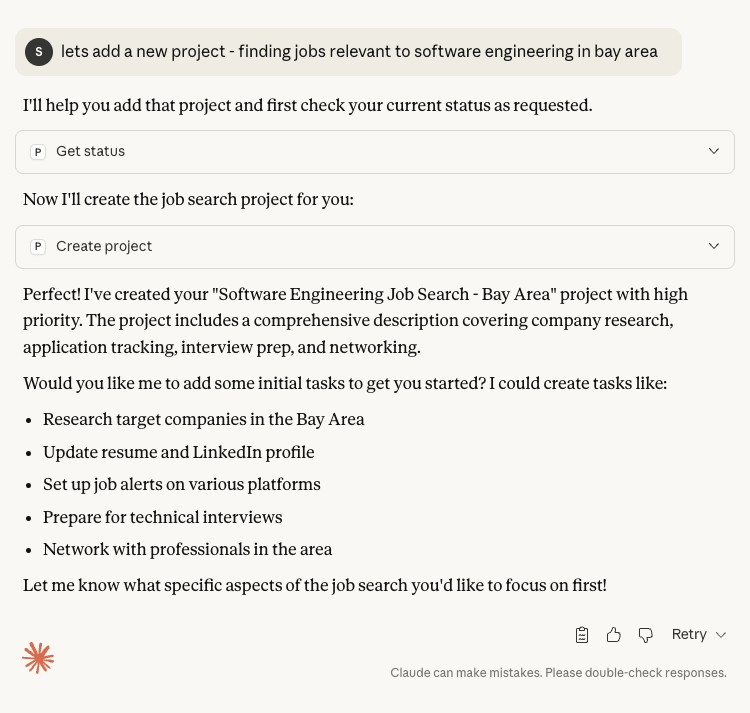
You can ask Claude to create projects, and it will use the MCP Personal Assistant tools to manage your project data.
Managing Project Data
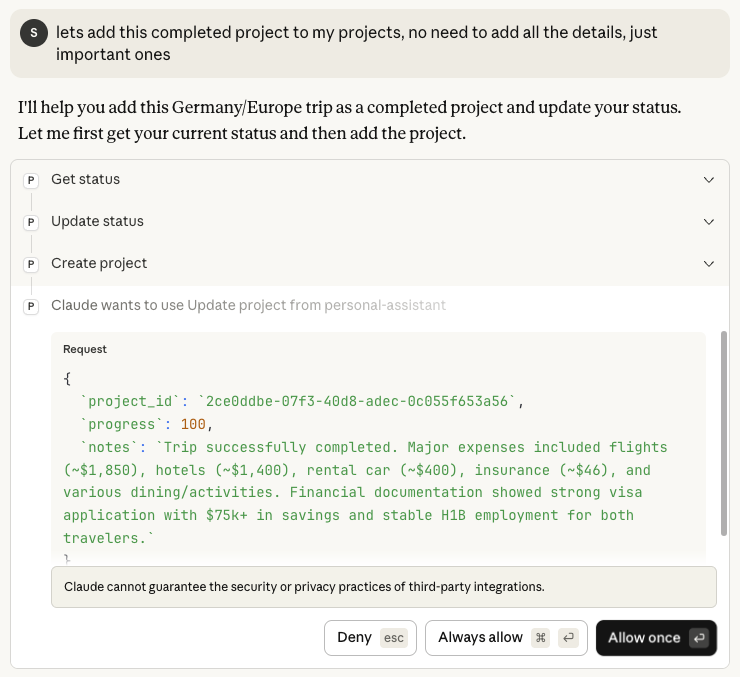
The assistant can update project status, add tasks, and maintain detailed project information with automatic data persistence.
Intelligent Assistance

Claude can access your status and project history to provide personalized recommendations and assistance based on your stored preferences and travel history.
Verification
After restarting Claude Desktop, you should see the MCP Personal Assistant tools available. You can verify the setup by:
Asking Claude to use the get_status tool
Creating a test project with create_project
Viewing the dashboard with get_dashboard
If you encounter issues, check the Claude Desktop logs at:
Quick Start Examples
🚀 PyPI Installation Quick Start
# Install the package
uvx install mcp-personal-assistant

# Copy the Claude Desktop config template (update paths as needed)
cp examples/claude_desktop_config.json ~/Library/Application\ Support/Claude/claude_desktop_config.json

# Restart Claude Desktop
🧪 Test the Installation
# Test the console script
mcp-personal-assistant --help

# Run the basic usage example to verify everything works
python examples/basic_usage.py
📁 Template Files
The examples/ directory contains ready-to-use templates and scripts:
claude_desktop_config.json - Template configuration for Claude Desktop
basic_usage.py - Standalone script to test functionality
Usage screenshots showing the MCP in action
Available Tools
Status Management
get_status
Get your current status including location, laptop details, permissions, and system information.
update_status
Update your status information.
Project Management
create_project
Create a new project with name, description, status, priority, dates, and tags.
list_projects
List all projects or filter by status.
get_project
Get detailed information about a specific project.
update_project
Update project information including status, priority, and progress.
add_project_task
Add a task to a project.
Todo Management
create_todo
Create a new todo with title, description, due date, priority, and tags.
list_todos
List all todos with optional completion status filter.
complete_todo
Mark a todo as completed.
Calendar Management
create_calendar_event
Create a calendar event with start/end times, location, and attendees.
list_calendar_events
List calendar events within a date range.
Document Management
upload_document
Upload a document with base64 encoded content.
Parameters:
- title: Document filename
- content_base64: Base64 encoded file content
- description: Optional description
- tags: Optional tags array
create_external_document
Create a reference to an external document.
Parameters:
- title: Document title
- external_url: URL to external document
- description: Optional description
- tags: Optional tags array
list_documents
List all documents with optional tag filtering.
get_document
Get detailed information about a specific document.
Dashboard
get_dashboard
Get a comprehensive dashboard view of all activities.
Database Support
SQLite (Default)
Better performance for larger datasets
ACID compliance with transaction support
Thread-safe with connection pooling
Efficient concurrent access
Supports database encryption
TinyDB
Simple JSON-based storage
Human-readable database file
Supports encryption via Fernet
Good for smaller datasets
Easy to backup and inspect
Document Storage
The document manager supports:
Automatic file type detection
SHA-256 checksum calculation
File size validation
Metadata tagging
External document references
Supported document types:
Security Features
Database Encryption
SQLite: Can use SQLCipher for encryption (if available)
TinyDB: Uses Fernet symmetric encryption
Encryption key configurable via environment variable
Document Security
Files stored with unique IDs
Original filenames preserved in metadata
Checksum verification for integrity
File size limits enforced
Advanced Usage
Using with Multiple Instances
The server supports concurrent access from multiple clients:
SQLite uses connection pooling
TinyDB uses thread-safe locking
Both handle concurrent read/write operations
Custom Database Location
export MCP_PA_DB_PATH=/custom/path/database.sqlite
Encrypted Database
export MCP_PA_ENCRYPTION_KEY=your-secure-key-here
Project Structure
mcp-personal-assistant/
├── README.md                  # Main documentation
├── pyproject.toml            # Package configuration
├── requirements.txt          # Core dependencies
├── LICENSE                   # License file
├── pytest.ini              # Test configuration
├── Makefile                 # Build automation
│
├── src/                     # Source code
│   ├── __init__.py
│   ├── server.py            # Main MCP server
│   ├── config.py            # Configuration management
│   ├── models.py            # Data models
│   ├── database_interface.py
│   ├── database_factory.py
│   ├── sqlite_database.py
│   ├── tinydb_database.py
│   ├── document_manager.py
│   └── config/              # Configuration modules
│
├── examples/                # Usage examples
│   ├── README.md
│   ├── claude_desktop_config.json
│   └── basic_usage.py
│
├── docs/                    # Documentation
│   ├── quickstart.md
│   ├── architecture.md
│   ├── cloud-architecture.md
│   ├── security.md
│   └── development-notes.md
│
├── tests/                   # Test files
│
├── scripts/                 # Utility scripts
│   ├── check_performance_regression.py
│   ├── run_http_server.py
│   ├── run_tests.sh
│   └── test_framework_validation.py
│
├── deployment/              # Deployment files
│   ├── docker-compose.yml
│   ├── Dockerfile
│   └── init-db.sql
│
└── archive/                 # Development artifacts
    ├── old requirements files
    └── development reports
Running Tests
Building the Package
pip install build
python -m build
Contributing
Contributions are welcome! Please feel free to submit a Pull Request.
License
MIT License - see LICENSE file for details.
Troubleshooting
Common Setup Issues
"ModuleNotFoundError: No module named 'src'"
"spawn python ENOENT"
"Server disconnected" errors
Check that all dependencies are installed: pip install -r requirements.txt
Verify the cwd path points to your project directory
Check Claude Desktop logs for specific error messages
"Unknown resource" errors
This usually indicates a configuration issue
Restart Claude Desktop after making config changes
Ensure the server is properly installed with pip install -e .
Log Files
Check these log files for debugging:
macOS: ~/Library/Logs/Claude/mcp-server-personal-assistant.log
Linux: ~/.config/Claude/logs/mcp-server-personal-assistant.log
Windows: %APPDATA%\Claude\logs\mcp-server-personal-assistant.log
Testing the Server Directly
You can test the server functionality outside of Claude Desktop:
# Activate virtual environment
source venv/bin/activate

# Test basic imports
python -c "import src.server; print('Server imports successfully')"

# Test database connection
python -c "from src.database_factory import get_database; db = get_database(); print('Database connected')"
Other Common Issues
Database Connection Errors
Document Upload Failures
Configuration Problems
Check environment variables
Verify the configuration file syntax
Ensure all required directories exist
Future Enhancements
File preview generation
Full-text search across documents
Automatic backup system
OAuth integration for cloud storage
Web interface for direct access
Plugin system for extensibility
Real-time notifications
Database migration tools
Support
For issues and feature requests, please create an issue in the GitHub repository.
