

MIT

mcp-llm
by sammcj
The mcp-llm server provides tools to interact with LLMs for code generation, documentation, and answering questions:
Generate Code: Create code based on a description in a specified programming language, with optional context.
Generate Code to File: Generate code and insert it directly into a file at a specific line number, optionally replacing existing lines.
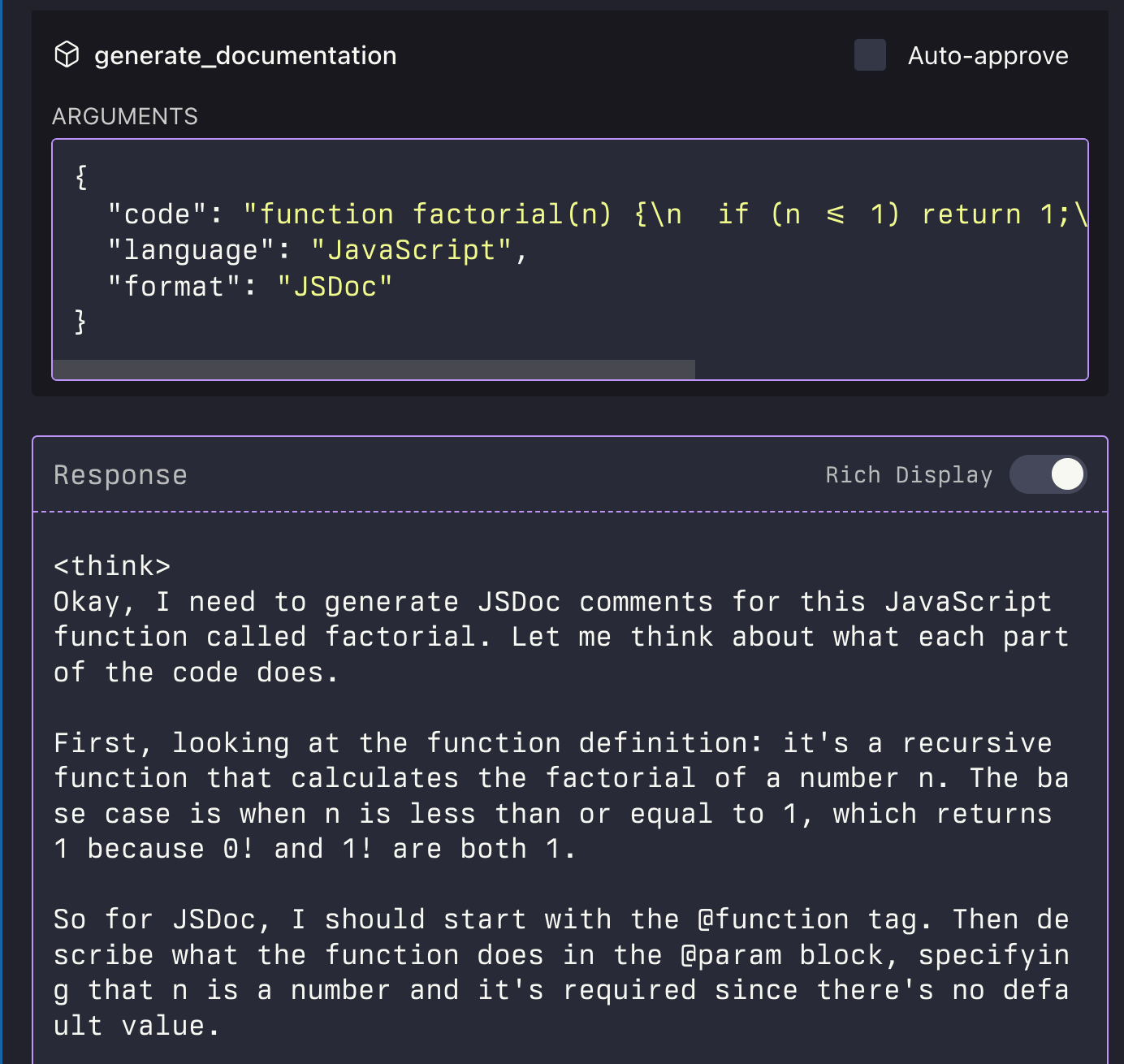
Generate Documentation: Automatically generate documentation for provided code in a specified format.
Ask Question: Pose general questions to the LLM with optional context for clarification.
Click on "Deploy Server".
Wait a few minutes for the server to deploy. Once ready, it will show a "Started" state.
In the chat, type
@followed by the MCP server name and your instructions, e.g., "@mcp-llmgenerate a Python function to calculate fibonacci numbers"
That's it! The server will respond to your query, and you can continue using it as needed.
Here is a step-by-step guide with screenshots.
MCP LLM
An MCP server that provides access to LLMs using the LlamaIndexTS library.
Features
This MCP server provides the following tools:
generate_code: Generate code based on a descriptiongenerate_code_to_file: Generate code and write it directly to a file at a specific line numbergenerate_documentation: Generate documentation for codeask_question: Ask a question to the LLM

Related MCP server: Globalping
Installation
Installing via Smithery
To install LLM Server for Claude Desktop automatically via Smithery:
npx -y @smithery/cli install @sammcj/mcp-llm --client claudeManual Install From Source
Clone the repository
Install dependencies:
npm installBuild the project:
npm run buildUpdate your MCP configuration
Using the Example Script
The repository includes an example script that demonstrates how to use the MCP server programmatically:
node examples/use-mcp-server.jsThis script starts the MCP server and sends requests to it using curl commands.
Examples
Generate Code
{
  "description": "Create a function that calculates the factorial of a number",
  "language": "JavaScript"
}
Generate Code to File
{
  "description": "Create a function that calculates the factorial of a number",
  "language": "JavaScript",
  "filePath": "/path/to/factorial.js",
  "lineNumber": 10,
  "replaceLines": 0
}
The generate_code_to_file tool supports both relative and absolute file paths. If a relative path is provided, it will be resolved relative to the current working directory of the MCP server.
Generate Documentation
{
  "code": "function factorial(n) {\n  if (n <= 1) return 1;\n  return n * factorial(n - 1);\n}",
  "language": "JavaScript",
  "format": "JSDoc"
}
Ask Question
{
  "question": "What is the difference between var, let, and const in JavaScript?",
  "context": "I'm a beginner learning JavaScript and confused about variable declarations."
}
License
Available Tools
4 toolsask_questionC
Ask a question to the LLM
| Name | Required | Description | Default |
|---|---|---|---|
| question | Yes | Question to ask | |
| context | No | Additional context for the question |
TDQS
C2.7/5.0
Behavior2/5
Does the description disclose side effects, auth requirements, rate limits, or destructive behavior?
No annotations are provided, so the description carries the full burden of behavioral disclosure. It only states the action ('Ask a question') without any details on traits like response format, rate limits, authentication needs, or potential side effects. This is inadequate for a tool with no annotations, as it leaves key behavioral aspects unspecified.
Agents need to know what a tool does to the world before calling it. Descriptions should go beyond structured annotations to explain consequences.
Conciseness5/5
Is the description appropriately sized, front-loaded, and free of redundancy?
The description is extremely concise with a single sentence ('Ask a question to the LLM'), which is front-loaded and wastes no words. It efficiently conveys the core action without unnecessary elaboration, making it easy to parse quickly.
Shorter descriptions cost fewer tokens and are easier for agents to parse. Every sentence should earn its place.
Completeness2/5
Given the tool's complexity, does the description cover enough for an agent to succeed on first attempt?
Given the lack of annotations and output schema, the description is incomplete. It doesn't explain what the tool returns, how responses are formatted, or any behavioral nuances. For a tool with no structured data to supplement it, the description should provide more context to be fully helpful.
Complex tools with many parameters or behaviors need more documentation. Simple tools need less. This dimension scales expectations accordingly.
Parameters3/5
Does the description clarify parameter syntax, constraints, interactions, or defaults beyond what the schema provides?
The schema description coverage is 100%, with clear descriptions for both parameters ('question' and 'context'). The description adds no additional meaning beyond the schema, such as examples or constraints. Since the schema does the heavy lifting, the baseline score of 3 is appropriate, but no extra value is provided.
Input schemas describe structure but not intent. Descriptions should explain non-obvious parameter relationships and valid value ranges.
Purpose3/5
Does the description clearly state what the tool does and how it differs from similar tools?
The description 'Ask a question to the LLM' states a clear verb ('Ask') and resource ('question'), but it's vague about what the LLM is and lacks specificity. It doesn't distinguish this tool from its siblings (e.g., generate_code, generate_code_to_file, generate_documentation), which also involve LLM interactions but for different purposes. The purpose is understandable but minimal.
Agents choose between tools based on descriptions. A clear purpose with a specific verb and resource helps agents select the right tool.
Usage Guidelines2/5
Does the description explain when to use this tool, when not to, or what alternatives exist?
The description provides no guidance on when to use this tool versus its siblings. It doesn't mention alternatives, exclusions, or context for usage. For example, it doesn't clarify if this is for general queries versus code generation or documentation tasks, leaving the agent with no explicit usage instructions.
Agents often have multiple tools that could apply. Explicit usage guidance like "use X instead of Y when Z" prevents misuse.
generate_codeC
Generate code based on a description
| Name | Required | Description | Default |
|---|---|---|---|
| description | Yes | Description of the code to generate | |
| language | No | Programming language (e.g., JavaScript, Python, TypeScript) | |
| additionalContext | No | Additional context or requirements for the code |
TDQS
C2.7/5.0
Behavior2/5
Does the description disclose side effects, auth requirements, rate limits, or destructive behavior?
No annotations are provided, so the description carries the full burden of behavioral disclosure. It only states the basic action ('generate code') without mentioning permissions, rate limits, response format, or any constraints. This is inadequate for a tool with potential complexity in code generation.
Agents need to know what a tool does to the world before calling it. Descriptions should go beyond structured annotations to explain consequences.
Conciseness5/5
Is the description appropriately sized, front-loaded, and free of redundancy?
The description is extremely concise with a single sentence ('Generate code based on a description'), which is front-loaded and wastes no words. However, this conciseness comes at the cost of completeness, as noted in other dimensions.
Shorter descriptions cost fewer tokens and are easier for agents to parse. Every sentence should earn its place.
Completeness2/5
Given the tool's complexity, does the description cover enough for an agent to succeed on first attempt?
Given the complexity of code generation, no annotations, and no output schema, the description is incomplete. It lacks details on behavioral traits, usage context, and output expectations, making it insufficient for an AI agent to understand the tool fully.
Complex tools with many parameters or behaviors need more documentation. Simple tools need less. This dimension scales expectations accordingly.
Parameters3/5
Does the description clarify parameter syntax, constraints, interactions, or defaults beyond what the schema provides?
Schema description coverage is 100%, so the schema already documents all three parameters. The description adds no meaning beyond what the schema provides, as it doesn't explain parameter interactions or usage examples. Baseline 3 is appropriate since the schema does the heavy lifting.
Input schemas describe structure but not intent. Descriptions should explain non-obvious parameter relationships and valid value ranges.
Purpose3/5
Does the description clearly state what the tool does and how it differs from similar tools?
The description states what the tool does ('Generate code based on a description'), which is clear but vague. It specifies the verb 'generate' and resource 'code', but doesn't distinguish it from sibling tools like 'generate_code_to_file' or 'generate_documentation', leaving ambiguity about scope and output format.
Agents choose between tools based on descriptions. A clear purpose with a specific verb and resource helps agents select the right tool.
Usage Guidelines2/5
Does the description explain when to use this tool, when not to, or what alternatives exist?
The description provides no guidance on when to use this tool versus alternatives. There are sibling tools like 'generate_code_to_file' and 'generate_documentation', but no explicit or implied context for choosing between them, such as output destination or purpose.
Agents often have multiple tools that could apply. Explicit usage guidance like "use X instead of Y when Z" prevents misuse.
generate_code_to_fileB
Generate code and write it directly to a file at a specific line number
| Name | Required | Description | Default |
|---|---|---|---|
| description | Yes | Description of the code to generate | |
| language | No | Programming language (e.g., JavaScript, Python, TypeScript) | |
| additionalContext | No | Additional context or requirements for the code | |
| filePath | Yes | Path to the file where the code should be written | |
| lineNumber | Yes | Line number where the code should be inserted (0-based) | |
| replaceLines | No | Number of lines to replace (0 for insertion only) |
TDQS
B3.2/5.0
Behavior2/5
Does the description disclose side effects, auth requirements, rate limits, or destructive behavior?
With no annotations provided, the description carries full burden but offers minimal behavioral disclosure. It mentions writing to files and line-based insertion/replacement, but doesn't address critical behaviors like: whether existing file content is preserved/modified, error handling for invalid paths/line numbers, authentication requirements, or rate limits. For a file-writing tool with zero annotation coverage, this leaves significant gaps.
Agents need to know what a tool does to the world before calling it. Descriptions should go beyond structured annotations to explain consequences.
Conciseness5/5
Is the description appropriately sized, front-loaded, and free of redundancy?
The description is a single, efficient sentence that front-loads the core functionality. Every word earns its place: 'Generate code' (action), 'write it directly to a file' (destination), 'at a specific line number' (precision). No redundant or vague phrasing.
Shorter descriptions cost fewer tokens and are easier for agents to parse. Every sentence should earn its place.
Completeness2/5
Given the tool's complexity, does the description cover enough for an agent to succeed on first attempt?
For a complex file-writing tool with 6 parameters, no annotations, and no output schema, the description is inadequate. It doesn't explain what happens on success/failure, how insertion vs replacement works, file encoding considerations, or interaction with existing content. The agent lacks sufficient context to use this tool safely and effectively.
Complex tools with many parameters or behaviors need more documentation. Simple tools need less. This dimension scales expectations accordingly.
Parameters3/5
Does the description clarify parameter syntax, constraints, interactions, or defaults beyond what the schema provides?
Schema description coverage is 100%, so parameters are well-documented in the schema. The description adds minimal value beyond schema: it mentions 'specific line number' (implied by lineNumber parameter) and 'write it directly to a file' (implied by filePath). No additional syntax, format, or usage details are provided beyond what the schema already describes.
Input schemas describe structure but not intent. Descriptions should explain non-obvious parameter relationships and valid value ranges.
Purpose5/5
Does the description clearly state what the tool does and how it differs from similar tools?
The description clearly states the specific action ('Generate code and write it directly to a file') with precise resource targeting ('at a specific line number'). It distinguishes from sibling tools like 'generate_code' (which likely doesn't write to files) and 'generate_documentation' (different output type). The verb+resource combination is unambiguous.
Agents choose between tools based on descriptions. A clear purpose with a specific verb and resource helps agents select the right tool.
Usage Guidelines2/5
Does the description explain when to use this tool, when not to, or what alternatives exist?
The description provides no guidance on when to use this tool versus alternatives. It doesn't mention when to choose this over 'generate_code' (which might return code without writing to file) or 'ask_question' (for clarification). There are no prerequisites, exclusions, or comparative context provided.
Agents often have multiple tools that could apply. Explicit usage guidance like "use X instead of Y when Z" prevents misuse.
generate_documentationC
Generate documentation for code
| Name | Required | Description | Default |
|---|---|---|---|
| code | Yes | Code to document | |
| language | No | Programming language of the code | |
| format | No | Documentation format (e.g., JSDoc, Markdown) |
TDQS
C2.9/5.0
Behavior2/5
Does the description disclose side effects, auth requirements, rate limits, or destructive behavior?
No annotations are provided, so the description carries full burden for behavioral disclosure. 'Generate documentation for code' implies a creation/write operation but doesn't specify whether this is a read-only analysis, whether it modifies existing files, what permissions are needed, or what the output looks like. It lacks details about rate limits, error conditions, or whether the tool actually creates files or returns documentation text.
Agents need to know what a tool does to the world before calling it. Descriptions should go beyond structured annotations to explain consequences.
Conciseness5/5
Is the description appropriately sized, front-loaded, and free of redundancy?
The description is extremely concise at just four words: 'Generate documentation for code.' It's front-loaded with the core action and resource, with zero wasted words. Every word earns its place by communicating the essential purpose without unnecessary elaboration.
Shorter descriptions cost fewer tokens and are easier for agents to parse. Every sentence should earn its place.
Completeness2/5
Given the tool's complexity, does the description cover enough for an agent to succeed on first attempt?
Given the complexity of a documentation generation tool with 3 parameters and no annotations or output schema, the description is insufficient. It doesn't explain what kind of documentation is generated, whether it includes examples or explanations, what the return format is, or any limitations. For a tool that presumably produces structured output, more context is needed beyond the minimal purpose statement.
Complex tools with many parameters or behaviors need more documentation. Simple tools need less. This dimension scales expectations accordingly.
Parameters3/5
Does the description clarify parameter syntax, constraints, interactions, or defaults beyond what the schema provides?
Schema description coverage is 100%, so the schema already documents all three parameters (code, language, format) with clear descriptions. The tool description adds no additional parameter information beyond what's in the schema. According to scoring rules, when schema coverage is high (>80%), the baseline is 3 even with no param info in the description.
Input schemas describe structure but not intent. Descriptions should explain non-obvious parameter relationships and valid value ranges.
Purpose4/5
Does the description clearly state what the tool does and how it differs from similar tools?
The description clearly states the tool's purpose with a specific verb ('Generate') and resource ('documentation for code'). It distinguishes from sibling tools like 'generate_code' and 'ask_question' by focusing on documentation generation rather than code creation or question answering. However, it doesn't explicitly differentiate from all siblings (e.g., 'generate_code_to_file' might share some conceptual overlap).
Agents choose between tools based on descriptions. A clear purpose with a specific verb and resource helps agents select the right tool.
Usage Guidelines2/5
Does the description explain when to use this tool, when not to, or what alternatives exist?
The description provides no guidance on when to use this tool versus alternatives. It doesn't mention when documentation generation is appropriate, what types of code benefit most, or how it differs from manual documentation. With siblings like 'generate_code' and 'ask_question', there's no indication of when to choose documentation generation over those options.
Agents often have multiple tools that could apply. Explicit usage guidance like "use X instead of Y when Z" prevents misuse.
Tool Schema Changelog
Recent tool additions, removals, and schema changes observed during successful MCP inspections.
4 tool updates
v1.0.6- First observed
ask_question - First observed
generate_code - First observed
generate_code_to_file - First observed
generate_documentation
TDQS
B3/5.0
Scored across 4 tools
Disambiguation3/5
The tools have overlapping purposes that could cause confusion. 'generate_code' and 'generate_code_to_file' both generate code, with the latter adding file writing functionality, which might lead to misselection when file output isn't needed. However, 'ask_question' and 'generate_documentation' are more distinct in their purposes, helping to mitigate some ambiguity.
Naming Consistency4/5
The naming follows a consistent verb_noun pattern throughout, such as 'ask_question' and 'generate_documentation'. There is a minor deviation with 'generate_code_to_file', which includes a prepositional phrase, but overall the pattern is clear and readable, maintaining good consistency.
Tool Count4/5
With 4 tools, the count is slightly low but reasonable for an LLM-focused server. It covers core functionalities like questioning, code generation, and documentation, though it might feel thin if more advanced features are expected. The scope is well-defined, so the number is appropriate for basic operations.
Completeness3/5
There are notable gaps in the tool surface for an LLM domain. While it covers code generation and documentation, it lacks tools for editing, refactoring, or analyzing existing code, and there's no way to manage conversations or context. This could lead to agent failures in more complex workflows, but core tasks are addressed.
Maintenance
ActivityInactive
ResponsivenessNo issues
Related MCP Connectors
MCP server for AI dialogue using various LLM models via AceDataCloud
MCP server for OpenAI API (chat completions, image generation, embeddings) via AceDataCloud
An MCP server that provides an API to LLMs to manage their JumpCloud resources.
Related MCP Servers

Globalpingofficial
FlicenseNot gradedqualityBmaintenanceRemote MCP server that gives LLMs access to run network commands64-- AlicenseNot gradedqualityDmaintenanceAn MCP server that publishes CLI tools on your machine for discoverability by LLMs5 npm1MIT
- AlicenseAqualityAmaintenanceFilesystem MCP server for AI assistants. Search, read, edit, and manage local files in directories you choose.414694 npm26MIT