
A
licenseB
qualityD
maintenanceThis server provides tools for uploading images and videos directly to Cloudinary using Claude/Cline, facilitating resource management with customizable options like resource type and public ID.
1
14 npm
10
MIT

这是一个模型上下文协议 (MCP) 服务器,它提供了一个从不同提供商生成占位符图像的工具。
从支持的提供商生成占位符图像
支持两种图像提供者:
placehold :提供简单的占位符图像
lorem-picsum :提供真实图像作为占位符图像
验证输入参数
返回可立即使用的图像 URL
Related MCP server: Grok AI Image Generation MCP Server
Python 3.9+
uv包管理器
克隆此存储库
服务器公开一个工具:
image_placeholder根据指定的参数生成占位符图像 URL。
参数:
provider :要使用的图像提供者( placehold或lorem-picsum )
width :图像的宽度(1-10000)
height :图像的高度(1-10000)
返回:
生成图像的 URL 字符串
示例用法:
# Generate a 300x200 placeholder image
url = image_placeholder(provider="placehold", width=300, height=200)

# Generate a 500px square lorem-picsum image
url = image_placeholder(provider="lorem-picsum", width=500)将以下内容添加到您的claude_desktop_config.json中:
{
    "mcpServers": {
        "image-placeholder": {
            "command": "uv",
            "args": [
                "--directory",
                "/ABSOLUTE/PATH/TO/PROJECT",
                "run",
                "main.py"
            ]
        }
    }
}
重启 Claude 桌面版
打开游标设置
前往Features部分
向下滚动到MCP Servers部分
点击Add new MCP server按钮
输入以下信息:
名称: image-placeholder
类型: command
服务器 URL: uv --directory /ABSOLUTE/PATH/TO/PROJECT run main.py
点击Add ↵按钮
如果未检测到该工具,请使用uv命令的绝对路径,例如
/ABSOLUTE/PATH/TO/uv --directory /ABSOLUTE/PATH/TO/PROJECT run main.py迅速的:
Create a new directory named "example" and a file named output.html.

Then create a single modern looking page using tailwindcss: https://unpkg.com/@tailwindcss/browser@4

Show a nice header, content, and footer, showing a photo gallery.

Save this into output.html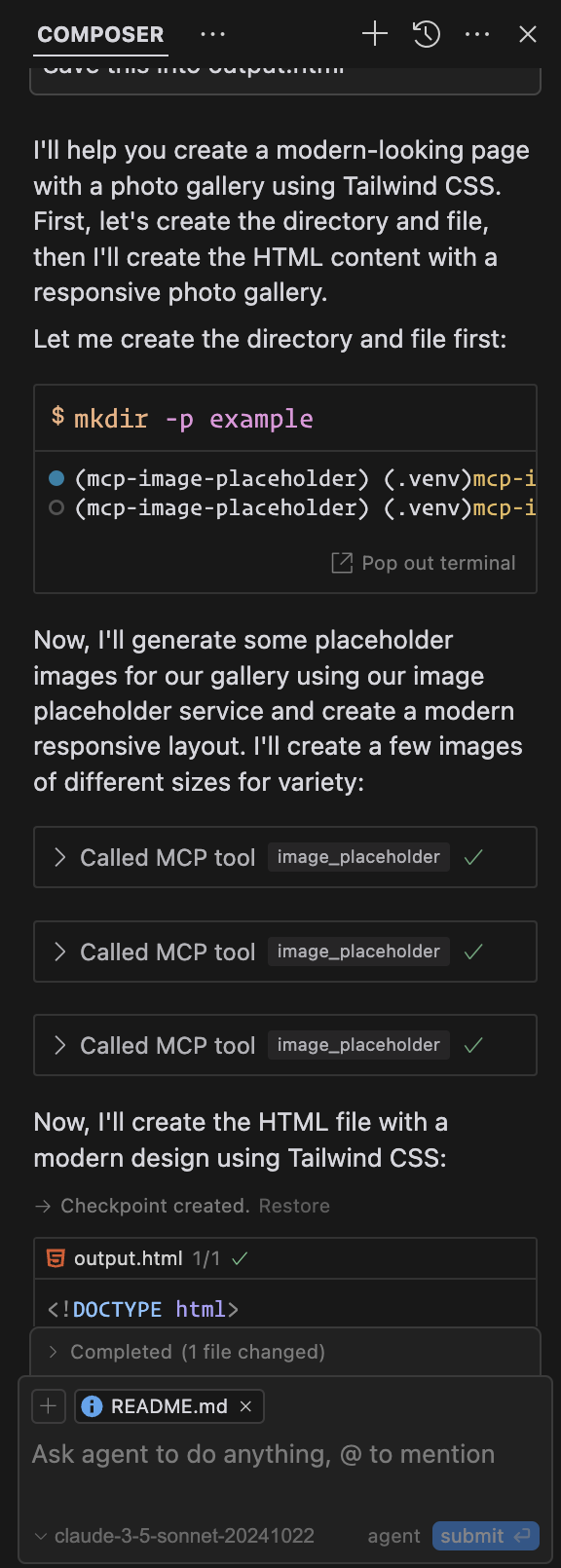
输出:示例输出(光标)
Generate a placeholder image based on a provider, width, and height.
Use this tool to generate a placeholder image for testing or development purposes.

Args:
    provider: The provider to use for the image, must be either `placehold` or `lorem-picsum`.
    width: The width of the image, must be a positive integer between 1 and 10000.
    height: The height of the image, must be a positive integer between 1 and 10000.
| Name | Required | Description | Default |
|---|---|---|---|
| provider | Yes | ||
| width | Yes | ||
| height | Yes |
Does the description disclose side effects, auth requirements, rate limits, or destructive behavior?
No annotations are provided, so the description carries the full burden. It mentions the tool generates an image but lacks details on behavioral traits like output format (e.g., URL, binary data), error handling, rate limits, or authentication needs. This leaves gaps for an agent to understand how to use it effectively.
Agents need to know what a tool does to the world before calling it. Descriptions should go beyond structured annotations to explain consequences.
Is the description appropriately sized, front-loaded, and free of redundancy?
The description is appropriately sized and front-loaded, with the purpose stated first and parameter details organized in a clear 'Args' section. It avoids unnecessary fluff, though the second sentence slightly repeats the purpose without adding new value.
Shorter descriptions cost fewer tokens and are easier for agents to parse. Every sentence should earn its place.
Given the tool's complexity, does the description cover enough for an agent to succeed on first attempt?
Given no annotations and no output schema, the description is incomplete for a tool that generates output. It explains parameters well but omits details on what the tool returns (e.g., image URL or data), which is critical for an agent to use it correctly. This gap reduces completeness despite good parameter coverage.
Complex tools with many parameters or behaviors need more documentation. Simple tools need less. This dimension scales expectations accordingly.
Does the description clarify parameter syntax, constraints, interactions, or defaults beyond what the schema provides?
The schema description coverage is 0%, but the description compensates fully by explaining all three parameters in the 'Args' section: provider options, width/height ranges, and constraints. This adds crucial meaning beyond the bare schema, making parameters clear and actionable.
Input schemas describe structure but not intent. Descriptions should explain non-obvious parameter relationships and valid value ranges.
Does the description clearly state what the tool does and how it differs from similar tools?
The description clearly states the specific action ('Generate a placeholder image') and resource ('based on a provider, width, and height'), with the second sentence reinforcing the purpose for testing/development. It uses precise verbs and distinguishes the tool's function without tautology.
Agents choose between tools based on descriptions. A clear purpose with a specific verb and resource helps agents select the right tool.
Does the description explain when to use this tool, when not to, or what alternatives exist?
The description provides clear context for when to use the tool ('for testing or development purposes'), which helps guide the agent. However, since there are no sibling tools mentioned, it cannot differentiate from alternatives, though this is not a flaw given the context.
Agents often have multiple tools that could apply. Explicit usage guidance like "use X instead of Y when Z" prevents misuse.
Recent tool additions, removals, and schema changes observed during successful MCP inspections.
image_placeholderScored across 1 tool
With only one tool, there is no possibility of ambiguity or overlap with other tools. The tool's purpose is clearly defined and distinct by default.
The single tool name 'image_placeholder' follows a clear and consistent verb_noun pattern. Since there is only one tool, naming consistency is inherently perfect.
A single tool for an image placeholder server feels thin and limited in scope. While it serves a specific purpose, it lacks related operations like listing available providers or generating images with additional parameters, making it borderline too few for practical use.
The tool covers the core functionality of generating placeholder images with basic parameters. However, there are notable gaps, such as no tools for retrieving image metadata, managing providers, or handling errors beyond parameter validation, which limits the server's utility.
Generate deterministic placeholder image URLs and packs for docs, staging, testing, and AI agents.
Focused MCP server for OpenAI image/audio generation (v2.0.0). Wraps endpoints via HAPI CLI.
AI-native mock API server with MCP. Create REST/SOAP mocks from Claude, Cursor, or Windsurf.
Mock REST APIs, fake OAuth2/OIDC provider, uptime monitors + heartbeats, live badge/QR images.