
A
licenseB
qualityD
maintenanceThis server provides tools for uploading images and videos directly to Cloudinary using Claude/Cline, facilitating resource management with customizable options like resource type and public ID.
1
14 npm
10
MIT

This server allows you to generate placeholder images for testing or development purposes with customizable dimensions.
Multiple Providers: Choose either placehold or lorem-picsum to generate images
Customizable Dimensions: Specify width and height (1-10000 pixels)
Return Image URLs: Get immediate URLs for the generated images
Referenced in an example usage where tailwindcss is loaded from unpkg.com for creating a modern page with a photo gallery
Click on "Deploy Server".
Wait a few minutes for the server to deploy. Once ready, it will show a "Started" state.
In the chat, type @ followed by the MCP server name and your instructions, e.g., "@MCP Image Placeholder Server generate a 400x300 placeholder image for my website mockup"
That's it! The server will respond to your query, and you can continue using it as needed.
Here is a step-by-step guide with screenshots.
This is a Model Context Protocol (MCP) server that provides a tool for generating placeholder images from different providers.
Generates placeholder images from supported providers
Supports two image providers:
placehold: Provides simple placeholder images
lorem-picsum: Provides real images as placeholder images
Validates input parameters
Returns image URLs for immediate use
Related MCP server: Grok AI Image Generation MCP Server
Python 3.9+
uv package manager
Clone this repository
The server exposes one tool:
image_placeholderGenerate a placeholder image URL based on specified parameters.
Parameters:
provider: The image provider to use (placehold or lorem-picsum)
width: The width of the image (1-10000)
height: The height of the image (1-10000)
Returns:
URL string of the generated image
Example Usage:
# Generate a 300x200 placeholder image
url = image_placeholder(provider="placehold", width=300, height=200)

# Generate a 500px square lorem-picsum image
url = image_placeholder(provider="lorem-picsum", width=500)Add the following to your claude_desktop_config.json:
{
    "mcpServers": {
        "image-placeholder": {
            "command": "uv",
            "args": [
                "--directory",
                "/ABSOLUTE/PATH/TO/PROJECT",
                "run",
                "main.py"
            ]
        }
    }
}
Restart Claude for Desktop
Open Cursor Settings
Head to the Features section
Scroll down to the MCP Servers section
Click on the Add new MCP server button
Enter the following information:
Name: image-placeholder
Type: command
Server URL: uv --directory /ABSOLUTE/PATH/TO/PROJECT run main.py
Click on the Add ↵ button
If the tool is not detected, use absolute path of the uv command, e.g.
/ABSOLUTE/PATH/TO/uv --directory /ABSOLUTE/PATH/TO/PROJECT run main.pyPrompt:
Create a new directory named "example" and a file named output.html.

Then create a single modern looking page using tailwindcss: https://unpkg.com/@tailwindcss/browser@4

Show a nice header, content, and footer, showing a photo gallery.

Save this into output.html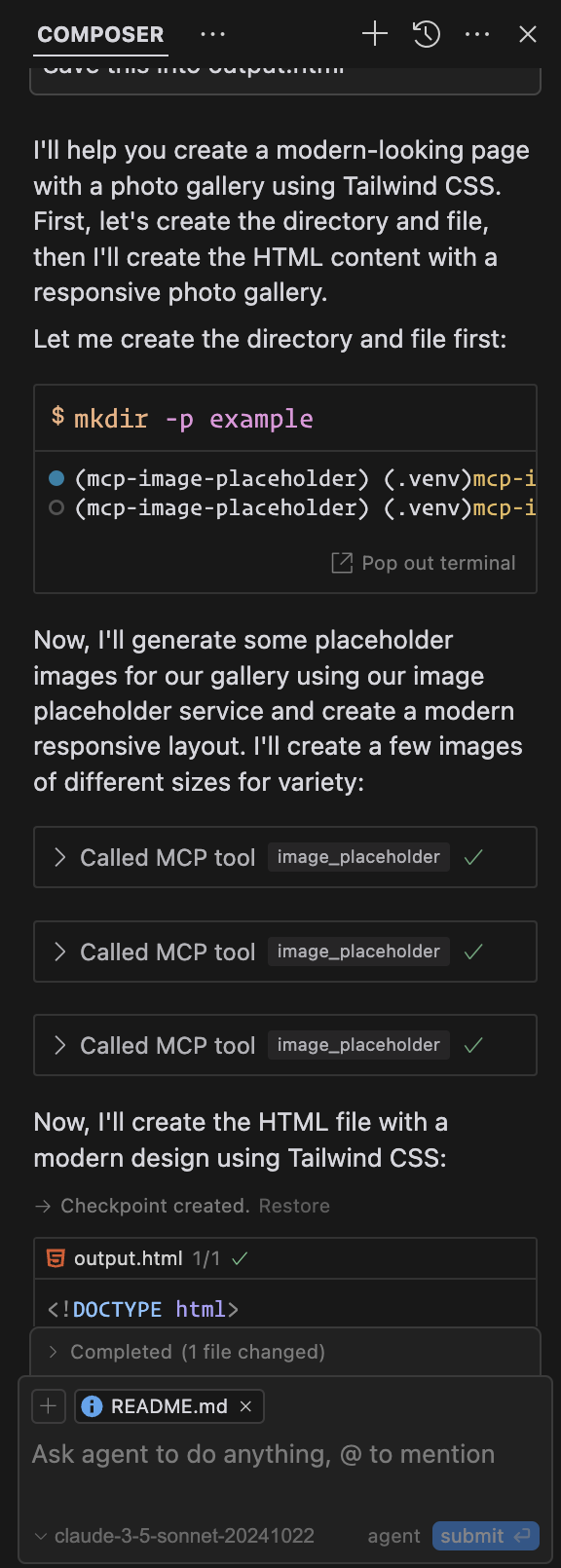
Output: Example Output (Cursor)
Generate a placeholder image based on a provider, width, and height.
Use this tool to generate a placeholder image for testing or development purposes.

Args:
    provider: The provider to use for the image, must be either `placehold` or `lorem-picsum`.
    width: The width of the image, must be a positive integer between 1 and 10000.
    height: The height of the image, must be a positive integer between 1 and 10000.
| Name | Required | Description | Default |
|---|---|---|---|
| provider | Yes | ||
| width | Yes | ||
| height | Yes |
Does the description disclose side effects, auth requirements, rate limits, or destructive behavior?
No annotations are provided, so the description carries the full burden. It mentions the tool generates an image but lacks details on behavioral traits like output format (e.g., URL, binary data), error handling, rate limits, or authentication needs. This leaves gaps for an agent to understand how to use it effectively.
Agents need to know what a tool does to the world before calling it. Descriptions should go beyond structured annotations to explain consequences.
Is the description appropriately sized, front-loaded, and free of redundancy?
The description is appropriately sized and front-loaded, with the purpose stated first and parameter details organized in a clear 'Args' section. It avoids unnecessary fluff, though the second sentence slightly repeats the purpose without adding new value.
Shorter descriptions cost fewer tokens and are easier for agents to parse. Every sentence should earn its place.
Given the tool's complexity, does the description cover enough for an agent to succeed on first attempt?
Given no annotations and no output schema, the description is incomplete for a tool that generates output. It explains parameters well but omits details on what the tool returns (e.g., image URL or data), which is critical for an agent to use it correctly. This gap reduces completeness despite good parameter coverage.
Complex tools with many parameters or behaviors need more documentation. Simple tools need less. This dimension scales expectations accordingly.
Does the description clarify parameter syntax, constraints, interactions, or defaults beyond what the schema provides?
The schema description coverage is 0%, but the description compensates fully by explaining all three parameters in the 'Args' section: provider options, width/height ranges, and constraints. This adds crucial meaning beyond the bare schema, making parameters clear and actionable.
Input schemas describe structure but not intent. Descriptions should explain non-obvious parameter relationships and valid value ranges.
Does the description clearly state what the tool does and how it differs from similar tools?
The description clearly states the specific action ('Generate a placeholder image') and resource ('based on a provider, width, and height'), with the second sentence reinforcing the purpose for testing/development. It uses precise verbs and distinguishes the tool's function without tautology.
Agents choose between tools based on descriptions. A clear purpose with a specific verb and resource helps agents select the right tool.
Does the description explain when to use this tool, when not to, or what alternatives exist?
The description provides clear context for when to use the tool ('for testing or development purposes'), which helps guide the agent. However, since there are no sibling tools mentioned, it cannot differentiate from alternatives, though this is not a flaw given the context.
Agents often have multiple tools that could apply. Explicit usage guidance like "use X instead of Y when Z" prevents misuse.
Recent tool additions, removals, and schema changes observed during successful MCP inspections.
image_placeholderScored across 1 tool
With only one tool, there is no possibility of ambiguity or overlap with other tools. The tool's purpose is clearly defined and distinct by default.
The single tool name 'image_placeholder' follows a clear and consistent verb_noun pattern. Since there is only one tool, naming consistency is inherently perfect.
A single tool for an image placeholder server feels thin and limited in scope. While it serves a specific purpose, it lacks related operations like listing available providers or generating images with additional parameters, making it borderline too few for practical use.
The tool covers the core functionality of generating placeholder images with basic parameters. However, there are notable gaps, such as no tools for retrieving image metadata, managing providers, or handling errors beyond parameter validation, which limits the server's utility.
Generate images from Claude, ChatGPT, Cursor and Codex with 12 top AI image models. Up to 4 images per call, SVG vectorization, background removal, upscaling and image-to-video. Remote MCP with OAuth, no API keys.
Generate images from Claude, ChatGPT, Cursor and Codex with 12 top AI image models and 10 tools: up to 4 images per call, SVG vectorization, editing and more. Remote MCP with OAuth, no API keys. Pay per image, no subscription.
Generate deterministic placeholder image URLs and packs for docs, staging, testing, and AI agents.
Focused MCP server for OpenAI image/audio generation (v2.0.0). Wraps endpoints via HAPI CLI.