A
licenseC
qualityC
maintenanceA Model Context Protocol server that provides image generation capabilities using the Ideogram API, allowing users to create images from text prompts with customizable parameters.
1
9 npm
5
MIT

The Meme MCP Server allows you to generate meme images using the ImgFlip API.
Generate memes: Create meme images by specifying a template ID and text
Use predefined templates: Utilize existing meme templates from ImgFlip by their numeric IDs
Customize text: Add text to two placeholders (text0 and text1) in the meme template
Integrate with AI tools: Function as an MCP server for AI integration
Simple setup: Requires configuration with ImgFlip account credentials
Click on "Deploy Server".
Wait a few minutes for the server to deploy. Once ready, it will show a "Started" state.
In the chat, type @ followed by the MCP server name and your instructions, e.g., "@Meme MCP Server generate a 'Distracted Boyfriend' meme about choosing between coffee and tea"
That's it! The server will respond to your query, and you can continue using it as needed.
Here is a step-by-step guide with screenshots.
A simple Model Context Protocol (MCP) server for generating memes using the ImgFlip API. This server enables AI models and tools to generate meme images from user prompts.
The server implements the following a single tool called generateMeme.
The tool accepts the following parameters:
templateNumericId: The numeric ID of the meme template to use.
text0: The text for the first placeholder.
text1: The text for the second placeholder.
Related MCP server: MCP TemplateIO
You can configure the meme generator server in your client using the meme-mcp NPM package. Here is an example configuration for Claude Desktop (Settings -> Developer -> Edit Config):
{
  "mcpServers": {
    "meme": {
      "command": "npx",
      "args": ["-y", "meme-mcp"],
      "env": {
        "IMGFLIP_USERNAME": "<IMGFLIP USERNAME>",
        "IMGFLIP_PASSWORD": "<IMGFLIP PASSWORD>"
      }
    }
  }
}
Note: you need to create a free account on ImgFlip to get your username and password.
Sometimes Claude Desktop fails to find the right version of npx (especially if you are using NVM, see this Issue for details). In this case, you can manually install meme-mcp globally and then use it directly.
npm install -g meme-mcpYou can find the path of your node executable by running which node in your terminal. After that your configuration should look like this:
{
  "mcpServers": {
    "meme": {
      "command": "/Users/<USERNAME>/.nvm/versions/node/v20.18.2/bin/node",
      "args": ["/Users/<USERNAME>/.nvm/versions/node/v20.18.2/lib/node_modules/meme-mcp/dist/index.js"],
      "env": {
        "IMGFLIP_USERNAME": "<IMGFLIP USERNAME>",
        "IMGFLIP_PASSWORD": "<IMGFLIP PASSWORD>"
      }
    }
  }
}After configuring Claude Desktop, you need to restart it and then you will see the small hammer icon on the bottom right in the chat input. You can then ask Claude to generate a meme for you.
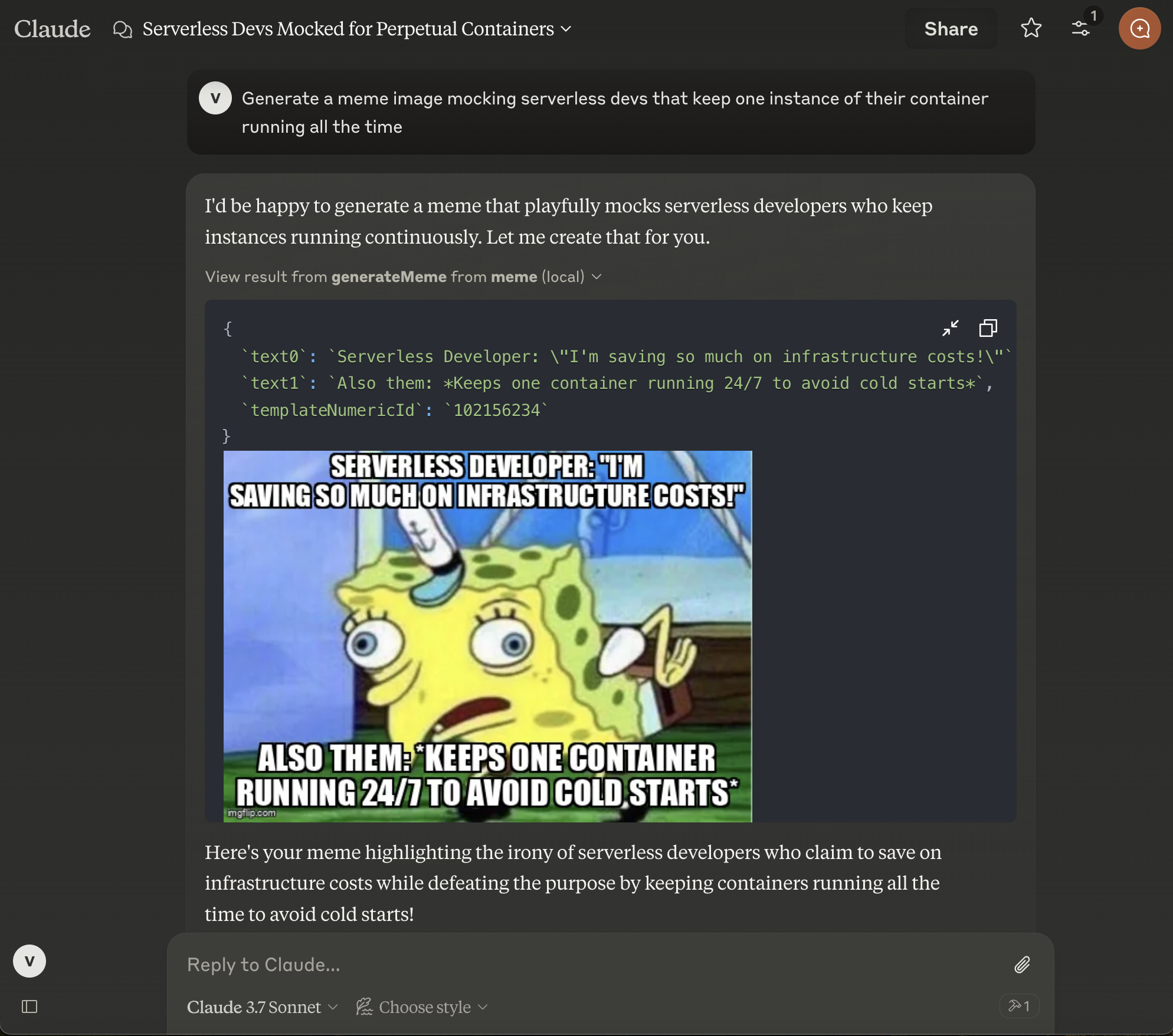
This project is created for fun by Vladimir Haltakov. If you find it interesting you can message me on X @haltakov.
Generate a meme image from Imgflip using the numeric template id and text
| Name | Required | Description | Default |
|---|---|---|---|
| templateNumericId | Yes | ||
| text0 | Yes | ||
| text1 | No |
Does the description disclose side effects, auth requirements, rate limits, or destructive behavior?
No annotations are provided, so the description carries the full burden of behavioral disclosure. It mentions generating a meme image but fails to describe key behaviors such as whether this is a read-only or mutating operation, potential rate limits, authentication needs, or what the output looks like (e.g., image URL or data). This leaves significant gaps in understanding the tool's behavior.
Agents need to know what a tool does to the world before calling it. Descriptions should go beyond structured annotations to explain consequences.
Is the description appropriately sized, front-loaded, and free of redundancy?
The description is a single, efficient sentence that directly states the tool's function without unnecessary words. It is front-loaded with the core action and includes essential details (source and inputs), making it highly concise and well-structured for quick comprehension.
Shorter descriptions cost fewer tokens and are easier for agents to parse. Every sentence should earn its place.
Given the tool's complexity, does the description cover enough for an agent to succeed on first attempt?
Given the tool's complexity (3 parameters, no output schema, no annotations), the description is incomplete. It lacks details on parameter meanings, behavioral traits, output format, and usage context. For a tool that generates external content, more information is needed to guide effective use, making it inadequate for the context.
Complex tools with many parameters or behaviors need more documentation. Simple tools need less. This dimension scales expectations accordingly.
Does the description clarify parameter syntax, constraints, interactions, or defaults beyond what the schema provides?
Schema description coverage is 0%, meaning the schema provides no descriptions for the three parameters. The description adds minimal semantics by naming the parameters ('numeric template id and text'), but it doesn't explain what 'templateNumericId', 'text0', or 'text1' represent, their formats, or examples. This insufficiently compensates for the lack of schema documentation.
Input schemas describe structure but not intent. Descriptions should explain non-obvious parameter relationships and valid value ranges.
Does the description clearly state what the tool does and how it differs from similar tools?
The description clearly states the action ('Generate a meme image') and the resource ('from Imgflip'), specifying the verb and target. It mentions the required inputs (template id and text), making the purpose specific. However, without sibling tools, it doesn't need to differentiate from alternatives, so it falls short of a perfect score.
Agents choose between tools based on descriptions. A clear purpose with a specific verb and resource helps agents select the right tool.
Does the description explain when to use this tool, when not to, or what alternatives exist?
The description provides no guidance on when to use this tool versus alternatives, prerequisites, or context for its application. It simply states what the tool does without indicating appropriate scenarios or limitations, leaving the agent with minimal usage direction.
Agents often have multiple tools that could apply. Explicit usage guidance like "use X instead of Y when Z" prevents misuse.
Recent tool additions, removals, and schema changes observed during successful MCP inspections.
generateMemeScored across 1 tool
With only one tool, there is no possibility of ambiguity or overlap between tools. The tool's purpose is clearly defined and distinct by default.
A single tool inherently has perfect naming consistency, as there are no other tools to compare it against. The tool name uses camelCase, which is consistent within itself.
A single tool is too few for a server named 'Meme MCP Server', which suggests a broader scope for meme-related operations. This minimal set limits functionality and feels incomplete for the domain.
The tool surface is severely incomplete for meme generation. It only offers generation via a specific template ID, lacking operations like listing templates, searching memes, editing, or managing meme content, which are typical for such a domain.
MCP server for meme generation, template search, caption rendering, and AI meme creation.
Imgflip MCP — wraps Imgflip API (free, no auth for template listing)
A comprehensive Model Context Protocol (MCP) server that enables AI assistants to interact with yo…
MCP server for Qwen Image 3 AI image generation