
A
licenseNot graded
qualityD
maintenanceEnables users to manage tasks through a simple JSON file interface. Provides basic task management functionality by reading and writing to a configurable tasks.json file.
11 npm
MIT

LLMエージェント向けのタスクバックログMCPサーバーです。Claude、Kiro、Cursor、Codexなど、あらゆるMCPクライアントで動作します。
エージェントはタスクを作成し、進捗を追跡し、成果物を添付し、すべてを横断して検索できます。人間はリアルタイムのWebビューアでエージェントの作業状況を確認できます。
インストール後すぐにローカルで実行可能です。また、Cloudflare Workers + D1でセルフホストすれば、あらゆるデバイスやMCPクライアントからアクセス可能な、常時稼働のリモートバックログとしても利用できます。
クイックスタート: LLMに次のように伝えてください:
Add backlog-mcp to .mcp.json and use it to track tasks
ライブデモ: backlog-mcp-viewer.pages.dev — 実際のホストインスタンスに接続されたビューアUI
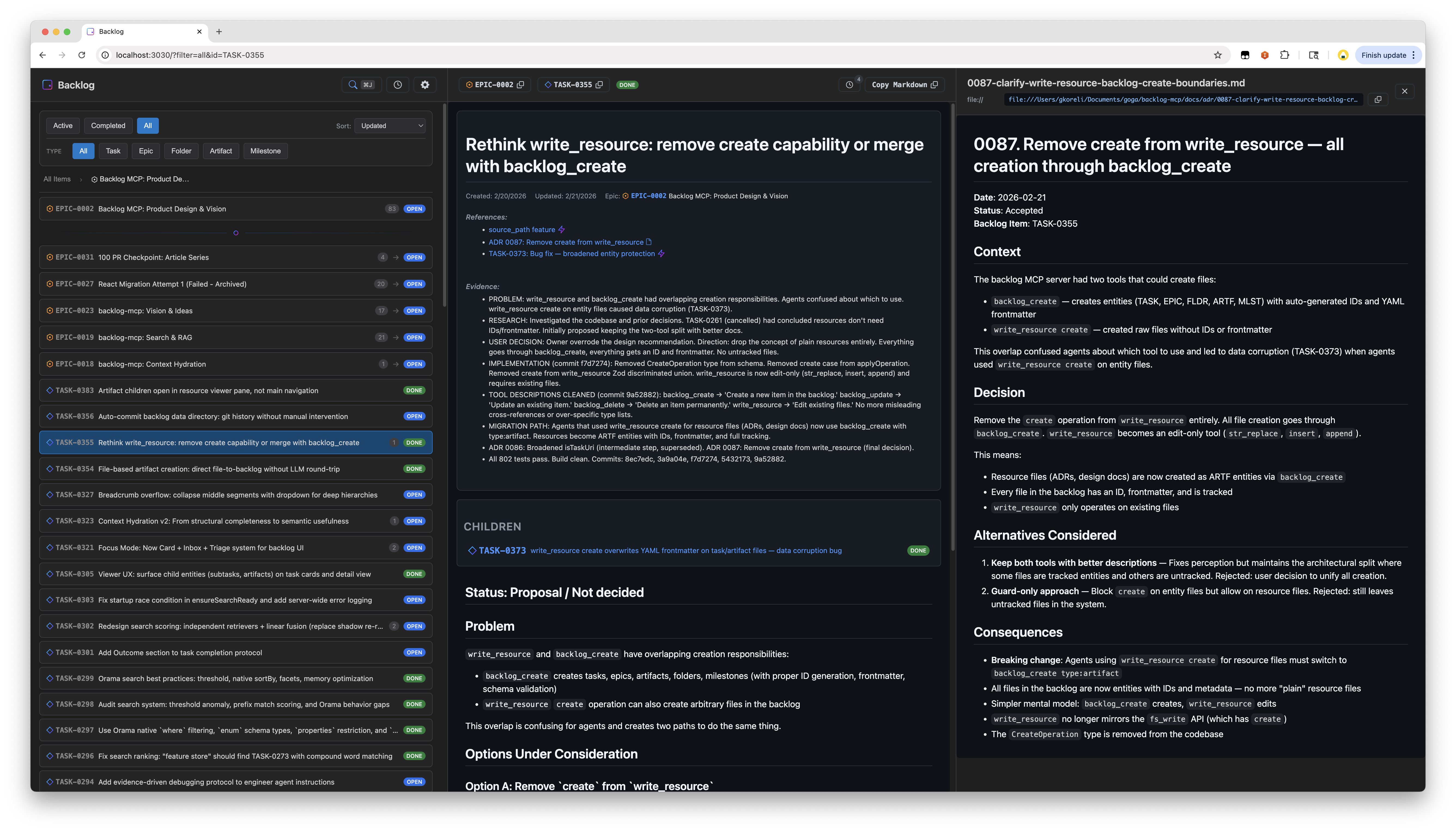
これは3つのパッケージを含むモノレポです:
パッケージ | npm | 役割 |
MCPサーバー、HTTP API、CLI | ||
— |
| |
— | 共有エンティティ型とIDユーティリティ |
ビューアは、@nisli/core として公開されている依存関係ゼロのリアクティブWebコンポーネントフレームワーク Nisli で構築されています。Nisliはこのリポジトリで始まり、現在は独立して管理されています。
Related MCP server: Task Manager MCP Server
MCP設定(.mcp.json またはMCPクライアントの設定)に追加してください:
{
  "mcpServers": {
    "backlog": {
      "command": "npx",
      "args": ["-y", "backlog-mcp"]
    }
  }
}Cloudflare Workers + D1を使用して、無料で常時稼働のリモートバックログをホストできます。 あらゆるデバイスやMCPクライアントからアクセス可能で、ローカルサーバープロセスは不要です。
前提条件: Cloudflareアカウント(無料枠で十分)、wrangler CLI、GitHub OAuthアプリ。
# 1. Clone and install
git clone https://github.com/gkoreli/backlog-mcp.git
cd backlog-mcp
pnpm install

# 2. Create the D1 database
cd packages/server
npx wrangler d1 create backlog
# Copy the database_id into packages/server/wrangler.jsonc

# 3. Apply the D1 migrations
npx wrangler d1 execute backlog --remote --file=migrations/0001_initial.sql
npx wrangler d1 execute backlog --remote --file=migrations/0002_oauth_refresh_tokens.sql

# 4. Set secrets
npx wrangler secret put JWT_SECRET          # any strong random string
npx wrangler secret put API_KEY             # your personal API key (for Claude Desktop)
npx wrangler secret put GITHUB_CLIENT_ID    # GitHub OAuth App client ID
npx wrangler secret put GITHUB_CLIENT_SECRET
npx wrangler secret put ALLOWED_GITHUB_USERNAMES  # comma-separated: "you,youralt"

# 5. Deploy
npx wrangler deploy
GitHub OAuthアプリの設定: GitHub → Settings → Developer settings → OAuth Apps → New に移動します。
コールバックURLを https://<your-worker>.workers.dev/oauth/github/callback に設定してください。
デプロイ後、MCPクライアントの設定に追加します:
{
  "mcpServers": {
    "backlog": {
      "command": "npx",
      "args": ["-y", "mcp-remote", "https://<your-worker>.workers.dev/mcp"]
    }
  }
}
Claude.aiやChatGPTはリモートMCP URL経由で直接接続できるため、ローカルプロセスは不要です。 GitHub OAuthセッションはローテーションされるリフレッシュトークンを使用するため、クライアントは毎日再認証することなくアクセスを更新できます。
http://localhost:3030 を開いてください。サーバー実行中は常に利用可能です。
機能:
タスクリストと詳細表示の分割ペインレイアウト
ハイブリッドテキスト + セマンティックマッチングによるスポットライト検索
SSEによるリアルタイム更新
アクティビティタイムライン
ステータス、タイプ、エピックによるフィルタリング
Mermaid図を含むGitHubスタイルのMarkdownレンダリング
URL状態の永続化
ビューアUIは Nisli (@nisli/core) で構築されています。
5つのエンティティ型があり、すべてYAMLフロントマター付きのMarkdownファイルとして保存されます:
型 | プレフィックス | 目的 |
Task |
| 作業項目 |
Epic |
| 関連タスクのグループ |
Folder |
| 整理用コンテナ |
Artifact |
| 添付された成果物(調査、設計、ログ) |
Milestone |
| 期日付きの期限目標 |
ステータス値: open, in_progress, blocked, done, cancelled
タスクファイルの例:
---
id: TASK-0001
title: Fix authentication flow
status: open
epic_id: EPIC-0002
parent_id: FLDR-0001
references:
  - url: https://github.com/org/repo/issues/123
    title: Related issue
evidence:
  - Fixed in PR #45
---

The authentication flow has an issue where...backlog_list # Active tasks (open, in_progress, blocked)
backlog_list status=["done"] # Completed tasks
backlog_list type="epic" # Only epics
backlog_list epic_id="EPIC-0002" # Tasks in an epic
backlog_list parent_id="FLDR-0001" # Items in a folder
backlog_list query="authentication" # Search across all fields
backlog_list counts=true # Include counts by status/type
backlog_list limit=50 # Limit resultsbacklog_get id="TASK-0001" # Single item
backlog_get id=["TASK-0001","EPIC-0002"] # Batch getbacklog_create title="Fix bug"
backlog_create title="Fix bug" description="Details..." epic_id="EPIC-0002"
backlog_create title="Q1 Goals" type="epic"
backlog_create title="Research notes" type="artifact" parent_id="TASK-0001"
backlog_create title="v2.0 Release" type="milestone" due_date="2026-03-01"
backlog_create title="Fix bug" source_path="/path/to/spec.md" # Read description from filebacklog_update id="TASK-0001" status="done"
backlog_update id="TASK-0001" status="blocked" blocked_reason=["Waiting on API"]
backlog_update id="TASK-0001" evidence=["Fixed in PR #45"]
backlog_update id="TASK-0001" parent_id="FLDR-0001"
backlog_update id="MLST-0001" due_date="2026-04-01"backlog_delete id="TASK-0001" # Permanent delete関連性スコアリング付きのフルテキスト + セマンティックハイブリッド検索:
backlog_search query="authentication bug"
backlog_search query="design decisions" types=["artifact"]
backlog_search query="blocked tasks" status=["blocked"] limit=10
backlog_search query="framework" sort="recent"
backlog_search query="search ranking" include_content=trueタスクの豊富なコンテキスト(親エピック、兄弟、子、相互参照、逆参照、最近のアクティビティ、セマンティックに関連する項目)を取得します:
backlog_context task_id="TASK-0001"
backlog_context task_id="TASK-0001" depth=2          # Grandparent/grandchildren
backlog_context query="search ranking improvements"   # Find by description
backlog_context task_id="TASK-0001" include_related=false # Skip semantic searchMCPサーバー上の既存ファイルを編集します。作成はすべて backlog_create を経由します。
# Edit task body (use str_replace — protects frontmatter)
write_resource uri="mcp://backlog/tasks/TASK-0001.md" \
  operation={type: "str_replace", old_str: "old text", new_str: "new text"}

# Insert after a specific line
write_resource uri="mcp://backlog/tasks/TASK-0001.md" \
  operation={type: "insert", insert_line: 5, new_str: "inserted line"}

# Append to a file
write_resource uri="mcp://backlog/resources/log.md" \
  operation={type: "append", new_str: "New entry"}
操作: str_replace(完全一致、一意である必要あり)、insert(行番号の後)、append(ファイルの末尾)。
npx -y backlog-mcp(デフォルトのMCP設定)を実行すると、以下の処理が行われます:
永続的なHTTPサーバーをバックグラウンドプロセスとして起動 — MCPエンドポイント (/mcp) とWebビューア (/) の両方をポート3030で提供します。
stdioをブリッジ — MCPクライアントはstdio経由で通信し、それが mcp-remote を介してHTTPサーバーに転送されます。
自動更新: npx -y は常に最新の公開バージョンを取得します。実行中のサーバーが古いバージョンの場合、自動的にシャットダウンされ、新しいバージョンで再起動されます。
回復機能: ブリッジの接続が切断された場合、スーパーバイザーが指数バックオフ(最大10回のリトライ)で再起動します。ECONNREFUSED のような接続エラーは自動的に検出され、処理されます。
HTTPサーバーはエージェントセッションをまたいで永続化されるため、複数のMCPクライアントで共有可能です。Webビューアは常に http://localhost:3030 で利用可能です。
npx経由の全コマンド:
$ npx backlog-mcp status
Server is running on port 3030
Version: 0.44.0
Data directory: /Users/you/.backlog
Task count: 451
Uptime: 3515s
Viewer: http://localhost:3030/
MCP endpoint: http://localhost:3030/mcp

$ npx backlog-mcp stop
Stopping server on port 3030...
Server stopped

$ npx backlog-mcp status
Server is not running
出力例:
$ npx backlog-mcp status
Server is running on port 3030
Version: 0.44.0
Data directory: /Users/you/.backlog
Task count: 451
Uptime: 3515s
Viewer: http://localhost:3030/
MCP endpoint: http://localhost:3030/mcp

$ npx backlog-mcp stop
Stopping server on port 3030...
Server stopped

$ npx backlog-mcp status
Server is not runningCLIは、人間がエージェントのバックグラウンドサーバーを検査・管理するために存在します。デフォルトモードではデタッチされたプロセスが生成されるため、status で確認し、stop でシャットダウンする必要があります。
serve はHTTPサーバーをデタッチせずにフォアグラウンドで実行します。デバッグ、Dockerコンテナ、またはMCPクライアントなしでの実行に便利です。通常の使用では必要ありません。デフォルトコマンドがすべてを処理します。
BACKLOG_DATA_DIR=~/.backlog    # Where to store tasks (default: data/tasks/)
BACKLOG_VIEWER_PORT=3030       # HTTP server port
ローカル開発用に .env ファイルを作成してください(.env.example を参照)。
git clone https://github.com/gkoreli/backlog-mcp.git
cd backlog-mcp
pnpm install
pnpm build          # Build all packages
pnpm test           # Run all workspace tests
pnpm dev # Server + viewer with hot reloadpackages/
├── server/ # MCP server, search, context hydration, storage
├── viewer/ # Web UI built with @nisli/core
└── shared/ # Entity types, ID utilities
docs/
├── adr/ # backlog-mcp architecture decision records
└── framework-adr/ # Pointer to Nisli ADRsBacklogのADR(アーキテクチャ決定記録)は重要な設計決定を文書化しています。完全なインデックスは docs/adr/README.md を参照してください。NisliのADRは Nisliリポジトリ にあります。
MIT
Use when ratifying an existing proposed ADR.
| Name | Required | Description | Default |
|---|---|---|---|
| as | No | OPTIONAL agent identity for this write — an AGENT- doc id or declared principal (e.g. "aime:granite"). Values are trimmed; whitespace-only is treated as absent. | |
| id | Yes |
Does the description disclose side effects, auth requirements, rate limits, or destructive behavior?
No annotations are provided, and the description lacks disclosure of behavioral traits such as idempotency, effects, permissions, or what 'ratifying' entails, which is a significant gap for a mutation tool.
Agents need to know what a tool does to the world before calling it. Descriptions should go beyond structured annotations to explain consequences.
Is the description appropriately sized, front-loaded, and free of redundancy?
The description is a single, concise sentence with no unnecessary words, earning its place.
Shorter descriptions cost fewer tokens and are easier for agents to parse. Every sentence should earn its place.
Given the tool's complexity, does the description cover enough for an agent to succeed on first attempt?
Given the simplicity of the tool (2 params, no output schema, no annotations), the description is somewhat incomplete, lacking explanation of the ratifying process and any connection to sibling tools.
Complex tools with many parameters or behaviors need more documentation. Simple tools need less. This dimension scales expectations accordingly.
Does the description clarify parameter syntax, constraints, interactions, or defaults beyond what the schema provides?
Schema coverage is 50% (id lacks description), and the description adds no parameter information beyond the schema, failing to explain what 'id' represents or how to obtain it.
Input schemas describe structure but not intent. Descriptions should explain non-obvious parameter relationships and valid value ranges.
Does the description clearly state what the tool does and how it differs from similar tools?
The description clearly states the action ('ratifying') and the resource ('existing proposed ADR'), distinguishing it from sibling tools like backlog_supersede_adr.
Agents choose between tools based on descriptions. A clear purpose with a specific verb and resource helps agents select the right tool.
Does the description explain when to use this tool, when not to, or what alternatives exist?
The description explicitly states when to use ('when ratifying an existing proposed ADR'), but does not provide exclusions or alternatives, though context implies differentiation from other tools.
Agents often have multiple tools that could apply. Explicit usage guidance like "use X instead of Y when Z" prevents misuse.
Use when attaching an artifact to a project item. parent_id is required.
| Name | Required | Description | Default |
|---|---|---|---|
| as | No | OPTIONAL agent identity for this write — an AGENT- doc id or declared principal (e.g. "aime:granite"). Values are trimmed; whitespace-only is treated as absent. | |
| path | No | ||
| title | Yes | ||
| content | No | ||
| parent_id | Yes | ||
| references | No | ||
| content_type | No |
Does the description disclose side effects, auth requirements, rate limits, or destructive behavior?
With no annotations provided, the description carries full burden for behavioral disclosure. It only states the action and required field, lacking information on side effects, permissions, or idempotency.
Agents need to know what a tool does to the world before calling it. Descriptions should go beyond structured annotations to explain consequences.
Is the description appropriately sized, front-loaded, and free of redundancy?
The description is extremely concise at one sentence, front-loading the key usage context. Every word contributes value, though 'parent_id is required' is somewhat redundant with the schema.
Shorter descriptions cost fewer tokens and are easier for agents to parse. Every sentence should earn its place.
Given the tool's complexity, does the description cover enough for an agent to succeed on first attempt?
Given the tool has 7 parameters, no output schema, and no annotations, the description is far from complete. It does not explain return values, additional constraints, or the nature of the artifact being attached.
Complex tools with many parameters or behaviors need more documentation. Simple tools need less. This dimension scales expectations accordingly.
Does the description clarify parameter syntax, constraints, interactions, or defaults beyond what the schema provides?
Schema description coverage is only 14% (1 out of 7 parameters have schema descriptions). The description adds no parameter meaning beyond noting that 'parent_id is required', which is already in the schema. Fails to compensate for the low coverage.
Input schemas describe structure but not intent. Descriptions should explain non-obvious parameter relationships and valid value ranges.
Does the description clearly state what the tool does and how it differs from similar tools?
The description clearly states the action 'attaching an artifact' and the target 'project item', which distinctly identifies the tool's purpose from siblings like 'backlog_capture_reference' or 'backlog_capture_requirement'.
Agents choose between tools based on descriptions. A clear purpose with a specific verb and resource helps agents select the right tool.
Does the description explain when to use this tool, when not to, or what alternatives exist?
The description provides a usage context ('Use when attaching an artifact to a project item'), but it does not explicitly compare to alternatives or specify when not to use this tool.
Agents often have multiple tools that could apply. Explicit usage guidance like "use X instead of Y when Z" prevents misuse.
Use when blocking a task with a reason.
| Name | Required | Description | Default |
|---|---|---|---|
| as | No | OPTIONAL agent identity for this write — an AGENT- doc id or declared principal (e.g. "aime:granite"). Values are trimmed; whitespace-only is treated as absent. | |
| id | Yes | ||
| blocked_reason | Yes |
Does the description disclose side effects, auth requirements, rate limits, or destructive behavior?
No annotations are provided, so the description bears full burden. It only states the basic purpose, omitting behavioral traits: whether the action is irreversible, what side effects occur (e.g., task disables), permissions needed, or idempotency. This renders transparency insufficient for an agent to predict outcomes.
Agents need to know what a tool does to the world before calling it. Descriptions should go beyond structured annotations to explain consequences.
Is the description appropriately sized, front-loaded, and free of redundancy?
The description is a single barely informative sentence. While concise with no wasted words, it lacks structure and fails to front-load key details. It is not overly verbose, but the brevity comes at the cost of clarity.
Shorter descriptions cost fewer tokens and are easier for agents to parse. Every sentence should earn its place.
Given the tool's complexity, does the description cover enough for an agent to succeed on first attempt?
Given the tool's complexity (3 parameters, 2 required), no output schema, no annotations, and many siblings, the description is critically incomplete. It does not explain the semantics of blocking, return values, or how this tool relates to similar ones. A tool with this profile requires more context for safe usage.
Complex tools with many parameters or behaviors need more documentation. Simple tools need less. This dimension scales expectations accordingly.
Does the description clarify parameter syntax, constraints, interactions, or defaults beyond what the schema provides?
Schema description coverage is low (33%, only 'as' documented). The description adds no meaningful parameter-level guidance beyond the schema; it mentions 'blocking with a reason' but does not explain how 'id' or 'blocked_reason' should be used. With low schema coverage, the description should compensate but fails to do so.
Input schemas describe structure but not intent. Descriptions should explain non-obvious parameter relationships and valid value ranges.
Does the description clearly state what the tool does and how it differs from similar tools?
The description clearly states the verb 'blocking' and the resource 'task', indicating the tool marks a task as blocked with a reason. However, it does not distinguish this from sibling tools like backlog_complete_task or backlog_delete, which could be confused.
Agents choose between tools based on descriptions. A clear purpose with a specific verb and resource helps agents select the right tool.
Does the description explain when to use this tool, when not to, or what alternatives exist?
The description provides a conditional usage guide ('Use when blocking a task with a reason'), which implies when to use it but does not explicitly state when not to use it or mention alternative tools. Given the many siblings, this is minimal guidance.
Agents often have multiple tools that could apply. Explicit usage guidance like "use X instead of Y when Z" prevents misuse.
Use when preserving a verbatim human directive as a chronological project prompt.
| Name | Required | Description | Default |
|---|---|---|---|
| as | No | OPTIONAL agent identity for this write — an AGENT- doc id or declared principal (e.g. "aime:granite"). Values are trimmed; whitespace-only is treated as absent. | |
| date | No | ||
| title | Yes | ||
| content | Yes | ||
| spawned | No | ||
| supersedes | No | ||
| uploaded_by | No |
Does the description disclose side effects, auth requirements, rate limits, or destructive behavior?
With no annotations provided, the description must disclose behavior. It only states 'preserving' without mentioning that it writes to a backlog, requires permissions, or any side effects, leaving significant gaps.
Agents need to know what a tool does to the world before calling it. Descriptions should go beyond structured annotations to explain consequences.
Is the description appropriately sized, front-loaded, and free of redundancy?
The description is a single, front-loaded sentence with no wasted words. It earns its place, though it could be slightly expanded without losing conciseness.
Shorter descriptions cost fewer tokens and are easier for agents to parse. Every sentence should earn its place.
Given the tool's complexity, does the description cover enough for an agent to succeed on first attempt?
With 7 parameters (2 required) and no output schema, the description is too brief. It omits parameter roles, return behavior, and usage context, making it incomplete for an agent to use confidently.
Complex tools with many parameters or behaviors need more documentation. Simple tools need less. This dimension scales expectations accordingly.
Does the description clarify parameter syntax, constraints, interactions, or defaults beyond what the schema provides?
Schema description coverage is only 14%, yet the description adds no parameter meanings beyond what the schema provides (e.g., required fields, constraints). The agent gets little help understanding how to use the 7 parameters.
Input schemas describe structure but not intent. Descriptions should explain non-obvious parameter relationships and valid value ranges.
Does the description clearly state what the tool does and how it differs from similar tools?
The description clearly states the tool preserves 'a verbatim human directive as a chronological project prompt,' specifying verb and resource. However, it does not differentiate from sibling tools like backlog_capture_reference or backlog_capture_requirement.
Agents choose between tools based on descriptions. A clear purpose with a specific verb and resource helps agents select the right tool.
Does the description explain when to use this tool, when not to, or what alternatives exist?
The description indicates when to use ('Use when preserving...') but provides no guidance on when not to use or how this tool compares to alternatives, leaving the agent to infer.
Agents often have multiple tools that could apply. Explicit usage guidance like "use X instead of Y when Z" prevents misuse.
Use when recording an external technology, prior-art system, or benchmark this project builds on — with authoritative citations and the project's adopt/park/reject relationship to it.
| Name | Required | Description | Default |
|---|---|---|---|
| as | No | OPTIONAL agent identity for this write — an AGENT- doc id or declared principal (e.g. "aime:granite"). Values are trimmed; whitespace-only is treated as absent. | |
| title | Yes | ||
| content | Yes | ||
| bears_on | Yes | NORTH-STAR tenets/invariants and ADRs this subject bears on. | |
| category | Yes | ||
| citations | Yes | ||
| what_it_is | Yes | ||
| our_relationship | Yes | What this project adopts, parks, or rejects from the subject, and why — with exact repo file citations where reproductions exist. |
Does the description disclose side effects, auth requirements, rate limits, or destructive behavior?
With no annotations provided, the description carries full burden for behavioral disclosure. It only mentions citations and relationship but does not explain side effects (e.g., creation of a record), required permissions, or what happens on invocation. The required parameters imply a write operation, but the description lacks explicit behavioral details.
Agents need to know what a tool does to the world before calling it. Descriptions should go beyond structured annotations to explain consequences.
Is the description appropriately sized, front-loaded, and free of redundancy?
The description is a single, concise sentence that front-loads the purpose. Every word adds value, with no wasted content.
Shorter descriptions cost fewer tokens and are easier for agents to parse. Every sentence should earn its place.
Given the tool's complexity, does the description cover enough for an agent to succeed on first attempt?
Given no output schema, low parameter coverage, and no annotations, the description is incomplete. It does not explain return values, state changes, or how to fill the 8 parameters (7 required). The tool is more complex than the description suggests.
Complex tools with many parameters or behaviors need more documentation. Simple tools need less. This dimension scales expectations accordingly.
Does the description clarify parameter syntax, constraints, interactions, or defaults beyond what the schema provides?
Schema description coverage is only 38%, yet the description adds little parameter-level meaning beyond 'citations' and 'relationship'. It does not clarify 'as', 'title', 'content', 'bears_on', 'category', or 'what_it_is'. The enum for 'category' is not mentioned, nor the format for 'citations'. The description fails to compensate for low schema coverage.
Input schemas describe structure but not intent. Descriptions should explain non-obvious parameter relationships and valid value ranges.
Does the description clearly state what the tool does and how it differs from similar tools?
The description clearly states the tool's purpose: recording an external technology, prior-art system, or benchmark with citations and relationship. It uses a specific verb-resource combination and distinguishes from sibling tools like 'backlog_capture_prompt' or 'backlog_capture_requirement' by focusing on external references.
Agents choose between tools based on descriptions. A clear purpose with a specific verb and resource helps agents select the right tool.
Does the description explain when to use this tool, when not to, or what alternatives exist?
The description explicitly states 'Use when recording an external technology, prior-art system, or benchmark', providing clear context. While it does not list alternatives or exclusions, the context sufficiently guides selection among sibling capture tools.
Agents often have multiple tools that could apply. Explicit usage guidance like "use X instead of Y when Z" prevents misuse.
Use when recording a human or system requirement in the current project.
| Name | Required | Description | Default |
|---|---|---|---|
| as | No | OPTIONAL agent identity for this write — an AGENT- doc id or declared principal (e.g. "aime:granite"). Values are trimmed; whitespace-only is treated as absent. | |
| date | No | ||
| title | Yes | ||
| domain | No | ||
| status | No | intake | |
| content | Yes | ||
| spawned | No | ||
| checked_at | No | ||
| checked_by | No | ||
| compliance | No | unchecked | |
| grounds_in | No | ||
| supersedes | No | ||
| uploaded_by | No | ||
| violated_by | No | ||
| check_evidence | No |
Does the description disclose side effects, auth requirements, rate limits, or destructive behavior?
No annotations are provided, and the description does not disclose any behavioral traits (e.g., side effects, authorization needs, or data persistence). The phrase 'recording' implies creation, but the tool could also update existing requirements, which is unclear.
Agents need to know what a tool does to the world before calling it. Descriptions should go beyond structured annotations to explain consequences.
Is the description appropriately sized, front-loaded, and free of redundancy?
The description is a single sentence, making it efficient but vague. It earns its place by being brief, but lacks sufficient detail for a 15-parameter tool.
Shorter descriptions cost fewer tokens and are easier for agents to parse. Every sentence should earn its place.
Given the tool's complexity, does the description cover enough for an agent to succeed on first attempt?
Given the tool's complexity (15 parameters, no output schema, no annotations), the description fails to explain return values, behavior, or how parameters interact. The phrase 'current project' is ambiguous without defined scope.
Complex tools with many parameters or behaviors need more documentation. Simple tools need less. This dimension scales expectations accordingly.
Does the description clarify parameter syntax, constraints, interactions, or defaults beyond what the schema provides?
With only 7% schema description coverage, the description adds no parameter context beyond the schema's minimal descriptions. An agent cannot infer which of the 15 parameters are key or how they relate (e.g., 'as', 'date', 'status').
Input schemas describe structure but not intent. Descriptions should explain non-obvious parameter relationships and valid value ranges.
Does the description clearly state what the tool does and how it differs from similar tools?
The description clearly states the tool records a 'human or system requirement' in the current project, providing a specific verb and resource. However, it does not differentiate from sibling tools like backlog_capture_prompt or backlog_capture_reference.
Agents choose between tools based on descriptions. A clear purpose with a specific verb and resource helps agents select the right tool.
Does the description explain when to use this tool, when not to, or what alternatives exist?
The description only says 'use when recording...' with no guidance on when not to use, prerequisites, or alternatives. This leaves an AI agent without context for tool selection.
Agents often have multiple tools that could apply. Explicit usage guidance like "use X instead of Y when Z" prevents misuse.
Use when completing a task, optionally with evidence.
| Name | Required | Description | Default |
|---|---|---|---|
| as | No | OPTIONAL agent identity for this write — an AGENT- doc id or declared principal (e.g. "aime:granite"). Values are trimmed; whitespace-only is treated as absent. | |
| id | Yes | ||
| evidence | No |
Does the description disclose side effects, auth requirements, rate limits, or destructive behavior?
No annotations exist, so the description carries full burden. It mentions 'optionally with evidence' but does not disclose if the operation is destructive, idempotent, requires authentication, or any side effects. For a mutation tool, this is insufficient.
Agents need to know what a tool does to the world before calling it. Descriptions should go beyond structured annotations to explain consequences.
Is the description appropriately sized, front-loaded, and free of redundancy?
The description is very short (1 sentence) and front-loaded with the verb. However, it omits crucial details, making it under-specified rather than efficiently concise.
Shorter descriptions cost fewer tokens and are easier for agents to parse. Every sentence should earn its place.
Given the tool's complexity, does the description cover enough for an agent to succeed on first attempt?
Given no output schema, no annotations, and 3 parameters, the description should explain what completing a task means, return values, error conditions, and relation to other tools. It only mentions evidence option. Important context is missing.
Complex tools with many parameters or behaviors need more documentation. Simple tools need less. This dimension scales expectations accordingly.
Does the description clarify parameter syntax, constraints, interactions, or defaults beyond what the schema provides?
Schema description coverage is only 33% (only 'as' has a description). The description adds no meaning to parameters beyond the schema, not even for the required 'id' or the optional 'evidence'. It does not compensate for the low coverage.
Input schemas describe structure but not intent. Descriptions should explain non-obvious parameter relationships and valid value ranges.
Does the description clearly state what the tool does and how it differs from similar tools?
The description clearly states the action ('completing a task') and mentions an optional feature (evidence). It distinguishes from siblings like 'backlog_block_task' or 'backlog_create_work' by the verb, but lacks specificity on what completion entails.
Agents choose between tools based on descriptions. A clear purpose with a specific verb and resource helps agents select the right tool.
Does the description explain when to use this tool, when not to, or what alternatives exist?
The description only says 'Use when completing a task' which is implicit usage. It provides no guidance on when not to use, prerequisites, or alternatives like blocking or creating tasks. The sibling tools list is not leveraged.
Agents often have multiple tools that could apply. Explicit usage guidance like "use X instead of Y when Z" prevents misuse.
List clusters of episodic memories that are ripe for consolidation into durable knowledge. Consolidator workflow: (1) call this and take ripe bundles; (2) per bundle, read members (backlog_get on MEMO- ids for depth), then write ONE narrative memory via backlog_remember({ layer: "semantic"|"procedural", derived: true, entity_refs: [member MEMO- ids + key source entities], context }) — a self-contained story, not fragments; (3) retire the members via backlog_forget({ ids }) so they stop appearing here while staying auditable; (4) track your progress with a backlog_remember state_key like "consolidation.watermark.".
| Name | Required | Description | Default |
|---|---|---|---|
| home | No | Select the document home for this call. Overrides bridge defaults: global uses the user-wide home; project uses project_root or the bridge project. | |
| limit | No | Max bundles, ripe first. Default: 10. | |
| context | No | Restrict to one context (e.g. "FLDR-0001"). | |
| min_count | No | Minimum bundle size to be ripe. Default: 3. | |
| min_demand | No | Recall-demand threshold — bundles recalled this often (30d) are ripe regardless of age. Default: 3. | |
| max_digests | No | Max digest lines per bundle. Default: 10. | |
| min_age_days | No | Minimum age (days) of the oldest member. Default: 7. | |
| project_root | No | Project root for this call. Overrides the bridge project root and selects the project home. |
Does the description disclose side effects, auth requirements, rate limits, or destructive behavior?
No annotations exist, so the description must disclose behavioral traits. While it implies a read operation ('list'), it does not explicitly state safety characteristics (e.g., read-only, no side effects). The workflow mentions future deletions via backlog_forget, but the tool itself is not clarified. A middle score is warranted as the description adds context but is not fully transparent.
Agents need to know what a tool does to the world before calling it. Descriptions should go beyond structured annotations to explain consequences.
Is the description appropriately sized, front-loaded, and free of redundancy?
The description is a single paragraph but well-organized with numbered workflow steps. It efficiently conveys necessary information without redundancy. Slightly more structure (e.g., bullet points) could improve scanability, but it remains concise.
Shorter descriptions cost fewer tokens and are easier for agents to parse. Every sentence should earn its place.
Given the tool's complexity, does the description cover enough for an agent to succeed on first attempt?
Given the complexity of the tool and its role in a multi-step workflow, the description fully explains what it returns (clusters/bundles of memories), how to use it, and the meaning of parameters in context. No output schema exists, but the description implies output structure sufficiently.
Complex tools with many parameters or behaviors need more documentation. Simple tools need less. This dimension scales expectations accordingly.
Does the description clarify parameter syntax, constraints, interactions, or defaults beyond what the schema provides?
Schema coverage is 100%, so baseline is 3. The description adds significant value by explaining how parameters like min_count, min_demand, and min_age_days determine ripeness, and by providing context on bundle structure. This goes well beyond the schema descriptions.
Input schemas describe structure but not intent. Descriptions should explain non-obvious parameter relationships and valid value ranges.
Does the description clearly state what the tool does and how it differs from similar tools?
The description begins with a clear verb and resource: 'List clusters of episodic memories that are ripe for consolidation'. It specifies the exact purpose and distinguishes from siblings by referencing the consolidation workflow and related tools.
Agents choose between tools based on descriptions. A clear purpose with a specific verb and resource helps agents select the right tool.
Does the description explain when to use this tool, when not to, or what alternatives exist?
The description provides an explicit step-by-step consolidator workflow (1-4), telling the agent when to call this tool, how to process results, and which sibling tools to use subsequently. This is exemplary usage guidance.
Agents often have multiple tools that could apply. Explicit usage guidance like "use X instead of Y when Z" prevents misuse.
List structural contradictions in memory: sets of ≥2 LIVE memories that share one state_key (e.g. "db.primary"), which should never happen — a new memory with a state_key auto-expires the previous holder. Each set means two beliefs about the same fact are both active. Resolution is yours, never automatic: pick the correct member, then either backlog_remember({ content, state_key, supersedes: }) to record the right value and retire the rest, or backlog_forget({ ids: [] }) to expire the wrong ones. Read members with backlog_get for full context before deciding. Set candidates: true to list semantic collision candidates instead: nearby live facts that deserve review, never contradiction verdicts.
| Name | Required | Description | Default |
|---|---|---|---|
| home | No | Select the document home for this call. Overrides bridge defaults: global uses the user-wide home; project uses project_root or the bridge project. | |
| candidates | No | Return semantic collision candidates instead of structural state_key contradictions. | |
| project_root | No | Project root for this call. Overrides the bridge project root and selects the project home. |
Does the description disclose side effects, auth requirements, rate limits, or destructive behavior?
With no annotations provided, the description bears full responsibility. It accurately conveys that the tool lists contradictions non-destructively and that resolution is manual. It also clarifies the difference between structural contradictions and semantic collision candidates. While read-only nature is implied, an explicit statement would improve transparency.
Agents need to know what a tool does to the world before calling it. Descriptions should go beyond structured annotations to explain consequences.
Is the description appropriately sized, front-loaded, and free of redundancy?
The description is thorough but somewhat verbose, packing significant procedural detail into a single paragraph. While every sentence adds value, it could be more concise by separating the resolution workflow into a bulleted list or shorter statements.
Shorter descriptions cost fewer tokens and are easier for agents to parse. Every sentence should earn its place.
Given the tool's complexity, does the description cover enough for an agent to succeed on first attempt?
Given the tool's complexity (two modes, resolution workflow, and no output schema), the description covers the essential concepts: what contradictions are, how to use the tool, and next steps. It mentions reading members via backlog_get for context. Lacking only an explicit statement about the output format (e.g., list of memory IDs).
Complex tools with many parameters or behaviors need more documentation. Simple tools need less. This dimension scales expectations accordingly.
Does the description clarify parameter syntax, constraints, interactions, or defaults beyond what the schema provides?
All parameters have schema descriptions (100% coverage). The tool description adds value by explaining the conceptual difference between 'candidates' and contradictions, beyond the schema's 'semantic collision candidates'. This contextual enrichment aids an agent in selecting the appropriate mode.
Input schemas describe structure but not intent. Descriptions should explain non-obvious parameter relationships and valid value ranges.
Does the description clearly state what the tool does and how it differs from similar tools?
The description clearly identifies the tool's purpose: listing structural contradictions in memory, specifically sets of ≥2 LIVE memories sharing a state_key. It explicitly distinguishes itself from sibling tools like backlog_remember and backlog_forget by detailing the resolution workflow using these tools, making its unique role evident.
Agents choose between tools based on descriptions. A clear purpose with a specific verb and resource helps agents select the right tool.
Does the description explain when to use this tool, when not to, or what alternatives exist?
The description provides explicit guidance on when to use the tool (to find and resolve structural contradictions) and how to proceed after using it (via backlog_remember or backlog_forget). It also explains the 'candidates' parameter for semantic collision candidates. However, it does not contrast directly with other list-like siblings such as backlog_search.
Agents often have multiple tools that could apply. Explicit usage guidance like "use X instead of Y when Z" prevents misuse.
Use when creating a project work item. Pass parent_id when known; parentless work surfaces as unfiled at wakeup.
| Name | Required | Description | Default |
|---|---|---|---|
| as | No | OPTIONAL agent identity for this write — an AGENT- doc id or declared principal (e.g. "aime:granite"). Values are trimmed; whitespace-only is treated as absent. | |
| title | Yes | ||
| content | No | ||
| parent_id | No | ||
| references | No |
Does the description disclose side effects, auth requirements, rate limits, or destructive behavior?
The description discloses one behavioral trait: parentless work surfaces as unfiled at wakeup. This adds context beyond the tool name, but there is no information about side effects, permissions, or rate limits. With no annotations, the description carries the full burden but only partially fulfills it.
Agents need to know what a tool does to the world before calling it. Descriptions should go beyond structured annotations to explain consequences.
Is the description appropriately sized, front-loaded, and free of redundancy?
The description consists of two sentences with no wasted words. The purpose is established in the first sentence, and additional guidance follows immediately. Every part earns its place.
Shorter descriptions cost fewer tokens and are easier for agents to parse. Every sentence should earn its place.
Given the tool's complexity, does the description cover enough for an agent to succeed on first attempt?
With 5 parameters, 1 required, no output schema, and no annotations, the description is too sparse. It explains only the parent_id behavior but omits details about content, references, the 'as' parameter, and return value. For a creation tool, more context is needed for proper agentic selection.
Complex tools with many parameters or behaviors need more documentation. Simple tools need less. This dimension scales expectations accordingly.
Does the description clarify parameter syntax, constraints, interactions, or defaults beyond what the schema provides?
Schema description coverage is only 20% (only 'as' is described in schema). The description adds meaning to 'parent_id' by explaining the consequence of omitting it. However, other parameters ('title', 'content', 'references') receive no additional clarification, which is insufficient given the low coverage.
Input schemas describe structure but not intent. Descriptions should explain non-obvious parameter relationships and valid value ranges.
Does the description clearly state what the tool does and how it differs from similar tools?
The description states 'Use when creating a project work item' which clearly identifies the action (creating) and the resource (project work item). However, it does not differentiate from sibling tools like backlog_capture_requirement or backlog_remember, which may have overlapping purposes.
Agents choose between tools based on descriptions. A clear purpose with a specific verb and resource helps agents select the right tool.
Does the description explain when to use this tool, when not to, or what alternatives exist?
The description provides a when-to-use statement ('Use when creating a project work item') and parameter guidance ('Pass parent_id when known'), but lacks explicit exclusions or alternatives. The usage is implied rather than directly compared to siblings.
Agents often have multiple tools that could apply. Explicit usage guidance like "use X instead of Y when Z" prevents misuse.
Delete an item permanently.
| Name | Required | Description | Default |
|---|---|---|---|
| as | No | OPTIONAL agent identity for this write — an AGENT- doc id or declared principal (e.g. "aime:granite"). Values are trimmed; whitespace-only is treated as absent. | |
| id | Yes | Task ID to delete | |
| home | No | Select the document home for this call. Overrides bridge defaults: global uses the user-wide home; project uses project_root or the bridge project. | |
| project_root | No | Project root for this call. Overrides the bridge project root and selects the project home. |
Does the description disclose side effects, auth requirements, rate limits, or destructive behavior?
The description only states that deletion is permanent, but lacks details on side effects, cascade deletions, permission requirements, or whether the action is reversible. Without annotations, the description carries the full burden and falls short.
Agents need to know what a tool does to the world before calling it. Descriptions should go beyond structured annotations to explain consequences.
Is the description appropriately sized, front-loaded, and free of redundancy?
The description is a single, concise sentence that front-loads the verb and object. It is efficient but could benefit from additional structure or context without becoming verbose.
Shorter descriptions cost fewer tokens and are easier for agents to parse. Every sentence should earn its place.
Given the tool's complexity, does the description cover enough for an agent to succeed on first attempt?
Given the tool has 4 parameters, no output schema, and no annotations, the description is insufficient. It does not explain return values, error conditions, or the scope of deletion, making it incomplete for a mutation tool.
Complex tools with many parameters or behaviors need more documentation. Simple tools need less. This dimension scales expectations accordingly.
Does the description clarify parameter syntax, constraints, interactions, or defaults beyond what the schema provides?
Schema description coverage is 100%, so baseline is 3. The description does not add any meaning beyond the schema; it fails to explain parameters like 'as', 'home', or 'project_root'.
Input schemas describe structure but not intent. Descriptions should explain non-obvious parameter relationships and valid value ranges.
Does the description clearly state what the tool does and how it differs from similar tools?
The description clearly states the action (delete) and the object (item), with 'permanently' emphasizing finality. However, it does not distinguish this tool from siblings like backlog_forget or backlog_complete_task, which may involve deletion-like behavior.
Agents choose between tools based on descriptions. A clear purpose with a specific verb and resource helps agents select the right tool.
Does the description explain when to use this tool, when not to, or what alternatives exist?
The description provides no guidance on when to use this tool versus alternatives, such as backlog_forget or backlog_complete. There is no context about prerequisites or scenarios where deletion is appropriate.
Agents often have multiple tools that could apply. Explicit usage guidance like "use X instead of Y when Z" prevents misuse.
Retract memories — soft-expire them so recall stops returning them (the record stays auditable in the viewer). Use when knowledge is wrong or obsolete and there is no replacement (if there IS a replacement, use backlog_remember with supersedes instead). expired:true garbage-collects already-expired memories.
| Name | Required | Description | Default |
|---|---|---|---|
| ids | No | Specific MEMO- ids to forget. | |
| home | No | Select the document home for this call. Overrides bridge defaults: global uses the user-wide home; project uses project_root or the bridge project. | |
| layer | No | Forget all memories in a layer. | |
| context | No | Forget all memories scoped to this context (e.g. "FLDR-0001"). | |
| expired | No | GC mode: hard-delete memories that are already expired. | |
| older_than | No | Forget memories created before this ISO date/datetime. | |
| project_root | No | Project root for this call. Overrides the bridge project root and selects the project home. |
Does the description disclose side effects, auth requirements, rate limits, or destructive behavior?
No annotations provided, so description carries full burden. Discloses soft-expire vs hard-delete, audit trail, and GC mode. Lacks idempotency and auth details, but sufficient for core behavior.
Agents need to know what a tool does to the world before calling it. Descriptions should go beyond structured annotations to explain consequences.
Is the description appropriately sized, front-loaded, and free of redundancy?
Two sentences with purpose, usage, and GC note. Front-loaded with action and effect. No wasted words.
Shorter descriptions cost fewer tokens and are easier for agents to parse. Every sentence should earn its place.
Given the tool's complexity, does the description cover enough for an agent to succeed on first attempt?
Given 7 boolean/string params, no output schema, and no annotations, description covers core behavior and parameter usage. Missing return value info but typical for forget action. Adequate for tool selection.
Complex tools with many parameters or behaviors need more documentation. Simple tools need less. This dimension scales expectations accordingly.
Does the description clarify parameter syntax, constraints, interactions, or defaults beyond what the schema provides?
Schema coverage 100% (baseline 3). Description adds meaningful context: 'ids' as MEMO- ids, 'home' as document home override, 'layer' as memory layer, 'context' with example, 'expired' as GC mode, 'older_than' with ISO date, 'project_root' as override. Provides value beyond schema.
Input schemas describe structure but not intent. Descriptions should explain non-obvious parameter relationships and valid value ranges.
Does the description clearly state what the tool does and how it differs from similar tools?
Clear verb 'retract' and 'soft-expire', resource 'memories', effect 'recall stops returning, record stays auditable'. Distinguishes from sibling backlog_remember with supersedes.
Agents choose between tools based on descriptions. A clear purpose with a specific verb and resource helps agents select the right tool.
Does the description explain when to use this tool, when not to, or what alternatives exist?
Explicitly states when to use (knowledge wrong/obsolete, no replacement) and when not to (if replacement exists, use backlog_remember with supersedes). Also explains expired:true GC mode.
Agents often have multiple tools that could apply. Explicit usage guidance like "use X instead of Y when Z" prevents misuse.
Get full details by ID. Accepts task IDs (TASK-0001, EPIC-0002), document paths (README.md, docs/adr/0001-example.md), or MCP resource URIs (mcp://backlog/resources/design.md). Works for any item regardless of status. Pass context:true when starting work on an entity to also see its relational neighborhood as stubs.
| Name | Required | Description | Default |
|---|---|---|---|
| id | Yes | Task ID (e.g. TASK-0001), document path (e.g. README.md, docs/notes/file.md), or MCP resource URI (e.g. mcp://backlog/resources/file.md). Array for batch fetch. | |
| home | No | Select the document home for this call. Overrides bridge defaults: global uses the user-wide home; project uses project_root or the bridge project. | |
| depth | No | Relational expansion depth with context:true. 1 = direct relations (default), 2 = grandparents/grandchildren. | |
| context | No | Expand the entity's relational neighborhood as stubs — parent/children/siblings/references/referenced_by/related; hydrate any stub with another backlog_get. | |
| project_root | No | Project root for this call. Overrides the bridge project root and selects the project home. |
Does the description disclose side effects, auth requirements, rate limits, or destructive behavior?
No annotations present, so description carries full burden. It fully discloses accepted ID formats, batch fetching via array, relational expansion via context and depth parameters, and override behavior for home and project_root. The tool is clearly read-only with no destructive side effects mentioned. No contradictions.
Agents need to know what a tool does to the world before calling it. Descriptions should go beyond structured annotations to explain consequences.
Is the description appropriately sized, front-loaded, and free of redundancy?
Purpose is front-loaded in the first sentence. All subsequent sentences are compact and informative. No redundant or filler content. Efficiently packs significant usage detail into a small space.
Shorter descriptions cost fewer tokens and are easier for agents to parse. Every sentence should earn its place.
Given the tool's complexity, does the description cover enough for an agent to succeed on first attempt?
Given no output schema, description covers input variations, parameter behaviors, and relational expansion well. It explains what the tool returns ('full details' and 'stubs') but could be slightly more specific about the stub format. Overall adequate for an agent to use correctly.
Complex tools with many parameters or behaviors need more documentation. Simple tools need less. This dimension scales expectations accordingly.
Does the description clarify parameter syntax, constraints, interactions, or defaults beyond what the schema provides?
Schema coverage is 100%, baseline 3. Description adds meaning beyond schema: explains context:true yields stubs for hydrate, depth controls expansion level (1=direct, 2=grand), home selects global vs project, and project_root overrides bridge. This adds value and justifies a score above baseline.
Input schemas describe structure but not intent. Descriptions should explain non-obvious parameter relationships and valid value ranges.
Does the description clearly state what the tool does and how it differs from similar tools?
Specifically states it retrieves full details by ID, accepts multiple ID formats (task IDs, document paths, MCP URIs), and works for any item regardless of status. This clearly distinguishes it from sibling tools like backlog_search (which might list items) and other operations.
Agents choose between tools based on descriptions. A clear purpose with a specific verb and resource helps agents select the right tool.
Does the description explain when to use this tool, when not to, or what alternatives exist?
Provides guidance on when to use context:true ('when starting work on an entity') and mentions that the tool works for any status. Implicitly suggests this is for fetching known entities, but does not explicitly contrast with alternatives like backlog_search or backlog_recall.
Agents often have multiple tools that could apply. Explicit usage guidance like "use X instead of Y when Z" prevents misuse.
Use when creating a folder to organize project items. Pass parent_id when known; parentless work surfaces as unfiled at wakeup.
| Name | Required | Description | Default |
|---|---|---|---|
| as | No | OPTIONAL agent identity for this write — an AGENT- doc id or declared principal (e.g. "aime:granite"). Values are trimmed; whitespace-only is treated as absent. | |
| title | Yes | ||
| content | No | ||
| parent_id | No |
Does the description disclose side effects, auth requirements, rate limits, or destructive behavior?
No annotations provided, so description carries full burden. It reveals the unfiled behavior for parentless folders but omits permission requirements, error handling, or effects of other parameters like 'as' or 'content'.
Agents need to know what a tool does to the world before calling it. Descriptions should go beyond structured annotations to explain consequences.
Is the description appropriately sized, front-loaded, and free of redundancy?
Two sentences, no wasted words. Information is front-loaded and immediately actionable.
Shorter descriptions cost fewer tokens and are easier for agents to parse. Every sentence should earn its place.
Given the tool's complexity, does the description cover enough for an agent to succeed on first attempt?
With 4 parameters, no output schema, and no annotations, the description leaves gaps: no return value description, no error conditions, and insufficient guidance for 'as' and 'content' usage.
Complex tools with many parameters or behaviors need more documentation. Simple tools need less. This dimension scales expectations accordingly.
Does the description clarify parameter syntax, constraints, interactions, or defaults beyond what the schema provides?
Schema coverage is low (25%, only for 'as'). The description adds meaning for parent_id (parentless unfiled) but offers no details on title or content, which are also undocumented in the schema.
Input schemas describe structure but not intent. Descriptions should explain non-obvious parameter relationships and valid value ranges.
Does the description clearly state what the tool does and how it differs from similar tools?
The description clearly states the tool creates a folder to organize project items. This distinguishes it from sibling tools like backlog_create_work (which likely creates general work items) and other specialized tools.
Agents choose between tools based on descriptions. A clear purpose with a specific verb and resource helps agents select the right tool.
Does the description explain when to use this tool, when not to, or what alternatives exist?
It advises to pass parent_id when known and explains consequences of parentless creation. However, it does not explicitly exclude alternatives or mention when to use backlog_create_work instead.
Agents often have multiple tools that could apply. Explicit usage guidance like "use X instead of Y when Z" prevents misuse.
Use when pausing a scheduled intake.
| Name | Required | Description | Default |
|---|---|---|---|
| as | No | OPTIONAL agent identity for this write — an AGENT- doc id or declared principal (e.g. "aime:granite"). Values are trimmed; whitespace-only is treated as absent. | |
| id | Yes |
Does the description disclose side effects, auth requirements, rate limits, or destructive behavior?
No annotations provided; description lacks behavioral details such as reversibility, idempotency, or required permissions. For a mutative action, this is insufficient.
Agents need to know what a tool does to the world before calling it. Descriptions should go beyond structured annotations to explain consequences.
Is the description appropriately sized, front-loaded, and free of redundancy?
Extremely concise (one sentence), but lacks structure. Front-loaded with purpose, but too brief to cover necessary details.
Shorter descriptions cost fewer tokens and are easier for agents to parse. Every sentence should earn its place.
Given the tool's complexity, does the description cover enough for an agent to succeed on first attempt?
For a 2-parameter tool with no output schema or annotations, description is very incomplete. Missing behavioral and parameter context.
Complex tools with many parameters or behaviors need more documentation. Simple tools need less. This dimension scales expectations accordingly.
Does the description clarify parameter syntax, constraints, interactions, or defaults beyond what the schema provides?
With 50% schema coverage, description adds no parameter details beyond the schema. Fails to explain what 'id' refers to or the role of 'as'.
Input schemas describe structure but not intent. Descriptions should explain non-obvious parameter relationships and valid value ranges.
Does the description clearly state what the tool does and how it differs from similar tools?
The description clearly states verb 'pausing' and resource 'scheduled intake', distinguishing it from siblings like backlog_resume_cron and backlog_schedule_cron.
Agents choose between tools based on descriptions. A clear purpose with a specific verb and resource helps agents select the right tool.
Does the description explain when to use this tool, when not to, or what alternatives exist?
Explicitly says when to use ('when pausing a scheduled intake'), but does not mention when not to use or provide alternatives. Context is clear given sibling names.
Agents often have multiple tools that could apply. Explicit usage guidance like "use X instead of Y when Z" prevents misuse.
Recall memories — knowledge and episodes captured across sessions. Returns STUBS (title + one-line digest + provenance) by default; expand interesting ones with backlog_get(MEMO-id), or pass full:true for bodies. Weigh a stub's trust BEFORE hydrating: age_days (on the knowledge's own timeline), uses/idle_days (recall demand), supersedes (this is a correction), derived (consolidator inference), kind (current/historical/plan/preference/timeless). Old + never-used = treat as hypothesis, not truth. Distinct from backlog_search (live entities). Use to answer "how do we deploy?", "have I hit this before?", "what did I finish about X?". Memories point back to source entities via entity_id.
| Name | Required | Description | Default |
|---|---|---|---|
| full | No | Return full memory bodies instead of stubs. Prefer stubs + backlog_get for the ones you need. | |
| home | No | Select the document home for this read. "all" queries global plus the explicitly supplied/bridged project root; it never scans prior projects. | |
| tags | No | Filter by memory tags (any-match). e.g. ["artifact"] or ["task"]. | |
| limit | No | Max results. Default: 10. | |
| query | Yes | Free-text query (keyword or phrase). | |
| layers | No | Restrict to specific memory layers. Default: all persisted layers (episodic + semantic + procedural). | |
| context | No | Optional scope — usually a parent_id like "FLDR-0001". Filters to memories captured with that entity as their context. | |
| project_root | No | Project root for this call. Overrides the bridge project root and selects the project home. | |
| token_budget | No | Approximate token budget — results are greedily packed to fit. |
Does the description disclose side effects, auth requirements, rate limits, or destructive behavior?
No annotations; description compensates fully. Explains stub format (title, digest, provenance), trust fields (age_days, uses/idle_days, supersedes, derived, kind), and interpretation ('Old + never-used = treat as hypothesis'). Also mentions entity_id linking back to source entities.
Agents need to know what a tool does to the world before calling it. Descriptions should go beyond structured annotations to explain consequences.
Is the description appropriately sized, front-loaded, and free of redundancy?
Well-structured: purpose, output description, trust guidance, usage examples. Length is justified by richness of info; slightly verbose but no waste.
Shorter descriptions cost fewer tokens and are easier for agents to parse. Every sentence should earn its place.
Given the tool's complexity, does the description cover enough for an agent to succeed on first attempt?
Given 9 parameters, no output schema, description fully explains return format, trust interpretation, and usage contexts. Covers all necessary aspects.
Complex tools with many parameters or behaviors need more documentation. Simple tools need less. This dimension scales expectations accordingly.
Does the description clarify parameter syntax, constraints, interactions, or defaults beyond what the schema provides?
Schema coverage is 100%, so baseline is 3. Description adds context like 'prefer stubs + backlog_get' but doesn't provide new parameter semantics beyond schema.
Input schemas describe structure but not intent. Descriptions should explain non-obvious parameter relationships and valid value ranges.
Does the description clearly state what the tool does and how it differs from similar tools?
Clearly states 'Recall memories — knowledge and episodes captured across sessions.' Distinguishes from backlog_search (live entities) and backlog_get (for expanding stubs).
Agents choose between tools based on descriptions. A clear purpose with a specific verb and resource helps agents select the right tool.
Does the description explain when to use this tool, when not to, or what alternatives exist?
Explicitly provides example queries ('how do we deploy?', 'have I hit this before?') and contrasts with backlog_search. Gives guidance on stub vs full retrieval.
Agents often have multiple tools that could apply. Explicit usage guidance like "use X instead of Y when Z" prevents misuse.
Write a durable memory — a stable fact, a procedure, or a preference you should know next session. Use when you learn something worth keeping: "this repo deploys via wrangler", "Goga prefers terse evidence bullets". To CORRECT existing knowledge, pass supersedes (the old MEMO- id is expired, lineage kept) or state_key (previous holders of the same evolving fact are closed). The optional collision_candidates receipt is tri-state: [] means the advisory scan completed clean; a non-empty array means nearby facts deserve adjudication; absent means the advisory scan did not run or failed, not that the write failed. Do not use for task events — completions are captured automatically.
| Name | Required | Description | Default |
|---|---|---|---|
| as | No | OPTIONAL agent identity for this write — an AGENT- doc id or declared principal (e.g. "aime:granite"). Values are trimmed; whitespace-only is treated as absent. | |
| home | No | Select the document home for this call. Overrides bridge defaults: global uses the user-wide home; project uses project_root or the bridge project. | |
| kind | No | Temporal kind: current fact / historical fact / future plan / preference / timeless (exempt from recency decay). | |
| tags | No | Freeform labels for filterable recall. | |
| layer | No | semantic = stable fact (default). procedural = how-to/process. episodic = a specific event worth keeping. | |
| title | Yes | Memory title (required, like a task title) — a short human-readable label for the fact. Title and body are both first-class. | |
| content | Yes | The memory body (markdown) — the fact itself. | |
| context | No | Scope container id (e.g. "FLDR-0001") — enables scoped recall and wakeup. | |
| derived | No | Mark as inference (consolidator output). Requires non-empty entity_refs citing the sources. | |
| state_key | No | Evolving-fact key (e.g. "build.bundler"). Storing a new memory with an existing key closes the previous holder. | |
| supersedes | No | MEMO- id this memory replaces. The predecessor is soft-expired. | |
| entity_refs | No | Source entities this knowledge derives from (e.g. ["TASK-0676"]). | |
| occurred_at | No | When the remembered event occurred — ISO date/datetime. Decay uses this instead of write time. | |
| valid_until | No | Expiry — ISO date/datetime. After this the memory drops out of recall. | |
| project_root | No | Project root for this call. Overrides the bridge project root and selects the project home. |
Does the description disclose side effects, auth requirements, rate limits, or destructive behavior?
With no annotations provided, the description fully carries the burden. It explains the tri-state collision_candidates receipt, how supersedes soft-expires predecessors, and that state_key closes previous holders. This goes beyond the schema to disclose behavioral traits.
Agents need to know what a tool does to the world before calling it. Descriptions should go beyond structured annotations to explain consequences.
Is the description appropriately sized, front-loaded, and free of redundancy?
The description is around 150 words and front-loaded with the core purpose. It is informative but slightly dense as a single paragraph; bullet points could improve scannability. Nonetheless, every sentence adds value.
Shorter descriptions cost fewer tokens and are easier for agents to parse. Every sentence should earn its place.
Given the tool's complexity, does the description cover enough for an agent to succeed on first attempt?
Given 15 parameters and no output schema, the description covers key behaviors (writing, correcting, receipt handling, scope) but doesn't detail the return value or error cases. It is mostly complete, leaving only minor gaps.
Complex tools with many parameters or behaviors need more documentation. Simple tools need less. This dimension scales expectations accordingly.
Does the description clarify parameter syntax, constraints, interactions, or defaults beyond what the schema provides?
Schema coverage is 100%, so baseline is 3. The description adds significant value by explaining the tri-state collision_candidates, how supersedes and state_key work, and giving usage examples, which enhances understanding beyond the schema descriptions.
Input schemas describe structure but not intent. Descriptions should explain non-obvious parameter relationships and valid value ranges.
Does the description clearly state what the tool does and how it differs from similar tools?
The description states 'Write a durable memory' with concrete examples like 'this repo deploys via wrangler', which is specific. It distinguishes from siblings by explicitly saying 'Do not use for task events — completions are captured automatically' and mentioning how to correct knowledge, differentiating it from other write tools.
Agents choose between tools based on descriptions. A clear purpose with a specific verb and resource helps agents select the right tool.
Does the description explain when to use this tool, when not to, or what alternatives exist?
The description clearly says 'Use when you learn something worth keeping' and warns not to use for task events. However, it does not directly compare with alternatives like backlog_capture_reference or backlog_capture_requirement, though it implies its scope is durable facts.
Agents often have multiple tools that could apply. Explicit usage guidance like "use X instead of Y when Z" prevents misuse.
Use when resuming a scheduled intake.
| Name | Required | Description | Default |
|---|---|---|---|
| as | No | OPTIONAL agent identity for this write — an AGENT- doc id or declared principal (e.g. "aime:granite"). Values are trimmed; whitespace-only is treated as absent. | |
| id | Yes |
Does the description disclose side effects, auth requirements, rate limits, or destructive behavior?
No annotations are provided, and the description gives no behavioral details beyond the resume action. It fails to disclose side effects, permissions, or safety implications of this mutation.
Agents need to know what a tool does to the world before calling it. Descriptions should go beyond structured annotations to explain consequences.
Is the description appropriately sized, front-loaded, and free of redundancy?
The description is a single sentence, which is concise, but lacks structure such as parameter notes or usage examples. It is adequately sized but not well organized.
Shorter descriptions cost fewer tokens and are easier for agents to parse. Every sentence should earn its place.
Given the tool's complexity, does the description cover enough for an agent to succeed on first attempt?
Given the tool's simplicity (2 params, no output schema, no annotations), the description is incomplete. It omits what 'resuming' entails, the role of the 'id' parameter, and any operational prerequisites.
Complex tools with many parameters or behaviors need more documentation. Simple tools need less. This dimension scales expectations accordingly.
Does the description clarify parameter syntax, constraints, interactions, or defaults beyond what the schema provides?
The description does not mention any parameters. Schema coverage is 50%: the 'as' parameter has a schema description, but 'id' lacks one, and the description fails to add meaning for the required 'id' parameter.
Input schemas describe structure but not intent. Descriptions should explain non-obvious parameter relationships and valid value ranges.
Does the description clearly state what the tool does and how it differs from similar tools?
The description specifies 'resuming a scheduled intake', using a clear verb and resource. It distinguishes from siblings like backlog_pause_cron and backlog_schedule_cron by focusing on the resume action.
Agents choose between tools based on descriptions. A clear purpose with a specific verb and resource helps agents select the right tool.
Does the description explain when to use this tool, when not to, or what alternatives exist?
Only states 'Use when resuming a scheduled intake' without any when-not-to-use or alternative guidance. No context on prerequisites or trade-offs versus sibling tools.
Agents often have multiple tools that could apply. Explicit usage guidance like "use X instead of Y when Z" prevents misuse.
Use when scheduling recurring project intake. Pass parent_id when known; parentless work surfaces as unfiled at wakeup.
| Name | Required | Description | Default |
|---|---|---|---|
| as | No | OPTIONAL agent identity for this write — an AGENT- doc id or declared principal (e.g. "aime:granite"). Values are trimmed; whitespace-only is treated as absent. | |
| title | Yes | ||
| command | Yes | ||
| content | No | ||
| enabled | No | ||
| schedule | Yes | ||
| parent_id | No |
Does the description disclose side effects, auth requirements, rate limits, or destructive behavior?
No annotations are provided, so the description carries the full burden. It hints at behavior ('parentless work surfaces as unfiled at wakeup') but does not disclose whether scheduling overrides existing crons, is destructive, requires permissions, or any side effects.
Agents need to know what a tool does to the world before calling it. Descriptions should go beyond structured annotations to explain consequences.
Is the description appropriately sized, front-loaded, and free of redundancy?
The description is two sentences with no redundant words. It immediately states purpose and adds a key behavioral nuance. Consistent with front-loading best practices.
Shorter descriptions cost fewer tokens and are easier for agents to parse. Every sentence should earn its place.
Given the tool's complexity, does the description cover enough for an agent to succeed on first attempt?
With 7 parameters, no output schema, and no annotations, the description is too sparse. It does not explain schedule format, command string semantics, or the effect of the enabled flag. The mention of parent_id is helpful but incomplete.
Complex tools with many parameters or behaviors need more documentation. Simple tools need less. This dimension scales expectations accordingly.
Does the description clarify parameter syntax, constraints, interactions, or defaults beyond what the schema provides?
Schema description coverage is only 14% (only 'as' parameter described). The description adds meaning only for parent_id. Essential parameters like schedule, command, content, and enabled are left unexplained, which is insufficient given low coverage.
Input schemas describe structure but not intent. Descriptions should explain non-obvious parameter relationships and valid value ranges.
Does the description clearly state what the tool does and how it differs from similar tools?
The description clearly states 'Use when scheduling recurring project intake,' which specifies the verb and resource. It implicitly distinguishes from siblings like backlog_pause_cron and backlog_resume_cron, but does not explicitly contrast with backlog_create_work for one-time intake.
Agents choose between tools based on descriptions. A clear purpose with a specific verb and resource helps agents select the right tool.
Does the description explain when to use this tool, when not to, or what alternatives exist?
Provides when-to-use condition ('scheduling recurring project intake') and a usage tip ('Pass parent_id when known; parentless work surfaces as unfiled at wakeup'). However, lacks explicit guidance on when not to use or alternatives among siblings.
Agents often have multiple tools that could apply. Explicit usage guidance like "use X instead of Y when Z" prevents misuse.
Search across all indexed backlog substrates and generic resources. Returns relevance-ranked results with match context. Use this for discovery; use backlog_list for filtering by status/type.
| Name | Required | Description | Default |
|---|---|---|---|
| home | No | Select the document home for this read. "all" queries global plus the explicitly supplied/bridged project root; it never scans prior projects. | |
| sort | No | Sort mode. "relevant" (default) ranks by search relevance. "recent" ranks by last updated. | |
| limit | No | Max results to return. Default: 20, max: 100. | |
| query | Yes | Search query. Supports keywords, phrases, and natural language. Fuzzy matching and semantic similarity are applied automatically. | |
| types | No | Filter by substrate type or "resource". Default: all searchable types. | |
| status | No | Filter entities by canonical substrate status. Default: all statuses. | |
| parent_id | No | Scope search to items under a specific parent. Example: "EPIC-0001" | |
| project_root | No | Project root for this call. Overrides the bridge project root and selects the project home. | |
| include_scores | No | Include relevance scores in results. Default: false. | |
| include_content | No | Include full content in results. Default: false (returns snippets only). Set true when you need the full text. |
Does the description disclose side effects, auth requirements, rate limits, or destructive behavior?
No annotations are provided, so the description carries full responsibility for behavioral disclosure. It does not mention side effects, permissions, rate limits, or any safety traits beyond stating it returns ranked results. This is minimal for a tool with 10 parameters and no output schema.
Agents need to know what a tool does to the world before calling it. Descriptions should go beyond structured annotations to explain consequences.
Is the description appropriately sized, front-loaded, and free of redundancy?
The description is two sentences: the first sentence states purpose and return, the second gives usage guidance. It is concise, front-loaded with key information, and every sentence adds value.
Shorter descriptions cost fewer tokens and are easier for agents to parse. Every sentence should earn its place.
Given the tool's complexity, does the description cover enough for an agent to succeed on first attempt?
Despite 10 parameters and no output schema, the description provides clear usage guidance and the schema covers all parameters. It lacks details on output format beyond 'match context', but is fairly complete for a search tool given the high schema coverage.
Complex tools with many parameters or behaviors need more documentation. Simple tools need less. This dimension scales expectations accordingly.
Does the description clarify parameter syntax, constraints, interactions, or defaults beyond what the schema provides?
Schema description coverage is 100%, so the schema already documents all parameters. The description adds no extra meaning to parameters beyond the general purpose statement. Baseline score of 3 is appropriate.
Input schemas describe structure but not intent. Descriptions should explain non-obvious parameter relationships and valid value ranges.
Does the description clearly state what the tool does and how it differs from similar tools?
The description clearly identifies the tool as a search tool with specific verb 'Search' and resources 'backlog substrates and generic resources'. It states it returns relevance-ranked results with match context, and distinguishes from sibling 'backlog_list' by noting its use for discovery versus filtering.
Agents choose between tools based on descriptions. A clear purpose with a specific verb and resource helps agents select the right tool.
Does the description explain when to use this tool, when not to, or what alternatives exist?
The description explicitly says 'Use this for discovery; use backlog_list for filtering by status/type.' This provides clear guidance on when to use this tool versus an alternative, making it easy for an agent to decide.
Agents often have multiple tools that could apply. Explicit usage guidance like "use X instead of Y when Z" prevents misuse.
Use when a newer ADR replaces an accepted or living ADR while preserving lineage.
| Name | Required | Description | Default |
|---|---|---|---|
| as | No | OPTIONAL agent identity for this write — an AGENT- doc id or declared principal (e.g. "aime:granite"). Values are trimmed; whitespace-only is treated as absent. | |
| superseded_id | Yes | ||
| replacement_id | Yes |
Does the description disclose side effects, auth requirements, rate limits, or destructive behavior?
No annotations are provided, so the description carries full burden. It highlights preserving lineage, a key behavioral trait, but omits details like whether the superseded ADR is deleted or archived, permission requirements, or side effects. The description adds some value but leaves gaps.
Agents need to know what a tool does to the world before calling it. Descriptions should go beyond structured annotations to explain consequences.
Is the description appropriately sized, front-loaded, and free of redundancy?
The description is a single well-structured sentence that front-loads the purpose and condition. No extraneous words; every word earns its place.
Shorter descriptions cost fewer tokens and are easier for agents to parse. Every sentence should earn its place.
Given the tool's complexity, does the description cover enough for an agent to succeed on first attempt?
With no output schema and sparse parameter descriptions, the description does not cover return values, error conditions, or the full behavioral effect (e.g., what happens to the superseded ADR). For a write operation, more completeness would be beneficial given the low schema coverage.
Complex tools with many parameters or behaviors need more documentation. Simple tools need less. This dimension scales expectations accordingly.
Does the description clarify parameter syntax, constraints, interactions, or defaults beyond what the schema provides?
Schema coverage is 33% (only 'as' has a description in schema), and the tool description adds no additional meaning to parameters. The description does not explain what superseded_id and replacement_id represent beyond their names, relying on the schema's minimal metadata.
Input schemas describe structure but not intent. Descriptions should explain non-obvious parameter relationships and valid value ranges.
Does the description clearly state what the tool does and how it differs from similar tools?
The description clearly states the tool's action: superseding an ADR while preserving lineage. It distinguishes from siblings like backlog_accept_adr or backlog_delete by focusing on replacement with lineage preservation.
Agents choose between tools based on descriptions. A clear purpose with a specific verb and resource helps agents select the right tool.
Does the description explain when to use this tool, when not to, or what alternatives exist?
The description specifies when to use ('when a newer ADR replaces an accepted or living ADR'), providing clear context. It does not explicitly exclude other cases or mention alternatives, but the condition is well-defined.
Agents often have multiple tools that could apply. Explicit usage guidance like "use X instead of Y when Z" prevents misuse.
Dense session-start briefing: active tasks, current epics, project constraints (requirements as stubs, violated/at-risk first — treat these as standing product intent), recent completions (with evidence snippets), recent activity, and the home-wide unfiled work count. No focal entity required — use this at the start of every session to understand what you were working on. Optional scope narrows the entity sections to a folder, milestone, or epic; unfiled remains home-wide because parentless work has no subtree ancestry. Optional operation resumes a mid-flight operation document: its live state becomes the briefing's FOCUS centerpiece and the rest of the briefing yields budget to it.
| Name | Required | Description | Default |
|---|---|---|---|
| home | No | Select the document home for this read. "all" queries global plus the explicitly supplied/bridged project root; it never scans prior projects. | |
| scope | No | Optional entity ID to scope the briefing to a subtree. Must be a container (folder/milestone/epic). Use a folder ID for project-scoped wake-up (e.g. "FLDR-0001"). Omit to get everything across the whole backlog. | |
| operation | No | Optional focal document ID (e.g. "OP-0001") to resume a mid-flight operation: the briefing gains a `focus` centerpiece carrying that document's declared wakeup projection, and non-focal sections yield budget deterministically (completions 5→2, activity 5→2, knowledge 5→3, declared sections capped at 2; constraints never yield). Works for any document whose substrate declares `disclosure.wakeup`. Unknown or non-live IDs error honestly, naming live candidates. | |
| max_activity | No | Max recent activity-log entries. Default: 5. | |
| project_root | No | Project root for this call. Overrides the bridge project root and selects the project home. | |
| max_completions | No | Max done tasks in the "recent" section. Default: 5. | |
| max_constraints | No | Max requirement constraint stubs. Default: 3; 0 disables. Truncation is reported via metadata.constraints_omitted. | |
| evidence_snippet_chars | No | Max chars of evidence to include per completion. Default: 160. |
Does the description disclose side effects, auth requirements, rate limits, or destructive behavior?
Without annotations, the description carries full burden. It discloses key behaviors: return sections (tasks, epics, constraints, completions, activity, unfiled), the operation focus mechanism with budget yielding, truncation via metadata.constraints_omitted, and error handling for unknown operation IDs. It does not cover auth or rate limits, but given the read-only nature this is acceptable.
Agents need to know what a tool does to the world before calling it. Descriptions should go beyond structured annotations to explain consequences.
Is the description appropriately sized, front-loaded, and free of redundancy?
The description is concise and well-structured, front-loading the purpose in the first sentence. It efficiently organizes sections: main purpose, optional scope, optional operation, with no redundant or wasted phrases. Every sentence adds value.
Shorter descriptions cost fewer tokens and are easier for agents to parse. Every sentence should earn its place.
Given the tool's complexity, does the description cover enough for an agent to succeed on first attempt?
Given the complexity (8 parameters, no output schema, no annotations), the description provides a solid understanding of the tool's operation. It covers parameter effects and behavior. However, it does not specify the response structure beyond listing sections; a brief example or field names would make it fully complete.
Complex tools with many parameters or behaviors need more documentation. Simple tools need less. This dimension scales expectations accordingly.
Does the description clarify parameter syntax, constraints, interactions, or defaults beyond what the schema provides?
Schema coverage is 100%, so baseline is 3. The description adds significant value beyond schema descriptions by explaining usage context: 'No focal entity required', 'unfiled remains home-wide because parentless work has no subtree ancestry', and the operation focus budget reductions. This contextualizes parameters effectively.
Input schemas describe structure but not intent. Descriptions should explain non-obvious parameter relationships and valid value ranges.
Does the description clearly state what the tool does and how it differs from similar tools?
The description clearly defines the tool as a 'dense session-start briefing' compiling active tasks, current epics, project constraints, recent completions, recent activity, and unfiled work count. This specific and composite purpose distinguishes it from sibling tools like backlog_search (focused search) or backlog_get (single entity retrieval).
Agents choose between tools based on descriptions. A clear purpose with a specific verb and resource helps agents select the right tool.
Does the description explain when to use this tool, when not to, or what alternatives exist?
The description explicitly states 'use this at the start of every session to understand what you were working on,' providing clear context. It also explains optional scope and operation parameters, but does not include explicit 'when not to use' or alternatives, which would elevate it to a 5.
Agents often have multiple tools that could apply. Explicit usage guidance like "use X instead of Y when Z" prevents misuse.
Use when you want backlog-mcp to validate and canonically persist an existing entity edit before reporting success. For ordinary repository prose edits, use your native Edit tool; reconciliation updates indexes and diagnostics afterward. Create and transition entities through the substrate-declared intent tools.
The append command will add content to the end of the body, automatically adding a newline if needed.
Notes for using the str_replace command:
The old_str parameter should match EXACTLY one or more consecutive lines from the original body. Be mindful of whitespaces!
If the old_str parameter is not unique in the body, the replacement will not be performed. Include enough context to make it unique.
The new_str parameter should contain the edited lines that should replace the old_str
| Name | Required | Description | Default |
|---|---|---|---|
| as | No | OPTIONAL agent identity for this write — an AGENT- doc id or declared principal (e.g. "aime:granite"). Values are trimmed; whitespace-only is treated as absent. | |
| id | Yes | Task or epic ID, e.g. TASK-0001 or EPIC-0002 | |
| home | No | Select the document home for this call. Overrides bridge defaults: global uses the user-wide home; project uses project_root or the bridge project. | |
| operation | Yes | Operation to apply to the body | |
| project_root | No | Project root for this call. Overrides the bridge project root and selects the project home. |
Does the description disclose side effects, auth requirements, rate limits, or destructive behavior?
No annotations provided, so description carries full burden. It explains validation and persistence behavior, and includes operational details for commands (append auto-newline, str_replace uniqueness). Could mention error handling or idempotency.
Agents need to know what a tool does to the world before calling it. Descriptions should go beyond structured annotations to explain consequences.
Is the description appropriately sized, front-loaded, and free of redundancy?
Front-loaded with purpose, but the command usage notes are lengthy and could be summarized more concisely. Every sentence is useful, but structure could be tighter.
Shorter descriptions cost fewer tokens and are easier for agents to parse. Every sentence should earn its place.
Given the tool's complexity, does the description cover enough for an agent to succeed on first attempt?
Provides usage guidelines and operational details for a complex tool with nested parameters. Lacks return value or error handling info, but overall comprehensive given no output schema.
Complex tools with many parameters or behaviors need more documentation. Simple tools need less. This dimension scales expectations accordingly.
Does the description clarify parameter syntax, constraints, interactions, or defaults beyond what the schema provides?
Schema coverage is 100%, baseline 3. The description adds operational notes for operation types (e.g., uniqueness of old_str, auto newline for append), which go beyond schema definitions.
Input schemas describe structure but not intent. Descriptions should explain non-obvious parameter relationships and valid value ranges.
Does the description clearly state what the tool does and how it differs from similar tools?
The description clearly states the tool's purpose: to validate and canonically persist an existing entity edit. It distinguishes this from ordinary prose edits (use native Edit tool) and creation/transition (use intent tools).
Agents choose between tools based on descriptions. A clear purpose with a specific verb and resource helps agents select the right tool.
Does the description explain when to use this tool, when not to, or what alternatives exist?
Explicitly says when to use this tool and when not, providing direct alternatives: 'For ordinary repository prose edits, use your native Edit tool; Create and transition entities through the substrate-declared intent tools.'
Agents often have multiple tools that could apply. Explicit usage guidance like "use X instead of Y when Z" prevents misuse.
Recent tool additions, removals, and schema changes observed during successful MCP inspections.
v0.70.0backlog_accept_adrbacklog_attach_artifactbacklog_block_taskbacklog_capture_promptbacklog_capture_referencebacklog_capture_requirementbacklog_complete_taskbacklog_consolidation_candidates2 fields changedInput schema / properties / homeAdded value: +{
+ "description": "Select the document home for this call. Overrides bridge defaults: global uses the user-wide home; project uses project_root or the bridge project.",
+ "enum": [
+ "global",
+ "project"
+ ],
+ "type": "string"
+}Input schema / properties / project_rootAdded value: +{
+ "description": "Project root for this call. Overrides the bridge project root and selects the project home.",
+ "minLength": 1,
+ "type": "string"
+}backlog_contradictions3 fields changedInput schema / properties / candidatesAdded value: +{
+ "description": "Return semantic collision candidates instead of structural state_key contradictions.",
+ "type": "boolean"
+}Input schema / properties / homeAdded value: +{
+ "description": "Select the document home for this call. Overrides bridge defaults: global uses the user-wide home; project uses project_root or the bridge project.",
+ "enum": [
+ "global",
+ "project"
+ ],
+ "type": "string"
+}Input schema / properties / project_rootAdded value: +{
+ "description": "Project root for this call. Overrides the bridge project root and selects the project home.",
+ "minLength": 1,
+ "type": "string"
+}backlog_createbacklog_create_workbacklog_delete3 fields changedInput schema / properties / asAdded value: +{
+ "description": "OPTIONAL agent identity for this write — an AGENT- doc id or declared principal (e.g. \"aime:granite\"). Values are trimmed; whitespace-only is treated as absent.",
+ "type": "string"
+}Input schema / properties / homeAdded value: +{
+ "description": "Select the document home for this call. Overrides bridge defaults: global uses the user-wide home; project uses project_root or the bridge project.",
+ "enum": [
+ "global",
+ "project"
+ ],
+ "type": "string"
+}Input schema / properties / project_rootAdded value: +{
+ "description": "Project root for this call. Overrides the bridge project root and selects the project home.",
+ "minLength": 1,
+ "type": "string"
+}backlog_forget2 fields changedInput schema / properties / homeAdded value: +{
+ "description": "Select the document home for this call. Overrides bridge defaults: global uses the user-wide home; project uses project_root or the bridge project.",
+ "enum": [
+ "global",
+ "project"
+ ],
+ "type": "string"
+}Input schema / properties / project_rootAdded value: +{
+ "description": "Project root for this call. Overrides the bridge project root and selects the project home.",
+ "minLength": 1,
+ "type": "string"
+}backlog_get5 fields changedInput schema / properties / contextAdded value: +{
+ "description": "Expand the entity's relational neighborhood as stubs — parent/children/siblings/references/referenced_by/related; hydrate any stub with another backlog_get.",
+ "type": "boolean"
+}Input schema / properties / depthAdded value: +{
+ "description": "Relational expansion depth with context:true. 1 = direct relations (default), 2 = grandparents/grandchildren.",
+ "maximum": 2,
+ "minimum": 1,
+ "type": "integer"
+}Input schema / properties / homeAdded value: +{
+ "description": "Select the document home for this call. Overrides bridge defaults: global uses the user-wide home; project uses project_root or the bridge project.",
+ "enum": [
+ "global",
+ "project"
+ ],
+ "type": "string"
+}Input schema / properties / id / descriptionPrevious value: -"Task ID (e.g. TASK-0001) or MCP resource URI (e.g. mcp://backlog/resources/file.md). Array for batch fetch."New value: +"Task ID (e.g. TASK-0001), document path (e.g. README.md, docs/notes/file.md), or MCP resource URI (e.g. mcp://backlog/resources/file.md). Array for batch fetch."Input schema / properties / project_rootAdded value: +{
+ "description": "Project root for this call. Overrides the bridge project root and selects the project home.",
+ "minLength": 1,
+ "type": "string"
+}backlog_listbacklog_organize_folderbacklog_pause_cronbacklog_recall2 fields changedInput schema / properties / homeAdded value: +{
+ "description": "Select the document home for this read. \"all\" queries global plus the explicitly supplied/bridged project root; it never scans prior projects.",
+ "enum": [
+ "global",
+ "project",
+ "all"
+ ],
+ "type": "string"
+}Input schema / properties / project_rootAdded value: +{
+ "description": "Project root for this call. Overrides the bridge project root and selects the project home.",
+ "minLength": 1,
+ "type": "string"
+}backlog_remember3 fields changedInput schema / properties / asAdded value: +{
+ "description": "OPTIONAL agent identity for this write — an AGENT- doc id or declared principal (e.g. \"aime:granite\"). Values are trimmed; whitespace-only is treated as absent.",
+ "type": "string"
+}Input schema / properties / homeAdded value: +{
+ "description": "Select the document home for this call. Overrides bridge defaults: global uses the user-wide home; project uses project_root or the bridge project.",
+ "enum": [
+ "global",
+ "project"
+ ],
+ "type": "string"
+}Input schema / properties / project_rootAdded value: +{
+ "description": "Project root for this call. Overrides the bridge project root and selects the project home.",
+ "minLength": 1,
+ "type": "string"
+}backlog_resume_cronbacklog_schedule_cronbacklog_search8 fields changedInput schema / properties / homeAdded value: +{
+ "description": "Select the document home for this read. \"all\" queries global plus the explicitly supplied/bridged project root; it never scans prior projects.",
+ "enum": [
+ "global",
+ "project",
+ "all"
+ ],
+ "type": "string"
+}Input schema / properties / project_rootAdded value: +{
+ "description": "Project root for this call. Overrides the bridge project root and selects the project home.",
+ "minLength": 1,
+ "type": "string"
+}Input schema / properties / status / descriptionPrevious value: -"Filter tasks/epics by status. Default: all statuses. Example: [\"open\", \"in_progress\"] for active work only."New value: +"Filter entities by canonical substrate status. Default: all statuses."Input schema / properties / status / items / enumRemoved value: -[
- "open",
- "in_progress",
- "blocked",
- "done",
- "cancelled"
-]Input schema / properties / status / items / minLengthAdded value: +1Input schema / properties / types / descriptionPrevious value: -"Filter results by type. Default: all types. Example: [\"task\", \"epic\"] to exclude resources."New value: +"Filter by substrate type or \"resource\". Default: all searchable types."Input schema / properties / types / items / enumRemoved value: -[
- "task",
- "epic",
- "resource"
-]Input schema / properties / types / items / minLengthAdded value: +1backlog_supersede_adrbacklog_updatebacklog_wakeup4 fields changedInput schema / properties / homeAdded value: +{
+ "description": "Select the document home for this read. \"all\" queries global plus the explicitly supplied/bridged project root; it never scans prior projects.",
+ "enum": [
+ "global",
+ "project",
+ "all"
+ ],
+ "type": "string"
+}Input schema / properties / max_constraintsAdded value: +{
+ "description": "Max requirement constraint stubs. Default: 3; 0 disables. Truncation is reported via metadata.constraints_omitted.",
+ "maximum": 50,
+ "minimum": 0,
+ "type": "number"
+}Input schema / properties / operationAdded value: +{
+ "description": "Optional focal document ID (e.g. \"OP-0001\") to resume a mid-flight operation: the briefing gains a `focus` centerpiece carrying that document's declared wakeup projection, and non-focal sections yield budget deterministically (completions 5→2, activity 5→2, knowledge 5→3, declared sections capped at 2; constraints never yield). Works for any document whose substrate declares `disclosure.wakeup`. Unknown or non-live IDs error honestly, naming live candidates.",
+ "type": "string"
+}Input schema / properties / project_rootAdded value: +{
+ "description": "Project root for this call. Overrides the bridge project root and selects the project home.",
+ "minLength": 1,
+ "type": "string"
+}write_resource3 fields changedInput schema / properties / asAdded value: +{
+ "description": "OPTIONAL agent identity for this write — an AGENT- doc id or declared principal (e.g. \"aime:granite\"). Values are trimmed; whitespace-only is treated as absent.",
+ "type": "string"
+}Input schema / properties / homeAdded value: +{
+ "description": "Select the document home for this call. Overrides bridge defaults: global uses the user-wide home; project uses project_root or the bridge project.",
+ "enum": [
+ "global",
+ "project"
+ ],
+ "type": "string"
+}Input schema / properties / project_rootAdded value: +{
+ "description": "Project root for this call. Overrides the bridge project root and selects the project home.",
+ "minLength": 1,
+ "type": "string"
+}v0.58.0backlog_consolidation_candidatesbacklog_contradictionsbacklog_create4 fields changedInput schema / properties / contentAdded value: +{
+ "description": "Item body in markdown",
+ "type": "string"
+}Input schema / properties / descriptionRemoved value: -{
- "description": "Task description in markdown",
- "type": "string"
-}Input schema / properties / source_path / descriptionPrevious value: -"Local file path to read as description. Mutually exclusive with description — provide one or the other. Server reads the file directly."New value: +"Local file path to read as content. Mutually exclusive with content — provide one or the other. Server reads the file directly."Input schema / properties / type / enumPrevious value: -[
- "task",
- "epic",
- "folder",
- "artifact",
- "milestone",
- "cron"
-]New value: +[
+ "task",
+ "epic",
+ "folder",
+ "artifact",
+ "milestone",
+ "cron",
+ "memory"
+]backlog_forgetbacklog_list2 fields changedInput schema / properties / query / descriptionPrevious value: -"Search across all task fields (title, description, evidence, references, etc.). Case-insensitive substring matching."New value: +"Search across all task fields (title, content, evidence, references, etc.). Case-insensitive substring matching."Input schema / properties / type / enumPrevious value: -[
- "task",
- "epic",
- "folder",
- "artifact",
- "milestone",
- "cron"
-]New value: +[
+ "task",
+ "epic",
+ "folder",
+ "artifact",
+ "milestone",
+ "cron",
+ "memory"
+]backlog_recall3 fields changedInput schema / properties / fullAdded value: +{
+ "description": "Return full memory bodies instead of stubs. Prefer stubs + backlog_get for the ones you need.",
+ "type": "boolean"
+}Input schema / properties / layers / descriptionPrevious value: -"Restrict to specific memory layers. Default: [\"episodic\"] (only Phase 3 capture kind today)."New value: +"Restrict to specific memory layers. Default: all persisted layers (episodic + semantic + procedural)."Input schema / properties / token_budgetAdded value: +{
+ "description": "Approximate token budget — results are greedily packed to fit.",
+ "minimum": 50,
+ "type": "number"
+}backlog_rememberbacklog_search1 field changedInput schema / properties / include_content / descriptionPrevious value: -"Include full description/content in results. Default: false (returns snippets only). Set true when you need the full text."New value: +"Include full content in results. Default: false (returns snippets only). Set true when you need the full text."v0.49.2backlog_contextbacklog_create4 fields changedInput schema / properties / commandAdded value: +{
+ "description": "Scheduler-invoked command. Required when type=cron. Interpreted by an external scheduler (e.g. studio-agents schedule), not backlog-mcp itself.",
+ "type": "string"
+}Input schema / properties / enabledAdded value: +{
+ "description": "Whether the external scheduler should tick this cron. Defaults to true on cron creation. Separate from status — status answers \"does this matter?\", enabled answers \"should it run?\". Not permitted on non-cron types.",
+ "type": "boolean"
+}Input schema / properties / scheduleAdded value: +{
+ "description": "Cron expression (5 fields: min hour dom month dow). Required when type=cron. Not permitted on other types.",
+ "type": "string"
+}Input schema / properties / type / enumPrevious value: -[
- "task",
- "epic",
- "folder",
- "artifact",
- "milestone"
-]New value: +[
+ "task",
+ "epic",
+ "folder",
+ "artifact",
+ "milestone",
+ "cron"
+]backlog_list1 field changedInput schema / properties / type / enumPrevious value: -[
- "task",
- "epic",
- "folder",
- "artifact",
- "milestone"
-]New value: +[
+ "task",
+ "epic",
+ "folder",
+ "artifact",
+ "milestone",
+ "cron"
+]backlog_recallbacklog_update5 fields changedInput schema / properties / commandAdded value: +{
+ "description": "Command string for external scheduler. Only permitted on cron entities.",
+ "type": "string"
+}Input schema / properties / enabledAdded value: +{
+ "description": "Whether the external scheduler should tick this cron. Separate from status. Only permitted on cron entities.",
+ "type": "boolean"
+}Input schema / properties / last_runAdded value: +{
+ "anyOf": [
+ {
+ "type": "string"
+ },
+ {
+ "type": "null"
+ }
+ ],
+ "description": "ISO-8601 timestamp of most recent scheduler tick. Typically written by the scheduler. Null to clear (e.g. scheduler reset)."
+}Input schema / properties / next_runAdded value: +{
+ "anyOf": [
+ {
+ "type": "string"
+ },
+ {
+ "type": "null"
+ }
+ ],
+ "description": "ISO-8601 timestamp of next scheduled tick. Typically written by the scheduler. Null to clear."
+}Input schema / properties / scheduleAdded value: +{
+ "description": "Cron expression (5 fields). Validated on write. Only permitted on cron entities.",
+ "type": "string"
+}backlog_wakeupwrite_resource8 fields changedInput schema / properties / idAdded value: +{
+ "description": "Task or epic ID, e.g. TASK-0001 or EPIC-0002",
+ "type": "string"
+}Input schema / properties / operation / descriptionPrevious value: -"Operation to apply"New value: +"Operation to apply to the body"Input schema / properties / operation / oneOfRemoved value: -[
- {
- "properties": {
- "new_str": {
- "description": "New string to replace old_str with",
- "type": "string"
- },
- "old_str": {
- "description": "String in file to replace (must match exactly)",
- "type": "string"
- },
- "type": {
- "const": "str_replace",
- "type": "string"
- }
- },
- "required": [
- "type",
- "old_str",
- "new_str"
- ],
- "type": "object"
- },
- {
- "properties": {
- "insert_line": {
- "description": "Line number after which new_str will be inserted",
- "type": "number"
- },
- "new_str": {
- "description": "String to insert",
- "type": "string"
- },
- "type": {
- "const": "insert",
- "type": "string"
- }
- },
- "required": [
- "type",
- "insert_line",
- "new_str"
- ],
- "type": "object"
- },
- {
- "properties": {
- "new_str": {
- "description": "Content to append to the file",
- "type": "string"
- },
- "type": {
- "const": "append",
- "type": "string"
- }
- },
- "required": [
- "type",
- "new_str"
- ],
- "type": "object"
- }
-]Input schema / properties / operation / propertiesAdded value: +{
+ "insert_line": {
+ "description": "insert: line number to insert after",
+ "type": "number"
+ },
+ "new_str": {
+ "description": "str_replace/insert/append: replacement or new content",
+ "type": "string"
+ },
+ "old_str": {
+ "description": "str_replace: exact string to replace",
+ "type": "string"
+ },
+ "type": {
+ "description": "Operation type",
+ "enum": [
+ "str_replace",
+ "insert",
+ "append"
+ ],
+ "type": "string"
+ }
+}Input schema / properties / operation / requiredAdded value: +[
+ "type"
+]Input schema / properties / operation / typeAdded value: +"object"Input schema / properties / uriRemoved value: -{
- "description": "MCP resource URI, e.g. mcp://backlog/path/to/file.md",
- "type": "string"
-}Input schema / requiredPrevious value: -[
- "uri",
- "operation"
-]New value: +[
+ "id",
+ "operation"
+]v0.1.0backlog_contextbacklog_createbacklog_deletebacklog_getbacklog_listbacklog_searchbacklog_updatewrite_resourceScored across 23 tools
Some tools are clearly distinct (backlog_get, backlog_delete, backlog_search), but overlap exists among 'capture' tools (backlog_capture_prompt, backlog_capture_reference, backlog_capture_requirement) and 'create' tools (backlog_create_work, backlog_organize_folder, backlog_schedule_cron) that may confuse selection. Also, backlog_wakeup and backlog_recall both serve retrieval purposes, but their contexts differ; the descriptions do help to differentiate these.
All tool names are lowercase with underscores, but the verb style varies: some use verb_noun (backlog_get, backlog_delete), others use verb_object (backlog_complete_task, backlog_attach_artifact), and some lack a clear verb-object structure (backlog_consolidation_candidates, backlog_contradictions). The consistent prefix 'backlog_' helps, but patterns like 'create' vs 'capture' and 'organize' are not uniform.
23 tools is a fairly large set, but it covers the domain of a project management/knowledge memory server well. Each tool serves a distinct function — CRUD for work items, ADR management, memory operations, scheduling, and organization. Slightly heavy, but justified given the breadth of features (tasks, ADRs, memories, scheduling).
The tool surface is extensive, covering work item lifecycle (create, get, delete, complete, block), ADR handling (accept, supersede), memory management (remember, recall, forget, consolidation), and project organization (folders, attachments, requirements). Minor gaps include no explicit 'update_work' or 'unblock_task', but these may be handled via write_resource or other mechanisms.
Local-first task manager: create, edit, and complete tasks, projects, and checklists via MCP.
AI-native task management: list, create, update and archive tasks with rich context for AI agents
Task management for people and AI agents, with scoped OAuth access to issues, projects, and docs.
Task management for people and AI agents, with scoped OAuth access to issues, projects, and docs.