
A
licenseNot graded
qualityD
maintenanceEnables users to manage tasks through a simple JSON file interface. Provides basic task management functionality by reading and writing to a configurable tasks.json file.
20 npm
MIT

Un servidor MCP de backlog de tareas para agentes LLM. Funciona con cualquier cliente MCP: Claude, Kiro, Cursor, Codex, etc.
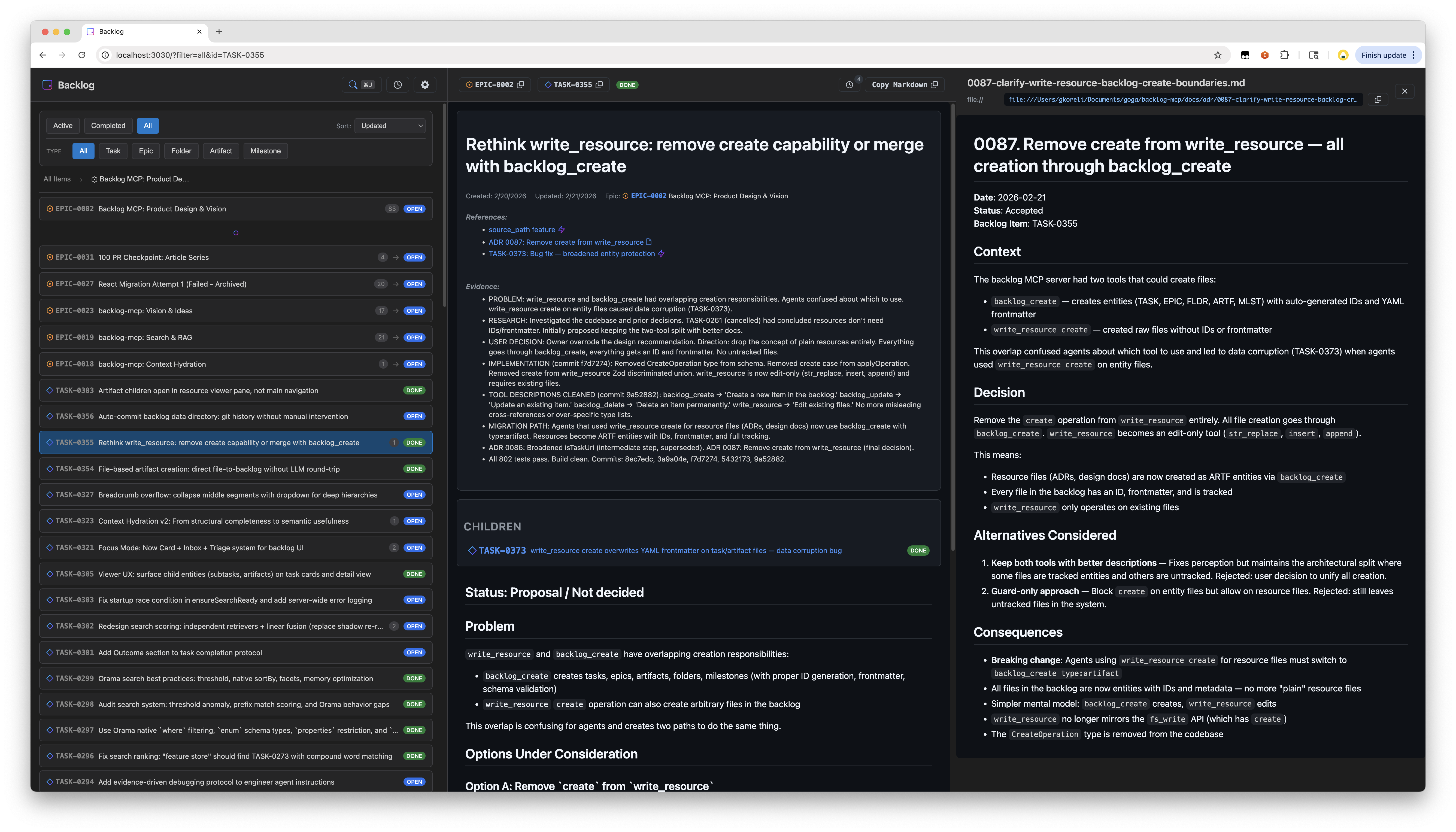
Los agentes crean tareas, realizan un seguimiento del progreso, adjuntan artefactos y buscan en todo. Los humanos obtienen un visor web en tiempo real para ver lo que están haciendo los agentes.
Se ejecuta localmente de forma inmediata. También se puede autoalojar en Cloudflare Workers + D1 para obtener un backlog remoto gratuito y siempre activo, accesible desde cualquier dispositivo o cliente MCP.
Inicio rápido: Dile a tu LLM:
Add backlog-mcp to .mcp.json and use it to track tasks
Demo en vivo: backlog-mcp-viewer.pages.dev — la interfaz de usuario del visor conectada a una instancia alojada real
Este es un monorepo con 3 paquetes:
Paquete | npm | Qué hace |
Servidor MCP, API HTTP, CLI | ||
— | Interfaz web construida sobre | |
— | Tipos de entidad compartidos y utilidades de ID |
El visor está construido con Nisli, un framework de componentes web reactivos sin dependencias publicado como @nisli/core. Nisli comenzó en este repositorio y ahora vive por separado.
Related MCP server: Task Manager MCP Server
Añádelo a tu configuración de MCP (.mcp.json o la configuración de tu cliente MCP):
{
  "mcpServers": {
    "backlog": {
      "command": "npx",
      "args": ["-y", "backlog-mcp"]
    }
  }
}Aloja tu propio backlog remoto siempre activo de forma gratuita usando Cloudflare Workers + D1. Accesible desde cualquier dispositivo o cliente MCP: no se requiere proceso de servidor local.
Requisitos previos: Cuenta de Cloudflare (el nivel gratuito es suficiente), CLI wrangler, una aplicación OAuth de GitHub.
# 1. Clone and install
git clone https://github.com/gkoreli/backlog-mcp.git
cd backlog-mcp
pnpm install

# 2. Create the D1 database
cd packages/server
npx wrangler d1 create backlog
# Copy the database_id into packages/server/wrangler.jsonc

# 3. Apply the D1 migrations
npx wrangler d1 execute backlog --remote --file=migrations/0001_initial.sql
npx wrangler d1 execute backlog --remote --file=migrations/0002_oauth_refresh_tokens.sql

# 4. Set secrets
npx wrangler secret put JWT_SECRET          # any strong random string
npx wrangler secret put API_KEY             # your personal API key (for Claude Desktop)
npx wrangler secret put GITHUB_CLIENT_ID    # GitHub OAuth App client ID
npx wrangler secret put GITHUB_CLIENT_SECRET
npx wrangler secret put ALLOWED_GITHUB_USERNAMES  # comma-separated: "you,youralt"

# 5. Deploy
npx wrangler deploy
Configuración de la aplicación OAuth de GitHub: ve a GitHub → Settings → Developer settings → OAuth Apps → New.
Establece la URL de callback en https://<your-worker>.workers.dev/oauth/github/callback.
Una vez desplegado, añádelo a la configuración de tu cliente MCP:
{
  "mcpServers": {
    "backlog": {
      "command": "npx",
      "args": ["-y", "mcp-remote", "https://<your-worker>.workers.dev/mcp"]
    }
  }
}
Claude.ai y ChatGPT pueden conectarse directamente a través de la URL remota de MCP: no se necesita ningún proceso local. Las sesiones de OAuth de GitHub utilizan tokens de actualización rotativos para que los clientes puedan renovar el acceso sin necesidad de volver a autenticarse diariamente.
Abre http://localhost:3030: siempre disponible cuando el servidor está en ejecución.
Características:
Diseño de panel dividido con lista de tareas y vista detallada
Búsqueda destacada con coincidencia híbrida de texto + semántica
Actualizaciones en tiempo real mediante SSE
Cronología de actividad
Filtrar por estado, tipo, épica
Renderizado de markdown estilo GitHub con diagramas Mermaid
Persistencia del estado de la URL
La interfaz de usuario del visor está construida con Nisli (@nisli/core).
5 tipos de entidad, todos almacenados como archivos markdown con frontmatter YAML:
Tipo | Prefijo | Propósito |
Tarea |
| Elementos de trabajo |
Épica |
| Grupos de tareas relacionadas |
Carpeta |
| Contenedores organizativos |
Artefacto |
| Salidas adjuntas (investigación, diseños, registros) |
Hito |
| Objetivos con fecha límite |
Valores de estado: open, in_progress, blocked, done, cancelled
Ejemplo de archivo de tarea:
---
id: TASK-0001
title: Fix authentication flow
status: open
epic_id: EPIC-0002
parent_id: FLDR-0001
references:
  - url: https://github.com/org/repo/issues/123
    title: Related issue
evidence:
  - Fixed in PR #45
---

The authentication flow has an issue where...backlog_list # Active tasks (open, in_progress, blocked)
backlog_list status=["done"] # Completed tasks
backlog_list type="epic" # Only epics
backlog_list epic_id="EPIC-0002" # Tasks in an epic
backlog_list parent_id="FLDR-0001" # Items in a folder
backlog_list query="authentication" # Search across all fields
backlog_list counts=true # Include counts by status/type
backlog_list limit=50 # Limit resultsbacklog_get id="TASK-0001" # Single item
backlog_get id=["TASK-0001","EPIC-0002"] # Batch getbacklog_create title="Fix bug"
backlog_create title="Fix bug" description="Details..." epic_id="EPIC-0002"
backlog_create title="Q1 Goals" type="epic"
backlog_create title="Research notes" type="artifact" parent_id="TASK-0001"
backlog_create title="v2.0 Release" type="milestone" due_date="2026-03-01"
backlog_create title="Fix bug" source_path="/path/to/spec.md" # Read description from filebacklog_update id="TASK-0001" status="done"
backlog_update id="TASK-0001" status="blocked" blocked_reason=["Waiting on API"]
backlog_update id="TASK-0001" evidence=["Fixed in PR #45"]
backlog_update id="TASK-0001" parent_id="FLDR-0001"
backlog_update id="MLST-0001" due_date="2026-04-01"backlog_delete id="TASK-0001" # Permanent deleteBúsqueda híbrida de texto completo + semántica con puntuación de relevancia:
backlog_search query="authentication bug"
backlog_search query="design decisions" types=["artifact"]
backlog_search query="blocked tasks" status=["blocked"] limit=10
backlog_search query="framework" sort="recent"
backlog_search query="search ranking" include_content=trueObtén un contexto enriquecido para una tarea: épica principal, tareas hermanas, hijas, referencias cruzadas, referencias inversas, actividad reciente y elementos semánticamente relacionados:
backlog_context task_id="TASK-0001"
backlog_context task_id="TASK-0001" depth=2          # Grandparent/grandchildren
backlog_context query="search ranking improvements"   # Find by description
backlog_context task_id="TASK-0001" include_related=false # Skip semantic searchEdita archivos existentes en el servidor MCP. Toda la creación pasa por backlog_create.
# Edit task body (use str_replace — protects frontmatter)
write_resource uri="mcp://backlog/tasks/TASK-0001.md" \
  operation={type: "str_replace", old_str: "old text", new_str: "new text"}

# Insert after a specific line
write_resource uri="mcp://backlog/tasks/TASK-0001.md" \
  operation={type: "insert", insert_line: 5, new_str: "inserted line"}

# Append to a file
write_resource uri="mcp://backlog/resources/log.md" \
  operation={type: "append", new_str: "New entry"}
Operaciones: str_replace (coincidencia exacta, debe ser única), insert (después del número de línea), append (final del archivo).
Ejecutar npx -y backlog-mcp (la configuración predeterminada de MCP) hace lo siguiente:
Inicia un servidor HTTP persistente como un proceso en segundo plano separado: sirve tanto el endpoint MCP (/mcp) como el visor web (/) en el puerto 3030
Conecta stdio a él: tu cliente MCP se comunica a través de stdio, que se reenvía al servidor HTTP a través de mcp-remote
Actualizaciones automáticas: npx -y siempre descarga la última versión publicada. Si el servidor en ejecución es una versión anterior, se cierra automáticamente y se reinicia con la nueva
Recuperación resiliente: Si el puente pierde la conexión, un supervisor lo reinicia con retroceso exponencial (hasta 10 reintentos). Los errores de conexión como ECONNREFUSED se detectan y manejan automáticamente
El servidor HTTP persiste durante las sesiones del agente: varios clientes MCP pueden compartirlo. El visor web siempre está disponible en http://localhost:3030.
Todos los comandos a través de npx:
npx backlog-mcp                # Start stdio bridge + auto-spawn HTTP server (default)
npx backlog-mcp status         # Check server status
npx backlog-mcp stop           # Stop the server
npx backlog-mcp version        # Show version
npx backlog-mcp serve          # Run HTTP server in foreground (optional, see below)
Salidas de muestra:
$ npx backlog-mcp status
Server is running on port 3030
Version: 0.44.0
Data directory: /Users/you/.backlog
Task count: 451
Uptime: 3515s
Viewer: http://localhost:3030/
MCP endpoint: http://localhost:3030/mcp

$ npx backlog-mcp stop
Stopping server on port 3030...
Server stopped

$ npx backlog-mcp status
Server is not running
La CLI existe para que los humanos inspeccionen y gestionen el servidor en segundo plano que utilizan los agentes. Dado que el modo predeterminado genera un proceso separado, necesitas status para comprobarlo y stop para cerrarlo.
serve ejecuta el servidor HTTP en primer plano en lugar de separado: útil para depuración, contenedores Docker o ejecución sin un cliente MCP. En el uso normal nunca lo necesitarás; el comando predeterminado maneja todo.
BACKLOG_DATA_DIR=~/.backlog    # Where to store tasks (default: data/tasks/)
BACKLOG_VIEWER_PORT=3030       # HTTP server port
Crea un archivo .env para el desarrollo local: consulta .env.example.
git clone https://github.com/gkoreli/backlog-mcp.git
cd backlog-mcp
pnpm install
pnpm build          # Build all packages
pnpm test           # Run all workspace tests
pnpm dev # Server + viewer with hot reloadpackages/
├── server/ # MCP server, search, context hydration, storage
├── viewer/ # Web UI built with @nisli/core
└── shared/ # Entity types, ID utilities
docs/
├── adr/ # backlog-mcp architecture decision records
└── framework-adr/ # Pointer to Nisli ADRsLos ADR de Backlog documentan decisiones de diseño importantes. Consulta docs/adr/README.md para ver el índice completo. Los ADR de Nisli viven en el repositorio de Nisli.
MIT
Use when ratifying an existing proposed ADR.
Inputs: id (required), as.
Use when attaching an artifact to a project item. parent_id is required.
Inputs: title (required), parent_id (required), as, path, +3 more.
Use when blocking a task with a reason.
Inputs: id (required), blocked_reason (required), as.
Use when preserving a verbatim human directive as a chronological project prompt.
Inputs: title (required), content (required), as, date, +3 more.
Use when recording an external technology, prior-art system, or benchmark this project builds on — with authoritative citations and the project's adopt/park/reject relationship to it.
Inputs: title (required), content (required), bears_on (required), category (required), +4 more.
Use when recording a human or system requirement in the current project.
Inputs: title (required), content (required), as, date, +11 more.
Use when completing a task, optionally with evidence.
Inputs: id (required), as, evidence.
List clusters of episodic memories that are ripe for consolidation into durable knowledge. Consolidator workflow: (1) call this and take ripe bundles; (2) per bundle, read members (backlog_get on MEMO- ids for depth), then write ONE narrative memory via backlog_remember({ layer: "semantic"|"procedural", derived: true, entity_refs: [member MEMO- ids + key source entities], context }) — a self-contained story, not fragments; (3) retire the members via backlog_forget({ ids }) so they stop appearing here while staying auditable; (4) track your progress with a backlog_remember state_key like "consolidation.watermark.".
Inputs: home, limit, context, min_count, +4 more.
List structural contradictions in memory: sets of ≥2 LIVE memories that share one state_key (e.g. "db.primary"), which should never happen — a new memory with a state_key auto-expires the previous holder. Each set means two beliefs about the same fact are both active. Resolution is yours, never automatic: pick the correct member, then either backlog_remember({ content, state_key, supersedes: }) to record the right value and retire the rest, or backlog_forget({ ids: [] }) to expire the wrong ones. Read members with backlog_get for full context before deciding. Set candidates: true to list semantic collision candidates instead: nearby live facts that deserve review, never contradiction verdicts.
Inputs: home, candidates, project_root.
Use when creating a project work item. Pass parent_id when known; parentless work surfaces as unfiled at wakeup.
Inputs: title (required), as, content, parent_id, +1 more.
Delete an item permanently.
Inputs: id (required), as, home, project_root.
Retract memories — soft-expire them so recall stops returning them (the record stays auditable in the viewer). Use when knowledge is wrong or obsolete and there is no replacement (if there IS a replacement, use backlog_remember with supersedes instead). expired:true garbage-collects already-expired memories.
Inputs: ids, home, layer, context, +3 more.
Get full details by ID. Accepts task IDs (TASK-0001, EPIC-0002), document paths (README.md, docs/adr/0001-example.md), or MCP resource URIs (mcp://backlog/resources/design.md). Works for any item regardless of status. Pass context:true when starting work on an entity to also see its relational neighborhood as stubs.
Inputs: id (required), home, depth, context, +1 more.
Use when creating a folder to organize project items. Pass parent_id when known; parentless work surfaces as unfiled at wakeup.
Inputs: title (required), as, content, parent_id.
Use when pausing a scheduled intake.
Inputs: id (required), as.
Recall memories — knowledge and episodes captured across sessions. Returns STUBS (title + one-line digest + provenance) by default; expand interesting ones with backlog_get(MEMO-id), or pass full:true for bodies. Weigh a stub's trust BEFORE hydrating: age_days (on the knowledge's own timeline), uses/idle_days (recall demand), supersedes (this is a correction), derived (consolidator inference), kind (current/historical/plan/preference/timeless). Old + never-used = treat as hypothesis, not truth. Distinct from backlog_search (live entities). Use to answer "how do we deploy?", "have I hit this before?", "what did I finish about X?". Memories point back to source entities via entity_id.
Inputs: query (required), full, home, tags, +5 more.
Write a durable memory — a stable fact, a procedure, or a preference you should know next session. Use when you learn something worth keeping: "this repo deploys via wrangler", "Goga prefers terse evidence bullets". To CORRECT existing knowledge, pass supersedes (the old MEMO- id is expired, lineage kept) or state_key (previous holders of the same evolving fact are closed). The optional collision_candidates receipt is tri-state: [] means the advisory scan completed clean; a non-empty array means nearby facts deserve adjudication; absent means the advisory scan did not run or failed, not that the write failed. Do not use for task events — completions are captured automatically.
Inputs: title (required), content (required), as, home, +11 more.
Use when resuming a scheduled intake.
Inputs: id (required), as.
Use when scheduling recurring project intake. Pass parent_id when known; parentless work surfaces as unfiled at wakeup.
Inputs: title (required), command (required), schedule (required), as, +3 more.
Search across all indexed backlog substrates and generic resources. Returns relevance-ranked results with match context. Use this for discovery; use backlog_list for filtering by status/type.
Inputs: query (required), home, sort, limit, +6 more.
Use when a newer ADR replaces an accepted or living ADR while preserving lineage.
Inputs: superseded_id (required), replacement_id (required), as.
Dense session-start briefing: active tasks, current epics, project constraints (requirements as stubs, violated/at-risk first — treat these as standing product intent), recent completions (with evidence snippets), recent activity, and the home-wide unfiled work count. No focal entity required — use this at the start of every session to understand what you were working on. Optional scope narrows the entity sections to a folder, milestone, or epic; unfiled remains home-wide because parentless work has no subtree ancestry. Optional operation resumes a mid-flight operation document: its live state becomes the briefing's FOCUS centerpiece and the rest of the briefing yields budget to it.
Inputs: home, scope, operation, max_activity, +4 more.
Use when you want backlog-mcp to validate and canonically persist an existing entity edit before reporting success. For ordinary repository prose edits, use your native Edit tool; reconciliation updates indexes and diagnostics afterward. Create and transition entities through the substrate-declared intent tools.
The append command will add content to the end of the body, automatically adding a newline if needed.
Notes for using the str_replace command:
The old_str parameter should match EXACTLY one or more consecutive lines from the original body. Be mindful of whitespaces!
If the old_str parameter is not unique in the body, the replacement will not be performed. Include enough context to make it unique.
The new_str parameter should contain the edited lines that should replace the old_str
Inputs: id (required), operation (required), as, home, +1 more.
Recent tool additions, removals, and schema changes observed during successful MCP inspections.
Loading tool schema changelog…
Scored across 23 tools
Some tools are clearly distinct (backlog_get, backlog_delete, backlog_search), but overlap exists among 'capture' tools (backlog_capture_prompt, backlog_capture_reference, backlog_capture_requirement) and 'create' tools (backlog_create_work, backlog_organize_folder, backlog_schedule_cron) that may confuse selection. Also, backlog_wakeup and backlog_recall both serve retrieval purposes, but their contexts differ; the descriptions do help to differentiate these.
All tool names are lowercase with underscores, but the verb style varies: some use verb_noun (backlog_get, backlog_delete), others use verb_object (backlog_complete_task, backlog_attach_artifact), and some lack a clear verb-object structure (backlog_consolidation_candidates, backlog_contradictions). The consistent prefix 'backlog_' helps, but patterns like 'create' vs 'capture' and 'organize' are not uniform.
23 tools is a fairly large set, but it covers the domain of a project management/knowledge memory server well. Each tool serves a distinct function — CRUD for work items, ADR management, memory operations, scheduling, and organization. Slightly heavy, but justified given the breadth of features (tasks, ADRs, memories, scheduling).
The tool surface is extensive, covering work item lifecycle (create, get, delete, complete, block), ADR handling (accept, supersede), memory management (remember, recall, forget, consolidation), and project organization (folders, attachments, requirements). Minor gaps include no explicit 'update_work' or 'unblock_task', but these may be handled via write_resource or other mechanisms.
Local-first task manager: create, edit, and complete tasks, projects, and checklists via MCP.
A graph-based task manager your agent can read and update: tasks, dependencies, blockers.
AI-native task management: list, create, update and archive tasks with rich context for AI agents
Create, search, and list Changologs logs and tasks