Glama
ferrislucas

iTerm MCP Server

by ferrislucas

iterm-mcp

iTerm セッションへのアクセスを提供するモデル コンテキスト プロトコル サーバー。
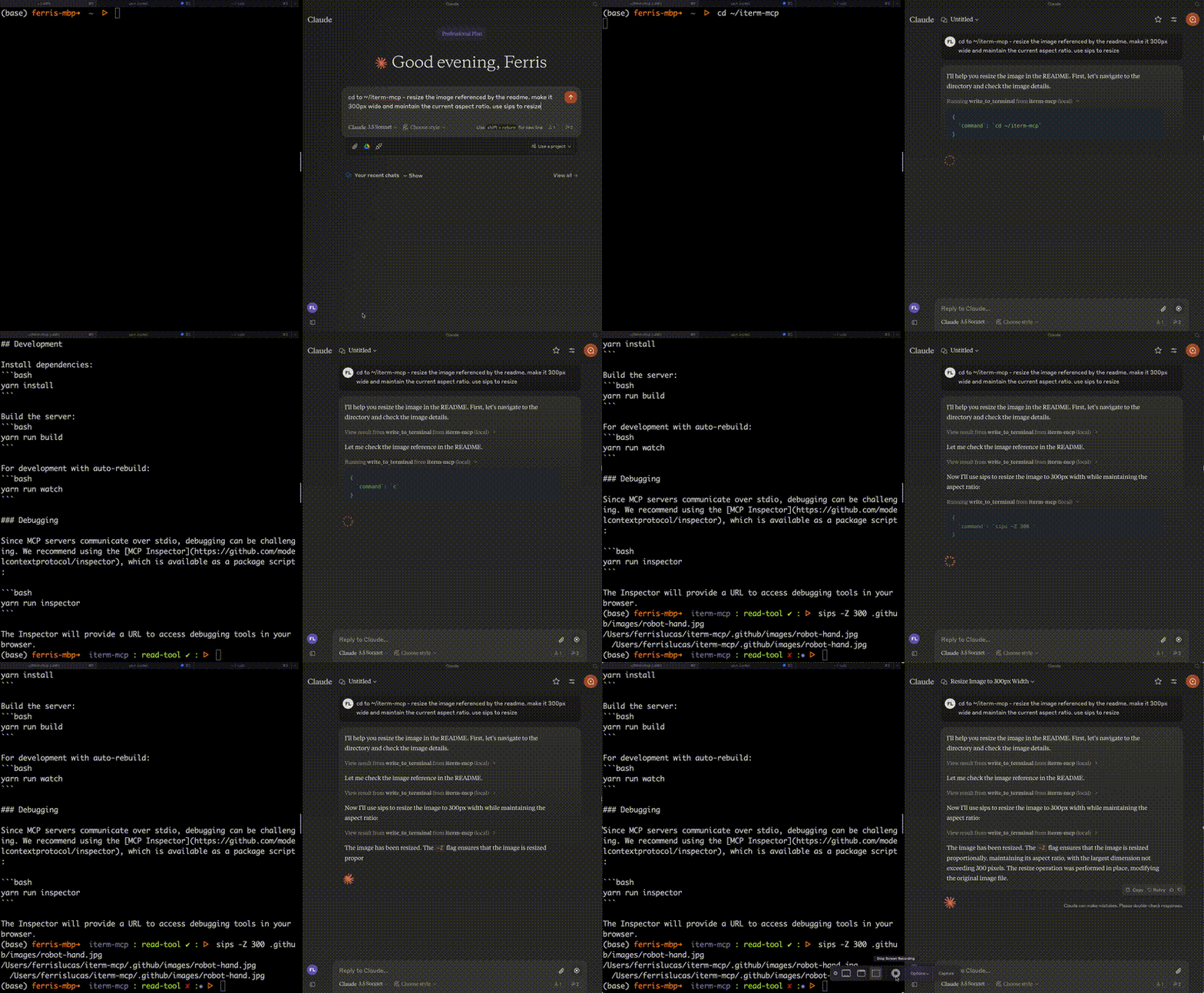
メイン画像

特徴

効率的なトークンの使用: iterm-mcp は、モデルが関心のある出力のみを検査する機能をモデルに提供します。モデルは通常、長時間実行されるコマンドの場合でも、出力の最後の数行のみを確認します。

自然な統合: iTermをモデルと共有します。画面に表示されている内容について質問したり、モデルにタスクを委任して各ステップの実行を確認したりできます。

**完全なターミナル制御と REPL サポート:**モデルは REPL を起動して対話できるほか、ctrl-c、ctrl-z などの制御文字を送信することもできます。

依存関係が最小限: iterm-mcpは最小限の依存関係で構築されており、npx経由で実行可能です。Claude Desktopやその他のMCPクライアントに簡単に追加できるように設計されています。そのまま動作するはずです。

安全に関する考慮事項

  • ツールを安全に使用する責任はユーザーにあります。

  • 組み込みの制限はありません: iterm-mcp は実行されるコマンドの安全性を評価しようとしません。

  • モデルは予期せぬ動作をする可能性があります。ユーザーはアクティビティを監視し、適切なタイミングで中止する必要があります。

  • 複数のステップから成るタスクでは、モデルが軌道から外れた場合に中断が必要になる場合があります。モデルの動作に慣れるまでは、小さくて焦点を絞ったタスクから始めてください。

ツール

  • write_to_terminal - アクティブなiTermターミナルに書き込みます。コマンドの実行によく使用されます。コマンドによって生成された出力の行数を返します。

  • read_terminal_output - アクティブな iTerm ターミナルから要求された行数を読み取ります。

  • send_control_character - アクティブな iTerm 端末に制御文字を送信します。

要件

  • iTerm2が実行されている必要があります

  • Node バージョン 18 以上

Related MCP server: iTerm MCP Server

インストール

Claude Desktop で使用するには、サーバー設定を追加します。

macOS の場合: ~/Library/Application Support/Claude/claude_desktop_config.json Windows の場合: %APPDATA%/Claude/claude_desktop_config.json

{
  "mcpServers": {
    "iterm-mcp": {
      "command": "npx",
      "args": [
        "-y",
        "iterm-mcp"
      ]
    }
  }
}

Smithery経由でインストール

Smithery経由で Claude Desktop 用の iTerm を自動的にインストールするには:

npx -y @smithery/cli install iterm-mcp --client claude

鍛冶屋のバッジ

発達

依存関係をインストールします:

yarn install

サーバーを構築します。

yarn run build

自動リビルドを使用した開発の場合:

yarn run watch

デバッグ

MCPサーバーはstdio経由で通信するため、デバッグが困難になる場合があります。パッケージスクリプトとして提供されているMCP Inspectorの使用をお勧めします。

yarn run inspector
yarn debug <command>

インスペクターは、ブラウザでデバッグ ツールにアクセスするための URL を提供します。

Available Tools

3 tools
read_terminal_outputB

Reads the output from the active iTerm terminal

ParametersJSON Schema
NameRequiredDescriptionDefault
linesOfOutputYesThe number of lines of output to read.

TDQS

B3.1/5.0
Behavior2/5

Does the description disclose side effects, auth requirements, rate limits, or destructive behavior?

With no annotations provided, the description carries the full burden of behavioral disclosure, yet it states nothing about side effects (e.g., whether reading clears output), output format, maximum lines, or error behavior. The agent lacks critical information about how the tool behaves at runtime.

Agents need to know what a tool does to the world before calling it. Descriptions should go beyond structured annotations to explain consequences.

Conciseness4/5

Is the description appropriately sized, front-loaded, and free of redundancy?

The description is highly concise: a single sentence with no waste. It is appropriately front-loaded. However, it could afford to include a tiny bit more context without harming conciseness, hence not a perfect 5.

Shorter descriptions cost fewer tokens and are easier for agents to parse. Every sentence should earn its place.

Completeness2/5

Given the tool's complexity, does the description cover enough for an agent to succeed on first attempt?

Given the tool's simplicity (single required parameter, no output schema), the description is insufficient. It omits essential context such as whether the read is destructive, how the terminal session is identified ('active' is ambiguous), and any limitations on the number of lines. The agent lacks enough information to use the tool confidently.

Complex tools with many parameters or behaviors need more documentation. Simple tools need less. This dimension scales expectations accordingly.

Parameters3/5

Does the description clarify parameter syntax, constraints, interactions, or defaults beyond what the schema provides?

Schema coverage is 100% because the only parameter ('linesOfOutput') is described in the schema. The description adds no additional meaning beyond the schema's 'The number of lines of output to read.' so it meets the baseline but does not enhance parameter understanding.

Input schemas describe structure but not intent. Descriptions should explain non-obvious parameter relationships and valid value ranges.

Purpose5/5

Does the description clearly state what the tool does and how it differs from similar tools?

The description clearly states the action ('reads') and the specific resource ('output from the active iTerm terminal'). It distinctively separates this tool from its siblings ('send_control_character' and 'write_to_terminal') which perform write operations, making the tool's purpose unambiguous.

Agents choose between tools based on descriptions. A clear purpose with a specific verb and resource helps agents select the right tool.

Usage Guidelines2/5

Does the description explain when to use this tool, when not to, or what alternatives exist?

The description provides no guidance on when to use this tool versus its siblings. It does not mention prerequisites, alternatives, or conditions under which this tool should be chosen. The agent receives no decision support beyond the basic action.

Agents often have multiple tools that could apply. Explicit usage guidance like "use X instead of Y when Z" prevents misuse.

send_control_characterA

Sends a control character to the active iTerm terminal (e.g., Control-C, or special sequences like ']' for telnet escape)

ParametersJSON Schema
NameRequiredDescriptionDefault
letterYesThe letter corresponding to the control character (e.g., 'C' for Control-C, ']' for telnet escape)

TDQS

A3.9/5.0
Behavior2/5

Does the description disclose side effects, auth requirements, rate limits, or destructive behavior?

No annotations provided. Description only states action, does not disclose side effects (e.g., interrupting processes), permissions, or return behavior. Minimal behavioral insight beyond the action itself.

Agents need to know what a tool does to the world before calling it. Descriptions should go beyond structured annotations to explain consequences.

Conciseness5/5

Is the description appropriately sized, front-loaded, and free of redundancy?

Single concise sentence with all essential information: action, target, examples. No wasted words; front-loaded with purpose.

Shorter descriptions cost fewer tokens and are easier for agents to parse. Every sentence should earn its place.

Completeness3/5

Given the tool's complexity, does the description cover enough for an agent to succeed on first attempt?

Adequate for a simple tool with one parameter and no output schema. Covers basic purpose and examples, but lacks behavioral details or usage context that would make it fully complete.

Complex tools with many parameters or behaviors need more documentation. Simple tools need less. This dimension scales expectations accordingly.

Parameters4/5

Does the description clarify parameter syntax, constraints, interactions, or defaults beyond what the schema provides?

Schema coverage 100% with description for 'letter'. Description adds examples ('C' for Control-C, ']' for telnet escape) and clarifies 'special sequences', enriching meaning beyond schema.

Input schemas describe structure but not intent. Descriptions should explain non-obvious parameter relationships and valid value ranges.

Purpose5/5

Does the description clearly state what the tool does and how it differs from similar tools?

Description clearly states the tool sends a control character to the active iTerm terminal, with specific examples (Control-C, telnet escape). It differentiates from siblings: write_to_terminal sends text, read_terminal_output reads output.

Agents choose between tools based on descriptions. A clear purpose with a specific verb and resource helps agents select the right tool.

Usage Guidelines4/5

Does the description explain when to use this tool, when not to, or what alternatives exist?

Provides examples of when to use (control characters, special sequences). Implicitly contrasts with write_to_terminal for regular text. Could explicitly state not to use for typing text, but adequate guidance.

Agents often have multiple tools that could apply. Explicit usage guidance like "use X instead of Y when Z" prevents misuse.

write_to_terminalA

Writes text to the active iTerm terminal - often used to run a command in the terminal

ParametersJSON Schema
NameRequiredDescriptionDefault
commandYesThe command to run or text to write to the terminal

TDQS

A3.7/5.0
Behavior2/5

Does the description disclose side effects, auth requirements, rate limits, or destructive behavior?

No annotations, and description lacks behavioral details such as whether the command waits for completion, effect on terminal state, or authentication needs. Critical for a command execution tool.

Agents need to know what a tool does to the world before calling it. Descriptions should go beyond structured annotations to explain consequences.

Conciseness5/5

Is the description appropriately sized, front-loaded, and free of redundancy?

One succinct sentence with no unnecessary information. Front-loaded with core action.

Shorter descriptions cost fewer tokens and are easier for agents to parse. Every sentence should earn its place.

Completeness3/5

Given the tool's complexity, does the description cover enough for an agent to succeed on first attempt?

Adequate for a simple tool, but lacks deeper context about execution behavior (synchronous? interactive?). Without annotations, description could do more to clarify usage.

Complex tools with many parameters or behaviors need more documentation. Simple tools need less. This dimension scales expectations accordingly.

Parameters3/5

Does the description clarify parameter syntax, constraints, interactions, or defaults beyond what the schema provides?

Single parameter 'command' with schema description 'The command to run or text to write to the terminal'. Description adds marginal value beyond schema, but schema coverage is 100%.

Input schemas describe structure but not intent. Descriptions should explain non-obvious parameter relationships and valid value ranges.

Purpose5/5

Does the description clearly state what the tool does and how it differs from similar tools?

Clearly states it writes text to the active iTerm terminal, often to run a command. Distinguishes from siblings (read_terminal_output and send_control_character) by its write action.

Agents choose between tools based on descriptions. A clear purpose with a specific verb and resource helps agents select the right tool.

Usage Guidelines4/5

Does the description explain when to use this tool, when not to, or what alternatives exist?

Implies use for running commands and writing text. Context with siblings suggests when not to use (reading output or sending control characters), but no explicit exclusions.

Agents often have multiple tools that could apply. Explicit usage guidance like "use X instead of Y when Z" prevents misuse.

Tool Schema Changelog

Recent tool additions, removals, and schema changes observed during successful MCP inspections.

  1. 3 tool updatesv1.0.0
    • First observedread_terminal_output
    • First observedsend_control_character
    • First observedwrite_to_terminal

TDQS

A3.8/5.0

Scored across 3 tools

Disambiguation5/5

Each tool has a clearly distinct function: reading output, sending control characters, and writing text. No overlap in purpose.

Naming Consistency5/5

All three tools follow a consistent verb_noun pattern in snake_case (read_terminal_output, send_control_character, write_to_terminal), making the set predictable.

Tool Count5/5

Three tools is well-scoped for terminal interaction, covering reading, writing, and control without unnecessary bloat.

Completeness4/5

The tools cover core terminal operations, but missing features like session management or terminal listing are minor gaps for a basic server.

Maintenance

ActivityInactive
ResponsivenessUnresponsive

Related MCP Connectors

Related MCP Servers

  • A
    license
    A
    quality
    D
    maintenance
    A server that lets Claude desktop app execute terminal commands on your computer and edit files through Model Context Protocol, featuring command execution, process management, and advanced file operations.
    19
    291,023 npm
    6
    MIT
  • A
    license
    A
    quality
    D
    maintenance
    A Model Context Protocol server that enables AI assistants to interact with iTerm2 terminals, allowing creation and management of terminal sessions, command execution, and reading terminal output.
    5
    69 npm
    14
    ISC
  • F
    license
    Not graded
    quality
    D
    maintenance
    A server implementation for the Model Context Protocol (MCP) that allows Claude AI to execute commands through a command-line interface, enabling direct system interactions from within Claude.
    -
  • A
    license
    A
    quality
    C
    maintenance
    An MCP server that provides full control over iTerm2 terminal sessions on macOS. It enables users to manage windows, tabs, and panes, run commands, read screen content, and interact with terminal sessions through Claude.
    18
    MIT