Glama
ferrislucas

iTerm MCP Server

by ferrislucas

iterm-mcp

A Model Context Protocol server that provides access to your iTerm session.
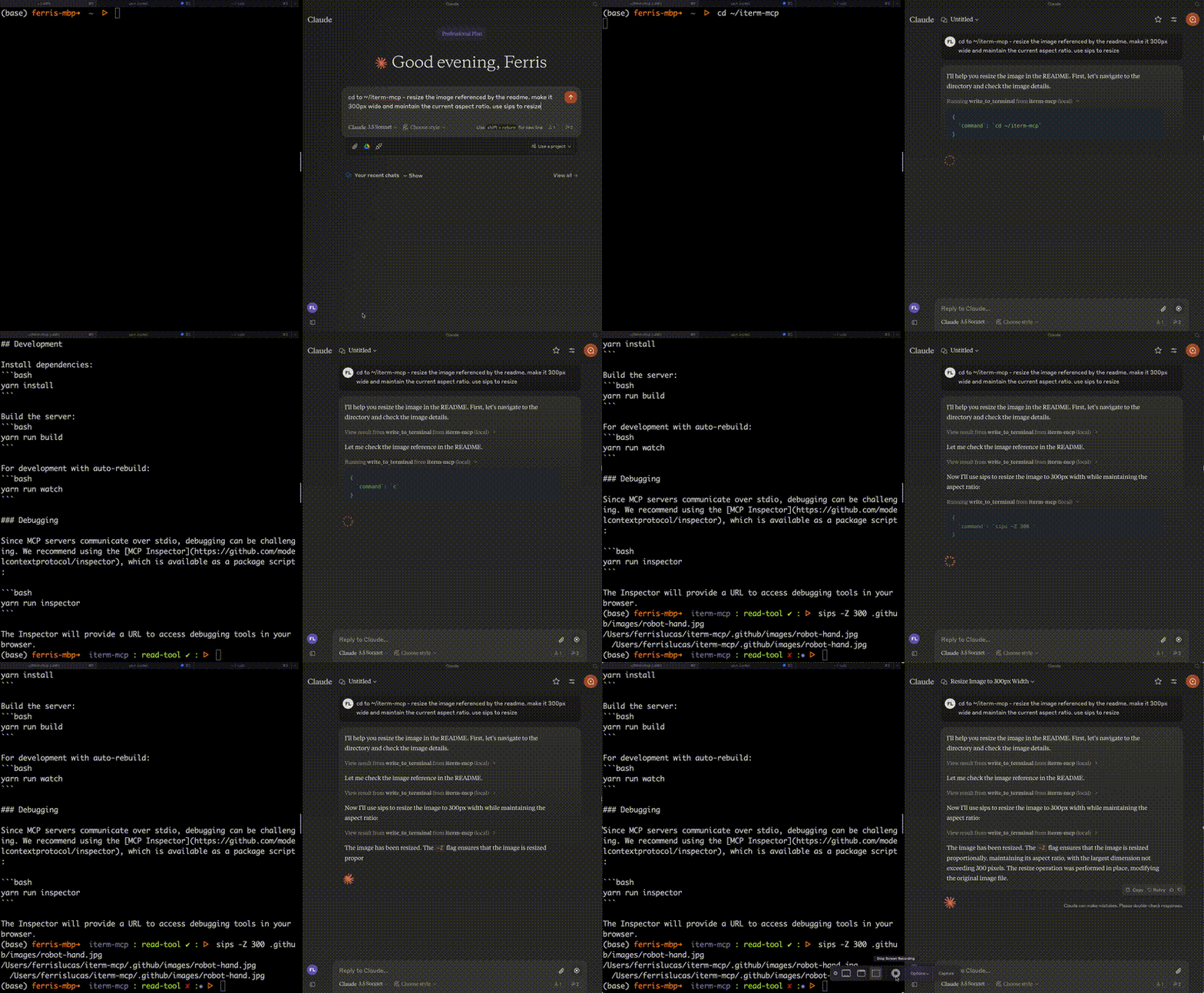
Main Image

Features

Efficient Token Use: iterm-mcp gives the model the ability to inspect only the output that the model is interested in. The model typically only wants to see the last few lines of output even for long running commands.

Natural Integration: You share iTerm with the model. You can ask questions about what's on the screen, or delegate a task to the model and watch as it performs each step.

Full Terminal Control and REPL support: The model can start and interact with REPL's as well as send control characters like ctrl-c, ctrl-z, etc.

Easy on the Dependencies: iterm-mcp is built with minimal dependencies and is runnable via npx. It's designed to be easy to add to Claude Desktop and other MCP clients. It should just work.

Safety Considerations

  • The user is responsible for using the tool safely.

  • No built-in restrictions: iterm-mcp makes no attempt to evaluate the safety of commands that are executed.

  • Models can behave in unexpected ways. The user is expected to monitor activity and abort when appropriate.

  • For multi-step tasks, you may need to interrupt the model if it goes off track. Start with smaller, focused tasks until you're familiar with how the model behaves.

Tools

  • write_to_terminal - Writes to the active iTerm terminal, often used to run a command. Returns the number of lines of output produced by the command.

  • read_terminal_output - Reads the requested number of lines from the active iTerm terminal.

  • send_control_character - Sends a control character to the active iTerm terminal.

Requirements

  • iTerm2 must be running

  • Node version 18 or greater

Related MCP server: iTerm MCP Server

Installation

To use with Claude Desktop, add the server config:

On macOS: ~/Library/Application Support/Claude/claude_desktop_config.json On Windows: %APPDATA%/Claude/claude_desktop_config.json

{
  "mcpServers": {
    "iterm-mcp": {
      "command": "npx",
      "args": [
        "-y",
        "iterm-mcp"
      ]
    }
  }
}

Installing via Smithery

To install iTerm for Claude Desktop automatically via Smithery:

npx -y @smithery/cli install iterm-mcp --client claude

Development

Install dependencies:

yarn install

Build the server:

yarn run build

For development with auto-rebuild:

yarn run watch

Debugging

Since MCP servers communicate over stdio, debugging can be challenging. We recommend using the MCP Inspector, which is available as a package script:

yarn run inspector
yarn debug <command>

The Inspector will provide a URL to access debugging tools in your browser.

Available Tools

3 tools
read_terminal_outputB

Reads the output from the active iTerm terminal

ParametersJSON Schema
NameRequiredDescriptionDefault
linesOfOutputYesThe number of lines of output to read.

TDQS

B3.1/5.0
Behavior2/5

Does the description disclose side effects, auth requirements, rate limits, or destructive behavior?

With no annotations provided, the description carries the full burden of behavioral disclosure, yet it states nothing about side effects (e.g., whether reading clears output), output format, maximum lines, or error behavior. The agent lacks critical information about how the tool behaves at runtime.

Agents need to know what a tool does to the world before calling it. Descriptions should go beyond structured annotations to explain consequences.

Conciseness4/5

Is the description appropriately sized, front-loaded, and free of redundancy?

The description is highly concise: a single sentence with no waste. It is appropriately front-loaded. However, it could afford to include a tiny bit more context without harming conciseness, hence not a perfect 5.

Shorter descriptions cost fewer tokens and are easier for agents to parse. Every sentence should earn its place.

Completeness2/5

Given the tool's complexity, does the description cover enough for an agent to succeed on first attempt?

Given the tool's simplicity (single required parameter, no output schema), the description is insufficient. It omits essential context such as whether the read is destructive, how the terminal session is identified ('active' is ambiguous), and any limitations on the number of lines. The agent lacks enough information to use the tool confidently.

Complex tools with many parameters or behaviors need more documentation. Simple tools need less. This dimension scales expectations accordingly.

Parameters3/5

Does the description clarify parameter syntax, constraints, interactions, or defaults beyond what the schema provides?

Schema coverage is 100% because the only parameter ('linesOfOutput') is described in the schema. The description adds no additional meaning beyond the schema's 'The number of lines of output to read.' so it meets the baseline but does not enhance parameter understanding.

Input schemas describe structure but not intent. Descriptions should explain non-obvious parameter relationships and valid value ranges.

Purpose5/5

Does the description clearly state what the tool does and how it differs from similar tools?

The description clearly states the action ('reads') and the specific resource ('output from the active iTerm terminal'). It distinctively separates this tool from its siblings ('send_control_character' and 'write_to_terminal') which perform write operations, making the tool's purpose unambiguous.

Agents choose between tools based on descriptions. A clear purpose with a specific verb and resource helps agents select the right tool.

Usage Guidelines2/5

Does the description explain when to use this tool, when not to, or what alternatives exist?

The description provides no guidance on when to use this tool versus its siblings. It does not mention prerequisites, alternatives, or conditions under which this tool should be chosen. The agent receives no decision support beyond the basic action.

Agents often have multiple tools that could apply. Explicit usage guidance like "use X instead of Y when Z" prevents misuse.

send_control_characterA

Sends a control character to the active iTerm terminal (e.g., Control-C, or special sequences like ']' for telnet escape)

ParametersJSON Schema
NameRequiredDescriptionDefault
letterYesThe letter corresponding to the control character (e.g., 'C' for Control-C, ']' for telnet escape)

TDQS

A3.9/5.0
Behavior2/5

Does the description disclose side effects, auth requirements, rate limits, or destructive behavior?

No annotations provided. Description only states action, does not disclose side effects (e.g., interrupting processes), permissions, or return behavior. Minimal behavioral insight beyond the action itself.

Agents need to know what a tool does to the world before calling it. Descriptions should go beyond structured annotations to explain consequences.

Conciseness5/5

Is the description appropriately sized, front-loaded, and free of redundancy?

Single concise sentence with all essential information: action, target, examples. No wasted words; front-loaded with purpose.

Shorter descriptions cost fewer tokens and are easier for agents to parse. Every sentence should earn its place.

Completeness3/5

Given the tool's complexity, does the description cover enough for an agent to succeed on first attempt?

Adequate for a simple tool with one parameter and no output schema. Covers basic purpose and examples, but lacks behavioral details or usage context that would make it fully complete.

Complex tools with many parameters or behaviors need more documentation. Simple tools need less. This dimension scales expectations accordingly.

Parameters4/5

Does the description clarify parameter syntax, constraints, interactions, or defaults beyond what the schema provides?

Schema coverage 100% with description for 'letter'. Description adds examples ('C' for Control-C, ']' for telnet escape) and clarifies 'special sequences', enriching meaning beyond schema.

Input schemas describe structure but not intent. Descriptions should explain non-obvious parameter relationships and valid value ranges.

Purpose5/5

Does the description clearly state what the tool does and how it differs from similar tools?

Description clearly states the tool sends a control character to the active iTerm terminal, with specific examples (Control-C, telnet escape). It differentiates from siblings: write_to_terminal sends text, read_terminal_output reads output.

Agents choose between tools based on descriptions. A clear purpose with a specific verb and resource helps agents select the right tool.

Usage Guidelines4/5

Does the description explain when to use this tool, when not to, or what alternatives exist?

Provides examples of when to use (control characters, special sequences). Implicitly contrasts with write_to_terminal for regular text. Could explicitly state not to use for typing text, but adequate guidance.

Agents often have multiple tools that could apply. Explicit usage guidance like "use X instead of Y when Z" prevents misuse.

write_to_terminalA

Writes text to the active iTerm terminal - often used to run a command in the terminal

ParametersJSON Schema
NameRequiredDescriptionDefault
commandYesThe command to run or text to write to the terminal

TDQS

A3.7/5.0
Behavior2/5

Does the description disclose side effects, auth requirements, rate limits, or destructive behavior?

No annotations, and description lacks behavioral details such as whether the command waits for completion, effect on terminal state, or authentication needs. Critical for a command execution tool.

Agents need to know what a tool does to the world before calling it. Descriptions should go beyond structured annotations to explain consequences.

Conciseness5/5

Is the description appropriately sized, front-loaded, and free of redundancy?

One succinct sentence with no unnecessary information. Front-loaded with core action.

Shorter descriptions cost fewer tokens and are easier for agents to parse. Every sentence should earn its place.

Completeness3/5

Given the tool's complexity, does the description cover enough for an agent to succeed on first attempt?

Adequate for a simple tool, but lacks deeper context about execution behavior (synchronous? interactive?). Without annotations, description could do more to clarify usage.

Complex tools with many parameters or behaviors need more documentation. Simple tools need less. This dimension scales expectations accordingly.

Parameters3/5

Does the description clarify parameter syntax, constraints, interactions, or defaults beyond what the schema provides?

Single parameter 'command' with schema description 'The command to run or text to write to the terminal'. Description adds marginal value beyond schema, but schema coverage is 100%.

Input schemas describe structure but not intent. Descriptions should explain non-obvious parameter relationships and valid value ranges.

Purpose5/5

Does the description clearly state what the tool does and how it differs from similar tools?

Clearly states it writes text to the active iTerm terminal, often to run a command. Distinguishes from siblings (read_terminal_output and send_control_character) by its write action.

Agents choose between tools based on descriptions. A clear purpose with a specific verb and resource helps agents select the right tool.

Usage Guidelines4/5

Does the description explain when to use this tool, when not to, or what alternatives exist?

Implies use for running commands and writing text. Context with siblings suggests when not to use (reading output or sending control characters), but no explicit exclusions.

Agents often have multiple tools that could apply. Explicit usage guidance like "use X instead of Y when Z" prevents misuse.

TDQS

A3.8/5.0
Disambiguation5/5

Each tool has a clearly distinct function: reading output, sending control characters, and writing text. No overlap in purpose.

Naming Consistency5/5

All three tools follow a consistent verb_noun pattern in snake_case (read_terminal_output, send_control_character, write_to_terminal), making the set predictable.

Tool Count5/5

Three tools is well-scoped for terminal interaction, covering reading, writing, and control without unnecessary bloat.

Completeness4/5

The tools cover core terminal operations, but missing features like session management or terminal listing are minor gaps for a basic server.

Maintenance

ActivityInactive
ResponsivenessUnresponsive

Resources

Unclaimed servers have limited discoverability.

Looking for Admin?

If you are the server author, to access and configure the admin panel.

Related MCP Connectors

Related MCP Servers

  • A
    license
    A
    quality
    D
    maintenance
    A server that lets Claude desktop app execute terminal commands on your computer and edit files through Model Context Protocol, featuring command execution, process management, and advanced file operations.
    19
    38,923
    6
    MIT
  • A
    license
    A
    quality
    C
    maintenance
    A Model Context Protocol server that enables AI assistants to interact with iTerm2 terminals, allowing creation and management of terminal sessions, command execution, and reading terminal output.
    5
    33
    14
    ISC
  • F
    license
    Not graded
    quality
    D
    maintenance
    A server implementation for the Model Context Protocol (MCP) that allows Claude AI to execute commands through a command-line interface, enabling direct system interactions from within Claude.
  • A
    license
    A
    quality
    C
    maintenance
    An MCP server that provides full control over iTerm2 terminal sessions on macOS. It enables users to manage windows, tabs, and panes, run commands, read screen content, and interact with terminal sessions through Claude.
    18
    MIT

Latest Blog Posts

MCP directory API

We provide all the information about MCP servers via our MCP API.

curl -X GET 'https://glama.ai/api/mcp/v1/servers/ferrislucas/iterm-mcp'

If you have feedback or need assistance with the MCP directory API, please join our Discord server