Glama
elizabethsiegle

Remote MCP Server for Website Analysis

在 Cloudflare 上构建远程 MCP 服务器(无需身份验证)

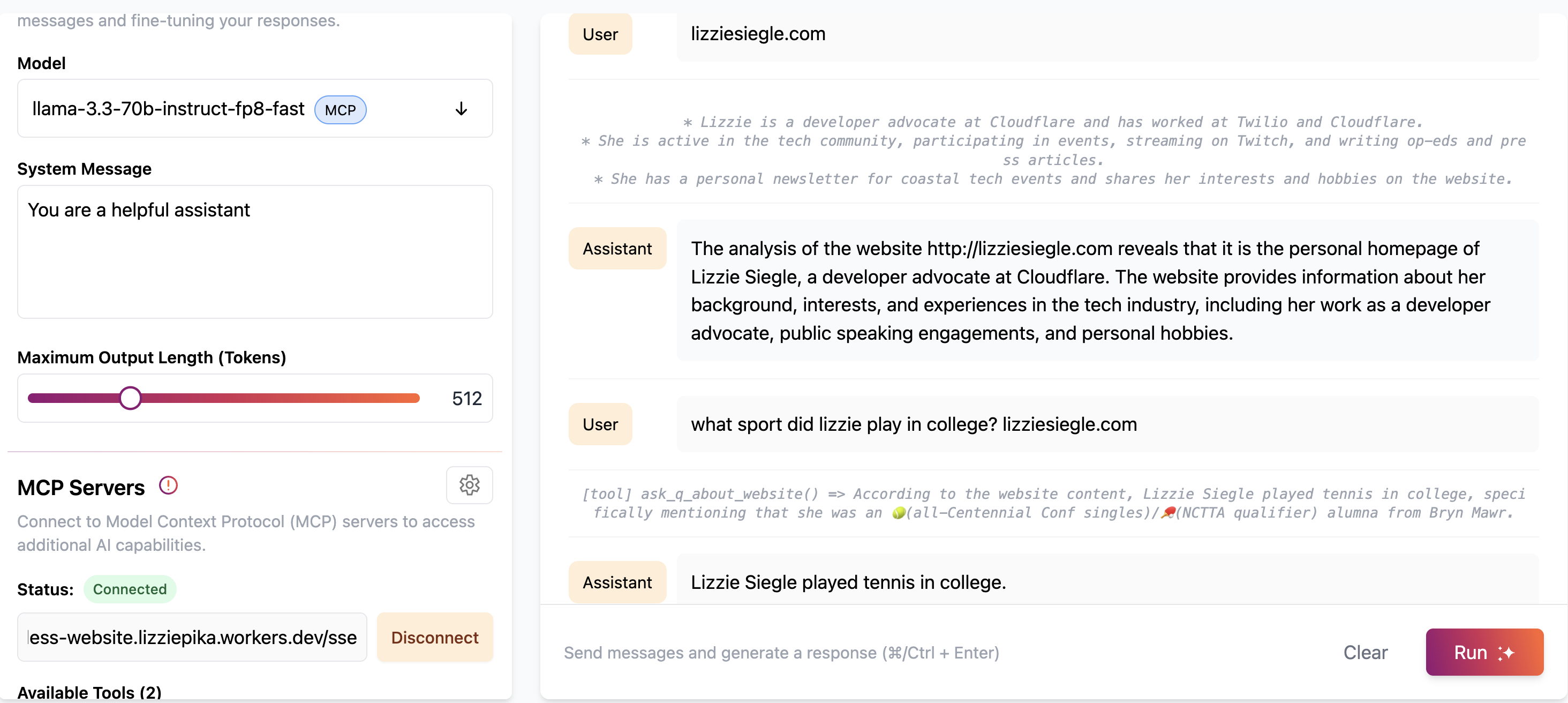
此示例允许您在 Cloudflare Workers 上部署无需身份验证的远程 MCP 服务器。该服务器包含使用 Cloudflare 的浏览器渲染和 AI 功能进行网站分析和内容提取的工具。 示例图片
开始:

部署至 Workers

这会将您的 MCP 服务器部署到类似以下 URL: remote-mcp-server-authless.<your-account>.workers.dev/sse

或者,您可以使用下面的命令行在本地计算机上创建远程 MCP 服务器:

npm create cloudflare@latest -- my-mcp-server --template=cloudflare/ai/demos/remote-mcp-authless

Related MCP server: Cloudflare Playwright MCP

可用工具

网站分析工具

  1. 分析网站

    • 使用 Cloudflare 的浏览器渲染功能抓取并分析网站

    • 使用 Cloudflare AI 提供网站内容摘要

    • 输入: url (字符串)- 需要分析的网站 URL

    • 示例: [tool] analyze_website(url: "https://example.com")

  2. 关于网站的问题

    • 抓取网站内容并回答有关其内容的具体问题

    • 使用 Cloudflare AI 理解并回答有关网站的问题

    • 输入:

      • url (字符串) - 要分析的网站 URL

      • question (字符串) - 您关于网站内容的问题

    • 示例: [tool] ask_q_about_website(url: "https://example.com", question: "What services does this company offer?")

自定义您的 MCP 服务器

要将您自己的工具添加到 MCP 服务器,请在src/index.tsinit()方法中使用this.server.tool(...)定义每个工具。

连接到 Cloudflare AI Playground

您可以从 Cloudflare AI Playground(一个远程 MCP 客户端)连接到您的 MCP 服务器:

  1. 前往https://playground.ai.cloudflare.com/

  2. 输入您部署的 MCP 服务器 URL ( remote-mcp-server-authless.<your-account>.workers.dev/sse )

  3. 您现在可以直接从游乐场使用您的 MCP 工具!

将 Claude Desktop 连接到您的 MCP 服务器

您还可以使用mcp-remote 代理从本地 MCP 客户端连接到远程 MCP 服务器。

要从 Claude Desktop 连接到您的 MCP 服务器,请按照Anthropic 的快速入门,并在 Claude Desktop 中转到设置 > 开发人员 > 编辑配置。

使用此配置进行更新:

{
  "mcpServers": {
    "calculator": {
      "command": "npx",
      "args": [
        "mcp-remote",
        "http://localhost:8787/sse"  // or remote-mcp-server-authless.your-account.workers.dev/sse
      ]
    }
  }
}

重新启动 Claude,您就会看到工具可用。

要求

要使用网站分析工具,您需要:

  1. 启用浏览器绑定的 Cloudflare Workers

  2. Cloudflare AI 绑定已配置

  3. 两种绑定的适当权限

确保您的wrangler.jsonc包含:

{
  "browser": {
    "binding": "BROWSER"
  },
  "ai": {
    "binding": "AI"
  }
}
F
license - not found
Not graded
quality - not tested
D
maintenance

Maintenance

Maintainers
Response time
Release cycle
Releases (12mo)
Commit activity

Resources

Unclaimed servers have limited discoverability.

Looking for Admin?

If you are the server author, to access and configure the admin panel.

Related MCP Servers

  • A
    license
    B
    quality
    D
    maintenance
    A server that leverages Cloudflare Browser Rendering to extract and process web content for use as context in LLMs, offering tools for fetching pages, searching documentation, extracting structured content, and summarizing content.
    4
    11
    MIT
  • F
    license
    Not graded
    quality
    C
    maintenance
    Enables AI assistants to perform web automation tasks such as navigation, typing, clicking, and taking screenshots using Playwright on Cloudflare Workers. This server allows LLMs to interact with and control a browser across platforms like Claude Desktop and GitHub Copilot.

View all related MCP servers

Related MCP Connectors

  • Scrape, crawl, map & search the web. Open-source, self-hostable Rust crawler & search for AI agents.

  • Read a URL as clean markdown, screenshot a website, url to PDF. Web access for agents, no signup.

  • Clean web reader for AI agents. Free remote read tier, optional x402 pay-per-call. No API keys.

View all MCP Connectors

Latest Blog Posts

MCP directory API

We provide all the information about MCP servers via our MCP API.

curl -X GET 'https://glama.ai/api/mcp/v1/servers/elizabethsiegle/remote-mcp-server-authless-scrape-and-analyze-website'

If you have feedback or need assistance with the MCP directory API, please join our Discord server