Remote MCP Server for Website Analysis
Cloudflare에서 원격 MCP 서버 구축(인증 없음)
이 예시를 통해 Cloudflare Workers에서 인증이 필요 없는 원격 MCP 서버를 배포할 수 있습니다. 이 서버에는 Cloudflare의 브라우저 렌더링 및 AI 기능을 활용한 웹사이트 분석 및 콘텐츠 추출 도구가 포함되어 있습니다.
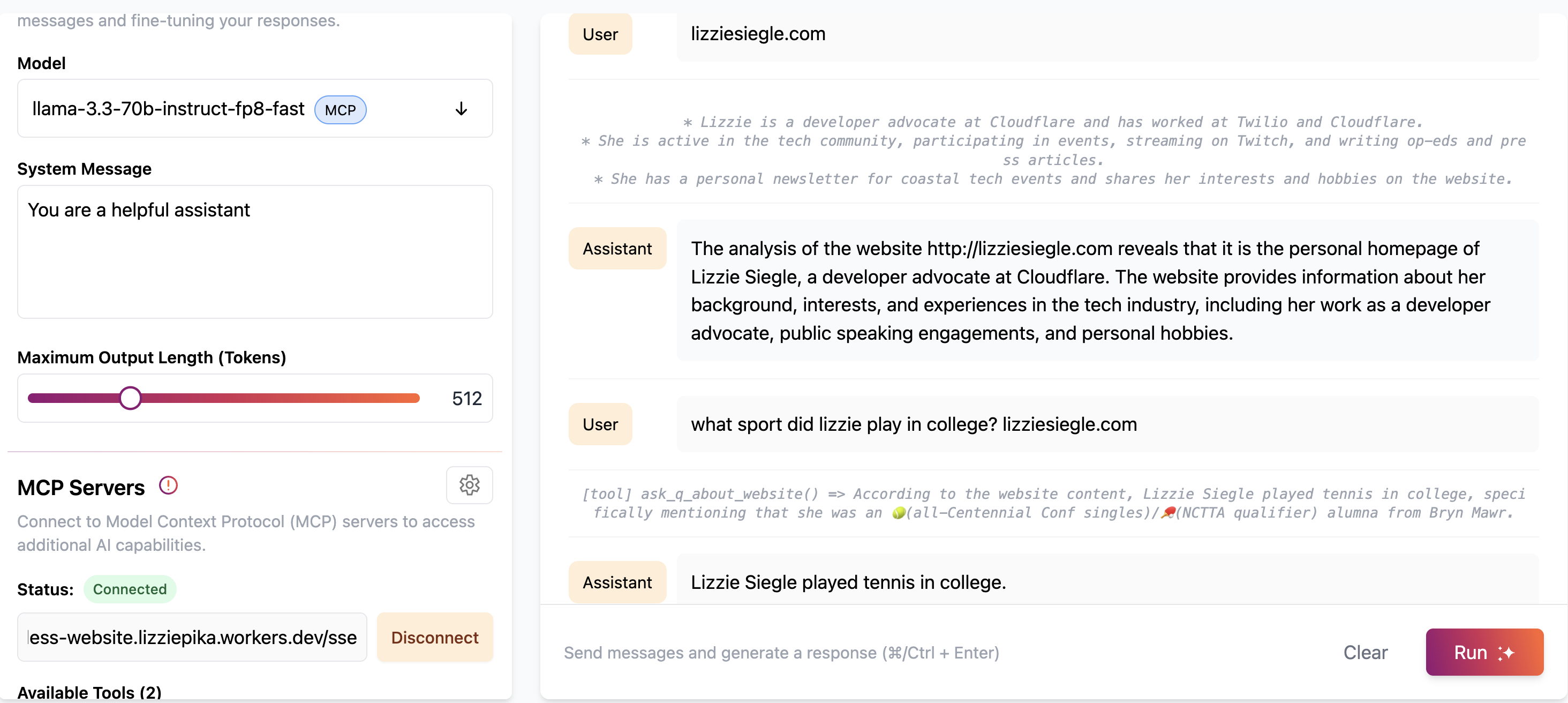
시작하기:

이렇게 하면 MCP 서버가 remote-mcp-server-authless.<your-account>.workers.dev/sse 와 같은 URL에 배포됩니다.
또는 아래 명령줄을 사용하여 로컬 컴퓨터에 원격 MCP 서버를 생성할 수 있습니다.
지엑스피1
Related MCP server: Cloudflare Playwright MCP
사용 가능한 도구
웹사이트 분석 도구
분석_웹사이트
Cloudflare의 브라우저 렌더링을 사용하여 웹사이트를 스크래핑하고 분석합니다.
Cloudflare AI를 사용하여 웹사이트 콘텐츠 요약을 제공합니다.
입력:
url(문자열) - 분석할 웹사이트 URL예:
[tool] analyze_website(url: "https://example.com")
웹사이트에 대해 물어보세요
웹사이트를 스크래핑하고 해당 콘텐츠에 대한 특정 질문에 답합니다.
Cloudflare AI를 사용하여 웹사이트에 대한 질문을 이해하고 응답합니다.
입력:
url(문자열) - 분석할 웹사이트 URLquestion(문자열) - 웹사이트 콘텐츠에 대한 질문
예:
[tool] ask_q_about_website(url: "https://example.com", question: "What services does this company offer?")
MCP 서버 사용자 지정
MCP 서버에 자체 도구를 추가하려면 src/index.ts 의 init() 메서드 내에서 this.server.tool(...) 사용하여 각 도구를 정의합니다.
Cloudflare AI Playground에 연결
원격 MCP 클라이언트인 Cloudflare AI Playground에서 MCP 서버에 연결할 수 있습니다.
배포된 MCP 서버 URL을 입력하세요(
remote-mcp-server-authless.<your-account>.workers.dev/sse)이제 놀이터에서 바로 MCP 도구를 사용할 수 있습니다!
Claude Desktop을 MCP 서버에 연결하세요
mcp-remote proxy를 사용하여 로컬 MCP 클라이언트에서 원격 MCP 서버에 연결할 수도 있습니다.
Claude Desktop에서 MCP 서버에 연결하려면 Anthropic의 빠른 시작을 따르고 Claude Desktop에서 설정 > 개발자 > 구성 편집으로 이동하세요.
다음 구성으로 업데이트:
{
"mcpServers": {
"calculator": {
"command": "npx",
"args": [
"mcp-remote",
"http://localhost:8787/sse" // or remote-mcp-server-authless.your-account.workers.dev/sse
]
}
}
}클로드를 다시 시작하면 도구를 사용할 수 있게 됩니다.
요구 사항
웹사이트 분석 도구를 사용하려면 다음이 필요합니다.
브라우저 바인딩이 활성화된 Cloudflare Workers
Cloudflare AI 바인딩이 구성되었습니다.
두 바인딩에 대한 적절한 권한
wrangler.jsonc 에 다음이 포함되어 있는지 확인하세요.
{
"browser": {
"binding": "BROWSER"
},
"ai": {
"binding": "AI"
}
}This server cannot be installed
Maintenance
Resources
Unclaimed servers have limited discoverability.
Looking for Admin?
If you are the server author, to access and configure the admin panel.
Related MCP Servers
- AlicenseBqualityDmaintenanceA server that leverages Cloudflare Browser Rendering to extract and process web content for use as context in LLMs, offering tools for fetching pages, searching documentation, extracting structured content, and summarizing content.411MIT
- AlicenseBqualityFmaintenanceA server that leverages Playwright for automated browser testing and integrates with Cloudflare Workers, enabling AI assistants to control web browsers for navigation, interaction, and screenshots.224,588,713256Apache 2.0
- AlicenseNot gradedqualityDmaintenanceA Cloudflare Workers-based server that extracts clean, formatted text from web pages using WebforAI and makes it accessible to AI models through the Model Context Protocol.3MIT
- FlicenseNot gradedqualityCmaintenanceEnables AI assistants to perform web automation tasks such as navigation, typing, clicking, and taking screenshots using Playwright on Cloudflare Workers. This server allows LLMs to interact with and control a browser across platforms like Claude Desktop and GitHub Copilot.
Related MCP Connectors
Scrape, crawl, map & search the web. Open-source, self-hostable Rust crawler & search for AI agents.
Read a URL as clean markdown, screenshot a website, url to PDF. Web access for agents, no signup.
Clean web reader for AI agents. Free remote read tier, optional x402 pay-per-call. No API keys.
Latest Blog Posts
- Who's Calling? MCP Hosts Are an Identity Blind Spot (And the Spec Knows It)By Om-Shree-0709 on .mcpAgent IdentityOAuth 2.1
- Your AI Chatbot Just Exposed Your CEO's Salary to an InternBy Om-Shree-0709 on .Agent IdentityMCP SecurityOAuth Delegation
- Why MCP Servers Need Execution Sandboxing (And Why Your Current Stack Isn't Enough)By Om-Shree-0709 on .Agentic AiPrompt InjectionWebAssembly
MCP directory API
We provide all the information about MCP servers via our MCP API.
curl -X GET 'https://glama.ai/api/mcp/v1/servers/elizabethsiegle/remote-mcp-server-authless-scrape-and-analyze-website'
If you have feedback or need assistance with the MCP directory API, please join our Discord server
