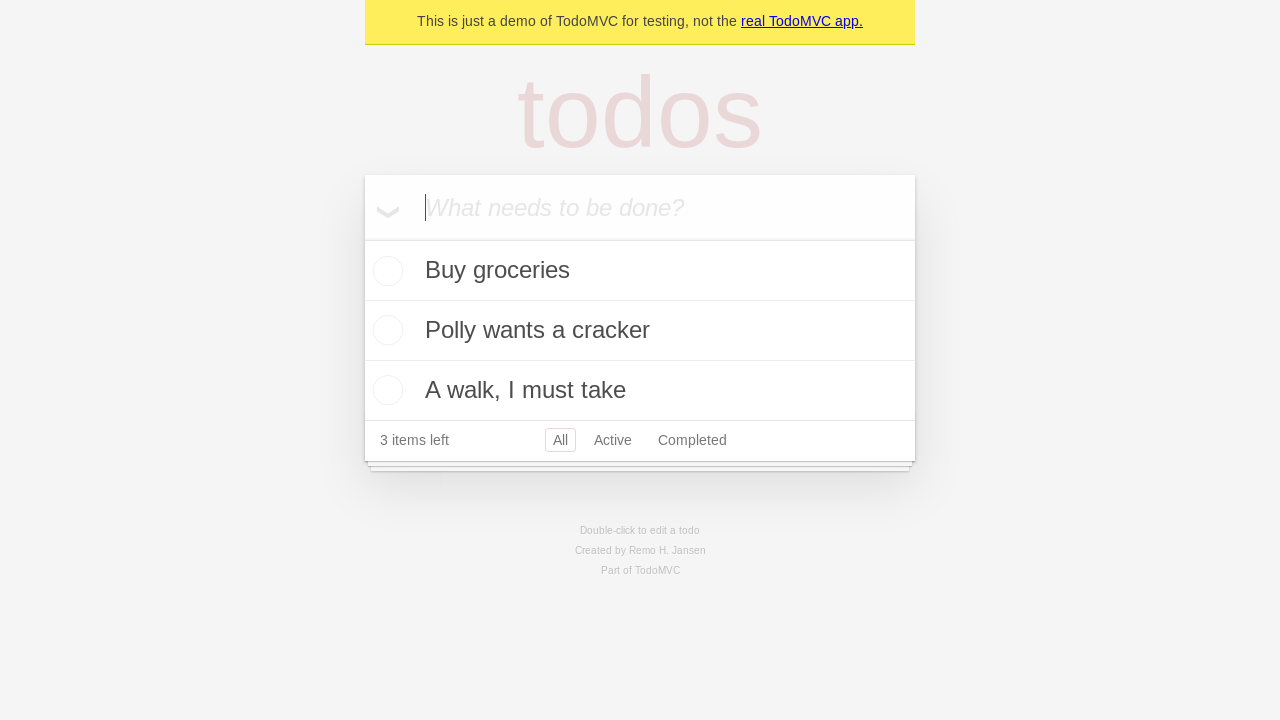
 A screenshot of the current page has been taken. The screenshot is in PNG format and is 56KB in size.
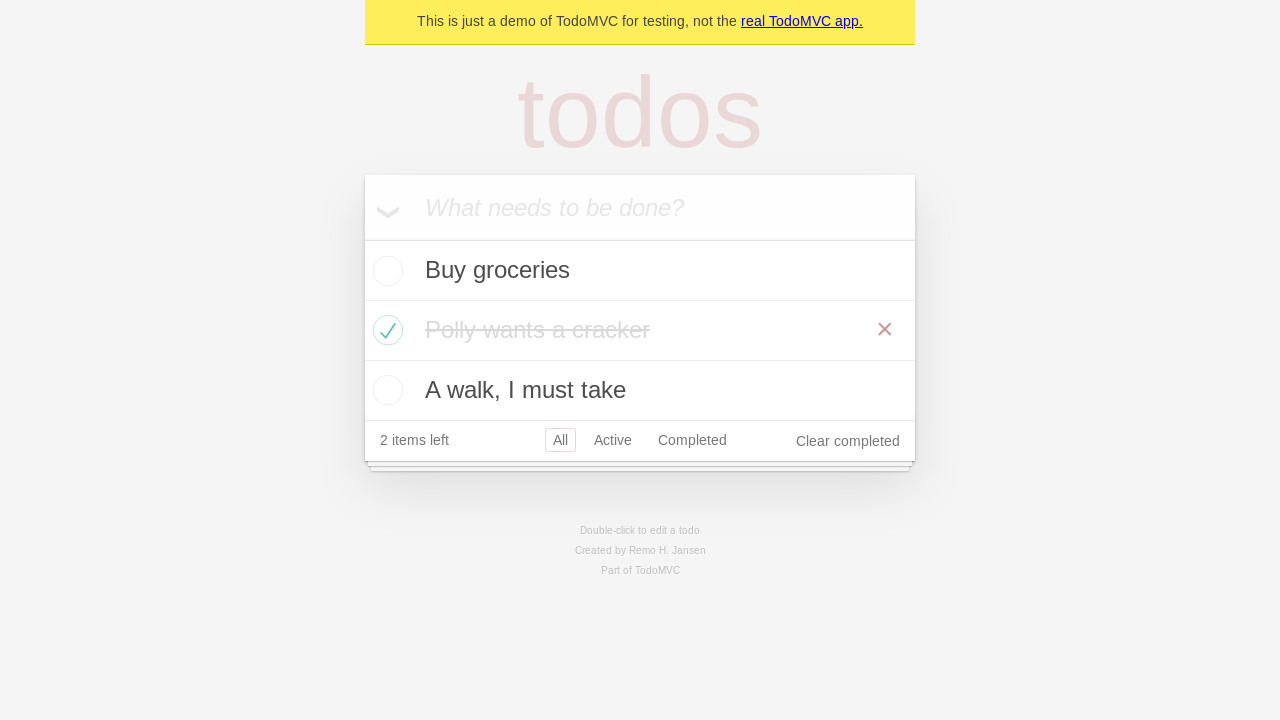 A screenshot of the current page has been taken. The screenshot is in PNG format and is 58KB in size.
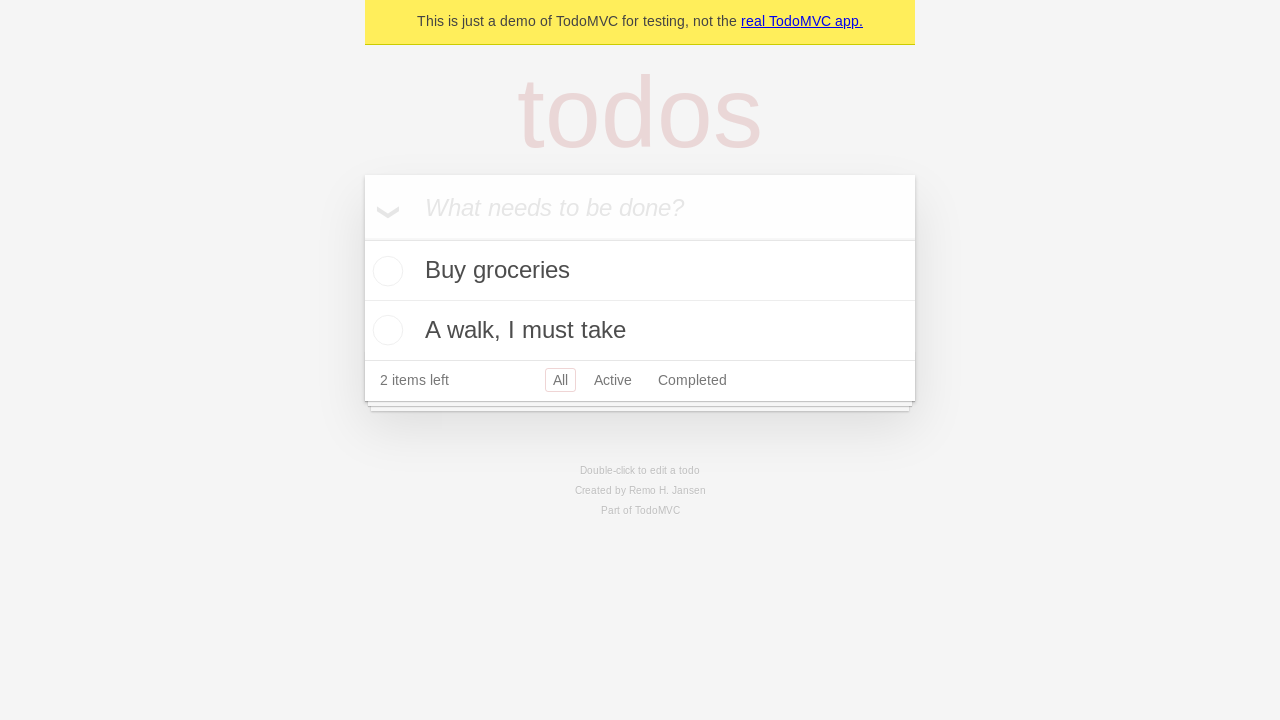 A final screenshot of the current page has been taken. The screenshot is in PNG format and is 50KB in size.
A
licenseNot graded
qualityD
maintenanceEnables AI assistants to control a browser through Playwright on Cloudflare Workers, allowing them to perform web automation tasks like navigation, typing, clicking, and taking screenshots.
Apache 2.0

The Cloudflare Playwright MCP server enables automated browser testing and interaction through an API with the following capabilities:
Browser Interaction: Navigate websites, click, hover, drag, type text, and interact with web elements using either accessibility snapshots or coordinate-based actions
Tab Management: Open, close, switch between, and list browser tabs
Capture & Output: Take screenshots, capture accessibility snapshots, save pages as PDFs, and view browser console messages
File Operations: Upload files and handle media
Browser Control: Resize windows, wait for specific durations, handle dialogs, and press keyboard keys
AI Integration: Use AI models to automate browser tasks through simple instructions
Setup: Install required browsers when needed
Integrates with Cloudflare Browser Rendering for automated browser testing
Enables deployment of the MCP server to Cloudflare Workers environment
Enables VS Code GitHub Copilot agents to use the Playwright MCP server for browser automation tasks
Provides browser automation for React applications, as demonstrated with the TodoMVC React example
Click on "Deploy Server".
Wait a few minutes for the server to deploy. Once ready, it will show a "Started" state.
In the chat, type @ followed by the MCP server name and your instructions, e.g., "@Cloudflare Playwright MCP go to github.com and take a screenshot of the homepage"
That's it! The server will respond to your query, and you can continue using it as needed.
Here is a step-by-step guide with screenshots.
This project leverages Playwright for automated browser testing and integrates with Cloudflare Workers, Browser Rendering and @cloudflare/playwright for deployment.
Follow these steps to set up and deploy the project:
Install dependencies:
npm ciBuild:
cd cloudflare
npm run build
Deploy to Cloudflare Workers:
cd cloudflare/example
npm ci
npx wrangler deploy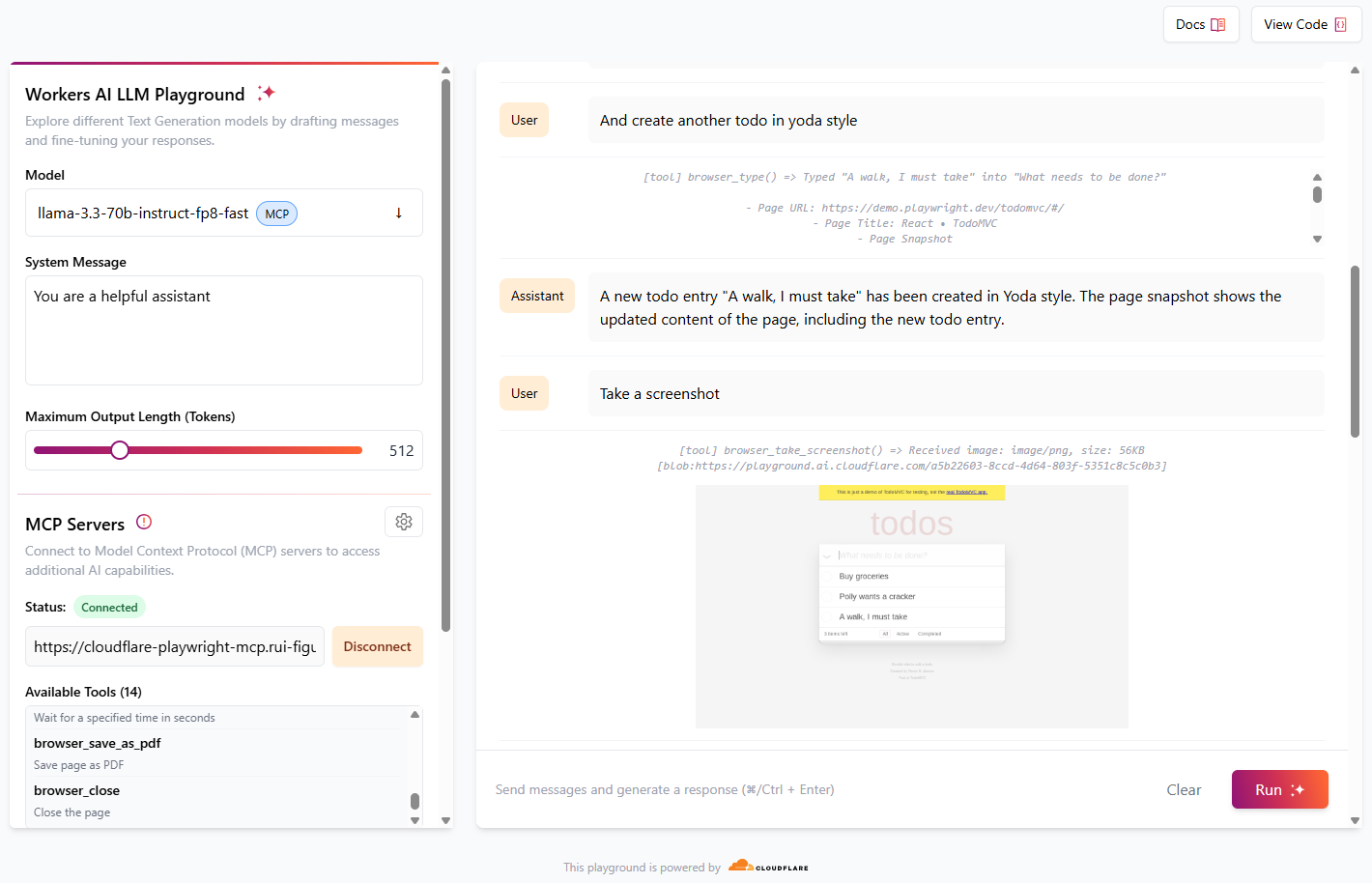
Cloudflare playground AI is a great way to test MCP servers using LLM models available in Workers AI.
Navigate to https://playground.ai.cloudflare.com/
Ensure model is set to llama-3.3-70b-instruct-fp8-fast
In MCP Servers, set URL to https://[my-mcp-url].workers.dev/sse
Click Connect
Status should update to Connected and it should list 14 available tools
You can now start to interact with the model, and it will run necessary tools to accomplish what was requested.
For best results, give simple instructions consisting of one single action, e. g., "Create a new todo entry", "Go to cloudflare site", "Take a screenshot"
Example of a conversation:
Role | Message |
User | Go to demo.playwright.dev/todomvc |
Assistant | runs browser_navigate tool The page has been navigated to https://demo.playwright.dev/todomvc/. The page title is "React • TodoMVC". The page snapshot shows the content of the page, including a heading, a textbox, and several links. |
User | Create some todo entry |
Assistant | runs browser_type tool A new todo entry "Buy groceries" has been created. The page snapshot shows the updated content of the page, including the new todo entry. |
User | Nice. Now create a todo in parrot style |
Assistant | runs browser_type tool A new todo entry "Polly wants a cracker" has been created in parrot style. The page snapshot shows the updated content of the page, including the new todo entry. |
User | And create another todo in yoda style |
Assistant | runs browser_type tool A new todo entry "A walk, I must take" has been created in Yoda style. The page snapshot shows the updated content of the page, including the new todo entry. |
User | Take a screenshot |
Assistant | runs browser_take_screenshot tool |
User | Now click the checkbox of the parrot todo entry |
Assistant | runs browser_clickt tool The checkbox of the parrot todo entry "Polly wants a cracker" has been clicked. The page snapshot shows the updated content of the page, with the checkbox now checked. |
User | Take a screenshot |
Assistant | runs browser_take_screenshot tool |
User | Remove completed todo entries |
Assistant | runs browser_clickt tool The "Clear completed" button has been clicked. The page snapshot shows the updated content of the page, with the completed todo entry "Polly wants a cracker" removed. |
User | Take a final screenshot |
Assistant | runs browser_take_screenshot tool |
As of now, Claude Desktop only supports local MCP servers. To use playground-mcp with Claude Desktop we make use of mcp-remote, a tool that proxies remote MCP servers and exposes them locally. Use the following configuration:
Open the configuration file for Claude Desktop.
Add the following JSON snippet under the mcpServers section:
{
  "mcpServers": {
    "cloudflare-playwright-mcp": {
      "command": "npx",
      "args": [
        "mcp-remote",
        "https://[my-mcp-url].workers.dev/sse"
      ]
    }
  }
}
Save the configuration file and restart Claude Desktop to apply the changes.
This setup ensures that Claude Desktop can communicate with the Cloudflare Playwright MCP server.
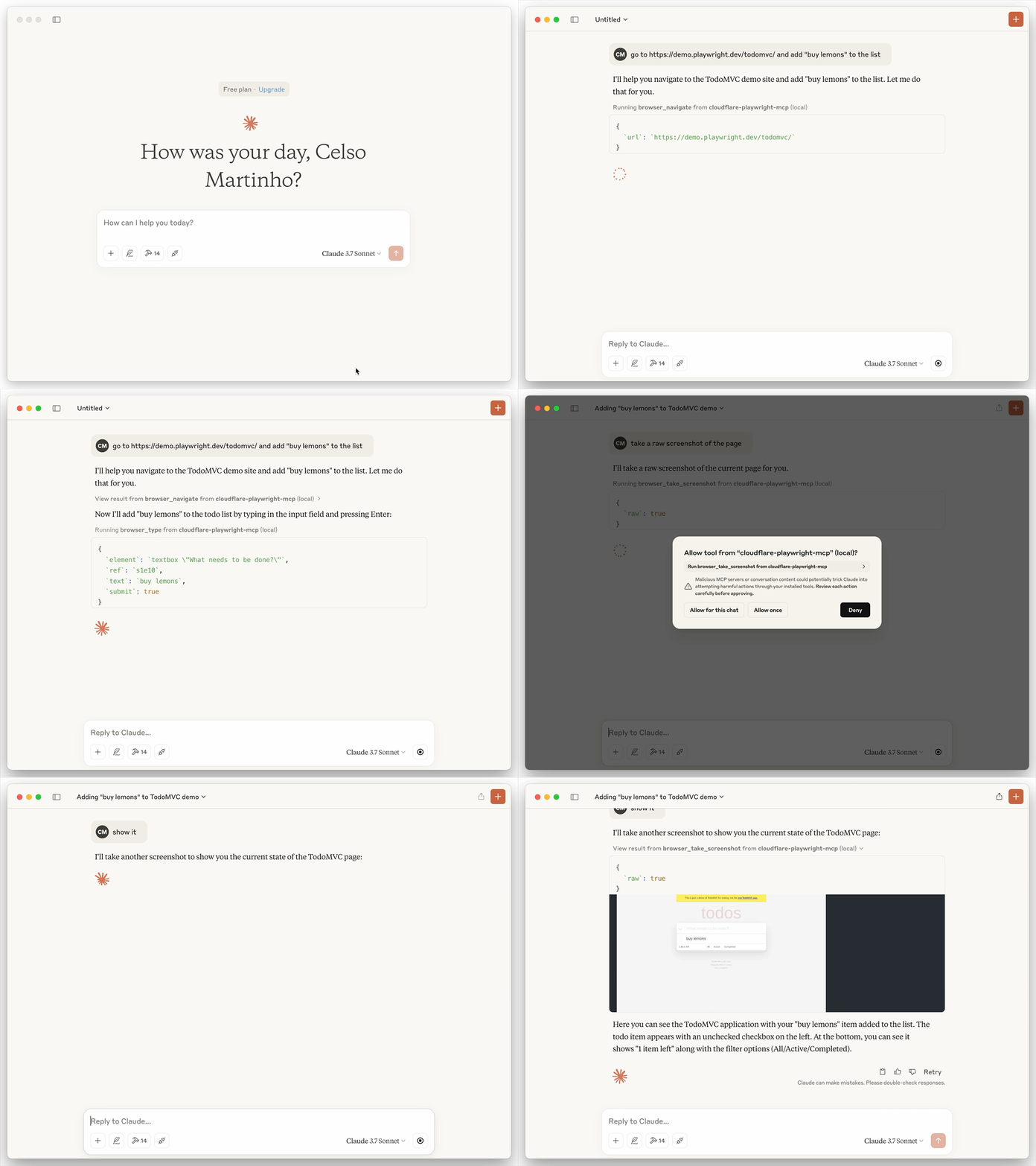
Here's an example of a session opening the TODO demo app, adding "buy lemons" and doing a screenshot, taking advantage of playwright-mcp tools and Browser Rendering:
You can install the Playwright MCP server using the VS Code CLI:
# For VS Code
code --add-mcp '{"name":"cloudflare-playwright","type":"sse","url":"https://[my-mcp-url].workers.dev/sse"}'
# For VS Code Insiders
code-insiders --add-mcp '{"name":"cloudflare-playwright","type":"sse","url":"https://[my-mcp-url].workers.dev/sse"}'After installation, the Playwright MCP server will be available for use with your GitHub Copilot agent in VS Code.
By default, when imageResponses is set to "auto", the server disables inline image responses for Cursor clients. To enable inline screenshots in Cursor, you need to override this behavior:
If you're running your own Cloudflare Worker, pass imageResponses: "allow" when creating the MCP agent:
export const PlaywrightMCP = createMcpAgent(env.BROWSER, {
  imageResponses: 'allow',
} as any);The tools are available in two modes:
Snapshot Mode (default): Uses accessibility snapshots for better performance and reliability
Vision Mode: Uses screenshots for visual-based interactions
Vision Mode works best with the computer use models that are able to interact with elements using X Y coordinate space, based on the provided screenshot.
browser_snapshot
Title: Page snapshot
Description: Capture accessibility snapshot of the current page, this is better than screenshot
Parameters: None
Read-only: true
browser_click
Title: Click
Description: Perform click on a web page
Parameters:
element (string): Human-readable element description used to obtain permission to interact with the element
ref (string): Exact target element reference from the page snapshot
doubleClick (boolean, optional): Whether to perform a double click instead of a single click
Read-only: false
browser_drag
Title: Drag mouse
Description: Perform drag and drop between two elements
Parameters:
startElement (string): Human-readable source element description used to obtain the permission to interact with the element
startRef (string): Exact source element reference from the page snapshot
endElement (string): Human-readable target element description used to obtain the permission to interact with the element
endRef (string): Exact target element reference from the page snapshot
Read-only: false
browser_hover
Title: Hover mouse
Description: Hover over element on page
Parameters:
element (string): Human-readable element description used to obtain permission to interact with the element
ref (string): Exact target element reference from the page snapshot
Read-only: true
browser_type
Title: Type text
Description: Type text into editable element
Parameters:
element (string): Human-readable element description used to obtain permission to interact with the element
ref (string): Exact target element reference from the page snapshot
text (string): Text to type into the element
submit (boolean, optional): Whether to submit entered text (press Enter after)
slowly (boolean, optional): Whether to type one character at a time. Useful for triggering key handlers in the page. By default entire text is filled in at once.
Read-only: false
browser_select_option
Title: Select option
Description: Select an option in a dropdown
Parameters:
element (string): Human-readable element description used to obtain permission to interact with the element
ref (string): Exact target element reference from the page snapshot
values (array): Array of values to select in the dropdown. This can be a single value or multiple values.
Read-only: false
browser_press_key
Title: Press a key
Description: Press a key on the keyboard
Parameters:
key (string): Name of the key to press or a character to generate, such as ArrowLeft or a
Read-only: false
browser_wait_for
Title: Wait for
Description: Wait for text to appear or disappear or a specified time to pass
Parameters:
time (number, optional): The time to wait in seconds
text (string, optional): The text to wait for
textGone (string, optional): The text to wait for to disappear
Read-only: true
browser_file_upload
Title: Upload files
Description: Upload one or multiple files
Parameters:
paths (array): The absolute paths to the files to upload. Can be a single file or multiple files.
Read-only: false
browser_handle_dialog
Title: Handle a dialog
Description: Handle a dialog
Parameters:
accept (boolean): Whether to accept the dialog.
promptText (string, optional): The text of the prompt in case of a prompt dialog.
Read-only: false
browser_navigate
Title: Navigate to a URL
Description: Navigate to a URL
Parameters:
url (string): The URL to navigate to
Read-only: false
browser_navigate_back
Title: Go back
Description: Go back to the previous page
Parameters: None
Read-only: true
browser_navigate_forward
Title: Go forward
Description: Go forward to the next page
Parameters: None
Read-only: true
browser_take_screenshot
Title: Take a screenshot
Description: Take a screenshot of the current page. You can't perform actions based on the screenshot, use browser_snapshot for actions.
Parameters:
raw (boolean, optional): Whether to return without compression (in PNG format). Default is false, which returns a JPEG image.
filename (string, optional): File name to save the screenshot to. Defaults to page-{timestamp}.{png|jpeg} if not specified.
element (string, optional): Human-readable element description used to obtain permission to screenshot the element. If not provided, the screenshot will be taken of viewport. If element is provided, ref must be provided too.
ref (string, optional): Exact target element reference from the page snapshot. If not provided, the screenshot will be taken of viewport. If ref is provided, element must be provided too.
Read-only: true
browser_pdf_save
Title: Save as PDF
Description: Save page as PDF
Parameters:
filename (string, optional): File name to save the pdf to. Defaults to page-{timestamp}.pdf if not specified.
Read-only: true
browser_network_requests
Title: List network requests
Description: Returns all network requests since loading the page
Parameters: None
Read-only: true
browser_console_messages
Title: Get console messages
Description: Returns all console messages
Parameters: None
Read-only: true
browser_install
Title: Install the browser specified in the config
Description: Install the browser specified in the config. Call this if you get an error about the browser not being installed.
Parameters: None
Read-only: false
browser_close
Title: Close browser
Description: Close the page
Parameters: None
Read-only: true
browser_resize
Title: Resize browser window
Description: Resize the browser window
Parameters:
width (number): Width of the browser window
height (number): Height of the browser window
Read-only: true
browser_tab_list
Title: List tabs
Description: List browser tabs
Parameters: None
Read-only: true
browser_tab_new
Title: Open a new tab
Description: Open a new tab
Parameters:
url (string, optional): The URL to navigate to in the new tab. If not provided, the new tab will be blank.
Read-only: true
browser_tab_select
Title: Select a tab
Description: Select a tab by index
Parameters:
index (number): The index of the tab to select
Read-only: true
browser_tab_close
Title: Close a tab
Description: Close a tab
Parameters:
index (number, optional): The index of the tab to close. Closes current tab if not provided.
Read-only: false
browser_generate_playwright_test
Title: Generate a Playwright test
Description: Generate a Playwright test for given scenario
Parameters:
name (string): The name of the test
description (string): The description of the test
steps (array): The steps of the test
Read-only: true
browser_screen_capture
Title: Take a screenshot
Description: Take a screenshot of the current page
Parameters: None
Read-only: true
browser_screen_move_mouse
Title: Move mouse
Description: Move mouse to a given position
Parameters:
element (string): Human-readable element description used to obtain permission to interact with the element
x (number): X coordinate
y (number): Y coordinate
Read-only: true
browser_screen_click
Title: Click
Description: Click left mouse button
Parameters:
element (string): Human-readable element description used to obtain permission to interact with the element
x (number): X coordinate
y (number): Y coordinate
Read-only: false
browser_screen_drag
Title: Drag mouse
Description: Drag left mouse button
Parameters:
element (string): Human-readable element description used to obtain permission to interact with the element
startX (number): Start X coordinate
startY (number): Start Y coordinate
endX (number): End X coordinate
endY (number): End Y coordinate
Read-only: false
browser_screen_type
Title: Type text
Description: Type text
Parameters:
text (string): Text to type into the element
submit (boolean, optional): Whether to submit entered text (press Enter after)
Read-only: false
browser_press_key
Title: Press a key
Description: Press a key on the keyboard
Parameters:
key (string): Name of the key to press or a character to generate, such as ArrowLeft or a
Read-only: false
browser_wait_for
Title: Wait for
Description: Wait for text to appear or disappear or a specified time to pass
Parameters:
time (number, optional): The time to wait in seconds
text (string, optional): The text to wait for
textGone (string, optional): The text to wait for to disappear
Read-only: true
browser_file_upload
Title: Upload files
Description: Upload one or multiple files
Parameters:
paths (array): The absolute paths to the files to upload. Can be a single file or multiple files.
Read-only: false
browser_handle_dialog
Title: Handle a dialog
Description: Handle a dialog
Parameters:
accept (boolean): Whether to accept the dialog.
promptText (string, optional): The text of the prompt in case of a prompt dialog.
Read-only: false
Perform click on a web page
| Name | Required | Description | Default |
|---|---|---|---|
| element | No | Human-readable element description used to obtain permission to interact with the element | |
| target | Yes | Exact target element reference from the page snapshot, or a unique element selector | |
| doubleClick | No | Whether to perform a double click instead of a single click | |
| button | No | Button to click, defaults to left | |
| modifiers | No | Modifier keys to press |
Does the description disclose side effects, auth requirements, rate limits, or destructive behavior?
Annotations already declare readOnlyHint=false and destructiveHint=true, indicating the tool mutates state and can be destructive. The description adds no further behavioral disclosure, such as possible navigation or permission requirements. It does not contradict annotations, but provides no value beyond them.
Agents need to know what a tool does to the world before calling it. Descriptions should go beyond structured annotations to explain consequences.
Is the description appropriately sized, front-loaded, and free of redundancy?
The description is a single concise sentence with no filler. However, it is terse and omits useful context that could be added without bloat, such as the requirement for a snapshot target. It is appropriately sized but not front-loaded with any distinguishing information.
Shorter descriptions cost fewer tokens and are easier for agents to parse. Every sentence should earn its place.
Given the tool's complexity, does the description cover enough for an agent to succeed on first attempt?
Given the tool's moderate complexity (5 parameters, no output schema), the description alone is minimally sufficient because the schema fully describes parameters. However, it lacks context about return values, when to use click vs other actions, and potential side effects. The schema covers parameter semantics, so a score of 3 is appropriate.
Complex tools with many parameters or behaviors need more documentation. Simple tools need less. This dimension scales expectations accordingly.
Does the description clarify parameter syntax, constraints, interactions, or defaults beyond what the schema provides?
Schema description coverage is 100%, with every parameter documented (e.g., target is 'Exact target element reference from the page snapshot, or a unique element selector'). The description itself adds no additional parameter meaning, so the baseline of 3 applies.
Input schemas describe structure but not intent. Descriptions should explain non-obvious parameter relationships and valid value ranges.
Does the description clearly state what the tool does and how it differs from similar tools?
The description clearly states the action ('Perform click') and the resource ('web page'), which is specific enough. However, it does not differentiate from sibling interaction tools like browser_hover or browser_drag; the agent must infer that 'click' is a distinct action without additional context. It is unambiguous about the core operation but lacks detail on the target element requirement.
Agents choose between tools based on descriptions. A clear purpose with a specific verb and resource helps agents select the right tool.
Does the description explain when to use this tool, when not to, or what alternatives exist?
The description provides no guidance on when to use this tool versus alternatives. It does not mention prerequisites such as needing a page snapshot to obtain a valid target, nor does it contrast with browser_hover or browser_drag. An agent receives no context for tool selection.
Agents often have multiple tools that could apply. Explicit usage guidance like "use X instead of Y when Z" prevents misuse.
Close the page
| Name | Required | Description | Default |
|---|---|---|---|
No parameters | |||
Does the description disclose side effects, auth requirements, rate limits, or destructive behavior?
The annotation already indicates destructiveHint=true, so the agent knows the action is destructive. The description simply repeats that by saying 'close' without adding any extra context about side effects (e.g., whether it closes just the current tab, loses unsaved state, or affects other tabs). It does not contradict the annotation, but it adds no new behavioral information.
Agents need to know what a tool does to the world before calling it. Descriptions should go beyond structured annotations to explain consequences.
Is the description appropriately sized, front-loaded, and free of redundancy?
The description is extremely concise, using only three words. It communicates the essential action and target without any fluff, making it easy to parse and understand quickly.
Shorter descriptions cost fewer tokens and are easier for agents to parse. Every sentence should earn its place.
Given the tool's complexity, does the description cover enough for an agent to succeed on first attempt?
Given the simplicity of the tool (no parameters, no output schema), the description is functional but lacks completeness. It leaves open the scope of 'close'—does it close the current page/tab, or the entire browser? In a context with sibling tools like browser_tabs, this ambiguity could be problematic. More detail would improve it.
Complex tools with many parameters or behaviors need more documentation. Simple tools need less. This dimension scales expectations accordingly.
Does the description clarify parameter syntax, constraints, interactions, or defaults beyond what the schema provides?
There are no parameters, so the schema coverage is trivially complete at 100%. The description does not need to explain any parameter semantics, and the baseline score of 3 applies.
Input schemas describe structure but not intent. Descriptions should explain non-obvious parameter relationships and valid value ranges.
Does the description clearly state what the tool does and how it differs from similar tools?
The description 'Close the page' clearly states the action (close) and the resource (page), making it unambiguous. It is distinct from sibling tools like browser_navigate or browser_snapshot, so an agent can easily identify it.
Agents choose between tools based on descriptions. A clear purpose with a specific verb and resource helps agents select the right tool.
Does the description explain when to use this tool, when not to, or what alternatives exist?
The description provides no guidance on when to use this tool versus alternatives. It does not mention potential alternatives (e.g., using browser_tabs to manage multiple pages) or any conditions that would make closing appropriate. The context is minimal and leaves the decision entirely to the agent.
Agents often have multiple tools that could apply. Explicit usage guidance like "use X instead of Y when Z" prevents misuse.
Returns all console messages
| Name | Required | Description | Default |
|---|---|---|---|
| level | Yes | Level of the console messages to return. Each level includes the messages of more severe levels. Defaults to "info". | info |
| all | No | Return all console messages since the beginning of the session, not just since the last navigation. Defaults to false. | |
| filename | No | Filename to save the console messages to. If not provided, messages are returned as text. |
Does the description disclose side effects, auth requirements, rate limits, or destructive behavior?
Annotations already indicate readOnlyHint true and destructiveHint false, so the description adds no conflicting side-effect information. It does not elaborate on behavior such as saving to a file, but that is covered by parameter descriptions.
Agents need to know what a tool does to the world before calling it. Descriptions should go beyond structured annotations to explain consequences.
Is the description appropriately sized, front-loaded, and free of redundancy?
The description is a single clear sentence with no redundancy, front-loading the verb and object.
Shorter descriptions cost fewer tokens and are easier for agents to parse. Every sentence should earn its place.
Given the tool's complexity, does the description cover enough for an agent to succeed on first attempt?
For a simple read-only tool with full schema coverage, the description is adequate, though it omits explicit use-case guidance and output format details beyond what the schema provides.
Complex tools with many parameters or behaviors need more documentation. Simple tools need less. This dimension scales expectations accordingly.
Does the description clarify parameter syntax, constraints, interactions, or defaults beyond what the schema provides?
Schema coverage is 100% with detailed parameter descriptions, so the tool description itself does not add meaning beyond the schema, but no parameter meaning is missing.
Input schemas describe structure but not intent. Descriptions should explain non-obvious parameter relationships and valid value ranges.
Does the description clearly state what the tool does and how it differs from similar tools?
Description uses a specific verb 'Returns' and identifies the resource 'console messages' with scope 'all', making the tool's purpose clear and distinct from sibling tools such as network request retrieval.
Agents choose between tools based on descriptions. A clear purpose with a specific verb and resource helps agents select the right tool.
Does the description explain when to use this tool, when not to, or what alternatives exist?
No guidance is provided on when to use this tool versus alternatives like browser_network_requests or browser_snapshot, nor does it mention filtering or filename-saving scenarios.
Agents often have multiple tools that could apply. Explicit usage guidance like "use X instead of Y when Z" prevents misuse.
Perform drag and drop between two elements
| Name | Required | Description | Default |
|---|---|---|---|
| startElement | No | Human-readable source element description used to obtain the permission to interact with the element | |
| startTarget | Yes | Exact target element reference from the page snapshot, or a unique element selector | |
| endElement | No | Human-readable target element description used to obtain the permission to interact with the element | |
| endTarget | Yes | Exact target element reference from the page snapshot, or a unique element selector |
Does the description disclose side effects, auth requirements, rate limits, or destructive behavior?
Annotations already indicate destructiveHint=true and readOnlyHint=false, so the destructive nature is covered. The description adds no extra behavioral context such as side effects on the DOM or event firing, but it does not contradict the annotations.
Agents need to know what a tool does to the world before calling it. Descriptions should go beyond structured annotations to explain consequences.
Is the description appropriately sized, front-loaded, and free of redundancy?
The description is a single concise sentence that front-loads the action and provides the core information without any irrelevant detail.
Shorter descriptions cost fewer tokens and are easier for agents to parse. Every sentence should earn its place.
Given the tool's complexity, does the description cover enough for an agent to succeed on first attempt?
For a simple action with well-described parameters and no output schema, the description is mostly complete. It does not mention any return values or wait behavior, but the lack of output schema makes this acceptable. It could have added a note about the order of start and end parameters, but the parameter names and descriptions handle that.
Complex tools with many parameters or behaviors need more documentation. Simple tools need less. This dimension scales expectations accordingly.
Does the description clarify parameter syntax, constraints, interactions, or defaults beyond what the schema provides?
Schema description coverage is 100% with all four parameters described. The tool description adds no additional parameter semantics beyond what the schema already provides, so the baseline of 3 is appropriate.
Input schemas describe structure but not intent. Descriptions should explain non-obvious parameter relationships and valid value ranges.
Does the description clearly state what the tool does and how it differs from similar tools?
The description clearly states the action (perform drag and drop) and the resource (between two elements), distinguishing it from sibling tools like browser_click, browser_hover, and browser_drop. It is specific and unambiguous.
Agents choose between tools based on descriptions. A clear purpose with a specific verb and resource helps agents select the right tool.
Does the description explain when to use this tool, when not to, or what alternatives exist?
The description does not provide any guidance on when to use this tool versus alternatives. It does not mention conditions such as needing to move an element or triggering drag-and-drop events, nor does it reference sibling tools like browser_drop or browser_click.
Agents often have multiple tools that could apply. Explicit usage guidance like "use X instead of Y when Z" prevents misuse.
Drop files or MIME-typed data onto an element, as if dragged from outside the page. At least one of "paths" or "data" must be provided.
| Name | Required | Description | Default |
|---|---|---|---|
| element | No | Human-readable element description used to obtain permission to interact with the element | |
| target | Yes | Exact target element reference from the page snapshot, or a unique element selector | |
| paths | No | Absolute paths to files to drop onto the element. | |
| data | No | Data to drop, as a map of MIME type to string value (e.g. {"text/plain": "hello", "text/uri-list": "https://example.com"}). |
Does the description disclose side effects, auth requirements, rate limits, or destructive behavior?
Annotations already convey destructive and non-read-only behavior, so the description does not need to repeat that. The description adds useful semantic context about simulating an external drag, but does not disclose any side effects beyond the basic drop action.
Agents need to know what a tool does to the world before calling it. Descriptions should go beyond structured annotations to explain consequences.
Is the description appropriately sized, front-loaded, and free of redundancy?
The description is a single, focused sentence that concisely explains both the action and the key parameter requirement. No filler or redundancy.
Shorter descriptions cost fewer tokens and are easier for agents to parse. Every sentence should earn its place.
Given the tool's complexity, does the description cover enough for an agent to succeed on first attempt?
The description, combined with the detailed schema and annotations, provides enough information to invoke the tool correctly. There is no output schema, so return-value details are not required, and the parameter permission explanation is handled by the 'element' field description.
Complex tools with many parameters or behaviors need more documentation. Simple tools need less. This dimension scales expectations accordingly.
Does the description clarify parameter syntax, constraints, interactions, or defaults beyond what the schema provides?
All parameters have clear schema descriptions. The tool description adds an important cross-parameter constraint that at least one of 'paths' or 'data' must be provided, which is not otherwise expressed in the schema.
Input schemas describe structure but not intent. Descriptions should explain non-obvious parameter relationships and valid value ranges.
Does the description clearly state what the tool does and how it differs from similar tools?
The description clearly states the action: dropping files or MIME-typed data onto an element. It uses a specific verb and resource, and distinguishes itself from in-page drag operations by specifying 'as if dragged from outside the page'.
Agents choose between tools based on descriptions. A clear purpose with a specific verb and resource helps agents select the right tool.
Does the description explain when to use this tool, when not to, or what alternatives exist?
The description gives a useful usage constraint ('At least one of paths or data must be provided') and hints at external drag context, but it does not explicitly name sibling tools or state when to prefer this over browser_file_upload or browser_drag.
Agents often have multiple tools that could apply. Explicit usage guidance like "use X instead of Y when Z" prevents misuse.
Evaluate JavaScript expression on page or element
| Name | Required | Description | Default |
|---|---|---|---|
| element | No | Human-readable element description used to obtain permission to interact with the element | |
| target | No | Exact target element reference from the page snapshot, or a unique element selector | |
| function | Yes | () => { /* code */ } or (element) => { /* code */ } when element is provided | |
| filename | No | Filename to save the result to. If not provided, result is returned as text. |
Does the description disclose side effects, auth requirements, rate limits, or destructive behavior?
Annotations already flag destructiveHint=true and readOnlyHint=false, so the agent knows this can modify state. The description adds minimal context beyond that—it mentions 'on page or element' but doesn't warn about the power of arbitrary JS execution or potential side effects. Since the annotation covers the destructive nature, the description's lack of extra detail keeps it at a baseline 3.
Agents need to know what a tool does to the world before calling it. Descriptions should go beyond structured annotations to explain consequences.
Is the description appropriately sized, front-loaded, and free of redundancy?
A single, clear sentence with no redundant words. The action is front-loaded and easy to parse. This is appropriately concise for a tool whose parameter details are already in the schema.
Shorter descriptions cost fewer tokens and are easier for agents to parse. Every sentence should earn its place.
Given the tool's complexity, does the description cover enough for an agent to succeed on first attempt?
Given that this tool executes arbitrary JavaScript with destructive potential, the description is too sparse. It doesn't mention that the function can modify the page, that results can be saved to a file (though schema covers it), or that there is a separate unsafe variant (browser_run_code_unsafe) that might be more appropriate for certain tasks. The description lacks the context an agent needs to safely and correctly use this tool, especially when annotations already warn about destructiveness but the description provides no additional guidance.
Complex tools with many parameters or behaviors need more documentation. Simple tools need less. This dimension scales expectations accordingly.
Does the description clarify parameter syntax, constraints, interactions, or defaults beyond what the schema provides?
Schema description coverage is 100%, so all four parameters are documented in the schema itself. The description does not add any meaning beyond what the schema provides—it doesn't elaborate on the function syntax, target usage, or filename behavior. With high schema coverage, the baseline is 3, and the description contributes nothing extra.
Input schemas describe structure but not intent. Descriptions should explain non-obvious parameter relationships and valid value ranges.
Does the description clearly state what the tool does and how it differs from similar tools?
The description clearly states the verb 'Evaluate' and the resource 'JavaScript expression on page or element', making the core purpose obvious. However, it doesn't distinguish from the sibling browser_run_code_unsafe, which might also execute code, so it loses a point for not differentiating between similar tools.
Agents choose between tools based on descriptions. A clear purpose with a specific verb and resource helps agents select the right tool.
Does the description explain when to use this tool, when not to, or what alternatives exist?
There is no guidance on when to use this tool versus alternatives like browser_run_code_unsafe or when to avoid it. No context about prerequisites (e.g., page must be loaded) or scenarios that favor this tool over others. The description simply states the action without any usage direction.
Agents often have multiple tools that could apply. Explicit usage guidance like "use X instead of Y when Z" prevents misuse.
Upload one or multiple files
| Name | Required | Description | Default |
|---|---|---|---|
| paths | No | The absolute paths to the files to upload. Can be single file or multiple files. If omitted, file chooser is cancelled. |
Does the description disclose side effects, auth requirements, rate limits, or destructive behavior?
The annotations already indicate destructive behavior and non-read-only semantics, so the description does not need to restate those. However, the description does not mention side effects beyond uploading, such as navigating away, opening or cancelling a file chooser, or potential overwrite behavior, though the parameter description partially covers the cancellation case.
Agents need to know what a tool does to the world before calling it. Descriptions should go beyond structured annotations to explain consequences.
Is the description appropriately sized, front-loaded, and free of redundancy?
The description is extremely concise and free of filler. Every word contributes meaning, and the parameter description adds necessary details without redundancy.
Shorter descriptions cost fewer tokens and are easier for agents to parse. Every sentence should earn its place.
Given the tool's complexity, does the description cover enough for an agent to succeed on first attempt?
For a simple one-parameter tool with no output schema, the description and parameter comment cover the essential input and basic behavior. However, it does not describe what happens after the upload, what success or failure looks like, or how this fits into the broader browser automation workflow, leaving some practical context missing.
Complex tools with many parameters or behaviors need more documentation. Simple tools need less. This dimension scales expectations accordingly.
Does the description clarify parameter syntax, constraints, interactions, or defaults beyond what the schema provides?
The schema only defines an array of strings, but the parameter description adds important meaning: paths must be absolute, multiple files are allowed, and omitting the parameter cancels the file chooser. This goes beyond the raw schema and helps an agent use the parameter correctly.
Input schemas describe structure but not intent. Descriptions should explain non-obvious parameter relationships and valid value ranges.
Does the description clearly state what the tool does and how it differs from similar tools?
The description clearly states the action ('Upload') and the resource ('files'), and specifies 'one or multiple'. It does not explicitly state the destination or context, but the tool name and sibling set make the browser file-upload intent sufficiently clear.
Agents choose between tools based on descriptions. A clear purpose with a specific verb and resource helps agents select the right tool.
Does the description explain when to use this tool, when not to, or what alternatives exist?
The description gives no guidance on when to use this tool versus alternatives such as browser_drop or other browser interaction tools. It also does not mention prerequisites like whether the file chooser must already be open or how paths should be formatted beyond 'absolute'.
Agents often have multiple tools that could apply. Explicit usage guidance like "use X instead of Y when Z" prevents misuse.
Fill multiple form fields
| Name | Required | Description | Default |
|---|---|---|---|
| fields | Yes | Fields to fill in |
Does the description disclose side effects, auth requirements, rate limits, or destructive behavior?
The annotations already declare readOnlyHint=false and destructiveHint=true, so the write and potentially destructive nature is covered. The description adds the 'multiple form fields' detail but does not disclose additional behavior such as overwriting values or submitting the form.
Agents need to know what a tool does to the world before calling it. Descriptions should go beyond structured annotations to explain consequences.
Is the description appropriately sized, front-loaded, and free of redundancy?
The description is a single clear sentence with no redundant words or boilerplate. It is appropriately short and easy to parse, though it sacrifices deeper context for brevity.
Shorter descriptions cost fewer tokens and are easier for agents to parse. Every sentence should earn its place.
Given the tool's complexity, does the description cover enough for an agent to succeed on first attempt?
The rich schema fully documents the nested field objects, including target references, type-specific value behavior, and permission-related element descriptions. Combined with the read-only and destructive annotations, the description is sufficient for correct invocation; only alternative-selection guidance is missing.
Complex tools with many parameters or behaviors need more documentation. Simple tools need less. This dimension scales expectations accordingly.
Does the description clarify parameter syntax, constraints, interactions, or defaults beyond what the schema provides?
Schema coverage is 100%: the fields array and its nested target, name, type, value, and element properties all have descriptive text. The description itself does not add parameter-level meaning beyond what the schema already provides.
Input schemas describe structure but not intent. Descriptions should explain non-obvious parameter relationships and valid value ranges.
Does the description clearly state what the tool does and how it differs from similar tools?
The description 'Fill multiple form fields' clearly identifies the action and resource, and the word 'multiple' helps distinguish it from single-field tools like browser_type. It does not explicitly contrast with sibling tools, but the core purpose is unambiguous.
Agents choose between tools based on descriptions. A clear purpose with a specific verb and resource helps agents select the right tool.
Does the description explain when to use this tool, when not to, or what alternatives exist?
No guidance is provided for when to use this tool instead of alternatives such as browser_type, browser_select_option, or browser_click. The term 'multiple' implies batch usage, but there is no explicit when-to-use or exclusion context.
Agents often have multiple tools that could apply. Explicit usage guidance like "use X instead of Y when Z" prevents misuse.
Handle a dialog
| Name | Required | Description | Default |
|---|---|---|---|
| accept | Yes | Whether to accept the dialog. | |
| promptText | No | The text of the prompt in case of a prompt dialog. |
Does the description disclose side effects, auth requirements, rate limits, or destructive behavior?
The annotations indicate readOnlyHint=false and destructiveHint=true, covering the main safety aspect. However, the description adds no detail about side effects, such as submitting a form or canceling a prompt, beyond what the parameter names imply. It does not clearly disclose the consequences of accepting or rejecting.
Agents need to know what a tool does to the world before calling it. Descriptions should go beyond structured annotations to explain consequences.
Is the description appropriately sized, front-loaded, and free of redundancy?
The description is extremely short and lacks necessary detail, making it under-specified. It is terse but not informative enough to guide an agent effectively, similar to a placeholder like 'Process'.
Shorter descriptions cost fewer tokens and are easier for agents to parse. Every sentence should earn its place.
Given the tool's complexity, does the description cover enough for an agent to succeed on first attempt?
No output schema or additional context is provided. The description does not explain what happens after handling the dialog, how the parameters interact, or any post-conditions. This is insufficient for an agent to fully understand the tool's behavior.
Complex tools with many parameters or behaviors need more documentation. Simple tools need less. This dimension scales expectations accordingly.
Does the description clarify parameter syntax, constraints, interactions, or defaults beyond what the schema provides?
Schema coverage is 100% with clear descriptions for both 'accept' (boolean) and 'promptText' (string for prompt dialogs). The description does not add extra meaning, but the schema already provides adequate parameter semantics, so the baseline of 3 is appropriate.
Input schemas describe structure but not intent. Descriptions should explain non-obvious parameter relationships and valid value ranges.
Does the description clearly state what the tool does and how it differs from similar tools?
The description 'Handle a dialog' identifies the action and resource but is vague. It does not specify the type of dialog (alert, confirm, prompt) or the precise effect, though the 'accept' parameter implies accept/dismiss. It is distinct from sibling tools, but the purpose is under-specified.
Agents choose between tools based on descriptions. A clear purpose with a specific verb and resource helps agents select the right tool.
Does the description explain when to use this tool, when not to, or what alternatives exist?
No guidance is provided about when to use this tool, such as after a dialog appears or in contrast to other browser actions. The description gives no context for the appropriate situation.
Agents often have multiple tools that could apply. Explicit usage guidance like "use X instead of Y when Z" prevents misuse.
Hover over element on page
| Name | Required | Description | Default |
|---|---|---|---|
| element | No | Human-readable element description used to obtain permission to interact with the element | |
| target | Yes | Exact target element reference from the page snapshot, or a unique element selector |
Does the description disclose side effects, auth requirements, rate limits, or destructive behavior?
Annotations already indicate readOnlyHint=false and destructiveHint=true, so the description doesn't need to re-state them. The description adds no extra behavioral detail about side effects (e.g., triggering JavaScript events, potential menu changes). With annotations present, the bar is lower, but there's still room for more transparency about outcomes.
Agents need to know what a tool does to the world before calling it. Descriptions should go beyond structured annotations to explain consequences.
Is the description appropriately sized, front-loaded, and free of redundancy?
The description is extremely concise—six words, no redundancy, and perfectly focused on the action. It follows a clear verb-object structure with no extra fluff, making it easy to parse and understand.
Shorter descriptions cost fewer tokens and are easier for agents to parse. Every sentence should earn its place.
Given the tool's complexity, does the description cover enough for an agent to succeed on first attempt?
For a simple interaction tool, the description, alongside the parameter schema and annotations, is adequate. It lacks details on return values (but no output schema exists) and does not mention any prerequisites or setup. Given the simplicity, it covers essential context without being overlong.
Complex tools with many parameters or behaviors need more documentation. Simple tools need less. This dimension scales expectations accordingly.
Does the description clarify parameter syntax, constraints, interactions, or defaults beyond what the schema provides?
Both parameters (target and element) have descriptions in the schema, achieving 100% coverage. The tool description does not add further meaning beyond the schema; it simply restates the action. Since schema coverage is complete, a baseline score of 3 is appropriate.
Input schemas describe structure but not intent. Descriptions should explain non-obvious parameter relationships and valid value ranges.
Does the description clearly state what the tool does and how it differs from similar tools?
The description clearly states the action (hover) and the target (element on page). It distinguishes itself from sibling tools like click, drag, and type by specifying the hover action. However, it lacks detail about what the hover does (e.g., showing tooltips or hover menus), but the core purpose is clear.
Agents choose between tools based on descriptions. A clear purpose with a specific verb and resource helps agents select the right tool.
Does the description explain when to use this tool, when not to, or what alternatives exist?
The description gives no explicit guidance on when to use hover versus other interactions. While it's intuitive that hover is for mouse-over actions, the description doesn't mention edge cases or alternative tools (e.g., use click for activating, hover for previews). It provides minimal implicit usage context.
Agents often have multiple tools that could apply. Explicit usage guidance like "use X instead of Y when Z" prevents misuse.
Returns all network requests since loading the page
| Name | Required | Description | Default |
|---|---|---|---|
| static | Yes | Whether to include successful static resources like images, fonts, scripts, etc. Defaults to false. | |
| requestBody | Yes | Whether to include request body. Defaults to false. | |
| requestHeaders | Yes | Whether to include request headers. Defaults to false. | |
| filter | No | Only return requests whose URL matches this regexp (e.g. "/api/.*user"). | |
| filename | No | Filename to save the network requests to. If not provided, requests are returned as text. |
Does the description disclose side effects, auth requirements, rate limits, or destructive behavior?
Annotations already declare readOnlyHint=true and destructiveHint=false. The description adds 'since loading the page' but does not elaborate on behavior like data volume or performance impact. It is consistent with annotations.
Agents need to know what a tool does to the world before calling it. Descriptions should go beyond structured annotations to explain consequences.
Is the description appropriately sized, front-loaded, and free of redundancy?
The description is a single sentence that directly states the tool's purpose. No extraneous information, front-loaded with the core action.
Shorter descriptions cost fewer tokens and are easier for agents to parse. Every sentence should earn its place.
Given the tool's complexity, does the description cover enough for an agent to succeed on first attempt?
While the description is clear, it lacks details about the return format (e.g., list of objects with URL, method). With no output schema, the agent may need more context. However, annotations and schema parameters provide some support.
Complex tools with many parameters or behaviors need more documentation. Simple tools need less. This dimension scales expectations accordingly.
Does the description clarify parameter syntax, constraints, interactions, or defaults beyond what the schema provides?
Schema coverage is 100%, and all parameters are described in the schema (e.g., static, filter). The description adds no additional meaning beyond the schema, so baseline 3 is appropriate.
Input schemas describe structure but not intent. Descriptions should explain non-obvious parameter relationships and valid value ranges.
Does the description clearly state what the tool does and how it differs from similar tools?
The description clearly states it returns network requests since page load. The verb 'Returns' and resource 'network requests' are specific, and it distinguishes from sibling tools like browser_console_messages.
Agents choose between tools based on descriptions. A clear purpose with a specific verb and resource helps agents select the right tool.
Does the description explain when to use this tool, when not to, or what alternatives exist?
No explicit guidance on when to use this tool vs alternatives like browser_navigate or browser_console_messages. It is implied that this tool is for network request inspection, but no when-not or prerequisites are mentioned.
Agents often have multiple tools that could apply. Explicit usage guidance like "use X instead of Y when Z" prevents misuse.
Press a key on the keyboard
| Name | Required | Description | Default |
|---|---|---|---|
| key | Yes | Name of the key to press or a character to generate, such as `ArrowLeft` or `a` |
Does the description disclose side effects, auth requirements, rate limits, or destructive behavior?
The description does not mention any side effects, such as triggering keyboard events or potential destructive behavior. The annotations indicate destructiveHint: true, but the description adds no additional behavioral context beyond that.
Agents need to know what a tool does to the world before calling it. Descriptions should go beyond structured annotations to explain consequences.
Is the description appropriately sized, front-loaded, and free of redundancy?
The description is extremely concise — a single sentence that directly conveys the action. No unnecessary information or repetition.
Shorter descriptions cost fewer tokens and are easier for agents to parse. Every sentence should earn its place.
Given the tool's complexity, does the description cover enough for an agent to succeed on first attempt?
For a simple action with a single well-defined parameter, the description is adequate. It lacks mention of when to use this tool (e.g., for shortcuts or navigation keys) but is otherwise complete for basic invocation.
Complex tools with many parameters or behaviors need more documentation. Simple tools need less. This dimension scales expectations accordingly.
Does the description clarify parameter syntax, constraints, interactions, or defaults beyond what the schema provides?
The parameter 'key' is fully described in the schema with examples, and schema coverage is 100%. The description adds minimal extra meaning ('on the keyboard') but doesn't clarify key formats or special keys, which is already covered by the schema.
Input schemas describe structure but not intent. Descriptions should explain non-obvious parameter relationships and valid value ranges.
Does the description clearly state what the tool does and how it differs from similar tools?
The description clearly states the action (press) and the resource (key on the keyboard). It is distinct from broader actions like navigate or click, though it does not explicitly differentiate from browser_type (typing) or browser_click (clicking).
Agents choose between tools based on descriptions. A clear purpose with a specific verb and resource helps agents select the right tool.
Does the description explain when to use this tool, when not to, or what alternatives exist?
No guidance is provided on when to use this tool versus its siblings (e.g., browser_type for text entry or browser_click for mouse actions). The description lacks any contextual cues for choosing this tool.
Agents often have multiple tools that could apply. Explicit usage guidance like "use X instead of Y when Z" prevents misuse.
Resize the browser window
| Name | Required | Description | Default |
|---|---|---|---|
| width | Yes | Width of the browser window | |
| height | Yes | Height of the browser window |
Does the description disclose side effects, auth requirements, rate limits, or destructive behavior?
The description does not disclose any behavioral traits beyond the bare action. Annotations already indicate it is not read-only and is destructive, but the description adds no extra context about side effects like layout reflows or potential viewport changes.
Agents need to know what a tool does to the world before calling it. Descriptions should go beyond structured annotations to explain consequences.
Is the description appropriately sized, front-loaded, and free of redundancy?
The description is a single, short declarative sentence with no unnecessary words. It is perfectly concise and well-structured for the simple action it describes.
Shorter descriptions cost fewer tokens and are easier for agents to parse. Every sentence should earn its place.
Given the tool's complexity, does the description cover enough for an agent to succeed on first attempt?
For a simple tool, the description is adequate, but it lacks any extra context such as units (e.g., pixels), constraints, or when resizing might be appropriate. Given the simplicity and schema coverage, it is minimally complete but not rich.
Complex tools with many parameters or behaviors need more documentation. Simple tools need less. This dimension scales expectations accordingly.
Does the description clarify parameter syntax, constraints, interactions, or defaults beyond what the schema provides?
The input schema already provides descriptions for both parameters (width and height), achieving 100% coverage. The description adds no additional meaning about the parameters, so it stays at the baseline of 3.
Input schemas describe structure but not intent. Descriptions should explain non-obvious parameter relationships and valid value ranges.
Does the description clearly state what the tool does and how it differs from similar tools?
The description clearly states the action (resize) and the resource (browser window), making it distinct from sibling tools like navigate or click. However, it lacks any nuance about whether it resizes the viewport or the entire window, but the core purpose is clear.
Agents choose between tools based on descriptions. A clear purpose with a specific verb and resource helps agents select the right tool.
Does the description explain when to use this tool, when not to, or what alternatives exist?
No guidance is provided about when to use this tool versus alternatives. It does not mention scenarios like adjusting viewport for responsive testing or any conditions that would make it preferable to other navigation tools.
Agents often have multiple tools that could apply. Explicit usage guidance like "use X instead of Y when Z" prevents misuse.
Run Playwright code snippet
| Name | Required | Description | Default |
|---|---|---|---|
| code | No | A JavaScript function containing Playwright code to execute. It will be invoked with a single argument, page, which you can use for any page interaction. For example: `async (page) => { await page.getByRole('button', { name: 'Submit' }).click(); return await page.title(); }` | |
| filename | No | Load code from the specified file. If both code and filename are provided, code will be ignored. |
Does the description disclose side effects, auth requirements, rate limits, or destructive behavior?
Annotations already indicate destructiveHint=true and readOnlyHint=false, so the description's minimalism is acceptable. However, it adds no extra behavioral context (e.g., potential page state changes, side effects) beyond what annotations provide.
Agents need to know what a tool does to the world before calling it. Descriptions should go beyond structured annotations to explain consequences.
Is the description appropriately sized, front-loaded, and free of redundancy?
The description is a single, readable sentence. It is concise but not underspecified—it effectively communicates the core function without unnecessary words.
Shorter descriptions cost fewer tokens and are easier for agents to parse. Every sentence should earn its place.
Given the tool's complexity, does the description cover enough for an agent to succeed on first attempt?
The description does not explain return values, error handling, or that the tool can load code from a file. Given the lack of an output schema and the tool's power (destructive, open world), more context is needed for complete understanding.
Complex tools with many parameters or behaviors need more documentation. Simple tools need less. This dimension scales expectations accordingly.
Does the description clarify parameter syntax, constraints, interactions, or defaults beyond what the schema provides?
The input schema has 100% coverage with detailed descriptions for both parameters (code and filename). The description adds no additional meaning, so the baseline score of 3 is appropriate.
Input schemas describe structure but not intent. Descriptions should explain non-obvious parameter relationships and valid value ranges.
Does the description clearly state what the tool does and how it differs from similar tools?
The description 'Run Playwright code snippet' clearly states the action and resource. It distinguishes this tool from siblings like browser_click or browser_navigate because it executes arbitrary Playwright code, not a specific browser action.
Agents choose between tools based on descriptions. A clear purpose with a specific verb and resource helps agents select the right tool.
Does the description explain when to use this tool, when not to, or what alternatives exist?
The description provides no guidance on when to use this tool vs. alternatives like browser_evaluate or other specific actions. There is no mention of prerequisites, when to avoid it, or when it is preferable.
Agents often have multiple tools that could apply. Explicit usage guidance like "use X instead of Y when Z" prevents misuse.
Select an option in a dropdown
| Name | Required | Description | Default |
|---|---|---|---|
| element | No | Human-readable element description used to obtain permission to interact with the element | |
| target | Yes | Exact target element reference from the page snapshot, or a unique element selector | |
| values | Yes | Array of values to select in the dropdown. This can be a single value or multiple values. |
Does the description disclose side effects, auth requirements, rate limits, or destructive behavior?
Annotations already indicate destructive=true, so the description does not contradict that. But the description adds no further behavioral detail (e.g., side effects on the page). With annotations present, the bar is lower, and the description is neutral.
Agents need to know what a tool does to the world before calling it. Descriptions should go beyond structured annotations to explain consequences.
Is the description appropriately sized, front-loaded, and free of redundancy?
The description is a single concise sentence with no redundant words. It is well-structured and to the point.
Shorter descriptions cost fewer tokens and are easier for agents to parse. Every sentence should earn its place.
Given the tool's complexity, does the description cover enough for an agent to succeed on first attempt?
The tool is simple and the schema covers all parameters. The description is short but sufficient for a basic understanding. It does not specify whether values are labels or values, but that is a minor omission given the context.
Complex tools with many parameters or behaviors need more documentation. Simple tools need less. This dimension scales expectations accordingly.
Does the description clarify parameter syntax, constraints, interactions, or defaults beyond what the schema provides?
Schema coverage is 100% with clear parameter descriptions for target and values. The tool description itself does not explain parameters beyond what the schema already provides, so it adds no extra semantic value.
Input schemas describe structure but not intent. Descriptions should explain non-obvious parameter relationships and valid value ranges.
Does the description clearly state what the tool does and how it differs from similar tools?
The description clearly states the action (select) and the target (option in a dropdown), distinguishing it from more general actions like click or type. However, it does not explicitly contrast with sibling tools, so it misses a bit of distinction.
Agents choose between tools based on descriptions. A clear purpose with a specific verb and resource helps agents select the right tool.
Does the description explain when to use this tool, when not to, or what alternatives exist?
The description provides no guidance on when to use this tool versus alternatives. It does not mention when selecting is appropriate or when other actions (e.g., click, type) might be preferred.
Agents often have multiple tools that could apply. Explicit usage guidance like "use X instead of Y when Z" prevents misuse.
Capture accessibility snapshot of the current page, this is better than screenshot
| Name | Required | Description | Default |
|---|---|---|---|
| target | No | Exact target element reference from the page snapshot, or a unique element selector | |
| filename | No | Save snapshot to markdown file instead of returning it in the response. | |
| depth | No | Limit the depth of the snapshot tree | |
| boxes | No | Include each element's bounding box as [box=x,y,width,height] in the snapshot |
Does the description disclose side effects, auth requirements, rate limits, or destructive behavior?
Annotations already mark the tool as read-only and non-destructive, which is consistent with the description. The description adds that it captures an accessibility snapshot, but does not detail what that entails or any behavioral quirks (e.g., whether it waits for page load, or the format of the snapshot).
Agents need to know what a tool does to the world before calling it. Descriptions should go beyond structured annotations to explain consequences.
Is the description appropriately sized, front-loaded, and free of redundancy?
The description is a single sentence, concise and front-loaded with the key action. However, it is almost too brief and could be slightly expanded without losing conciseness.
Shorter descriptions cost fewer tokens and are easier for agents to parse. Every sentence should earn its place.
Given the tool's complexity, does the description cover enough for an agent to succeed on first attempt?
Given the tool has four optional parameters and no output schema, the description is insufficient. It does not explain what an accessibility snapshot is, how target selection works, or what the return value looks like. The schema descriptions help but overall context is missing.
Complex tools with many parameters or behaviors need more documentation. Simple tools need less. This dimension scales expectations accordingly.
Does the description clarify parameter syntax, constraints, interactions, or defaults beyond what the schema provides?
Input schema has 100% description coverage, so the description does not need to add parameter semantics. It doesn't add any beyond the schema, which is acceptable per baseline.
Input schemas describe structure but not intent. Descriptions should explain non-obvious parameter relationships and valid value ranges.
Does the description clearly state what the tool does and how it differs from similar tools?
Description clearly states the tool captures an accessibility snapshot of the current page. It also distinguishes it from the sibling tool browser_take_screenshot by claiming superiority, making the purpose obvious and differentiated.
Agents choose between tools based on descriptions. A clear purpose with a specific verb and resource helps agents select the right tool.
Does the description explain when to use this tool, when not to, or what alternatives exist?
The description implies this tool should be used instead of a screenshot for accessibility data. However, it does not explicitly state when not to use it or list alternatives beyond the single comparison.
Agents often have multiple tools that could apply. Explicit usage guidance like "use X instead of Y when Z" prevents misuse.
List, create, close, or select a browser tab.
| Name | Required | Description | Default |
|---|---|---|---|
| action | Yes | Operation to perform | |
| index | No | Tab index, used for close/select. If omitted for close, current tab is closed. | |
| url | No | URL to navigate to in the new tab, used for new. |
Does the description disclose side effects, auth requirements, rate limits, or destructive behavior?
Annotations already declare destructiveHint=true and readOnlyHint=false, so the safety profile is known. However, the description adds no behavioral context beyond what the schema provides (e.g., index omission for close closes current tab is in schema). No mention of side effects like tab switching or browser-level changes.
Agents need to know what a tool does to the world before calling it. Descriptions should go beyond structured annotations to explain consequences.
Is the description appropriately sized, front-loaded, and free of redundancy?
The description is a single sentence that efficiently lists all supported actions. It is front-loaded with verbs and avoids unnecessary words.
Shorter descriptions cost fewer tokens and are easier for agents to parse. Every sentence should earn its place.
Given the tool's complexity, does the description cover enough for an agent to succeed on first attempt?
The tool has multiple actions and a required action parameter. The description lists the actions but does not explain action-specific requirements (e.g., URL required for new, index for close/select) or edge cases like closing the last tab. Given the schema covers parameter details, the description is adequate but not rich. With no output schema, the agent must infer return values from the action.
Complex tools with many parameters or behaviors need more documentation. Simple tools need less. This dimension scales expectations accordingly.
Does the description clarify parameter syntax, constraints, interactions, or defaults beyond what the schema provides?
Schema description coverage is 100% with each parameter having a description (url, index, action with enum). The tool description adds no parameter-level detail, so it does not go beyond schema. Baseline 3 applies.
Input schemas describe structure but not intent. Descriptions should explain non-obvious parameter relationships and valid value ranges.
Does the description clearly state what the tool does and how it differs from similar tools?
The description clearly states the tool's purpose with specific verbs (list, create, close, select) and a specific resource (browser tab). It distinguishes from siblings like browser_close (closes the entire browser) and browser_navigate (navigates current tab) by focusing on tab operations.
Agents choose between tools based on descriptions. A clear purpose with a specific verb and resource helps agents select the right tool.
Does the description explain when to use this tool, when not to, or what alternatives exist?
The description implies usage through the list of actions but provides no explicit when-to-use guidance or exclusions. Given siblings like browser_close (closes the entire browser) and browser_navigate (navigates current tab), an agent might benefit from explicit differentiation, but the actions themselves are clear enough that usage is implied.
Agents often have multiple tools that could apply. Explicit usage guidance like "use X instead of Y when Z" prevents misuse.
Take a screenshot of the current page. You can't perform actions based on the screenshot, use browser_snapshot for actions.
| Name | Required | Description | Default |
|---|---|---|---|
| element | No | Human-readable element description used to obtain permission to interact with the element | |
| target | No | Exact target element reference from the page snapshot, or a unique element selector | |
| type | Yes | Image format for the screenshot. Default is png. | png |
| filename | No | File name to save the screenshot to. Defaults to `page-{timestamp}.{png|jpeg}` if not specified. Prefer relative file names to stay within the output directory. | |
| fullPage | No | When true, takes a screenshot of the full scrollable page, instead of the currently visible viewport. Cannot be used with element screenshots. |
Does the description disclose side effects, auth requirements, rate limits, or destructive behavior?
The description adds behavioral context beyond annotations: it states that you cannot perform actions based on the screenshot, which is not covered by readOnlyHint or destructiveHint. This is valuable for an AI agent.
Agents need to know what a tool does to the world before calling it. Descriptions should go beyond structured annotations to explain consequences.
Is the description appropriately sized, front-loaded, and free of redundancy?
Very concise: two sentences with no wasted words. The critical guidance is front-loaded.
Shorter descriptions cost fewer tokens and are easier for agents to parse. Every sentence should earn its place.
Given the tool's complexity, does the description cover enough for an agent to succeed on first attempt?
Given the tool's simplicity and the rich schema/annotations, the description is mostly complete. However, it could mention the return format (e.g., base64 image or file) since there is no output schema.
Complex tools with many parameters or behaviors need more documentation. Simple tools need less. This dimension scales expectations accordingly.
Does the description clarify parameter syntax, constraints, interactions, or defaults beyond what the schema provides?
Schema coverage is 100%, so baseline is 3. The description does not add additional meaning to the parameters beyond what the schema already provides.
Input schemas describe structure but not intent. Descriptions should explain non-obvious parameter relationships and valid value ranges.
Does the description clearly state what the tool does and how it differs from similar tools?
The description clearly states the action (take a screenshot) and the resource (current page), and distinguishes it from the sibling tool browser_snapshot by specifying that you cannot perform actions on the screenshot.
Agents choose between tools based on descriptions. A clear purpose with a specific verb and resource helps agents select the right tool.
Does the description explain when to use this tool, when not to, or what alternatives exist?
Explicitly tells when to use the tool (taking a screenshot) and when not to (for actions), and provides an alternative (browser_snapshot). This is high-quality guidance.
Agents often have multiple tools that could apply. Explicit usage guidance like "use X instead of Y when Z" prevents misuse.
Type text into editable element
| Name | Required | Description | Default |
|---|---|---|---|
| element | No | Human-readable element description used to obtain permission to interact with the element | |
| target | Yes | Exact target element reference from the page snapshot, or a unique element selector | |
| text | Yes | Text to type into the element | |
| submit | No | Whether to submit entered text (press Enter after) | |
| slowly | No | Whether to type one character at a time. Useful for triggering key handlers in the page. By default entire text is filled in at once. |
Does the description disclose side effects, auth requirements, rate limits, or destructive behavior?
The annotation destructiveHint=true and readOnlyHint=false already signal that this tool can modify state, so the description does not contradict that. However, the main description adds no additional behavioral context beyond the annotations, such as whether typing overwrites existing content or triggers page events. The parameter descriptions do mention key-handler triggering and Enter submission, but the main description itself stays shallow.
Agents need to know what a tool does to the world before calling it. Descriptions should go beyond structured annotations to explain consequences.
Is the description appropriately sized, front-loaded, and free of redundancy?
The description is a single, focused sentence with no filler or repetition. It front-loads the verb and object, making the tool's primary purpose immediately obvious.
Shorter descriptions cost fewer tokens and are easier for agents to parse. Every sentence should earn its place.
Given the tool's complexity, does the description cover enough for an agent to succeed on first attempt?
For a tool with several closely related siblings (fill_form, press_key, click), the description is too thin to fully orient an agent. It lacks any mention of when typing is appropriate, how the target is resolved, or what side effects to expect, so the agent must rely on parameter descriptions and external context to make a confident choice.
Complex tools with many parameters or behaviors need more documentation. Simple tools need less. This dimension scales expectations accordingly.
Does the description clarify parameter syntax, constraints, interactions, or defaults beyond what the schema provides?
Schema coverage is 100%, so the baseline is 3 because the input schema already documents all five parameters. The main description, 'Type text into editable element,' adds no meaning beyond the schema's parameter descriptions, which already define text, slowly, submit, target, and element clearly enough.
Input schemas describe structure but not intent. Descriptions should explain non-obvious parameter relationships and valid value ranges.
Does the description clearly state what the tool does and how it differs from similar tools?
The description states a clear action ('Type text') and a clear target ('editable element'), which distinguishes it from many sibling tools at a high level. It is slightly vague about whether 'editable element' includes textareas, contenteditable regions, or only input fields, but the core purpose is unambiguous.
Agents choose between tools based on descriptions. A clear purpose with a specific verb and resource helps agents select the right tool.
Does the description explain when to use this tool, when not to, or what alternatives exist?
The description gives no guidance on when to prefer this tool over sibling tools such as browser_fill_form or browser_press_key. It does not mention exclusions, prerequisites, or scenarios where typing would be inappropriate, leaving the agent to infer usage from the tool name alone.
Agents often have multiple tools that could apply. Explicit usage guidance like "use X instead of Y when Z" prevents misuse.
Wait for text to appear or disappear or a specified time to pass
| Name | Required | Description | Default |
|---|---|---|---|
| time | No | The time to wait in seconds | |
| text | No | The text to wait for | |
| textGone | No | The text to wait for to disappear |
Does the description disclose side effects, auth requirements, rate limits, or destructive behavior?
The description adds behavioral detail beyond the readOnlyHint by explaining that it waits for text appearance/disappearance or a time delay. However, it does not specify what happens if multiple parameters are provided or if none are provided, so behavior is not fully transparent.
Agents need to know what a tool does to the world before calling it. Descriptions should go beyond structured annotations to explain consequences.
Is the description appropriately sized, front-loaded, and free of redundancy?
The description is a single concise sentence that front-loads the core action and conditions. It contains no unnecessary words and is easy to parse.
Shorter descriptions cost fewer tokens and are easier for agents to parse. Every sentence should earn its place.
Given the tool's complexity, does the description cover enough for an agent to succeed on first attempt?
For a simple wait tool with no output schema, the description covers the main use cases, but it omits edge cases such as default behavior when no parameters are supplied, timeout behavior, or error conditions. These gaps make it only partially complete.
Complex tools with many parameters or behaviors need more documentation. Simple tools need less. This dimension scales expectations accordingly.
Does the description clarify parameter syntax, constraints, interactions, or defaults beyond what the schema provides?
The schema descriptions already cover each parameter individually, and the tool description mostly restates them. It does not clarify the relationship between text, textGone, and time (e.g., whether they are mutually exclusive or combinable), so minimal semantic value is added beyond the schema.
Input schemas describe structure but not intent. Descriptions should explain non-obvious parameter relationships and valid value ranges.
Does the description clearly state what the tool does and how it differs from similar tools?
The description clearly states the tool waits for a condition: text to appear, text to disappear, or a specified time to pass. This distinguishes it from sibling tools like click, navigate, or type, and its purpose is immediately understandable.
Agents choose between tools based on descriptions. A clear purpose with a specific verb and resource helps agents select the right tool.
Does the description explain when to use this tool, when not to, or what alternatives exist?
The description implies when to use the tool (when waiting for page state or a delay), but it does not explicitly state when to prefer this over alternatives or how to choose among text, textGone, and time parameters. It provides functional guidance but lacks explicit usage conditions.
Agents often have multiple tools that could apply. Explicit usage guidance like "use X instead of Y when Z" prevents misuse.
Recent tool additions, removals, and schema changes observed during successful MCP inspections.
v0.0.5browser_click5 fields changedInput schema / $schemaPrevious value: -"http://json-schema.org/draft-07/schema#"New value: +"https://json-schema.org/draft/2020-12/schema"Input schema / properties / modifiersAdded value: +{
+ "description": "Modifier keys to press",
+ "items": {
+ "enum": [
+ "Alt",
+ "Control",
+ "ControlOrMeta",
+ "Meta",
+ "Shift"
+ ],
+ "type": "string"
+ },
+ "type": "array"
+}Input schema / properties / refRemoved value: -{
- "description": "Exact target element reference from the page snapshot",
- "type": "string"
-}Input schema / properties / targetAdded value: +{
+ "description": "Exact target element reference from the page snapshot, or a unique element selector",
+ "type": "string"
+}Input schema / requiredPrevious value: -[
- "element",
- "ref"
-]New value: +[
+ "target"
+]browser_close1 field changedInput schema / $schemaPrevious value: -"http://json-schema.org/draft-07/schema#"New value: +"https://json-schema.org/draft/2020-12/schema"browser_console_messages5 fields changedInput schema / $schemaPrevious value: -"http://json-schema.org/draft-07/schema#"New value: +"https://json-schema.org/draft/2020-12/schema"Input schema / properties / allAdded value: +{
+ "description": "Return all console messages since the beginning of the session, not just since the last navigation. Defaults to false.",
+ "type": "boolean"
+}Input schema / properties / filenameAdded value: +{
+ "description": "Filename to save the console messages to. If not provided, messages are returned as text.",
+ "type": "string"
+}Input schema / properties / levelAdded value: +{
+ "default": "info",
+ "description": "Level of the console messages to return. Each level includes the messages of more severe levels. Defaults to \"info\".",
+ "enum": [
+ "error",
+ "warning",
+ "info",
+ "debug"
+ ],
+ "type": "string"
+}Input schema / requiredAdded value: +[
+ "level"
+]browser_drag6 fields changedInput schema / $schemaPrevious value: -"http://json-schema.org/draft-07/schema#"New value: +"https://json-schema.org/draft/2020-12/schema"Input schema / properties / endRefRemoved value: -{
- "description": "Exact target element reference from the page snapshot",
- "type": "string"
-}Input schema / properties / endTargetAdded value: +{
+ "description": "Exact target element reference from the page snapshot, or a unique element selector",
+ "type": "string"
+}Input schema / properties / startRefRemoved value: -{
- "description": "Exact source element reference from the page snapshot",
- "type": "string"
-}Input schema / properties / startTargetAdded value: +{
+ "description": "Exact target element reference from the page snapshot, or a unique element selector",
+ "type": "string"
+}Input schema / requiredPrevious value: -[
- "startElement",
- "startRef",
- "endElement",
- "endRef"
-]New value: +[
+ "startTarget",
+ "endTarget"
+]browser_dropbrowser_evaluate4 fields changedInput schema / $schemaPrevious value: -"http://json-schema.org/draft-07/schema#"New value: +"https://json-schema.org/draft/2020-12/schema"Input schema / properties / filenameAdded value: +{
+ "description": "Filename to save the result to. If not provided, result is returned as text.",
+ "type": "string"
+}Input schema / properties / refRemoved value: -{
- "description": "Exact target element reference from the page snapshot",
- "type": "string"
-}Input schema / properties / targetAdded value: +{
+ "description": "Exact target element reference from the page snapshot, or a unique element selector",
+ "type": "string"
+}browser_file_upload3 fields changedInput schema / $schemaPrevious value: -"http://json-schema.org/draft-07/schema#"New value: +"https://json-schema.org/draft/2020-12/schema"Input schema / properties / paths / descriptionPrevious value: -"The absolute paths to the files to upload. Can be a single file or multiple files."New value: +"The absolute paths to the files to upload. Can be single file or multiple files. If omitted, file chooser is cancelled."Input schema / requiredRemoved value: -[
- "paths"
-]browser_fill_formbrowser_handle_dialog1 field changedInput schema / $schemaPrevious value: -"http://json-schema.org/draft-07/schema#"New value: +"https://json-schema.org/draft/2020-12/schema"browser_hover4 fields changedInput schema / $schemaPrevious value: -"http://json-schema.org/draft-07/schema#"New value: +"https://json-schema.org/draft/2020-12/schema"Input schema / properties / refRemoved value: -{
- "description": "Exact target element reference from the page snapshot",
- "type": "string"
-}Input schema / properties / targetAdded value: +{
+ "description": "Exact target element reference from the page snapshot, or a unique element selector",
+ "type": "string"
+}Input schema / requiredPrevious value: -[
- "element",
- "ref"
-]New value: +[
+ "target"
+]browser_installbrowser_navigate1 field changedInput schema / $schemaPrevious value: -"http://json-schema.org/draft-07/schema#"New value: +"https://json-schema.org/draft/2020-12/schema"browser_navigate_back1 field changedInput schema / $schemaPrevious value: -"http://json-schema.org/draft-07/schema#"New value: +"https://json-schema.org/draft/2020-12/schema"browser_navigate_forwardbrowser_network_requests7 fields changedInput schema / $schemaPrevious value: -"http://json-schema.org/draft-07/schema#"New value: +"https://json-schema.org/draft/2020-12/schema"Input schema / properties / filenameAdded value: +{
+ "description": "Filename to save the network requests to. If not provided, requests are returned as text.",
+ "type": "string"
+}Input schema / properties / filterAdded value: +{
+ "description": "Only return requests whose URL matches this regexp (e.g. \"/api/.*user\").",
+ "type": "string"
+}Input schema / properties / requestBodyAdded value: +{
+ "default": false,
+ "description": "Whether to include request body. Defaults to false.",
+ "type": "boolean"
+}Input schema / properties / requestHeadersAdded value: +{
+ "default": false,
+ "description": "Whether to include request headers. Defaults to false.",
+ "type": "boolean"
+}Input schema / properties / staticAdded value: +{
+ "default": false,
+ "description": "Whether to include successful static resources like images, fonts, scripts, etc. Defaults to false.",
+ "type": "boolean"
+}Input schema / requiredAdded value: +[
+ "static",
+ "requestBody",
+ "requestHeaders"
+]browser_press_key1 field changedInput schema / $schemaPrevious value: -"http://json-schema.org/draft-07/schema#"New value: +"https://json-schema.org/draft/2020-12/schema"browser_resize1 field changedInput schema / $schemaPrevious value: -"http://json-schema.org/draft-07/schema#"New value: +"https://json-schema.org/draft/2020-12/schema"browser_run_codebrowser_select_option4 fields changedInput schema / $schemaPrevious value: -"http://json-schema.org/draft-07/schema#"New value: +"https://json-schema.org/draft/2020-12/schema"Input schema / properties / refRemoved value: -{
- "description": "Exact target element reference from the page snapshot",
- "type": "string"
-}Input schema / properties / targetAdded value: +{
+ "description": "Exact target element reference from the page snapshot, or a unique element selector",
+ "type": "string"
+}Input schema / requiredPrevious value: -[
- "element",
- "ref",
- "values"
-]New value: +[
+ "target",
+ "values"
+]browser_snapshot5 fields changedInput schema / $schemaPrevious value: -"http://json-schema.org/draft-07/schema#"New value: +"https://json-schema.org/draft/2020-12/schema"Input schema / properties / boxesAdded value: +{
+ "description": "Include each element's bounding box as [box=x,y,width,height] in the snapshot",
+ "type": "boolean"
+}Input schema / properties / depthAdded value: +{
+ "description": "Limit the depth of the snapshot tree",
+ "type": "number"
+}Input schema / properties / filenameAdded value: +{
+ "description": "Save snapshot to markdown file instead of returning it in the response.",
+ "type": "string"
+}Input schema / properties / targetAdded value: +{
+ "description": "Exact target element reference from the page snapshot, or a unique element selector",
+ "type": "string"
+}browser_tab_closebrowser_tab_listbrowser_tab_newbrowser_tab_selectbrowser_tabsbrowser_take_screenshot6 fields changedInput schema / $schemaPrevious value: -"http://json-schema.org/draft-07/schema#"New value: +"https://json-schema.org/draft/2020-12/schema"Input schema / properties / element / descriptionPrevious value: -"Human-readable element description used to obtain permission to screenshot the element. If not provided, the screenshot will be taken of viewport. If element is provided, ref must be provided too."New value: +"Human-readable element description used to obtain permission to interact with the element"Input schema / properties / filename / descriptionPrevious value: -"File name to save the screenshot to. Defaults to `page-{timestamp}.{png|jpeg}` if not specified."New value: +"File name to save the screenshot to. Defaults to `page-{timestamp}.{png|jpeg}` if not specified. Prefer relative file names to stay within the output directory."Input schema / properties / refRemoved value: -{
- "description": "Exact target element reference from the page snapshot. If not provided, the screenshot will be taken of viewport. If ref is provided, element must be provided too.",
- "type": "string"
-}Input schema / properties / targetAdded value: +{
+ "description": "Exact target element reference from the page snapshot, or a unique element selector",
+ "type": "string"
+}Input schema / requiredAdded value: +[
+ "type"
+]browser_type4 fields changedInput schema / $schemaPrevious value: -"http://json-schema.org/draft-07/schema#"New value: +"https://json-schema.org/draft/2020-12/schema"Input schema / properties / refRemoved value: -{
- "description": "Exact target element reference from the page snapshot",
- "type": "string"
-}Input schema / properties / targetAdded value: +{
+ "description": "Exact target element reference from the page snapshot, or a unique element selector",
+ "type": "string"
+}Input schema / requiredPrevious value: -[
- "element",
- "ref",
- "text"
-]New value: +[
+ "target",
+ "text"
+]browser_wait_for1 field changedInput schema / $schemaPrevious value: -"http://json-schema.org/draft-07/schema#"New value: +"https://json-schema.org/draft/2020-12/schema"v1.0.0browser_clickbrowser_closebrowser_console_messagesbrowser_dragbrowser_evaluatebrowser_file_uploadbrowser_handle_dialogbrowser_hoverbrowser_installbrowser_navigatebrowser_navigate_backbrowser_navigate_forwardbrowser_network_requestsbrowser_press_keybrowser_resizebrowser_select_optionbrowser_snapshotbrowser_tab_closebrowser_tab_listbrowser_tab_newbrowser_tab_selectbrowser_take_screenshotbrowser_typebrowser_wait_forScored across 22 tools
Most tools have clear distinct purposes, but browser_evaluate and browser_run_code both execute JavaScript, and browser_snapshot vs browser_take_screenshot could cause confusion despite the descriptions clarifying differences.
All tools follow the 'browser_verb_noun' pattern in snake_case, which is highly consistent and predictable.
22 tools cover a comprehensive range of browser automation tasks (navigation, interaction, state capture, etc.) without feeling excessive.
The toolset covers core browser interactions but lacks some advanced features like scrolling or cookie management, which are minor gaps for typical use cases.
Cloud browser, web extraction, screenshots, and remote CDP tools for AI agents.
Cloud browsers for AI agents: saved logins, residential IPs, live human takeover, 57 browser tools.
Official Browserless MCP server: browser automation, scraping, screenshots and PDFs for AI agents.
Browser agents and stealth cloud browsers for AI: run web tasks, fill forms, extract data.