bank-mcp
🏦 bank-mcp
Dale a tu asistente de IA acceso seguro y de solo lectura a tus cuentas bancarias.
La mayoría de las personas gestionan sus finanzas iniciando sesión en portales bancarios, descargando archivos CSV y creando hojas de cálculo. bank-mcp elimina esa fricción al permitir que tu asistente de IA consulte tus cuentas bancarias directamente (saldos, transacciones, desgloses de gastos) a través de una conversación natural. Se conecta a APIs bancarias reales mediante el Protocolo de Contexto de Modelo, por lo que cualquier cliente compatible con MCP (Claude Code, Claude Desktop y otros) puede entender tus finanzas.
5 proveedores, más de 15.000 instituciones — Cobertura de bancos en EE. UU. y Europa
Diseñado como solo lectura — sin acceso de escritura, sin transferencias, sin modificaciones
Funciona con cualquier cliente MCP — Claude Code, Claude Desktop, Cursor y más
Arquitectura conectable — añade tu propio proveedor en menos de 100 líneas
Tabla de contenidos
Related MCP server: Lunch Flow MCP Server
Proveedores admitidos
Proveedor | Región | Instituciones | Método de autenticación | Dificultad de configuración |
Europa | 2.000+ | Clave RSA + sesión | Media | |
EE. UU. | 7.000+ | Certificado mTLS | Media | |
EE. UU. / CA / EU | 12.000+ | ID de cliente + secreto | Fácil | |
Europa | 3.400+ | Token OAuth2 | Fácil | |
Mock | Demo | — | Ninguno | Instantánea |
Bancos de EE. UU.
Admitidos a través de Plaid y Teller, cubriendo las 20 principales instituciones de EE. UU. y miles más:
JPMorgan Chase · Bank of America · Wells Fargo · Citibank · Capital One · U.S. Bank · PNC · Truist · Goldman Sachs · TD Bank · Citizens · Fifth Third · M&T Bank · Huntington · KeyBank · Ally · Regions · BMO · American Express · USAA
Bancos europeos
Admitidos a través de Enable Banking y Tink, cubriendo los principales bancos de la UE y el Reino Unido:
HSBC · BNP Paribas · Deutsche Bank · ING · Crédit Agricole · Santander · Société Générale · UniCredit · Intesa Sanpaolo · Barclays · Lloyds · BBVA · CaixaBank · Commerzbank · Rabobank · ABN AMRO · Swedbank · Handelsbanken · Nordea · PKO Bank Polski
Inicio rápido
1. Ejecuta el asistente de configuración
npx @bank-mcp/server initEl asistente interactivo te guía a través de todo: selección de proveedor, credenciales, autorización bancaria y verificación de cuenta, todo con una interfaz de terminal pulida:
┌ bank-mcp — Connect your bank account
│
◇ Choose your banking provider
│ Plaid / Teller / Tink / Enable Banking
│
◇ Environment
│ Sandbox / Development / Production
│
◇ Found 3 account(s) ─────────────────────────╮
│ ****1591 (Bank of America Platinum Card) │
│ ****3588 (Bank of America My Checking) │
│ ****2450 (Bank of America Essential Savings)│
├───────────────────────────────────────────────╯
│
└ Setup complete!2. Añádelo a tu cliente MCP
Al finalizar la configuración, el asistente te preguntará qué cliente MCP utilizas y te mostrará la configuración exacta:
Claude Code — un comando:
claude mcp add bank -- npx @bank-mcp/serverCursor — añadir a
.cursor/mcp.jsonWindsurf — añadir a
~/.codeium/windsurf/mcp_config.jsonGemini CLI — añadir a
~/.gemini/settings.jsonCodex CLI — añadir a
~/.codex/config.json
¿Usas otra herramienta? Consulta Configuración del cliente para ver todos los clientes admitidos, incluidos Claude Desktop, VS Code y Zed.
3. Pruébalo
Pregúntale a tu asistente de IA sobre tus finanzas en lenguaje natural:
"What's my checking account balance?"
"Show my spending by category this month"
"Find all Amazon purchases over $50"
"Compare my spending this month vs last month"Modo Demo
¿Aún no tienes credenciales bancarias? Empieza con datos falsos realistas:
npx @bank-mcp/server --mockEsto se inicia con un proveedor simulado que genera cuentas y transacciones de muestra deterministas, perfecto para probar tu configuración o desarrollar sobre bank-mcp antes de conectar cuentas reales.
Configuración del cliente
bank-mcp funciona con cualquier cliente compatible con MCP. Elige tu herramienta a continuación.
Claude Code
Añadir a .mcp.json en la raíz de tu proyecto (o ~/.claude/.mcp.json para todos los proyectos):
{
"mcpServers": {
"bank": {
"command": "npx",
"args": ["@bank-mcp/server"]
}
}
}O añadir a través de la CLI:
claude mcp add bank -- npx @bank-mcp/serverClaude Desktop
Añadir a tu claude_desktop_config.json:
{
"mcpServers": {
"bank": {
"command": "npx",
"args": ["@bank-mcp/server"]
}
}
}Ubicación del archivo de configuración:
macOS:
~/Library/Application Support/Claude/claude_desktop_config.jsonWindows:
%APPDATA%\Claude\claude_desktop_config.json
Cursor
Añadir a .cursor/mcp.json en la raíz de tu proyecto (o ~/.cursor/mcp.json globalmente):
{
"mcpServers": {
"bank": {
"command": "npx",
"args": ["@bank-mcp/server"]
}
}
}VS Code (Copilot)
Añadir a .vscode/mcp.json en tu espacio de trabajo:
{
"servers": {
"bank": {
"type": "stdio",
"command": "npx",
"args": ["@bank-mcp/server"]
}
}
}Windsurf
Añadir a ~/.codeium/windsurf/mcp_config.json:
{
"mcpServers": {
"bank": {
"command": "npx",
"args": ["@bank-mcp/server"]
}
}
}OpenAI Codex CLI
Añadir a ~/.codex/config.toml (o .codex/config.toml en tu proyecto):
[mcp_servers.bank]
command = "npx"
args = ["@bank-mcp/server"]O añadir a través de la CLI:
codex mcp add bank -- npx @bank-mcp/serverGemini CLI
Añadir a ~/.gemini/settings.json (o .gemini/settings.json en tu proyecto):
{
"mcpServers": {
"bank": {
"command": "npx",
"args": ["@bank-mcp/server"]
}
}
}Zed
Añadir a tu settings.json de Zed:
{
"context_servers": {
"bank": {
"command": {
"path": "npx",
"args": ["@bank-mcp/server"]
}
}
}
}¿No ves tu herramienta? bank-mcp utiliza el transporte estándar MCP stdio. Cualquier cliente que admita servidores MCP stdio puede conectarse usando
npx @bank-mcp/servercomo comando.
Herramientas disponibles
Herramienta | Descripción | Parámetros clave |
| Lista todas las cuentas bancarias de las conexiones |
|
| Obtiene transacciones con filtrado |
|
| Búsqueda de texto completo en descripciones y comercios |
|
| Saldos actuales y disponibles |
|
| Gastos agrupados por comercio o categoría |
|
Capturas de pantalla
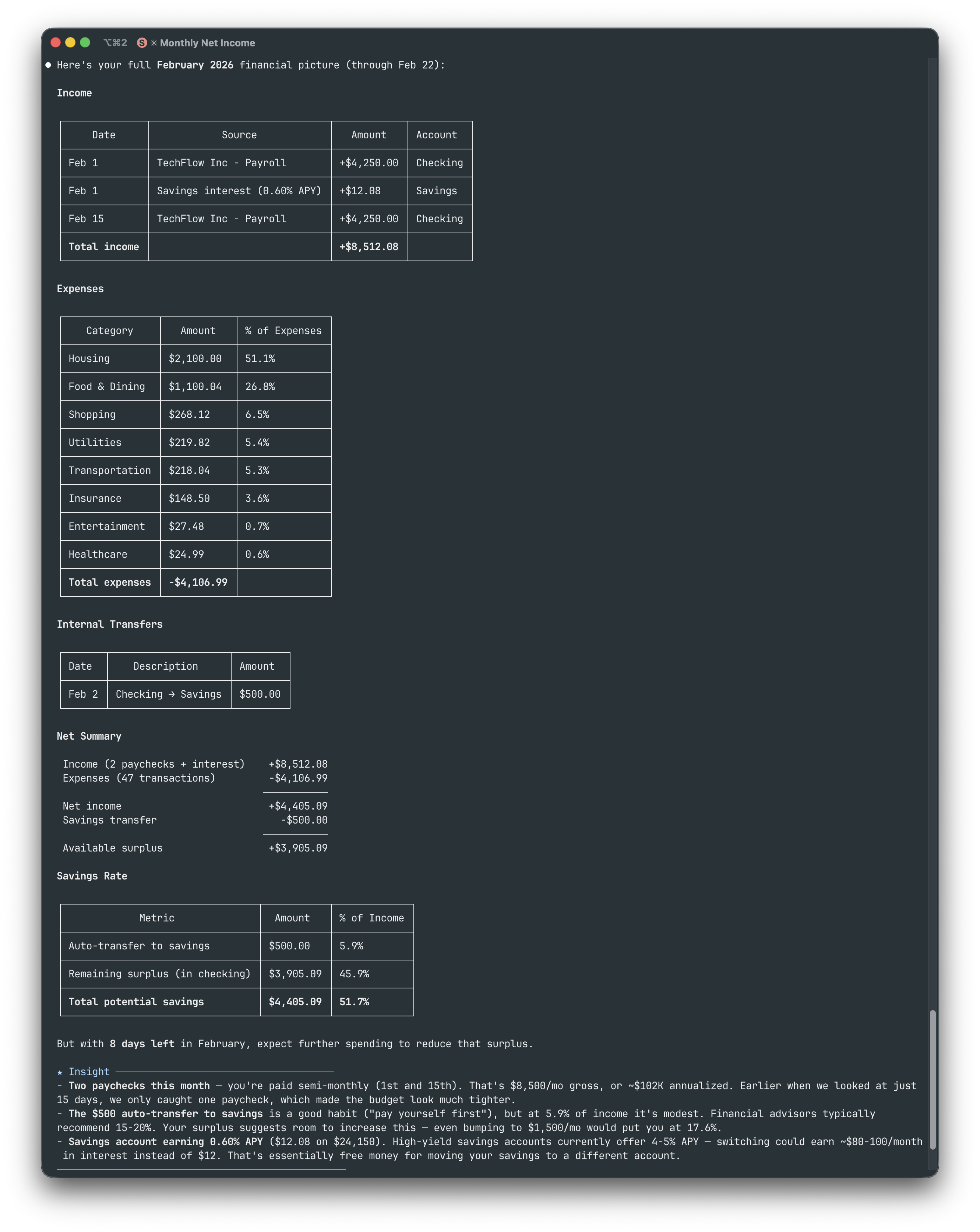
Todos los ejemplos a continuación usan Claude Code con el proveedor simulado (npx @bank-mcp/server --mock).
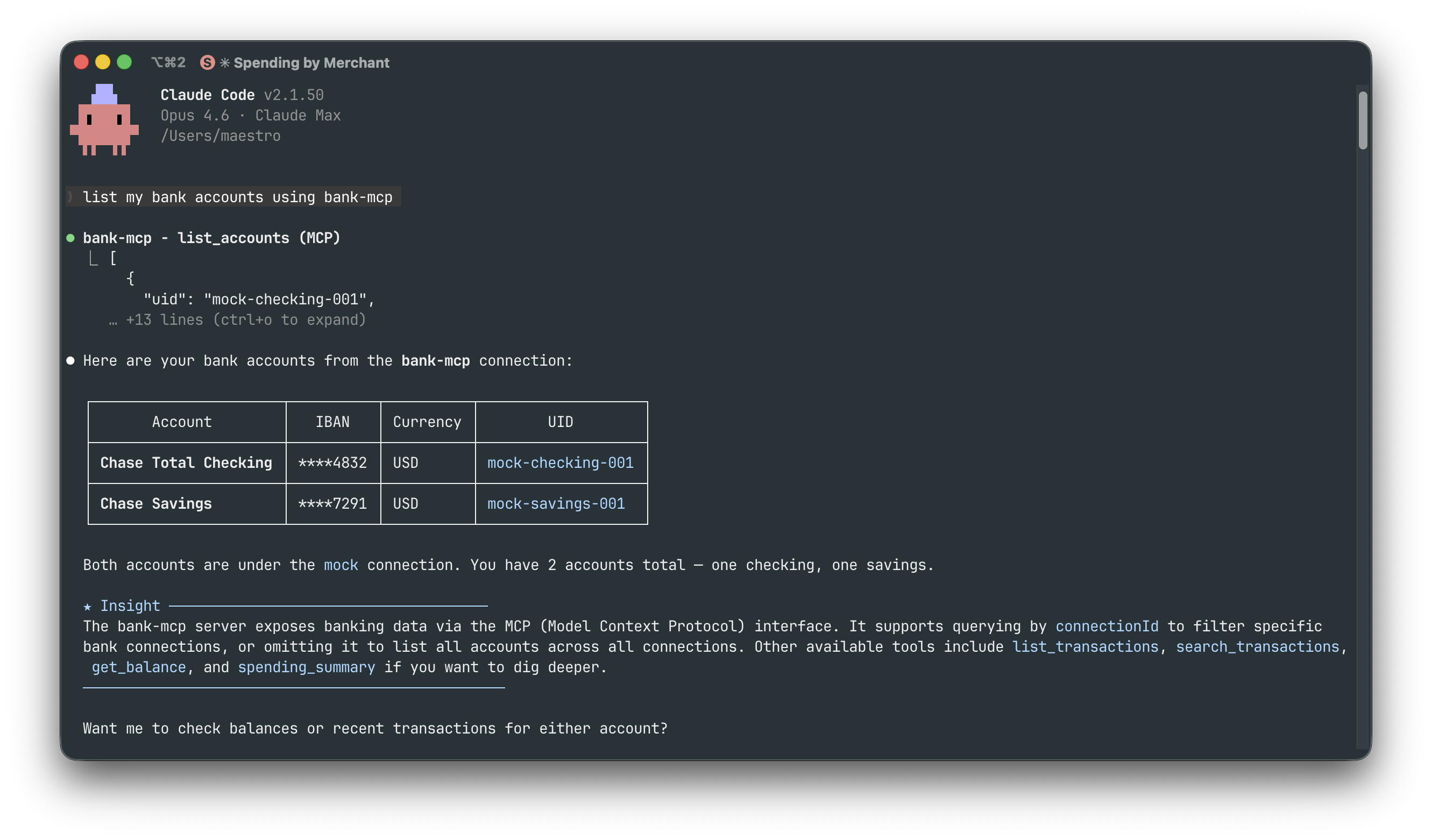
Listar cuentas — "Lista mis cuentas bancarias"
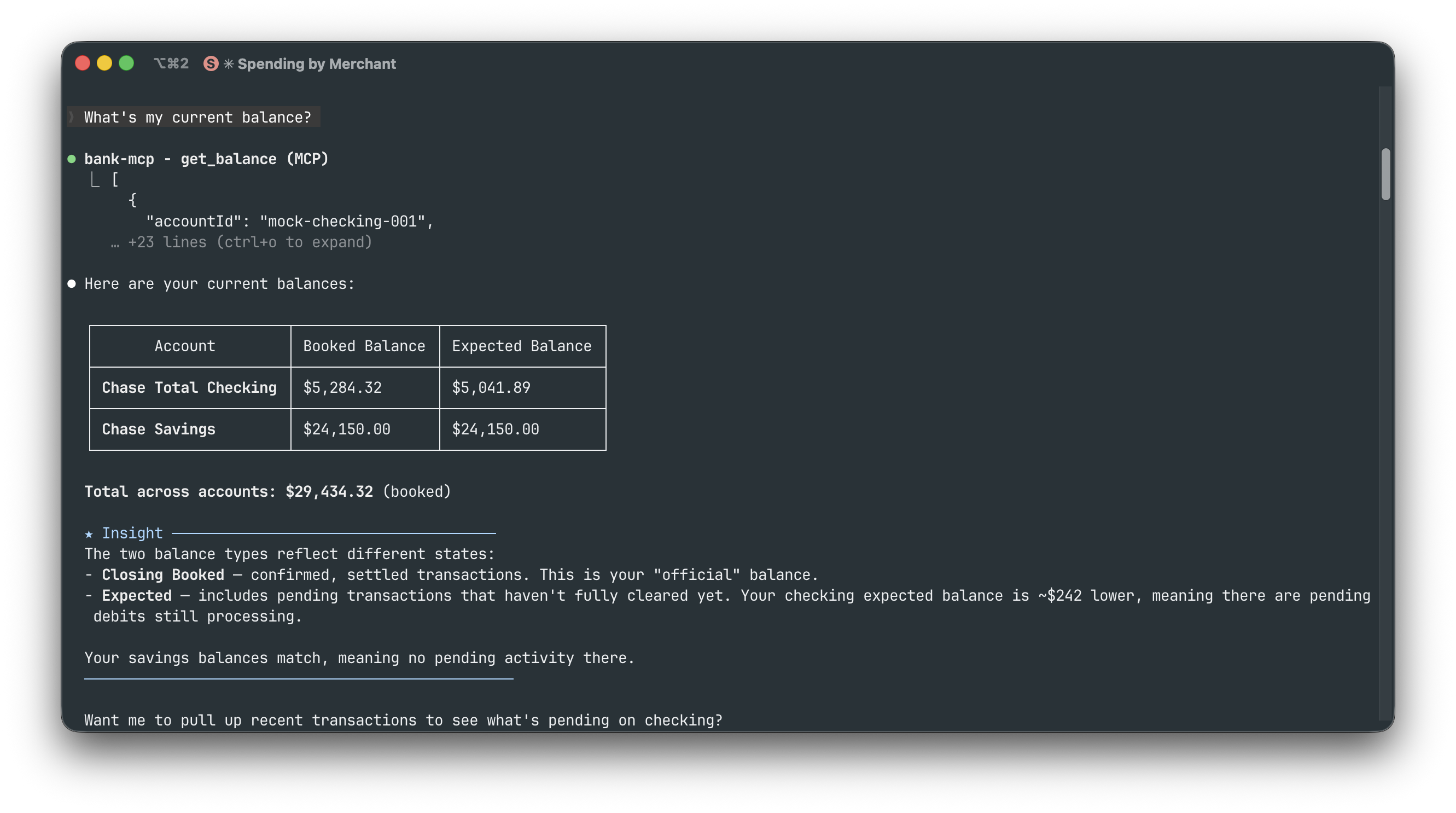
Consultar saldos — "¿Cuál es mi saldo actual?"
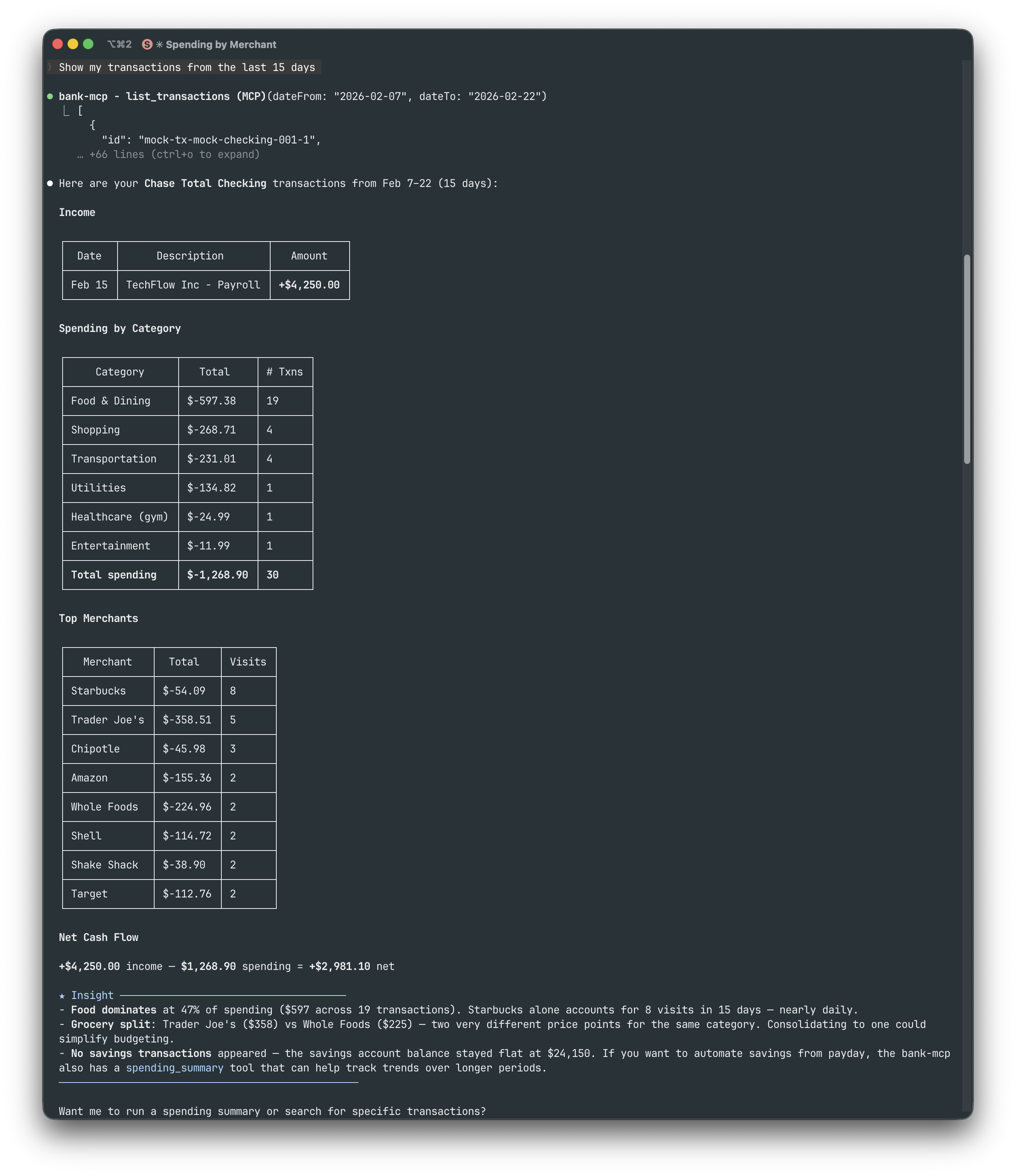
Historial de transacciones — "Muestra mis transacciones de los últimos 15 días"
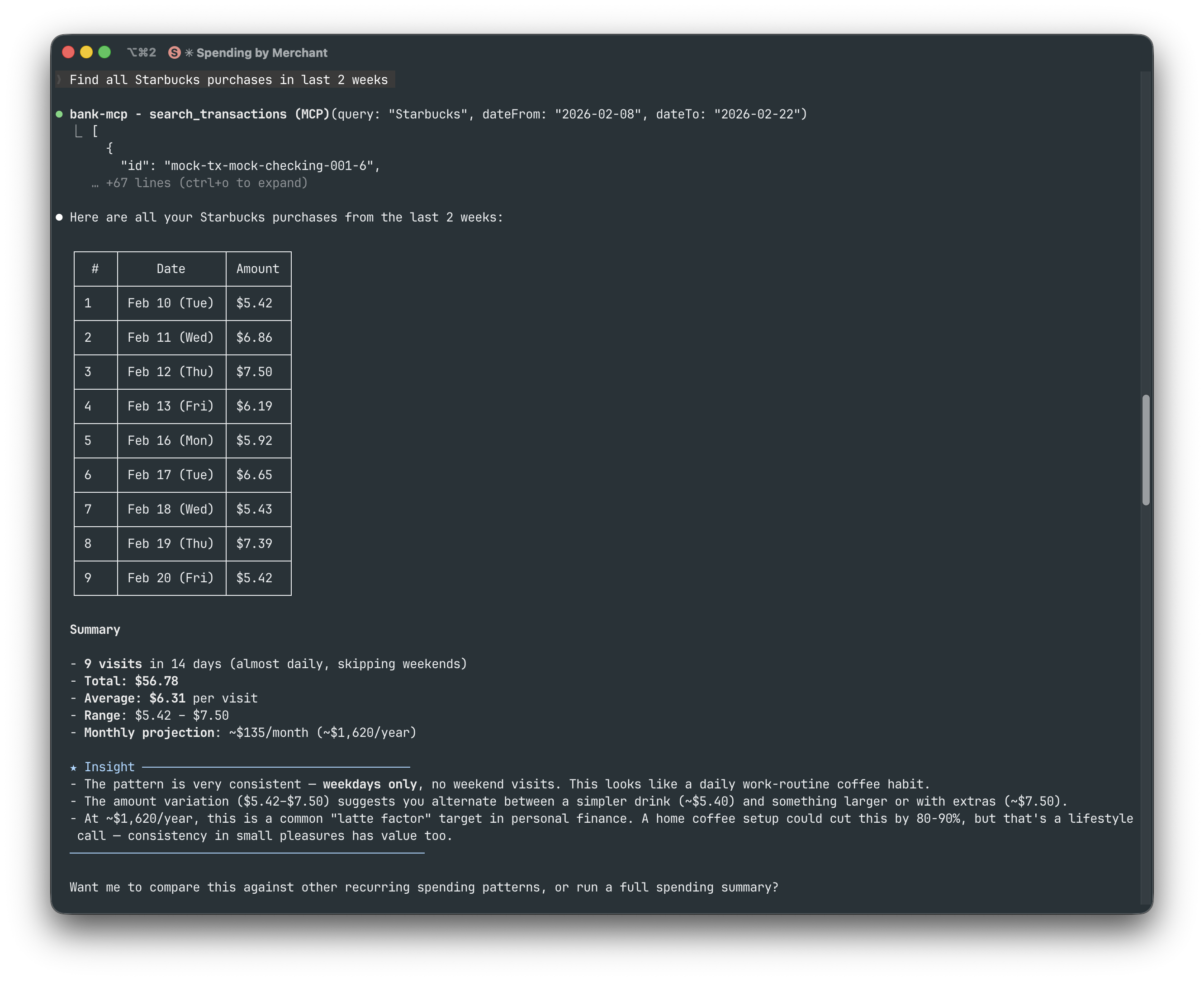
Buscar transacciones — "Encuentra todas las compras en Starbucks en las últimas 2 semanas"
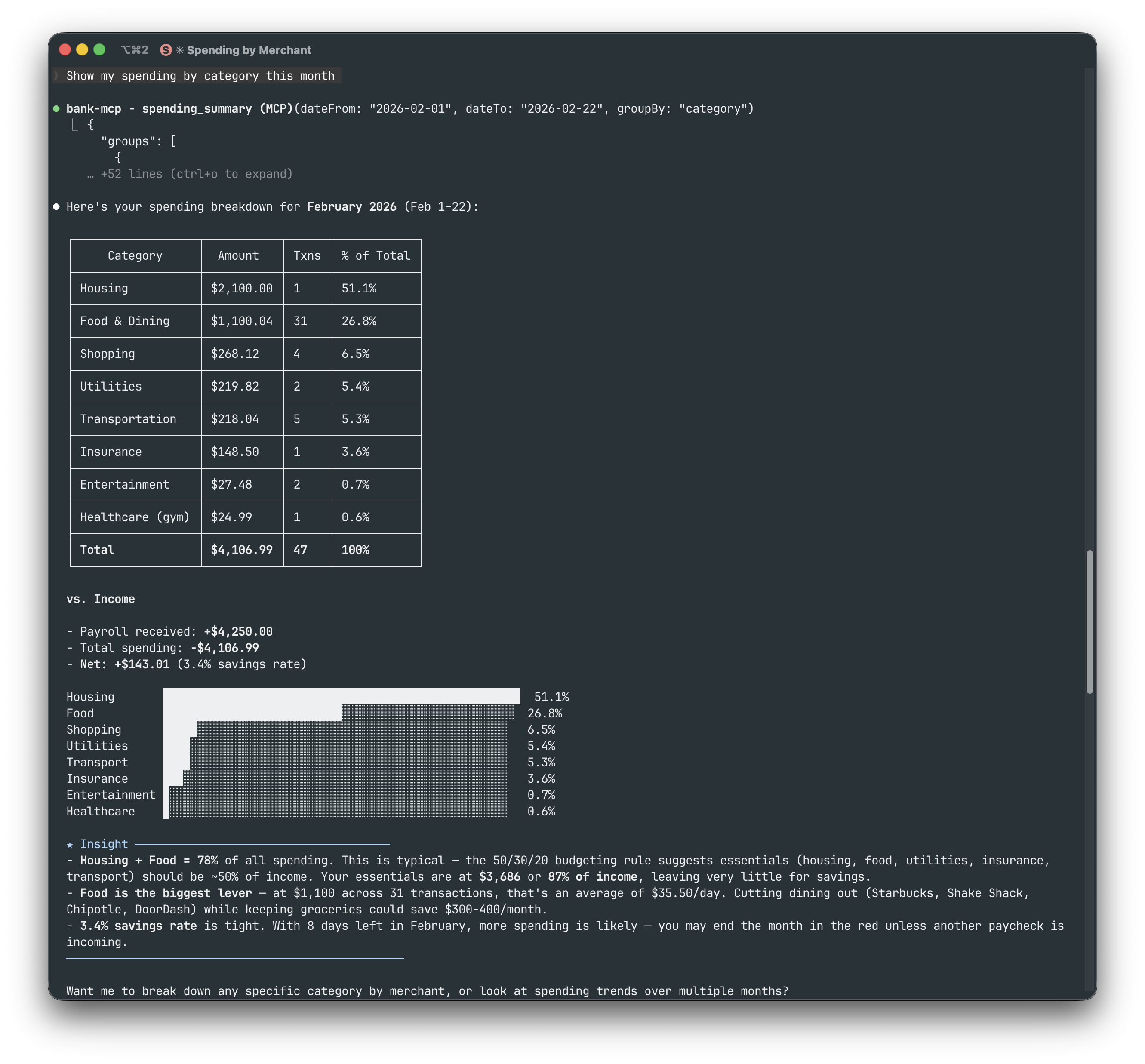
Gastos por categoría — "Muestra mis gastos por categoría este mes"
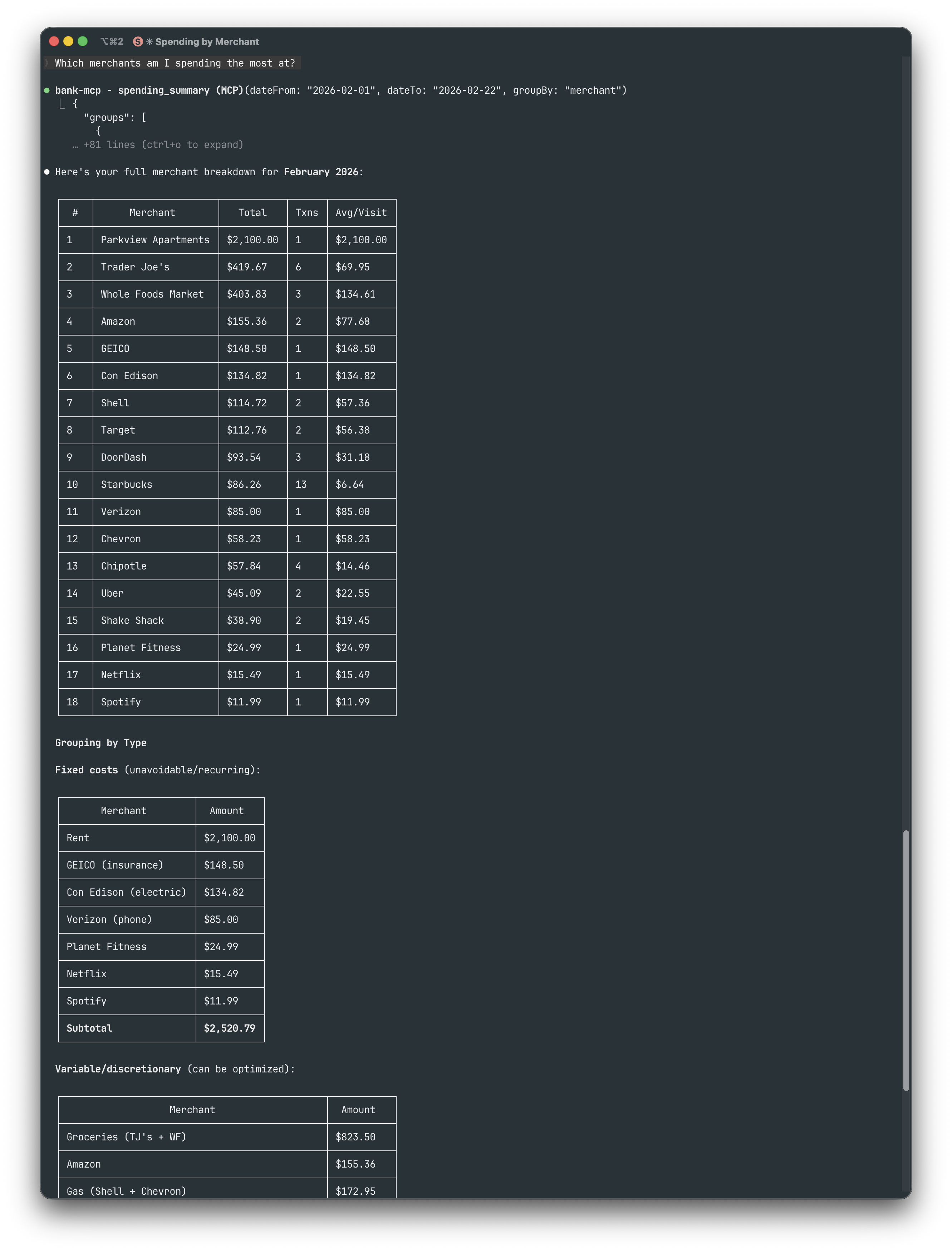
Comercios principales — "¿En qué comercios gasto más?"
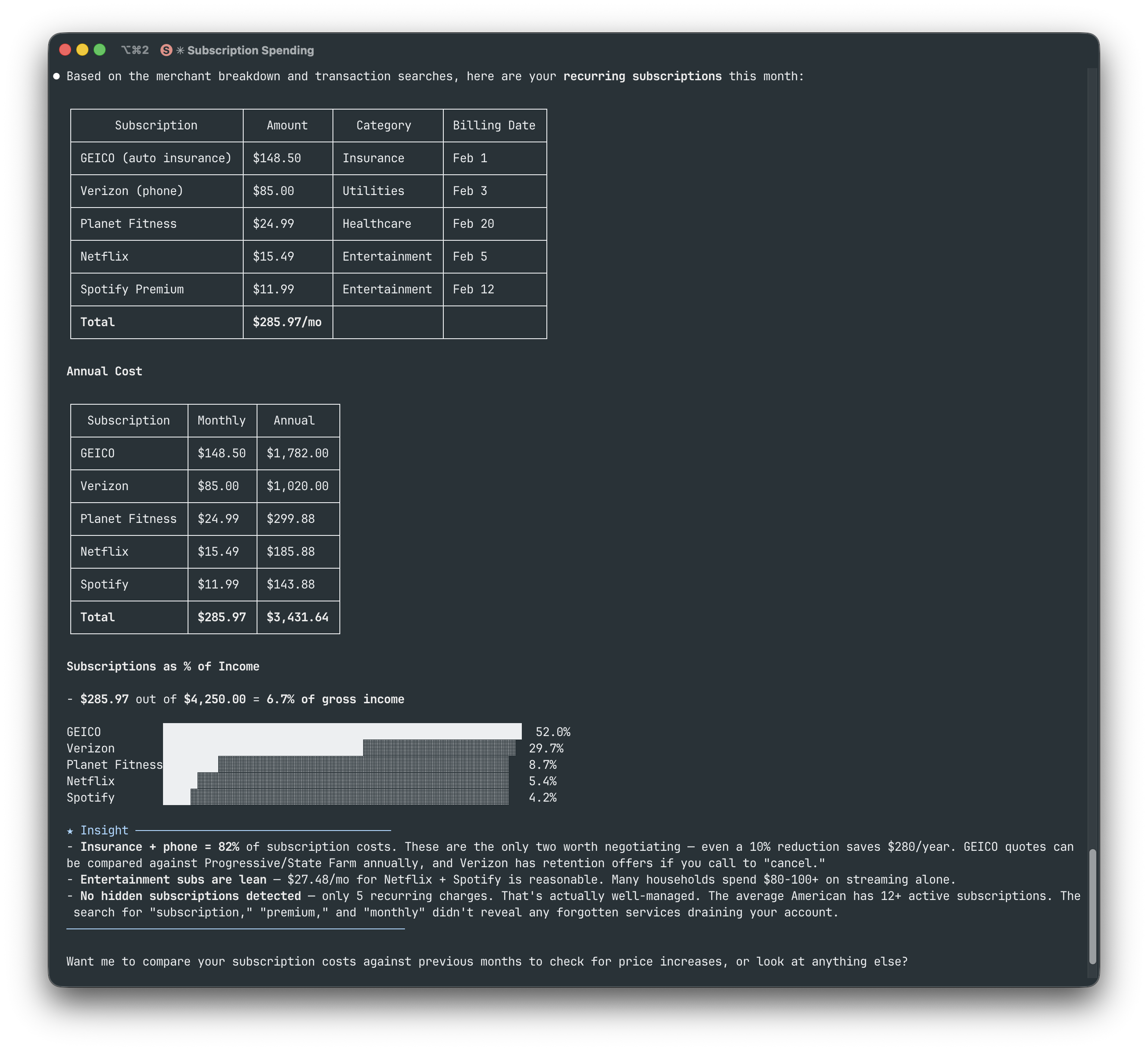
Seguimiento de suscripciones — "Muestra mis suscripciones recurrentes"
Comparación de supermercados — "Compara mis gastos en Trader Joe's vs Whole Foods"
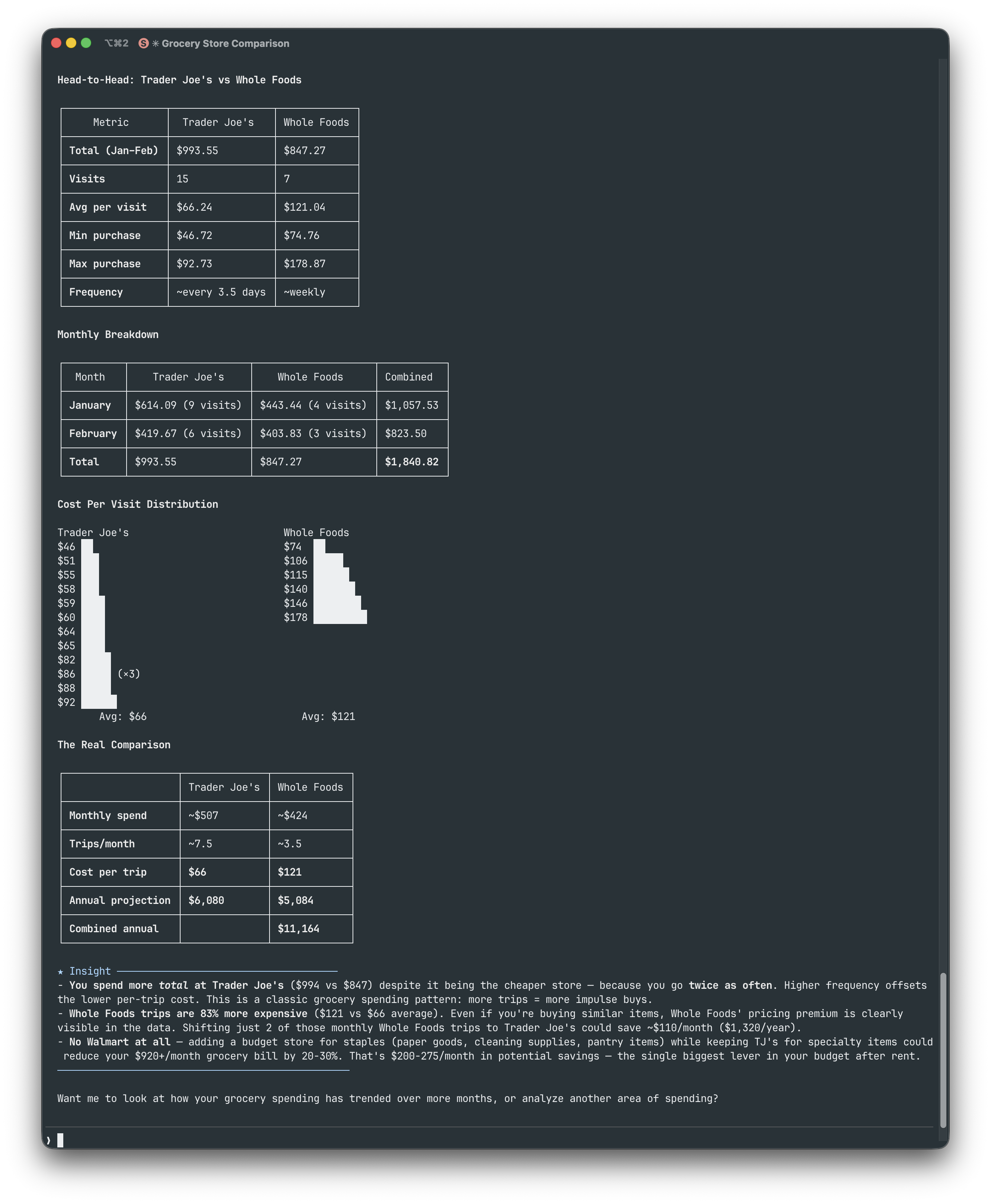
Imagen financiera completa — "Dame mi imagen financiera completa de febrero"
Arquitectura
Estructura de archivos
~/.bank-mcp/
config.json # Connections & credentials (permissions: 600)
keys/ # RSA keys and certificates
src/
providers/
base.ts # Abstract BankProvider class
registry.ts # Provider registration
enable-banking/ # PSD2 via Enable Banking API
teller/ # US banks via mTLS
plaid/ # US/CA/EU via Plaid API
tink/ # EU Open Banking via Tink API
mock/ # Deterministic fake data
tools/ # MCP tool implementations
utils/
cache.ts # In-memory TTL cache
http.ts # Fetch with timeout + retryInterfaz del proveedor
Cada proveedor extiende la misma clase abstracta, lo que facilita la adición de nuevas integraciones:
abstract class BankProvider {
abstract listAccounts(config): Promise<BankAccount[]>;
abstract listTransactions(config, accountId, filter?): Promise<Transaction[]>;
abstract getBalance(config, accountId): Promise<Balance[]>;
abstract getConfigSchema(): ConfigField[];
}Guías de configuración de proveedores
Enable Banking (PSD2)
Qué necesitas:
[ ] Una cuenta de Enable Banking con una aplicación registrada
[ ] Tu clave privada RSA (archivo
.pem, descargado cuando creaste la aplicación)
npx @bank-mcp/server init
# Select: Enable Banking → enter App ID + key path
# Pick your country → select your bank
# Log in at your bank → paste the redirect URL
# → Session created, accounts verified!Consejo: El asistente maneja todo el flujo OAuth: configuración de URI de redirección, selección de banco y creación de sesión. Las sesiones caducan después de 90 días (regulación PSD2); vuelve a ejecutar
initpara actualizar.
Teller (Bancos de EE. UU.)
Qué necesitas:
[ ] Una cuenta de desarrollador de Teller
[ ] Tu ID de aplicación (desde el panel de control de Teller)
npx @bank-mcp/server init
# Select: Teller → enter Application ID
# Pick environment (sandbox for testing)
# → Teller Connect opens in your browser
# → Link your bank, token captured automatically!Consejo: Empieza con sandbox: no se necesitan certificados, datos de prueba instantáneos. Para desarrollo/producción, el asistente solicita las rutas de los certificados mTLS. El nivel gratuito admite hasta 100 conexiones en vivo.
Plaid (EE. UU./CA/EU)
Qué necesitas:
[ ] Una cuenta de desarrollador de Plaid (registro gratuito)
[ ] Tu ID de cliente y secreto (desde el panel de control de Plaid)
npx @bank-mcp/server init
# Select: Plaid → enter client ID + secret
# Pick environment (sandbox for testing)
# → Sandbox: token created automatically!
# → Dev/Prod: paste an existing access tokenConsejo: Empieza con sandbox: el asistente crea automáticamente un token de prueba, no se necesita navegador. Plaid proporciona la categorización de transacciones más rica (104 subcategorías con puntuaciones de confianza), ideal para el análisis de gastos impulsado por LLM.
Tink (Open Banking de la UE)
Qué necesitas:
[ ] Una cuenta de desarrollador de Tink (gratuita para pruebas)
[ ] Tu ID de cliente y secreto de cliente (desde la Consola de Tink)
npx @bank-mcp/server init
# Select: Tink → enter Client ID + Secret
# Pick your market (country)
# → Tink Link opens in your browser
# → Connect your bank, paste redirect URLConsejo: Tink cubre más de 3.400 bancos en toda Europa. Para sandbox, usa Demo Bank con credenciales de prueba (que se muestran en el asistente). Las transacciones incluyen categorías PFM con enriquecimiento de comercios.
Caché
Todos los datos se almacenan en caché en memoria (sin persistencia en disco; la caché muere con el proceso):
Datos | TTL | Por qué |
Lista de cuentas | 1 hora | Las cuentas rara vez cambian; minimiza las llamadas a la API |
Transacciones | 15 minutos | Equilibra nuevas transacciones vs frescura |
Saldos | 5 minutos | Lo más sensible al tiempo; los usuarios esperan datos actuales |
La caché es por conexión y por cuenta. Reiniciar el servidor borra todas las cachés.
Conexiones múltiples
Configura tantas conexiones bancarias como necesites, incluso entre diferentes proveedores:
{
"connections": [
{ "id": "ing-main", "provider": "enable-banking", "..." : "..." },
{ "id": "chase-checking", "provider": "plaid", "..." : "..." },
{ "id": "revolut", "provider": "tink", "..." : "..." }
]
}Todas las herramientas aceptan un parámetro opcional connectionId para dirigirse a una conexión específica. Cuando se omite, se consulta cada conexión y los resultados se fusionan, por lo que "muestra todos mis saldos" funciona automáticamente en todos los bancos.
Seguridad
Principios de diseño
bank-mcp maneja credenciales financieras sensibles. Su postura de seguridad se basa en minimizar la superficie de ataque:
Diseñado como solo lectura — la interfaz
BankProvidersolo expone métodos de lectura (listAccounts,listTransactions,getBalance). No hay métodos de escritura: no hay transferencias, no hay modificaciones de cuenta, no hay inicio de pagos. Esto se aplica a nivel de tipo, no por convención.Sin oyente de red — bank-mcp se ejecuta como un proceso stdio (stdin/stdout), no como un servidor HTTP. No hay puerto abierto, no hay superficie de ataque desde la red.
Dependencias mínimas — solo 4 dependencias en tiempo de ejecución (
@modelcontextprotocol/sdk,@clack/prompts,jsonwebtoken,zod). Menos dependencias significa menos riesgos en la cadena de suministro.Código abierto — cada línea es auditable. Sin código ofuscado, sin blobs compilados, sin telemetría.
Almacenamiento de credenciales
El archivo de configuración en
~/.bank-mcp/config.jsonse crea con permisos600(solo lectura/escritura del propietario)Las claves RSA y los certificados se almacenan en
~/.bank-mcp/keys/con los mismos permisos restrictivosLas credenciales nunca se registran
Available Tools
5 toolsget_balanceA
Get current account balance(s). Returns closing booked balance and expected balance when available.
| Name | Required | Description | Default |
|---|---|---|---|
| connectionId | No | ||
| accountId | No | Account UID. If omitted, returns balances for all accounts. |
TDQS
Does the description disclose side effects, auth requirements, rate limits, or destructive behavior?
With no annotations, the description must fully disclose behavior. It does mention the return types ('closing booked balance' and 'expected balance'), which is helpful, but it does not address whether the tool is read-only, if it requires authentication (implicit via connectionId), or any side effects.
Agents need to know what a tool does to the world before calling it. Descriptions should go beyond structured annotations to explain consequences.
Is the description appropriately sized, front-loaded, and free of redundancy?
The description is two sentences, no redundant words, and directly addresses the tool's purpose and output. Every sentence adds value.
Shorter descriptions cost fewer tokens and are easier for agents to parse. Every sentence should earn its place.
Given the tool's complexity, does the description cover enough for an agent to succeed on first attempt?
For a simple balance retrieval tool with two parameters and no output schema, the description is mostly complete. It covers the output type and the optionality of accountId. However, it could clarify terms like 'closing booked balance' and 'expected balance' for better clarity.
Complex tools with many parameters or behaviors need more documentation. Simple tools need less. This dimension scales expectations accordingly.
Does the description clarify parameter syntax, constraints, interactions, or defaults beyond what the schema provides?
Schema description coverage is 50% (only accountId has a description). The description for accountId adds useful context: 'If omitted, returns balances for all accounts.' However, connectionId lacks a description in both schema and tool description, leaving its meaning unclear.
Input schemas describe structure but not intent. Descriptions should explain non-obvious parameter relationships and valid value ranges.
Does the description clearly state what the tool does and how it differs from similar tools?
The description clearly states the verb 'Get' and the resource 'current account balance(s)', and specifies that it returns 'closing booked balance and expected balance'. This distinguishes it from sibling tools like list_accounts or list_transactions, which deal with other account data.
Agents choose between tools based on descriptions. A clear purpose with a specific verb and resource helps agents select the right tool.
Does the description explain when to use this tool, when not to, or what alternatives exist?
No guidance is provided on when to use this tool versus alternatives. There is no mention of prerequisites, when to prefer get_balance over list_accounts or spending_summary, or any exclusions.
Agents often have multiple tools that could apply. Explicit usage guidance like "use X instead of Y when Z" prevents misuse.
list_accountsB
List all bank accounts across configured connections. Returns account UIDs, IBANs, names, and currencies.
| Name | Required | Description | Default |
|---|---|---|---|
| connectionId | No | Connection ID to query. If omitted, queries all connections. |
TDQS
Does the description disclose side effects, auth requirements, rate limits, or destructive behavior?
No annotations exist, so the description must cover behavioral traits. It does not mention that this is a read-only operation, nor any potential performance considerations, rate limits, or required permissions.
Agents need to know what a tool does to the world before calling it. Descriptions should go beyond structured annotations to explain consequences.
Is the description appropriately sized, front-loaded, and free of redundancy?
Two short sentences: one describing the action and scope, one describing the output. No redundant information, efficient and front-loaded.
Shorter descriptions cost fewer tokens and are easier for agents to parse. Every sentence should earn its place.
Given the tool's complexity, does the description cover enough for an agent to succeed on first attempt?
For a simple list tool with no output schema and no annotations, the description is adequate but lacks usage guidelines and behavioral context. It covers the basic purpose and return fields but not when or how to use effectively.
Complex tools with many parameters or behaviors need more documentation. Simple tools need less. This dimension scales expectations accordingly.
Does the description clarify parameter syntax, constraints, interactions, or defaults beyond what the schema provides?
The schema covers 100% of the single parameter with a clear description. The tool description adds no additional semantics beyond stating it lists accounts, so baseline score of 3 is appropriate.
Input schemas describe structure but not intent. Descriptions should explain non-obvious parameter relationships and valid value ranges.
Does the description clearly state what the tool does and how it differs from similar tools?
The description clearly states the tool lists all bank accounts across configured connections and specifies the returned fields (UIDs, IBANs, names, currencies). It distinguishes from siblings like get_balance or list_transactions by focusing on account listing.
Agents choose between tools based on descriptions. A clear purpose with a specific verb and resource helps agents select the right tool.
Does the description explain when to use this tool, when not to, or what alternatives exist?
No guidance on when to use this tool versus alternatives (e.g., get_balance for a single account). No explicit conditions or prerequisites provided.
Agents often have multiple tools that could apply. Explicit usage guidance like "use X instead of Y when Z" prevents misuse.
list_transactionsB
List bank transactions with optional filters. Defaults to last 90 days. Supports date range, amount range, and debit/credit type filtering.
| Name | Required | Description | Default |
|---|---|---|---|
| connectionId | No | Connection ID. If omitted, queries all connections. | |
| accountId | No | Account UID. If omitted, queries all accounts. | |
| dateFrom | No | Start date (YYYY-MM-DD). Defaults to 90 days ago. | |
| dateTo | No | End date (YYYY-MM-DD). Defaults to today. | |
| amountMin | No | Minimum absolute amount. | |
| amountMax | No | Maximum absolute amount. | |
| type | No | Filter by transaction type. | |
| limit | No | Maximum number of transactions to return. |
TDQS
Does the description disclose side effects, auth requirements, rate limits, or destructive behavior?
No annotations are provided, so the description carries the full burden. It discloses default date range and optional filters, but does not state that the operation is read-only, nor mention pagination, rate limits, or any side effects. This is a significant gap for a tool with 8 parameters.
Agents need to know what a tool does to the world before calling it. Descriptions should go beyond structured annotations to explain consequences.
Is the description appropriately sized, front-loaded, and free of redundancy?
Two sentences, front-loaded with the primary action and resource. Every sentence adds value: first states purpose and filters, second gives default behavior. No waste.
Shorter descriptions cost fewer tokens and are easier for agents to parse. Every sentence should earn its place.
Given the tool's complexity, does the description cover enough for an agent to succeed on first attempt?
For a list tool with 8 parameters and no output schema, the description covers defaults and filter types, but does not explain return value, pagination behavior, or typical usage scenarios. Schema descriptions fill some gaps, but overall completeness is adequate but not thorough.
Complex tools with many parameters or behaviors need more documentation. Simple tools need less. This dimension scales expectations accordingly.
Does the description clarify parameter syntax, constraints, interactions, or defaults beyond what the schema provides?
Schema description coverage is 100%, so baseline is 3. The description adds little beyond the schema – it mentions 'debit/credit type filtering' which is already in the enum, and 'amount range' which is covered by 'amountMin' and 'amountMax'. No new semantic insight.
Input schemas describe structure but not intent. Descriptions should explain non-obvious parameter relationships and valid value ranges.
Does the description clearly state what the tool does and how it differs from similar tools?
The description clearly states the tool lists bank transactions with optional filters. It is a specific verb-resource pairing. However, it does not differentiate from sibling 'search_transactions', which may have overlapping functionality.
Agents choose between tools based on descriptions. A clear purpose with a specific verb and resource helps agents select the right tool.
Does the description explain when to use this tool, when not to, or what alternatives exist?
The description implies usage for listing transactions with filters and mentions a default 90-day window, but lacks explicit guidance on when to use this tool versus alternatives like 'search_transactions' or 'spending_summary'. No exclusions are stated.
Agents often have multiple tools that could apply. Explicit usage guidance like "use X instead of Y when Z" prevents misuse.
search_transactionsA
Full-text search across transaction descriptions, merchant names, and references. Use for finding specific payments or payees.
| Name | Required | Description | Default |
|---|---|---|---|
| query | Yes | Search text — matched against description, merchant name, and reference. | |
| connectionId | No | ||
| dateFrom | No | ||
| dateTo | No | ||
| limit | No | Max results. Default 50. |
TDQS
Does the description disclose side effects, auth requirements, rate limits, or destructive behavior?
With no annotations provided, the description carries the full burden. It describes the search operation but does not disclose whether it is read-only, any performance implications, pagination behavior, or error handling. The word 'search' implies read but is not explicit.
Agents need to know what a tool does to the world before calling it. Descriptions should go beyond structured annotations to explain consequences.
Is the description appropriately sized, front-loaded, and free of redundancy?
The description is two sentences long with no extraneous words. The first sentence states the action, the second provides usage context. Every word earns its place.
Shorter descriptions cost fewer tokens and are easier for agents to parse. Every sentence should earn its place.
Given the tool's complexity, does the description cover enough for an agent to succeed on first attempt?
The tool has 5 parameters (1 required) and no output schema. While the purpose is clear, the description fails to explain optional parameters like connectionId, dateFrom, dateTo, and does not describe return format or behavior for edge cases. This leaves gaps for effective use.
Complex tools with many parameters or behaviors need more documentation. Simple tools need less. This dimension scales expectations accordingly.
Does the description clarify parameter syntax, constraints, interactions, or defaults beyond what the schema provides?
Schema description coverage is 40% (only query and limit have descriptions). The description adds semantics for query (full-text across specific fields) but does not explain connectionId, dateFrom, or dateTo. With low schema coverage, the description should compensate but does not fully.
Input schemas describe structure but not intent. Descriptions should explain non-obvious parameter relationships and valid value ranges.
Does the description clearly state what the tool does and how it differs from similar tools?
The description clearly states it is a 'full-text search across transaction descriptions, merchant names, and references' with a specific use case of 'finding specific payments or payees'. This distinctly separates it from sibling tools like list_transactions which likely list all transactions without search.
Agents choose between tools based on descriptions. A clear purpose with a specific verb and resource helps agents select the right tool.
Does the description explain when to use this tool, when not to, or what alternatives exist?
The description indicates when to use the tool ('for finding specific payments or payees') but does not explicitly mention when not to use it or compare to alternatives like list_transactions. The guidance is clear but lacks explicit exclusionary context.
Agents often have multiple tools that could apply. Explicit usage guidance like "use X instead of Y when Z" prevents misuse.
spending_summaryC
Group expenses by merchant or category with totals. Shows where money is being spent. Use groupBy "merchant" for vendor breakdown, "category" for category breakdown.
| Name | Required | Description | Default |
|---|---|---|---|
| connectionId | No | ||
| dateFrom | No | ||
| dateTo | No | ||
| groupBy | No | Group expenses by "merchant" (default) or "category". | |
| limit | No | Max groups to return (default 20, sorted by total spent). |
TDQS
Does the description disclose side effects, auth requirements, rate limits, or destructive behavior?
No annotations are provided, so the description carries full responsibility. It mentions grouping and totals but omits critical behavioral details such as the ability to filter by date range (dateFrom, dateTo) and the default limit and sorting behavior, which are only present in the schema.
Agents need to know what a tool does to the world before calling it. Descriptions should go beyond structured annotations to explain consequences.
Is the description appropriately sized, front-loaded, and free of redundancy?
The description is brief, with three clear sentences that front-load the purpose. It avoids unnecessary detail and is easy to parse, though it could be slightly more structured.
Shorter descriptions cost fewer tokens and are easier for agents to parse. Every sentence should earn its place.
Given the tool's complexity, does the description cover enough for an agent to succeed on first attempt?
Given five parameters and no output schema, the description omits important context such as the meaning of dateFrom/dateTo for filtering and the default limit of 20. It also lacks any hint of the return format beyond 'totals', making it incomplete for an agent to use effectively.
Complex tools with many parameters or behaviors need more documentation. Simple tools need less. This dimension scales expectations accordingly.
Does the description clarify parameter syntax, constraints, interactions, or defaults beyond what the schema provides?
The description adds minimal value beyond the input schema: it reiterates the groupBy options but does not explain the purpose of connectionId, dateFrom, dateTo, or limit beyond what the schema already provides. With 40% schema coverage, the description should compensate more.
Input schemas describe structure but not intent. Descriptions should explain non-obvious parameter relationships and valid value ranges.
Does the description clearly state what the tool does and how it differs from similar tools?
The description clearly states the tool groups expenses by merchant or category with totals, showing where money is spent. It distinguishes from sibling tools like list_transactions and get_balance by focusing on aggregation rather than raw data or balances.
Agents choose between tools based on descriptions. A clear purpose with a specific verb and resource helps agents select the right tool.
Does the description explain when to use this tool, when not to, or what alternatives exist?
The description suggests when to use each groupBy option but does not provide explicit guidance on when to use this tool versus alternatives like search_transactions or list_transactions. The context is implied but not directly contrasted.
Agents often have multiple tools that could apply. Explicit usage guidance like "use X instead of Y when Z" prevents misuse.
Tool Schema Changelog
Recent tool additions, removals, and schema changes observed during successful MCP inspections.
5 tool updates
v0.1.0- First observed
get_balance - First observed
list_accounts - First observed
list_transactions - First observed
search_transactions - First observed
spending_summary
TDQS
Scored across 5 tools
Each tool has a clearly distinct purpose: get_balance for balances, list_accounts for account listing, list_transactions for filtered transaction lists, search_transactions for full-text search, spending_summary for aggregation. No overlap.
All tool names use a consistent snake_case verb_noun or descriptive pattern (get_balance, list_accounts, list_transactions, search_transactions, spending_summary). No mixing of conventions.
5 tools is well-scoped for a banking data retrieval server. Each tool covers a core function without redundancy, and the count feels natural for the domain.
The set covers balance, accounts, transactions (with search and filters), and spending summaries. Minor gaps include no individual transaction detail endpoint, but search can retrieve specifics. Overall solid coverage for read-only banking information.
Maintenance
Related MCP Connectors
Read-only bank access for your AI agent. Connects Claude, ChatGPT, Cursor, Gemini, Codex.
Connects AI agents to live, verified financial data from 18,000+ institutions — ready to reason from
- BankSyncOAuthio.banksync
Connect AI agents to bank accounts, transactions, balances, and investments.
Chat with your bank data: balances, transactions, budgets, bills. Reads only, never moves money.
Related MCP Servers
- AlicenseNot gradedqualityCmaintenanceEnables AI assistants to access and analyze MonarchMoney personal finance data through natural language queries. Provides comprehensive financial insights including account balances, transaction analysis, budget tracking, and spending patterns with enterprise-grade security.9MIT
- AlicenseNot gradedqualityDmaintenanceEnables AI assistants to access financial data from 20,000+ banks across 40+ countries, allowing users to query account balances, transactions, and spending patterns through natural language.4MIT
- FlicenseNot gradedqualityFmaintenanceAn AI-powered financial management engine that enables budgeting, smart expense tracking, and affordability analytics via the Model Context Protocol. It allows AI assistants to interact with financial data through natural language for tasks like category detection, bulk expense ingestion, and budget impact predictions.1-
- AlicenseNot gradedqualityDmaintenanceConnects AI assistants to 500+ financial data tools from 40+ providers via the Model Context Protocol, enabling natural language queries for financial data.1MIT