bank-mcp
Allows accessing account balances, transaction history, and spending summaries for American Express accounts via integrated banking providers.
Allows accessing account balances, transaction history, and spending summaries for Bank of America accounts via integrated banking providers.
Allows accessing account balances, transaction history, and spending summaries for Barclays accounts via integrated banking providers.
Allows accessing account balances, transaction history, and spending summaries for CaixaBank accounts via integrated banking providers.
Allows accessing account balances, transaction history, and spending summaries for JPMorgan Chase accounts via integrated banking providers.
Allows accessing account balances, transaction history, and spending summaries for Commerzbank accounts via integrated banking providers.
Allows accessing account balances, transaction history, and spending summaries for Deutsche Bank accounts via integrated banking providers.
Allows accessing account balances, transaction history, and spending summaries for Goldman Sachs accounts via integrated banking providers.
Allows accessing account balances, transaction history, and spending summaries for HSBC accounts via integrated banking providers.
Allows accessing account balances, transaction history, and spending summaries for Revolut accounts via integrated banking providers.
Allows accessing account balances, transaction history, and spending summaries for Wells Fargo accounts via integrated banking providers.
Click on "Install Server".
Wait a few minutes for the server to deploy. Once ready, it will show a "Started" state.
In the chat, type
@followed by the MCP server name and your instructions, e.g., "@bank-mcpShow my spending by category for this month"
That's it! The server will respond to your query, and you can continue using it as needed.
Here is a step-by-step guide with screenshots.
🏦 bank-mcp
Give your AI assistant secure, read-only access to your bank accounts.
Most people manage their finances by logging into bank portals, downloading CSVs, and building spreadsheets. bank-mcp eliminates that friction by letting your AI assistant query your bank accounts directly — balances, transactions, spending breakdowns — through natural conversation. It connects to real bank APIs via the Model Context Protocol so any MCP-compatible client (Claude Code, Claude Desktop, and others) can understand your finances.
5 providers, 15,000+ institutions — US and European banks covered
Read-only by design — no write access, no transfers, no modifications
Works with any MCP client — Claude Code, Claude Desktop, Cursor, and more
Pluggable architecture — add your own provider in under 100 lines
Table of Contents
Related MCP server: Lunch Flow MCP Server
Supported Providers
Provider | Region | Institutions | Auth Method | Setup Difficulty |
Europe | 2,000+ | RSA key + session | Medium | |
US | 7,000+ | mTLS certificate | Medium | |
US / CA / EU | 12,000+ | Client ID + secret | Easy | |
Europe | 3,400+ | OAuth2 token | Easy | |
Mock | Demo | — | None | Instant |
US Banks
Supported through Plaid and Teller — covering the top 20 US institutions and thousands more:
JPMorgan Chase · Bank of America · Wells Fargo · Citibank · Capital One · U.S. Bank · PNC · Truist · Goldman Sachs · TD Bank · Citizens · Fifth Third · M&T Bank · Huntington · KeyBank · Ally · Regions · BMO · American Express · USAA
European Banks
Supported through Enable Banking and Tink — covering major banks across the EU and UK:
HSBC · BNP Paribas · Deutsche Bank · ING · Crédit Agricole · Santander · Société Générale · UniCredit · Intesa Sanpaolo · Barclays · Lloyds · BBVA · CaixaBank · Commerzbank · Rabobank · ABN AMRO · Swedbank · Handelsbanken · Nordea · PKO Bank Polski
Quick Start
1. Run the setup wizard
npx @bank-mcp/server initThe interactive wizard walks you through everything — provider selection, credentials, bank authorization, and account verification — all with a polished terminal UI:
┌ bank-mcp — Connect your bank account
│
◇ Choose your banking provider
│ Plaid / Teller / Tink / Enable Banking
│
◇ Environment
│ Sandbox / Development / Production
│
◇ Found 3 account(s) ─────────────────────────╮
│ ****1591 (Bank of America Platinum Card) │
│ ****3588 (Bank of America My Checking) │
│ ****2450 (Bank of America Essential Savings)│
├───────────────────────────────────────────────╯
│
└ Setup complete!2. Add to your MCP client
At the end of setup, the wizard asks which MCP client you use and shows the exact configuration:
Claude Code — one command:
claude mcp add bank -- npx @bank-mcp/serverCursor — add to
.cursor/mcp.jsonWindsurf — add to
~/.codeium/windsurf/mcp_config.jsonGemini CLI — add to
~/.gemini/settings.jsonCodex CLI — add to
~/.codex/config.json
Using a different tool? See Client Setup for all supported clients including Claude Desktop, VS Code, and Zed.
3. Try it
Ask your AI assistant about your finances in natural language:
"What's my checking account balance?"
"Show my spending by category this month"
"Find all Amazon purchases over $50"
"Compare my spending this month vs last month"Demo Mode
Don't have bank credentials yet? Start with realistic fake data:
npx @bank-mcp/server --mockThis launches with a mock provider that generates deterministic sample accounts and transactions — perfect for testing your setup or building on top of bank-mcp before connecting real accounts.
Client Setup
bank-mcp works with any MCP-compatible client. Pick your tool below.
Claude Code
Add to .mcp.json in your project root (or ~/.claude/.mcp.json for all projects):
{
"mcpServers": {
"bank": {
"command": "npx",
"args": ["@bank-mcp/server"]
}
}
}Or add via the CLI:
claude mcp add bank -- npx @bank-mcp/serverClaude Desktop
Add to your claude_desktop_config.json:
{
"mcpServers": {
"bank": {
"command": "npx",
"args": ["@bank-mcp/server"]
}
}
}Config file location:
macOS:
~/Library/Application Support/Claude/claude_desktop_config.jsonWindows:
%APPDATA%\Claude\claude_desktop_config.json
Cursor
Add to .cursor/mcp.json in your project root (or ~/.cursor/mcp.json globally):
{
"mcpServers": {
"bank": {
"command": "npx",
"args": ["@bank-mcp/server"]
}
}
}VS Code (Copilot)
Add to .vscode/mcp.json in your workspace:
{
"servers": {
"bank": {
"type": "stdio",
"command": "npx",
"args": ["@bank-mcp/server"]
}
}
}Windsurf
Add to ~/.codeium/windsurf/mcp_config.json:
{
"mcpServers": {
"bank": {
"command": "npx",
"args": ["@bank-mcp/server"]
}
}
}OpenAI Codex CLI
Add to ~/.codex/config.toml (or .codex/config.toml in your project):
[mcp_servers.bank]
command = "npx"
args = ["@bank-mcp/server"]Or add via the CLI:
codex mcp add bank -- npx @bank-mcp/serverGemini CLI
Add to ~/.gemini/settings.json (or .gemini/settings.json in your project):
{
"mcpServers": {
"bank": {
"command": "npx",
"args": ["@bank-mcp/server"]
}
}
}Zed
Add to your Zed settings.json:
{
"context_servers": {
"bank": {
"command": {
"path": "npx",
"args": ["@bank-mcp/server"]
}
}
}
}Don't see your tool? bank-mcp uses standard MCP stdio transport. Any client that supports MCP stdio servers can connect using
npx @bank-mcp/serveras the command.
Available Tools
Tool | Description | Key Parameters |
| List all bank accounts across connections |
|
| Fetch transactions with filtering |
|
| Full-text search on descriptions and merchants |
|
| Current and available balances |
|
| Expenses grouped by merchant or category |
|
Screenshots
All examples below use Claude Code with the mock provider (npx @bank-mcp/server --mock).
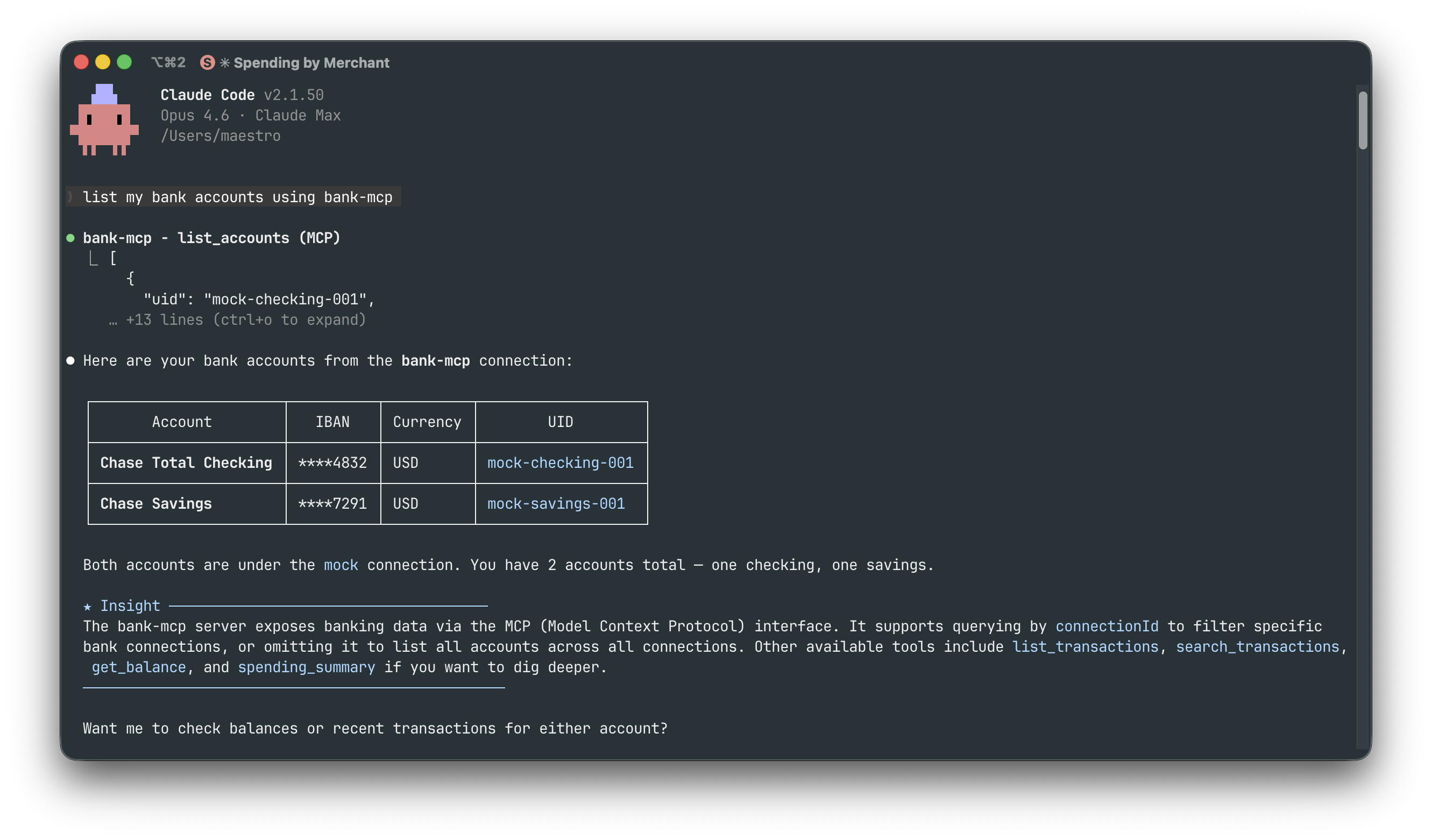
Listing accounts — "List my bank accounts"
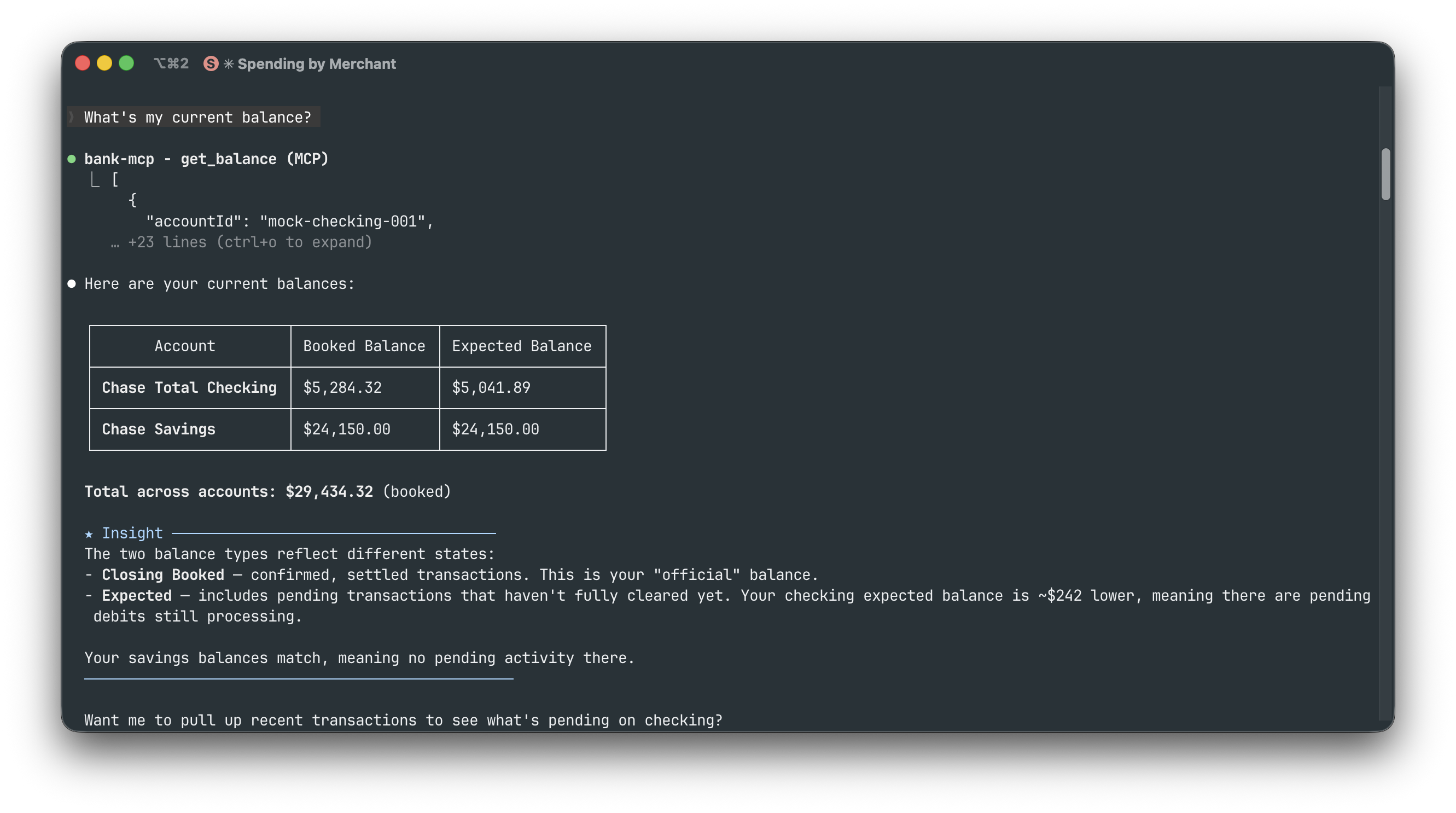
Checking balances — "What's my current balance?"
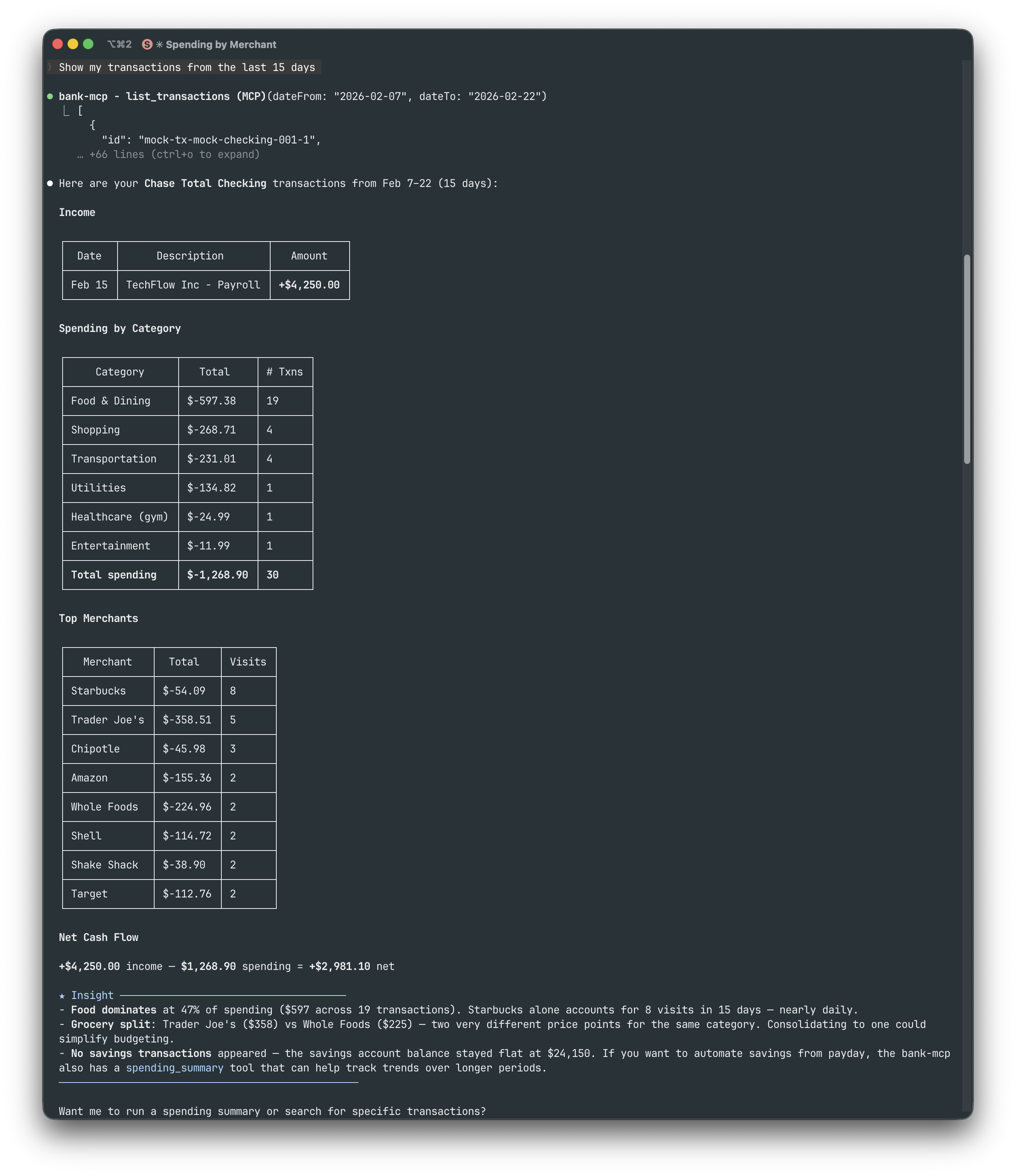
Transaction history — "Show my transactions from the last 15 days"
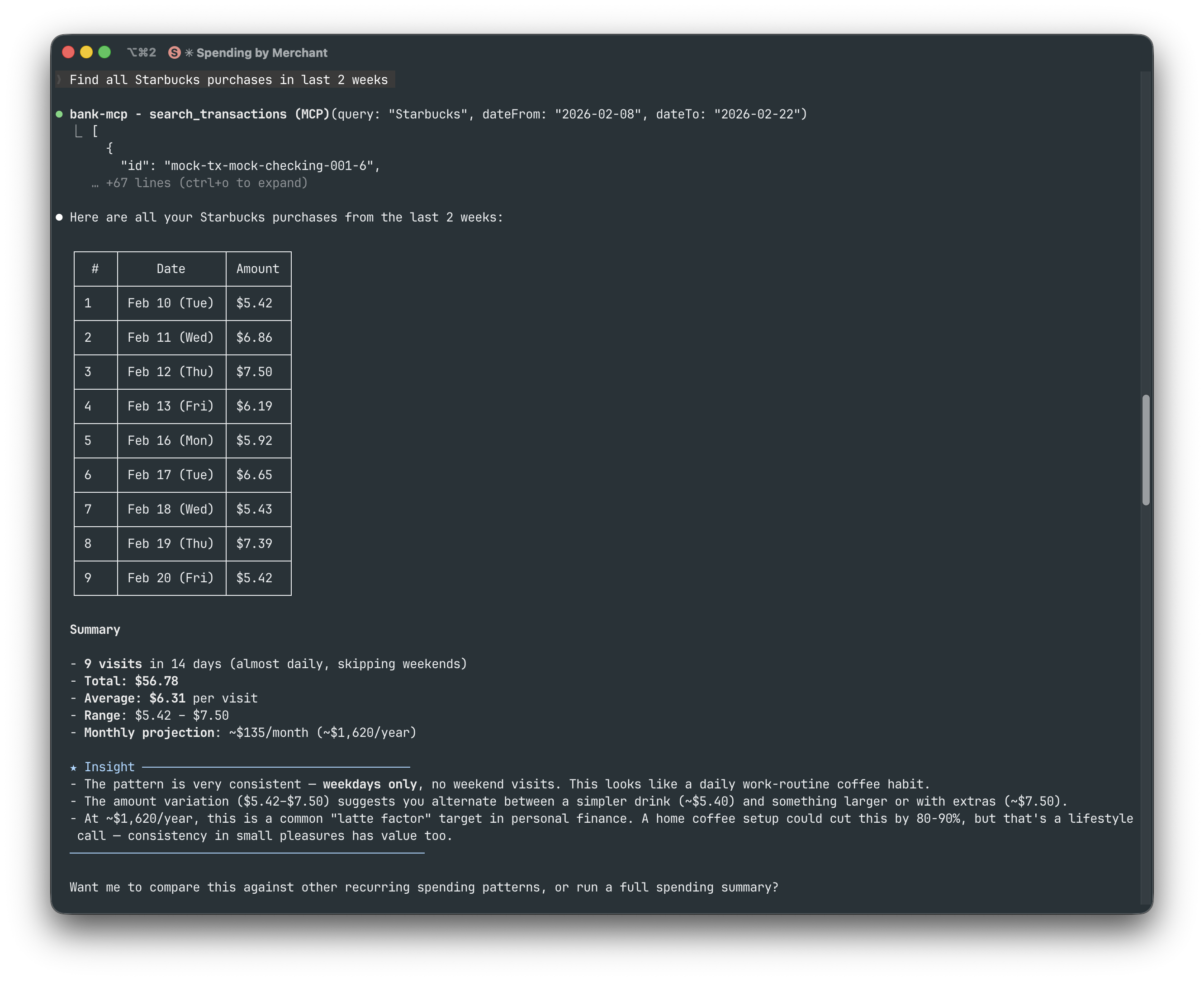
Searching transactions — "Find all Starbucks purchases in last 2 weeks"
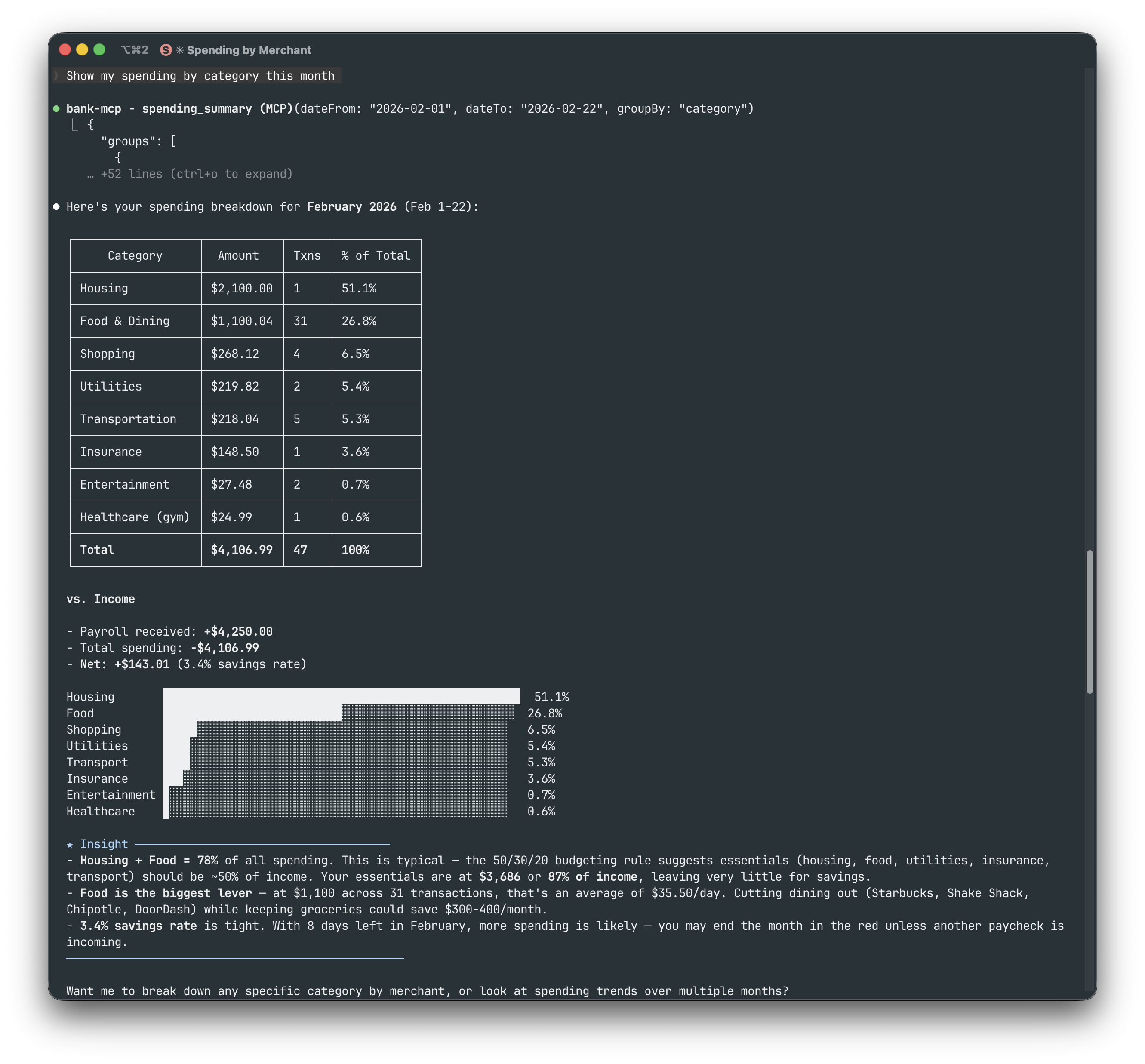
Spending by category — "Show my spending by category this month"
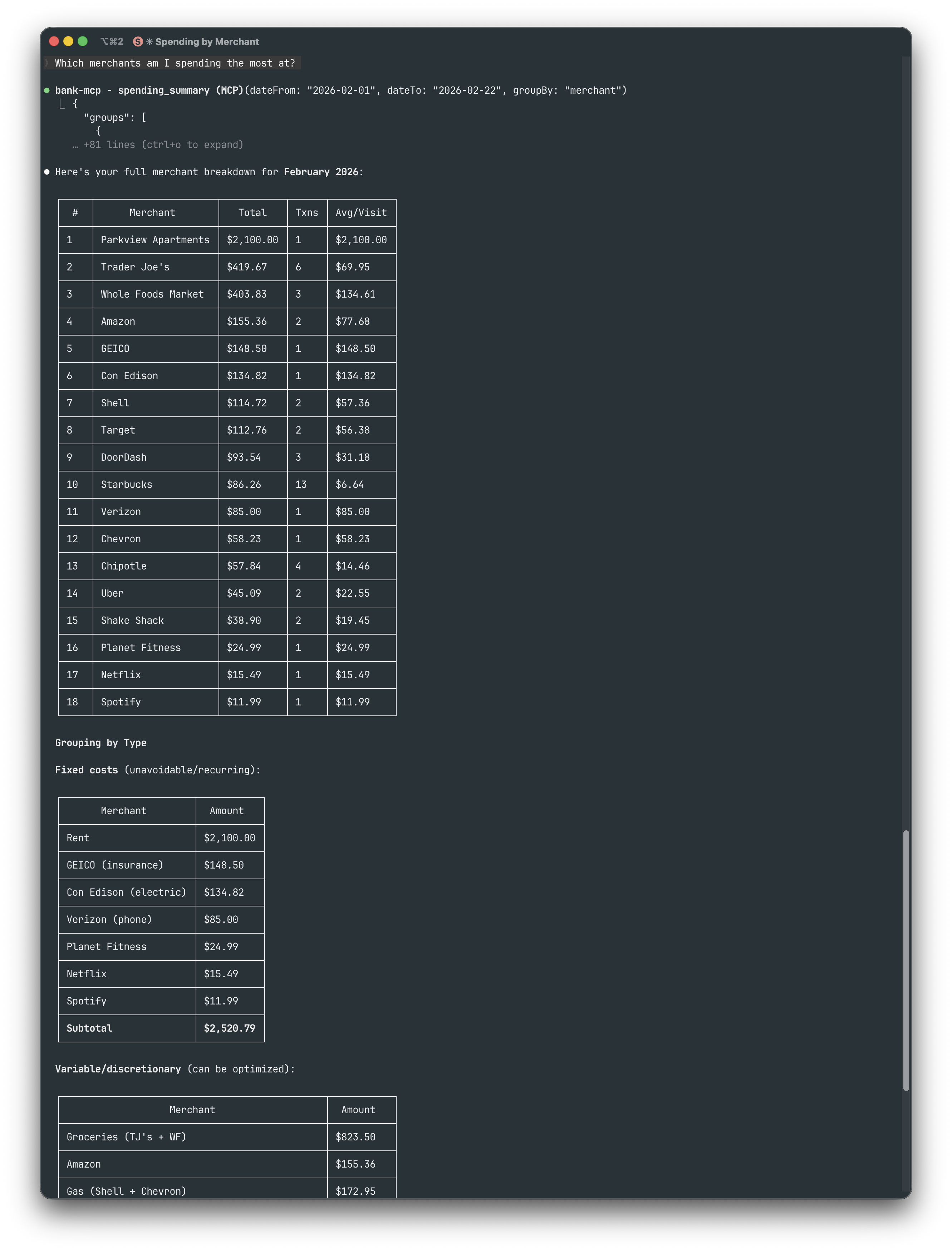
Top merchants — "Which merchants am I spending the most at?"
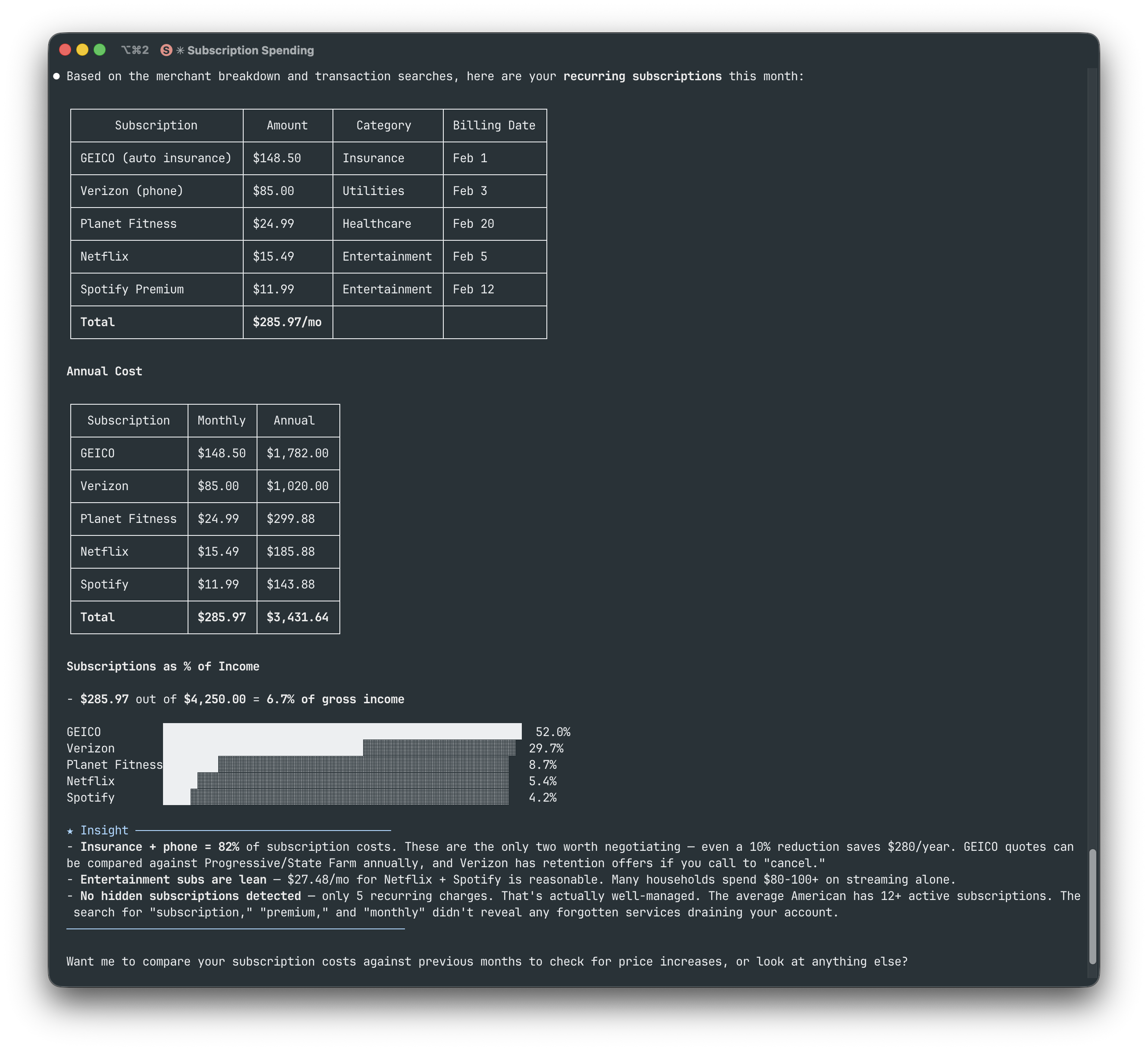
Subscription tracking — "Show my recurring subscriptions"
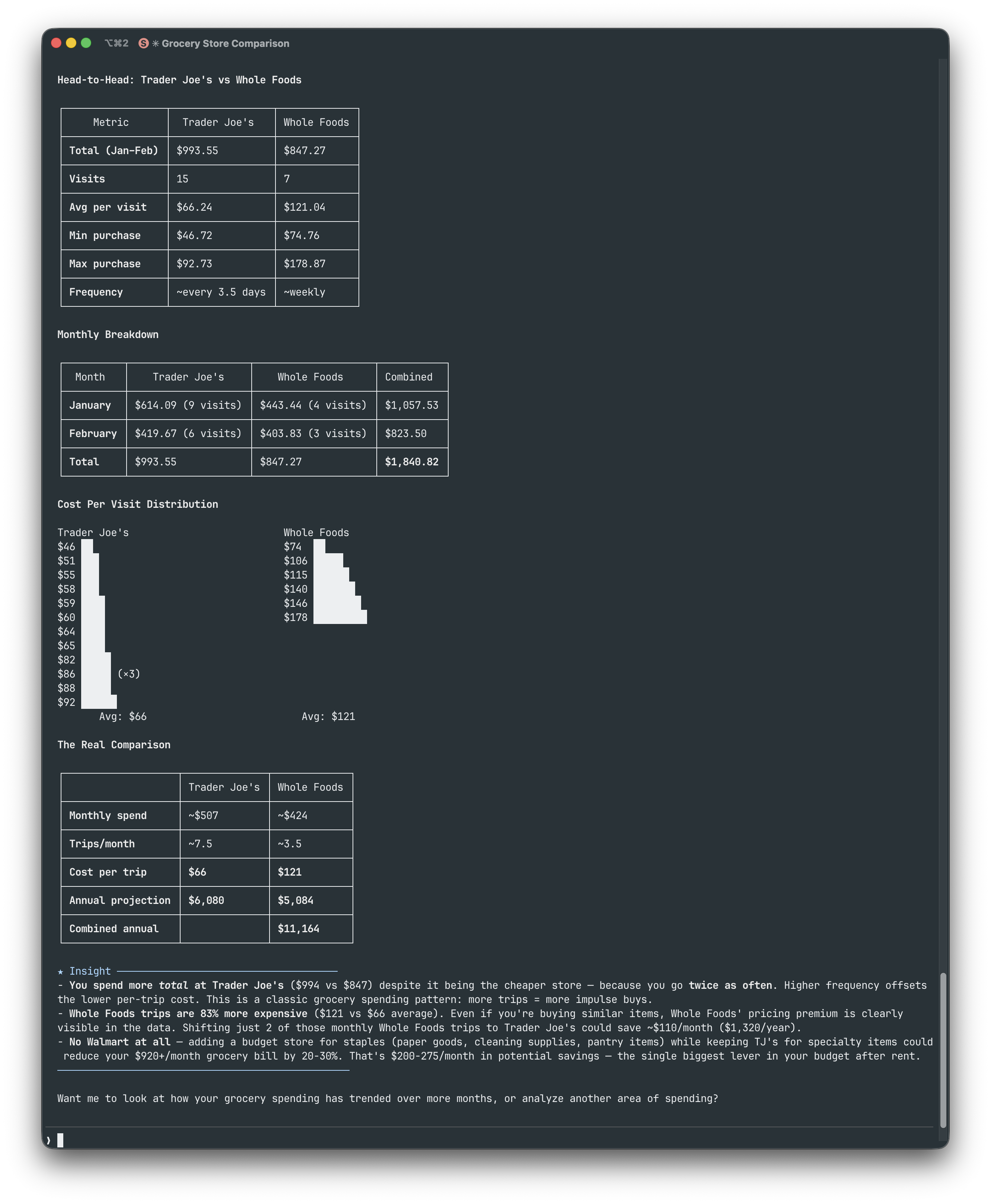
Grocery comparison — "Compare Trader Joe's vs Whole Foods spending"
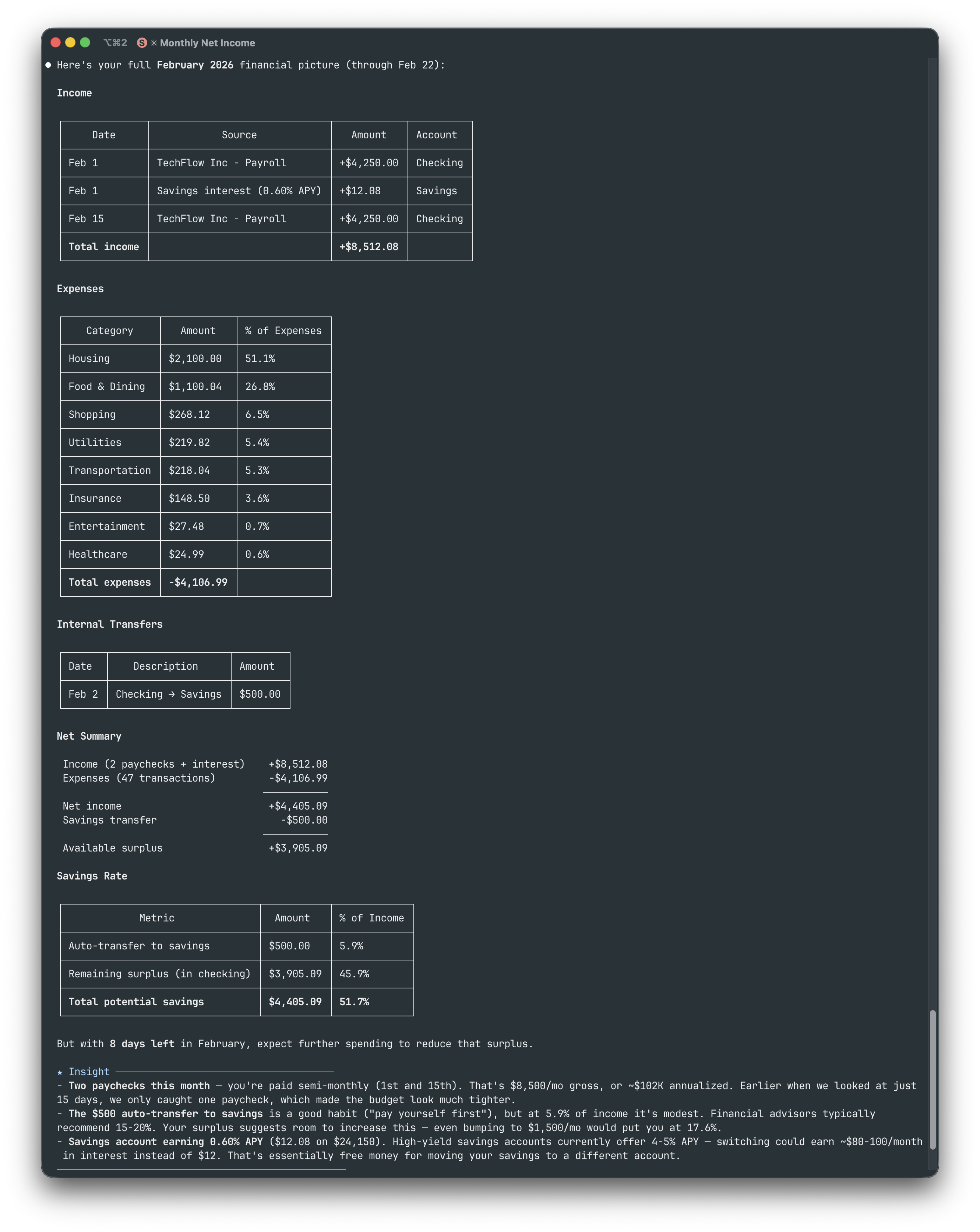
Full financial picture — "Give me my full February financial picture"
Architecture
File Structure
~/.bank-mcp/
config.json # Connections & credentials (permissions: 600)
keys/ # RSA keys and certificates
src/
providers/
base.ts # Abstract BankProvider class
registry.ts # Provider registration
enable-banking/ # PSD2 via Enable Banking API
teller/ # US banks via mTLS
plaid/ # US/CA/EU via Plaid API
tink/ # EU Open Banking via Tink API
mock/ # Deterministic fake data
tools/ # MCP tool implementations
utils/
cache.ts # In-memory TTL cache
http.ts # Fetch with timeout + retryProvider Interface
Every provider extends the same abstract class, making it straightforward to add new integrations:
abstract class BankProvider {
abstract listAccounts(config): Promise<BankAccount[]>;
abstract listTransactions(config, accountId, filter?): Promise<Transaction[]>;
abstract getBalance(config, accountId): Promise<Balance[]>;
abstract getConfigSchema(): ConfigField[];
}Provider Setup Guides
Enable Banking (PSD2)
What you need:
An Enable Banking account with a registered app
Your RSA private key (
.pemfile, downloaded when you created the app)
npx @bank-mcp/server init
# Select: Enable Banking → enter App ID + key path
# Pick your country → select your bank
# Log in at your bank → paste the redirect URL
# → Session created, accounts verified!Tip: The wizard handles the entire OAuth flow — redirect URI setup, bank selection, and session creation. Sessions expire after 90 days (PSD2 regulation); re-run
initto refresh.
Teller (US Banks)
What you need:
A Teller developer account
Your Application ID (from the Teller dashboard)
npx @bank-mcp/server init
# Select: Teller → enter Application ID
# Pick environment (sandbox for testing)
# → Teller Connect opens in your browser
# → Link your bank, token captured automatically!Tip: Start with sandbox — no certificates needed, instant test data. For development/production, the wizard prompts for mTLS certificate paths. Free tier supports up to 100 live connections.
Plaid (US/CA/EU)
What you need:
A Plaid developer account (free signup)
Your Client ID and Secret (from the Plaid dashboard)
npx @bank-mcp/server init
# Select: Plaid → enter client ID + secret
# Pick environment (sandbox for testing)
# → Sandbox: token created automatically!
# → Dev/Prod: paste an existing access tokenTip: Start with sandbox — the wizard auto-creates a test token, no browser needed. Plaid provides the richest transaction categorization — 104 sub-categories with confidence scores — ideal for LLM-driven spending analysis.
Tink (EU Open Banking)
What you need:
A Tink developer account (free for testing)
Your Client ID and Client Secret (from the Tink Console)
npx @bank-mcp/server init
# Select: Tink → enter Client ID + Secret
# Pick your market (country)
# → Tink Link opens in your browser
# → Connect your bank, paste redirect URLTip: Tink covers 3,400+ banks across Europe. For sandbox, use Demo Bank with test credentials (shown in the wizard). Transactions include PFM categories with merchant enrichment.
Caching
All data is cached in-memory (no disk persistence — cache dies with the process):
Data | TTL | Why |
Account list | 1 hour | Accounts rarely change; minimizes API calls |
Transactions | 15 minutes | Balances new transactions vs freshness |
Balances | 5 minutes | Most time-sensitive; users expect current data |
Cache is per-connection and per-account. Restarting the server clears all caches.
Multiple Connections
Configure as many bank connections as you need — even across different providers:
{
"connections": [
{ "id": "ing-main", "provider": "enable-banking", "..." : "..." },
{ "id": "chase-checking", "provider": "plaid", "..." : "..." },
{ "id": "revolut", "provider": "tink", "..." : "..." }
]
}All tools accept an optional connectionId parameter to target a specific connection. When omitted, every connection is queried and results are merged — so "show all my balances" works across banks automatically.
Security
Design Principles
bank-mcp handles sensitive financial credentials. Its security posture is built on minimizing attack surface:
Read-only by design — the
BankProviderinterface exposes only read methods (listAccounts,listTransactions,getBalance). There are no write methods — no transfers, no account modifications, no payment initiation. This is enforced at the type level, not by convention.No network listener — bank-mcp runs as a stdio process (stdin/stdout), not an HTTP server. There is no open port, no attack surface from the network.
Minimal dependencies — only 4 runtime dependencies (
@modelcontextprotocol/sdk,@clack/prompts,jsonwebtoken,zod). Fewer dependencies means fewer supply chain risks.Open source — every line is auditable. No obfuscated code, no compiled blobs, no telemetry.
Credential Storage
Config file at
~/.bank-mcp/config.jsonis created with600permissions (owner read/write only)RSA keys and certificates are stored in
~/.bank-mcp/keys/with the same restrictive permissionsCredentials are never logged — the server sanitizes config objects before any debug output
No credential caching beyond the process lifetime — when the server stops, credentials exist only on disk
Data Flow
Your Bank's API ← HTTPS → bank-mcp (local process) ← stdio → MCP Client (local)Transaction data flows directly from your bank's API to your local MCP client
Nothing is stored remotely — no cloud relay, no proxy server, no intermediate storage
No telemetry — zero analytics, no crash reports, no usage tracking, no phone-home
In-memory cache is per-process and dies when the server stops
What Your MCP Client Sees
The MCP client (Claude, Cursor, etc.) receives structured tool results containing:
Account names, types, and balances
Transaction descriptions, amounts, dates, and categories
Spending summaries
The LLM processes this in its context window. Be aware that cloud-hosted LLMs send your conversation (including tool results) to their servers. If this is a concern, use a local model or review your provider's data retention policy.
Recommendations
Rotate tokens — if your banking provider supports token rotation, enable it
Use sandbox first — test your setup with mock data or Plaid sandbox before connecting live accounts
Review permissions — ensure
~/.bank-mcp/is not world-readable (ls -la ~/.bank-mcp/)Scope access — if your provider supports it, request the minimum scopes needed (read-only account and transaction access)
Reporting Vulnerabilities
If you discover a security issue, please email the maintainer directly rather than opening a public issue. See CONTRIBUTING.md for contact details.
Adding a New Provider
The pluggable architecture makes it straightforward to add support for additional banking APIs:
Create your provider at
src/providers/your-provider/index.tsExtend
BankProvider— implementlistAccounts,listTransactions,getBalance, andgetConfigSchemaRegister it in
src/providers/registry.tsAdd an init flow at
src/init/flows/your-provider.ts— interactive setup using@clack/prompts
See src/providers/enable-banking/ as a reference implementation. The mock provider at src/providers/mock/ is also useful for understanding the expected data shapes.
Troubleshooting
npx is running an old version
npx caches packages. Force the latest:
npx @bank-mcp/server@latest"Permission denied" reading config
The config file should be readable by your user:
ls -la ~/.bank-mcp/config.json
# Should show: -rw------- (600)
# Fix: chmod 600 ~/.bank-mcp/config.json"Session expired" (Enable Banking)
PSD2 sessions expire after 90 days. Re-run the init wizard:
npx @bank-mcp/server init
# Select your existing Enable Banking connection to update the sessionTools not showing up in your MCP client
Verify the server starts:
npx @bank-mcp/server --mock(should output MCP protocol on stdout)Check your config file path matches your client's expected location
Restart your MCP client after adding the config
Check your client's MCP logs for connection errors
"ETLS" or certificate errors (Teller)
Teller requires mTLS. Verify your certificate files:
ls -la ~/.bank-mcp/keys/teller/
# Should contain: certificate.pem, private_key.pem
# Both should be chmod 600Development
git clone https://github.com/elcukro/bank-mcp.git
cd bank-mcp
npm install
npm test # Run tests (vitest)
npm run build # Compile TypeScript
npm run dev # Watch mode (recompile on change)
npm run lint # ESLintContributing
Contributions are welcome! Please see CONTRIBUTING.md for guidelines.
If you're adding a new provider, open an issue first to discuss the approach — we want to make sure the integration fits the project's architecture.
License
MIT — use it however you want.
Available Tools
5 toolsget_balanceA
Get current account balance(s). Returns closing booked balance and expected balance when available.
| Name | Required | Description | Default |
|---|---|---|---|
| connectionId | No | ||
| accountId | No | Account UID. If omitted, returns balances for all accounts. |
TDQS
Does the description disclose side effects, auth requirements, rate limits, or destructive behavior?
With no annotations, the description must fully disclose behavior. It does mention the return types ('closing booked balance' and 'expected balance'), which is helpful, but it does not address whether the tool is read-only, if it requires authentication (implicit via connectionId), or any side effects.
Agents need to know what a tool does to the world before calling it. Descriptions should go beyond structured annotations to explain consequences.
Is the description appropriately sized, front-loaded, and free of redundancy?
The description is two sentences, no redundant words, and directly addresses the tool's purpose and output. Every sentence adds value.
Shorter descriptions cost fewer tokens and are easier for agents to parse. Every sentence should earn its place.
Given the tool's complexity, does the description cover enough for an agent to succeed on first attempt?
For a simple balance retrieval tool with two parameters and no output schema, the description is mostly complete. It covers the output type and the optionality of accountId. However, it could clarify terms like 'closing booked balance' and 'expected balance' for better clarity.
Complex tools with many parameters or behaviors need more documentation. Simple tools need less. This dimension scales expectations accordingly.
Does the description clarify parameter syntax, constraints, interactions, or defaults beyond what the schema provides?
Schema description coverage is 50% (only accountId has a description). The description for accountId adds useful context: 'If omitted, returns balances for all accounts.' However, connectionId lacks a description in both schema and tool description, leaving its meaning unclear.
Input schemas describe structure but not intent. Descriptions should explain non-obvious parameter relationships and valid value ranges.
Does the description clearly state what the tool does and how it differs from similar tools?
The description clearly states the verb 'Get' and the resource 'current account balance(s)', and specifies that it returns 'closing booked balance and expected balance'. This distinguishes it from sibling tools like list_accounts or list_transactions, which deal with other account data.
Agents choose between tools based on descriptions. A clear purpose with a specific verb and resource helps agents select the right tool.
Does the description explain when to use this tool, when not to, or what alternatives exist?
No guidance is provided on when to use this tool versus alternatives. There is no mention of prerequisites, when to prefer get_balance over list_accounts or spending_summary, or any exclusions.
Agents often have multiple tools that could apply. Explicit usage guidance like "use X instead of Y when Z" prevents misuse.
list_accountsB
List all bank accounts across configured connections. Returns account UIDs, IBANs, names, and currencies.
| Name | Required | Description | Default |
|---|---|---|---|
| connectionId | No | Connection ID to query. If omitted, queries all connections. |
TDQS
Does the description disclose side effects, auth requirements, rate limits, or destructive behavior?
No annotations exist, so the description must cover behavioral traits. It does not mention that this is a read-only operation, nor any potential performance considerations, rate limits, or required permissions.
Agents need to know what a tool does to the world before calling it. Descriptions should go beyond structured annotations to explain consequences.
Is the description appropriately sized, front-loaded, and free of redundancy?
Two short sentences: one describing the action and scope, one describing the output. No redundant information, efficient and front-loaded.
Shorter descriptions cost fewer tokens and are easier for agents to parse. Every sentence should earn its place.
Given the tool's complexity, does the description cover enough for an agent to succeed on first attempt?
For a simple list tool with no output schema and no annotations, the description is adequate but lacks usage guidelines and behavioral context. It covers the basic purpose and return fields but not when or how to use effectively.
Complex tools with many parameters or behaviors need more documentation. Simple tools need less. This dimension scales expectations accordingly.
Does the description clarify parameter syntax, constraints, interactions, or defaults beyond what the schema provides?
The schema covers 100% of the single parameter with a clear description. The tool description adds no additional semantics beyond stating it lists accounts, so baseline score of 3 is appropriate.
Input schemas describe structure but not intent. Descriptions should explain non-obvious parameter relationships and valid value ranges.
Does the description clearly state what the tool does and how it differs from similar tools?
The description clearly states the tool lists all bank accounts across configured connections and specifies the returned fields (UIDs, IBANs, names, currencies). It distinguishes from siblings like get_balance or list_transactions by focusing on account listing.
Agents choose between tools based on descriptions. A clear purpose with a specific verb and resource helps agents select the right tool.
Does the description explain when to use this tool, when not to, or what alternatives exist?
No guidance on when to use this tool versus alternatives (e.g., get_balance for a single account). No explicit conditions or prerequisites provided.
Agents often have multiple tools that could apply. Explicit usage guidance like "use X instead of Y when Z" prevents misuse.
list_transactionsB
List bank transactions with optional filters. Defaults to last 90 days. Supports date range, amount range, and debit/credit type filtering.
| Name | Required | Description | Default |
|---|---|---|---|
| connectionId | No | Connection ID. If omitted, queries all connections. | |
| accountId | No | Account UID. If omitted, queries all accounts. | |
| dateFrom | No | Start date (YYYY-MM-DD). Defaults to 90 days ago. | |
| dateTo | No | End date (YYYY-MM-DD). Defaults to today. | |
| amountMin | No | Minimum absolute amount. | |
| amountMax | No | Maximum absolute amount. | |
| type | No | Filter by transaction type. | |
| limit | No | Maximum number of transactions to return. |
TDQS
Does the description disclose side effects, auth requirements, rate limits, or destructive behavior?
No annotations are provided, so the description carries the full burden. It discloses default date range and optional filters, but does not state that the operation is read-only, nor mention pagination, rate limits, or any side effects. This is a significant gap for a tool with 8 parameters.
Agents need to know what a tool does to the world before calling it. Descriptions should go beyond structured annotations to explain consequences.
Is the description appropriately sized, front-loaded, and free of redundancy?
Two sentences, front-loaded with the primary action and resource. Every sentence adds value: first states purpose and filters, second gives default behavior. No waste.
Shorter descriptions cost fewer tokens and are easier for agents to parse. Every sentence should earn its place.
Given the tool's complexity, does the description cover enough for an agent to succeed on first attempt?
For a list tool with 8 parameters and no output schema, the description covers defaults and filter types, but does not explain return value, pagination behavior, or typical usage scenarios. Schema descriptions fill some gaps, but overall completeness is adequate but not thorough.
Complex tools with many parameters or behaviors need more documentation. Simple tools need less. This dimension scales expectations accordingly.
Does the description clarify parameter syntax, constraints, interactions, or defaults beyond what the schema provides?
Schema description coverage is 100%, so baseline is 3. The description adds little beyond the schema – it mentions 'debit/credit type filtering' which is already in the enum, and 'amount range' which is covered by 'amountMin' and 'amountMax'. No new semantic insight.
Input schemas describe structure but not intent. Descriptions should explain non-obvious parameter relationships and valid value ranges.
Does the description clearly state what the tool does and how it differs from similar tools?
The description clearly states the tool lists bank transactions with optional filters. It is a specific verb-resource pairing. However, it does not differentiate from sibling 'search_transactions', which may have overlapping functionality.
Agents choose between tools based on descriptions. A clear purpose with a specific verb and resource helps agents select the right tool.
Does the description explain when to use this tool, when not to, or what alternatives exist?
The description implies usage for listing transactions with filters and mentions a default 90-day window, but lacks explicit guidance on when to use this tool versus alternatives like 'search_transactions' or 'spending_summary'. No exclusions are stated.
Agents often have multiple tools that could apply. Explicit usage guidance like "use X instead of Y when Z" prevents misuse.
search_transactionsA
Full-text search across transaction descriptions, merchant names, and references. Use for finding specific payments or payees.
| Name | Required | Description | Default |
|---|---|---|---|
| query | Yes | Search text — matched against description, merchant name, and reference. | |
| connectionId | No | ||
| dateFrom | No | ||
| dateTo | No | ||
| limit | No | Max results. Default 50. |
TDQS
Does the description disclose side effects, auth requirements, rate limits, or destructive behavior?
With no annotations provided, the description carries the full burden. It describes the search operation but does not disclose whether it is read-only, any performance implications, pagination behavior, or error handling. The word 'search' implies read but is not explicit.
Agents need to know what a tool does to the world before calling it. Descriptions should go beyond structured annotations to explain consequences.
Is the description appropriately sized, front-loaded, and free of redundancy?
The description is two sentences long with no extraneous words. The first sentence states the action, the second provides usage context. Every word earns its place.
Shorter descriptions cost fewer tokens and are easier for agents to parse. Every sentence should earn its place.
Given the tool's complexity, does the description cover enough for an agent to succeed on first attempt?
The tool has 5 parameters (1 required) and no output schema. While the purpose is clear, the description fails to explain optional parameters like connectionId, dateFrom, dateTo, and does not describe return format or behavior for edge cases. This leaves gaps for effective use.
Complex tools with many parameters or behaviors need more documentation. Simple tools need less. This dimension scales expectations accordingly.
Does the description clarify parameter syntax, constraints, interactions, or defaults beyond what the schema provides?
Schema description coverage is 40% (only query and limit have descriptions). The description adds semantics for query (full-text across specific fields) but does not explain connectionId, dateFrom, or dateTo. With low schema coverage, the description should compensate but does not fully.
Input schemas describe structure but not intent. Descriptions should explain non-obvious parameter relationships and valid value ranges.
Does the description clearly state what the tool does and how it differs from similar tools?
The description clearly states it is a 'full-text search across transaction descriptions, merchant names, and references' with a specific use case of 'finding specific payments or payees'. This distinctly separates it from sibling tools like list_transactions which likely list all transactions without search.
Agents choose between tools based on descriptions. A clear purpose with a specific verb and resource helps agents select the right tool.
Does the description explain when to use this tool, when not to, or what alternatives exist?
The description indicates when to use the tool ('for finding specific payments or payees') but does not explicitly mention when not to use it or compare to alternatives like list_transactions. The guidance is clear but lacks explicit exclusionary context.
Agents often have multiple tools that could apply. Explicit usage guidance like "use X instead of Y when Z" prevents misuse.
spending_summaryC
Group expenses by merchant or category with totals. Shows where money is being spent. Use groupBy "merchant" for vendor breakdown, "category" for category breakdown.
| Name | Required | Description | Default |
|---|---|---|---|
| connectionId | No | ||
| dateFrom | No | ||
| dateTo | No | ||
| groupBy | No | Group expenses by "merchant" (default) or "category". | |
| limit | No | Max groups to return (default 20, sorted by total spent). |
TDQS
Does the description disclose side effects, auth requirements, rate limits, or destructive behavior?
No annotations are provided, so the description carries full responsibility. It mentions grouping and totals but omits critical behavioral details such as the ability to filter by date range (dateFrom, dateTo) and the default limit and sorting behavior, which are only present in the schema.
Agents need to know what a tool does to the world before calling it. Descriptions should go beyond structured annotations to explain consequences.
Is the description appropriately sized, front-loaded, and free of redundancy?
The description is brief, with three clear sentences that front-load the purpose. It avoids unnecessary detail and is easy to parse, though it could be slightly more structured.
Shorter descriptions cost fewer tokens and are easier for agents to parse. Every sentence should earn its place.
Given the tool's complexity, does the description cover enough for an agent to succeed on first attempt?
Given five parameters and no output schema, the description omits important context such as the meaning of dateFrom/dateTo for filtering and the default limit of 20. It also lacks any hint of the return format beyond 'totals', making it incomplete for an agent to use effectively.
Complex tools with many parameters or behaviors need more documentation. Simple tools need less. This dimension scales expectations accordingly.
Does the description clarify parameter syntax, constraints, interactions, or defaults beyond what the schema provides?
The description adds minimal value beyond the input schema: it reiterates the groupBy options but does not explain the purpose of connectionId, dateFrom, dateTo, or limit beyond what the schema already provides. With 40% schema coverage, the description should compensate more.
Input schemas describe structure but not intent. Descriptions should explain non-obvious parameter relationships and valid value ranges.
Does the description clearly state what the tool does and how it differs from similar tools?
The description clearly states the tool groups expenses by merchant or category with totals, showing where money is spent. It distinguishes from sibling tools like list_transactions and get_balance by focusing on aggregation rather than raw data or balances.
Agents choose between tools based on descriptions. A clear purpose with a specific verb and resource helps agents select the right tool.
Does the description explain when to use this tool, when not to, or what alternatives exist?
The description suggests when to use each groupBy option but does not provide explicit guidance on when to use this tool versus alternatives like search_transactions or list_transactions. The context is implied but not directly contrasted.
Agents often have multiple tools that could apply. Explicit usage guidance like "use X instead of Y when Z" prevents misuse.
TDQS
Each tool has a clearly distinct purpose: get_balance for balances, list_accounts for account listing, list_transactions for filtered transaction lists, search_transactions for full-text search, spending_summary for aggregation. No overlap.
All tool names use a consistent snake_case verb_noun or descriptive pattern (get_balance, list_accounts, list_transactions, search_transactions, spending_summary). No mixing of conventions.
5 tools is well-scoped for a banking data retrieval server. Each tool covers a core function without redundancy, and the count feels natural for the domain.
The set covers balance, accounts, transactions (with search and filters), and spending summaries. Minor gaps include no individual transaction detail endpoint, but search can retrieve specifics. Overall solid coverage for read-only banking information.
Maintenance
Resources
Unclaimed servers have limited discoverability.
Looking for Admin?
If you are the server author, to access and configure the admin panel.
Related MCP Connectors
Read-only bank access for your AI agent. Connects Claude, ChatGPT, Cursor, Gemini, Codex.
Connects AI agents to live, verified financial data from 18,000+ institutions — ready to reason from
Connect AI agents to bank accounts, transactions, balances, and investments.
Chat with your bank data: balances, transactions, budgets, bills. Reads only, never moves money.
Related MCP Servers
- AlicenseNot gradedqualityDmaintenanceEnables AI assistants to access and analyze MonarchMoney personal finance data through natural language queries. Provides comprehensive financial insights including account balances, transaction analysis, budget tracking, and spending patterns with enterprise-grade security.9MIT
- AlicenseNot gradedqualityDmaintenanceEnables AI assistants to access financial data from 20,000+ banks across 40+ countries, allowing users to query account balances, transactions, and spending patterns through natural language.5MIT
- FlicenseNot gradedqualityFmaintenanceAn AI-powered financial management engine that enables budgeting, smart expense tracking, and affordability analytics via the Model Context Protocol. It allows AI assistants to interact with financial data through natural language for tasks like category detection, bulk expense ingestion, and budget impact predictions.1
- AlicenseNot gradedqualityDmaintenanceConnects AI assistants to 500+ financial data tools from 40+ providers via the Model Context Protocol, enabling natural language queries for financial data.1MIT
Latest Blog Posts
- Who's Calling? MCP Hosts Are an Identity Blind Spot (And the Spec Knows It)By Om-Shree-0709 on .mcpAgent IdentityOAuth 2.1
- Your AI Chatbot Just Exposed Your CEO's Salary to an InternBy Om-Shree-0709 on .Agent IdentityMCP SecurityOAuth Delegation
- Why MCP Servers Need Execution Sandboxing (And Why Your Current Stack Isn't Enough)By Om-Shree-0709 on .Agentic AiPrompt InjectionWebAssembly
MCP directory API
We provide all the information about MCP servers via our MCP API.
curl -X GET 'https://glama.ai/api/mcp/v1/servers/elcukro/bank-mcp'
If you have feedback or need assistance with the MCP directory API, please join our Discord server