Glama

织物 MCP

Fabric MCP 是一个基于 Python 的 MCP 服务器,用于与 Microsoft Fabric API 交互。它提供用于管理工作区、Lakehouse、仓库和表的实用程序。(未来将添加更多功能)。该项目的灵感来自以下项目: https://github.com/Augustab/microsoft\ _fabric\_mcp/tree/main

特征

  • 列出工作区、湖屋、仓库和桌子。

  • 检索 Delta 表的架构和元数据。

  • 为 Delta 表生成 markdown 文档。

Related MCP server: power-bi-mcp

要求

  • Python 3.12 或更高版本

  • 用于身份验证的 Azure 凭据

  • uv(来自 astral):安装说明

  • Azure Cli:安装说明

  • 可选:用于运行 MCP 检查器的 Node.js 和 npm:安装说明

安装

  1. 克隆存储库:

    git clone https://github.com/your-repo/fabric-mcp.git
    cd fabric-mcp
  2. 设置虚拟环境并安装依赖项:

    uv sync
  3. 安装依赖项:

    pip install -r requirements.txt

用法

连接到 MS Fabric

  • 运行 Azure CLI 命令登录:

    az login --scope https://api.fabric.microsoft.com/.default

运行 MCP 服务器并使用 MCP 检查器连接到它

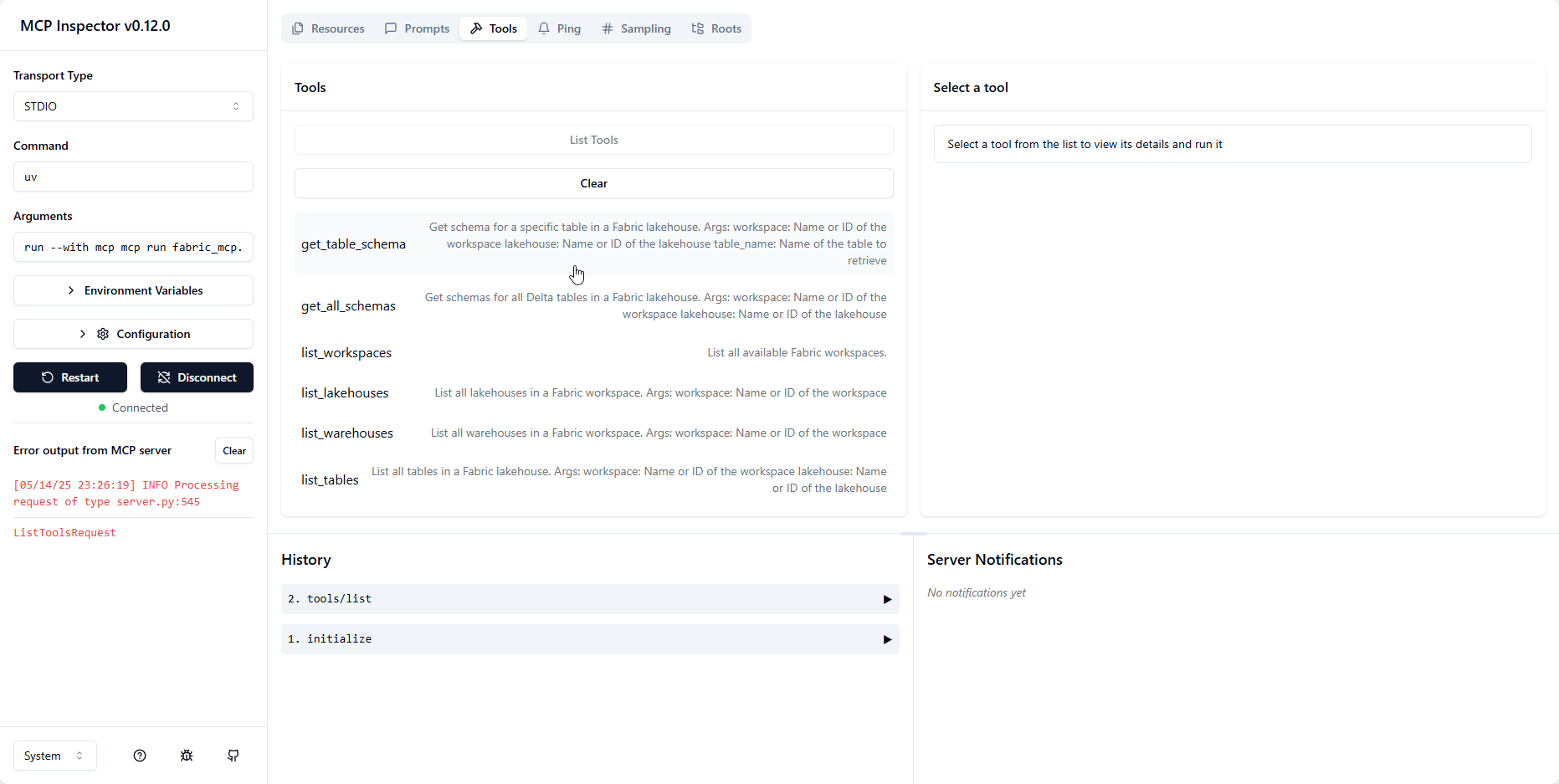
  • 运行 MCP 服务器并公开检查器进行测试: bash uv run --with mcp mcp dev fabric_mcp.py这将启动服务器并在http://localhost:6274公开检查器。替代文本

运行 MCP 服务器并使用 MCP 检查器连接到它

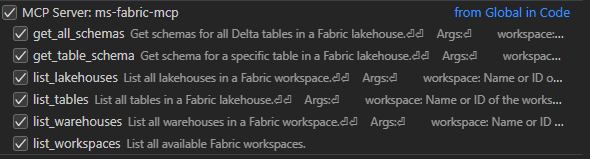
  • 要将 MCP 服务器与 VSCode 一起使用,您可以在launch.json文件中设置启动配置:

    {
        //Existing configurations...
        "mcp": {
        "servers": {
            "ms-fabric-mcp": {
                "type": "stdio",
                "command": "<FullPathToProjectFolder>\\.venv\\Scripts\\python.exe ",
                "args": [
                    "<FullPathToProjectFolder>\\fabric_mcp.py"
                ]
            }
        }
    }
    }

    此配置允许您直接从 VSCode 运行并连接到 MCP 服务器。并提供对以下工具的访问:替代文本

  • 使用 Copilot 聊天中的代理模式,您可以通过使用 # 指定工具名称来访问 MCP 服务器中可用的不同工具,例如 #list_workspaces。

可用工具

可通过 MCP 服务器使用以下工具:

  • list_workspaces :列出所有可用的 Fabric 工作区。

  • list_lakehouses(workspace) :列出指定工作区中的所有 Lakehouse。

  • list_warehouses(workspace) :列出指定工作区中的所有仓库。

  • list_tables(workspace, lakehouse) :列出指定 lakehouse 中的所有表。

  • get_lakehouse_table_schema(workspace, lakehouse, table_name) :检索特定 Delta 表的架构和元数据。

  • get_all_lakehouse_schemas(workspace, lakehouse) :检索 lakehouse 中所有 Delta 表的模式和元数据。

  • set_lakehouse(workspace, lakehouse) :设置当前的 lakehouse 上下文。

  • set_warehouse(workspace, warehouse) :设置当前仓库上下文。

  • set_workspace(workspace) :设置当前工作区上下文。

执照

本项目遵循 MIT 许可证。详情请参阅 LICENSE 文件。

F
license - not found
Not graded
quality - not tested
D
maintenance

Maintenance

Maintainers
Response time
Release cycle
Releases (12mo)
Commit activity

Resources

Unclaimed servers have limited discoverability.

Looking for Admin?

If you are the server author, to access and configure the admin panel.

Related MCP Servers

View all related MCP servers

Related MCP Connectors

  • GibsonAI MCP server: manage your databases with natural language

  • Official Microsoft MCP Server to query Microsoft Entra data using natural language

  • MCP server for generating rough-draft project plans from natural-language prompts.

View all MCP Connectors

Latest Blog Posts

MCP directory API

We provide all the information about MCP servers via our MCP API.

curl -X GET 'https://glama.ai/api/mcp/v1/servers/datumnova/ms-fabric-mcp'

If you have feedback or need assistance with the MCP directory API, please join our Discord server