Fabric MCP
패브릭 MCP
Fabric MCP는 Microsoft Fabric API와 상호 작용하는 Python 기반 MCP 서버입니다. 작업 공간, 레이크하우스, 창고 및 테이블을 관리하는 유틸리티를 제공합니다. (향후 더 많은 기능이 추가될 예정입니다.) 이 프로젝트는 다음 프로젝트에서 영감을 받았습니다. https://github.com/Augustab/microsoft\_fabric\_mcp/tree/main
특징
작업 공간, 레이크하우스, 창고, 테이블을 나열하세요.
Delta 테이블에 대한 스키마와 메타데이터를 검색합니다.
델타 테이블에 대한 마크다운 문서를 생성합니다.
Related MCP server: power-bi-mcp
요구 사항
Python 3.12 이상
인증을 위한 Azure 자격 증명
uv(astral에서 유래): 설치 지침
Azure Cli: 설치 지침
선택 사항: MCP 검사기 실행을 위한 Node.js 및 npm: 설치 지침
설치
저장소를 복제합니다.
지엑스피1
가상 환경을 설정하고 종속성을 설치하세요.
uv sync종속성 설치:
pip install -r requirements.txt
용법
MS Fabric에 연결
Azure CLI 명령을 실행하여 로그인하세요.
az login --scope https://api.fabric.microsoft.com/.default
MCP 서버를 실행하고 MCP 검사기를 사용하여 연결
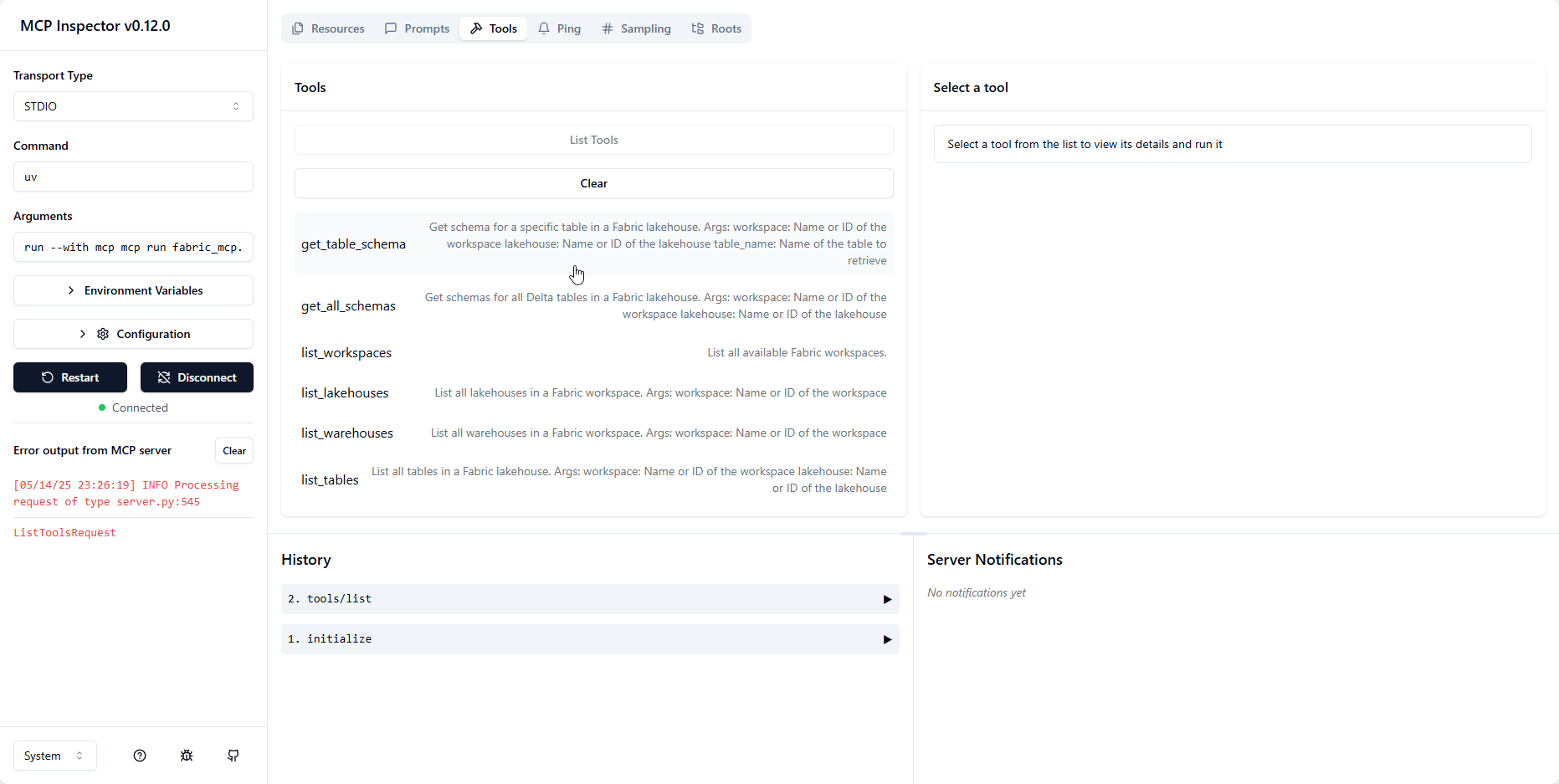
테스트를 위해 검사기를 노출한 MCP 서버를 실행합니다.
bash uv run --with mcp mcp dev fabric_mcp.py이렇게 하면 서버가 시작되고http://localhost:6274에서 검사기가 노출됩니다.
MCP 서버를 실행하고 MCP 검사기를 사용하여 연결
VSCode에서 MCP 서버를 사용하려면
launch.json파일에서 시작 구성을 설정하면 됩니다.{ //Existing configurations... "mcp": { "servers": { "ms-fabric-mcp": { "type": "stdio", "command": "<FullPathToProjectFolder>\\.venv\\Scripts\\python.exe ", "args": [ "<FullPathToProjectFolder>\\fabric_mcp.py" ] } } } }이 구성을 사용하면 VSCode에서 직접 MCP 서버를 실행하고 연결할 수 있습니다. 또한 도구에 대한 액세스를 제공합니다.
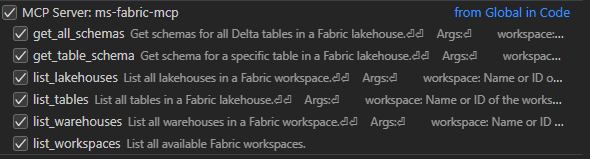
Copilot 채팅에서 에이전트 모드를 사용하면 도구 이름에 #을 지정하여(예: #list_workspaces) MCP 서버에서 사용 가능한 다양한 도구에 액세스할 수 있습니다.
사용 가능한 도구
다음 도구는 MCP 서버를 통해 사용할 수 있습니다.
list_workspaces: 사용 가능한 모든 Fabric 작업 공간을 나열합니다.list_lakehouses(workspace): 지정된 작업공간에 있는 모든 레이크하우스를 나열합니다.list_warehouses(workspace): 지정된 작업공간에 있는 모든 창고를 나열합니다.list_tables(workspace, lakehouse): 지정된 lakehouse의 모든 테이블을 나열합니다.get_lakehouse_table_schema(workspace, lakehouse, table_name): 특정 Delta 테이블에 대한 스키마와 메타데이터를 검색합니다.get_all_lakehouse_schemas(workspace, lakehouse): lakehouse의 모든 Delta 테이블에 대한 스키마와 메타데이터를 검색합니다.set_lakehouse(workspace, lakehouse): 현재 lakehouse 컨텍스트를 설정합니다.set_warehouse(workspace, warehouse): 현재 창고 컨텍스트를 설정합니다.set_workspace(workspace): 현재 작업공간 컨텍스트를 설정합니다.
특허
이 프로젝트는 MIT 라이선스에 따라 라이선스가 부여됩니다. 자세한 내용은 라이선스 파일을 참조하세요.
This server cannot be installed
Maintenance
Resources
Unclaimed servers have limited discoverability.
Looking for Admin?
If you are the server author, to access and configure the admin panel.
Related MCP Servers
- AlicenseNot gradedqualityDmaintenanceThe Fabric-Analytics-MCP server enables AI agents to interact directly with Microsoft Fabric using natural language. It transforms complex data engineering tasks—such as workspace management, data exploration, and job execution—into intuitive, conversational workflows for LLMs like Claude or GitHub17109MIT
- AlicenseAqualityBmaintenanceAn MCP (Model Context Protocol) server that lets AI agents manage Power BI workspaces, datasets, and refreshes via natural language.112MIT
- AlicenseNot gradedqualityDmaintenanceA Model Context Protocol server for Microsoft Fabric that enables AI agents to query and analyze Lakehouse and Eventhouse data, and manage Eventstreams, using natural language through the MCP interface.MIT
- AlicenseNot gradedqualityCmaintenanceMCP server for Microsoft Fabric REST APIs that enables data engineers and analysts to manage Fabric components using AI assistants.21AGPL 3.0
Related MCP Connectors
GibsonAI MCP server: manage your databases with natural language
Official Microsoft MCP Server to query Microsoft Entra data using natural language
MCP server for generating rough-draft project plans from natural-language prompts.
Latest Blog Posts
- Who's Calling? MCP Hosts Are an Identity Blind Spot (And the Spec Knows It)By Om-Shree-0709 on .mcpAgent IdentityOAuth 2.1
- Your AI Chatbot Just Exposed Your CEO's Salary to an InternBy Om-Shree-0709 on .Agent IdentityMCP SecurityOAuth Delegation
- Why MCP Servers Need Execution Sandboxing (And Why Your Current Stack Isn't Enough)By Om-Shree-0709 on .Agentic AiPrompt InjectionWebAssembly
MCP directory API
We provide all the information about MCP servers via our MCP API.
curl -X GET 'https://glama.ai/api/mcp/v1/servers/datumnova/ms-fabric-mcp'
If you have feedback or need assistance with the MCP directory API, please join our Discord server