A
licenseA
qualityF
maintenanceEnables natural language control of AutoCAD LT through AutoLISP code generation and execution, allowing users to create engineering drawings with conversational prompts.
8
545
MIT

CAD-MCP 是一项创新的 CAD 控制服务,允许通过自然语言指令控制 CAD 软件进行绘图操作。该项目结合了自然语言处理和 CAD 自动化技术,使用户能够通过简单的文本命令创建和修改 CAD 图纸,而无需手动操作 CAD 界面。
Related MCP server: CAD-MCP
支持多种CAD软件:支持主流CAD软件,包括AutoCAD、GstarCAD(GCAD)、ZWCAD
基本绘图功能:
线条画
圆形绘图
圆弧绘制
矩形绘制
折线绘制
文本添加
图案填充
尺寸标注
图层管理:创建和切换图层
图形保存:将当前图形保存为 DWG 文件
命令解析:将自然语言指令解析为CAD操作参数
颜色识别:从文本中提取颜色信息并将其应用于绘图对象
形状关键词映射:支持各种形状描述词的识别
动作关键字映射:识别各种绘图和编辑动作
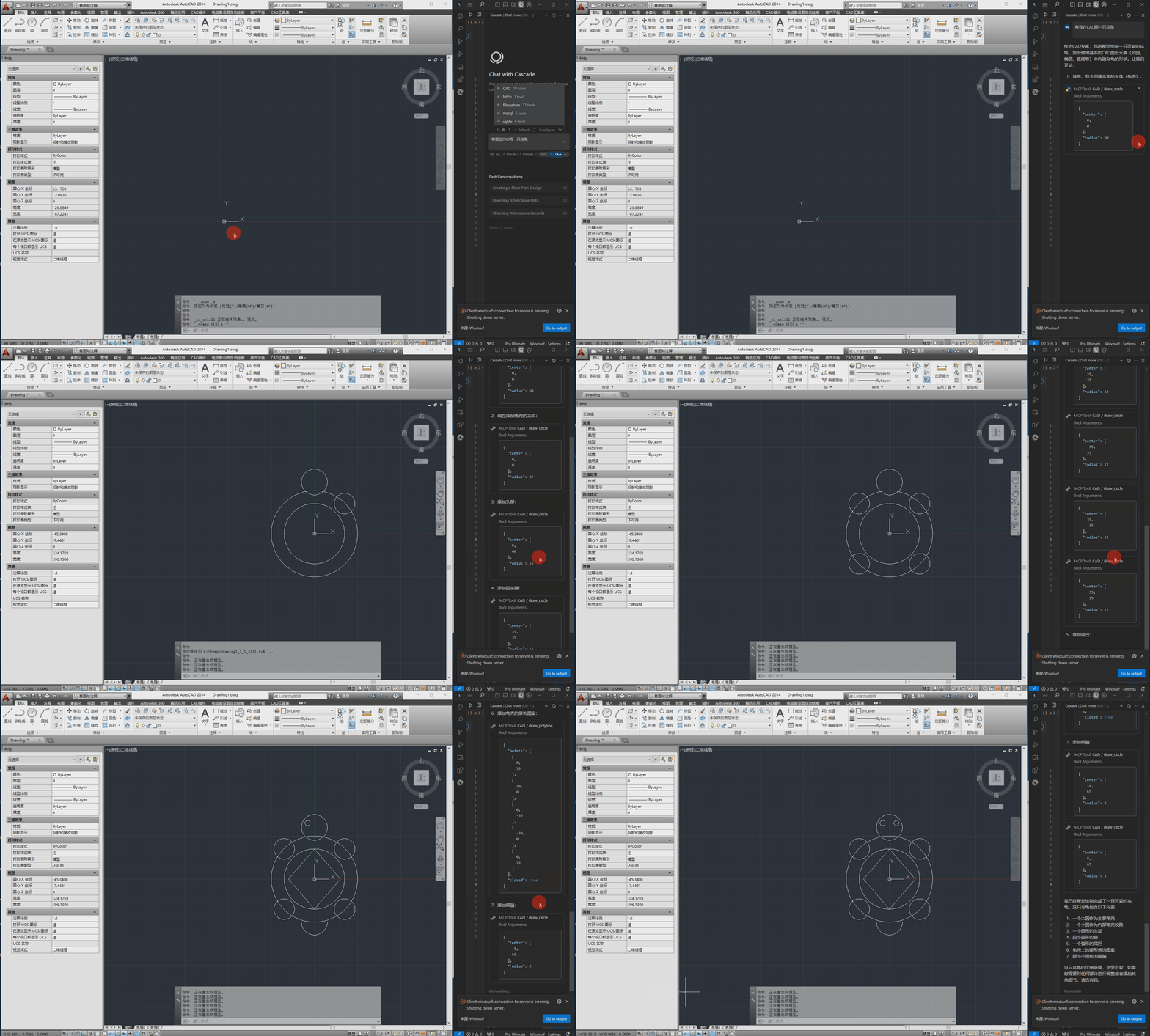
以下是演示视频。
pywin32>=228    # Windows COM interface support
mcp>=0.1.0      # Model Control Protocol library
pydantic>=2.0.0 # Data validation
typing>=3.7.4.3 # Type annotation supportWindows操作系统
已安装的 CAD 软件(AutoCAD、GstarCAD 或 ZWCAD)
配置文件位于src/config.json ,包含以下主要设置:
{
    "server": {
        "name": "CAD MCP Server",
        "version": "1.0.0"
    },
    "cad": {
        "type": "AutoCAD",
        "startup_wait_time": 20,
        "command_delay": 0.5
    },
    "output": {
        "directory": "./output",
        "default_filename": "cad_drawing.dwg"
    }
}
server :服务器名称和版本信息
计算机辅助设计:
type :CAD 软件类型(AutoCAD、GCAD、GstarCAD 或 ZWCAD)
startup_wait_time :CAD启动等待时间(秒)
command_delay :命令执行延迟(秒)
输出:输出文件设置
python src/server.py# add to claude_desktop_config.json. Note: use your path
{
"mcpServers": {
"CAD": {
"command": "python",
"args": [
# your path, e.g.: "C:\\cad-mcp\\src\\server.py"
"~/server.py"
]
}
}
}# Add according to the following diagram Cursor MCP. Note: use your path 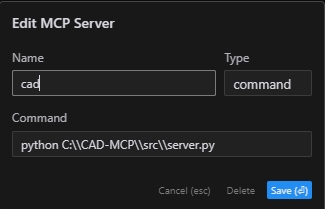
注:新版cursor也改为JSON配置,请参考上一节
# Note: use your path
npx -y @modelcontextprotocol/inspector python C:\\cad-mcp\\src\\server.py服务端提供的主要API函数如下:
draw_line :画一条线
draw_circle :画一个圆圈
draw_arc :绘制圆弧
draw_polyline :绘制折线
draw_rectangle :绘制矩形
draw_text :添加文本
draw_hatch :绘制阴影图案
add_dimension :添加线性维度
save_drawing :保存绘图
process_command :处理自然语言命令
CAD-MCP/
├── imgs/                # Images and video resources
│   └── CAD-mcp.mp4     # Demo video
├── requirements.txt     # Project dependencies
└── src/                 # Source code
    ├── __init__.py     # Package initialization
    ├── cad_controller.py # CAD controller
    ├── config.json     # Configuration file
    ├── nlp_processor.py # Natural language processor
└── server.py # Server implementationMIT 许可证
This server cannot be deployed
Convert Revit files to XKT, IFC, or DWG and query BIM data via natural language.
DXF and PDF/X-4 for AI agents: structured facts, PNG renders, an interactive in-chat viewer.
Parametric 3D CAD for AI agents: build print-ready parts, check them, export STL, 3MF or STEP.
AI Hub for AEC — 50+ 3D formats, clash detection, ACC integration via Autodesk Platform Services.
