A
licenseA
qualityF
maintenanceEnables natural language control of AutoCAD LT through AutoLISP code generation and execution, allowing users to create engineering drawings with conversational prompts.
8
545
MIT

CAD-MCP는 자연어 명령을 통해 도면 작업을 위한 CAD 소프트웨어를 제어할 수 있는 혁신적인 CAD 제어 서비스입니다. 이 프로젝트는 자연어 처리와 CAD 자동화 기술을 결합하여 사용자가 CAD 인터페이스를 직접 조작하지 않고도 간단한 텍스트 명령으로 CAD 도면을 생성하고 수정할 수 있도록 지원합니다.
Related MCP server: CAD-MCP
다양한 CAD 소프트웨어 지원 : AutoCAD, GstarCAD(GCAD), ZWCAD를 포함한 주류 CAD 소프트웨어 지원
기본 그리기 기능 :
선화
원 그리기
호 도면
직사각형 그리기
폴리라인 그리기
텍스트 추가
패턴 채우기
차원 주석
레이어 관리 : 레이어 생성 및 전환
도면 저장 : 현재 도면을 DWG 파일로 저장합니다.
명령 구문 분석 : 자연어 명령을 CAD 작업 매개변수로 구문 분석
색상 인식 : 텍스트에서 색상 정보를 추출하여 도면 객체에 적용
모양 키워드 매핑 : 다양한 모양 설명 단어 인식 지원
액션 키워드 매핑 : 다양한 그리기 및 편집 액션 인식
다음은 데모 영상입니다.
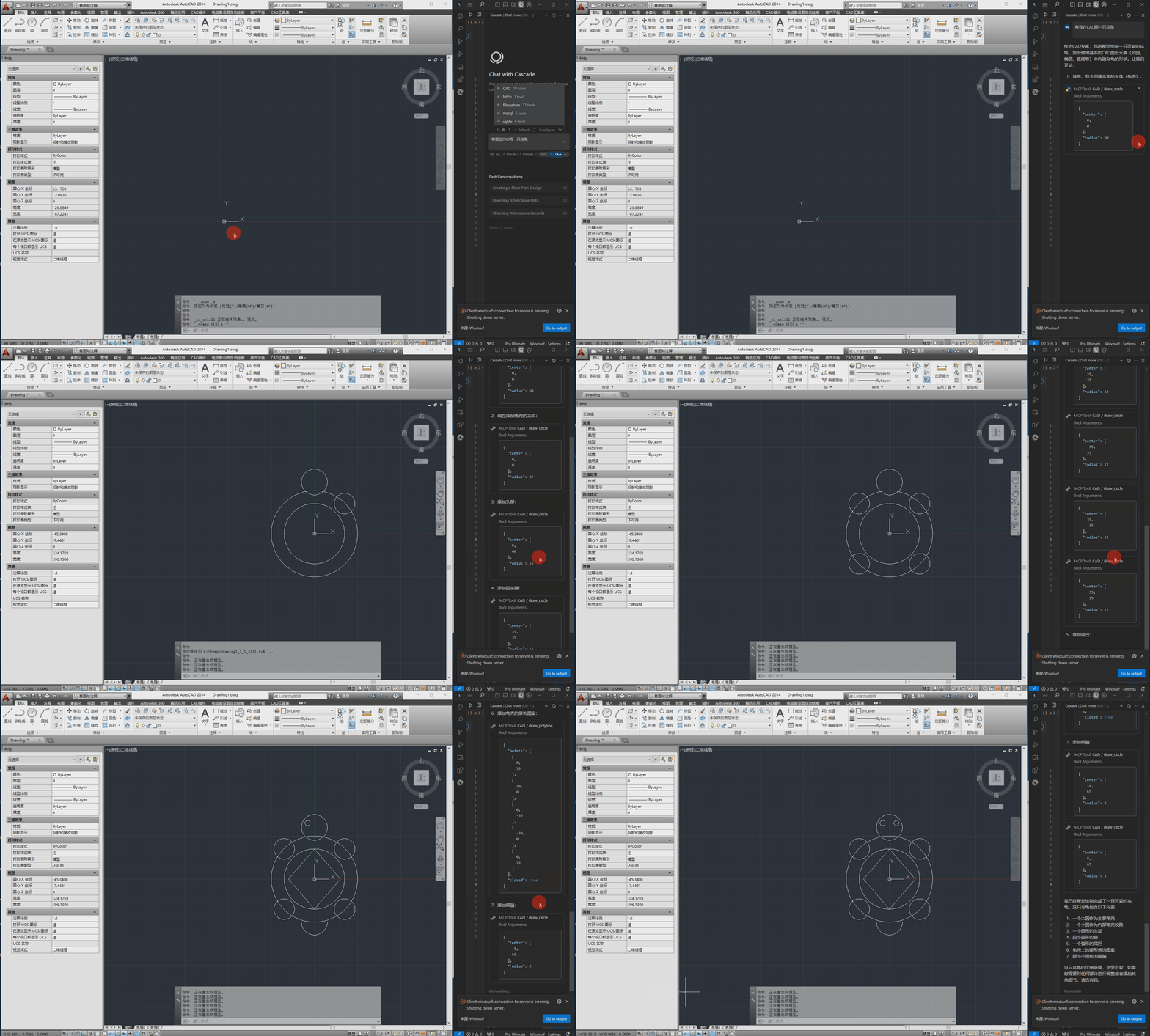
지엑스피1
윈도우 운영체제
설치된 CAD 소프트웨어(AutoCAD, GstarCAD 또는 ZWCAD)
구성 파일은 src/config.json 에 있으며 다음과 같은 주요 설정을 포함합니다.
{
    "server": {
        "name": "CAD MCP Server",
        "version": "1.0.0"
    },
    "cad": {
        "type": "AutoCAD",
        "startup_wait_time": 20,
        "command_delay": 0.5
    },
    "output": {
        "directory": "./output",
        "default_filename": "cad_drawing.dwg"
    }
}
서버 : 서버 이름 및 버전 정보
캐드 :
type : CAD 소프트웨어 유형(AutoCAD, GCAD, GstarCAD 또는 ZWCAD)
startup_wait_time : CAD 시작 대기 시간(초)
command_delay : 명령 실행 지연(초)
출력 : 출력 파일 설정
python src/server.py# add to claude_desktop_config.json. Note: use your path
{
"mcpServers": {
"CAD": {
"command": "python",
"args": [
# your path, e.g.: "C:\\cad-mcp\\src\\server.py"
"~/server.py"
]
}
}
}# Add according to the following diagram Cursor MCP. Note: use your path 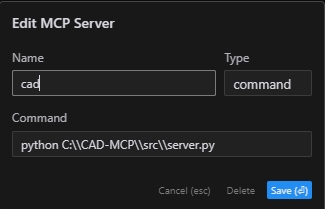
참고: 커서의 새 버전도 JSON 구성으로 변경되었습니다. 이전 섹션을 참조하세요.
# Note: use your path
npx -y @modelcontextprotocol/inspector python C:\\cad-mcp\\src\\server.py서버는 다음과 같은 주요 API 기능을 제공합니다.
draw_line : 선을 그립니다
draw_circle : 원을 그립니다
draw_arc : 호를 그립니다
draw_polyline : 폴리라인을 그립니다
draw_rectangle : 사각형을 그립니다
draw_text : 텍스트 추가
draw_hatch : 해치 패턴을 그립니다
add_dimension : 선형 차원 추가
save_drawing : 도면을 저장합니다
process_command : 자연어 명령 처리
CAD-MCP/
├── imgs/                # Images and video resources
│   └── CAD-mcp.mp4     # Demo video
├── requirements.txt     # Project dependencies
└── src/                 # Source code
    ├── __init__.py     # Package initialization
    ├── cad_controller.py # CAD controller
    ├── config.json     # Configuration file
    ├── nlp_processor.py # Natural language processor
└── server.py # Server implementationMIT 라이센스
This server cannot be deployed
Convert Revit files to XKT, IFC, or DWG and query BIM data via natural language.
DXF and PDF/X-4 for AI agents: structured facts, PNG renders, an interactive in-chat viewer.
Parametric 3D CAD for AI agents: build print-ready parts, check them, export STL, 3MF or STEP.
AI Hub for AEC — 50+ 3D formats, clash detection, ACC integration via Autodesk Platform Services.
