A
licenseA
qualityF
maintenanceEnables natural language control of AutoCAD LT through AutoLISP code generation and execution, allowing users to create engineering drawings with conversational prompts.
8
545
MIT

CAD-MCPは、自然言語による指示を通じてCADソフトウェアの図面操作を制御できる革新的なCAD制御サービスです。このプロジェクトは、自然言語処理とCAD自動化技術を組み合わせ、ユーザーがCADインターフェースを手動で操作することなく、簡単なテキストコマンドでCAD図面を作成および修正できるようにします。
Related MCP server: CAD-MCP
複数のCADソフトウェアのサポート:AutoCAD、GstarCAD(GCAD)、ZWCADなどの主要なCADソフトウェアをサポート
基本的な描画機能:
線画
円の描画
円弧描画
長方形の描画
ポリライン描画
テキストの追加
パターン塗りつぶし
寸法注釈
レイヤー管理: レイヤーの作成と切り替え
図面の保存: 現在の図面をDWGファイルとして保存します
コマンド解析:自然言語の指示をCAD操作パラメータに解析します。
色認識: テキストから色情報を抽出し、描画オブジェクトに適用します
形状キーワードマッピング: さまざまな形状の説明語の認識をサポート
アクションキーワードマッピング: さまざまな描画および編集アクションを認識する
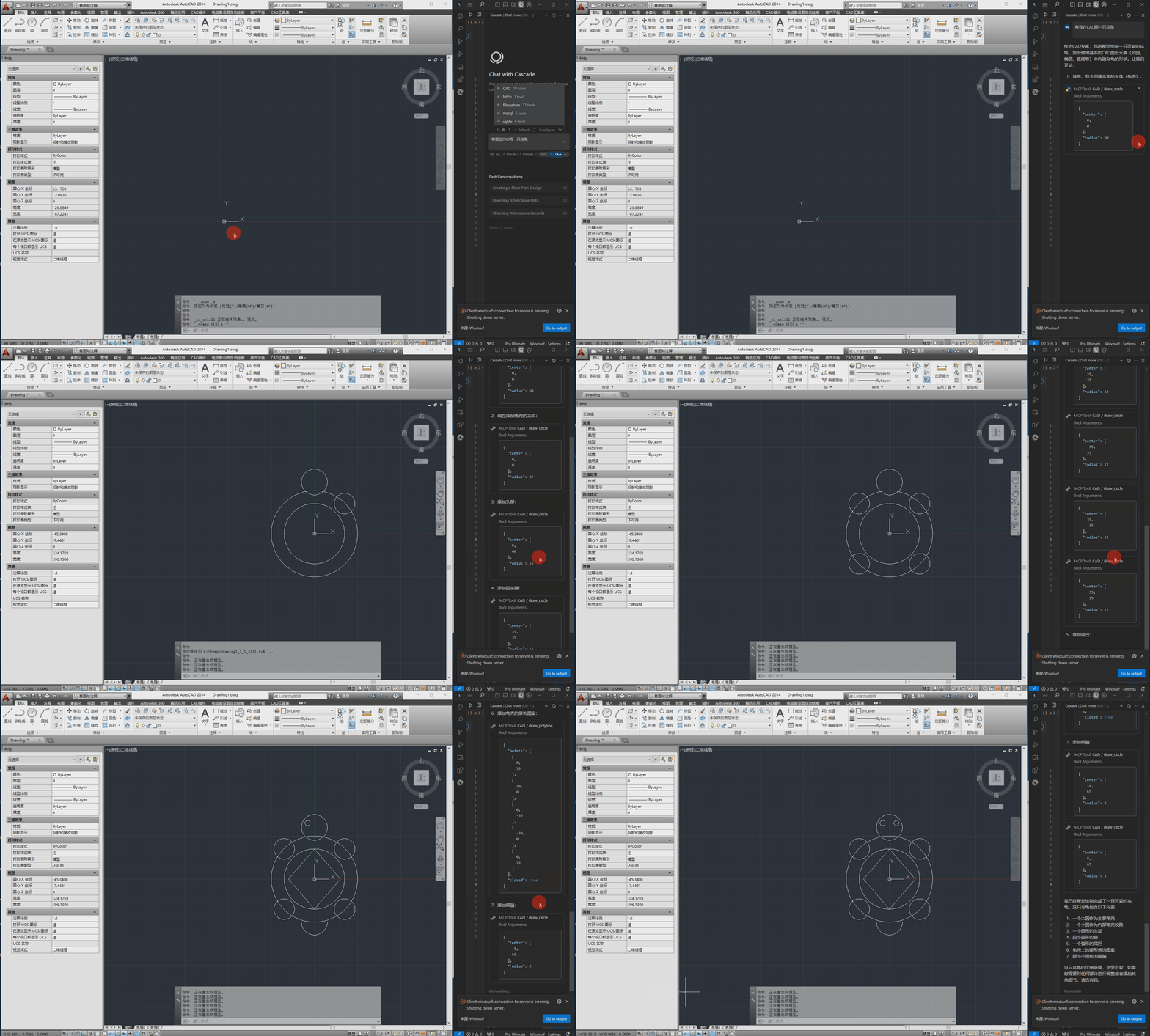
以下はデモビデオです。
pywin32>=228    # Windows COM interface support
mcp>=0.1.0      # Model Control Protocol library
pydantic>=2.0.0 # Data validation
typing>=3.7.4.3 # Type annotation supportWindows オペレーティング システム
インストールされた CAD ソフトウェア (AutoCAD、GstarCAD、または ZWCAD)
構成ファイルはsrc/config.jsonにあり、次の主な設定が含まれています。
{
    "server": {
        "name": "CAD MCP Server",
        "version": "1.0.0"
    },
    "cad": {
        "type": "AutoCAD",
        "startup_wait_time": 20,
        "command_delay": 0.5
    },
    "output": {
        "directory": "./output",
        "default_filename": "cad_drawing.dwg"
    }
}
server : サーバー名とバージョン情報
キャドバリー:
type : CAD ソフトウェアの種類 (AutoCAD、GCAD、GstarCAD、または ZWCAD)
startup_wait_time : CAD 起動待機時間(秒)
command_delay : コマンド実行遅延(秒)
出力:出力ファイルの設定
python src/server.py# add to claude_desktop_config.json. Note: use your path
{
"mcpServers": {
"CAD": {
"command": "python",
"args": [
# your path, e.g.: "C:\\cad-mcp\\src\\server.py"
"~/server.py"
]
}
}
}# Add according to the following diagram Cursor MCP. Note: use your path 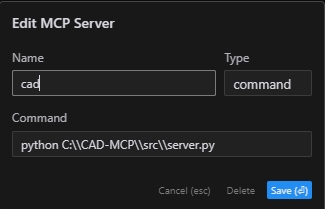
注:カーソルの新しいバージョンもJSON構成に変更されました。前のセクションを参照してください。
# Note: use your path
npx -y @modelcontextprotocol/inspector python C:\\cad-mcp\\src\\server.pyサーバーは次の主な API 関数を提供します。
draw_line : 線を描く
draw_circle : 円を描く
draw_arc : 円弧を描く
draw_polyline : ポリラインを描く
draw_rectangle : 長方形を描く
draw_text : テキストを追加する
draw_hatch : ハッチパターンを描画する
add_dimension : 線形寸法を追加する
save_drawing : 図面を保存する
process_command : 自然言語コマンドを処理する
CAD-MCP/
├── imgs/                # Images and video resources
│   └── CAD-mcp.mp4     # Demo video
├── requirements.txt     # Project dependencies
└── src/                 # Source code
    ├── __init__.py     # Package initialization
    ├── cad_controller.py # CAD controller
    ├── config.json     # Configuration file
    ├── nlp_processor.py # Natural language processor
└── server.py # Server implementationMITライセンス
This server cannot be deployed
Convert Revit files to XKT, IFC, or DWG and query BIM data via natural language.
DXF and PDF/X-4 for AI agents: structured facts, PNG renders, an interactive in-chat viewer.
Parametric 3D CAD for AI agents: build print-ready parts, check them, export STL, 3MF or STEP.
AI Hub for AEC — 50+ 3D formats, clash detection, ACC integration via Autodesk Platform Services.
