

A
licenseA
qualityA
maintenanceA Model Context Protocol server that integrates Google Calendar with Claude Desktop, enabling users to manage calendar events (view, create, update, delete) through natural language.
5
110 npm
59
MIT

强大的模型上下文协议 (MCP) 服务器提供全面的日历管理功能。
创建日历事件
列出日历事件
更新现有事件
删除事件
Related MCP server: Google Calendar MCP Server
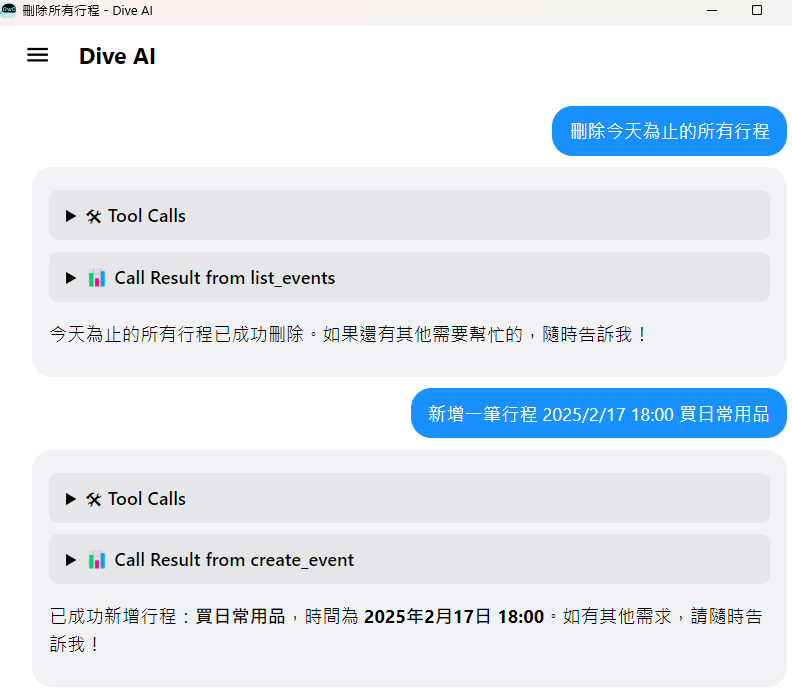
npm install -g @cablate/mcp-google-calendarmcp-google-calendar在 Dive Desktop 中点击“+ 添加 MCP 服务器”
复制并粘贴此配置:
{
  "mcpServers": {
    "calendar": {
      "command": "npx",
      "args": ["-y", "@cablate/mcp-google-calendar"],
      "env": {
        "GOOGLE_CALENDAR_ID": "your_calendar_id",
        "GOOGLE_TIME_ZONE": "your_time_zone",
        "GOOGLE_CREDENTIALS_PATH": "your_credentials_path"
      },
      "enabled": true
    }
  }
}
点击“保存”安装 MCP 服务器
以下是创建 Google 服务帐户和凭据的简单步骤:
创建新项目或选择现有项目
导航至“IAM 和管理”部分
点击“服务帐户”
点击“创建服务帐户”
输入服务帐户的名称(例如“MCP Google 日历”)
点击“创建”
点击“创建密钥”
选择“JSON”作为密钥类型
点击“创建”
下载 JSON 文件并将其保存为credentials.json
如果还有任何问题,请谷歌并找到答案。
麻省理工学院
欢迎社区参与和贡献!贡献方式如下:
⭐️ 如果您觉得有用,请为项目加星标
🐛 提交问题:报告问题或提供建议
🔧 创建 Pull 请求:提交代码改进
如果您有任何问题或建议,请随时联系我们:
📧 GitHub: CabLate
🤝合作:欢迎洽谈项目合作
📚 技术指导:诚挚欢迎建议和指导
This server cannot be deployed
Hosted Google Calendar MCP server for AI agents. No self-hosting or Google Cloud setup.
Calendar API for AI agents: events, availability, Google/Microsoft setup, scheduling, and iCal.
A MCP server that works with Google Calendar to manage event listing, reading, and updates.
GDPR-compliant calendar access for AI assistants: read, create, edit, RSVP. Google, MS 365, Apple.