Bio-OS MCP Server
The Bio-OS MCP Server is a Model Context Protocol-based tool server for managing Bio-OS workflows, Docker images, workspaces, and external workflow integrations.
Workflow Management
import_workflow– Upload WDL workflows (single file or directory) to Bio-OSvalidate_wdl– Validate WDL workflow scripts for syntax correctnesscheck_workflow_import_status– Check the import status of a workflowsubmit_workflow– Submit and optionally monitor Bio-OS workflowscheck_workflow_run_status– Query the running status of a submitted workflowget_workflow_logs– Retrieve execution logs for a workflow submissiondelete_submission– Delete a workflow submission
Input/Template Generation
generate_inputs_json_template_bioos– Generate an inputs.json template for an imported workflowcompose_input_json– Generate a filled input.json from user-provided values (supports single/multi-sample)validate_workflow_input_json– Validate workflow input JSON files against a WDL
Workspace Management
list_workspace– List all workspaces with names and descriptionscreate_workspace_bioos– Create a new workspace in Bio-OSexport_bioos_workspace– Export workspace metadata to a local pathupload_dashboard_file– Upload a dashboard file to a workspace's S3 bucket
IES (Interactive Environment) Management
create_iesapp– Create a new IES instance within a workspacecheck_ies_status– Check the creation/running status of an IES instanceget_ies_events– Retrieve creation logs/events for an IES instance
Docker Image Management
build_docker_image– Build a Docker image from a Dockerfile or archivecheck_build_status– Check the status of a Docker image build taskget_docker_image_url– Retrieve the full URL for a Docker image
Dockstore Integration
search_dockstore– Search for workflows on Dockstorefetch_wdl_from_dockstore– Download a workflow from Dockstore by URL
Enables building Docker images, checking build status, monitoring build progress, and retrieving build logs through the Bio-OS system.
Click on "Deploy Server".
Wait a few minutes for the server to deploy. Once ready, it will show a "Started" state.
In the chat, type
@followed by the MCP server name and your instructions, e.g., "@Bio-OS MCP Server validate my WDL script for the RNA-seq workflow"
That's it! The server will respond to your query, and you can continue using it as needed.
Here is a step-by-step guide with screenshots.
Bio-OS MCP Server
A Model Context Protocol (MCP) based tool and prompt server for Bio-OS that provides workflow management and Docker image building capabilities.
Usage
We recommend using the CLINE extension for VSCode to interact with this MCP tool. There are two deployment options available: standalone installation on your local machine or using Code Server in a Miracle Cloud IES instance. Choose the option that best suits your needs.
Local Installation (Using MCP through local VSCode)
Prerequisites
Bio-OS MCP Server requires the following dependencies:
Install uv (Python package manager):
pip install uvInstall Cromwell (Workflow execution engine):
brew install cromwellInstallation
Clone the Bio-OS MCP Server repository:
git clone https://github.com/GBA-BI/bioos-mcp-server.gitConfiguration
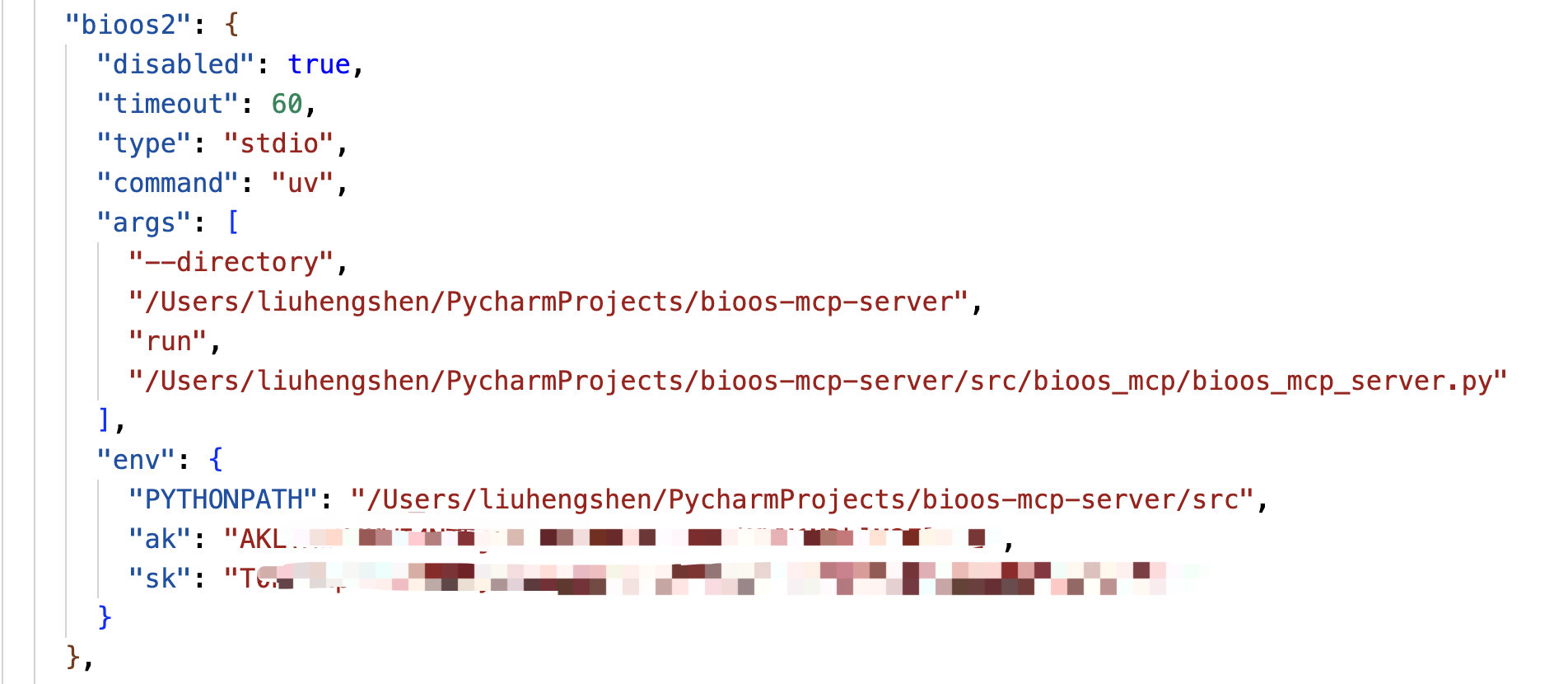
Configure the Bio-OS MCP Server script path in CLINE's MCP settings. Replace the placeholders with absolute paths to your installation:
{
"mcpServers": {
"bioos": {
"command": "path/to/uv",
"args": [
"--directory",
"path/to/bioos-mcp-server",
"run",
"path/to/bioos-mcp-server/src/bioos_mcp/bioos_mcp_server.py"
],
"env": {
"PYTHONPATH": "path/to/bioos-mcp-server/src",
"MIRACLE_ACCESS_KEY": "xxxxxxxxxxxx",
"MIRACLE_SECRET_KEY": "xxxxxxxxxxxx"
}
}
}
} Follow the configuration process shown below. The Bio-OS MCP Server is ready to use when the status turns green. If the connection is unstable, click "Retry Connection":
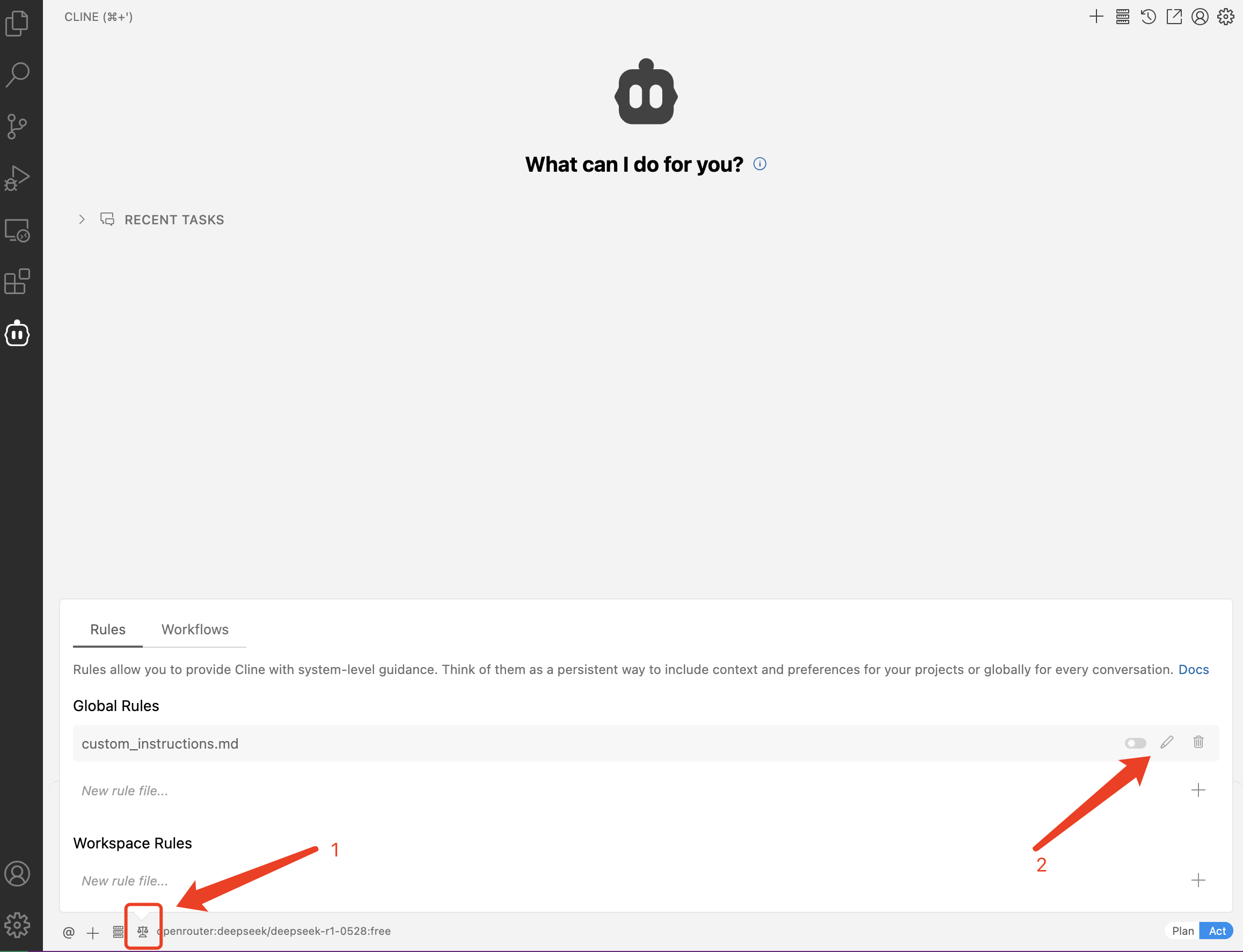
Since CLINE does not yet support MCP Prompts, copy the contents of bioos-mcp-prompt.md into CLINE's Custom Instructions for optimal experience:
After completing the configuration, you can begin using the Bio-OS MCP Server for development.
Cloud Installation (Using MCP through Code Server in Miracle Cloud)
For Miracle Cloud users, we provide a pre-configured Docker image with all Bio-OS MCP Server dependencies. Follow these steps:
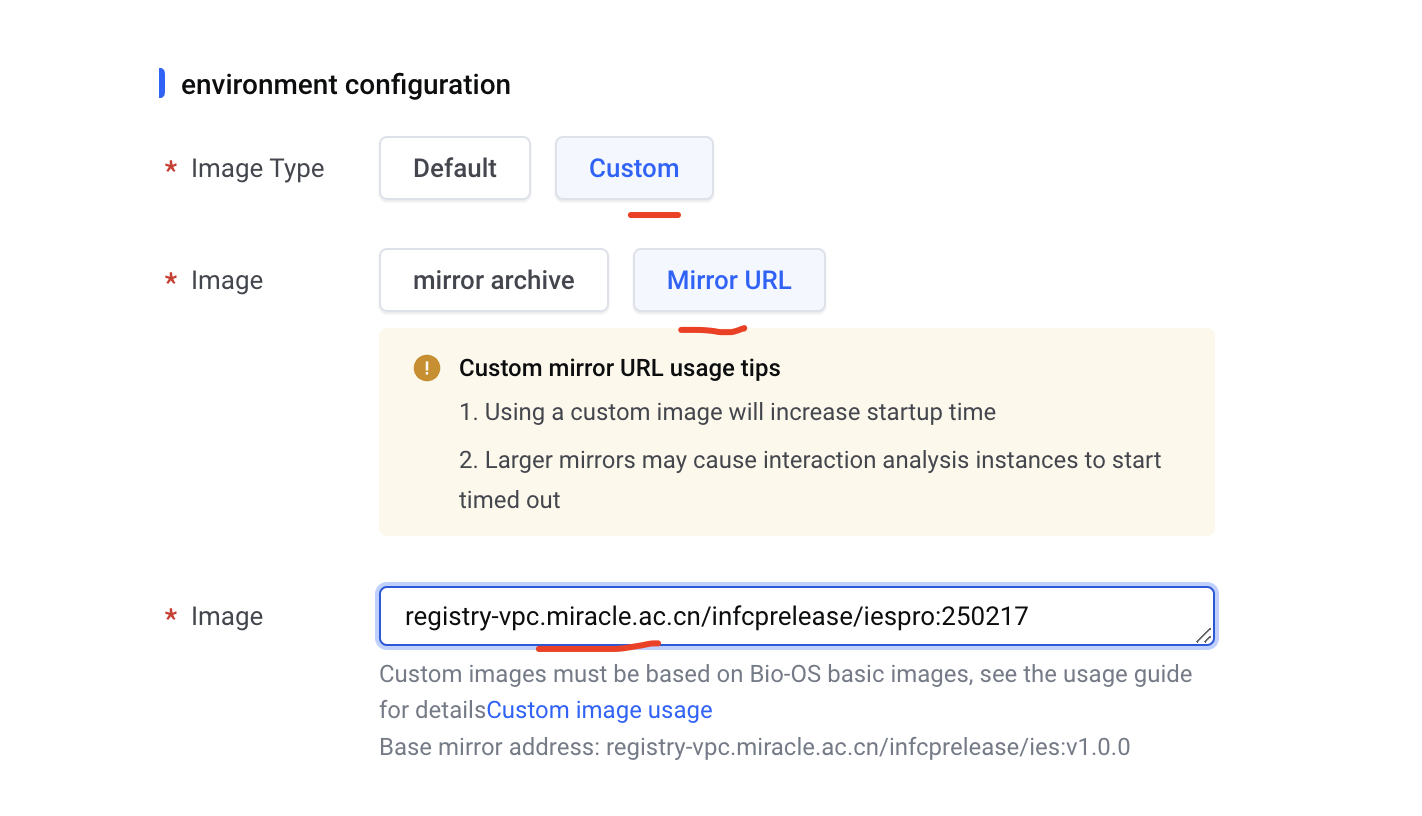
Launch an IES instance using the image:
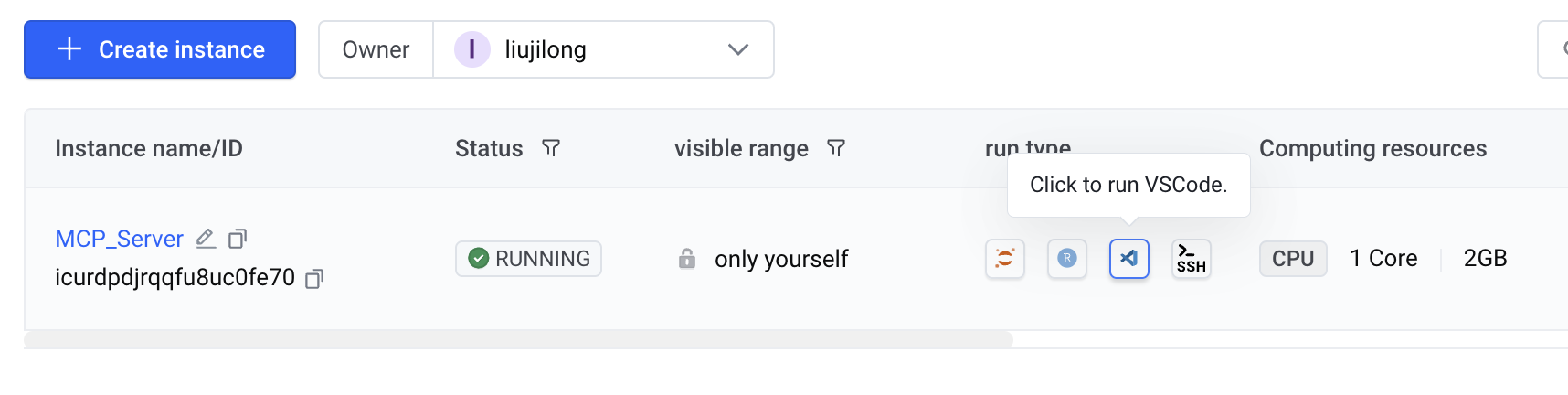
registry-vpc.miracle.ac.cn/infcprelease/iespro:250217Select "Open with VSCode" to access the development environment:
Configuration in Code Server
Click the CLINE icon in the left sidebar and configure your LLM model credentials:
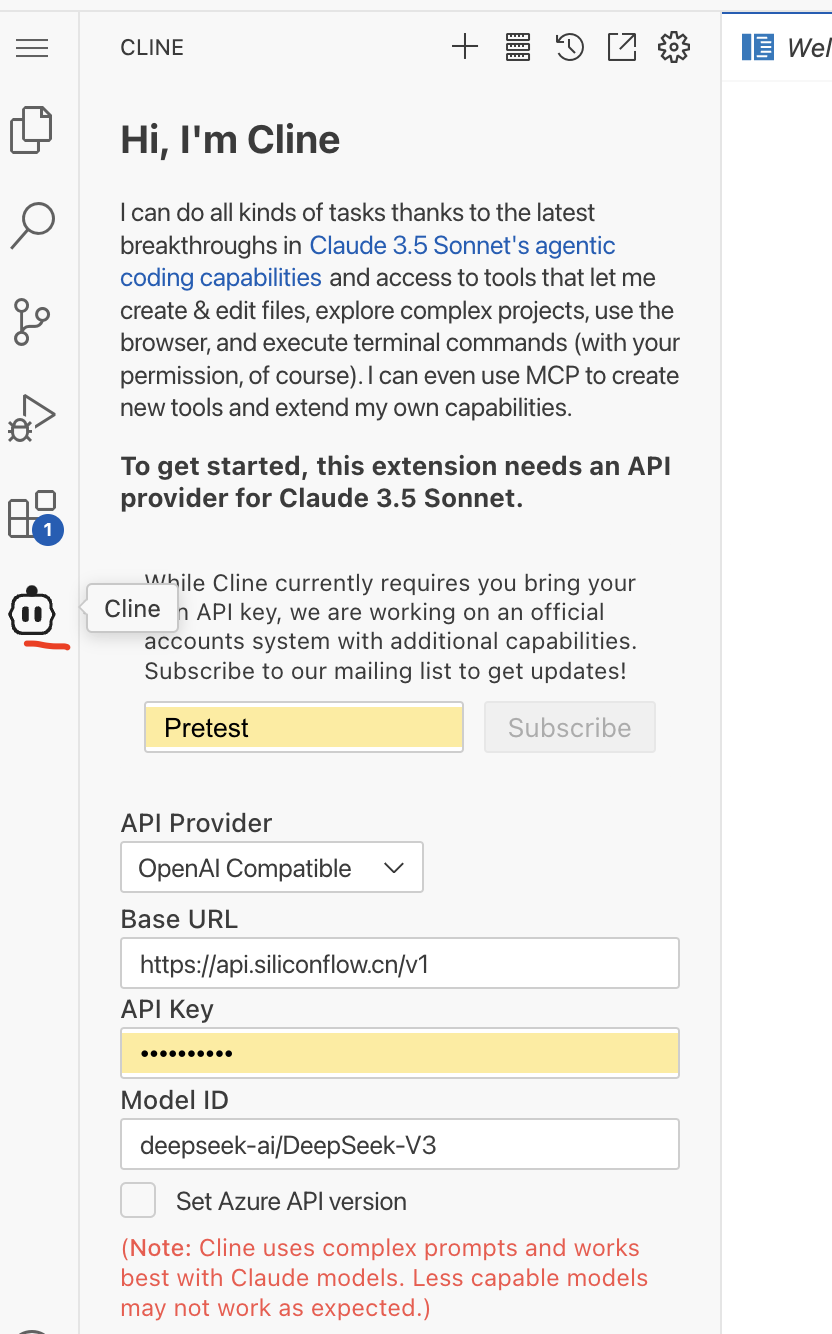
Navigate to CLINE's MCP configuration page and verify that Bio-OS MCP Server is properly connected. Use "Retry Connection" if needed:
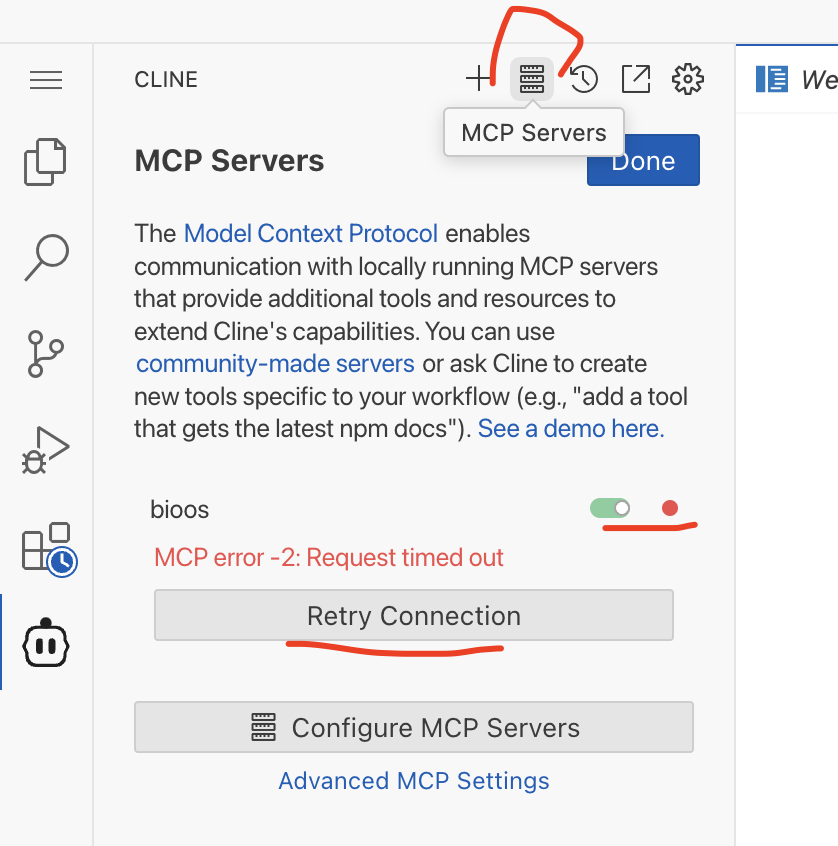
Once configured, you can begin development with Bio-OS MCP Server.
Related MCP server: ESMfold MCP Server
Features
1. Workflow Management
Submit and monitor workflows
Upload WDL workflows
Validate WDL scripts
Generate input file templates
2. Docker Image Management
Build Docker images
Check build status
Monitor build progress
Retrieve build logs
API Reference
Tools
submit_workflowFunction: Submit Bio-OS workflow
Parameters:
ak: Access Key
sk: Secret Key
workspace_name: Workspace name
workflow_name: Workflow name
input_json: Input JSON file path
import_workflowFunction: Upload WDL workflow to Bio-OS system
Parameters:
ak: Access Key
sk: Secret Key
workspace_name: Workspace name
workflow_name: Workflow name
workflow_source: WDL file path
workflow_desc: Workflow description
validate_wdlFunction: Validate WDL workflow script
Parameters:
wdl_path: WDL file path
generate_inputsFunction: Generate WDL input file template
Parameters:
wdl_path: WDL file path
build_docker_imageFunction: Build Docker image
Parameters:
registry: Image registry address
namespace_name: Namespace
repo_name: Repository name
tag: Version tag
source_path: Dockerfile or archive path
check_build_statusFunction: Check Docker image build status
Parameters:
task_id: Build task ID
Prompts (Not supported in Cline yet)
wdl_development_workflow_promptFunction: Generate complete guidance for WDL workflow development
Content:
WDL script development steps
Task structure guidelines
Runtime configuration requirements
Docker image preparation guide
wdl_runtime_promptFunction: Generate WDL runtime configuration template
Content:
Required docker image configuration
Memory settings (default: 8 GB)
Disk settings (default: 20 GB)
CPU settings (default: 4)
workflow_input_promptFunction: Generate workflow input preparation guide
Content:
Input file preparation steps
Parameter validation guidelines
File path requirements
workflow_submission_promptFunction: Generate workflow submission template
Content:
Required credentials (ak/sk)
Workspace configuration
Input file requirements
docker_build_promptFunction: Generate Docker build process guide
Content:
Dockerfile generation steps
Build configuration requirements
Image registry settings
Build status monitoring guide
Note: Prompts are currently not supported in Cline environment. These prompts are only available when using the MCP server directly or through Claude Desktop.
✅ Certified by MCPHub
This server is officially certified by MCPHub. Verify certification status on our MCPHub profile page.
Contributing
Issues and Pull Requests are welcome.
License
MIT License
Available Tools
22 toolsbuild_docker_imageD
构建 Docker 镜像
Inputs: config (required). Returns: result
check_build_statusB
检查 Docker 镜像构建状态
Inputs: task_id (required). Returns: result
check_ies_statusC
查看指定workspace中的指定IES 实例的创建状态
Inputs: cfg (required). Returns: result
check_workflow_import_statusC
查询工作流导入状态
Inputs: config (required). Returns: result
check_workflow_run_statusC
查询工作流运行状态
Inputs: config (required). Returns: result
compose_input_jsonC
根据用户给的数值生成input.json
Inputs: cfg (required). Returns: result
create_iesappC
在指定的workspace中新建一个 IES 实例,用户可在该 IES 实例上进行分析
Inputs: cfg (required). Returns: result
create_workspace_bioosC
Bio-OS 创建新工作空间
Inputs: cfg (required). Returns: result
delete_submissionC
Bio-OS 删除工作流提交
Inputs: cfg (required). Returns: result
export_bioos_workspaceD
Bio-OS 导出工作空间元信息
Inputs: cfg (required). Returns: result
fetch_wdl_from_dockstoreC
从Dockstore下载工作流
Inputs: config (required). Returns: result
generate_inputs_json_template_bioosC
Bio-OS 上已导入 workflow 的 inputs.json 查询,并生成符合的输入参数模板
Inputs: cfg (required). Returns: result
get_docker_image_urlC
获取 Docker 镜像的完整 URL
Inputs: config (required). Returns: result
get_ies_eventsB
查看指定workspace中的指定IES实例的创建日志
Inputs: cfg (required). Returns: result
get_workflow_logsD
获取工作流执行日志
Inputs: config (required). Returns: result
import_workflowC
该工具用于将 WDL 工作流上传到 Bio‑OS,支持上传单个文件或整个目录。
Inputs: config (required). Returns: result
list_workspaceC
列出当前登录环境的工作空间名称与描述
Inputs: config (required). Returns: result
search_dockstoreD
在Dockstore中检索工作流
Inputs: config (required). Returns: result
submit_workflowC
提交并监控 Bio-OS 工作流
Inputs: config (required). Returns: result
upload_dashboard_fileB
上传__dashboard__.md文件到指定工作空间的S3桶
Inputs: cfg (required). Returns: result
validate_wdlB
验证 WDL 文件的语法正确性
Inputs: config (required). Returns: result
validate_workflow_input_jsonC
验证工作流输入 JSON 文件
Inputs: config (required). Returns: result
Tool Schema Changelog
Recent tool additions, removals, and schema changes observed during successful MCP inspections.
Loading tool schema changelog…
TDQS
Scored across 22 tools
Most tools have distinct purposes, but there is some overlap between 'check_workflow_import_status' and 'check_workflow_run_status' which could cause confusion in monitoring workflows. Additionally, 'compose_input_json' and 'generate_inputs_json_template_bioos' both handle input JSON generation, though their descriptions suggest different contexts (user-provided values vs. template generation). Overall, the tools are well-differentiated, but a few pairs require careful reading to avoid misselection.
The naming follows a mostly consistent verb_noun pattern (e.g., 'build_docker_image', 'create_workspace_bioos'), but there are deviations such as 'fetch_wdl_from_dockstore' (verb_noun_preposition) and mixed use of underscores with terms like 'Bio-OS' in names (e.g., 'export_bioos_workspace'). While readable, the lack of a strict convention across all tools reduces predictability.
With 22 tools, the count is on the higher side but reasonable for a comprehensive bioinformatics platform covering Docker builds, workspace management, workflow handling, and IES instances. It feels slightly heavy but not excessive, as each tool appears to serve a specific function in the domain without obvious redundancy.
The tool set provides complete coverage for the bioinformatics domain, including CRUD operations for workspaces and IES instances, workflow lifecycle management (import, validate, submit, monitor, delete), and supporting utilities like Docker image handling and input generation. No significant gaps are apparent; agents can perform end-to-end tasks without dead ends.
Maintenance
Related MCP Connectors
Discover, run, inspect, build, test, and privately reuse AI workflows.
Build, test, publish, and run Kovca workflows from AI agents over remote MCP.
Build and manage Cloudgate workflow-APIs: controllers, actions, workflow graphs, and databases.
BPJ rule-based task-state reviews and workflow tool discovery. Free, no account required.
Related MCP Servers
- AlicenseNot gradedqualityDmaintenanceEnables AI assistants to create, monitor, and manage computational tasks through GA4GH Task Execution Service (TES) functionality. Provides seamless access to TES-compliant services for executing bioinformatics and scientific computing workflows.Apache 2.0
- FlicenseNot gradedqualityDmaintenanceEnables protein sequence analysis and structure prediction by extracting ESM-2 embeddings and batch processing FASTA files via Docker. It provides tools for large-scale embedding extraction, job monitoring, and model management within an MCP-compatible environment.-
- AlicenseNot gradedqualityFmaintenanceEnables AI agents to manage OSOP workflows by providing tools for validation, execution, testing, and optimization. It also supports converting workflows between OSOP and external formats like GitHub Actions, BPMN, and Airflow DAGs.1Apache 2.0
- AlicenseAqualityCmaintenanceEnables AI assistants to run reproducible bioinformatics pipelines over MCP, with verifiable provenance via checksums and Workflow Run RO-Crate metadata.62MIT