A
licenseA
qualityD
maintenanceA flexible Model Context Protocol server that makes documentation or codebases searchable by AI assistants, allowing users to chat with code or docs by simply pointing to a git repository or folder.
1
92
MIT

This MCP server enables natural language querying of Erick Wendel's contributions (talks, blog posts, and videos) through AI tools like Claude and Cursor.
Core Tools:
get_talks: Filter by ID, title, language (Spanish/English/Portuguese), city, country, or year; supports pagination, count-only mode, and aggregated grouping by language/country/city
get_posts: Filter by ID, title, language, or portal with pagination support
get_videos: Filter by ID, title, or language with pagination
check_status: Verify API health and availability
Prompts:
find-content: Generate queries to locate specific content by type, topic, and language
summarize-activity: Create content activity summaries by year
Resources:
erickwendel://about: Server information and capabilities metadata
erickwendel://statistics: Content statistics and available queries
Integration & Development:
Compatible with Claude Desktop, Cursor IDE, and MCPHost (with Ollama)
Easy setup via npx without installation
Type-safe TypeScript with Zod validation, modular architecture, and structured error handling
Integrates with a GraphQL API at tml-api.herokuapp.com to fetch data about Erick Wendel's talks, posts, and videos with filtering capabilities
Connects to a GraphQL API hosted on Heroku to fetch and filter Erick Wendel's contributions data
Runs natively in Node.js environment without transpilation, providing tools for querying Erick Wendel's content
Supports integration with Ollama through MCPHost as a free alternative to Claude, enabling LLMs to interact with the MCP server
Built with TypeScript for type safety, with native support in Node.js without requiring transpilation
Uses Zod schema validation to ensure type safety and proper data validation for API requests and responses
Click on "Deploy Server".
Wait a few minutes for the server to deploy. Once ready, it will show a "Started" state.
In the chat, type @ followed by the MCP server name and your instructions, e.g., "@Erick Wendel Contributions MCP show me talks about Node.js in Portuguese"
That's it! The server will respond to your query, and you can continue using it as needed.
Here is a step-by-step guide with screenshots.


A Model Context Protocol (MCP) server that provides tools to query Erick Wendel's contributions across different platforms. Query talks, blog posts, and videos using natural language through Claude, Cursor or similars. This project was built using Cursor IDE with the default agent (trial version).
Use this MCP server directly with Claude Desktop or Cursor without installation:
{
  "mcpServers": {
    "erickwendel-contributions": {
      "command": "npx",
      "args": ["-y", "@erickwendel/contributions-mcp"]
    }
  }
}
Add this configuration to:
Claude Desktop: ~/Library/Application Support/Claude/claude_desktop_config.json (macOS)
Cursor: ~/.cursor/mcp.json
Related MCP server: MCP TabNews Integration
This MCP server provides the following capabilities:
get-talks: Retrieves a paginated list of talks with optional filtering
Supports filtering by ID, title, language, city, country, and year
Can return counts grouped by language, country, or city
get-posts: Fetches posts with optional filtering and pagination
Supports filtering by ID, title, language, and portal
get-videos: Retrieves videos with optional filtering and pagination
Supports filtering by ID, title, and language
check-status: Verifies if the API is alive and responding
find-content: Generate queries to find specific content by type, topic, and language
summarize-activity: Create summaries of content activity by year
erickwendel://about: Server information and capabilities metadata
erickwendel://statistics: Content statistics and available queries
You can inspect this MCP server's capabilities using the MCP Inspector:
npm run inspectThis will show you all available tools, their parameters, and how to use them.
Make sure you're using Node.js v20+
node -v
# v20.x.x or higher
Clone this repository:
git clone https://github.com/erickwendel/erickwendel-contributions-mcp.git
cd erickwendel-contributions-mcp
Install dependencies:
npm ciRun the server:
npm startAdd the following configuration to ~/.cursor/mcp.json:
{
  "mcpServers": {
    "erickwendel-contributions": {
      "command": "npx",
      "args": ["-y", "@erickwendel/contributions-mcp"]
    }
  }
}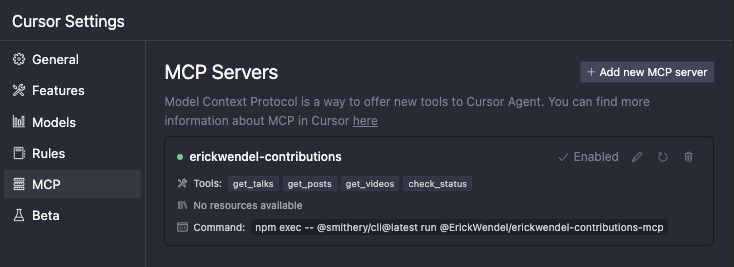
Make sure Cursor chat is in Agent mode by selecting "Agent" in the lower left side dropdown, then ask "how many videos were published about JavaScript in 2024":

For local development, use the absolute path to the project:
{
  "mcpServers": {
    "erickwendel-contributions": {
      "command": "node",
      "args": ["--experimental-strip-types", "ABSOLUTE_PATH_TO_PROJECT/src/index.ts"]
    }
  }
}Go to Claude settings
Click in the Developer tab
Click in edit config
Open the config in a code editor
Add the following configuration to ~/Library/Application Support/Claude/claude_desktop_config.json (macOS):
{
  "mcpServers": {
    "erickwendel-contributions": {
      "command": "npx",
      "args": ["-y", "@erickwendel/contributions-mcp"]
    }
  }
}For local development, use the absolute path to the project:
{
  "mcpServers": {
    "erickwendel-contributions": {
      "command": "node",
      "args": ["--experimental-strip-types", "ABSOLUTE_PATH_TO_PROJECT/src/index.ts"]
    }
  }
}If you don't have access to Claude Desktop or Cursor, you can use MCPHost with Ollama as a free alternative.
Install MCPHost:
go install github.com/mark3labs/mcphost@latestCreate a config file (e.g. ./mcp.jsonc):
{
  "mcpServers": {
    "erickwendel-contributions": {
      "command": "npx",
      "args": ["-y", "@erickwendel/contributions-mcp"]
    }
  }
}
Run with Ollama:
ollama pull MODEL_NAME
mcphost --config ./mcp.jsonc -m ollama:MODEL_NAMEFor local development, update the config:
{
  "mcpServers": {
    "erickwendel-contributions": {
      "command": "node",
      "args": ["--experimental-strip-types", "ABSOLUTE_PATH_TO_PROJECT/src/index.ts"]
    }
  }
}Here are some examples of queries you can ask Claude, Cursor or any MCP Client:
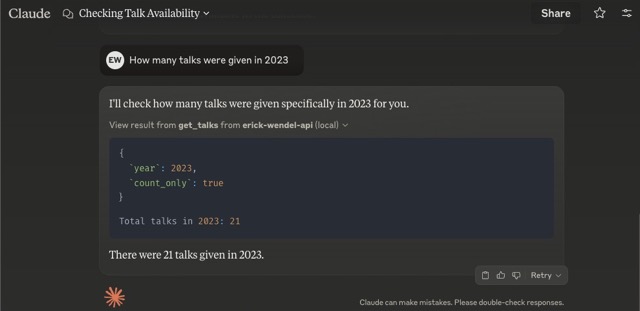
"How many talks were given in 2023?"
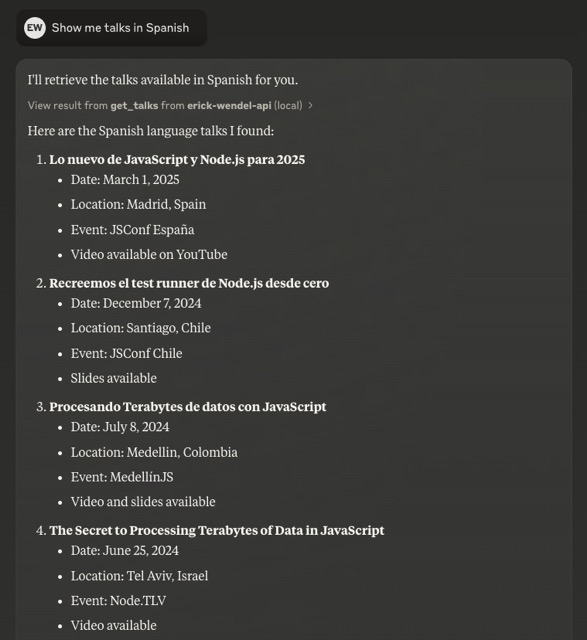
"Show me talks in Spanish"
"Find posts about WebXR"
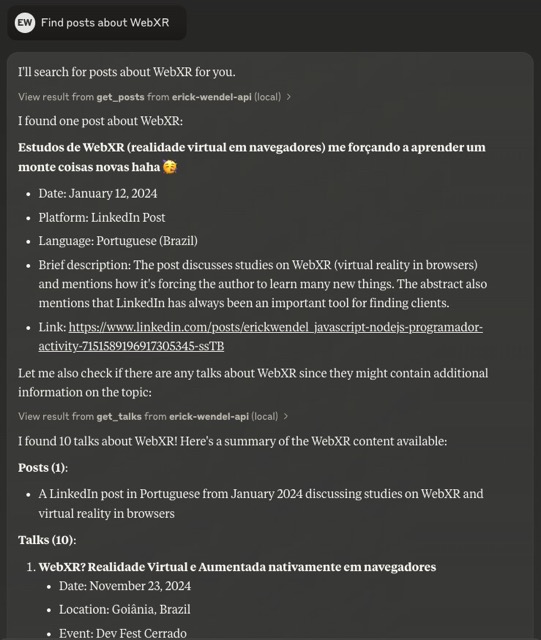
Built with Model Context Protocol (MCP)
Full MCP Capabilities: Tools, Prompts, and Resources
Type-safe with TypeScript and Zod schema validation
Native TypeScript support in Node.js without transpilation
Generated SDK using GenQL
Modular architecture with separation of concerns
Standard I/O transport for easy integration
Structured error handling
Compatible with Claude Desktop, Cursor, and MCPHost (free alternative)
Note: This project requires Node.js v23+ as it uses the native TypeScript support added in the last year.
The codebase follows a modular structure:
src/
  ├── config/      # Configuration settings
  ├── types/       # TypeScript interfaces and types
  ├── tools/       # MCP tool implementations
  ├── utils/       # Utility functions
  ├── services/    # API service layer
└── index.ts # Main entry pointTo run the test suite:
npm testFor development mode with watch:
npm run test:devContributions are welcome! Please feel free to submit a Pull Request.
This project is licensed under the MIT License - see the LICENSE file for details.
Check if the API is alive and responding.
Inputs: no named parameters.
Get a list of posts with optional filtering and pagination.
Inputs: id, title, language, portal, +2 more.
Get a list of talks with optional filtering and pagination.
Inputs: id, title, language, city, +6 more.
Get a list of videos with optional filtering and pagination.
Inputs: id, title, language, skip, +1 more.
Recent tool additions, removals, and schema changes observed during successful MCP inspections.
Loading tool schema changelog…
Scored across 4 tools
Each tool has a clearly distinct purpose targeting different resource types: API status, posts, talks, and videos. There is no overlap in functionality, making it easy for an agent to select the correct tool without confusion.
All tool names follow a consistent verb_noun pattern (check_status, get_posts, get_talks, get_videos), using snake_case throughout. This predictability enhances readability and usability for agents.
With 4 tools, the count is reasonable for a contributions-focused server, covering status and three content types. It feels slightly thin but well-scoped, as each tool serves a distinct purpose without unnecessary bloat.
The toolset provides read-only access to posts, talks, and videos with filtering and pagination, which is adequate for retrieval. However, there are notable gaps: no create, update, or delete operations, limiting full lifecycle management of contributions in the domain.
A comprehensive Model Context Protocol (MCP) server that enables AI assistants to interact with yo…
A Model Context Protocol server for Wix AI tools
The Mercado Pago MCP Server implements the Model Context Protocol to provide AI agents and LLMs with access to Mercado Pago's APIs and tools within compatible development environments. It acts as an intermediary that translates Mercado Pago resources into executable functions (tools) that AI applications can invoke to perform actions and automate flows. The server simplifies integration, enables using documentation to implement or improve code, and optimizes operations through natural language interactions without manual implementations.
The Telnyx MCP server is an official implementation of the Model Context Protocol that enables AI clients (like Claude Desktop, Cursor, and OpenAI Agents) to interact with Telnyx's telephony, messaging, and AI assistant APIs. It provides comprehensive capabilities including making and managing phone calls, sending SMS/MMS messages, purchasing and configuring phone numbers, creating AI assistants with custom instructions, managing cloud storage buckets, scraping and embedding website content, and handling integration secrets. The server exists as both a local implementation and a remotely hosted version, allowing developers to integrate real-world communication infrastructure directly into AI applications.