

A
licenseA
qualityD
maintenanceA flexible Model Context Protocol server that makes documentation or codebases searchable by AI assistants, allowing users to chat with code or docs by simply pointing to a git repository or folder.
1
17 npm
91
MIT


モデルコンテキストプロトコル(MCP)サーバー。Erick Wendelの貢献を様々なプラットフォームでクエリするためのツールを提供します。Claude、Cursor、または類似のツールを使って、自然言語で講演、ブログ投稿、動画を検索できます。このプロジェクトは、 Cursor IDEのデフォルトエージェント(試用版)を使用して構築されました。
この MCP サーバーは、直接統合のためにSmitheryでも利用できます。
この MCP サーバーは、API と対話するための次のツールを提供します。
get-talks : オプションのフィルタリングを使用して、ページ分けされた講演のリストを取得します。
ID、タイトル、言語、都市、国、年によるフィルタリングをサポート
言語、国、都市ごとにグループ化されたカウントを返すことができます
get-posts : オプションのフィルタリングとページ区切りを使用して投稿を取得します
ID、タイトル、言語、ポータルによるフィルタリングをサポート
get-videos : オプションのフィルタリングとページ区切りを使用してビデオを取得します
ID、タイトル、言語によるフィルタリングをサポート
check-status : APIが稼働していて応答しているかどうかを確認する
Related MCP server: MCP TabNews Integration
Smithery を使用してこの MCP サーバーの機能を調べることができます。
npx -y @smithery/cli@latest inspect @ErickWendel/erickwendel-contributions-mcpこれにより、利用可能なすべてのツール、そのパラメーター、および使用方法が表示されます。
Node.js v23以降を使用していることを確認してください
node -v
#v23.9.0
このリポジトリをクローンします:
git clone https://github.com/erickwendel/erickwendel-contributions-mcp.git
cd erickwendel-contributions-mcp
依存関係を復元します。
npm ciカーソル設定を開く
MCPセクションへ移動
「新しいMCPサーバーを追加」をクリックします
サーバーを構成します。
Name = erickwendel-contributions
Type = command
Command = node ABSOLUTE_PATH_TO_PROJECT/src/index.ts
またはSmitheryから実行することを好む場合
Name = erickwendel-contributions
Type = command
Command = npm exec -- @smithery/cli@latest run @ErickWendel/erickwendel-contributions-mcp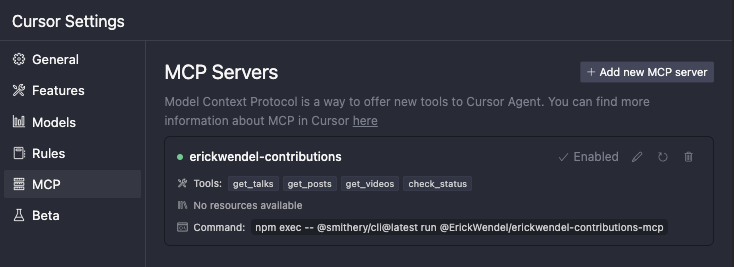
または、 ~/.cursor/mcp.jsonにあるカーソルのグローバル MCP ファイルから直接構成し、以下を追加します。
{
  "mcpServers": {
    "erickwendel-contributions": {
      "command": "node",
      "args": ["ABSOLUTE_PATH_TO_PROJECT/src/index.ts"]
    }
  }
}
またはSmitheryから実行することを好む場合
{
  "mcpServers": {
    "erickwendel-contributions": {
      "command": "npm",
      "args": [
        "exec",
        "--",
        "@smithery/cli@latest",
        "run",
        "@ErickWendel/erickwendel-contributions-mcp"
      ]
    }
  }
}
左下のドロップダウンから「エージェント」を選択して、カーソルチャットがエージェントモードになっていることを確認します。
チャットに行って「2024年にJavaScriptに関するビデオは何本公開されましたか?」と質問してください

Smithery経由で Claude Desktop 用の Erick Wendel Contributions を自動的にインストールするには:
npx -y @smithery/cli install @ErickWendel/erickwendel-contributions-mcp --client claude注:Claude の Smithery CLI インストールに現在問題が発生しています。問題が解決するまで、以下の手動インストール方法をご利用ください。
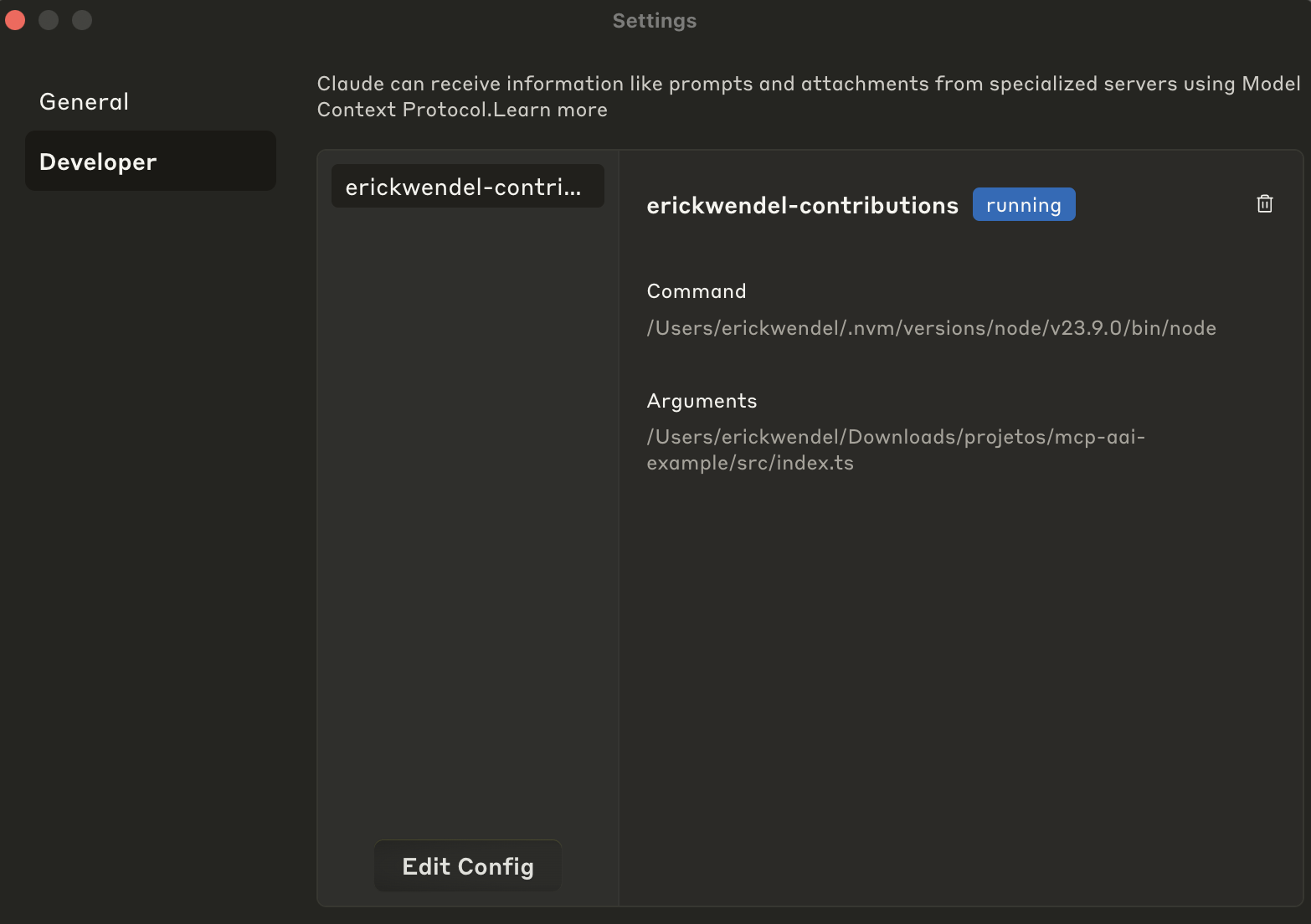
クロードの設定に移動
開発タブをクリックします
編集設定をクリック
コードエディタで設定を開く
Claude Desktop 構成に次の構成を追加します。
{
  "mcpServers": {
    "erickwendel-contributions": {
      "command": "node",
      "args": ["ABSOLUTE_PATH_TO_PROJECT/src/index.ts"]
    }
  }
}
またはSmitheryから実行することを好む場合
{
  "mcpServers": {
    "erickwendel-contributions": {
      "command": "npm",
      "args": [
        "exec",
        "--",
        "@smithery/cli@latest",
        "run",
        "@ErickWendel/erickwendel-contributions-mcp"
      ]
    }
  }
}
ファイルを保存してClaude Desktopを再起動します
もう一度開発タブを開き、次のように「実行中」状態になっているかどうかを確認します。
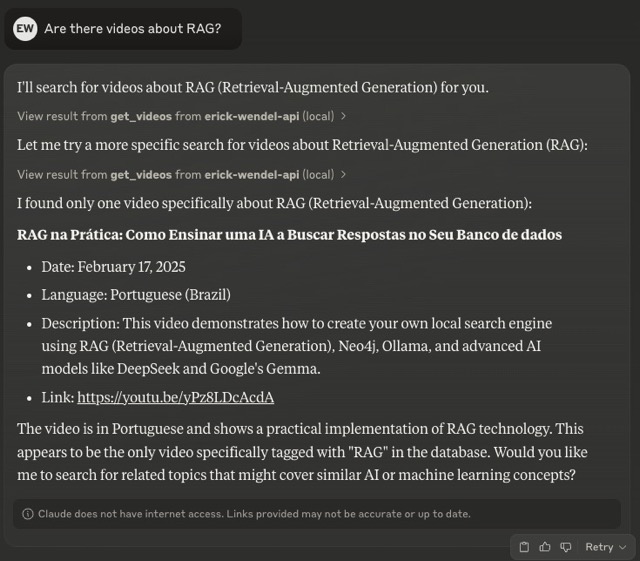
チャットに行って「RAG に関するビデオはありますか?」と質問してください。
Claude Desktop や Cursor にアクセスできない場合は、無料の代替手段として Ollama と連携したMCPHost を利用できます。MCPHost は、大規模言語モデルが MCP サーバーと連携できるようにする CLI ツールです。
MCPHost をインストールします。
go install github.com/mark3labs/mcphost@latest設定ファイルを作成します (例: ./mcp.jsonc ):
{
  "mcpServers": {
    "erickwendel-contributions": {
      "command": "node",
      "args": ["ABSOLUTE_PATH_TO_PROJECT/src/index.ts"]
    }
  }
}
またはSmitheryから実行することを好む場合
{
  "mcpServers": {
    "erickwendel-contributions": {
      "command": "npm",
      "args": [
        "exec",
        "--",
        "@smithery/cli@latest",
        "run",
        "@ErickWendel/erickwendel-contributions-mcp"
      ]
    }
  }
}
好みの Ollama モデルで MCPHost を実行します。
ollama pull MODEL_NAME
mcphost --config ./mcp.jsonc -m ollama:MODEL_NAMEClaude、Cursor、または MCP クライアントに尋ねることができるクエリの例をいくつか示します。
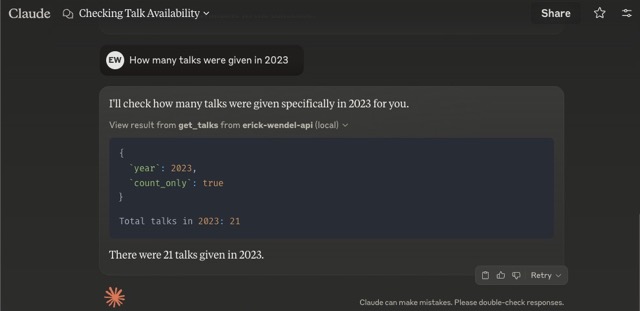
「2023年に何回講演が行われましたか?」
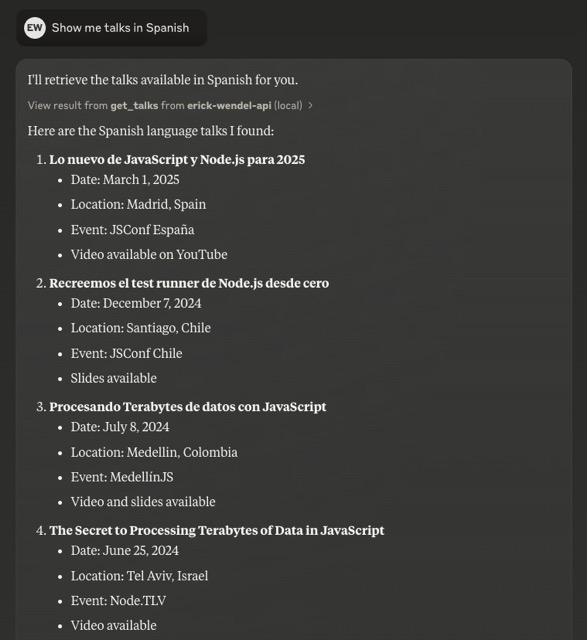
「スペイン語の講演を見せてください」
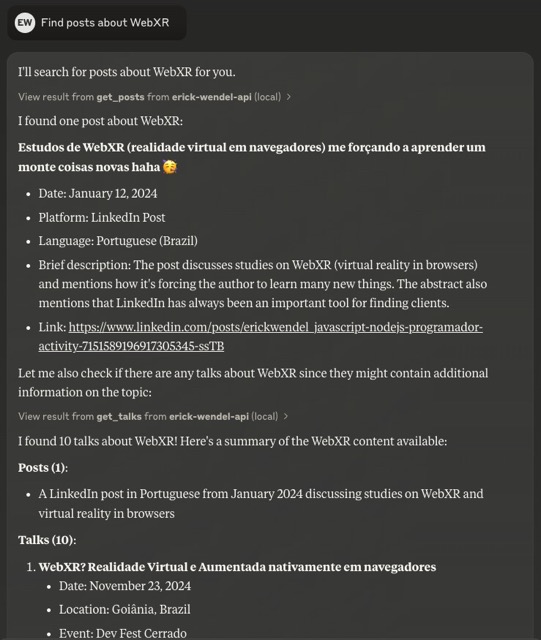
「WebXRに関する投稿を探す」
モデルコンテキストプロトコル(MCP)で構築
TypeScript と Zod スキーマ検証による型安全
Node.js でトランスパイルなしでネイティブ TypeScript をサポート
GenQLを使用して生成されたSDK
関心の分離を伴うモジュラーアーキテクチャ
簡単に統合できる標準I/Oトランスポート
構造化されたエラー処理
Claude Desktop、Cursor、 MCPHost (無料の代替品)と互換性があります
注: このプロジェクトでは、昨年追加されたネイティブ TypeScript サポートを使用するため、Node.js v23 以降が必要です。
コードベースはモジュール構造に従います。
src/
  ├── config/      # Configuration settings
  ├── types/       # TypeScript interfaces and types
  ├── tools/       # MCP tool implementations
  ├── utils/       # Utility functions
  ├── services/    # API service layer
  └── index.ts     # Main entry point
テスト スイートを実行するには:
npm testウォッチ付き開発モードの場合:
npm run test:dev貢献を歓迎します!お気軽にプルリクエストを送信してください。
このプロジェクトは MIT ライセンスに基づいてライセンスされています - 詳細についてはLICENSEファイルを参照してください。
Check if the API is alive and responding.
| Name | Required | Description | Default |
|---|---|---|---|
No parameters | |||
Does the description disclose side effects, auth requirements, rate limits, or destructive behavior?
No annotations are provided, so the description carries the full burden. It states the tool performs a liveness check, implying a read-only operation, but it does not disclose what response to expect, error behavior, or whether any side effects occur. This is adequate for a zero-parameter tool but lacks depth.
Agents need to know what a tool does to the world before calling it. Descriptions should go beyond structured annotations to explain consequences.
Is the description appropriately sized, front-loaded, and free of redundancy?
The description is a single sentence, perfectly concise and front-loaded. It conveys the tool's purpose without any extraneous information or repetition of the tool name.
Shorter descriptions cost fewer tokens and are easier for agents to parse. Every sentence should earn its place.
Given the tool's complexity, does the description cover enough for an agent to succeed on first attempt?
Given the tool's simplicity (zero parameters, no output schema, no annotations), the description adequately conveys the core purpose. It could be improved by mentioning the expected return value or how to interpret 'responding,' but for a basic health check, the description is sufficiently complete.
Complex tools with many parameters or behaviors need more documentation. Simple tools need less. This dimension scales expectations accordingly.
Does the description clarify parameter syntax, constraints, interactions, or defaults beyond what the schema provides?
The tool has zero parameters, so the input schema fully covers any parameter semantics. The description adds no parameter details because none are necessary. Per the rubric, 0 parameters warrants a baseline score of 4.
Input schemas describe structure but not intent. Descriptions should explain non-obvious parameter relationships and valid value ranges.
Does the description clearly state what the tool does and how it differs from similar tools?
The description uses a specific verb 'check' and clearly identifies the resource ('the API'), making the tool's purpose unambiguous. It is distinctly different from sibling tools like get_talks, get_posts, and get_videos, which retrieve content rather than verify API health.
Agents choose between tools based on descriptions. A clear purpose with a specific verb and resource helps agents select the right tool.
Does the description explain when to use this tool, when not to, or what alternatives exist?
The description implies usage: if you need to verify the API is alive, use this tool. However, there is no explicit guidance on when to use it versus alternatives, nor any mention of prerequisites or exclusions. The context of sibling get_* tools suggests a read-only health check, but this is not stated.
Agents often have multiple tools that could apply. Explicit usage guidance like "use X instead of Y when Z" prevents misuse.
Get a list of posts with optional filtering and pagination.
| Name | Required | Description | Default |
|---|---|---|---|
| id | No | Filter posts by ID | |
| title | No | Filter posts by title | |
| language | No | Filter posts by language | |
| portal | No | Filter posts by portal | |
| skip | No | Number of posts to skip | |
| limit | No | Maximum number of posts to return |
Does the description disclose side effects, auth requirements, rate limits, or destructive behavior?
With no annotations provided, the description carries the full burden of behavioral disclosure. It states the tool retrieves a list with filtering and pagination but doesn't cover critical aspects like whether it's read-only, rate limits, authentication needs, error handling, or what the return format looks like (e.g., JSON structure). This leaves significant gaps for an agent to understand the tool's behavior.
Agents need to know what a tool does to the world before calling it. Descriptions should go beyond structured annotations to explain consequences.
Is the description appropriately sized, front-loaded, and free of redundancy?
The description is a single, efficient sentence that front-loads the core purpose ('Get a list of posts') and adds essential qualifiers ('with optional filtering and pagination') without any wasted words. It's appropriately sized for the tool's complexity.
Shorter descriptions cost fewer tokens and are easier for agents to parse. Every sentence should earn its place.
Given the tool's complexity, does the description cover enough for an agent to succeed on first attempt?
Given the tool's moderate complexity (6 parameters, no output schema, no annotations), the description is adequate but incomplete. It covers the basic purpose and hints at parameter usage but lacks details on behavioral traits, return values, and sibling differentiation, making it minimally viable but with clear gaps.
Complex tools with many parameters or behaviors need more documentation. Simple tools need less. This dimension scales expectations accordingly.
Does the description clarify parameter syntax, constraints, interactions, or defaults beyond what the schema provides?
The description mentions 'optional filtering and pagination,' which aligns with parameters like 'id', 'title', 'skip', and 'limit' in the schema. However, with 100% schema description coverage, the schema already fully documents all 6 parameters, so the description adds minimal value beyond reinforcing the general purpose of filtering and pagination.
Input schemas describe structure but not intent. Descriptions should explain non-obvious parameter relationships and valid value ranges.
Does the description clearly state what the tool does and how it differs from similar tools?
The description clearly states the verb ('Get') and resource ('list of posts'), making the purpose unambiguous. However, it doesn't differentiate from sibling tools like 'get_talks' or 'get_videos' beyond mentioning posts specifically, so it lacks explicit sibling distinction.
Agents choose between tools based on descriptions. A clear purpose with a specific verb and resource helps agents select the right tool.
Does the description explain when to use this tool, when not to, or what alternatives exist?
The description mentions 'optional filtering and pagination' but provides no guidance on when to use this tool versus alternatives like 'get_talks' or 'get_videos', nor does it specify any prerequisites or exclusions for usage.
Agents often have multiple tools that could apply. Explicit usage guidance like "use X instead of Y when Z" prevents misuse.
Get a list of talks with optional filtering and pagination.
| Name | Required | Description | Default |
|---|---|---|---|
| id | No | Filter talks by ID | |
| title | No | Filter talks by title | |
| language | No | Filter talks by language (e.g., 'spanish', 'english', 'portuguese' or direct codes like 'es', 'en', 'pt-br') | |
| city | No | Filter talks by city | |
| country | No | Filter talks by country | |
| year | No | Filter talks by year | |
| skip | No | Number of talks to skip | |
| limit | No | Maximum number of talks to return | |
| count_only | No | If true, returns only the count without talk details | |
| group_by | No | Group counts by a specific field (language, country, city) |
Does the description disclose side effects, auth requirements, rate limits, or destructive behavior?
No annotations are provided, so the description carries the full burden. It mentions 'optional filtering and pagination' but lacks critical behavioral details: what the return format looks like (e.g., list structure, fields included), whether it's a safe read operation (implied by 'Get' but not explicit), error handling, rate limits, or authentication requirements. For a tool with 10 parameters and no annotation coverage, this is insufficient.
Agents need to know what a tool does to the world before calling it. Descriptions should go beyond structured annotations to explain consequences.
Is the description appropriately sized, front-loaded, and free of redundancy?
The description is a single, efficient sentence: 'Get a list of talks with optional filtering and pagination.' It's front-loaded with the core purpose and wastes no words. Every part of the sentence earns its place by highlighting key features.
Shorter descriptions cost fewer tokens and are easier for agents to parse. Every sentence should earn its place.
Given the tool's complexity, does the description cover enough for an agent to succeed on first attempt?
Given the tool's complexity (10 parameters, no annotations, no output schema), the description is incomplete. It lacks details on return values, error conditions, behavioral traits (e.g., whether it's idempotent or safe), and usage context relative to siblings. For a list-retrieval tool with rich filtering options, more guidance is needed to help an agent use it effectively.
Complex tools with many parameters or behaviors need more documentation. Simple tools need less. This dimension scales expectations accordingly.
Does the description clarify parameter syntax, constraints, interactions, or defaults beyond what the schema provides?
Schema description coverage is 100%, so the schema fully documents all 10 parameters. The description adds minimal value beyond the schema—it mentions 'optional filtering and pagination,' which aligns with parameters like 'skip,' 'limit,' and filtering fields, but doesn't provide additional syntax, format details, or usage examples. Baseline 3 is appropriate when the schema does the heavy lifting.
Input schemas describe structure but not intent. Descriptions should explain non-obvious parameter relationships and valid value ranges.
Does the description clearly state what the tool does and how it differs from similar tools?
The description clearly states the tool's purpose: 'Get a list of talks with optional filtering and pagination.' It specifies the verb ('Get') and resource ('talks'), and mentions key capabilities (filtering, pagination). However, it doesn't explicitly differentiate from sibling tools like 'get_posts' or 'get_videos' beyond the resource type.
Agents choose between tools based on descriptions. A clear purpose with a specific verb and resource helps agents select the right tool.
Does the description explain when to use this tool, when not to, or what alternatives exist?
The description provides no guidance on when to use this tool versus alternatives. It mentions 'optional filtering and pagination' but doesn't specify scenarios, prerequisites, or exclusions. With sibling tools like 'get_posts' and 'get_videos' available, there's no indication of when to choose talks over posts or videos.
Agents often have multiple tools that could apply. Explicit usage guidance like "use X instead of Y when Z" prevents misuse.
Get a list of videos with optional filtering and pagination.
| Name | Required | Description | Default |
|---|---|---|---|
| id | No | Filter videos by ID | |
| title | No | Filter videos by title | |
| language | No | Filter videos by language | |
| skip | No | Number of videos to skip | |
| limit | No | Maximum number of videos to return |
Does the description disclose side effects, auth requirements, rate limits, or destructive behavior?
With no annotations provided, the description carries the full burden of behavioral disclosure. It mentions filtering and pagination but fails to describe critical behaviors like whether this is a read-only operation, what permissions are needed, rate limits, error handling, or the format of returned data. For a tool with 5 parameters and no annotations, this is inadequate.
Agents need to know what a tool does to the world before calling it. Descriptions should go beyond structured annotations to explain consequences.
Is the description appropriately sized, front-loaded, and free of redundancy?
The description is a single, efficient sentence that front-loads the core purpose ('Get a list of videos') and adds key features ('with optional filtering and pagination') without any wasted words. It's appropriately sized for the tool's complexity.
Shorter descriptions cost fewer tokens and are easier for agents to parse. Every sentence should earn its place.
Given the tool's complexity, does the description cover enough for an agent to succeed on first attempt?
Given the tool's moderate complexity (5 parameters, no annotations, no output schema), the description is insufficient. It lacks details on behavioral traits, output format, error conditions, and differentiation from siblings. While the schema covers parameters well, the description doesn't compensate for missing annotations and output schema, leaving the agent with incomplete context.
Complex tools with many parameters or behaviors need more documentation. Simple tools need less. This dimension scales expectations accordingly.
Does the description clarify parameter syntax, constraints, interactions, or defaults beyond what the schema provides?
The description adds minimal value beyond the input schema, which has 100% coverage with clear parameter descriptions. It mentions 'optional filtering and pagination' which aligns with parameters like 'id', 'title', 'language', 'skip', and 'limit', but doesn't provide additional semantic context or usage examples. Baseline 3 is appropriate given the schema's thoroughness.
Input schemas describe structure but not intent. Descriptions should explain non-obvious parameter relationships and valid value ranges.
Does the description clearly state what the tool does and how it differs from similar tools?
The description clearly states the action ('Get a list of videos') and resource ('videos'), making the purpose understandable. However, it doesn't distinguish this tool from potential siblings like 'get_posts' or 'get_talks' beyond the resource type, which prevents a perfect score.
Agents choose between tools based on descriptions. A clear purpose with a specific verb and resource helps agents select the right tool.
Does the description explain when to use this tool, when not to, or what alternatives exist?
The description mentions 'optional filtering and pagination' which implies some usage context, but provides no explicit guidance on when to use this tool versus alternatives like 'get_posts' or 'get_talks', nor any prerequisites or exclusions. This leaves significant gaps in usage direction.
Agents often have multiple tools that could apply. Explicit usage guidance like "use X instead of Y when Z" prevents misuse.
Recent tool additions, removals, and schema changes observed during successful MCP inspections.
v1.0.0check_statusget_postsget_talksget_videoscheck_statusget_postsget_talksget_videoscheck_statusget_postsget_talksget_videosScored across 4 tools
Each tool has a clearly distinct purpose targeting different resource types: API status, posts, talks, and videos. There is no overlap in functionality, making it easy for an agent to select the correct tool without confusion.
All tool names follow a consistent verb_noun pattern (check_status, get_posts, get_talks, get_videos), using snake_case throughout. This predictability enhances readability and usability for agents.
With 4 tools, the count is reasonable for a contributions-focused server, covering status and three content types. It feels slightly thin but well-scoped, as each tool serves a distinct purpose without unnecessary bloat.
The toolset provides read-only access to posts, talks, and videos with filtering and pagination, which is adequate for retrieval. However, there are notable gaps: no create, update, or delete operations, limiting full lifecycle management of contributions in the domain.
A comprehensive Model Context Protocol (MCP) server that enables AI assistants to interact with yo…
A Model Context Protocol server for Wix AI tools
The Mercado Pago MCP Server implements the Model Context Protocol to provide AI agents and LLMs with access to Mercado Pago's APIs and tools within compatible development environments. It acts as an intermediary that translates Mercado Pago resources into executable functions (tools) that AI applications can invoke to perform actions and automate flows. The server simplifies integration, enables using documentation to implement or improve code, and optimizes operations through natural language interactions without manual implementations.
The Telnyx MCP server is an official implementation of the Model Context Protocol that enables AI clients (like Claude Desktop, Cursor, and OpenAI Agents) to interact with Telnyx's telephony, messaging, and AI assistant APIs. It provides comprehensive capabilities including making and managing phone calls, sending SMS/MMS messages, purchasing and configuring phone numbers, creating AI assistants with custom instructions, managing cloud storage buckets, scraping and embedding website content, and handling integration secrets. The server exists as both a local implementation and a remotely hosted version, allowing developers to integrate real-world communication infrastructure directly into AI applications.
